


Starting a new desk setup often leads shoppers to ask what are the best gaming chairs for long hours of sitting. Standard office seating sometimes lacks the extended backrest support, generous reclining range, or integrated footrests that many gamers prefer during marathon sessions. Finding the right option requires looking closely at measurable dimensions such as seat width, cushion thickness, and adjustability rather than relying on flashier racing aesthetics. Paired with a proper desk surface and an extended mouse pad, a well-matched chair helps maintain balanced posture throughout work and play.
A solid chair should adapt to your personal body frame and desk setup rather than forcing you into an awkward posture. Evaluating weight capacities, cushion construction, and armrest flexibility provides a practical foundation before making a purchase. Many popular models offer combinations of high-density foam, interior pocket springs, and synchronized tilt mechanisms to suit different sitting habits. By focusing on verified structural details and functional features, you can narrow down the choices that actually support your everyday routine.




Evaluating What Makes the Best Gaming Chair for Your Desk
Answering what are the best gaming chairs comes down to matching specific engineering choices with your individual body frame and daily habits. Rather than a single universal winner, the most effective chair balances seat cushion construction, lumbar contouring, and mechanical adjustability to suit your specific desk setup. Buyers often get distracted by vivid colors or flashy racing branding while overlooking critical dimensions like seat depth and weight capacity. Looking at tangible physical components such as internal spring units, steel frame thickness, and armrest articulation helps identify chairs that hold up under real-world use.
Cushion Architecture: High-Density Foam Versus Pocket Spring Cores
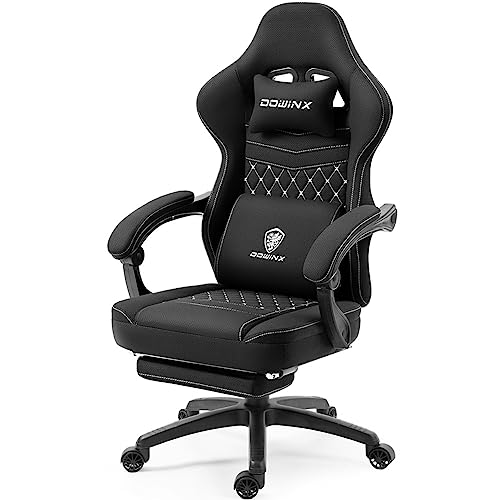
The internal cushioning of a gaming chair determines how well it distributes weight across long sessions at your desk. Traditional budget chairs frequently rely on a single slab of cut foam that can compress permanently over several months of heavy use. In contrast, models like the Video Gaming Chair for Adults from JECQCUPG combine high-density, high-rebound foam with individual pocket spring coils. Borrowed from premium mattress and sofa design, pocket springs provide responsive upward support that prevents you from bottoming out against the underlying subframe. This hybrid architecture absorbs concentrated pressure under the pelvic bones while allowing the surrounding foam to cradle your thighs comfortably.
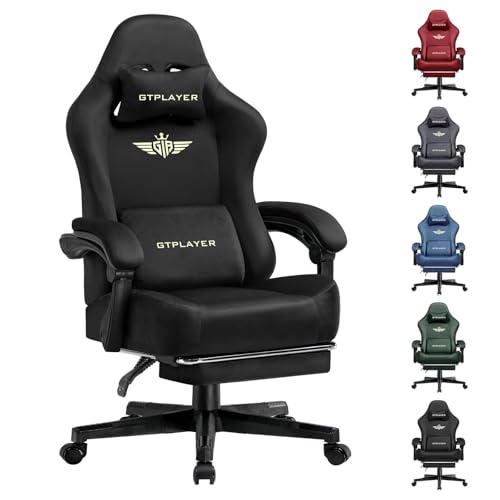
Alternative designs such as the Office Desk Computer Gaming Chair for Adults from Wismestr also integrate pocket spring cushions to promote resilient comfort during extended daily tasks. When foam sits on top of independent coils, each spring compresses according to localized weight rather than sagging across the entire platform. Baseboard construction beneath the cushion also plays an underappreciated role in supporting this padding over time. For example, the GTPLAYER Gaming Chair, Computer Chair utilizes FSC-certified wood support beneath its rich foam padding to ensure a stable, level foundation. Evaluating the complete cushion stack from the base material up to the top foam layer helps you avoid chairs that quickly feel like hard stone.
Seat Pan Geometry: Wingless Flat Bases Versus Bolstered Bucket Seats
Seat pan geometry significantly affects your freedom of movement and overall seating posture. Classic racing-style chairs feature sharp side bolsters angled upward to simulate the lateral containment of a sports car seat. While bolsters look aggressive, they frequently pinch the outer thighs of larger individuals and restrict flexible sitting habits. Chairs with wingless, flat seat pans eliminate those rigid metal-reinforced boundaries to provide an unconstrained seating area. A wide, flat cushion allows you to shift naturally, spread your knees, or even sit cross-legged when relaxing between tasks.
The effective width of a seat differs dramatically depending on whether side wings intrude into the usable surface. The Video Gaming Chair for Adults offers a 51cm flat, wingless seat, which provides roughly 13cm more usable room than traditional 38cm bolstered seats. Similarly, the N-GEN GAMING Big and Tall Gaming Chair advertises an extra-wide seat specifically engineered for criss-cross sitting. Without hard steel edges pressing against your hips, blood flow remains steady and muscle stiffness is less likely to develop during extended computer sessions. Examining usable seat measurements rather than overall outer chair dimensions ensures you choose a platform that truly fits your body.
Recline Range, Synchronized Linkage, and Multi-Directional 3D Armrests
Backrest adjustability separates purpose-built gaming seating from conventional rigid task chairs. Most gaming models incorporate a multi-angle recline mechanism that locks securely at distinct resting points. Upright angles around 90 degrees promote focused posture for typing and competitive gaming, while gentle tilts near 110 degrees suit casual browsing. Deeper angles ranging from 135 to 150 degrees allow users to kick back completely for relaxing breaks or media viewing. The Video Gaming Chair for Adults with Footrest from HELXQEXB features a 150-degree recline system combined with a pull-out footrest for comprehensive relaxation.
Armrest behavior during recline is an essential consideration that impacts shoulder comfort. Models equipped with linkage armrests, such as the N-GEN GAMING Gaming Chair with Footrest, Lumbar, pivot automatically in sync with the backrest angle. When you recline backward, the armrests slide along a guided hinge track to keep your elbows supported without stretching. This synchronized movement prevents shoulder strain by maintaining a comfortable forearm angle regardless of whether you sit upright or lean back. Chairs with fixed armrests, on the other hand, leave your forearms unsupported whenever you tilt the backrest away from the vertical plane.
For upright desk work, multi-directional 3D armrests offer a different kind of precision support. Options like the GTPLAYER Gaming Chair with Footrest and its color variations GTPLAYER Gaming Chair with Footrest and GTPLAYER Gaming Chair with Footrest let you raise height, shift forward, and angle the pads inward. Aligning your forearms with your desk surface while using a responsive wireless mouse reduces muscular tension across the upper shoulders. Whether you prefer synchronized linkage rests for relaxed leaning or 3D adjustable rests for competitive desk work depends entirely on your primary sitting habits.
Structural Integrity: Weight Ratings, Steel Frames, and Certified Gas Lifts
The structural backbone of any durable gaming chair consists of its internal frame and central pneumatic cylinder. Flimsy chairs occasionally rely on thin tubular steel or brittle plastic framing that wobbles or squeaks under daily use. High-quality alternatives feature integrated one-piece steel frames with heavy-duty gauge metal to resist bending under shifting loads. For instance, the N-GEN GAMING Big and Tall Gaming Chair features a reinforced base rated for a 400-pound heavy-duty capacity. Stated weight limits provide a helpful baseline for structural security, though they should not be treated as a universal guarantee of comfortable fit.
The hydraulic gas lift cylinder is the primary mechanical component responsible for smooth height adjustments and load bearing. Look for chairs specifying certified cylinders, such as the SGS-certified gas lift included with the N-GEN GAMING Gaming Chair with Footrest, Lumbar. Certified gas cylinders undergo standardized pressure cycles to ensure the internal pneumatic seals do not degrade prematurely or lose height overnight. A reliable cylinder allows you to fine-tune your seating height within a standard 10cm range, matching your chair to various desk heights. Metal bases, such as the heavy-duty legs on the GTPLAYER Gaming Chair, Computer Chair, further stabilize this assembly by maintaining a low center of gravity that resists tipping.
Lumbar Contour and Headrest Ergonomics for Everyday Posture
Spinal curvature requires targeted lumbar and cervical support to counteract the natural tendency to slouch during long sessions. Most gaming chairs address this through external lumbar cushions and headrest pillows mounted on elastic straps. The Video Gaming Chair for Adults with Footrest utilizes an S-curve backrest contour paired with removable cushions to follow the natural alignment of your spine. Meanwhile, chairs like the Office Desk Computer Gaming Chair for Adults from Wismestr incorporate built-in vibration massage modules inside the lumbar pillow for added relaxation. These adjustable supports help maintain the natural curve of your lower back without forcing a rigid, uncomfortable posture.
Independent adjustability makes external pillows far more adaptable for people of different heights than fixed internal lumbar bumps. The Video Gaming Chair for Adults provides independently sliding head and lumbar cushions designed to accommodate users ranging between 120cm and 190cm. Being able to slide the lumbar cushion up or down lets you position the support squarely in the small of your back rather than against your lower sacrum. Similarly, positioning the headrest behind the cervical curve of your neck relieves head weight during brief pauses between tasks. Removable pillows also give you the freedom to detach them entirely if your back naturally prefers a flatter backrest profile.
Workspace Fit: Desk Height Clearance, Recline Space, and Caster Selection
Finding the right gaming chair requires verifying that its exterior dimensions integrate smoothly with your existing workspace. A chair with wide wingtips or bulky armrests might not tuck beneath your desktop, consuming valuable floor space in compact bedrooms. Standard desks feature clear heights between 28 and 30 inches, meaning your chair armrests must lower sufficiently to clear the desktop edge. Laying out your workspace with an oversized desk pad and thoughtful cable routing helps define how much room you have for chair movement. Measuring the distance between your desk legs ensures your five-star base can swivel freely without knocking into drawer pedestals.
Reclining footprints and caster performance also demand careful spatial consideration. Chairs that tilt back to 135 or 150 degrees with extended footrests can require up to five feet of clear linear floor space behind your desk. If your chair is positioned against a wall or close to a bookshelf, you will not be able to deploy the full recline function comfortably. Furthermore, chairs equipped with quiet rubberized wheels glide smoothly across hardwood or tile without requiring an unsightly plastic floor mat. Evaluating both room clearance and flooring material alongside your chair selection protects your home finishes while ensuring quiet, fluid mobility.
Assembly Hardware, Material Maintenance, and Warranty Terms
Unboxing and assembling a gaming chair is a physical task that sets the foundation for its long-term stability. Most models arrive flat-packed with step-by-step illustrated manuals, hex keys, and pre-sorted hardware packs. The Video Gaming Chair for Adults with Footrest from HELXQEXB features an intuitive bolt layout that typically allows one person to finish assembly in 15 to 20 minutes. Similarly, N-GEN GAMING Gaming Chair with Footrest, Lumbar includes a dedicated installation manual and quick QR-code setup video for troubleshooting tricky alignment steps. Taking care not to cross-thread bolts into the internal steel frame ensures tight, creak-free joints over months of use.
Material care and warranty protections safeguard your investment against premature wear and component failure. Products like the N-GEN GAMING Big and Tall Gaming Chair use smooth, soft PU leather that wipes clean easily with a damp cloth, protecting against spills and everyday grime. Keeping synthetic upholstery away from direct heat sources prevents premature drying and surface flaking over time. Meanwhile, brands like GTPLAYER and N-GEN GAMING provide 1-year warranties on structural frames and mechanical lift parts, alongside 30-day return windows. Checking warranty coverage and return shipping conditions before ordering gives you reassurance if a chair model ultimately feels mismatched to your body frame.
Selecting the best gaming chair ultimately requires weighing cushion construction, recline mechanics, and physical measurements against your personal sitting style. By prioritizing practical features such as pocket spring support, wingless seat bases, and certified gas cylinders, you invest in dependable functionality rather than surface aesthetics alone. Taking accurate measurements of your body and desk space, reviewing stated warranty terms carefully, and following proper assembly guidelines helps you secure a seating setup that comfortably supports your gaming and work sessions for years to come.



Write Your Review
No reviews yet. Be the first to share your experience!