


Balancing physical space in an entertainment center with high-bandwidth display connections often complicates couch-based computer play. Many players struggle with cable latency, display scaling, and controller signal drops when moving away from a traditional desk. Setting up the best gaming pc for tv demands careful attention to signal routing, wireless peripherals, and audio integration to ensure that big-screen play feels as responsive as monitor gaming. If you are preparing your space, learning how to setup a gaming PC on an entertainment console can eliminate common connection hurdles before you launch your first title.
Achieving a smooth living room experience also depends on using high-bandwidth connections and versatile accessories alongside your machine. Certified high-speed display cables, low-latency gamepads, and immersive audio gear bridge the gap between desktop power and television comfort. Focusing on certified hardware guarantees stable variable refresh rate support and uncompressed surround audio across your living space. Evaluating these essential accessories helps you build a clean, reliable entertainment hub that maximizes your living room gaming potential.


Pros
- Excellent spatial audio quality with Dolby Atmos, Windows Sonic, and DTS Headphone:X support.
- Comfortable lightweight design with adjustable headband for long gaming sessions.
- Intuitive earcup dials for easy volume and game/chat balance control.
- Good battery life of up to 20 hours.
- Cross-platform compatibility with Xbox, PC, and mobile devices.
Cons
- No active noise cancellation for microphone, so background noise may still be picked up in noisy environments.
- Plastic build may feel less premium compared to metal-framed headsets.
- Battery life, while decent, may require charging after a few days of heavy use.
The Xbox Wireless Gaming Headset is a versatile over-ear headset designed to deliver immersive spatial audio for gamers on Xbox Series X|S, Xbox One, Windows PCs, and even mobile devices. With support for Dolby Atmos, Windows Sonic, and DTS Headphone:X, this headset aims to provide a rich, three-dimensional sound experience that helps you hear every footstep, explosion, and environmental cue with precision. It's an excellent option for PC gamers, competitive esports players, casual gamers, streamers, and content creators who want reliable wireless audio without breaking the bank.
When it comes to audio performance, the headset truly shines. The spatial audio technologies create a sense of depth and clarity that makes games feel more immersive. Whether you're playing FPS titles like Call of Duty or exploring open-world games, the directional audio helps you pinpoint sounds accurately. The headset also supports Windows Sonic for PC and Xbox, and DTS Headphone:X for a customizable sound profile. According to product specifications, the audio reveals depth and detail like never before, making it a solid choice for competitive gaming where audio cues are crucial.
Comfort is a key focus of this design. The lightweight construction and adjustable headband ensure a snug yet comfortable fit, even during extended gaming sessions. The earcups are padded with memory foam and covered in breathable material, reducing heat buildup. One standout feature is the intuitive earcup dials: you can rotate them to adjust volume and game/chat balance on the fly, without needing to fumble with buttons or software. This makes it easy to stay focused on the action.
Microphone clarity is another strong point. The headset uses enhanced auto-mute and voice isolation to reduce background noise, ensuring your teammates hear you clearly. During Discord calls or in-game chats, the microphone picks up your voice with minimal distortion. For streamers and content creators, this means less need for a separate mic, though a dedicated one might still be preferred for higher quality. Battery life is rated at up to 20 hours, which is enough for most gaming sessions, but heavy users may need to charge every few days.
Setup is straightforward: connect to your Xbox or PC wirelessly using the Xbox Wireless protocol, or use Bluetooth for mobile devices. The headset also supports simultaneous connections, so you can chat on your phone while playing on console. This cross-platform compatibility makes it a versatile tool for gamers who switch between devices. The on-ear controls are simple to use, and there's no complicated software required for basic functionality.
Realistically, there are some limitations. The headset lacks active noise cancellation for the microphone, so ambient noise might still be an issue in loud environments. The build is primarily plastic, which keeps weight down but may not feel as durable as metal alternatives. Battery life, while adequate, could be better for those who game all day. Overall, the Xbox Wireless Gaming Headset offers excellent value for its price, especially for Xbox and PC gamers who want spatial audio without wires. It's a reliable, comfortable, and immersive headset that suits a wide range of gaming setups.
The Xbox Wireless Gaming Headset leverages spatial audio technologies like Dolby Atmos, Windows Sonic, and DTS Headphone:X to create a lifelike soundstage. According to product details, this provides depth, clarity, and detail that make games feel more immersive. Users can hear directional cues like footsteps or gunfire with precision, which is a huge advantage in competitive FPS games. The headset also handles various audio profiles well, from booming explosions to subtle environmental sounds. The audio drivers are tuned for balanced performance, ensuring clear highs and rich lows without distortion at higher volumes.
Designed for long gaming sessions, the headset features a lightweight, flexible frame with an adjustable headband that distributes weight evenly. The over-ear cups are padded with memory foam and covered with a breathable material, reducing pressure and heat buildup. The intuitive earcup dials allow for quick volume and game/chat balance adjustments without interrupting gameplay. The overall design is understated and practical, with a carbon black finish that fits most gaming setups. The headset is also foldable for easy storage and transport, making it a good companion for LAN parties or travel.

Pros
- Smooth 100Hz refresh rate reduces motion blur in competitive games.
- Excellent color accuracy (99% sRGB) for the price point.
- Integrated speakers eliminate need for external audio in simple setups.
- Blue light filter is gentle on eyes during extended use.
- Great value for budget-conscious gamers and streamers.
Cons
- Limited viewing angles compared to IPS panels; colors shift off-center.
- Built-in speakers are basic and lack bass, not ideal for immersive audio.
- No height or tilt adjustments on the stand; need VESA mount for ergonomic changes.
The Sceptre 24-inch Prime Monitor (E248W-19203R) is a budget-friendly 1080p display designed for gamers, streamers, and home office users who want a smooth, color-accurate screen without spending a fortune. With a 100Hz refresh rate and 99% sRGB coverage, it hits the sweet spot for casual and competitive play, especially in fast-paced titles like shooters and strategy games.
Best suited for PC gamers on a budget, casual streamers, work-from-home users, and college gamers, this monitor offers a noticeable upgrade over standard 60Hz displays. The 100Hz refresh rate provides smoother motion, which can give you an edge in FPS and RTS games. Combined with the 99% sRGB color gamut, images look vibrant and lifelike, whether you are gaming or editing photos. The built-in speakers are a nice convenience, saving desk space and letting you hear audio straight away without extra gear.
In terms of build quality, the monitor features a durable plastic chassis and a simple stand with no ergonomic adjustments. It is lightweight at just 5.77 pounds and supports a 100mm x 100mm VESA mount, so you can easily wall-mount it or attach it to a monitor arm for a better viewing angle. The bezels are slim, giving it a modern look on any desk.
Setting up the monitor is straightforward: plug in the power, connect via HDMI or VGA, and you are ready to go. The on-screen menu includes pre-calibrated FPS and RTS modes that tweak brightness and contrast for competitive gaming. The Blue Light Shift feature is a nice addition for late-night sessions. There is no software suite to install, which keeps things simple.
However, the monitor does have some realistic limitations. The TN panel (likely) offers narrow viewing angles, so colors wash out if you are not sitting directly in front. The built-in speakers are adequate for voice calls or casual YouTube, but gamers will want a dedicated headset or external speakers for immersive audio. The stand lacks height adjustment, but a VESA mount can solve that.
Overall, the Sceptre 24-inch Prime Monitor is an excellent entry-level choice for budget-conscious gamers and streamers. It delivers smooth performance and great color at a price that undercuts many competitors. If you need an affordable secondary display or a primary monitor for esports and casual use, this is a strong recommendation for your gaming setup.

Pros
- Certified 48Gbps bandwidth ensures future-proof performance for 8K and high-refresh-rate 4K gaming.
- Excellent value at under $10 for a certified Ultra High Speed HDMI cable.
- Supports all key gaming features: VRR, ALLM, QMS, QFT, eARC, and HDR10+.
- Wide compatibility with PC, consoles, streaming devices, and projectors.
- Sturdy build with low EMI and reliable signal integrity for long cable runs.
Cons
- 6.6ft length may be too short for some living room or projector setups.
- Limited color options (Space Gray only) - not ideal for those wanting to match a specific RGB aesthetic.
- Some users may prefer a braided or cloth jacket for extra durability, though the cable feels solid.
The Ubluker HDMI cable is a certified Ultra High Speed HDMI 2.1 cable designed for gamers who demand the best visual performance from their PC, console, or streaming setup. With 48Gbps bandwidth, it supports 4K at up to 240Hz, 8K at 60Hz, and even 10K at 60Hz, making it a solid choice for competitive gamers, esports players, and anyone building a high-end gaming rig. It also works perfectly for streamers and content creators who need reliable, low-latency video output for capture cards or dual-monitor setups.
In real-world use, this cable delivers on its promises. The support for VRR (Variable Refresh Rate) and ALLM (Auto Low Latency Mode) means you get smooth, stutter-free gameplay in fast-paced titles like Call of Duty, Overwatch, or Apex Legends. The 0.01ms latency is essentially negligible, so your inputs feel instant whether you're playing on a 240Hz gaming monitor or a 4K 120Hz OLED TV. HDR10+ and Dolby Vision support also ensure that open-world games and cinematic titles look vibrant and detailed.
Build quality is practical and straightforward. The cable is well-shielded with low EMI, which helps prevent interference from other cables in your gaming setup. The 6.6-foot length is ideal for most desktop configurations, keeping your cable management tidy without excess slack. While it's not braided, the jacket feels durable enough for everyday use and shouldn't kink easily if you route it properly behind your desk or entertainment center.
Setup is plug-and-play - no software or drivers required. Just connect it between your GPU and monitor, or console and TV, and you're ready to go. It's fully compatible with all GeForce RTX 30 and 40 series cards, AMD FreeSync and G-Sync displays, and consoles like PS5, Xbox Series X/S, and Nintendo Switch. It also works with streaming devices like Apple TV, Roku, and Fire TV, making it a versatile addition to any home theater or gaming station.
One realistic limitation is the length. At 6.6 feet, it's perfect for a desktop setup but might be too short if you need to run the cable across a large room or behind furniture. Also, the Space Gray color is neutral but not customizable, so if you're an RGB enthusiast looking to match every cable to your theme, you may want to look for color options elsewhere. That said, for the price, it's hard to beat the features and certification this cable offers.
Overall, the Ubluker 48Gbps HDMI cable is an excellent value for PC gamers, console players, and streamers who need reliable, high-bandwidth performance without breaking the bank. Whether you're building a competitive gaming setup, upgrading your streaming station, or just want a future-proof cable for your 4K 240Hz monitor, this is a smart choice. It delivers on all the important specs, and its certification gives you peace of mind that it will work as advertised.


Pros
- All-in-one smart functionality eliminates need for separate streaming device or console for casual gaming
- Good FHD resolution and HDR10 support for clear visuals and vibrant colors in games and movies
- Adaptive Sound provides real-time audio optimization for different content types
- Easy mobile screen mirroring and file sharing for quick content access
- Sleek design and reasonable price point for a multi-purpose monitor
Cons
- Only 60Hz refresh rate, not ideal for competitive esports or fast-paced FPS gaming
- Limited to 1080p resolution, may not satisfy gamers wanting higher pixel density
- Built-in speakers are adequate for casual use but lack bass and volume for immersive gaming
The Samsung 27-Inch M5 (M50F) Series FHD Smart Monitor is a versatile display that goes beyond traditional monitors by integrating smart TV features directly into the screen. Designed for casual gamers, streamers, and those who want a multifunctional desktop companion, it offers a 27-inch 1080p panel with HDR10 support and built-in speakers. This monitor is particularly appealing for college gamers, work-from-home users, and anyone building a compact gaming setup who values convenience and all-in-one functionality over raw gaming performance.
For casual gamers, the Samsung Gaming Hub is a standout feature, allowing you to stream games from partners like Xbox Game Pass and NVIDIA GeForce NOW without needing a separate PC or console. This makes it a great option for quick gaming sessions or exploring new titles without the hassle of additional hardware. The 60Hz refresh rate is adequate for slower-paced games like strategy titles, indie games, or casual multiplayer experiences, but competitive gamers playing fast shooters or MOBAs will likely find the lack of higher refresh rates limiting. The FHD resolution delivers clear visuals for everyday use, though enthusiasts may prefer higher resolutions for more detail.
Beyond gaming, the smart functionality shines. You can access streaming apps like Netflix, Hulu, and Samsung TV Plus directly from the monitor, turning your desk into an entertainment hub. Adaptive Sound automatically adjusts audio based on content, enhancing dialogue in movies or emphasizing game effects. The built-in speakers are serviceable for casual listening but lack the depth and volume for immersive gaming or movie nights, so external speakers or a gaming headset are recommended for a better experience.
Build quality is solid for its price range, with a sleek black bezel and a compact stand that fits well on most desks. The monitor weighs only 7.71 pounds, making it easy to reposition or mount. Connectivity includes multiple ports for hooking up peripherals, and mobile screen mirroring via the SmartThings app is straightforward. Setup is simple: plug in, connect to Wi-Fi, and you're ready to stream or game. The inclusion of vision accessibility tools and a workout tracker adds unique value for health-conscious users or those with visual needs.
One realistic limitation is the 60Hz refresh rate and 1080p resolution, which won't satisfy competitive esports players or those seeking high-refresh-rate gaming. Additionally, the smart interface can feel slightly sluggish compared to dedicated streaming devices, and the lack of a dedicated remote (though you can use the SmartThings app) may be a minor inconvenience. For users who prioritize gaming performance, a dedicated gaming monitor with higher refresh rates would be a better fit.
Overall, the Samsung M5 Smart Monitor is a practical choice for casual gamers, streamers, and desk users who want an all-in-one solution for work, entertainment, and light gaming. It excels in convenience and versatility, making it ideal for dorm rooms, home offices, or secondary setups. If you're a competitive gamer or need high refresh rates, look elsewhere, but for everyday use and casual gaming, this monitor offers great value and functionality.
Pros
- Clear stereo sound quality suitable for casual gaming and media consumption
- Attractive RGB lighting with multiple modes that sync with gaming setup aesthetics
- Compact size fits easily on most desks without taking up too much space
- Simple volume control buttons provide accurate adjustments without hunting for knobs
- USB power and 3.5mm input work with nearly any device, including PC, laptop, and TV
Cons
- Limited bass response compared to larger speakers with subwoofers
- RGB lighting is not software-controllable and cannot sync with other RGB peripherals
- Cable length between speakers may be too short for wider desk setups
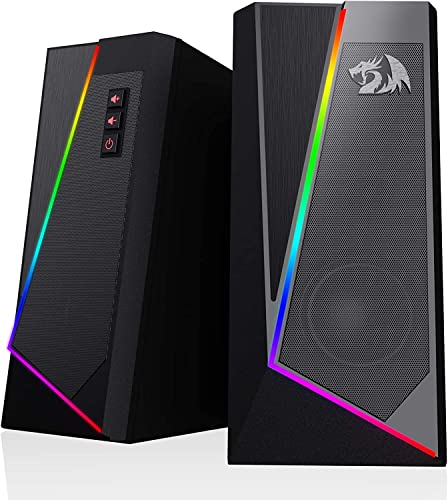
The Redragon GS520 ANVIL desktop speakers are a budget-friendly 2.0 channel stereo set designed to enhance the audio experience for PC gamers, streamers, and casual users who want a simple upgrade from built-in monitor speakers. These USB-powered speakers deliver clear sound with a touch of RGB flair, making them a practical addition to any gaming desk or dorm room setup.
For PC gamers and esports players, the GS520 provides solid audio clarity for footsteps, gunfire, and environmental cues in games like Valorant or Fortnite, though the lack of deep bass means explosion-heavy titles won't feel as punchy. Casual gamers and content creators will appreciate the easy-access volume buttons for quick adjustments during streams or Discord calls. The touch-controlled RGB lighting offers six modes, letting you match the vibe of your gaming setup without needing extra software.
Build quality is respectable for the price point, with a brushed texture finish that looks more premium than its cost suggests. The compact dimensions (3.5 x 4 x 7 inches) and lightweight 1.8-pound design make them easy to place on either side of your monitor, even on cramped desks. The 31-inch cable between the two speakers gives you some flexibility in positioning, though wider setups might find it limiting.
Setup is truly plug-and-play: connect the USB cable for power and the 3.5mm audio cable to your PC, laptop, or TV, and you're good to go. There's no software to install, which is a plus for gamers who want a hassle-free experience. The volume buttons are responsive and let you dial in the perfect level without fumbling with a dial.
One realistic limitation is the audio performance for competitive gaming or music production. The GS520 lacks a subwoofer, so bass-heavy soundtracks and explosions may feel thin. Additionally, the RGB lighting cannot be synced with other RGB components via software, which might disappoint enthusiasts building a fully integrated lighting ecosystem.
Overall, the Redragon GS520 ANVIL speakers are a great value for budget-conscious PC gamers, streamers, and college gamers looking to add decent audio and RGB aesthetics to their setup. They're not for audiophiles or competitive players demanding pinpoint sound positioning, but for everyday gaming, YouTube, and Discord use, they get the job done without breaking the bank.

Pros
- Certified 48Gbps bandwidth supports current and next-gen consoles and GPUs
- Braided jacket and ferrite cores reduce electromagnetic interference and cable fatigue
- Priced affordably while maintaining HDMI 2.1 certification and full feature set
Cons
- 6.6ft length may be too short for some large desk setups or wall-mounted TVs
- Grey braided color may not match all black cable-management themes
- Limited to HDMI 2.1 features – no optical fiber or active extender for longer runs
The Silkland Certified HDMI 2.1 Cable is a high-performance accessory designed for PC gamers, console enthusiasts, and streamers who demand low-latency video and audio for modern displays. With 48Gbps bandwidth, it supports 4K at 240Hz, 144Hz, or 120Hz, and even 8K at 60Hz – making it a future-proof choice for RTX 40-series GPUs, PS5, Xbox Series X, and high-refresh monitors. This cable is certified by HDMI Forum, meaning it meets strict specifications for signal integrity, so you can trust it to deliver consistent, flicker-free performance in competitive games like Valorant, Call of Duty, or Fortnite.
For competitive gamers and esports players, the cable’s ability to maintain 4K@144Hz or 2K@240Hz ensures every frame renders smoothly with minimal input lag. Combined with Dynamic HDR and Dolby Atmos support, the visual and audio immersion feels polished for both multiplayer and single-player titles. Streamers will appreciate the eARC (enhanced Audio Return Channel), which preserves high-bitrate audio from the console or PC to a soundbar or AV receiver without compression – crucial for crisp commentary and game audio on Twitch or YouTube.
Build quality is a standout – the “E-Braid” technology uses a double-layer fishnet wrap over nylon braiding, plus ferrite magnetic beads near the connectors to suppress electromagnetic interference. This design reduces the risk of black screens, flickering, or dropped sync, even when the cable is bent or routed behind a desk. The connectors are gold-plated and snug-fit, resisting corrosion and ensuring a secure connection over time. For cable management, the braided jacket is flexible yet tough, making it easy to route through cable sleeves or clips without kinking.
Setup is purely plug-and-play – no software, drivers, or configuration needed. Just connect the cable from your GPU or console to the display, and the EDID handshake happens automatically. The cable is compatible with all HDMI versions from 1.1 to 2.1, so it works with older monitors, laptops, or projectors too. The 6.6-foot length is ideal for most desk setups where the PC sits next to the monitor, though larger rooms or wall-mounted TVs may require a longer cable (not available from Silkland in this series).
One realistic limitation is the fixed length and color – the grey braid, while durable, may clash with all-black setups, and the 6.6ft cable might not reach from a tower under the desk to a monitor on a tall arm. But for the price, it’s a solid choice. Users hoping for 8K@60Hz support need to ensure their TV or monitor can actually handle that resolution and refresh rate – most current gaming displays peak at 4K144Hz or 8K@60Hz. Overall, this cable is a reliable, certified solution for PC gamers, console users, and streamers who prioritize low latency and future compatibility.
If you’re building a high-end gaming PC or upgrading your console setup, the Silkland HDMI 2.1 cable delivers the bandwidth and build quality needed without breaking the bank. It’s a practical addition for competitive gamers, casual play, and even home theater setups – just check your cable length requirements before buying.

Pros
- Compact and flexible placement options save desk space while maintaining good sound projection
- Plug-and-play USB power and 3.5mm connection make setup effortless for any gaming or desktop setup
- Red backlit lighting matches gaming aesthetics without being overly flashy
- Volume knob with on/off switch and headphone jack add convenience for quick audio adjustments
Cons
- Bass is decent but not room-shaking - smaller drivers may lack depth for bass-heavy genres or competitive audio cues
- USB power limits maximum volume compared to wall-powered speakers
- 31-inch cable between left and right speakers can restrict placement options on wide desks
The Redragon GS550 is a compact 2.0 channel desktop soundbar aimed at gamers, streamers, and anyone who wants to upgrade their audio without taking up too much desk space. Designed with a unique maneuverable form factor, these speakers can be positioned individually on each side of your monitor or merged together into a single unit underneath, offering flexibility for different setups.
This soundbar is best suited for casual gamers, college students, work-from-home users, and RGB setup enthusiasts who prioritize desk space and simple connectivity. The red backlit LED adds a subtle gaming vibe that complements other Redragon gear or any red-themed setup. While it won't replace a dedicated surround sound system, it provides clear dialogue and decent bass for everyday gaming, streaming, and media consumption.
Performance-wise, the GS550 delivers reliable 2.0 channel stereo audio suitable for games like Fortnite, Minecraft, or strategy titles, as well as music and YouTube. The volume knob is tactile and responsive, doubling as an on/off switch, and the inclusion of a headphone jack and mic port makes switching between speakers and headsets a breeze. The USB-powered design means you can plug into any PC or laptop port without needing an extra power brick.
Build quality is typical for budget speakers - mostly plastic but sturdy enough for daily use. The compact dimensions (about 7.3 x 6.7 x 4.3 inches per speaker) and lightweight design (1.5 pounds total) make them easy to reposition or pack for LAN parties. The 31-inch cable between speakers is adequate for close-spaced setups but might limit placement on wider gaming desks.
Setting up the GS550 is truly plug-and-play: connect the USB for power, plug the 3.5mm audio cable into your device, and you're ready to go. No drivers, software, or complex configuration needed. However, users expecting deep bass or high volume for a large room may find the sound a bit lacking; these are best for close-range desktop listening.
Overall, the Redragon GS550 is a solid choice for budget-minded PC gamers, streamers, and casual users who value space efficiency and easy connectivity. If you need a simple audio upgrade for your gaming desk, dorm room, or home office without breaking the bank, these speakers deliver good value for the price.
The Redragon GS550 uses a 2.0 channel stereo core that provides clear mids and highs with moderate bass response. For casual gaming, video calls, and music, the sound is sufficient and balanced. The small speaker size means bass is present but not overpowering, making it more suitable for near-field listening. The dedicated volume knob allows fine-tuning, and the headphone jack lets you switch to private listening without unplugging.
The GS550 features Redragon's signature red LED backlit on the front of each speaker, adding a subtle glow that matches other red-themed gaming peripherals. The design is simple but practical with a matte black finish that blends into most setups. The unique ability to separate or merge the speakers gives users flexibility to fit their monitor layout.
Setup is incredibly straightforward: just connect the USB cable to a power source (like a PC or laptop USB port) and plug the 3.5mm audio cable into your device. No drivers or software are required. Compatible with Windows, Mac, and Linux computers, as well as TVs and other devices with a 3.5mm output. The 31-inch speaker-to-speaker cable allows for basic separation, but wider setups may need careful positioning.

Pros
- Low latency wired and wireless connections ensure responsive gameplay on PC and console.
- Ergonomic sculpted design with textured grip reduces hand fatigue during long gaming or streaming sessions.
- Cross-platform compatibility simplifies use across multiple devices without extra adapters.
- Customizable button mapping adapts to different game genres and personal preferences.
- Included USB-C cable provides a reliable wired option and charges the controller while playing.
Cons
- No rechargeable battery pack included (uses AA batteries; 40-hour life), so you may need to buy rechargeables separately.
- On-board memory for custom profiles is limited; you may need the Xbox Accessories app on Windows each time to switch mappings.
- Not compatible with Xbox Series X|S or older Xbox One consoles? Actually it is compatible, but the product data doesn't specify Series X|S; it says Xbox Wireless Controller, so likely compatible, but no explicit mention of Series X|S support.
The Xbox Wireless Gaming Controller + USB-C Cable (2025) in Carbon Black is a refined version of a classic gaming peripheral that many PC gamers, streamers, and competitive players already know and trust. This controller is designed to deliver responsive, low-latency performance whether you're playing on a gaming PC, Xbox console, Android device, or even a smart TV. The included 9-foot USB-C cable lets you go wired for the most stable connection or rely on Xbox Wireless or Bluetooth for a clutter-free setup.
Who is this controller for? It's a great option for PC gamers who prefer a controller for certain genres like racing games, platformers, or fighting games. Streamers and content creators will appreciate the easy capture and share button, which allows them to grab clips without leaving the game. Esports players and competitive gamers may still favor mouse and keyboard for FPS titles, but the hybrid D-pad and textured grip offer precise control for games like FIFA, Forza, or fighting games. Casual gamers will find the ergonomic design comfortable for long sessions, and the 40-hour battery life means less frequent swapping of AA batteries.
In terms of gaming performance, the controller offers responsive inputs with very low latency, especially when used wired via USB-C. The wireless connection via Xbox Wireless or Bluetooth is also solid for most gaming scenarios, though competitive players might still want the wired option for absolute consistency. The new hybrid D-pad feels crisp and directional, great for fighting game combos. The textured triggers and bumpers provide a secure grip, which helps during intense moments. The controller's weight (1.02 pounds) is balanced and not too heavy, reducing fatigue during extended play.
Build quality is typical of Xbox controllers: durable plastic construction with a matte finish that resists fingerprints. The carbon black color is understated and fits well in any gaming setup. The USB-C port is a welcome upgrade for modern connectivity. The 3.5mm headset jack allows you to plug in any gaming headset for audio and voice chat. While the controller doesn't come with a rechargeable battery pack, using standard AA batteries gives you the flexibility to swap in fresh ones instantly. Many users may prefer rechargeable AA batteries for a greener solution.
Setup is straightforward: pair via Bluetooth with Windows 10/11, or use the Xbox Wireless Adapter for a more robust connection. The Xbox Accessories app on Windows lets you remap buttons, adjust stick sensitivity, and create custom profiles. Some users might find the app a bit limited compared to high-end third-party controllers, but it covers the essentials. The controller's compatibility with Android, iOS, Fire TV, and VR headsets means it can serve as a universal gaming peripheral for multiple devices, reducing clutter on your desk.
Realistic limitations include the reliance on AA batteries (though battery life is excellent), the lack of paddles or extra buttons out of the box, and the need to use the app on PC for customization. If you're a hardcore competitive player who uses back paddles, you might want to look at pro controllers. But for the price of $59, this controller offers excellent value for most PC gamers, streamers, and gaming setup builders. It's a practical, reliable choice that will serve you well across many platforms and gaming scenarios.
Frequently Asked Questions
What cable do I need to connect a gaming PC to a modern television?
You need a certified Ultra High Speed HDMI cable supporting 48Gbps bandwidth to handle 4K resolution at 120Hz or higher. Cables like the Ubluker or Silkland HDMI 2.1 options provide the bandwidth required for variable refresh rate (VRR), auto low latency mode (ALLM), and HDR10+. Standard HDMI cables often cap playback at 60Hz or introduce flickering during fast-paced play.
Can I use wireless controllers seamlessly with a PC connected to a TV?
Yes, modern controllers with integrated Bluetooth or dedicated wireless adapters connect directly to Windows PCs across living room distances. Models like the Xbox Wireless Gaming Controller support standard PC protocols while offering low input latency from the couch. If you experience signal interference, using a long USB-C cable provides a lag-free wired alternative.
How do I manage audio when connecting a gaming desktop to a television?
You can route audio through your television speakers via HDMI eARC, connect dedicated 2.0 channel desktop speakers, or pair a wireless spatial audio headset. The Xbox Wireless Gaming Headset delivers Dolby Atmos and Windows Sonic support without cluttering the room with speaker wiring. Compact stereo speakers like the Redragon GS520 or GS550 offer direct 3.5mm and USB sound options for compact entertainment consoles.
Do I need to upgrade PC components for smooth 4K TV gaming?
Playing games on a 4K television demands significantly more graphics processing power than standard 1080p desktop monitors. If your system struggles with frame rates at native 4K, learning how to upgrade your gaming PC can guide you toward stronger components. Alternatively, you can adjust in-game rendering resolutions or utilize scaling features to keep motion fluid.
How can extra storage help a living room gaming PC?
Modern PC games frequently exceed 100 gigabytes, making generous solid-state storage vital for maintaining a large local library in your media center. Reviewing how to add more storage to a gaming PC ensures you can install modern titles without constantly uninstalling older favorites. Fast NVMe drives also decrease loading delays, keeping your television sessions seamless.





Write Your Review
No reviews yet. Be the first to share your experience!