


Balancing component specifications against a tight budget can be tricky when entry-level desktop listings combine refurbished hardware with dedicated graphics. Buyers often worry about whether older processors can handle daily tasks without bottlenecking system responsiveness. When searching for the cheapest gaming pc, it helps to distinguish everyday computing parts from the hardware needed for basic 3D rendering. A balanced rig requires sufficient memory for multitasking, responsive solid-state storage, and a dedicated GPU. If you are new to the platform, reviewing our practical beginner guide for PC gaming can help clarify core hardware needs.
Entry-level options typically feature dedicated cards like the GeForce GT 1030 2GB or Radeon RX 550 4GB paired with quad-core Intel processors. While these configurations maintain accessible entry prices, storage drives between 256GB and 512GB can fill quickly once modern games install. Some listings, such as standalone cases, only supply the enclosure and cooling fans rather than a complete machine. Checking exact component lists and operating systems ensures your choice fits your desk and expectations. You can also explore setting up a gaming desktop properly before your equipment arrives.

Pros
- Affordable entry point into PC gaming
- 16GB RAM handles multitasking and daily use well
- SSD ensures quick system responsiveness
- Includes RGB peripherals and WiFi
- Renewed by Dell may offer reliability and warranty
Cons
- GT 1030 is limited for modern AAA gaming; best for esports and older titles
- Only 256GB SSD may fill up quickly; consider adding more storage
- Renewed product condition may vary; check seller ratings
This Dell Gaming Tower Desktop PC (Renewed) is a budget-friendly entry-level desktop aimed at casual gamers, college students, and anyone looking to dip their toes into PC gaming without a huge investment. It pairs a 7th-gen Intel Core i5-7500 processor with 16GB of DDR4 RAM and a 256GB SSD, plus a dedicated GeForce GT 1030 graphics card. The package also includes an RGB keyboard and mouse, making it a ready-to-play setup for light gaming, schoolwork, or home office use.
In terms of real-world performance, this PC handles esports titles like Fortnite, League of Legends, and CS:GO at moderate settings quite well thanks to the GT 1030. The i5-7500 and 16GB RAM keep multitasking snappy, and the SSD delivers quick boot times and responsive storage. However, the GT 1030 is not meant for modern AAA games at high settings; if you're after the latest blockbusters, you'll need a more powerful GPU. For casual gamers and those who play older or indie titles, it's perfectly capable.
Build quality is typical of Dell’s tower designs, and being a renewed unit, it has been tested and refurbished to work like new. The included RGB keyboard and mouse are basic but functional, giving your desk a bit of customizable lighting out of the box. WiFi is built-in, so you can connect without Ethernet, and Windows 11 Pro comes pre-installed, providing a modern and familiar OS environment.
Setup is straightforward: plug in the power, connect peripherals, and you’re ready to go. The small 256GB SSD is a limitation; you may quickly run out of space for games and files. Adding a secondary hard drive or external storage is advisable. Also, as a renewed product, cosmetic wear or minor marks are possible, though performance should be reliable if purchased from a reputable seller.
Overall, this Dell gaming tower is a solid pick for budget-focused buyers who want a functional gaming PC for esports, everyday computing, and a taste of PC gaming. For more demanding gamers, consider saving for a system with a better GPU. But as an affordable gateway to PC gaming, it hits the mark.

Pros
- Affordable entry point for budget-conscious gamers and streamers.
- RGB lighting adds visual flair to any gaming desk setup.
- Solid performance for esports and casual gaming with fast SSD storage.
- Includes essential peripherals and WiFi adapter for immediate use.
Cons
- Integrated graphics limit performance in demanding AAA titles.
- 8GB RAM may require an upgrade for heavy multitasking or modern games.
- Renewed unit may show minor cosmetic wear from previous use.
The HP ProDesk Desktop with RGB Lights is a renewed gaming PC that offers a practical entry point for PC gamers, streamers, and gaming setup builders who want a budget-friendly system without sacrificing style. Powered by an Intel Core i5-6500 processor, 8GB of DDR4 RAM, and a 256GB SSD, this machine is designed to handle esports titles like Fortnite, Valorant, and League of Legends with responsive performance. The front-panel RGB lighting, controlled via a remote, lets you customize colors and effects to match your gaming desk aesthetic, making it a great fit for RGB enthusiasts and setup builders.
For competitive gamers and casual players, the Core i5-6500 provides reliable processing power for smooth gameplay at moderate settings. The 256GB SSD ensures fast boot times and quick game loading, while 8GB of RAM is sufficient for most gaming and streaming tasks. However, users who plan to play demanding AAA titles or run multiple applications simultaneously may want to consider a RAM upgrade. The integrated Intel HD Graphics 530 handles older and less demanding games well, but dedicated graphics are recommended for modern titles.
Build quality is typical of HP's ProDesk line, with a sturdy metal chassis that feels durable and practical for daily use. The compact tower dimensions (19 x 16 x 7 inches) make it easy to fit on most desks, and the included gaming keyboard and mouse combo provide a complete setup out of the box. The USB WiFi adapter adds wireless connectivity, which is convenient for dorm rooms or home offices where wired Ethernet isn't available. Cable management is straightforward, and the front-panel RGB lighting adds a touch of personality without requiring complex software.
Setup is simple: just plug in the power cord, connect the keyboard and mouse, and you're ready to go with Windows 11 Pro pre-installed. The renewed unit has been professionally inspected and tested, so it should arrive in good working condition. Maintenance is minimal, though the compact design may limit airflow, so keeping the interior dust-free is recommended for long-term reliability. The 90-day warranty offers basic protection, which is standard for refurbished products.
One realistic limitation is the integrated graphics, which won't deliver high frame rates in graphically intensive games. Additionally, the 8GB of RAM may feel restrictive for users who stream, edit video, or run multiple apps while gaming. The renewed status means the unit may have minor cosmetic blemishes, but functionality should be solid. For budget-conscious gamers, streamers, or college students looking for an affordable desktop that can handle esports and everyday tasks, this HP ProDesk is a practical choice. It's also a good foundation for future upgrades, such as adding a dedicated GPU or more RAM, to extend its lifespan.
Overall, the HP ProDesk Desktop with RGB Lights is a smart buy for PC gamers and setup builders who want a cost-effective system with customizable lighting. It's best suited for esports players, casual gamers, and content creators who don't need top-tier performance. If you're looking for a reliable, ready-to-use gaming PC that won't break the bank, this renewed desktop is worth considering.

Pros
- Affordable entry-level gaming PC with solid 1080p performance for esports and older titles
- Includes WiFi 6 and Bluetooth 5.0 for fast wireless connectivity
- Generous 16GB RAM and 512GB SSD for smooth multitasking and quick boot times
- RGB lighting on fans and included peripherals adds a clean gaming aesthetic
- 1-year parts & labor warranty plus free lifetime tech support offers peace of mind
Cons
- Radeon RX 550 4GB is entry-level; not suitable for high-demand AAA games at max settings
- Only 2 RGB fans may require aftermarket cooling for heavy workloads or hot environments
- Case design with red accents may not fit all RGB or minimalist desk setups
The STGAubron Prebuilt Gaming PC Desktop is a budget-oriented tower aimed at PC gamers who want a ready-to-run system without the hassle of building from scratch. It combines an Intel Core i5 processor (up to 3.6GHz), 16GB of DDR4 RAM, a 512GB SSD, and an AMD Radeon RX 550 4G graphics card. This setup is designed to handle popular competitive games like Fortnite, Valorant, CSGO, and League of Legends at smooth 60+ FPS, as well as lighter creative tasks like photo and video editing.
This PC is best suited for casual gamers, college students, streamers getting started, and anyone who wants a reliable desktop for work and play. The included WiFi 6 and Bluetooth 5.0 make it easy to connect to modern networks and peripherals without extra dongles. The dual RGB fans not only look good but also provide enough airflow for moderate gaming sessions. However, the RX 550 is an entry-level GPU, so expect to dial down settings for newer AAA titles like Elden Ring or Hogwarts Legacy to maintain playable frame rates.
Build quality is decent for a prebuilt at this price point. The case has a black finish with red accents, which may not match all setups but is fairly standard. The included RGB keyboard and mouse are basic but functional, giving you everything to start gaming right away. The 512GB SSD offers fast load times, but you might need to add more storage later if you have a large game library. The 16GB of RAM is a nice touch, as many budget prebuilts only offer 8GB.
Setup is straightforward: plug in, connect to WiFi, and you're gaming. Windows 11 Home preinstalled means no extra OS purchases. The 1-year warranty and free lifetime tech support add value, especially for first-time PC buyers. One limitation is the cooling – only two RGB fans may not be enough for intense CPU/GPU loads over long periods. Adding an extra exhaust fan or upgrading the CPU cooler could help if you plan to push the system hard.
For the price, this STGAubron desktop delivers practical performance for esports and light productivity. If you're a competitive gamer focused on high FPS in shooters or a streamer using OBS, this rig can handle 1080p streaming and gaming simultaneously. Just don't expect to max out Cyberpunk 2077. It's a solid choice for budget-conscious gamers who want a prebuilt with modern connectivity and decent specs right out of the box.

Pros
- Exceptional value with 7 pre-installed PWM ARGB fans
- Stunning 270-degree dual tempered glass panel
- Includes Type-C port for modern connectivity
- Excellent cooling potential with expandable fan support up to 10
Cons
- Case width of 8.35 inches may be too wide for smaller desks
- No included radiator support specifications; liquid cooling clearance may require careful planning
- Cable management depth behind motherboard tray could be tighter for extensive builds
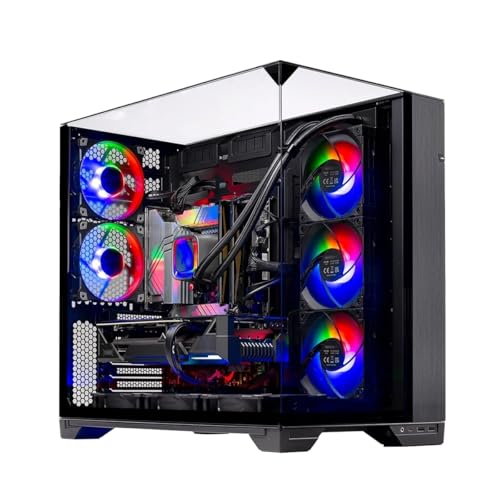
The MUSETEX K2 is a mid tower ATX PC case that comes ready to impress straight out of the box. With seven pre-installed PWM ARGB fans and a striking 270-degree dual tempered glass panel, this case is built for gamers and PC builders who want both performance and visual flair. Whether you're assembling a high-end gaming rig, a streaming powerhouse, or a RGB-lit showpiece, the K2 aims to deliver a balanced experience without breaking the bank.
Cooling is a clear priority here. The three side-mounted fans draw in fresh air directly onto the GPU and CPU area, while three top fans and one rear fan exhaust heat efficiently. All seven fans are PWM controlled and ARGB enabled, so you can sync lighting effects and adjust fan speeds through your motherboard software. The case also supports up to 10 fans total, giving you room to expand if needed. Magnetic dust filters on the top and bottom keep dust out while maintaining airflow, which is a thoughtful touch for long-term maintenance.
The dual tempered glass panels are the visual centerpiece. The front and left side are seamless glass, offering a clear view of your components from nearly any angle. The interior layout is clean and spacious, with plenty of room for large graphics cards and CPU coolers. Build quality is solid, with a sturdy steel frame and glass panels that feel secure. The included Type-C port on the I/O panel is a welcome addition for modern peripherals, alongside two USB 3.0 ports and audio jacks.
Setting up a build in the K2 is straightforward. The case fits ATX, Micro-ATX, and Mini-ITX motherboards, and the power supply shroud helps with cable management. There are grommets and tie-down points to route cables neatly, though the space behind the motherboard tray is a bit tight if you have many cables. The pre-installed fans already have their cables daisy-chained, which simplifies connection to the motherboard. Overall, installation should be smooth for builders with some experience.
One realistic limitation is the case width. At 8.35 inches wide, it's wider than many standard mid towers, so make sure your desk or shelf can accommodate it. Additionally, the manual doesn't specify exact radiator support dimensions, so if you plan to use a liquid cooling system, double-check the clearance before buying. The cable management area could also be deeper for very complex builds with lots of RGB controllers.
Overall, the MUSETEX K2 is a strong contender for budget-conscious PC gamers and RGB enthusiasts who want a ready-to-go cooling solution with great looks. It's especially suited for first-time builders looking to avoid the hassle of buying and installing fans separately, and for anyone who wants a clear view of their components. If you can work within its size constraints and plan your cooling setup accordingly, this case offers excellent value for a modern gaming PC build.
The MUSETEX K2 comes with seven pre-installed PWM ARGB fans that are strategically placed for balanced airflow. Three side fans act as intakes, pulling fresh air directly over the GPU and motherboard area, while three top fans and one rear fan exhaust hot air out. This positive pressure setup helps reduce dust accumulation when used with the included magnetic dust filters. All fans are PWM controllable, allowing you to fine-tune speeds for noise or performance. The case also supports up to three additional fans (two top and one rear) if you need extra cooling for high-end components.
Airflow is further enhanced by the side panel ventilation apertures, which allow the side fans to draw air efficiently. The top and bottom magnetic dust filters are easy to remove and clean, keeping maintenance simple. The case does not include a dedicated PSU shroud fan mount, but the power supply area has its own intake from the bottom filter. For most gaming builds, the stock fan configuration should provide adequate cooling. If you're pushing overclocked hardware or a high-TDP GPU, you may want to consider adding a rear exhaust fan (the included one is already there) or upgrading to a liquid cooler, though clearance for radiators should be measured carefully.
The MUSETEX K2 features a steel chassis with two tempered glass panels on the front and left side, creating a panoramic view of your components. The glass is tinted slightly dark, which complements RGB lighting nicely. The frame feels sturdy and supports standard ATX, Micro-ATX, and Mini-ITX motherboards. The I/O panel includes a Type-C port, two USB 3.0 ports, and audio jacks, all mounted on the top front for easy access. The power and reset buttons are tactile and responsive.
Inside, the layout is clean with a PSU shroud that hides cables and drives. There are two 2.5-inch SSD mounts on the shroud and one 3.5-inch HDD cage in the bottom. Cable management openings are well-placed, with Velcro straps to secure bundles. The pre-installed fans use daisy-chained connectors, simplifying cable routing. The only drawback is that the space behind the motherboard tray is limited, so thick cable bundles may bulge a bit against the side panel. Overall, the design focuses on aesthetics and ease of installation for a mid-range price point.

Pros
- Affordable price point for a complete gaming desktop with Windows 11 Home pre-installed
- Decent 1080p performance for popular esports and casual games at medium settings
- Generous 16GB RAM and 512GB SSD for fast load times and smooth multitasking
- Includes WiFi, Bluetooth, and a full set of peripherals for immediate use
- Three RGB fans add visual flair and help with cooling
Cons
- Older Xeon E5 processor and RX 550 GPU may struggle with newer AAA titles at high settings
- Limited upgrade path due to older platform and proprietary components
- Only 0 reviews at launch, so long-term reliability is unverified
The STGAubron Gaming PC Desktop is a pre-built tower aimed at budget-conscious gamers and streamers who want a hassle-free entry into PC gaming. It combines an Intel Xeon E5 processor, AMD Radeon RX 550 4GB graphics, 16GB of RAM, and a 512GB SSD, all housed in a black tower with three RGB fans. This system is designed to run popular titles like Fortnite, Valorant, Apex Legends, and Minecraft at 60+ FPS on medium settings, making it a practical choice for casual gamers and those new to PC gaming.
For competitive gamers and esports players, the RX 550 can handle games like CSGO, Overwatch, and Rocket League smoothly, though you may need to lower settings for more demanding shooters. Streamers and content creators will appreciate the 16GB RAM for basic multitasking, but the older Xeon processor may limit heavy encoding or editing tasks. The included RGB keyboard and mouse are a nice bonus for getting started, though serious gamers may want to upgrade them later.
Build quality is typical for a budget pre-built: the case is functional with decent airflow from the three RGB fans, and cable management is adequate. The tower weighs 21.4 pounds, so it's not too heavy to move around a dorm room or desk setup. Connectivity includes WiFi, Bluetooth 5.0, HDMI, DisplayPort, and DVI, giving you flexibility for monitors and peripherals. The 512GB SSD provides fast boot times and enough space for a few games, but you may need additional storage for a larger library.
Setup is straightforward: plug in the power, connect your monitor and peripherals, and you're ready to go with Windows 11 Home pre-installed. The RGB fans can be controlled via the case's built-in controller, adding a touch of customization to your gaming room. Maintenance is simple, with easy access to the interior for cleaning dust filters or upgrading RAM and storage in the future.
One realistic limitation is the older Xeon E5 platform, which may not support the latest CPUs or high-speed RAM, limiting future upgrades. The RX 550 is also entry-level, so don't expect high frame rates in AAA titles like Cyberpunk 2077 or Elden Ring at high settings. Additionally, with zero reviews at launch, it's wise to check user feedback over time for reliability insights.
Overall, the STGAubron Gaming PC is a solid budget option for casual gamers, college students, or anyone building their first gaming setup without the complexity of building a PC. It's best suited for esports, indie games, and light streaming, and offers good value for the price. If you're a competitive gamer needing higher frame rates or a content creator requiring more power, consider investing in a system with a newer GPU and CPU. But for an affordable, ready-to-play desktop, this is a practical choice.
Frequently Asked Questions
What dedicated graphics cards are included in these budget desktops?
The prebuilt systems in this lineup feature either an NVIDIA GeForce GT 1030 2GB or an AMD Radeon RX 550 4GB GDDR5 card. These entry-level dedicated GPUs have dedicated video memory, which avoids borrowing system RAM. The product specifications indicate they are designed for casual and entry-level gaming rather than high-resolution settings.
Can storage be added to these budget gaming PCs?
Desktop towers generally accommodate additional drives, though physical clearance depends on internal chassis space. These entry-level prebuilts provide 256GB or 512GB SSDs, which may fill rapidly with larger game libraries. Checking our guide on expanding your PC storage drives can help you plan drive additions. Always verify available motherboard SATA or M.2 ports before purchasing extra storage.
Is 8GB of RAM enough or should you look for 16GB?
An 8GB memory configuration handles basic computing and light gaming, but 16GB provides smoother multitasking and fewer bottlenecks. Several listed options include 16GB of DDR4 RAM to support running voice chat and background utilities alongside games. If you begin with 8GB, researching upgrading desktop hardware down the road can help you expand capacity when needed.
What is the difference between a prebuilt PC and a standalone case?
A standalone chassis, like the MUSETEX mid tower, includes only the computer case and pre-installed cooling fans. The manufacturer details confirm it does not include a processor, motherboard, power supply, or graphics card. Prebuilt desktops, by comparison, arrive assembled with core components, storage, and an operating system ready to plug in.
Do these entry-level systems include Wi-Fi connectivity?
Yes, the listed prebuilt towers include wireless networking support through either built-in Wi-Fi or included USB Wi-Fi adapters. Some models also specify Bluetooth 5.0 alongside standard RJ-45 Ethernet ports for wired connections. Reviewing the product specifications helps identify whether wireless connectivity is internal or provided via an external USB dongle.







Write Your Review
No reviews yet. Be the first to share your experience!