


High-stakes competitive matches frequently push your focus and reflexes to their absolute limits, but they also trigger intense physical reactions. When you find yourself in the final circle or holding an angle during a crucial round, your palms often become damp, slick, and difficult to manage against smooth plastic surfaces. Understanding why do hands sweat when gaming starts with recognizing how stress, physiological fight-or-flight responses, and desk ergonomics collide during extended play. Many players assume their hands are unusually sweaty, yet this moisture buildup is a standard biological reaction amplified by warm gaming environments.
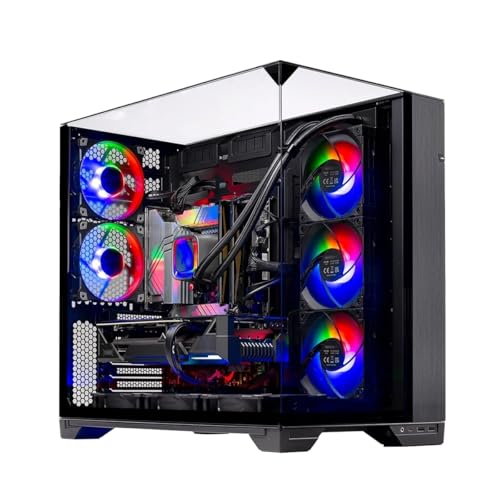
Desk thermals also contribute heavily to palm temperature, especially when a powerful desktop gaming PC tower vents hot internal exhaust directly across your mouse pad. When elevated room temperatures combine with rapid autonomic nervous system activation, maintaining a stable grip on your mouse or controller becomes a persistent challenge. Managing this moisture involves both understanding your body’s stress response and making sensible adjustments to your immediate physical setup. Addressing these factors ensures your fingers stay dry, responsive, and comfortable throughout long gaming sessions.

Pros
- Clean, powder-free moisture absorption prevents sticky build-up on mouse shells and controller grips
- Quick palm reset during match queues, respawn screens, and tactical timeouts
- Esports-inspired visual design looks great next to modern PC gaming battle stations
- Hand-washable and reusable materials offer long-term setup utility
- Comes in a convenient two-pack with an included travel pouch for LAN tournaments
Cons
- Requires momentarily lifting your hands from mouse or controller during natural pauses
- Must be given adequate time to air-dry completely after hand-washing before reuse
- Works best for routine palm moisture rather than extreme clinical conditions
The Gdrctica Gaming Sweat Absorbing Grip Bag is a specialized desktop accessory built to tackle palm moisture without the chalky mess of traditional athletic grip aids. Aimed directly at PC gamers, competitive FPS and MOBA players, streamers, and console gamers, this accessory offers an immediate reset for sweaty hands. Whether you are grinding ranked matches in tactical shooters or tracking targets in fast-paced arena games, hand slippage can directly degrade your mouse control. This two-pack system gives players a dedicated, clean method to dry their palms between respawns, match queues, or tactical timeouts.
From a performance standpoint, consistent grip friction directly impacts micro-adjustments, flick shots, and overall input accuracy. Unlike liquid antiperspirants that leave sticky films or athletic chalk that clogs mouse sensors and mechanical keyboard switches, this grip bag uses dry mineral beads inside a moisture-wicking fleece shell. Squeezing or rolling the pouch for a few seconds absorbs surface sweat rapidly, restoring natural hand texture so your fingers do not slide across mouse side grips or controller thumbsticks during tense clutch rounds.
The physical construction stands out compared to basic gym chalk balls. The exterior uses a durable, double-sided performance fleece that feels soft against the skin, while reinforced perimeter stitching prevents the inner mineral beads from leaking onto your mouse pad. Styled in an esports black colorway with cyan and magenta accents, it sits naturally beside a mechanical keyboard, custom mouse pad, or stream deck without clashing against clean RGB desktop aesthetics.
Routine maintenance and setup convenience are straightforward. Because the bag produces no loose dust, you can keep it directly on your desktop or inside a drawer without needing extra cleaning supplies. When it eventually accumulates skin oils from extended sessions, you can gently hand-rinse it under cool water and let it air-dry completely. The included travel pouch also makes it easy to toss into a backpack for LAN events, college dorm gaming, or local esports tournaments.
Realistic limitations exist for any passive absorption accessory. You have to physically release your peripherals to squeeze the bag, meaning moisture management happens during natural gameplay lulls rather than mid-firefight. In addition, while it handles common palm sweat exceptionally well during high-stress matches, players with severe hand perspiration may find that repeated use requires regular drying breaks, especially during longer marathon sessions in warm gaming rooms.
Overall, the Gdrctica Grip Bag is a practical and low-maintenance upgrade for competitive PC gamers, streamers, and setup enthusiasts who want dependable traction without dirtying their gear. It delivers reliable sweat absorption, solid stitching, and an aesthetic that complements modern gaming battle stations, making it an excellent addition to your everyday desktop setup.
Maintaining a reliable grip on lightweight gaming mice or textured controller grips is crucial when micro-adjustments decide the round. By quickly pulling surface sweat away from your fingers and palms, this grip bag prevents unexpected slip during rapid flicks and tracked aiming. Because it operates without chalk dust, optical mouse sensors and mechanical switch housings remain clean and free of abrasive particles.
The tactile squeeze motion also acts as a subtle physical reset between intense encounters. Grabbing the pouch during death screens or round transitions helps relax grip tension, allowing you to return to the keyboard and mouse with dry palms, renewed dexterity, and calm muscle control.
Unlike bulky gym accessories, this compact sweat bag is proportioned specifically for gaming desks. Its low-profile footprint allows it to rest comfortably between your mouse pad and keyboard without consuming valuable tracking surface or interfering with wide mouse swipes in low-DPI gaming setups.
The included carry pouch allows streamers and tournament players to transport one bag to LAN parties while keeping a second unit stationed at home. Its subtle esports accents complement dark mouse mats, anodized keyboard frames, and coordinated desktop peripherals.
The Biology, Desk Thermals, and Practical Fixes for Sweaty Hands
Sweaty palms during gaming sessions stem from biological reflexes, localized heat, and prolonged skin contact with non-porous surfaces. When competitive tension spikes, your body releases adrenaline that activates the eccrine sweat glands concentrated in your palms. At the same time, operating a desktop computer near your hand placement can warm your workspace and accelerate perspiration. Addressing this moisture requires examining both physiological triggers and the thermal conditions around your setup.
Excessive moisture degrades mouse control, ruins controller thumbstick traction, and introduces friction against your mouse pad. Players often compensate by squeezing their peripherals harder, which restricts airflow and traps even more warmth. Understanding the exact mechanisms behind this reaction allows you to implement reliable moisture management strategies without disrupting your gameplay rhythm. Combining targeted environmental changes with practical absorbing tools helps you maintain consistent tactile precision during high-pressure matches.
The Autonomic Nervous System and Palmar Perspiration
The human body regulates sweating through the sympathetic branch of the autonomic nervous system, which triggers involuntary reactions under stress. Fast-paced shooters, battle royales, and tactical strategy games demand rapid decisions, placing players in a state of heightened arousal. In this state, the brain releases hormones like adrenaline that signal an urgent need to react quickly. This evolutionary response historically provided extra friction on the palms for gripping tools or escaping physical threats.
Human palms contain the highest density of eccrine sweat glands anywhere on the body. Unlike glands in other regions that respond primarily to core body temperature, palmar eccrine glands react intensely to psychological stimuli. Mental focus, ranking anxiety, and sudden audio cues cause these glands to secrete moisture almost instantly. Because this reaction is hardwired into your central nervous system, attempting to simply will yourself to stop sweating is rarely effective.
The intensity of this physiological response varies with individual stress tolerance and game pacing. Turn-based strategy titles trigger far less sudden palmar moisture than tactical first-person shooters where one mistake ends the round. Repeated exposure to stressful gameplay can help players stay calmer, but high-stakes moments will almost always prompt some hormonal release. Recognizing that damp hands represent a normal biological process makes the issue much easier to address through practical management techniques.
Desk Thermals, Component Heat, and Workspace Airflow
Biological arousal is only one factor, as the physical environment around your desktop plays a major role in hand temperature. High-performance graphics cards and desktop processors generate considerable thermal energy that exhausts into your room. If your computer case sits beside your mouse pad with fans venting warm air toward your hand, your skin temperature rises quickly. This convective heating triggers thermal sweating alongside the psychological perspiration stimulated by the game.
Confined gaming rooms with limited air circulation trap this accumulated heat over hours of play. As ambient room temperature climbs, your body dilates blood vessels to cool your extremities, increasing perspiration across your hands. Monitor power bricks and illuminated desk accessories also contribute small amounts of radiant warmth to your desk surface. When ambient temperatures rise, sweat evaporation slows down, leaving hands feeling slick and clammy rather than comfortably dry.
Proper computer chassis placement on your desk can significantly mitigate unwanted heat transfer. Angling case exhaust fans away from your primary mouse area or placing the tower beneath the desk prevents hot air currents from bathing your hand. Ensuring that your chassis has sufficient internal airflow helps fans run efficiently without blowing localized heat onto your peripherals. Managing these environmental thermals creates a neutral baseline that keeps your hands cooler during play.
Ergonomics, Grip Pressure, and Plastic Contact Traps
How you hold your gaming mouse or controller influences how much moisture accumulates against your skin. Gamers using a full palm grip rest their entire hand surface against solid plastic for hours without interruption. This posture creates a sealed contact zone where body heat cannot radiate away and sweat cannot evaporate. Without ventilation channels between your skin and the mouse chassis, moisture quickly pools along the palm rest and side grips.
Excessive physical tension in your fingers and wrist also accelerates blood flow and localized heat generation. When players experience tracking difficulties, they frequently squeeze their peripheral with excessive force in a bid for tighter control. Squeezing harder causes hand fatigue and seals the skin even more tightly against the non-porous plastic. Finding balanced sensitivity settings, such as properly calibrating mouse DPI settings for gaming, helps you maintain accurate aim without relying on a suffocating death grip.
Alternative grip styles, such as claw or fingertip grips, naturally introduce small air gaps that allow minor heat dissipation. In these orientations, only your fingertips or the base of your palm make direct contact with the shell, leaving the palm exposed to room air. While switching grip styles requires retraining your muscle memory, even minor reductions in grip force cut moisture accumulation. Consciously relaxing your hand during slower gameplay sequences gives your skin brief intervals to breathe.
Absorbent Grip Bags and Rapid In-Game Refresh Routines
Waiting for a gaming session to conclude before addressing sweaty hands is rarely practical, making fast refresh solutions valuable between rounds. Using a dedicated moisture-absorbing accessory, such as the 2 Pack Gaming Sweat Absorbing Grip Bag for Sweaty hands from Gdrctica, provides an immediate reset during brief downtime. Squeezing or rolling a specialized grip bag between respawns, matchmaking queues, or tactical timeouts pulls surface perspiration off your palms. This allows you to return to your mouse or controller with a dry grip before the next round begins.
Unlike traditional gym chalk or sports lotions, a dedicated gaming grip bag avoids messy residues that could damage sensitive computer equipment. The Gdrctica sweat bag utilizes a double-sided performance-fleece shell filled with flexible mineral beads that conform smoothly to your palm. Because it contains no loose powder, players do not have to worry about dust migrating into mechanical keyboard switches or optical mouse sensors. The soft exterior fabric absorbs moisture directly, leaving hands feeling clean and tactilely responsive.
Maintenance for reusable grip bags is straightforward and fits easily into a regular gaming setup. The performance-fleece shell is carefully stitched for repeated use and can be gently hand-rinsed in water before being completely air-dried. With a two-pack setup, you can keep one bag beside your mouse pad and store the other inside an included travel pouch for events away from home. Establishing a regular squeeze routine during non-active game phases stops sweat buildup before it compromises your precision.
Desk Airflow Solutions and Ambient Room Regulation
Modifying your broader gaming space delivers noticeable improvements in how your hands handle thermal and emotional stress. Adding a compact USB desk fan aimed across your mouse pad creates continuous convective cooling over your hand and forearm. This constant gentle airflow accelerates sweat evaporation as soon as moisture emerges, preventing it from gathering into slick pools. Many competitive players view a quiet desk fan as an essential accessory because of how effectively it counters warm operating environments.
Maintaining an optimal ambient room temperature keeps your body from triggering secondary thermal cooling responses. Setting your thermostat or using an air conditioner to keep your room around sixty-eight to seventy-two degrees Fahrenheit provides a comfortable thermal buffer. When your entire gaming area remains cool, your core temperature stays stable, significantly diminishing the sweat produced by psychological excitement. Pairing climate control with an organized workspace layout ensures that computer exhaust disperses efficiently rather than stagnating around your hands.
Cable management and equipment spacing also quietly impact air circulation patterns across your desk. Crowding your mouse pad against monitors or bulky hardware blocks ambient air currents from sweeping over your playing hand. Leaving several inches of open clearance around your primary control area ensures that air flows freely and prevents heat from radiating from nearby electronics. Even minor layout adjustments create noticeable improvements in everyday comfort and peripheral handling during extended sessions.
Peripheral Materials, Textured Grip Tape, and Shell Finishes
The physical texture and chemical composition of your gaming hardware directly determine how moisture affects your control. Many factory peripherals use smooth ABS plastic that becomes exceptionally slippery as soon as sweat forms on the contact points. Peripherals constructed with textured PBT plastic or matte coatings offer micro-ridges that maintain usable friction even when slightly damp. Upgrading to peripherals that feature higher-grade surface treatments is a viable strategy for players who naturally experience persistent palmar sweating.
Applying aftermarket polyurethane or synthetic rubber grip tape over your mouse buttons and side panels is another highly effective countermeasure. These specialized grip tapes feature textured patterns that physically channel moisture away from your primary skin contact zones. Because the material absorbs a degree of liquid while maintaining a naturally tacky feel, you retain reliable control without increasing physical grip pressure. When selecting hardware alongside a complete desktop gaming PC bundle, choosing peripherals that accommodate grip tape makes moisture management simpler.
Some manufacturers also offer ultra-lightweight gaming mice that utilize perforated honeycomb chassis designs to promote passive air circulation. These cutouts along the palm rest and side walls allow warm air to escape rather than remaining trapped against your skin. While open-shell designs do expose internal components to dust and require occasional cleaning, they provide noticeable passive cooling benefits for palm-grip gamers. Evaluating these hardware features helps you tailor your gear to your specific physiological profile.
Hand Hygiene, Hydration Habits, and Session Pacing
Developing simple personal hygiene and preparation habits prior to gaming can dramatically curb palm slipperiness. Washing your hands with cool water and soap immediately before a session removes accumulated skin oils and lotion residues. Clean skin provides significantly better natural friction against plastic and rubber surfaces than skin coated in natural oils, which cause sweat to bead up slickly. Cool water also temporarily constricts micro-capillaries in your fingertips, delaying the onset of perspiration during early rounds.
Maintaining proper hydration throughout your day also influences how effectively your body regulates internal temperature. When you become dehydrated, your body works harder to dissipate heat, leading to erratic temperature spikes and sporadic sweating bursts. Drinking cool water regularly while playing helps stabilize your internal core temperature and prevents rapid overheating during extended play. Avoiding excessive caffeine intake before competitive tournaments is also beneficial, as high stimulant levels excite the sympathetic nervous system and amplify sweat output.
Incorporating brief breaks between competitive matches allows both your nervous system and your peripheral gear to reset completely. Stepping away from your computer desk gives your hands an opportunity to cool down while allowing your heart rate to return to baseline. Wiping down your mouse, controller, and desk surface with a microfiber cloth during these pauses removes lingering moisture before it can dry into a tacky film. Pacing your gaming sessions preserves physical comfort, sharpens focus, and ensures your hands stay dependable.
Balancing Biology and Setup for Consistent Control
Dealing with damp hands during high-intensity gaming is a challenge shared by casual and competitive players alike, but it does not have to compromise your execution. Recognizing that this moisture stems from natural neurological fight-or-flight reactions helps you adopt a constructive approach to moisture control. Combining localized cooling tools like small desk fans with absorbent accessories like the Gdrctica mineral-bead grip bag gives you instant options to neutralize sweat between rounds. When you also reposition your computer exhaust and relax your grip tension, you establish a setup that keeps you comfortable, focused, and ready to compete.







Write Your Review
No reviews yet. Be the first to share your experience!