


Picking the ideal central processor can dictate how smoothly your gaming desktop handles demanding physics, background operating system tasks, and competitive high-refresh titles. When exploring which ryzen 7 is best for gaming, your decision largely hinges on whether you prioritize absolute top-tier frame rates or maximum performance per dollar spent on your motherboard and memory. The modern processor landscape offers distinct choices spanning proven platforms and newer architectures equipped with stacked cache memory. Buyers looking at affordable prebuilt gaming systems frequently encounter different processor generations that dramatically alter system behavior.
Desktop processors in this tier feature eight physical cores and sixteen threads, creating a balanced foundation that avoids the scheduling complexities of hybrid chip designs. Advanced Micro Devices has refined this configuration across several generations, introducing high-density 3D V-Cache options that dramatically reduce data access latency in complex simulation games. Deciding which ryzen 7 is best for gaming also requires evaluating your overall graphics card pairing, display resolution targets, and platform upgrade intentions. Understanding how these architectural differences translate to real-world gaming balance ensures you invest your hardware budget where it makes the greatest practical difference.

Pros
- Excellent single-threaded performance for gaming at 1080p and 1440p
- Comes with a capable RGB cooler, reducing initial investment
- Easy drop-in upgrade for AM4 motherboards with a BIOS update
- Strong multitasking ability for streaming and productivity workloads
Cons
- Runs warmer than lower-TDP chips, requiring good case airflow or an aftermarket cooler for heavy loads
- Not the best value for pure gaming compared to X3D variants, which offer higher frame rates in some titles
- Lacks support for newer AM5 platform features like DDR5 memory and PCIe 5.0
The AMD Ryzen 7 5800XT is an 8-core, 16-thread desktop processor that brings the proven Zen 3 architecture to the AM4 platform. It's designed for PC gamers, streamers, content creators, and enthusiasts who want a performance boost without upgrading their motherboard and RAM. With a max boost clock of 4.8 GHz and unlocked multiplier, this CPU is ready for both high-FPS gaming and demanding multitasking.
For competitive gamers, the 5800XT delivers snappy responsiveness in fast-paced titles like FPS and MOBA games. User feedback highlights strong clock speeds between 4.2 and 4.5 GHz even without manual overclocking, ensuring smooth gameplay at 1080p and 1440p resolutions. The 36 MB cache helps reduce latency, which can translate to better frame rates in CPU-bound scenarios. Streamers and content creators will appreciate the 16 threads for handling encoding, editing, and live broadcasting simultaneously.
Build quality is solid, with AMD's reliable Zen 3 architecture and support for PCIe 4.0, allowing faster communication with modern GPUs and NVMe SSDs. The included Wraith Prism cooler features RGB lighting that adds visual appeal to any gaming setup, though some users note the cooler can be a bit tricky to install and the RGB defaults to on. For those seeking lower temperatures or quieter operation, an aftermarket cooler is a worthwhile consideration.
Setup is straightforward for an AM4 upgrade: a BIOS update on compatible B450, B550, or X570 boards is typically required before installation. The processor itself installs easily with standard socket alignment, and the cooler uses the existing AM4 mounting brackets. Cable management is simplified since the cooler's RGB cable can be connected to a motherboard header for software control, though some users may prefer to manage the extra wire.
One realistic limitation is that the 5800XT runs warmer than lower-TDP chips, especially under sustained loads. Users in warm climates or with compact cases may want to invest in a better cooler or ensure good case airflow. Additionally, while the 5800XT is a strong performer, the X3D variants offer higher gaming performance in many titles, and the AM5 platform provides DDR5 and PCIe 5.0 support for future-proofing.
Overall, the AMD Ryzen 7 5800XT is a practical choice for gamers and creators who want to extend the life of their AM4 build with a noticeable performance uplift. It's especially suitable for budget-conscious builders who already have DDR4 RAM and a compatible motherboard. If you're looking for a balanced CPU that handles gaming, streaming, and productivity without breaking the bank, this processor delivers reliable value.
Pros
- Outstanding gaming performance with smooth frame pacing and minimal stutter
- Runs cool and efficient, even with a mid-range air cooler
- Easy to install on AM5 motherboards with straightforward BIOS compatibility
- Great value for pure gaming builds compared to more expensive alternatives
Cons
- Not the best choice for heavy multi-threaded productivity workloads like video rendering or 3D modeling
- Requires a dedicated GPU for serious gaming; integrated graphics are basic
- Premium pricing may be overkill for casual gamers who don't play CPU-intensive titles
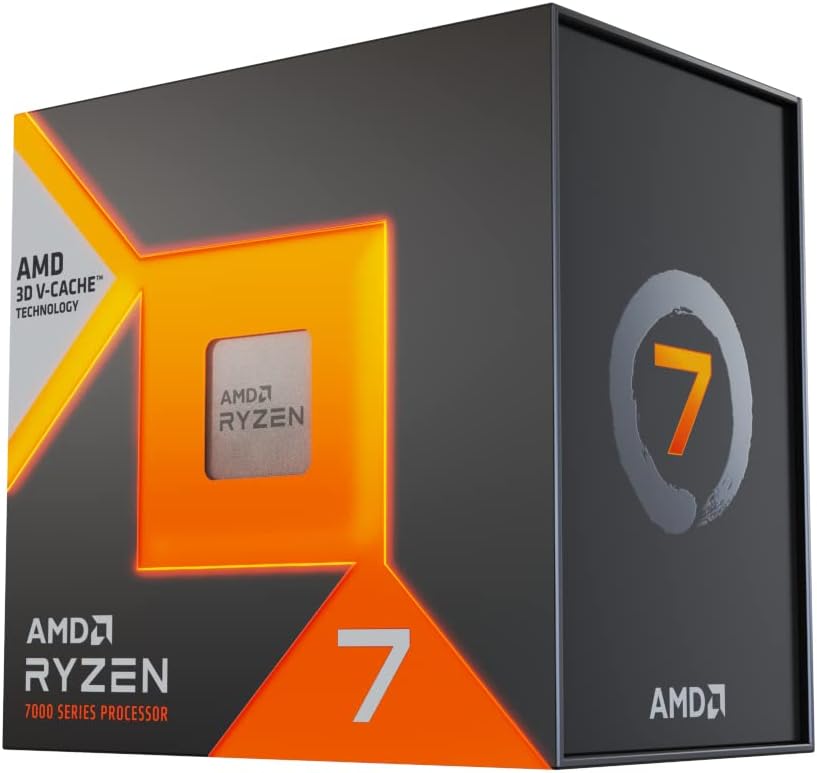
The AMD Ryzen 7 7800X3D is a desktop processor built specifically for gamers who demand the highest possible frame rates and the smoothest gameplay experience. It's an 8-core, 16-thread CPU based on AMD's Zen 4 architecture, but what sets it apart is the 3D V-Cache technology that stacks an extra 64MB of L3 cache on top of the standard 32MB, for a total of 96MB. This massive cache helps the CPU keep more game data close at hand, reducing the need to fetch data from slower system memory and dramatically improving performance in CPU-bound gaming scenarios.
This processor is best suited for PC gamers, competitive esports players, and streamers who want a no-compromise gaming experience. If you play fast-paced shooters like Valorant, Counter-Strike 2, or Rainbow Six Siege, the 7800X3D's cache helps maintain incredibly consistent frame times, even during intense firefights or when many objects are on screen. It also works well for casual gamers who enjoy open-world titles like Elden Ring or Cyberpunk 2077, where the extra cache can reduce stutter when loading new areas. Content creators who do light video editing or streaming alongside gaming will find the 8 cores and 16 threads sufficient, though heavy rendering workloads are better left to higher-core-count CPUs.
In real-world use, the 7800X3D delivers exceptional gaming responsiveness. User reviews consistently highlight how smooth and stutter-free games feel, with high 1% and 0.1% lows that keep gameplay fluid even when the action gets chaotic. The CPU runs surprisingly cool for its performance level, with many users reporting temperatures in the 60-75°C range under gaming load with a decent air cooler or AIO. This thermal efficiency means less fan noise and more headroom for your GPU to do its thing. The 4.2 GHz base clock and 5.0 GHz boost clock are more than enough for modern games, and the 5nm process keeps power draw reasonable.
Build quality is typical of AMD's Ryzen lineup: the processor itself is solid, and the IHS (integrated heat spreader) is flat for good thermal contact. Installation on an AM5 motherboard is straightforward, though you'll need to ensure your BIOS is updated for compatibility. The CPU supports DDR5 RAM, which is now widely available and offers good performance gains. Cable management is simplified because the CPU doesn't require any special power connectors beyond the standard motherboard power, and the AM5 socket's retention mechanism is easy to use. Software setup is minimal: just install the CPU, apply thermal paste, mount your cooler, and you're good to go. AMD's Ryzen Master utility can be used for monitoring and basic tuning, but most users won't need to tweak anything for excellent gaming performance.
One realistic limitation is that the 7800X3D isn't the best choice for pure productivity tasks like 3D rendering, video encoding, or scientific simulations. In those workloads, CPUs with more cores (like the Ryzen 9 7950X) will outperform it. Additionally, the integrated Radeon Graphics are basic and not suitable for gaming, so you'll need a dedicated graphics card. The price is also on the higher side, but for gamers who prioritize frame rates and smoothness, it's a worthwhile investment.
Overall, the AMD Ryzen 7 7800X3D is a fantastic choice for anyone building a gaming-focused PC. It offers best-in-class gaming performance, runs cool and quiet, and is easy to set up. If your primary use is gaming, and you want a CPU that will keep your system feeling snappy for years to come, this is one of the smartest purchases you can make. Pair it with a good B650 or X670 motherboard, fast DDR5 RAM, and a capable GPU, and you'll have a gaming rig that handles anything you throw at it.

Pros
- Exceptional gaming performance with massive L3 cache for reduced latency
- Significant IPC uplift over previous gen, boosting frame rates in CPU-bound titles
- Drop-in compatibility with Socket AM5 simplifies upgrades for existing users
- Improved thermal design allows higher sustained clock speeds under load
Cons
- Cooler not included, requiring separate purchase of an AM5-compatible cooler
- Premium pricing may be overkill for casual gamers or non-gaming workloads
- Limited to AM5 platform, requiring motherboard upgrade for AM4 users
The AMD Ryzen 7 9800X3D is a desktop processor designed specifically for PC gamers and performance enthusiasts who demand the absolute best in gaming performance. Built on AMD's latest Zen5 architecture and featuring next-generation 3D V-Cache technology, this CPU is marketed as the world's fastest gaming processor. With 8 cores and 16 threads, it's engineered to deliver exceptional responsiveness in both single-threaded and multi-threaded workloads, making it a strong choice for competitive esports players, streamers, and content creators who need reliable performance during intense gaming sessions or while multitasking with streaming software.
For gamers, the 9800X3D's key advantage lies in its massive 96MB L3 cache, which helps reduce memory latency and improve frame rates in CPU-intensive titles like first-person shooters, MOBAs, and open-world games. Users upgrading from previous generations can expect a noticeable uplift in gaming responsiveness, especially in scenarios where cache size matters. The processor also supports high-speed DDR5 memory and PCIe 5.0, ensuring compatibility with modern graphics cards and storage for a future-proof gaming setup. Its improved thermal performance allows for higher sustained clock speeds up to 5.2GHz, which can translate to smoother gameplay and lower input lag.
Build quality and practicality are typical of AMD's Ryzen lineup, with a focus on reliability and compatibility. The processor is drop-in ready for the Socket AM5 platform, meaning users with an existing AM5 motherboard can upgrade without needing a new board. However, it's important to note that a cooler is not included, so buyers will need to purchase an AM5-compatible air or liquid cooler separately. This adds to the overall cost but also gives users the flexibility to choose a cooling solution that fits their noise and performance preferences, whether for a quiet home office setup or a high-airflow gaming rig with RGB fans.
Setting up the 9800X3D is straightforward for anyone familiar with PC building. After installing the CPU into an AM5 motherboard, applying thermal paste, and mounting a cooler, users can update BIOS for optimal compatibility. The processor's power efficiency is a plus, as it generates less heat compared to some competing high-end CPUs, which can lead to lower fan noise and more comfortable long gaming sessions. For streamers and content creators, the 8-core/16-thread configuration provides enough muscle for encoding, editing, and running multiple applications simultaneously without stuttering.
One realistic limitation is that the 9800X3D's premium performance comes at a higher price point, which might not be necessary for casual gamers or those focused solely on productivity tasks like video editing that benefit more from higher core counts. Additionally, users on older AM4 platforms will need to invest in a new motherboard and potentially new DDR5 RAM, increasing the total upgrade cost. For those building a new gaming PC from scratch, however, this processor pairs excellently with high-end GPUs and fast memory to create a balanced, top-tier gaming machine.
In summary, the AMD Ryzen 7 9800X3D is a compelling choice for PC gamers, esports players, and streamers who want the fastest gaming performance available on the AM5 platform. Its combination of Zen5 architecture, large L3 cache, and efficient power usage makes it a strong contender for high-refresh-rate gaming and demanding multitasking. While the lack of an included cooler and premium pricing are factors to consider, users seeking a drop-in upgrade for their AM5 system or building a new high-performance gaming rig will find this processor delivers on its promise of exceptional gaming responsiveness.



Pros
- Exceptional performance for the price in a tiny form factor
- Triple 4K display capability great for multitasking and light gaming
- Fast LPDDR5 memory and NVMe SSD improve overall responsiveness
- Excellent connectivity with WiFi 6, Bluetooth 5.2, and 2.5G LAN
- Easy to set up and comes with VESA mount for clean installation
Cons
- Integrated Radeon 680M graphics limit high-end AAA gaming at max settings
- No dedicated graphics card upgrade path typical of full-size PCs
- Limited internal expansion for additional drives or RAM beyond the single M.2 slot
The KAMRUI Hyper H1 is a mini gaming PC that packs a surprising punch for its size. It's built around the AMD Ryzen 7 7735HS processor, a mobile-grade chip with 8 cores and 16 threads that can boost up to 4.75 GHz. This CPU, combined with 16GB of LPDDR5 RAM running at 5500 MT/s and a 512GB NVMe SSD, makes the Hyper H1 a solid choice for PC gamers who need a compact system for esports, casual gaming, or as a secondary streaming rig.
Who is this mini PC best suited for? It's ideal for competitive gamers playing lighter titles like Valorant, CS2, or Fortnite, where the integrated Radeon 680M graphics can deliver smooth frame rates at 1080p. Casual gamers who enjoy indie games or older AAA titles will also find it capable. Streamers and content creators can use it as a dedicated encoding machine or for light video editing. Work-from-home gamers and college students will appreciate its tiny footprint, which easily tucks behind a monitor or sits on a small desk.
In real-world use, the Hyper H1 offers snappy responsiveness for everyday tasks and gaming. The triple 4K display support via HDMI and USB-C allows you to run multiple monitors, which is great for productivity or having a game on one screen and chat on another. The WiFi 6 and Bluetooth 5.2 keep wireless connections fast and stable, reducing latency during online matches. While it's not meant for 4K gaming, it handles 1440p or 1080p gaming well in less demanding titles.
Build quality is solid for a mini PC, with a compact metal chassis that feels durable. The included VESA mount lets you attach it to the back of a monitor, keeping your desk clean. Setup is straightforward: plug in the power, connect your peripherals, and you're ready to go with Windows 11 Pro pre-installed. The system runs relatively cool under load thanks to its efficient design, though heavy gaming may cause the fan to become audible.
A realistic limitation is the integrated graphics. The Radeon 680M is one of the best iGPUs, but it can't match a dedicated gaming GPU. If you play graphically intensive AAA games at high settings, this isn't the right system. Also, expansion is limited: there's only one M.2 slot for storage (up to 4TB), and no room for additional RAM or a dedicated GPU. But for esports, casual gaming, and productivity, it's more than adequate.
Overall, the KAMRUI Hyper H1 is a practical buy for gamers who value space savings and versatility. It works well as a primary machine for less demanding games or as a secondary PC for streaming and content creation. For its size and price, it delivers a strong balance of performance and convenience, making it a great option for gamers building a compact setup or needing a quiet, low-profile system for a dorm room or home office.
Pros
- Strong 1080p gaming performance with RTX 5060 and Ryzen 7 5700.
- Generous 32GB RAM and 1TB NVMe SSD for fast multitasking and storage.
- Clean, bloatware-free Windows 11 installation for a smooth experience.
- Attractive tempered glass case with ARGB fans for a premium look.
- Free keyboard and mouse included, reducing initial setup costs.
Cons
- Graphics card brand may vary, which could affect consistency.
- Only one HDMI and one DisplayPort output guaranteed; additional ports may vary.
- Case size may be larger than some compact desk setups require.
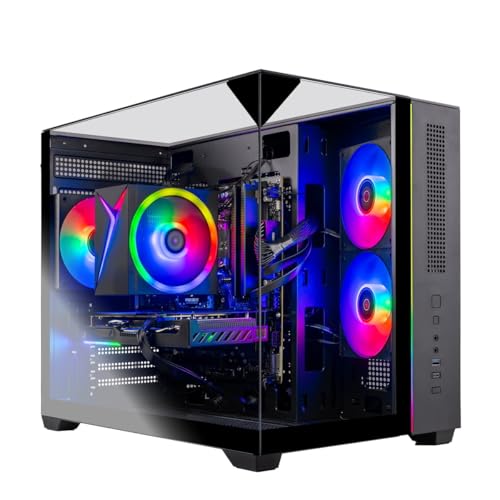
The Skytech Gaming Crystal is a pre-built gaming desktop designed for PC gamers who want a powerful system without the hassle of building one themselves. It combines an AMD Ryzen 7 5700 processor with an NVIDIA GeForce RTX 5060 graphics card, 32GB of DDR4 RAM, and a 1TB NVMe SSD, all housed in a striking tempered glass case with ARGB fans. This setup is well-suited for competitive gamers, casual players, streamers, and content creators who need reliable performance for 1080p gaming at high settings.
In terms of real-world gaming performance, the RTX 5060 and Ryzen 7 5700 deliver smooth frame rates in popular titles like Call of Duty, Fortnite, Valorant, and Elden Ring at 1080p Ultra settings, often exceeding 60 FPS. The 32GB of RAM ensures you can run games alongside Discord, streaming software, or browser tabs without slowdowns. The 1TB NVMe SSD provides fast load times, so you spend less time waiting and more time playing. The included high-performance air cooler and ARGB fans help maintain good airflow and keep temperatures in check during long sessions.
Build quality is solid, with a durable steel frame and triple tempered glass panels that showcase the internal components and RGB lighting. The case offers decent cable management options, though some users may want to tidy up the interior further. The system comes with a free gaming keyboard and mouse, which are functional for getting started but may be upgraded later for a more premium feel. The lack of bloatware is a nice touch, as it keeps the Windows 11 experience clean and responsive.
Setup is straightforward: plug in the power, connect your monitor and peripherals, and you're ready to go. The system includes Wi-Fi 802.11ac for wireless connectivity, plus USB 2.0, 3.0, and 3.2 Gen1 ports for your devices. One limitation is that the graphics card brand may vary, and only one HDMI and one DisplayPort output are guaranteed, which could be a concern if you need multiple monitors with specific port types. The case is also on the larger side, so make sure your desk or gaming space can accommodate its dimensions (16.6 x 11.3 x 14.4 inches).
For streamers and content creators, the Ryzen 7 5700's multi-core performance handles encoding and editing tasks reasonably well, though a dedicated streaming PC or higher-end CPU might be better for heavy workloads. The 32GB of RAM is a plus for multitasking, and the NVMe SSD speeds up file transfers and project loading. The ARGB fans and tempered glass panels make it a visually appealing centerpiece for any RGB-themed gaming setup.
Overall, the Skytech Gaming Crystal is a practical choice for PC gamers who want a ready-to-use system with strong 1080p performance, ample memory, and fast storage. It's especially suitable for those who prefer a pre-built over DIY assembly, value a clean software experience, and want a case that shows off their components. While there are minor limitations like variable GPU branding and limited guaranteed video outputs, the overall package offers good value for its target audience.

Determining the Best Ryzen 7 Processor for Desktop Gaming
Finding the right processor requires looking past raw clock speeds to evaluate cache hierarchy, socket support, and your specific display resolution. If your primary goal is achieving the highest possible frame rates in modern titles, the AMD RYZEN 7 9800X3D 8-Core and the AMD Ryzen 7 7800X3D 8-Core represent the leading edge of desktop performance due to their specialized cache architecture. For builders working within tighter hardware allowances, existing AM4 processors like the AMD Ryzen™ 7 5800XT 8-Core continue to provide dependable eight-core processing without requiring brand new memory kits and motherboards. Deciding which ryzen 7 is best for gaming ultimately depends on whether you are building an entirely new high-end platform or extending the life of your current setup.
The Impact of 3D V-Cache on Modern Gaming Performance
Modern gaming engines frequently bottleneck on processor memory access when managing dense draw calls, physics simulations, and dynamic non-player characters. Advanced Micro Devices addressed this physical limitation by stacking additional memory directly onto the processor die, an innovation marketed as 3D V-Cache. The AMD Ryzen 7 7800X3D 8-Core features 96 megabytes of L3 cache combined with 8 megabytes of L2 cache, offering a massive high-speed buffer that minimizes data retrieval delays from system memory. This large pool of local memory proves especially advantageous in open-world titles, simulation games, and competitive esports where sudden frame drops can disrupt gameplay.
Building upon that established foundation, the AMD RYZEN 7 9800X3D 8-Core introduces architectural enhancements based on the Zen 5 design. This updated processor improves thermal conductivity between the silicon layers, allowing the chip to sustain boost clock speeds up to 5.2 GHz compared to previous thermal boundaries. Standard octa-core chips that lack this physical vertical cache structure must rely more heavily on standard system memory bandwidth to feed instructions to the graphics pipeline. For players who demand the smoothest visual delivery at competitive frame thresholds, investing in an X3D processor remains a clear architectural advantage.
AM5 Versus AM4 Platform Longevity and Memory Architecture
Choosing a gaming processor also binds your computer to a specific physical socket and memory generation. The Socket AM5 ecosystem powers the newer Zen 4 and Zen 5 processor families, establishing full compatibility with DDR5 memory modules and high-speed PCIe 5.0 lanes. This platform requires a motherboard equipped with modern chipsets, such as the B650 or B850 series found in prebuilt systems like the STORMCRAFT Phantom RTX 5080 Gaming PC Ryzen 7. Adopting AM5 means higher overall platform setup requirements, but it guarantees that future desktop processor generations can drop into the same motherboard.
In contrast, the older Socket AM4 platform has delivered exceptional longevity across multiple processor releases. Processors like the AMD Ryzen™ 7 5800XT 8-Core operate on this mature socket, utilizing DDR4-3200 memory and PCIe 4.0 data lanes. For gamers who already own a compatible AM4 motherboard and an existing set of DDR4 memory, upgrading to an eight-core Zen 3 processor represents a sensible path to extend system life. Evaluating your willingness to replace surrounding system parts helps clarify the actual investment required for each processor family.
Evaluating Budget and Value Tier Ryzen 7 Desktop Options
Not every desktop build demands top-tier processor pricing to produce enjoyable, responsive gaming experiences. Processors such as the AMD Ryzen™ 7 5800XT 8-Core arrive unlocked for overclocking, reaching maximum boost frequencies of 4.8 GHz while including an AMD Wraith Prism RGB cooler inside the retail box. Bundled cooling saves additional hardware spending, allowing builders to allocate resources toward a more capable graphics card. This eight-core processor handles modern multi-threaded game engines smoothly, making it a dependable option for mainstream resolutions.
Subtle architectural differences exist across mid-tier desktop processors that warrant close inspection before buying. For example, prebuilt systems like the Prebuilt Gaming PC, RTX 3060 Ti 8GB feature the Ryzen 7 5700X, which incorporates 32 megabytes of L3 cache to help maintain steady frame delivery. Meanwhile, other configurations like the Skytech Gaming Crystal Gaming PC utilize the standard Ryzen 7 5700, which features a 3.7 GHz base clock and up to 4.6 GHz turbo boost. Checking specific model numbers and cache capacities ensures you understand the exact memory buffer available to your games.
Comparing Individual Processors to Complete Prebuilt Systems
Selecting a standalone processor appeals to experienced hobbyists who enjoy selecting each internal component and assembling their own system. If you prefer a verified out-of-the-box experience, prebuilt desktops integrate modern eight-core processors with matched power supplies, cooling solutions, and graphics cards. High-end systems like the ASUS ROG GM700 (2026) Gaming Desktop PC combine the AMD RYZEN 7 9800X3D 8-Core with an NVIDIA GeForce RTX 5080, 32GB of DDR5 memory, and a 2TB NVMe PCIe 4.0 SSD inside a 58-liter dual-glass chassis. Readers researching custom gaming desktop component selection often discover that prebuilt towers eliminate assembly troubleshooting while providing integrated component warranties.
System builders also offer balanced prebuilt options that pair high-end processors with robust cooling hardware. The STORMCRAFT Phantom RTX 5080 Gaming PC Ryzen 7 incorporates a 360mm all-in-one liquid cooler and an 850W Gold certified power supply to maintain stable voltages during intense gameplay. These preconfigured systems ensure that high-draw components receive adequate power and chassis airflow right from the start. You avoid the risk of selecting an undersized power unit or discovering that a massive liquid cooling radiator cannot fit inside your chosen chassis.
Mainstream prebuilt systems cater to players with more modest performance targets who still want dependable octa-core computing. The Skytech Gaming Crystal Gaming PC brings together an eight-core processor, an RTX 5060 graphics card, 32GB of DDR4 memory, and a 650W Gold power supply inside a tempered glass enclosure. Buying a prebuilt system like this guarantees functional component compatibility without requiring you to flash motherboard firmware or install individual thermal paste applications. It offers a direct pathway to gaming without the troubleshooting challenges often encountered during custom assembly.
Desktop Towers Versus Compact Mini PCs and Mobile Chips
Processor branding can sometimes blur the physical distinctions between full-size desktop computing and compact mobile implementations. Devices like the KAMRUI Mini Gaming PC, Hyper H1 win-11 Pro AMD feature the AMD Ryzen 7 7735HS processor, offering eight cores, sixteen threads, and boost clocks up to 4.75 GHz in an ultra-compact chassis. Similarly, portable devices like the AI-Light-Gaming-Laptop AMD Ryzen 7 7735HS 16GB leverage integrated Radeon 680M graphics to run esports titles such as Valorant or League of Legends. While these processors carry the Ryzen 7 moniker, their physical power envelopes and integrated graphics differentiate them sharply from socketed desktop parts.
Mobile-derived chips operate within strict thermal and electrical parameters designed to preserve battery life and fit within space-constrained enclosures. In small-form-factor mini PCs, power limits restrict long-term boost clocks under sustained workloads compared to a desktop processor backed by a 240mm or 360mm cooler. Laptop systems like the GIGABYTE Gaming A16 – AMD Ryzen 7 260 GeForce RTX pair an eight-core processor with a dedicated GeForce RTX 5060 laptop GPU, yet they still face mobile thermal boundaries. For uncompromising frame rates, dedicated desktop silicon seated in an ATX or Micro-ATX chassis remains the primary choice.
Thermal Management, Cooling Hardware, and Power Supplies
Operating an eight-core processor at sustained high frequencies demands adequate cooling to prevent automatic thermal throttling. The AMD Ryzen 7 7800X3D 8-Core lists a maximum operating temperature of 89 degrees Celsius, requiring a competent thermal solution to maintain its peak boost behavior. Desktop processors in this performance category typically omit bundled box coolers, leaving the choice of thermal hardware to the builder. Pairing these chips with a dual-tower air cooler or an all-in-one liquid cooling system guarantees that operating temperatures remain well within safe factory limits.
Power delivery and system ventilation represent equally crucial pillars for overall hardware reliability when deploying modern processors. High-draw desktop configurations, such as the STORMCRAFT Phantom with its 850W Gold certified power supply, ensure sufficient electrical headroom for sudden power spikes during heavy gaming sequences. Cases equipped with multiple intake and exhaust fans keep fresh air moving across the CPU cooler, graphics card, and motherboard voltage regulators. Following manufacturer installation instructions and verifying that all power cables are firmly locked prevents instability during marathon gaming sessions.
Balancing Processor Capability with Graphics Card Selection
A gaming processor never operates in isolation, meaning its practical performance depends heavily on the paired graphics card and your monitor resolution. At 1080p resolution, the graphics card renders frames quickly, placing heavier computational pressure on the processor to feed draw instructions continuously. In this high-refresh scenario, the specialized cache of the AMD RYZEN 7 9800X3D 8-Core or 7800X3D delivers tangible frame rate dividends by keeping the graphics card fully saturated. Competitive multiplayer gamers who target 240Hz or 360Hz displays benefit immensely from investing heavily in processor cache bandwidth.
As you transition to 1440p and 4K display resolutions, the computational bottleneck shifts predominantly toward the graphics processing unit. At 4K with ray tracing enabled, the graphics card spends significantly more time rendering complex geometry and lighting per frame, which narrows the visible performance gap between high-end and mid-tier processors. Complete gaming builds like the Prebuilt Gaming PC, RTX 3060 Ti 8GB balance a Ryzen 7 5700X with an RTX 3060 Ti to deliver smooth 1080p and 1440p experiences without overspending on the processor alone. Matching component tiers prevents you from pairing an expensive processor with an underpowered graphics card that restricts your visual settings.
System memory speed also interacts with processor performance to influence overall rendering consistency. Processors on the AM5 platform benefit noticeably from 32GB of DDR5 memory configured at 6000MHz with tight subtimings, as seen in the STORMCRAFT Phantom desktop. Meanwhile, AM4 processors deliver their optimal responsiveness when paired with dual-channel DDR4-3200 or DDR4-3600 memory kits. Ensuring your memory modules operate in dual-channel mode with correct EXPO or XMP profiles activated in the BIOS allows the processor to access data without unnecessary latency.
Practical Guidance for Choosing Your Ideal Ryzen 7 Gaming Setup
Navigating the processor marketplace becomes much simpler when you match specific chip characteristics to your actual gaming priorities. If you are constructing a flagship desktop machine intended for ultra-high refresh rates or heavy simulation titles, the AMD RYZEN 7 9800X3D 8-Core stands out as the ultimate gaming processor due to its Zen 5 architecture and Next Gen 3D V-Cache. For enthusiasts seeking top-tier gaming speeds on the AM5 platform at a slightly more accessible entry point, the AMD Ryzen 7 7800X3D 8-Core remains an exceptional gaming champion. Both options provide the deep memory buffers needed to sustain smooth frame pacing in demanding modern releases.
Players committed to maintaining their current AM4 motherboards should look toward the AMD Ryzen™ 7 5800XT 8-Core as a rewarding, drop-in upgrade path. This processor supplies ample multi-threaded muscle for modern gaming without demanding an overhaul of your motherboard, cooler, or DDR4 memory. If you prefer to bypass assembly entirely, complete prebuilts ranging from the value-conscious Skytech Gaming Crystal Gaming PC to the powerhouse ASUS ROG GM700 (2026) Gaming Desktop PC offer balanced, warrantied configurations suited to various performance ambitions. Take time to assess your target resolution, visual expectations, and platform upgrade path before selecting your next gaming processor.






Write Your Review
No reviews yet. Be the first to share your experience!