


PC gamers often turn to gamepads when keyboard and mouse controls feel awkward for third-person action titles, driving simulators, or fighting games. Determining what is the best gaming controller requires looking past console branding to examine how a pad communicates with Windows, handles input latency, and maintains precision over time. A player configuring a new desktop setup from complete gaming setup bundles quickly discovers that peripheral choices shape the daily gaming experience just as much as internal PC components. While gamepads remain accessories rather than core PC hardware, input reliability and native driver compatibility can make or break competitive sessions.
Modern options vary widely in sensor technology, switch types, and wireless protocols, meaning that no single pad suits every genre or hand size. Some players require magnetic Hall Effect sensors to eliminate stick drift, while others prioritize mechanical microswitch bumpers or high polling rates for fast-paced shooters. Balancing control responsiveness with physical comfort is just as critical as fine-tuning competitive aim on a gaming mouse. Understanding how connection modes, trigger travel, and software customization affect gameplay allows desktop players to select hardware that fits their preferred titles and playstyle.

Pros
- Hall Effect sensors provide drift-free, precise analog control.
- Long 20-hour battery life supports marathon gaming sessions.
- Customizable RGB lighting adds flair to any gaming setup.
- Two programmable back buttons enhance gameplay versatility.
- Works with multiple platforms including PC, Switch, iOS, and Android.
Cons
- Not compatible with Xbox, PlayStation, or Nvidia GeForce Now.
- No included software for advanced remapping or RGB customization.
- Weight is extremely light, which may feel less substantial for some users.
The EasySMX X15 is a wireless Bluetooth controller designed primarily for PC gamers, but it also works with Switch, Android, and iOS devices. It's a versatile gamepad that suits a wide range of players, from competitive esports enthusiasts to casual gamers who want a reliable controller for their gaming PC or mobile setup. With its Hall Effect joysticks and triggers, it promises no stick drift and no dead zones, making it an attractive option for anyone tired of traditional potentiometer-based controllers wearing out over time.
In real-world gaming, the Hall Effect sensors deliver smooth, accurate input that feels responsive and precise. Whether you're playing fast-paced FPS games, navigating open-world adventures, or racing around tracks, the controller's analog sticks and triggers provide consistent performance without the jitter or drift that can plague standard controllers. The programmable back buttons are a nice touch for assigning quick actions or combos, giving you an edge in competitive titles. The RGB lighting, with seven adjustable colors, adds a bit of personality to your desk setup, and you can turn it off if you prefer a minimalist look.
Build quality is decent for the price point. The controller feels lightweight and compact, which may be a plus for portability or for gamers with smaller hands. The button layout is standard, and the ABXY key swap function is handy if you switch between PC and Switch games. Connectivity is straightforward via Bluetooth, and the controller pairs easily with Windows, Android, and Switch. The 1000mAh battery offers up to 20 hours of gameplay, which is impressive for a controller in this price range, so you won't be tethered to a charging cable during long sessions.
Setting up the EasySMX X15 is simple: charge it, pair it via Bluetooth, and you're ready to go. There's no software to install for basic use, but that also means you can't customize the RGB or remap buttons beyond the two rear buttons. The controller works with Steam and Android games out of the box, and it's recognized as a standard gamepad on Windows. Maintenance is minimal, though the lightweight plastic build may not feel as premium as more expensive controllers.
One realistic limitation is compatibility: the X15 does not work with Xbox, PlayStation, Luna, or Nvidia GeForce Now. So if you're a console gamer or use cloud gaming services, this controller isn't for you. Also, the extremely light weight (under 1 gram listed, which seems like an error) might feel flimsy to some users who prefer a heftier, more substantial controller. The lack of a dedicated companion app means you can't fine-tune sensitivity or lighting effects beyond the built-in options.
Overall, the EasySMX X15 is a solid budget-friendly wireless controller for PC gamers, streamers, and casual players who want Hall Effect precision and long battery life without breaking the bank. It's a practical choice for a dorm room gaming setup, a home office gaming break, or as a spare controller for multiplayer sessions. If you prioritize no-drift performance, RGB flair, and multi-platform support, this controller delivers good value for the price.

Pros
- Comfortable ergonomic design with improved contours for extended play
- Hybrid D-pad offers excellent directional input for fighting and platform games
- Textured grip on triggers, bumpers, and back-case enhances handling during intense matches
- Multi-platform support via Xbox Wireless and Bluetooth works great with Windows PCs and mobile devices
- Long 40-hour battery life reduces downtime between charges
Cons
- Uses AA batteries; a rechargeable pack is not included and must be purchased separately
- USB-C cable not included, so wired use requires an additional purchase
- Lacks back paddles or programmable buttons found on some pro controllers
The Xbox Wireless Controller (2025) in Deep Pink is a refined take on Microsoft's iconic gamepad, designed to offer a modernized feel with improved ergonomics and connectivity. This controller is compatible with Xbox Series X/S, Xbox One, Windows PC, Android, and iOS devices, making it a versatile choice for PC gamers who also enjoy console or mobile gaming. The standout Deep Pink color adds a vibrant touch to any gaming setup.
For PC gamers and streamers, this controller delivers solid performance with low-latency wireless connectivity via Xbox Wireless or Bluetooth. The hybrid D-pad combines a traditional cross shape with a circular dish for precise diagonal inputs, ideal for fighting games or platformers. Textured grips on the triggers, bumpers, and back-case provide a secure hold during intense sessions, reducing hand fatigue. The 40-hour battery life ensures you can game for days without worrying about charging, though note it uses AA batteries rather than a built-in rechargeable pack.
Build quality is typical of Xbox controllers – durable plastic with a comfortable weight (0.85 lbs). The sculpted surfaces and refined geometry fit naturally in most hand sizes, making it suitable for long gaming sessions on your desktop or couch. The share button lets you quickly capture screenshots or clips, which is handy for streamers or content creators looking to share highlights without interrupting gameplay.
Setting up the controller on a Windows PC is straightforward: pair via Bluetooth or use a USB-C cable (not included) for a wired connection. The 3.5mm headset jack allows you to plug in any compatible headset for game audio and chat, simplifying your desk setup. While it doesn't offer the extra customization of pro controllers (no back paddles or remappable buttons via software), the standard layout works fine for most PC games, from shooters to racing titles.
One limitation is the lack of a rechargeable battery pack and USB-C cable in the box. Many PC gamers prefer a built-in battery or a rechargeable kit, but you can always use standard AA batteries or buy a separate play-and-charge kit. Also, if you rely on Xbox Wireless for lower latency on PC, you may need a separate Xbox Wireless Adapter (sold separately), as Bluetooth can introduce slight lag depending on your system.
Overall, the Xbox Wireless Controller (2025) Deep Pink is a solid choice for PC gamers, casual players, and streamers who want a reliable, comfortable controller that works across multiple platforms. Its vibrant color and improved ergonomics make it a great addition to any gaming setup, especially for those who enjoy both PC and Xbox gaming. If you're looking for a no-fuss wireless gamepad with great battery life and broad compatibility, this is a practical pick.


Pros
- Quiet-press buttons are a game-changer for noise-sensitive environments like dorm rooms or shared living spaces.
- Hall effect joysticks ensure no drift over time, outperforming traditional potentiometer-based controllers.
- 1000Hz polling rate provides incredibly responsive input, ideal for competitive gaming.
- Comfortable ergonomic design with soft-touch grip reduces fatigue during long gaming sessions.
- Long-lasting 1000mAh battery keeps you playing for hours without frequent recharging.
Cons
- Not compatible with Xbox or PlayStation consoles, limiting its use for console-only gamers.
- Bluetooth mode offers only 125Hz polling, which may feel less responsive for competitive play.
- Programmable buttons are placed on top, which may take some getting used to if you prefer rear paddles.
The EasySMX X05Pro Wireless PC Controller is a well-rounded gaming accessory designed for PC gamers, streamers, and casual players who value quiet operation and responsive controls. Based on the product specifications, this controller stands out with its Hall effect joysticks that eliminate the dreaded stick drift common in many controllers, making it a reliable choice for long-term use. The 1000Hz polling rate in wired and 2.4G wireless modes ensures low-latency input, which is crucial for competitive gaming in FPS, MOBA, or racing titles.
One of the standout features is the quiet-press buttons, rebuilt with silicone dampers to significantly reduce noise. This makes the X05Pro perfect for late-night gaming sessions in dorm rooms or shared living spaces where you don’t want to disturb others. The dual-stage impulse triggers with adjustable travel and dual rumble motors provide immersive feedback, whether you’re drifting in a racing game or feeling recoil in an FPS. The two programmable top buttons are a thoughtful addition, offering extra functionality without the accidental press issues common with back paddles.
In terms of build quality, the controller features a soft-touch silicone coating that provides a secure, sweat-resistant grip even during intense gaming marathons. The 8-way D-pad with dome switches ensures precise diagonal inputs, making it a solid option for fighting and retro games. The built-in 1000mAh battery offers extended playtime, reducing the need for frequent charging. Setup is straightforward: simply connect via USB, 2.4G dongle, or Bluetooth, and the controller is recognized by Windows, Switch, Android, and iOS without additional software.
While the X05Pro excels in many areas, there are a few limitations to consider. It is not compatible with Xbox or PlayStation consoles, so it’s strictly for PC and mobile/tablet gamers. Additionally, Bluetooth mode operates at 125Hz, which may feel slightly less snappy than the 1000Hz wired/wireless modes – but for casual gaming or mobile use, it’s perfectly adequate. The top-mounted programmable buttons are a slight departure from the common rear paddle design, but they are positioned to avoid accidental presses, and many users will appreciate the intuitive placement.
Overall, the EasySMX X05Pro is an excellent value for PC gamers looking for a quiet, drift-free controller with high responsiveness. It’s particularly well-suited for competitive gamers who need low latency, streamers who want minimal background noise, and college gamers who game in shared spaces. The multi-platform compatibility adds versatility, making it a great addition to any gaming setup. If you’re in the market for a reliable PC controller without breaking the bank, this is a strong contender.
The EasySMX X05Pro delivers impressive gaming performance thanks to its Hall effect joysticks and 1000Hz polling rate. In wired or 2.4G wireless mode, inputs register almost instantly, making it ideal for fast-paced FPS games like Call of Duty or Overwatch. The adjustable trigger locks allow you to switch between long and short travel, perfect for racing games that need precise throttle control or shooters that benefit from quicker trigger pulls. The dual rumble motors provide tactile feedback, enhancing immersion in action games. The 8-way D-pad also handles fighting games well, with smooth diagonal inputs and responsive directional control.
The EasySMX X05Pro feels solid and well-constructed. The soft-touch silicone coating on the grips offers a comfortable, non-slip hold that resists sweat during long gaming sessions. The Hall effect joysticks are a major durability upgrade over traditional analog sticks, as they are less prone to wear and drift. The buttons have a satisfying, quiet feel thanks to the silicone dampers, and the D-pad uses dome switches for a crisp response. The controller weighs just under 0.86 pounds, giving it a substantial but not heavy feel. Overall, the build quality is impressive for its price point.

Pros
- Low latency wired and wireless connections ensure responsive gameplay on PC and console.
- Ergonomic sculpted design with textured grip reduces hand fatigue during long gaming or streaming sessions.
- Cross-platform compatibility simplifies use across multiple devices without extra adapters.
- Customizable button mapping adapts to different game genres and personal preferences.
- Included USB-C cable provides a reliable wired option and charges the controller while playing.
Cons
- No rechargeable battery pack included (uses AA batteries; 40-hour life), so you may need to buy rechargeables separately.
- On-board memory for custom profiles is limited; you may need the Xbox Accessories app on Windows each time to switch mappings.
- Not compatible with Xbox Series X|S or older Xbox One consoles? Actually it is compatible, but the product data doesn't specify Series X|S; it says Xbox Wireless Controller, so likely compatible, but no explicit mention of Series X|S support.
The Xbox Wireless Gaming Controller + USB-C Cable (2025) in Carbon Black is a refined version of a classic gaming peripheral that many PC gamers, streamers, and competitive players already know and trust. This controller is designed to deliver responsive, low-latency performance whether you're playing on a gaming PC, Xbox console, Android device, or even a smart TV. The included 9-foot USB-C cable lets you go wired for the most stable connection or rely on Xbox Wireless or Bluetooth for a clutter-free setup.
Who is this controller for? It's a great option for PC gamers who prefer a controller for certain genres like racing games, platformers, or fighting games. Streamers and content creators will appreciate the easy capture and share button, which allows them to grab clips without leaving the game. Esports players and competitive gamers may still favor mouse and keyboard for FPS titles, but the hybrid D-pad and textured grip offer precise control for games like FIFA, Forza, or fighting games. Casual gamers will find the ergonomic design comfortable for long sessions, and the 40-hour battery life means less frequent swapping of AA batteries.
In terms of gaming performance, the controller offers responsive inputs with very low latency, especially when used wired via USB-C. The wireless connection via Xbox Wireless or Bluetooth is also solid for most gaming scenarios, though competitive players might still want the wired option for absolute consistency. The new hybrid D-pad feels crisp and directional, great for fighting game combos. The textured triggers and bumpers provide a secure grip, which helps during intense moments. The controller's weight (1.02 pounds) is balanced and not too heavy, reducing fatigue during extended play.
Build quality is typical of Xbox controllers: durable plastic construction with a matte finish that resists fingerprints. The carbon black color is understated and fits well in any gaming setup. The USB-C port is a welcome upgrade for modern connectivity. The 3.5mm headset jack allows you to plug in any gaming headset for audio and voice chat. While the controller doesn't come with a rechargeable battery pack, using standard AA batteries gives you the flexibility to swap in fresh ones instantly. Many users may prefer rechargeable AA batteries for a greener solution.
Setup is straightforward: pair via Bluetooth with Windows 10/11, or use the Xbox Wireless Adapter for a more robust connection. The Xbox Accessories app on Windows lets you remap buttons, adjust stick sensitivity, and create custom profiles. Some users might find the app a bit limited compared to high-end third-party controllers, but it covers the essentials. The controller's compatibility with Android, iOS, Fire TV, and VR headsets means it can serve as a universal gaming peripheral for multiple devices, reducing clutter on your desk.
Realistic limitations include the reliance on AA batteries (though battery life is excellent), the lack of paddles or extra buttons out of the box, and the need to use the app on PC for customization. If you're a hardcore competitive player who uses back paddles, you might want to look at pro controllers. But for the price of $59, this controller offers excellent value for most PC gamers, streamers, and gaming setup builders. It's a practical, reliable choice that will serve you well across many platforms and gaming scenarios.

Pros
- Ergonomic sculpted shape reduces hand fatigue during long gaming or streaming sessions
- Hybrid D-pad offers excellent accuracy for fighting games, platformers, and retro titles
- Wide platform compatibility with Bluetooth and Xbox Wireless for easy device switching
- Long 40-hour battery life keeps you gaming without frequent recharges
Cons
- Requires separate USB-C cable for PC wired use (not included in box)
- Uses AA batteries by default; rechargeable battery pack sold separately adds to cost
- Some user reports mention potential thumbstick drift over extended use (anecdotal)
The Xbox Core Wireless Controller in Electric Volt is a versatile gaming accessory designed for both console and PC gamers. It's part of the latest Xbox controller lineup, featuring a refined shape with sculpted surfaces and improved grip texture on the triggers, bumpers, and back case. This controller is aimed at anyone from competitive esports players and casual gamers to streamers and content creators who need reliable, low-latency input across multiple devices.
Based on product specifications and user feedback, the controller's performance is strong for most gaming scenarios. The hybrid D-pad provides crisp directional inputs, which is a noticeable upgrade for fighting games, platformers, and any title that requires precise diagonal movements. The textured grips help maintain control during intense sessions, and the 40-hour battery life ensures you won't be cut short in the middle of a ranked match or a long streaming broadcast. The inclusion of both Xbox Wireless and Bluetooth makes it easy to switch between an Xbox Series X|S, a gaming PC, or even a mobile device for cloud gaming.
Build quality feels solid, with a comfortable weight (just under a pound) and a design that fits naturally in most hand sizes. The buttons and analog sticks have a responsive feel, and the 3.5mm audio jack lets you plug in any wired headset for in-game chat or Discord calls. The dedicated Share button is a nice touch for capturing clips or screenshots without leaving the game. For PC gamers, the controller works seamlessly with Windows 10 and 11 via Bluetooth or a USB-C connection, though you'll need to supply your own cable for wired mode.
Setup is straightforward: pair via Bluetooth or plug in for instant recognition. The Xbox Accessories app allows you to remap buttons, adjust stick sensitivity, and even create custom profiles for different game genres. This level of customization is especially useful for competitive players who want to optimize their control layout. Cleaning is simple thanks to the smooth plastic surfaces; just wipe down with a damp cloth. The controller's compact size also makes it easy to pack for LAN parties or dorm room gaming setups.
A realistic limitation to consider is the lack of a built-in rechargeable battery. The controller runs on two AA batteries (included), which is fine for many but may lead to ongoing costs or waste. You can purchase the Xbox Rechargeable Battery Pack separately to mitigate this. Additionally, some users have reported thumbstick drift after extended use, though this varies by individual unit. For the price point, the controller offers a lot of value, especially if you game across multiple platforms.
Overall, the Xbox Core Wireless Controller in Electric Volt is a practical buy for PC gamers who want a reliable and comfortable controller with broad compatibility. It's especially well-suited for those who play on both Xbox and PC, streamers who need a quick share button, or anyone building a gaming setup that prioritizes seamless connectivity and ergonomic comfort. While it's not a budget option, the performance and build quality justify the investment for most users.
Evaluating the Best Gaming Controllers for PC Platforms
Finding an ideal gamepad for desktop gaming requires identifying how you play, the genres you frequent, and how the controller communicates with Windows. While keyboard and mouse setups dominate real-time strategy and tactical first-person shooters, controllers remain the preferred tool for platformers, sports games, third-person action titles, and flight or driving simulators. Answering the question of which model stands out comes down to balancing input precision, switch durability, ergonomics, and driver compatibility. Rather than searching for a mythical universal gamepad, smart buyers evaluate how specific controller features match their desktop gaming habits.
Sensor Technology: Hall Effect Sticks Versus Traditional Potentiometers
Analog stick degradation remains one of the most frustrating hardware failures for PC gamers. Traditional gamepads rely on potentiometer-based joysticks, which use physical wiper arms sliding against resistive carbon tracks to measure directional input. Over dozens of hours of intense gameplay, physical friction wears down these contact points, causing electrical resistance to fluctuate unpredictably. This wear manifests as stick drift, where your in-game character or camera creeps across the screen even when your thumbs are completely off the thumbsticks.
Modern gaming controllers increasingly resolve this issue by adopting Hall Effect sensors. Instead of physical friction, Hall Effect modules utilize permanent magnets and sensitive electrical sensors that measure changes in magnetic field strength as the joystick moves. Because no internal parts make direct contact during rotation, the components experience virtually zero physical wear during standard operation. Controllers such as the EasySMX X15 PC Controller and the EasySMX X05Pro Wireless PC Controller highlight these magnetic sensors to prevent stick drift from developing over time.
Beyond longevity, Hall Effect sensors deliver superior centering consistency and allow for tighter dead zone configurations. Traditional potentiometers often require generous dead zones in game settings to mask minor center-point jitter, which reduces responsiveness around the stick center. Magnetic sensors allow PC players to minimize dead zones in competitive shooters or racing titles, translating micro-adjustments directly into game movement. When paired with high-resolution analog-to-digital converters, magnetic modules provide remarkably fluid tracking across the entire circular range of motion.
Polling Rates, Latency, and Connection Modes
Input latency plays a substantial role in how responsive a gamepad feels during intense encounters. Desktop controllers generally offer three distinct connection methods: standard Bluetooth, low-latency 2.4GHz wireless via a dedicated USB receiver, and direct wired USB cables. Bluetooth provides broad multi-device convenience across mobile phones, tablets, and smart TVs, but it typically caps polling rates at roughly 125Hz on Windows. That polling speed translates to an input check every eight milliseconds, which casual players may not notice but competitive gamers can feel during fast-paced sequences.
Players seeking twitch responsiveness often favor dedicated 2.4GHz wireless dongles or direct USB-C connections. For instance, the EasySMX X05Pro controller supports up to a 1000Hz polling rate in both wired mode and 2.4GHz wireless mode, reporting inputs to your operating system once every single millisecond. Connecting a high-polling gamepad directly to a high-speed USB port on a dedicated gaming PC tower ensures that commands register with minimal delay. Bypassing Bluetooth also eliminates the risk of radio interference from nearby wireless routers, mobile devices, and desktop components.
Cable management and desk setup should guide your connectivity preference. Direct wired connections remove battery life concerns entirely and eliminate wireless signal dropouts during marathon sessions. However, wireless setups offer clean aesthetics and allow players to lean back comfortably away from their monitors without tension on front-panel USB ports. Evaluating whether you prioritize tournament-grade latency or wireless freedom helps narrow down the optimal connection profile for your desktop setup.
Native Windows Integration and the Xbox Ergonomic Standard
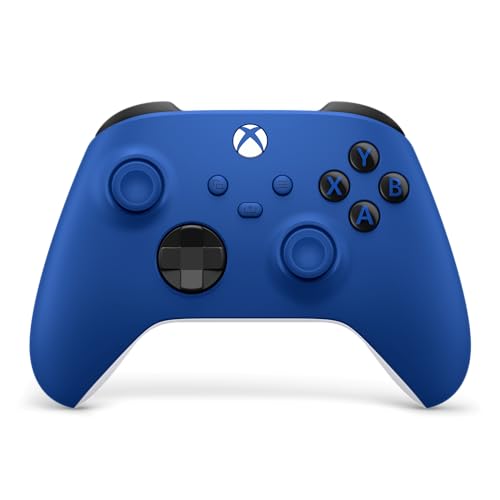
Microsoft set the standard for modern PC controller integration when it introduced the XInput programming interface. Because Windows natively supports this protocol, official Microsoft hardware like the Xbox Wireless Gaming Controller (2025), XBOX Wireless Gaming Controller | Shock Blue, and Xbox Core Wireless Gaming Controller operates right out of the box without third-party driver installations. Launching titles across Steam, Xbox Game Pass for PC, or the Epic Games Store automatically recognizes the button prompts, mapping, and vibration routines without manual troubleshooting.
The physical design of the official Xbox controller remains a favorite among players due to its asymmetrical stick placement and contoured chassis. The offset analog sticks align naturally with the resting angle of the left thumb, while the right thumb rests over the face buttons. Modern iterations incorporate a refined hybrid directional pad that combines the tactile feedback of a four-way cross with the diagonal precision of a circular dish. Textured grips along the back housing, trigger guards, and shoulder bumpers further enhance control stability during heated gameplay.
Software customization through the official Xbox Accessories application on Windows expands functionality for these standard controllers. Players can reassign face buttons, swap bumper functions, and invert thumbstick axes to accommodate specific playstyles or physical accessibility preferences. Furthermore, bundles like the Xbox Wireless Gaming Controller + USB-C® Cable supply a generous nine-foot cord that transforms the wireless unit into a dependable wired peripheral. This straightforward integration makes official Xbox controllers the baseline against which all third-party PC alternatives are evaluated.
Trigger Mechanics, Adjustable Travel, and Haptic Feedback
Trigger design directly influences gameplay execution across vastly different PC genres. Racing simulations and flight titles rely on full-throw analog triggers that measure fine degrees of pressure, enabling smooth throttle regulation and progressive braking. In contrast, competitive first-person shooters reward lightning-fast actuation, where long trigger pulls introduce unnecessary physical delay before a shot registers. Having the wrong trigger feel can turn an otherwise well-built gamepad into a handicap depending on what you play.
To bridge this gap, select modern gamepads integrate dual-stage impulse triggers with physical trigger stops. The EasySMX X05Pro, for example, features physical lock toggles that switch between long analog travel for racing and short, hair-trigger travel for rapid-fire shooters. Limiting the physical travel distance allows competitive players to tap fire and reset buttons far faster than standard analog triggers permit. When you finish an FPS match and launch an open-world driving game, sliding the switch restores the extended analog throw instantly.
Vibration motors and haptic rumble systems add another layer of physical immersion to desktop gaming. Advanced pads place asymmetric motors inside both hand grips and underneath the trigger housings to replicate engine rumble, weapon recoil, and surface friction. While competitive players frequently disable vibration to keep their aim perfectly steady, immersive single-player adventures benefit substantially from nuanced rumble feedback. Examining whether a controller offers independent trigger motors or adjustable rumble intensity ensures that physical feedback matches your immersion preferences.
Button Switch Types, Acoustics, and Ergonomic Layouts
The internal switch mechanisms behind directional pads and face buttons heavily influence tactile sensation, acoustic noise, and actuation speed. Traditional controllers employ conductive rubber membrane pads beneath the plastic keys, providing a cushioned, familiar bottom-out feel that generates minimal noise. More specialized pads incorporate tactile microswitches or metal dome switches, delivering crisp, clicky feedback similar to a mechanical gaming mouse. These clicky switches actuate rapidly with minimal pre-travel, making them popular for precision execution in fighting games and retro side-scrollers.
For players sharing a room or streaming live gameplay, loud button clatter can become an annoyance. Controllers like the EasySMX X05Pro feature quiet-press buttons rebuilt with silicone dampers to absorb bottom-out impact, keeping button presses nearly silent during late-night sessions. This acoustic dampening prevents microphone pick-up without sacrificing tactile responsiveness. Combining quiet face buttons with an eight-way recessed pivot D-pad provides smooth diagonal rolls for fighting game inputs while maintaining a polite noise profile in quiet environments.
Additional programmable buttons also differentiate performance pads from standard consumer options. Controllers such as the EasySMX X15 offer customizable paddles on the back housing, while the X05Pro positions extra mappable buttons along the top shoulders to prevent accidental presses. These extra inputs allow players to keep both thumbs on the analog sticks while jumping, sliding, or reloading in intense action titles. Some versatile models even include hardware-level button swap combinations, letting you shift between standard PC button layouts and Nintendo Switch layouts with a quick shortcut.
Legacy Compatibility and Budget-Focused Wired Alternatives
Not every desktop gaming situation requires expensive wireless connectivity or magnetic sensors. Dedicated wired controllers like the Logitech G F310 Wired Gamepad Controller Console offer an entry-level path into PC gamepad play while solving unique software hurdles. Because the F310 incorporates a physical hardware switch toggling between XInput and DirectInput modes, it bridges the gap between modern releases and classic retro PC ports. DirectInput support ensures that legacy flight games and early Windows titles from past eras still recognize your controller without complex third-party emulation software.
Software configurability on older or budget-focused pads provides exceptional utility for titles lacking native controller support. The Logitech Profiler software lets users map gamepad buttons directly to keyboard keystrokes and mouse cursor movements. This capability allows you to play point-and-click adventures, classic RPGs, or browser-based games using a comfortable handheld pad rather than hunching over a keyboard. The floating directional pad design on the F310 also rests on four distinct switches rather than a single central pivot, improving responsiveness during rapid directional shifts.
Budget wired models also eliminate battery degradation concerns and drastically reduce overall unit weight. Without internal battery cells or heavy rumble motors, a lightweight wired pad exerts minimal wrist fatigue during extended gaming sessions. The integrated six-foot USB cable provides ample slack for standard desk configurations while drawing minimal power from your motherboard. For secondary co-op play, guest usage, or travel setups, dependable wired options deliver practical value without unnecessary complexity.
Power Architecture, Battery Life, and Desktop Setup Protection
Battery architecture represents an important operational difference between various wireless controller designs. Official Xbox wireless pads utilize removable AA batteries or optional modular rechargeable packs, offering up to 40 hours of gameplay per fresh pair. This system allows players to swap in pre-charged rechargeable batteries in seconds, eliminating tethered charging downtime entirely. Conversely, third-party pads like the EasySMX X15 and X05Pro rely on integrated 1000mAh lithium-ion batteries that deliver roughly 20 hours of continuous wireless use between USB-C charges.
Internal rechargeable batteries simplify your desktop by reducing peripheral clutter, as a single USB-C cable handles both controller charging and wired play. However, internal lithium cells experience natural capacity degradation over hundreds of charge cycles, eventually reducing maximum playtime after several years of regular usage. Players should assess whether they prefer the convenience of universal USB-C recharging or the long-term replaceability of standard AA battery bays. Monitoring battery indicator LEDs or companion desktop software helps prevent sudden power cutoffs in the middle of critical boss fights.
Managing the electrical load and protection of your desktop rig also matters when charging multiple high-drain gaming peripherals. Connecting a desktop tower and powered USB accessories to an uninterruptible power supply for gaming protects sensitive internal hardware and prevents unexpected system shutdowns during power brownouts. A stable battery backup guarantees that power surges or flickers will not interrupt firmware updates or corrupt controller profile data stored on your PC. Ensuring your entire gaming station enjoys clean electrical delivery safeguards your investments across both computing hardware and connected accessories.
Selecting the Right Controller for Your PC Gaming Goals
Determining which gaming controller represents the optimal choice ultimately depends on matching hardware specifications to your specific game library. If your focus centers on competitive first-person shooters, flight simulators, or high-precision action titles, prioritizing Hall Effect joysticks and 1000Hz polling rates delivers measurable responsiveness and long-term durability against stick drift. Players who prioritize seamless integration across Windows games and value refined ergonomic contours will find standard Xbox wireless models remarkably capable and hassle-free. Meanwhile, budget-conscious users running retro games or seeking a reliable wired backup can achieve excellent control using versatile DirectInput options.
Before making a final decision, verify platform compatibility and input protocols against your setup. While official Xbox controllers provide flawless cross-platform utility across consoles, mobile operating systems, and Windows PCs, many third-party PC gamepads do not function with Xbox or PlayStation home consoles. Taking a close look at your hand size, button acoustic preferences, trigger requirements, and preferred connection mode ensures you invest in a controller that elevates your desktop gaming experience for years to come.





Write Your Review
No reviews yet. Be the first to share your experience!