


Mobile gaming hardware has evolved rapidly, moving far beyond simple single-function handhelds into versatile portable entertainment machines. Finding an answer to what is the best handheld gaming console depends entirely on the types of games you intend to play, whether you prefer local emulation, native Android titles, or wireless cloud streaming from home hardware. While stationary battlestations and dedicated gaming desktop towers offer uncompromised graphics processing and thermal headroom, handheld systems prioritize battery efficiency, compact ergonomics, and versatile display panels.
Selecting the right handheld requires balancing several hardware realities, such as processor architecture, input precision, and thermal dissipation. Some players prioritize dedicated retro systems that can fit easily into a pocket for quick commuting sessions, while others require larger touchscreens and low-latency wireless connections for remote desktop streaming. Clarifying whether your focus centers on classic retro emulation or cloud-based remote play ensures you invest in hardware that genuinely matches your everyday gaming habits. Taking time to evaluate control layouts, screen technology, and battery capacity prevents buyer frustration before taking your games on the road.


Pros
- Excellent cloud gaming performance with GeForce NOW and Xbox Cloud Gaming, even on mid-range home Wi-Fi
- Comfortable ergonomics and light 430g build reduce fatigue during long portable play sessions
- Flexible input options with digital joysticks and gyroscope support for fine-tuned aiming and movement
- Bright 1080P 7-inch screen with good color accuracy makes games look sharp on the go
Cons
- Requires separate subscriptions for Xbox Cloud Gaming, GeForce NOW, or PlayStation Plus Premium to access most AAA titles
- Android app compatibility can be limited for some resource-heavy local games
- Emulation performance on PS2 and GameCube titles may vary depending on game optimization
The abxylute OnePro Cloud Handheld is a purpose-built portable console designed for PC gamers, streamers, and casual players who want to access their game library from nearly anywhere. Rather than a traditional console that runs games locally, this device shines as a cloud gaming and remote play hub. It streams titles from services like Xbox Cloud Gaming, NVIDIA GeForce NOW, Amazon Luna, and PlayStation Plus Premium, and can also connect to your home PC via Moonlight or Steam Link. For retro enthusiasts, it runs emulators for PS2 and GameCube, and it supports Android games from Google Play. This makes it a handy companion for college gamers, content creators on set, or anyone who wants to keep playing during travel.
Performance is driven by the MediaTek Genio 510 chipset, which abxylute claims offers a 300% improvement over the first-gen model. In practice, that means smoother streaming with less stutter and faster app loading. The built-in 2T2R MU-MIMO Wi-Fi module helps maintain a stable connection, which is critical for cloud gaming where input lag can ruin the experience. According to the product specs, you'll want at least 5Mbps broadband Wi-Fi for remote play. The 7-inch 1080P touchscreen delivers a sharp image with decent brightness, making it usable both indoors and in moderate outdoor light. For those times you want a bigger view, the USB-C port supports 4K video output to an external monitor or AR glasses.
Controls are a standout feature. The OnePro is the first handheld to use capacitor digital joysticks that are taller and larger than typical sticks. You can switch between Circle Mode for 0.2% precise tracking (great for sniping in FPS games) and Square Mode for broader input (useful for fighting games or menu navigation). The handheld also includes haptics, a gyroscope, and responsive face buttons. At just 430 grams, it's light enough for extended sessions without hand strain. The ergonomics are good, with a grip that fits average hands comfortably. Battery life is rated above 8 hours, which is solid for a device this size, and fast charging gets you back in the game quickly.
Build quality feels solid for the price point. The black transparent shell shows off the internal components, which appeals to gamers who like tech aesthetics. The dual speakers have upgraded drivers that deliver clearer vocals and decent immersion, though you'll still want a good pair of gaming headphones for competitive play. Setup is straightforward: you install the required apps (Xbox Game Pass, GeForce NOW, or any remote play app), log in with your subscriptions, and start streaming. There's no complex software to configure, and the Android interface is familiar to anyone who has used a smartphone. Cleaning is simple with a microfiber cloth, and there are no moving parts to worry about.
Realistic limitations are important to mention. This is not a standalone console that runs AAA games locally. It relies heavily on a stable, fast internet connection. If your home Wi-Fi is spotty or you're on a hotel network with restrictions, you may experience lag or disconnects. Also, you need subscriptions for most cloud services, which adds ongoing cost. Emulation for PS2 and GameCube can be hit or miss depending on the title and power of the chipset - some games run well, others may have slowdown. Lastly, the Android app library is large but not every game will support the controller perfectly without remapping.
Who should buy the abxylute OnePro? If you're a PC gamer who already has Game Pass Ultimate or GeForce NOW, and you want to play your library on the couch, in bed, or during a commute, this is a solid investment. Streamers who want to check in on their setup while away, or casual gamers who want access to a huge variety of games without buying a dedicated gaming laptop, will find it useful. It's not a replacement for a gaming PC, but it's a versatile companion that fills the gap between mobile gaming and desktop power. For enthusiasts looking for a lightweight, full-featured cloud gaming handheld with excellent controls and a sharp screen, the OnePro is worth considering.
The abxylute OnePro is built around the MediaTek Genio 510 chipset with a dedicated 2T2R MU-MIMO Wi-Fi module, which helps maintain a stable connection to cloud gaming servers. In real-world use, streaming from Xbox Cloud Gaming and GeForce NOW is smooth at 1080P resolution, provided you have a reliable 5-15Mbps connection. Input latency is low enough for casual play and even some competitive shooters when using Circle Mode on the digital joysticks. The device supports multiple cloud services out of the box, including Amazon Luna, Boosteroid, and PlayStation Plus Premium. For PC remote play, Moonlight and Steam Link work well with local network streaming. Keep in mind that cloud gaming quality heavily depends on your internet speed and proximity to data centers. This handheld performs best in homes with solid Wi-Fi 5 or 6 coverage.


Evaluating Handheld Gaming Consoles Across Emulation, Streaming, and Hardware Design
Answering what is the best handheld gaming console starts with identifying the specific software ecosystem you want to access on the move. Handheld gaming hardware spans distinct tiers, ranging from pocket-sized offline emulators to sophisticated wireless streaming devices. Rather than a single machine dominating every scenario, the ideal device depends on whether you value offline retro libraries, cloud services, or remote play from existing desktop systems. Understanding these design categories allows buyers to align hardware specifications with their realistic gaming expectations.
Defining Core Categories: Dedicated Emulators Versus Cloud Streaming Handhelds
Portable consoles generally divide into two functional architectures based on where the primary compute workload takes place. Dedicated emulation consoles, such as those running lightweight Linux distributions, execute games natively on low-power system-on-chip hardware. These devices rely on preloaded memory cards or local storage expansions, making them completely independent of external internet connections during travel. Because processing happens entirely on board, performance remains predictable regardless of whether you are commuting on a subway or camping in remote areas.
Cloud and remote play handhelds approach mobile entertainment from the opposite direction by shifting graphical rendering to external servers or home computers. The OnePro Cloud Handheld Portable Remote Play exemplifies this streaming architecture, utilizing high-speed wireless connectivity to play modern titles through Xbox Cloud Gaming, NVIDIA GeForce NOW, and local streaming applications like Moonlight or Steam Link. While these streaming machines access visually demanding games that no pocket-sized chip could run natively, they depend entirely on stable network connections. When comparing these platforms to budget desktop gaming systems, cloud devices act as wireless display terminals rather than self-contained rendering engines.
Hybrid designs also exist, blending lightweight native Android gaming with local retro emulation. These multi-purpose platforms offer broad media playback, web browsing, and touchscreen navigation alongside standard gamepad buttons. Choosing between an offline retro machine and a streaming-focused portable ultimately comes down to your travel routines and home network quality. A daily commuter who spends hours away from Wi-Fi will find an offline retro console far more dependable than a device tied to cloud servers.
Processing Architectures: Rockchip RK3326, RK3562, and MediaTek Genio 510
The processing chip dictates which gaming eras a handheld can emulate smoothly without noticeable audio distortion or frame drops. Entry-level retro devices frequently rely on the Rockchip RK3326 quad-core Cortex-A35 processor. Devices like the R46H Retro Handheld Game Console and the Boltz Retro Handheld Game Console with 20,503 use this chip to handle classic eight-bit, sixteen-bit, and early thirty-two-bit consoles reliably. For systems up to the original PlayStation era, the RK3326 provides dependable instruction execution while maintaining modest power draw.
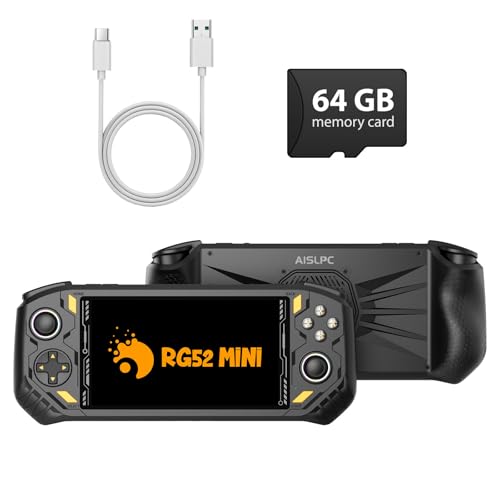
Mid-tier retro consoles often upgrade to the Rockchip RK3562 quad-core Cortex-A53 processor running at clock speeds up to 2.0GHz. The RG56PRO Retro Handheld Game Console with EVA Hard and the RG52MINI Retro Handheld Game Console leverage this enhanced silicon to improve fifth-generation 3D gaming emulation. With upgraded clock frequencies and complementary memory allocations, such as the 2+4GB RAM configuration listed on the RG52MINI, these handhelds maintain more consistent pacing in demanding classic titles. The extra processing capability reduces computational bottlenecks when scaling older game resolutions on modern panels.
Higher-tier multi-function portables incorporate advanced multimedia processors designed specifically for high-throughput decoding. The MediaTek Genio 510 found in the abxylute OnePro represents a major shift toward high-efficiency network processing and higher-complexity emulation. This hardware handles demanding retro systems like PlayStation 2 and GameCube with improved compatibility while running local Android applications. Its dedicated hardware video decoders ensure that incoming high-definition video streams decode with minimal processing delay.
Display Formats and Aspect Ratios: From Square Panels to 1080p Widescreens
Display technology fundamentally shapes visual clarity, color reproduction, and comfort during extended handheld play. The physical aspect ratio of the screen should ideally match the native formatting of the games you play most frequently. For instance, the Boltz handheld incorporates a 3.75-inch IPS display with a unique 720 by 720 square resolution. This 1:1 format provides an authentic visual canvas for classic handheld systems and vintage arcade games without excessive black bars across the panel.
Widescreen displays become essential when expanding into fifth-generation 3D consoles, modern Android titles, and PC game streaming. Handhelds like the RG56PRO and RG52MINI feature 5.5-inch fully laminated IPS displays with 1280 by 720 resolutions. Full lamination reduces internal light reflections between the glass and the underlying digitizer, producing deeper black levels and richer colors in varying ambient lighting. The anti-glare coatings on these 5.5-inch screens also help reduce eye strain during prolonged sessions under bright overhead lights.
Streaming handhelds prioritize larger canvas sizes to render complex user interfaces and fine text clearly. The abxylute OnePro features a 7-inch 1080p touchscreen that delivers sharp text and crisp details in modern game streams. When playing PC ports or reading dialogue in narrative adventures, having a full high-definition 1920 by 1080 resolution prevents graphical elements from appearing cramped. The wider viewing angles of IPS panels ensure that colors remain consistent even when tilting the console during dynamic gameplay.
Control Precision: Hall-Effect Triggers, Digital Joysticks, and Input Longevity
Control mechanics determine whether a handheld console feels responsive and durable over years of active use. Traditional analog potentiometers rely on physical contact wipers that inevitably wear down, eventually creating unwanted drift in the thumbsticks. To counter this mechanical degradation, modern portables increasingly adopt Hall-effect sensors for critical control inputs. Both the RG56PRO and RG52MINI incorporate Hall-effect linear triggers that detect position through magnetic fields, eliminating mechanical friction and ensuring consistent analog input over long-term gaming sessions.
Analog thumbstick design also diverges significantly between budget retro consoles and dedicated streaming hardware. Standard handhelds feature compact dual 3D joysticks suitable for platformers, vintage arcade games, and directional movement. In contrast, the abxylute OnePro introduces larger capacitor digital joysticks with taller stems and broader movement ranges. This device allows users to toggle between Circle Mode for precise 0.2 percent tracking and Square Mode for broader sweeping inputs, catering directly to different competitive play styles.
Tactile feedback and secondary button layouts complete the physical user experience. The inclusion of internal vibration motors provides physical cues during racing collisions or action combat, adding valuable sensory immersion. Furthermore, customizable RGB lighting rings around the analog sticks, as seen on the RG56PRO and RG52MINI, allow players to personalize their handheld aesthetics. Responsive mechanical action buttons and well-positioned shoulder triggers ensure that inputs register cleanly during fast-paced arcade challenges.
Network Hardware and Remote Play Ecosystems
Network performance represents the primary bottleneck for any handheld console designed around game streaming and multiplayer functionality. Basic retro devices like the Sunnymark R46H integrate standard Wi-Fi primarily for wireless two-player matchups and local netplay. In these scenarios, local network connectivity synchronizes player inputs across identical emulator cores, enabling shared arcade challenges without extra cables. Because the data packets transferred during local emulation are exceptionally small, basic wireless chips easily manage the required bandwidth.
Streaming full-motion video feeds at high framerates requires substantially more capable wireless hardware. The abxylute OnePro features a 2T2R MU-MIMO Wi-Fi module designed to maintain high bandwidth and minimal packet loss across modern home routers. This dual-antenna configuration helps stabilize connections when streaming from services like GeForce NOW or when linking locally to complete prebuilt PC gaming setups in another room. Stable Wi-Fi reception prevents visual compression artifacts, audio stuttering, and severe input latency during fast-paced action sequences.
Software protocol compatibility is equally vital when setting up remote play environments. Dedicated streaming consoles support popular local streaming bridges including Moonlight, PXPlay, and Steam Link alongside cloud gaming subscriptions. These protocols dynamically adjust bitrate and buffer sizes to match fluctuations in local network congestion. For buyers who already own powerful home gaming hardware, a well-equipped streaming handheld effectively extends their desktop library to any room in the house.
Thermal Management, Battery Capacity, and Power Delivery
Thermal management plays a direct role in maintaining sustained performance across extended portable sessions. While ultra-compact handhelds like the Boltz rely on passive chassis dissipation, higher-powered emulation devices require dedicated cooling pathways. The RG56PRO integrates an active cooling system with internal ventilation to expel heat generated by the RK3562 quad-core processor. Active airflow prevents thermal throttling during intensive 3D emulation, ensuring that internal clock speeds remain stable rather than dropping to protect the silicon.
Battery capacity directly dictates practical playtime when traveling away from electrical outlets. The compact Boltz handheld includes a 3500mAh rechargeable cell that delivers up to five hours of continuous play under moderate display brightness. Larger 5.5-inch and 7-inch systems, including the RG56PRO, RG52MINI, and abxylute OnePro, integrate larger batteries reaching 5000mAh or higher. These larger capacities support up to eight hours of playtime, though runtime fluctuates depending on volume, wireless usage, vibration feedback, and screen brightness.
Proper power delivery is essential for prolonging internal lithium-ion battery health and preventing electrical damage. Manufacturers of Linux emulation handhelds often specify conservative charging requirements, such as using an included cable with a standard 5V/2A power supply. Using fast-charging wall adapters that output higher voltages can exceed the safe input thresholds of budget charging circuitry. Always verify the manufacturer power ratings and avoid high-wattage phone chargers unless the handheld documentation explicitly lists support for rapid USB Power Delivery protocols.
Operating Systems and Storage Flexibility: Linux, Dual Boot, and Android
The operating system governs interface navigation, game scraping, and customization flexibility across different handheld consoles. Many dedicated retro machines operate on specialized, open-source Linux distributions tailored specifically for controller navigation. Devices like the R46H provide a plug-and-play menu structure that organizes classic games by console family, allowing users to jump into gameplay immediately. Linux systems minimize background operating overhead, reserving system memory and processor cycles strictly for emulator execution.
Dual-boot architectures provide an extra layer of versatility for enthusiasts who like experimenting with different frontend configurations. The RG52MINI features a dual-system environment supporting both EmuELEC and RGBOX operating interfaces. This dual setup allows users to switch between specialized emulation engines or utilize network downloaders over Wi-Fi to expand their title libraries. Having access to multiple system kernels improves compatibility when certain rom formats refuse to boot under a single operating distribution.
Android-based operating systems open the door to modern touch-based titles, cloud service apps, and expandable storage solutions. Handhelds running Android allow direct downloads from Google Play, alongside emulator applications configured directly through intuitive touch interfaces. Storage flexibility is similarly robust across these portables, with devices supporting external TF micro-SD cards up to 1TB. Furthermore, multi-purpose ports on consoles like the RG52MINI support Type-C DisplayPort output, USB OTG peripherals, and standard HDMI out for big-screen television play.
Selecting the Right Handheld Console for Your Gaming Routine
Determining the right handheld console requires matching hardware specifications with your personal gaming environment and travel habits. If your main objective is reliving arcade and vintage console classics during daily travel, a lightweight Linux emulator with an RK3326 or RK3562 processor offers the best balance of portability and immediate convenience. These self-contained retro machines eliminate setup friction, boot instantly from micro-SD cards, and operate reliably without internet access. Their physical durability and modest form factors make them effortless companions in any travel bag.
Conversely, gamers who want access to modern graphical showcases and broader digital libraries should gravitate toward streaming portables with high-resolution displays. A device equipped with a 7-inch 1080p panel, advanced Wi-Fi modules, and Hall-effect or capacitor joysticks serves as a flexible remote terminal for home PC systems and subscription cloud services. While these devices command a different physical footprint and rely on stable internet connections, they unlock gaming experiences far beyond what self-contained retro silicon can deliver. Selecting the proper device ultimately hinges on knowing whether your priorities lie in nostalgic offline play or expansive network-driven adventures.







Write Your Review
No reviews yet. Be the first to share your experience!