


Competitive PC gamers frequently look beyond traditional mice and keyboards when seeking ergonomic comfort and fluid movement in cross-platform titles. Understanding What Is A Scuf Gaming Controller begins with recognizing that it is a specialized input peripheral rather than a standalone computer or internal hardware component. These controllers build upon standard gamepad layouts by integrating customizable rear paddles, adjustable triggers, and modular thumbsticks designed to optimize reaction times. Many players pair these specialized gamepads with a budget gaming PC setup to enjoy competitive shooters and racing games without sacrificing physical agility.
While standard gamepads force players to lift their right thumb off the aiming stick to press face buttons, paddle-equipped controllers allow simultaneous movement, jumping, and aiming. Modern Windows environments natively support these devices through established input protocols, giving desktop gamers wide flexibility across competitive and casual titles. Evaluating whether a modified peripheral or a standard first-party controller matches your needs depends on the specific games you play and your preferred ergonomic layout. Clarifying these hardware distinctions helps PC players determine whether additional mechanical inputs will genuinely complement their desktop gaming experience.

Pros
- Comfortable ergonomic design with improved contours for extended play
- Hybrid D-pad offers excellent directional input for fighting and platform games
- Textured grip on triggers, bumpers, and back-case enhances handling during intense matches
- Multi-platform support via Xbox Wireless and Bluetooth works great with Windows PCs and mobile devices
- Long 40-hour battery life reduces downtime between charges
Cons
- Uses AA batteries; a rechargeable pack is not included and must be purchased separately
- USB-C cable not included, so wired use requires an additional purchase
- Lacks back paddles or programmable buttons found on some pro controllers
The Xbox Wireless Controller (2025) in Deep Pink is a refined take on Microsoft's iconic gamepad, designed to offer a modernized feel with improved ergonomics and connectivity. This controller is compatible with Xbox Series X/S, Xbox One, Windows PC, Android, and iOS devices, making it a versatile choice for PC gamers who also enjoy console or mobile gaming. The standout Deep Pink color adds a vibrant touch to any gaming setup.
For PC gamers and streamers, this controller delivers solid performance with low-latency wireless connectivity via Xbox Wireless or Bluetooth. The hybrid D-pad combines a traditional cross shape with a circular dish for precise diagonal inputs, ideal for fighting games or platformers. Textured grips on the triggers, bumpers, and back-case provide a secure hold during intense sessions, reducing hand fatigue. The 40-hour battery life ensures you can game for days without worrying about charging, though note it uses AA batteries rather than a built-in rechargeable pack.
Build quality is typical of Xbox controllers – durable plastic with a comfortable weight (0.85 lbs). The sculpted surfaces and refined geometry fit naturally in most hand sizes, making it suitable for long gaming sessions on your desktop or couch. The share button lets you quickly capture screenshots or clips, which is handy for streamers or content creators looking to share highlights without interrupting gameplay.
Setting up the controller on a Windows PC is straightforward: pair via Bluetooth or use a USB-C cable (not included) for a wired connection. The 3.5mm headset jack allows you to plug in any compatible headset for game audio and chat, simplifying your desk setup. While it doesn't offer the extra customization of pro controllers (no back paddles or remappable buttons via software), the standard layout works fine for most PC games, from shooters to racing titles.
One limitation is the lack of a rechargeable battery pack and USB-C cable in the box. Many PC gamers prefer a built-in battery or a rechargeable kit, but you can always use standard AA batteries or buy a separate play-and-charge kit. Also, if you rely on Xbox Wireless for lower latency on PC, you may need a separate Xbox Wireless Adapter (sold separately), as Bluetooth can introduce slight lag depending on your system.
Overall, the Xbox Wireless Controller (2025) Deep Pink is a solid choice for PC gamers, casual players, and streamers who want a reliable, comfortable controller that works across multiple platforms. Its vibrant color and improved ergonomics make it a great addition to any gaming setup, especially for those who enjoy both PC and Xbox gaming. If you're looking for a no-fuss wireless gamepad with great battery life and broad compatibility, this is a practical pick.
Understanding SCUF Controllers and PC Gaming Performance
A SCUF controller is a specialized, performance-oriented gamepad engineered with patented rear paddle inputs, adjustable hair triggers, and swappable thumbstick components. Originally designed for competitive console tournaments, these modified gamepads have become popular input devices for desktop PC gamers seeking fluid character movement in fast-paced titles. While a standard controller requires players to lift their thumbs from the analog sticks to press face buttons, a paddle-equipped controller keeps your fingers stationed on critical controls at all times. Understanding the mechanical architecture and operating-system integration of these devices helps PC players evaluate their genuine utility on desktop rigs.
The Definition and Origins of SCUF Gaming Controllers
The concept of the SCUF controller originated when competitive players sought ergonomic solutions to bridge the gap between game mechanics and standard controller layouts. Founded as a third-party modification company before joining Corsair, SCUF Gaming pioneered rear-mounted paddles beneath the controller chassis. In traditional ergonomics, jumping, sliding, or swapping weapons requires pressing face buttons on the right side of the gamepad. Redirecting those inputs to fingers resting naturally beneath the controller eliminates crucial milliseconds of thumb travel during competitive matches.
In the broader context of PC hardware, a controller remains an external input peripheral rather than a dedicated computing system. Desktop gaming PCs rely on central processors, graphics cards, system memory, and motherboards to render game worlds and calculate physics. An advanced gamepad merely translates physical hand movements into digital input signals interpreted by Windows. Clarifying this distinction prevents confusion between internal rendering performance and peripheral response times, which govern physical control precision.
Over the past decade, the competitive gaming industry adopted rear paddles as a functional standard across major esports circuits. What started as handcrafted modifications evolved into sophisticated commercial manufacturing with customizable colorways, interchangeable parts, and integrated digital components. Today, PC players who transition between mouse-and-keyboard setups and controller play often seek out these modified gamepads to maintain competitive parity. Understanding their rise highlights why mechanical input design remains an active discussion across the gaming community.
Core Hardware Features: Rear Paddles, Digital Triggers, and Modular Sticks
The primary defining characteristic of any SCUF gamepad is the inclusion of programmable rear paddles built directly into the grip casing. These paddles align naturally with your fingers, enabling tactile input without shifting your hand grip. Gamers can remap standard button signals to these paddles, allowing actions such as crouching or jumping to occur simultaneously with active aiming. This physical configuration prevents awkward grip techniques, such as the claw grip, which often cause hand fatigue during extended gaming sessions.
Adjustable trigger systems represent another crucial mechanical upgrade found on competitive controllers. Traditional analog triggers feature long pull distances designed for throttle modulation in racing titles, which can feel sluggish in fast-action shooters. Competitive gamepads counter this by introducing mechanical trigger stops and digital hair triggers that shorten pull travel significantly. When engaged, these stops provide a mouse-click tactile sensation, drastically reducing physical latency when firing a virtual weapon.
Modular thumbstick assemblies further separate specialized competitive pads from mass-market hardware. Players can physically swap the thumbsticks to select varying shaft lengths, concave surfaces, or domed caps depending on their specific ergonomic needs. A taller right analog stick increases the physical arc of motion, allowing for finer aim adjustments at high in-game sensitivities. Textured rubber compounds and high-friction outer rings also minimize thumb slippage, giving players consistent tactile feedback through intense combat scenarios.
How SCUF Controllers Differ from Standard First-Party Gamepads
Standard first-party controllers provide the functional baseline for desktop and console gaming across the industry. Devices such as the Xbox Wireless Gaming Controller (2025) showcase refined geometry, hybrid D-pads, and textured grips on the triggers and back case. These controllers are engineered for broad universal comfort, long battery life, and dependable plug-and-play operation across multiple platforms. However, standard models do not feature rear paddle inputs or mechanical hair triggers straight from the box, requiring users to rely on conventional face button layouts.
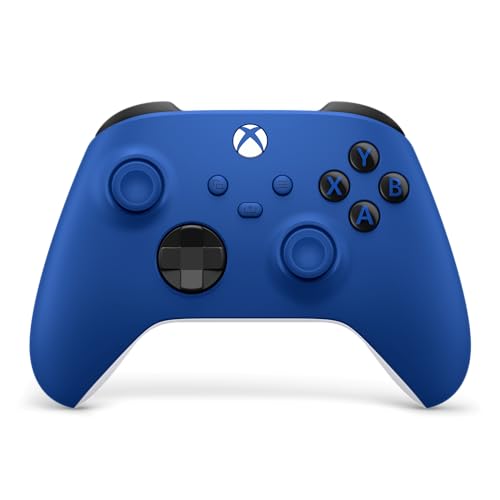
Options like the XBOX Wireless Gaming Controller | Shock Blue demonstrate how mainstream gamepads integrate digital customizability through software. Using the native Xbox Accessories application on Windows, players can remap digital button commands and create custom controller profiles tailored to individual game genres. While this software flexibility is helpful, remapping face buttons on a standard controller still forces your right thumb to juggle aiming and jumping. Specialized controllers solve this bottleneck by adding extra mechanical levers beneath the casing, keeping thumb and finger tasks separated.
The manufacturing philosophy also diverges significantly between standard consumer gamepads and customized tournament pads. First-party hardware focuses on balanced cost, universal durability, and accessible mass production for casual and competitive players alike. In contrast, performance gamepads prioritize modularity, mechanical click triggers, and internal tuning suited for esports competitors. While this specialization offers ergonomic advantages for dedicated players, it also introduces more mechanical components that require careful handling and deliberate maintenance.
Connecting Competitive Controllers to a Desktop Gaming PC
Connecting modern gamepads to a desktop PC involves choosing between high-speed wired USB-C connections and wireless radio protocols. When plugging a controller into a desktop gaming PC tower, connecting directly to the rear motherboard I/O panel yields the most consistent power delivery and electrical grounding. Front-panel USB ports and unpowered external hubs can occasionally introduce minor signal variance or physical disconnection risks if cables are bumped. Establishing a stable physical connection ensures that Windows detects the gamepad immediately through native drivers.
Wired USB-C connections remain the gold standard for competitive PC players seeking minimal input latency. While modern Bluetooth and proprietary 2.4 GHz wireless dongles offer impressive convenience, wireless transmission can experience interference from nearby routers, smartphones, or internal wireless antennas. A dedicated wired connection eliminates packet drops and maintains a stable polling cycle between the controller and the operating system. Furthermore, wired play eliminates reliance on internal rechargeable batteries or external AA cells during prolonged gaming marathons.
Windows handles game controller communication primarily through the XInput and DirectInput programming interfaces. Most modern gamepads, including customized Xbox-based models, utilize XInput, allowing them to function seamlessly across digital storefronts like Steam, Epic Games Store, and PC Game Pass. When Windows recognizes an XInput device, games automatically display matching on-screen button prompts without demanding manual key binding. This standardized driver architecture makes adding an advanced controller to a Windows desktop remarkably straightforward.
Software Configuration and Button Mapping on Windows
Configuring advanced controllers in a PC environment depends on whether the device uses onboard hardware mapping or dedicated desktop software. Many competitive gamepads feature onboard remapping systems that allow players to change paddle functions using physical button combinations without installing background utilities. This standalone approach is popular among tournament players because it keeps the controller configuration self-contained and avoids potential software conflicts. Other models utilize proprietary Windows software suites that offer granular control over stick deadzones, trigger actuation points, and vibration intensity.
Steam also provides an extensive built-in controller configuration layer that works alongside desktop hardware. Through Steam Input, players can create custom response curves, configure gyro controls if hardware sensors exist, and assign secondary functions to long button presses. However, running complex software layers on top of native game inputs can occasionally introduce slight processing overhead or conflicts with anti-cheat software. Keeping your input configuration simple and relying on direct hardware mapping generally provides the cleanest competitive experience on modern gaming rigs.
Calibrating analog stick deadzones is an essential configuration step that every PC player should complete inside their favorite titles. The deadzone represents the small neutral area around the center of the thumbstick where minor movements do not register in-game. Setting this threshold too high makes the controller feel unresponsive, while setting it too low can expose minor mechanical centering variations. Adjusting these settings through in-game menus ensures smooth, predictable camera pans without unexpected drift during tense firefights.
Controller Versus Mouse and Keyboard in Desktop Gaming
The choice between a controller and a mechanical keyboard with an optical mouse depends largely on the genres you play on your PC. Racing titles, sports simulations, third-person action games, and platformers benefit immensely from the 360-degree analog control provided by thumbsticks and progressive triggers. Conversely, competitive real-time strategy games and tactical first-person shooters traditionally favor the rapid target acquisition offered by a gaming mouse. PC gamers who fine-tune their mouse sensitivity and aim settings often appreciate having both input options available at their desk.
In modern cross-platform shooters, rotational aim assist has significantly shifted how competitive PC players view gamepads. Developers implement subtle aim slowdown and tracking assistance to help analog sticks track moving targets as effectively as a freehand mouse. When combined with rear paddles that allow jumping and sliding without interrupting aim, a controller becomes a formidable input device in close-quarters skirmishes. This dynamic has led thousands of dedicated PC players to adopt specialized controllers as their primary input for competitive battle royale games.
Physical comfort also plays a major role in the controller versus keyboard debate on desktop systems. Keyboards require a fixed posture with wrists resting on a desk surface, which can cause strain during extended gaming sessions. In contrast, holding a contoured gamepad allows players to lean back, adjust arm positioning, and maintain relaxed posture. For players balancing workdays at a desk with evening gaming sessions, an ergonomic controller offers a welcome physical break.
Durability, Maintenance, and Mechanical Component Wear
High-performance gaming controllers endure intense mechanical stress, making regular maintenance vital for long-term reliability. Analog stick drift remains one of the most common issues affecting both standard gamepads and modified esports controllers over time. This phenomenon occurs when internal potentiometer contacts accumulate microscopic dust particles or suffer carbon wear from friction. Keeping your gaming area clean, covering the gamepad when not in use, and avoiding excessive downward thumbstick pressure helps preserve sensor life.
Rear paddles and digital microswitches require mindful handling to prevent physical fatigue and switch degradation. Because competitive gamers frequently actuate paddles rapidly during high-intensity matches, pressing them with excessive force can weaken the internal mechanical springs. Routine cleaning with a dry microfiber cloth and using short bursts of compressed air around button seams prevents grime buildup from impeding switch actuation. Never spray liquid cleaners or industrial solvents directly into controller crevices, as moisture can short-circuit the internal printed circuit board.
Modular components provide an advantage when addressing standard wear and tear on specialized gamepads. When thumbstick rubber begins to peel or smooth down from heavy usage, modular designs allow players to detach the faceplate and snap in fresh thumbsticks in seconds. This modularity extends the usable lifespan of the exterior hardware without requiring complete peripheral replacement. Checking the availability of official replacement parts from the manufacturer ensures that your investment remains functional over years of competitive gaming.
Evaluating Controller Options for Your PC Gaming Setup
Deciding whether to invest in an advanced paddle controller or stick with a standard first-party model comes down to your personal gaming goals. If you primarily enjoy casual action RPGs, driving simulators, and single-player adventures, a dependable standard controller delivers all the precision and comfort you need. Standard models provide exceptional build quality, straightforward wireless pairing, and seamless Windows support without unnecessary complexity. For these gaming styles, standard face buttons and analog triggers are more than sufficient to provide an immersive experience.
Dedicated tournament players and competitive shooter enthusiasts, however, gain clear mechanical advantages from rear paddles and digital hair triggers. The ability to perform complex movement sequences while maintaining continuous thumb contact on the right analog stick translates directly to improved in-game agility. Before purchasing, verify that the controller fits your hand size comfortably and provides durable remapping suited to your desktop setup. Evaluating your primary game genres and ergonomic habits ensures you choose the right balance of performance, features, and durability.
Equipping your desktop setup with the right input hardware comes down to matching peripheral capabilities with your actual gaming routine. Whether you select a customized competitive controller with rear paddles or a reliable standard gamepad, verifying stable USB connectivity and proper driver setup on Windows will ensure consistent gameplay. Taking time to configure deadzones and button layouts according to your individual preferences will help you get the most out of every gaming session.








Write Your Review
No reviews yet. Be the first to share your experience!