


Entering PC gaming on a modest budget often feels overwhelming because hardware specifications look complicated and marketing labels can be deceiving. Many players wonder what is best budget gaming pc hardware to run their favorite titles without spending unnecessarily on high-end components. A solid entry-level system should balance processing speed, graphical capability, and baseline system memory to deliver playable frame rates at 1080p resolution. Exploring verified budget desktop build configurations provides a practical starting point for understanding how part selection impacts total gaming performance.
Prebuilt systems offer convenience and ready-to-use software environments, but they also vary dramatically in component quality, expansion room, and cooling design. Buyers must look closely at power supplies, motherboards, and graphics architecture instead of focusing solely on colorful case fans or flashy chassis designs. Understanding these trade-offs ensures you get reliable hardware that handles current esports or casual games while leaving open pathways for sensible future component upgrades.


Pros
- Strong 1080p gaming performance with RTX 2060 at this price point
- Generous 16GB RAM and 512GB SSD for modern gaming needs
- Includes Wi-Fi 6, Bluetooth 5.0, and Windows 11 Home out of the box
- Comes with RGB mouse and keyboard bundle, saving on initial setup costs
- Compact tower size conserves desk space while still offering expandability
Cons
- Single-channel RAM configuration may limit CPU performance in CPU-intensive games; upgrading to dual-channel is recommended
- 512GB SSD fills up quickly with modern games; additional storage may be needed soon
- Case airflow could be improved for long sessions under heavy load; adding extra fans or a better CPU cooler might help
The STGAubron Gaming PC Desktop is a prebuilt tower designed for gamers who want a capable rig without the hassle of building from scratch. Powered by an Intel Core i5 processor (3.3GHz base, up to 3.7GHz turbo) and an NVIDIA GeForce RTX 2060 6GB graphics card, this system is built to handle popular esports titles and modern AAA games at 1080p with high settings. With 16GB of DDR4 RAM and a 512GB SSD, it balances speed and storage for most gaming and streaming workloads right out of the box.
This gaming PC is best suited for competitive and casual PC gamers who play Fortnite, Valorant, Call of Duty, Apex Legends, or Overwatch and expect smooth frame rates. It also works well for streamers starting out on Twitch or YouTube, as the RTX 2060 supports NVENC encoding for high-quality streaming without hammering the CPU. Work-from-home users and college gamers will appreciate the built-in Wi-Fi 6 and Bluetooth 5.0 for cable-free connectivity, plus Windows 11 Home for a familiar desktop experience.
In terms of performance, users can expect 60+ FPS in most current titles at 1080p medium to high settings, based on the hardware combo. The 16GB RAM is sufficient for gaming plus a few background apps like Discord or a browser, though it's configured as a single stick—upgrading to dual-channel would improve frame rates in CPU-bound scenarios. The 512GB SSD provides quick boot and load times, but modern game installs can eat that up fast, so adding a secondary HDD or larger SSD down the line is a practical move.
Build quality is solid for a budget prebuilt, with a standard steel-and-plastic chassis that includes two pre-installed RGB fans for a touch of lighting and basic airflow. The case is compact (about 18 inches tall) and fits easily on most desks without overwhelming your space. Cable management inside is acceptable, though not pristine—nothing that would affect daily use. The included RGB mouse and keyboard are functional for getting started, but serious gamers may want to upgrade to their own peripherals for better feel and precision.
Setting up this system is straightforward: plug in power, connect to monitor via HDMI or DisplayPort (the RTX 2060 has both), and you're ready to game. Windows 11 Home is pre-activated, so no OS installation is needed. The free lifetime tech support is a nice bonus for newcomers who might need help with driver updates or troubleshooting. One realistic limitation is the stock CPU cooler, which may run a bit noisier under load—a budget-friendly aftermarket cooler could improve noise levels and thermals for extended sessions.
Overall, the STGAubron Gaming PC offers a strong value proposition for budget-minded buyers who want a ready-to-play system with modern features like Wi-Fi 6 and an RTX 2060. It's a practical choice for gamers stepping up from consoles or older laptops, streamers building their first dedicated rig, or anyone looking for a cost-effective entry into PC gaming. With a 1-year warranty and tech support, it's a low-risk investment for a reliable 1080p gaming experience.


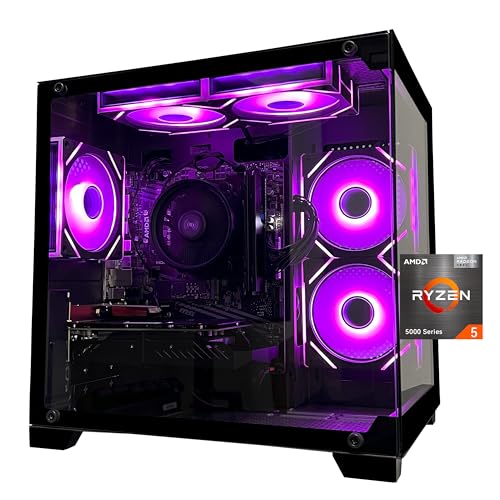
Pros
- Strong CPU and GPU combo for smooth 1080p gaming and streaming.
- Generous 32GB RAM and 1TB NVMe storage for multitasking and fast load times.
- Attractive ARGB fans with remote control add visual flair and effective cooling.
- Includes WiFi and Bluetooth, reducing cable clutter and setup complexity.
- Prebuilt design saves time and effort for those not comfortable building their own PC.
Cons
- 550W 80+ Bronze power supply may limit future GPU upgrades without replacement.
- Brand SKYESEV is less established, so long-term support and reliability are unknown.
- No reviews yet, so real-world performance feedback is unavailable at launch.
The SKYESEV Gaming Desktop PC is a prebuilt tower designed for gamers, streamers, and content creators who want a balanced system without the hassle of building one themselves. It combines an AMD Ryzen 5 5600 processor with an NVIDIA GeForce RTX 3050 6GB graphics card, 32GB of DDR4 RAM, and a 1TB NVMe SSD. This configuration targets smooth 1080p gaming, efficient multitasking, and light streaming or productivity tasks.
For PC gamers and competitive players, the Ryzen 5 5600 offers solid responsiveness in titles like Valorant, Fortnite, and Apex Legends, while the RTX 3050 handles ray tracing in games like Cyberpunk 2077 at medium settings. The 32GB of dual-channel RAM is overkill for most games but beneficial for streamers running OBS, Discord, and a game simultaneously. The 1TB NVMe drive ensures quick boot times and snappy level loads, reducing downtime.
Build quality is typical for a budget prebuilt: the case features a tempered glass side panel and five ARGB 120mm fans with a remote control for lighting effects. The motherboard is an MSI A520M-A PRO, a reliable entry-level board. However, the power supply is a 550W 80+ Bronze unit, which is adequate for the current components but may require an upgrade if you plan to install a more power-hungry GPU later. The system includes WiFi and Bluetooth, which is convenient for wireless peripherals and internet connectivity.
Setup is straightforward: the PC comes with foam inside for shipping protection, which you need to remove before powering on. After that, it's plug-and-play. Cable management inside the case appears tidy based on product images, though the included PSU is non-modular, which can limit routing options. The ARGB fans can be controlled via the remote, but there is no software customization mentioned.
A realistic limitation is the lack of customer reviews, so long-term durability and customer support are unproven. The 550W PSU may also feel restrictive for enthusiasts who want to overclock or upgrade to a higher-tier GPU. Additionally, the RTX 3050 6GB is a budget card, so 4K gaming or high-refresh-rate 1440p is not realistic.
Overall, this SKYESEV prebuilt is a practical choice for casual and competitive gamers who want a ready-to-use system for 1080p gaming, streaming, or college dorm setups. It offers good value with its 32GB RAM and fast storage, but buyers should be aware of the PSU limitation and the brand's newer market presence. If you prefer a hassle-free experience and don't plan heavy upgrades, this PC may work well for your gaming and streaming needs.

Pros
- Strong price-to-performance ratio for entry-level to mid-range gaming
- Ample RAM and SSD storage for smooth multitasking and quick game loads
- Includes WiFi 6 and Bluetooth 5.0 for modern wireless connectivity
- Comes with RGB peripherals and four RGB fans for an immersive setup aesthetic
Cons
- Processor is a 4th-gen Intel Core i7, which may bottleneck newer AAA titles compared to modern CPUs
- Graphics card (RX 580) is an older architecture, limiting ray tracing and high-refresh gaming at 1440p
- Only 512GB SSD may require additional storage for larger game libraries
The STGAubron Gaming PC Desktop is a pre-built tower designed for gamers who want a solid entry-level to mid-range gaming experience without the hassle of building their own system. It combines an Intel Core i7 processor (4th-gen, up to 3.9GHz) with an AMD Radeon RX 580 8GB graphics card, 16GB of RAM, and a 512GB SSD. This configuration is well-suited for casual and competitive gamers, streaming enthusiasts, and even those who need a capable machine for photo/video editing, schoolwork, or day trading.
When it comes to real-world gaming, the RX 580 can handle popular titles like Fortnite, Call of Duty Warzone, Valorant, Apex Legends, and GTA V at 60+ FPS on medium to high settings. The 16GB of RAM ensures smooth multitasking, letting you run Discord, OBS, or browser tabs in the background while gaming. The 512GB SSD provides quick boot times and fast level loads, though heavy gamers may want to add a secondary drive later.
Build quality is typical for a budget-friendly pre-built: a standard tower with a tempered glass side panel (likely) and four RGB fans for decent airflow. The included RGB gaming mouse and keyboard are functional starters, but most users will eventually upgrade to more premium peripherals. The system also features WiFi 6 and Bluetooth 5.0, which means lag-free wireless connections and fast downloads if your router supports it.
Setup is straightforward: unbox, plug in the power and peripherals, connect to your monitor via HDMI or DisplayPort, and boot into Windows 11 Home. The case has minimal cable management pre-installed, and the RGB fans and case lighting can be controlled via a remote or button on the case. For cleaning, the easily removable side panel makes dusting the interior simple.
A realistic limitation is that the CPU is an older 4th-gen Core i7, which might hold back performance in CPU-heavy games or multitasking scenarios compared to newer budget processors like an i3-12100F. The RX 580 also lacks modern features like ray tracing and efficient encoding, so if you're aiming for high-refresh 1440p gaming or intensive streaming, you may want to look at higher-end options. The 512GB SSD fills up quickly, so an external or secondary drive is worth considering.
Overall, this STGAubron gaming PC offers good value for its price point, especially for gamers on a tight budget who want a turnkey system that can handle esports and mainstream titles. It's also a nice fit for college students or home office users who want a versatile desktop that can game and work. Just be aware of the older components and plan for potential upgrades down the line.
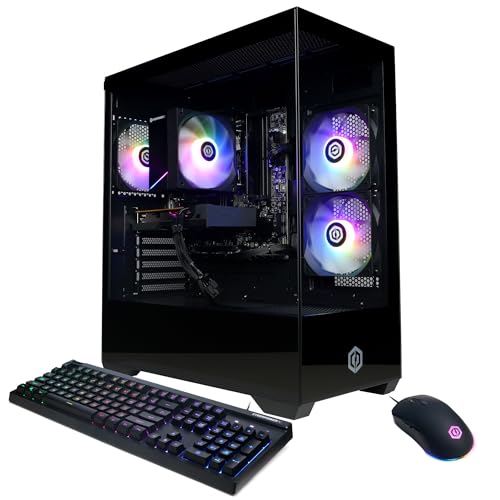
Pros
- Affordable price point for a complete gaming PC with modern CPU and fast SSD.
- Upgradable platform with AMD AM4 socket and DDR4 memory for future improvements.
- Includes keyboard and mouse, plus lifetime tech support from CyberPowerPC.
- Compact tower design fits well on most desks without taking up too much space.
Cons
- Only 8GB of RAM may limit multitasking in demanding games and streaming scenarios.
- Radeon RX 6500 XT lacks hardware encoding, which can impact streaming quality.
- Limited to 4GB VRAM may struggle with newer AAA titles at higher settings.
The CyberPowerPC Gamer Master GMA3100A3 is a pre-built gaming desktop aimed at gamers who want a ready-to-play system without the hassle of building their own. Powered by the AMD Ryzen 5 5500 processor and Radeon RX 6500 XT graphics, this rig is designed for smooth 1080p gaming in popular titles like Fortnite, Valorant, League of Legends, and CS2. It's a smart choice for casual gamers, college students dorm-room warriors, and anyone stepping into PC gaming for the first time.
In real-world use, the Ryzen 5 5500 handles everyday tasks and gaming with ease, offering responsive performance for both work and play. The 500GB PCIe 4.0 NVMe SSD ensures games and Windows load quickly, cutting down on waiting times. However, the 8GB of DDR4 RAM is a limiting factor — you may want to upgrade to 16GB soon if you plan to keep multiple browser tabs, Discord, and a game open at once. The RX 6500 XT is capable at 1080p medium settings in most esports titles, but its 4GB VRAM can be a bottleneck in newer AAA releases or when trying to push higher textures.
The system comes in a compact black tower with a tempered glass side panel and customizable RGB lighting. This makes it easy to show off your build, and the included keyboard and mouse help you get started right out of the box. Connectivity is solid with four USB-A 3.2 ports, four USB-A 2.0 ports, HDMI and DisplayPort outputs, WiFi 5, and Bluetooth 5.0. The lack of USB-C on the front panel is a minor inconvenience, but most peripherals will work fine with the available ports.
One realistic drawback is the RX 6500 XT's lack of hardware encoding, which means streaming via OBS or Discord may suffer in quality compared to Nvidia or higher-tier AMD cards. If streaming is a priority, you might want to consider a system with a better GPU. Also, the 8GB RAM is entry-level by today's standards — upgrading to 16GB is highly recommended for smoother multitasking and better performance in memory-intensive games.
Build quality is typical for a budget prebuilt: the case is sturdy enough, cable management is decent, and the cooling solution keeps temperatures in check during long gaming sessions. The 500W power supply is adequate for this configuration, but leaves limited headroom for major GPU upgrades later. If you're comfortable with basic upgrades, adding another 8GB stick of DDR4 is a simple and cost-effective improvement.
Overall, the CyberPowerPC Gamer Master GMA3100A3 is a solid entry-level gaming PC for those who want to jump into PC gaming without building from scratch. It's especially well-suited for esports players, casual gamers, and students on a budget. For more demanding AAA gaming or streaming, you may want to look at higher-tier configurations. But as a first gaming PC or a secondary system for a dorm room, it offers good value and room to grow.

Pros
- Excellent 1080p gaming performance for the price
- Generous 1TB NVMe SSD for fast storage and quick load times
- Effective cooling system with seven ARGB fans keeps components cool under load
- 16GB RAM is ample for gaming and multitasking without bottlenecks
- Ready to use out of the box with no assembly required
Cons
- RTX 3050 6GB may struggle with demanding titles at 1440p or with ray tracing enabled
- No user reviews available yet, so long-term reliability is unverified
- Potential limited upgrade path due to proprietary case or motherboard (typical of budget prebuilts)
The ZYNEEX Gaming Desktop PC is a prebuilt gaming tower designed for U.S. PC gamers who want a straightforward, no-fuss entry into 1080p gaming. It combines an AMD R5 5500 processor with an NVIDIA GeForce RTX 3050 6GB graphics card, 16GB of DDR4 RAM, and a 1TB NVMe SSD. This setup targets budget-conscious gamers, casual players, streamers, and even college gamers who need a reliable machine for both gaming and everyday tasks.
When it comes to real-world performance, this PC handles esports titles like Valorant, Fortnite, and League of Legends at high settings with smooth frame rates. The RTX 3050 6GB is capable for 1080p gaming but will show its limits in graphically demanding AAA games or if you try to push 1440p resolutions. The 16GB RAM and fast NVMe SSD help with quick load times and smooth multitasking, so you can keep Discord, Spotify, or a browser open while gaming without noticeable lag.
The cooling system is a standout feature. Seven ARGB case fans plus a quad-copper-pipe air cooler work together to keep the CPU and GPU temperatures in check during long gaming sessions. The included RGB controller lets you customize the lighting to match your desk setup or gaming room aesthetic, which will appeal to RGB enthusiasts and gaming setup builders.
Build quality is typical for a budget prebuilt. The case uses a tempered glass side panel to show off the internals, and cable management appears clean from the photos. As a plug-and-play system, you can take it out of the box, connect your peripherals, and start gaming immediately. The one-year warranty from ZYNEEX adds a layer of protection, though it's always wise to check return policies and customer support responsiveness.
One realistic limitation is that the RTX 3050 is not a powerhouse for ray tracing or high-refresh-rate 1440p gaming. Also, since there are no user reviews yet, early adopters take a small risk on build quality consistency. Upgrade potential may be limited depending on proprietary motherboard or PSU choices, so this is best suited as a complete system rather than a base for future upgrades.
Overall, the ZYNEEX Gaming Desktop PC is a practical option for U.S. PC gamers who want a balanced, ready-to-run setup without spending over a thousand dollars. It works well for casual to competitive 1080p gaming, streaming on Twitch or YouTube, and handling everyday productivity for work-from-home or school use. If you're looking for a prebuilt that offers strong cooling and a fast SSD at this price point, this machine is worth considering.
The ZYNEEX Gaming Desktop PC is built for smooth 1080p gaming across a wide range of titles. The AMD R5 5500 processor with 6 cores and 12 threads pairs well with the GeForce RTX 3050 6GB graphics card. In esports games like Counter-Strike 2, Overwatch 2, and Apex Legends, you can expect high frame rates at medium to high settings. For more demanding single-player games like Cyberpunk 2077 or Red Dead Redemption 2, lowering settings to medium will still deliver playable performance.
The 16GB of DDR4 RAM at 3200MHz ensures that game assets load quickly and multitasking remains fluid. The 1TB NVMe SSD drastically reduces loading times, so you spend less time waiting and more time playing. While the RTX 3050 supports NVIDIA's DLSS and ray tracing, these features will have a noticeable performance impact, so it's best to use them sparingly or only in less demanding scenes.
This PC is a solid choice for competitive gamers who prioritize consistent frame rates in popular shooters and MOBAs. Casual gamers will appreciate the out-of-box convenience, and streamers can rely on the CPU's multithreading for basic streaming setups without a separate capture card.
The ZYNEEX prebuilt features a mid-tower case with a tempered glass side panel to showcase the internal components. The cooling solution is one of its strongest assets: seven ARGB case fans (three front intake, three top exhaust, one rear exhaust) combined with a Tianjifeng J8 quad-copper-pipe air cooler for the CPU. This setup provides excellent airflow, keeping the system quiet and cool even under sustained gaming loads.
Users can customize the RGB fan lighting using the included controller, allowing for various colors and effects to match their gaming desk or room aesthetic. The case has a clean interior with decent cable management, though it's not fully modular. The power supply is not specified but is likely a standard 80+ unit sufficient for these components.
For maintenance, the front panel can be removed to clean dust filters, and the glass panel is easy to wipe down. Overall, the thermal design ensures that performance doesn't throttle during long sessions, which is critical for both gaming and streaming usage.

Defining Value and Realistic Expectations for Budget Gaming Desktops
Determining what constitutes a quality budget gaming desktop requires looking beyond raw price tags and focusing on balanced hardware architecture. The best budget gaming PC is a system that provides a dedicated graphics card, a capable multi-core processor, and sufficient system memory to sustain stable frame rates in standard 1080p titles. Many entry-level shoppers fall into the trap of purchasing systems with flashy aesthetic lighting but severely outdated internal silicon. Identifying a sensible balance among core components protects your investment and ensures everyday reliability across your favorite gaming libraries.
Hardware value also depends on how well a machine accommodates future upgrades without demanding a complete platform replacement. Systems equipped with standard industry form factors and established motherboard sockets allow users to swap graphics cards or add storage as their needs expand. Conversely, configurations using proprietary motherboards or legacy components restrict subsequent improvements and often require full replacement sooner than anticipated. Careful evaluation of individual component generations ensures that your machine remains functional and adaptable over several years of regular gaming.
Dedicated Graphics Processing Versus Integrated Graphics Solutions
A dedicated graphics processing unit remains the single most critical component in any desktop intended for interactive 3D gaming. Modern desktop gaming relies heavily on video memory and specialized compute pipelines to render textures, geometry, and lighting calculations smoothly. Units with integrated graphics share main system RAM and typically struggle to deliver consistent performance outside of basic lightweight titles. Prioritizing a system equipped with a discrete GPU ensures your computer has the necessary hardware resources to handle modern game rendering demands.
Budget prebuilts showcase a broad spectrum of graphics options ranging from entry-level cards like the AMD Radeon RX 6500 XT or NVIDIA GeForce RTX 3050 up to cards like the GeForce RTX 2060 or newer RTX 5060 series. While entry cards handle esports games cleanly at moderate visual settings, mid-tier cards offer greater video memory buffers that support richer visual fidelity. Reviewing our dedicated graphics card selection guide clarifies how memory bandwidth and processing cores shape real-world rendering capability. Matching your intended graphical targets to realistic hardware capabilities prevents unexpected performance bottlenecks down the line.
Buyers must remain vigilant when reviewing system descriptions that advertise high processor speeds while omitting a dedicated graphics card altogether. Configurations relying entirely on integrated graphics processors, such as basic desktop productivity units, cannot provide the graphical horsepower required for demanding modern titles. These setups frequently encounter severe frame stuttering and low resolutions in modern 3D environments. Investing in a configuration with a verified discrete graphics card prevents the frustration of unplayable frame pacing.
Balancing Central Processing Units and Motherboard Architectures
The central processing unit coordinates game logic, background physics calculations, and asset streaming while feeding frame commands directly to the graphics card. In balanced systems, modern processors such as the AMD Ryzen 5 5600 or Intel Core i5-14400F deliver snappy system responsiveness and avoid creating severe processing bottlenecks. These modern platforms feature modern instruction sets and high IPC ratings that help sustain steady minimum frame rates during intense gaming moments. Selecting a contemporary platform also guarantees support for modern operating systems and modern security protocols.
Some extremely low-priced gaming configurations cut manufacturing costs by utilizing decade-old legacy silicon, such as fourth-generation Intel Core processors. While these refurbished systems paired with older cards like the Radeon RX 580 can run older titles, their dated motherboards lack support for high-speed PCIe lanes and newer system memory. This technical limitation severely restricts future upgrade pathways and reduces overall system efficiency. Consulting our analysis of entry-level desktop considerations highlights why choosing modern motherboard platforms yields superior long-term reliability.
Platform longevity also influences whether a budget desktop can handle non-gaming tasks like content creation, lightweight streaming, and remote productivity. Newer six-core and eight-core processors, such as the AMD Ryzen 7 8700F, provide extra processing threads that handle multitasking without stuttering game play. Motherboards paired with modern chipsets, including the AMD B550 or Intel B760, feature expanded USB connectivity and faster communication buses. Choosing an up-to-date platform ensures your gaming rig handles daily computing responsibilities with speed and stability.
System Memory Configurations and Dual-Channel Performance
Random access memory acts as high-speed temporary workspace where active game assets, operating system files, and running background programs reside. While basic office computers function adequately with eight gigabytes of RAM, modern gaming demands higher capacity to prevent system swapping. Running modern games on an eight-gigabyte configuration often causes noticeable micro-stutter when asset-heavy scenes load into system memory. Upgrading to sixteen gigabytes has become the practical standard for maintaining responsive system responsiveness across popular desktop games.
Memory architecture matters just as much as overall capacity when configuring a budget gaming machine. Utilizing two matching memory sticks in a dual-channel configuration doubles the theoretical bandwidth between the memory controller and the system RAM. This bandwidth improvement directly aids processor performance in memory-sensitive game engines and esports titles. Single-channel configurations with one solitary memory stick force the processor to queue data transfers, which can depress minimum frame rates.
For users planning to stream their gameplay or run intensive background applications like voice chat and video capture, thirty-two gigabytes of RAM offers ample operational headroom. Systems utilizing high-speed DDR4 or newer DDR5 memory modules provide the throughput necessary for seamless multi-application workflows. Verifying whether a prebuilt desktop includes open memory slots gives buyers clear insight into future upgrade simplicity. A motherboard with four memory DIMM slots allows straightforward capacity expansion without discarding existing memory modules.
Solid State Storage Speed and Modern Game Installation Demands
Solid state storage has completely transformed desktop responsiveness by slashing boot times and accelerating level loading across all gaming genres. Budget desktops configured with M.2 NVMe solid state drives load game environments substantially faster than older mechanical hard drives. Rapid storage access helps eliminate texture pop-in during gameplay by streaming graphical assets into video memory without delays. Ensuring your prospective desktop includes an NVMe drive should be considered an essential requirement rather than a luxury upgrade.
Drive capacity requires careful calculation because modern game installations routinely consume fifty to well over one hundred gigabytes of storage space each. A modest 256GB drive quickly fills up after installing the operating system, necessary device drivers, and perhaps two mainstream titles. Choosing a system with a 512GB or 1TB solid state drive provides practical breathing room for several large games alongside personal documents. Having sufficient storage space prevents the annoying routine of constantly uninstalling and reinstalling games to make room.
Storage expansion flexibility is another crucial metric to inspect on any prospective budget desktop tower. Quality gaming chassis and motherboards provide extra M.2 slots or SATA ports to accommodate secondary storage additions as your game library grows. Adding a secondary solid state drive later is typically a simple hardware task that requires minimal technical experience. Verifying the availability of expansion bays and motherboards connectors ensures your storage infrastructure can adapt to growing game sizes over time.
Thermal Design, Case Airflow, and Power Supply Standards
Reliable system cooling ensures that sensitive computer processors and graphics cards maintain stable operating frequencies without thermal throttling. Inadequate case ventilation traps hot air around delicate internal components, leading to elevated fan noise and reduced system lifespan. Prebuilt cases equipped with mesh front panels and multiple intake and exhaust fans facilitate healthy airflow across internal heat sinks. Proper thermal management allows internal hardware to sustain consistent clock speeds throughout extended gaming sessions.
CPU cooling solutions range from compact basic aluminum coolers to robust tower-style units with copper heat pipes and dedicated cooling fans. More capable air coolers maintain lower processor operating temperatures while generating noticeably less acoustic noise during heavy processing loads. Furthermore, case designs featuring dust filters protect internal cooling fins and fans from accumulating debris that degrades thermal efficiency. Choosing a computer case built with intentional airflow pathways ensures your components stay cooler and run quieter.
The power supply unit delivers regulated electrical current to all internal components and represents the backbone of overall system stability. Budget configurations often utilize power supplies ranging from 400W up to 650W, frequently accompanied by 80 PLUS bronze or gold efficiency ratings. An efficient power supply wastes less electrical energy as excess heat and provides stable voltage lines to your graphics card and processor. Checking the rated wattage and power connector availability guarantees adequate electrical headroom for prospective hardware upgrades down the road.
Prebuilt Convenience Versus Component Matching Realities
Purchasing a prebuilt gaming computer provides immediate plug-and-play convenience with pre-installed operating systems and manufacturer warranty protections. For buyers who lack the time or inclination to assemble components by hand, prebuilt desktops eliminate assembly frustration and initial configuration hurdles. Manufacturers typically include basic peripheral bundles such as gaming keyboards and mice to help newcomers get started right away. These complete systems arrive ready for connection to display monitors and home network connections.
However, budget shoppers must carefully differentiate between core computing towers and adjacent streaming peripherals when evaluating system setups. For example, dedicated USB condenser microphones enhance voice communications during multiplayer sessions or streaming broadcasts, but they do not influence PC gaming performance. External peripherals represent separate accessories rather than core system hardware that dictates resolution or frame rate output. Maintaining a clear conceptual separation between computing hardware and gaming accessories keeps your purchasing priorities focused on core performance drivers.
Prebuilt offerings also require careful scrutiny regarding hardware warranties and post-purchase technical support coverage. Reputable system assemblers provide multi-month or annual parts and labor protections alongside dedicated troubleshooting lines for hardware diagnosis. Reviewing manufacturer return policies and technical service agreements offers peace of mind when investing in a complete desktop assembly. A solid warranty commitment ensures you receive necessary assistance if any internal component experiences an unexpected operational issue.
Setting Realistic Resolution and Frame Rate Targets
Managing expectations regarding visual resolutions and frame rates ensures lasting satisfaction with your budget gaming desktop selection. Most affordable gaming computers are engineered primarily for 1080p high-definition displays, where they deliver fluid movement across popular multiplayer titles. Expecting an entry-level rig to power demanding 1440p or 4K monitors at ultra visual settings will lead to disappointing performance. Aligning your monitor choice with your system graphics capabilities guarantees a crisp and visually responsive gameplay experience.
Modern graphical settings menus allow players to fine-tune visual fidelity to achieve optimal balance between visual beauty and responsive gameplay. Adjusting heavy settings like volumetric fog, screen-space reflections, and dynamic shadows can reclaim substantial frame rates without degrading overall visual presentation. Furthermore, modern resolution scaling technologies like DLSS and FSR help render games efficiently on supported graphics architectures. Utilizing these built-in software features empowers budget hardware to achieve smoother visual motion in visually demanding titles.
Competitive esports games like first-person shooters and multiplayer battle arenas generally feature optimized game engines that run well on modest hardware. Conversely, sprawling open-world action titles and graphically intensive role-playing games demand significantly more computing power from both the processor and the GPU. Assessing which specific genres dominate your play schedule helps dictate where your budget priority should focus. Prioritizing graphics strength over decorative case features ensures your computer delivers enjoyable performance in the titles you love most.
Setup Verification and Avoiding Common First-Time Mistakes
Unpacking and configuring a new desktop gaming computer requires attention to several simple physical connection details to avoid common setup errors. The most frequent mistake newcomers make is plugging display cables directly into the upper motherboard ports rather than the lower graphics card outputs. Motherboard display outputs connect to internal integrated graphics, leaving the dedicated graphics card inactive and resulting in blank screens or severe lag. Connecting HDMI or DisplayPort cables directly to the discrete graphics card ensures full rendering power reaches your display.
Before powering the system on for the first time, users should inspect the computer interior to verify all transit packaging materials have been removed. Many system builders place internal expanding foam inside the chassis to protect heavy graphics cards and cooling towers during shipment. Leaving protective foam or plastic peel films inside the case blocks vital airflow and creates severe thermal hazards during operation. Taking a moment to check that power cords, internal cables, and cooling fans are clear ensures safe initial bootup.
Once Windows is configured, verifying display refresh rate settings and updating graphics drivers ensures your hardware functions at peak efficiency. Modern gaming monitors often default to a standard sixty-hertz refresh rate until manually configured within operating system display settings. Installing the latest official graphics drivers directly from the GPU manufacturer unlocks optimal engine compatibility and fixes software anomalies. Taking these straightforward setup steps guarantees your budget gaming machine delivers the fluid visual experience you anticipated.






Write Your Review
No reviews yet. Be the first to share your experience!