


Selecting the Right Gamepad for Portable PC Rigs
Laptop keyboards often cramp your fingers during intense sessions, and their flat switches cannot match the analog precision needed for racing or action titles. Adding a dedicated external gamepad immediately transforms a portable machine into a versatile battle station without demanding extra desk space. Identifying the best gaming controller for laptop setups requires looking closely at connection types, input latency, and ergonomic designs that fit neatly into your travel bag. A reliable wireless or USB pad pairs seamlessly whether you connect to a machine featuring a high refresh display or a compact ultrabook.
Hardware specifications like Hall effect joysticks help prevent stick drift over time, while low-latency 2.4GHz wireless dongles or direct USB cables avoid the signal drops common with crowded Bluetooth bands. Battery capacity also matters when you game on the go, with rechargeable packs ranging up to twenty hours of play. Compatibility with platforms like Steam and Windows ensures plug-and-play operation across standard notebooks and a high-performance gaming rig with direct GPU routing. Balancing physical comfort, weight, and trigger customization will give you the ideal setup for travel or desk play.

Pros
- Hall Effect sensors provide drift-free, precise analog control.
- Long 20-hour battery life supports marathon gaming sessions.
- Customizable RGB lighting adds flair to any gaming setup.
- Two programmable back buttons enhance gameplay versatility.
- Works with multiple platforms including PC, Switch, iOS, and Android.
Cons
- Not compatible with Xbox, PlayStation, or Nvidia GeForce Now.
- No included software for advanced remapping or RGB customization.
- Weight is extremely light, which may feel less substantial for some users.
The EasySMX X15 is a wireless Bluetooth controller designed primarily for PC gamers, but it also works with Switch, Android, and iOS devices. It's a versatile gamepad that suits a wide range of players, from competitive esports enthusiasts to casual gamers who want a reliable controller for their gaming PC or mobile setup. With its Hall Effect joysticks and triggers, it promises no stick drift and no dead zones, making it an attractive option for anyone tired of traditional potentiometer-based controllers wearing out over time.
In real-world gaming, the Hall Effect sensors deliver smooth, accurate input that feels responsive and precise. Whether you're playing fast-paced FPS games, navigating open-world adventures, or racing around tracks, the controller's analog sticks and triggers provide consistent performance without the jitter or drift that can plague standard controllers. The programmable back buttons are a nice touch for assigning quick actions or combos, giving you an edge in competitive titles. The RGB lighting, with seven adjustable colors, adds a bit of personality to your desk setup, and you can turn it off if you prefer a minimalist look.
Build quality is decent for the price point. The controller feels lightweight and compact, which may be a plus for portability or for gamers with smaller hands. The button layout is standard, and the ABXY key swap function is handy if you switch between PC and Switch games. Connectivity is straightforward via Bluetooth, and the controller pairs easily with Windows, Android, and Switch. The 1000mAh battery offers up to 20 hours of gameplay, which is impressive for a controller in this price range, so you won't be tethered to a charging cable during long sessions.
Setting up the EasySMX X15 is simple: charge it, pair it via Bluetooth, and you're ready to go. There's no software to install for basic use, but that also means you can't customize the RGB or remap buttons beyond the two rear buttons. The controller works with Steam and Android games out of the box, and it's recognized as a standard gamepad on Windows. Maintenance is minimal, though the lightweight plastic build may not feel as premium as more expensive controllers.
One realistic limitation is compatibility: the X15 does not work with Xbox, PlayStation, Luna, or Nvidia GeForce Now. So if you're a console gamer or use cloud gaming services, this controller isn't for you. Also, the extremely light weight (under 1 gram listed, which seems like an error) might feel flimsy to some users who prefer a heftier, more substantial controller. The lack of a dedicated companion app means you can't fine-tune sensitivity or lighting effects beyond the built-in options.
Overall, the EasySMX X15 is a solid budget-friendly wireless controller for PC gamers, streamers, and casual players who want Hall Effect precision and long battery life without breaking the bank. It's a practical choice for a dorm room gaming setup, a home office gaming break, or as a spare controller for multiplayer sessions. If you prioritize no-drift performance, RGB flair, and multi-platform support, this controller delivers good value for the price.
Pros
- Works immediately with PC, PS3, and Android without extra drivers or software.
- Vibration feedback adds tactile immersion without added cost.
- Compact and lightweight build is easy to pack or store.
- Wired connection ensures no input lag or battery issues.
- D-pad and stick swap feature adds flexibility for retro games or fighting games.
Cons
- Does not support Xbox consoles, Mac OS, or iOS devices.
- Android compatibility requires a separate OTG adapter (not included).
- Build quality may feel slightly plasticky compared to premium controllers.
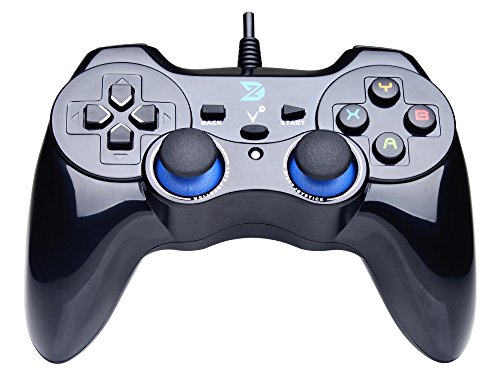
The ZD-V+ USB Wired Gaming Controller is a straightforward, budget-friendly gamepad designed for PC, PS3, Android, and Steam. It adopts a classic dual-analog stick layout similar to the PlayStation DualShock design, making it instantly familiar for most gamers. While it doesn't include advanced features like wireless connectivity or programmable buttons, it delivers reliable plug-and-play performance for a wide range of gaming scenarios.
This controller best suits casual PC gamers, retro gaming enthusiasts, streamers needing a backup input device, or college gamers building a compact desk setup. Its support for both Xinput and DirectInput modes means it works out of the box with most modern PC games on Steam and with older titles that rely on DirectInput. The vibration feedback adds a nice layer of immersion for racing games, action adventures, and open-world exploration.
In terms of responsiveness, the wired connection ensures low latency and consistent input accuracy. You won't experience dropped inputs or sync issues common with wireless controllers. The D-pad and analog sticks provide adequate precision for most genres, though serious competitive or esports players might prefer a controller with higher-quality sticks or mechanical buttons. For casual or medium-skill play, it performs admirably.
Build quality is decent for the price point. The plastic shell feels lightweight but not flimsy, and the buttons and sticks have a satisfactory tactile response. The JD-SWITCH function is a handy addition—it lets you swap the D-pad and left-stick functions on the fly, which can improve control in fighting games or retro platformers. The 6.5-foot cable gives enough range for most desk setups without excessive clutter.
Setup is truly plug-and-play on Windows and PS3; just connect the USB cable and the controller is recognized immediately. Android users will need a separate OTG adapter (not included), but once connected, it works similarly. One limitation is that the controller does not work with Xbox consoles, Mac OS, or iOS, so multi-platform users may need another option. The lack of any software customization means no remapping or macro programming—what you see is what you get.
Overall, the ZD-V+ is a practical choice for gamers who want a functional, no-fuss wired controller without breaking the bank. It's ideal as a spare for multiplayer sessions, a travel controller for laptops, or an affordable upgrade from keyboard-only gaming. If you need advanced features like programmable buttons or wireless freedom, you'd spend more—but for basic, reliable performance, this controller offers solid value.


Pros
- Quiet-press buttons are a game-changer for noise-sensitive environments like dorm rooms or shared living spaces.
- Hall effect joysticks ensure no drift over time, outperforming traditional potentiometer-based controllers.
- 1000Hz polling rate provides incredibly responsive input, ideal for competitive gaming.
- Comfortable ergonomic design with soft-touch grip reduces fatigue during long gaming sessions.
- Long-lasting 1000mAh battery keeps you playing for hours without frequent recharging.
Cons
- Not compatible with Xbox or PlayStation consoles, limiting its use for console-only gamers.
- Bluetooth mode offers only 125Hz polling, which may feel less responsive for competitive play.
- Programmable buttons are placed on top, which may take some getting used to if you prefer rear paddles.
The EasySMX X05Pro Wireless PC Controller is a well-rounded gaming accessory designed for PC gamers, streamers, and casual players who value quiet operation and responsive controls. Based on the product specifications, this controller stands out with its Hall effect joysticks that eliminate the dreaded stick drift common in many controllers, making it a reliable choice for long-term use. The 1000Hz polling rate in wired and 2.4G wireless modes ensures low-latency input, which is crucial for competitive gaming in FPS, MOBA, or racing titles.
One of the standout features is the quiet-press buttons, rebuilt with silicone dampers to significantly reduce noise. This makes the X05Pro perfect for late-night gaming sessions in dorm rooms or shared living spaces where you don’t want to disturb others. The dual-stage impulse triggers with adjustable travel and dual rumble motors provide immersive feedback, whether you’re drifting in a racing game or feeling recoil in an FPS. The two programmable top buttons are a thoughtful addition, offering extra functionality without the accidental press issues common with back paddles.
In terms of build quality, the controller features a soft-touch silicone coating that provides a secure, sweat-resistant grip even during intense gaming marathons. The 8-way D-pad with dome switches ensures precise diagonal inputs, making it a solid option for fighting and retro games. The built-in 1000mAh battery offers extended playtime, reducing the need for frequent charging. Setup is straightforward: simply connect via USB, 2.4G dongle, or Bluetooth, and the controller is recognized by Windows, Switch, Android, and iOS without additional software.
While the X05Pro excels in many areas, there are a few limitations to consider. It is not compatible with Xbox or PlayStation consoles, so it’s strictly for PC and mobile/tablet gamers. Additionally, Bluetooth mode operates at 125Hz, which may feel slightly less snappy than the 1000Hz wired/wireless modes – but for casual gaming or mobile use, it’s perfectly adequate. The top-mounted programmable buttons are a slight departure from the common rear paddle design, but they are positioned to avoid accidental presses, and many users will appreciate the intuitive placement.
Overall, the EasySMX X05Pro is an excellent value for PC gamers looking for a quiet, drift-free controller with high responsiveness. It’s particularly well-suited for competitive gamers who need low latency, streamers who want minimal background noise, and college gamers who game in shared spaces. The multi-platform compatibility adds versatility, making it a great addition to any gaming setup. If you’re in the market for a reliable PC controller without breaking the bank, this is a strong contender.
The EasySMX X05Pro delivers impressive gaming performance thanks to its Hall effect joysticks and 1000Hz polling rate. In wired or 2.4G wireless mode, inputs register almost instantly, making it ideal for fast-paced FPS games like Call of Duty or Overwatch. The adjustable trigger locks allow you to switch between long and short travel, perfect for racing games that need precise throttle control or shooters that benefit from quicker trigger pulls. The dual rumble motors provide tactile feedback, enhancing immersion in action games. The 8-way D-pad also handles fighting games well, with smooth diagonal inputs and responsive directional control.
The EasySMX X05Pro feels solid and well-constructed. The soft-touch silicone coating on the grips offers a comfortable, non-slip hold that resists sweat during long gaming sessions. The Hall effect joysticks are a major durability upgrade over traditional analog sticks, as they are less prone to wear and drift. The buttons have a satisfying, quiet feel thanks to the silicone dampers, and the D-pad uses dome switches for a crisp response. The controller weighs just under 0.86 pounds, giving it a substantial but not heavy feel. Overall, the build quality is impressive for its price point.
Frequently Asked Questions
Do laptop controllers require special drivers on Windows?
Most modern PC gamepads work immediately through native Windows XInput drivers without separate software. Devices like the EasySMX X15 PC Controller and standard Xbox pads connect via plug-and-play detection. Some legacy models, such as the Logitech G F310 Wired Gamepad Controller Console, offer optional profiler tools to map keys for older titles lacking native gamepad support.
Is a wired controller better than wireless for gaming laptops?
Wired controllers eliminate wireless interference and never run out of battery mid-match. USB options like the ZD-V+ USB Wired Gaming Controller Gamepad provide reliable, instant response without draining your notebook battery with an active Bluetooth connection. Wireless gamepads offer better mobility, but wired connections remain the simplest zero-latency choice when traveling.
What are Hall effect joysticks on PC gamepads?
Hall effect joysticks use magnetic sensors rather than physical contact wipers to measure stick position. This design eliminates mechanical wear and helps avoid the stick drift common in standard analog modules. Gamepads like the EasySMX X05Pro Wireless PC Controller feature these sensors to maintain accurate aim and centering during extended competitive play.
How do I connect an Xbox wireless controller to my notebook?
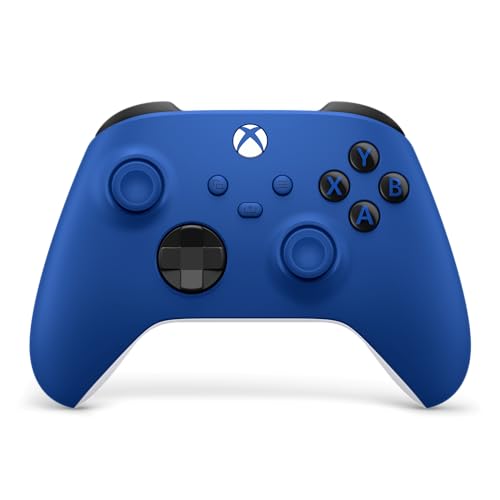
You can connect an XBOX Wireless Gaming Controller | Shock Blue through standard Bluetooth, an Xbox Wireless adapter, or a USB-C cord. Bluetooth pairing requires opening Windows Bluetooth settings and holding the controller pairing button until the light flashes rapidly. Direct USB-C connections provide instantaneous plug-and-play capability while simultaneously keeping the unit powered. Pair this responsiveness with a budget gaming laptop for a solid mobile arcade setup.
Which input mode is best for modern PC games?
XInput is the universal standard for modern Windows and Steam games. Most recent gamepads default to XInput so button prompts match on-screen cues automatically. DirectInput remains useful primarily for retro emulation or older PC titles released before standard Xbox controller integration. You can also explore accessories alongside the top VR headsets for gaming laptops to broaden your portable entertainment options.


Write Your Review
No reviews yet. Be the first to share your experience!