


Selecting the Right Personal Computer for Everyday Tasks
Everyday productivity suffers when hardware cannot keep up with basic multitasking and browsing. Many budget machines pair modest processors with limited system memory, leading to sluggish response times when opening several browser tabs. Selecting the best personal pc laptop requires matching realistic computing demands with proper memory capacity and responsive solid-state storage. While buyers with graphical workloads prefer a budget gaming laptop RTX 4050 configuration, routine home tasks run smoothly on efficient multi-core mobile processors.
Screen quality and daily ergonomics also determine how comfortable a portable computer feels during long sessions. A display with balanced resolution prevents eye fatigue, whereas smoother refresh panels seen on a best gaming laptop 144Hz display setup demonstrate how visual fluidity helps daily comfort. Practical options like the Dell 15 DC15250 and HP 14 provide functional setups featuring Windows 11, integrated graphics, and essential USB connectivity. Matching your workload to either cloud storage or expanded local drives ensures dependable daily use without overspending.

Pros
- Affordable price point for a Windows 11 laptop
- Lightweight and portable for on-the-go use
- Webcam and microphone included for streaming and video calls
- Solid-state drive ensures fast startup and app loading
Cons
- 4GB RAM may limit multitasking for heavier applications
- 64GB storage fills up quickly with games and media
- Intel Celeron processor is not suitable for demanding modern games
This HP 14" HD Laptop is a renewed device that brings Windows 11 to a highly accessible price point. Powered by an Intel Celeron Dual-Core Processor that can reach up to 2.60GHz, it's designed for basic computing tasks, light web browsing, and casual gaming. With 4GB of RAM and a 64GB SSD, it offers enough speed for everyday use, though it won't handle heavy gaming or intensive creative software.
This laptop is best suited for college gamers, work-from-home professionals, or anyone needing a secondary device for streaming, video calls, and light productivity. It's not built for competitive esports or high-end gaming, but it can run older or less demanding titles and handle streaming services like Twitch or YouTube without issue. The integrated HD webcam and digital microphone make it a practical choice for Discord chats or online classes.
In terms of real-world performance, the laptop boots quickly thanks to the SSD, and basic tasks like word processing, web browsing, and media playback feel responsive. The 14-inch HD display provides adequate clarity for watching videos or working on documents, though the 1366 x 768 resolution is on the lower side for modern standards. For casual gaming, you can expect playable frame rates in lightweight games, but don't expect high refresh rates or detailed graphics.
Build quality is typical for an entry-level laptop, with a durable plastic chassis in a Dale Blue finish. The keyboard and trackpad are functional for everyday typing and navigation. Connectivity includes three USB Type-A ports, an SD card reader, and a headphone/microphone jack, which covers basic peripheral needs. Wi-Fi and Bluetooth support ensure easy wireless connections for mice, headsets, or external storage.
Setup is straightforward, as the laptop comes with Windows 11 pre-installed and a renewed certification that ensures it's been tested and refurbished. The 64GB storage is limited, so you'll want to rely on cloud services or external drives for larger files. Maintenance is minimal, but you may need to manage storage carefully if you plan to install several applications or games.
Overall, this HP laptop is a practical choice for budget-conscious users who need a reliable machine for light gaming, streaming, and daily tasks. It's not a gaming powerhouse, but for casual use, schoolwork, or as a secondary streaming device, it offers solid value. If your gaming needs are modest and your budget is tight, this renewed laptop is worth considering.

Pros
- 120Hz display is rare at this price point, offering smoother animations and reduced eye strain
- Solid build quality with a clean Carbon Black finish and ergonomic hinge design
- Fast SSD storage and adequate 8GB RAM for light gaming and productivity tasks
- Included 1 Year Onsite Service adds convenience for hardware issues
Cons
- Integrated Intel UHD Graphics limit gaming to less demanding titles and lower settings
- 8GB RAM may feel restrictive for heavy multitasking or running multiple applications side by side
- Battery life is average compared to some competitors in the same price range
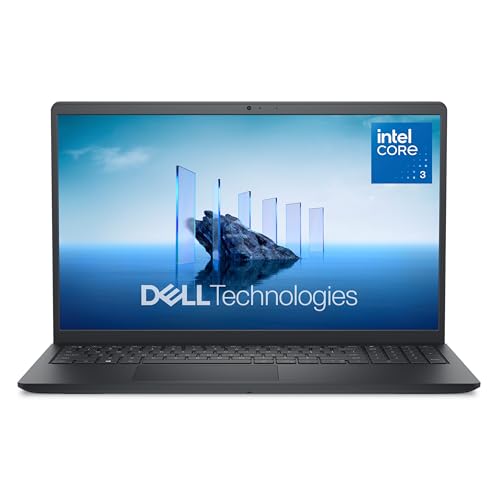
The Dell 15 Laptop (DC15250) is a traditional laptop designed for everyday computing, but it offers a few features that casual gamers and college gamers will appreciate. With a 15.6-inch FHD display refreshing at 120Hz, this laptop prioritizes visual smoothness at an affordable price point. While it's not a dedicated gaming machine, the high refresh rate screen makes browsing, streaming, and less graphically intensive games feel more fluid than your typical 60Hz workhorse.
This laptop is best suited for casual gamers who enjoy lighter titles like indie games, older RPGs, or esports games at lower settings. College students and work-from-home gamers will also benefit from the comfortable keyboard with a numeric keypad and the lifted hinge design that promotes ergonomic wrist positioning for long typing or study sessions. Streamers or content creators on a tight budget may find it adequate for video playback and basic editing, but the integrated Intel UHD Graphics won't handle heavy rendering or high-bitrate streaming smoothly.
In terms of real-world performance, the 120Hz display stands out for reducing motion blur and making everyday tasks feel snappier. The Intel Core 3 processor paired with 8GB DDR4 RAM is enough for web browsing, office apps, and light multitasking. The 512GB SSD ensures quick boot times and fast loading for your primary applications and a few games. However, the lack of a dedicated graphics card means you'll need to lower resolutions and details to play modern titles, and even then, frame rates will be modest.
Build quality is decent for a budget laptop. The Carbon Black chassis feels solid, and the hinges are sturdy enough to lift the bottom of the laptop for better airflow and a comfortable typing angle. At 4.19 pounds, it's portable enough for a backpack. The keyboard includes a separate numeric keypad and a calculator hotkey, which is a nice productivity touch. Setup is straightforward with Windows 11 Home pre-installed; you just need to sign in and update. The Dell ComfortView software is a welcome addition for reducing blue light, which helps during late-night gaming or study sessions.
One realistic limitation is the integrated graphics, which will struggle with demanding games. Also, the 8GB RAM is soldered? Actually, many Dell 15 models allow upgrading RAM, but check specifications. If you plan to run multiple tabs and applications simultaneously, you may hit memory limits. Battery life is typical for this class, lasting around 6-8 hours under light use but less with the 120Hz screen active during gaming. The 1 Year Onsite Service is a nice bonus, providing direct support if hardware issues arise.
Overall, the Dell 15 is a practical buy for casual gamers, college students, or anyone needing a responsive display for everyday computing on a tight budget. If you're a competitive gamer or streamer requiring higher frame rates and graphics power, you'll need a dedicated GPU laptop. But for light gaming, schoolwork, or home office tasks within a strict budget, this laptop offers good value with its smooth 120Hz screen and solid build.
Frequently Asked Questions
How much RAM is needed for a personal laptop in 2026?
Eight gigabytes of RAM is generally recommended for smooth multitasking under Windows 11. Basic 4GB models handle light document entry, but multiple tabs quickly fill capacity. An 8GB configuration keeps daily applications responsive. For heavier graphical tasks, comparing dedicated hardware such as gaming laptops with MUX switch features highlights how component balance affects overall performance.
What is the practical difference between 64GB and 512GB storage?
A 512GB SSD offers ample room for files and updates, while 64GB storage requires strict management. Routine system updates consume much of a 64GB drive, making cloud storage or SD cards necessary. A 512GB drive stores documents, software, and media offline without constant maintenance.
Can an entry-level personal PC laptop handle modern PC gaming?
No, personal laptops with integrated Intel UHD Graphics are not built for demanding gaming. They easily run casual web games and media streams, but lack dedicated rendering power. Demanding titles, like running Rust on gaming laptops, require discrete graphics cards to maintain playable speeds.
Why does display refresh rate matter for everyday laptop use?
A higher refresh rate like 120Hz produces smoother cursor movement and visual scrolling. The Dell 15 DC15250 features a 120Hz FHD panel to decrease motion blur during daily computing. While not essential for simple text tasks, it improves overall eye comfort over prolonged viewing sessions.
Do you need external speakers for a personal laptop setup?
Integrated laptop speakers often lack volume, so compact stereo speakers offer an easy audio boost. USB-powered desktop speakers plug directly into a USB port and 3.5mm jack to enhance sound for meetings and media. They improve clarity without requiring a separate wall power outlet.
Does Best Personal Pc Laptop selection depend on operating system updates?
Yes, current systems like Windows 11 require compliant hardware and drive space for security patches. Selecting a personal laptop equipped with Windows 11 ensures compatibility with modern software and continued vendor support. This avoids the technical challenges of running an operating system near end-of-life.





Write Your Review
No reviews yet. Be the first to share your experience!