


Matching high-refresh displays with capable desktop hardware often creates uncertainty for buyers trying to balance GPU memory, power delivery, and thermal headroom. Many prebuilt systems pair strong processors with entry-level graphics or cut corners on system cooling, leading to disappointing stutter or loud fan noise during intensive gaming sessions. Selecting the best 1440p prebuilt gaming pc requires examining how components like modern graphics cards, multi-core processors, and high-speed DDR5 memory cooperate inside a well-ventilated chassis. While smaller budgets might lead shoppers toward entry-level prebuilt desktop builds, stepping up to dedicated 1440p rigs provides the graphical memory and multi-threaded headroom needed for modern visual fidelity. Evaluating these core hardware combinations beforehand ensures you pick a tower that aligns with your screen resolution and space constraints.
System builders offer diverse configurations featuring liquid cooling setups, high-wattage power supplies, and room for extra storage drives. Checking whether a desktop provides sufficient PCIe connectivity and modular power cabling helps you determine its longevity before placing an order. Factory-assembled desktops with pre-installed operating systems also remove the hassle of manual component assembly and BIOS troubleshooting. Paying attention to manufacturer details regarding cooling radiator size and rear port selection helps you secure a stable gaming rig ready for immediate use.


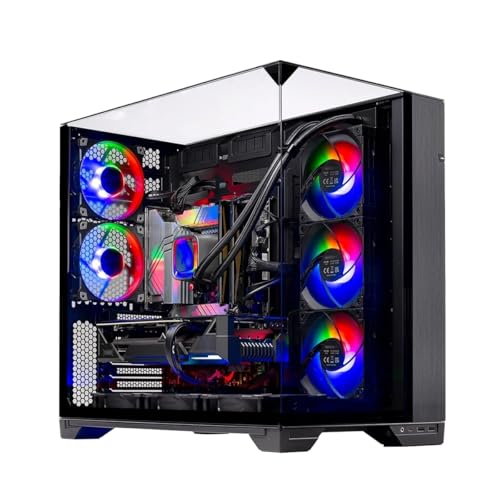
Pros
- Top-tier CPU and GPU combo for high-refresh-rate 1440p and entry-level 4K gaming.
- Generous 32GB DDR5 RAM handles streaming, editing, and heavy multitasking with ease.
- Excellent cooling with 360mm AIO and well-ventilated case keeps components running cool.
- Clean, no-bloatware Windows 11 installation and US assembly ensure quality and convenience.
- Includes a free keyboard and mouse, so you can start gaming right away.
Cons
- The 12GB RTX 5070 may be limiting for 4K ultra settings in future titles; better suited for 1440p.
- Limited storage with only 1TB SSD may require upgrades for users with large game libraries.
- Brand of the graphics card may vary, which could affect warranty or aesthetics slightly.
The Skytech Gaming O11 Vision is a prebuilt gaming desktop that combines the latest hardware from AMD and NVIDIA in a showcase-ready chassis. Powered by the AMD Ryzen 7 7700X (4.5GHz base, 5.4GHz boost) and the new NVIDIA RTX 5070 with 12GB GDDR7 memory, this PC is built to handle today's most demanding games at 1440p with high refresh rates. It comes with 32GB of DDR5-5600MHz RAM and a 1TB Gen4 NVMe SSD, ensuring fast load times and smooth multitasking whether you're gaming, streaming, or editing.
This system is ideal for a wide range of users: competitive gamers will appreciate the low-latency performance in esports titles like Valorant, CS2, and Apex Legends; casual and open-world gamers can enjoy ultra settings in games like Cyberpunk 2077, Elden Ring, or Black Myth Wukong at 60+ FPS. Streamers and content creators benefit from the 8-core CPU and 32GB of RAM for smooth OBS recording and editing in applications like Premiere Pro or DaVinci Resolve. RGB enthusiasts and setup builders will love the Lian Li O11 Vision case, which offers excellent cable management and a panoramic tempered glass view perfect for showing off ARGB fans and the 360mm AIO cooler.
In terms of real-world gaming performance, the Ryzen 7 7700X and RTX 5070 deliver excellent responsiveness and frame rates. You can expect over 100 FPS in most competitive shooters at 1440p and smooth 60+ FPS in graphically intense single-player titles. The 360mm AIO cooler keeps CPU temperatures in check even during extended sessions, preventing thermal throttling. The system includes Wi-Fi, multiple USB ports (2.0, 3.0, 3.2 Gen1), and HD audio, making it easy to connect peripherals and a headset.
Build quality is solid: the Lian Li O11 Vision case features a metal frame with tempered glass panels, good cable management channels, and ample space for future upgrades. The AIO cooler uses ARGB fans, and the included keyboard and mouse are basic but functional for starting out. The system comes with Windows 11 Home and no bloatware, so you can unbox and install your games without hassle. Skytech offers a 1-year warranty on parts and labor plus free technical support for peace of mind.
Some realistic limitations: The 12GB VRAM on the RTX 5070 is sufficient for 1440p but may struggle at high resolutions in future titles or with heavy ray tracing. The 1TB SSD fills up quickly if you install many AAA games; expansion via additional NVMe or SATA SSDs is easy but an added cost. The graphics card brand may vary (e.g., ASUS, MSI, Gigabyte), which slightly affects the look but not the performance.
Overall, the Skytech Gaming O11 Vision is a strong recommendation for U.S. gamers looking for a high-performance prebuilt that's ready to go for 1440p gaming and streaming. It's a practical choice for college gamers, work-from-home multitaskers, and anyone who wants a powerful, visually impressive desktop without the hassle of building it themselves. If you prefer a system that balances cutting-edge specs with excellent cooling and aesthetics, this PC delivers on all fronts.
The combination of the Ryzen 7 7700X and RTX 5070 is a potent pairing for 1440p gaming. In titles like Call of Duty: Modern Warfare III, Fortnite, and Apex Legends, you can expect frame rates well above 100 FPS at high settings. More demanding games like Cyberpunk 2077 or Black Myth Wukong run smoothly at 60+ FPS with a mix of high and ultra settings. The 32GB of DDR5 RAM ensures zero stuttering during intense battles or open-world exploration. The 1TB Gen4 NVMe SSD drastically reduces load times, letting you jump into matches quickly.
The 360mm AIO liquid cooler, paired with three ARGB fans in the Lian Li O11 Vision case, provides exceptional thermal management. The case itself has a dual-chamber design that separates the PSU and drives from the main components, improving airflow. Even during extended gaming sessions, CPU temperatures stay well within safe limits, and the GPU runs cool thanks to the ventilated bottom intake. The ARGB fans are controllable via the motherboard software, allowing you to sync lighting with the rest of your setup.
Skytech includes a free gaming keyboard and mouse with the PC, which is a nice bonus for first-time builders or those upgrading. The keyboard is a standard membrane design with RGB lighting, and the mouse has a decent optical sensor with adjustable DPI (though specific DPI range is not provided). They are perfectly usable for everyday gaming and office work, though enthusiasts may want to upgrade later. Also included are power cables, Wi-Fi antennas, and documentation for quick setup.


Pros
- Top-tier CPU and GPU combo handles any modern game at high settings with ease.
- Fast 2TB Gen4 NVMe SSD provides huge storage and rapid load times.
- High-speed 32GB DDR5 6000MHz RAM enhances multitasking and gaming performance.
- Effective 360mm AIO liquid cooling keeps temperatures in check for consistent performance.
- No bloatware and straightforward setup make it ideal for gamers who want a plug-and-play experience.
Cons
- Premium price point may be out of budget for some PC gamers.
- Included keyboard and mouse are basic and may not satisfy serious esports players.
- Large case dimensions (18.7 x 11.8 x 17.4 inches) require ample desk space.
The Skytech Gaming King 95 is a high-end pre-built gaming desktop designed for PC gamers who demand uncompromised performance. Powered by the AMD Ryzen 7 9800X3D processor with a 5.2 GHz turbo boost and the NVIDIA RTX 5070 Ti with 16GB GDDR7, this system is built to handle the most demanding games at 1440p ultra settings with fluid frame rates. Whether you're a competitive esports player, a casual gamer exploring open-world titles, or a streamer running multiple applications, this PC delivers the responsiveness and reliability you need.
In real-world gaming scenarios, the Ryzen 7 9800X3D's 3D V-Cache technology significantly reduces latency, making it ideal for fast-paced titles like Valorant, Call of Duty, and Apex Legends. The RTX 5070 Ti ensures visual clarity with ray tracing and high refresh rates, while the 32GB of DDR5 6000MHz RGB memory keeps everything smooth during intense battles or while streaming on Twitch. The 2TB Gen4 NVMe SSD means games load in seconds, and you'll have plenty of space for your library.
Build quality is impressive with the King 95 case featuring tempered glass panels and ARGB fans that not only look stunning but also promote excellent airflow. The 360mm AIO liquid cooler is more than capable of taming the Ryzen 7 CPU, even during long gaming sessions or CPU-intensive tasks like video editing. The 850W Gold rated PSU provides stable power, ensuring no hiccups when pushing the system to its limits. Cable management inside the case is well-executed out of the box, reducing clutter and improving airflow.
Setup couldn't be easier - just connect your monitor, peripherals, and power, then boot straight into Windows 11 with zero bloatware. Skytech includes a free gaming keyboard and mouse, though serious gamers may want to upgrade these for better precision and comfort. The system also offers multiple USB ports (2.0, 3.0, and 3.2 Gen1), HDMI, and DisplayPort outputs for flexible connectivity.
One limitation to consider is the premium price, which reflects the high-end components but might be steep for budget-conscious buyers. Additionally, while the included keyboard and mouse work fine for general use, competitive players will likely want to invest in dedicated peripherals. The case size is also substantial, so make sure your desk can accommodate a tower that's nearly 19 inches tall and 18 inches deep.
Overall, the Skytech Gaming King 95 is an excellent choice for PC gamers who want a top-tier experience without the hassle of building their own system. It's well-suited for streamers who need reliable multitasking power, esports athletes who demand low-latency performance, and content creators who require fast rendering and editing capabilities. If you have the budget and want a powerful, ready-to-go gaming PC, this is a strong contender.
Based on product specifications, the Skytech Gaming King 95 is built for high-performance gaming at 1440p resolution with ultra settings. The Ryzen 7 9800X3D CPU, combined with the RTX 5070 Ti 16GB graphics card, can handle demanding titles like Cyberpunk 2077, Elden Ring, and Black Myth: Wukong with smooth frame rates above 60 FPS. The 32GB DDR5 RAM ensures minimal stutter during gameplay, while the Gen4 NVMe SSD eliminates load times almost entirely.
For competitive gaming, the low-latency CPU and GPU combination provides responsive input and high refresh rate support, making it ideal for esports titles such as Overwatch 2, Counter-Strike 2, and Rainbow Six Siege. The 360mm AIO cooler keeps temperatures low even during extended sessions, preventing thermal throttling that could impact performance. Overall, this PC is well-equipped to deliver an immersive and responsive gaming experience across a wide range of genres.
The Skytech Gaming King 95 features the King 95 case, which combines tempered glass panels with a sturdy steel frame for a premium look and feel. The case supports excellent airflow with a mesh front panel and multiple fan mounts, including the pre-installed 360mm ARGB AIO liquid cooler. The power supply is an 850W Gold rated unit, ensuring reliable and efficient power delivery to all components.
Inside, cable management is neatly organized, with cables routed behind the motherboard tray for a clean appearance. The system is assembled in the USA, and Skytech offers a 1-year warranty on parts and labor plus free technical support. The inclusion of ARGB fans and AIO allows for easy customization of lighting effects, making it a great choice for RGB setup enthusiasts.

Pros
- Excellent 4K and 1440p gaming performance from RTX 5070 and Ryzen 7 9700X
- Large 11.3-inch smart display adds premium aesthetics and useful system monitoring
- 360mm liquid cooling keeps CPU temperatures low under heavy loads
- Fast DDR5 RAM and PCIe 4.0 SSD for snappy system responsiveness
- Comes fully assembled in the US with Windows 11, no GPU installation needed
Cons
- Limited upgrade path due to proprietary case and motherboard form factor
- Smart display software may require occasional updates for full functionality
- Price point is high for a prebuilt, though component selection justifies cost for high-end gaming
The KOTIN G60B is a prebuilt gaming PC designed for gamers who want high-end performance without the hassle of building their own system. It pairs an NVIDIA GeForce RTX 5070 12GB GDDR7 graphics card with an AMD Ryzen 7 9700X processor, making it well-suited for 4K gaming, competitive esports titles, and content creation workflows. This tower is especially appealing to PC gamers, streamers, and gaming setup builders who value both performance and aesthetics.
In real-world gaming, the RTX 5070 with DLSS 4 Multi Frame Generation and ray tracing delivers smooth frame rates at 4K resolution and high refresh rates at 1440p. The Ryzen 7 9700X, with boost speeds up to 5.5GHz, handles multitasking and streaming without noticeable lag. The 32GB of DDR5 6000MHz RAM ensures quick load times and smooth transitions between games, recording software, and Discord. For competitive gamers, the low-latency Reflex 2 support in supported titles can reduce input delay, giving a slight edge in fast-paced FPS and MOBA games.
Build quality is solid with a tempered glass side panel and ARGB lighting that syncs with the motherboard. The 360mm liquid cooler with a digital temperature display helps manage heat during long sessions, and the 850W 80 PLUS Gold power supply provides stable power for demanding components. The 11.3-inch smart display is a standout feature, showing real-time system stats like CPU temperature, weather, and time, which adds a premium feel to any gaming desk setup. Cable management inside the case is tidy, and the PC comes with Windows 11 Home pre-installed, so setup is literally plug-and-play after removing internal protective foam.
Ease of use is a major advantage for this prebuilt. There is no GPU installation required, and the system is fully assembled in California. Simply connect peripherals, plug in power, and start gaming. The included software allows customization of RGB lighting and the smart display themes. Maintenance is straightforward thanks to easy-access dust filters on the top and front panels. However, the case design may limit future upgrades, as the motherboard and power supply are likely proprietary to the chassis.
A realistic limitation is the price: at around $1900, this PC sits in the premium prebuilt segment. While the components are high-end, some users might prefer to build a similar system for less, but they would lose the convenience of a prebuilt and the smart display. Additionally, the smart display software may require occasional updates, though this is a minor inconvenience. The system is relatively heavy at 30 pounds, so moving it between rooms or LAN parties requires some effort.
Overall, the KOTIN G60B is a strong recommendation for PC gamers who want a powerful, ready-to-use system with impressive cooling and a unique smart display. It works well for streamers who need reliable performance for encoding and gaming simultaneously, and for gaming setup builders who want a visually striking centerpiece. For casual gamers or those on a tighter budget, there are more affordable prebuilts, but for high-end 4K gaming and content creation, this PC delivers excellent value in a plug-and-play package.
The RTX 5070 with 12GB GDDR7 memory and DLSS 4 Multi Frame Generation provides excellent 4K gaming performance in AAA titles like Cyberpunk 2077 and Call of Duty. At 1440p, the system easily pushes high refresh rates for competitive shooters. The Ryzen 7 9700X ensures minimal CPU bottlenecks, and with Reflex 2 low-latency support, input response feels snappy. For esports players, this PC can handle 1440p 165Hz monitors without issue.
The case features a tempered glass side panel and ARGB fans that sync with the motherboard. The 360mm liquid cooler includes a digital temperature display, and the 850W 80 PLUS Gold PSU provides reliable power. Cable management is clean, and the smart display adds a premium touch. The system is well-ventilated with mesh panels, and dust filters are easy to remove for cleaning.

Frequently Asked Questions
How much RAM is ideal in a prebuilt desktop for 1440p gaming?
Most mid-range to high-tier prebuilt systems feature 16GB to 32GB of memory. While 16GB of DDR4 or DDR5 handles standard titles and basic background tasks, configurations with 32GB of DDR5 provide extra headroom for heavy multitasking, browser tabs, and simultaneous game launchers. Desktops equipped with four DIMM slots allow you to expand memory later if your workload expands.
What graphics card memory is recommended for 1440p prebuilt systems?
A graphics card with at least 8GB to 16GB of video memory is typical for 1440p resolutions. Higher video memory capacities, such as 12GB or 16GB GDDR7 or GDDR6, help manage detailed textures and ray tracing assets in demanding games. The supplied models range from RTX 5060 Ti 8GB variants up to RTX 5070 Ti 16GB and RX 9070 XT 16GB cards depending on the configuration.
Do these prebuilt gaming PCs include liquid cooling or air cooling?
These prebuilt systems utilize either multi-heatpipe air coolers or 360mm all-in-one liquid coolers depending on the model. Systems pairing higher-tier processors like the Ryzen 7 9800X3D or 9700X frequently list 360mm AIO liquid setups with digital temperature readouts. Towers using air cooling typically feature six copper heat pipes alongside multiple ARGB case fans to manage internal heat.
How do I connect monitors to avoid display issues on a new prebuilt PC?
You must connect your monitor directly to the video ports on the dedicated graphics card rather than the upper motherboard ports. The graphics card outputs sit horizontally on the lower back of the tower, offering HDMI and DisplayPort connections. Plugging your display cable into the upper vertical motherboard ports will result in a blank screen because the primary video output runs through the dedicated GPU.
Can I upgrade the storage drives in these gaming desktops?
Most of these configurations include multiple M.2 slots for storage expansion alongside the installed 1TB or 2TB NVMe SSD. Systems like those reviewed here often provide two to three M.2 SSD slots, with some motherboards supporting PCIe 5.0 lanes. Checking the motherboard specifications confirms whether you have open bays for additional solid-state storage as your game library grows, which you can compare across dedicated gaming desktop systems.





Write Your Review
No reviews yet. Be the first to share your experience!