


Stuttering in open worlds, thermal throttling during long sessions, and driver timeouts can ruin the experience. Many gamers wonder if is gaming laptop worth it compared to a desktop. The gap in raw performance has narrowed, but portability and heat management still play huge roles. After carefully analyzing product specs, GPU architectures, and user feedback across 10 models, it’s clear that modern gaming laptops offer competitive frame rates in a mobile package. The RTX 5070 Ti and Core Ultra 9 275HX in the Thunderobot Zero Pro, for example, target smooth 1440p gameplay without sacrificing travel flexibility. But not every laptop handles heat the same way, and some budget options cut corners on cooling that lead to noisy fans or reduced clock speeds. For a deeper look at what to avoid, check out our guide on cheapest gaming laptops.
nnnnBattery life expectations also differ. A powerful GPU draws more power, so heavy gaming usually means staying plugged in. That’s fine for a desk setup but less ideal for travel. Still, with Wi-Fi 6E, high refresh rate displays, and plenty of RAM, a gaming laptop can double as a productivity machine. The key is matching the hardware to your needs. If you prioritize competitive esports, a high-refresh screen and low input lag matter more than max resolution. For AAA titles, GPU VRAM and thermal design become critical. We’ve gathered models from ASUS, GIGABYTE, NIMO, Thunderobot, HP, and MSI to help you decide. For more context, read our thoughts on whether HP gaming laptops are good.
nnnn

Pros
- Excellent price-to-performance ratio for mid-range gaming and creative work.
- Fast 165Hz display with 16:10 aspect ratio gives extra vertical screen space for productivity.
- Plenty of storage expansion with an open M.2 SSD slot for easy upgrades.
- Quiet fans under normal loads, with effective cooling that keeps temps below 71C under heavy gaming.
- Sturdy build quality with a 180-degree hinge that allows flexible placement.
Cons
- GiMATE software can be buggy and uses up to 2.5GB of RAM; some users report difficulty disabling AI features.
- Fan noise ramps up noticeably under heavy loads, requiring a well-ventilated desk setup.
- Battery life is limited when gaming (needs constant AC power); average speakers lack depth and volume.
The GIGABYTE Gaming A16 is a mid-range gaming laptop designed for PC gamers, streamers, and content creators who want solid performance without breaking the bank. It pairs an Intel Core i7-13620H processor with an NVIDIA GeForce RTX 5070 GPU, 32GB of DDR5 RAM, and a 1TB NVMe SSD, making it capable of handling modern AAA titles and creative software at high settings.
In real-world use, this laptop delivers smooth framerates in demanding games like Cyberpunk 2077 (around 70-90 FPS with DLSS 4 enabled) and consistent 165 FPS in lighter esports titles. The 1920x1200 165Hz display offers fluid motion and a taller aspect ratio that feels natural for both gaming and browsing. However, the 45% NTSC color coverage means it's not ideal for professional color work, but for gaming and media consumption it's perfectly adequate.
Build quality is decent for the price. The chassis is slim (0.76 inches) and the 180-degree hinge feels robust, though the keyboard deck has a lot of empty space around the keys. The GIGABYTE Golden Curve keyboard provides satisfying tactile feedback with minimal noise, making it comfortable for long gaming sessions. The trackpad is accurate, but some users note it travels too far when clicking.
Cooling is effective, keeping the CPU and GPU under 71°C during heavy loads, but the fans become quite loud. Proper ventilation is essential - placing the laptop on a hard, flat surface or a grated stand helps maintain performance. The included straight power plug is a minor inconvenience for desk cable management.
The biggest downside is the GiMATE software. It's designed to optimize battery life and performance, but it can be intrusive and resource-heavy. Several users report that it disables the dedicated GPU without warning, and uninstalling it is the only fix. If you're comfortable managing drivers manually, this is a minor annoyance. Otherwise, it's a significant drawback.
Overall, the GIGABYTE Gaming A16 is a strong value for budget-conscious gamers who prioritize frame rates over bells and whistles. It works well for gaming setups, dorm rooms, or home offices where you need a powerful yet portable machine. If you can tolerate the software quirks and invest in a good cooling pad, this laptop will serve you well for several years of gaming and productivity.
The RTX 5070 (8GB) and Core i7-13620H provide excellent 1080p-1200p gaming performance. In Battlefield 6 and Star Citizen, users report consistent 70-90 FPS on max settings, while Cyberpunk 2077 with DLSS 4 delivers around 165 FPS at 1900x1080 with ray tracing on Ultra. The 165Hz display ensures smooth gameplay, though path tracing drops frames significantly. The GPU lacks the raw power of higher-tier cards, but for most modern titles, it's more than capable.
The laptop feels sturdy with a slim profile and a 180-degree hinge that allows flat placement. The chassis is all plastic but doesn't flex excessively. The keyboard is comfortable for typing and gaming, though the trackpad's click mechanism could be better. The speakers are downward-firing and adequate for casual use, but external headphones or speakers are recommended for immersive audio. The 1TB SSD is fast, and there's an empty M.2 slot for easy storage expansion.
The GiMATE software is a mixed bag. It offers pre-set power modes (Performance, Balanced, Eco) and some AI-driven battery optimization, but lacks manual fan curve control. Several users found it intrusive and RAM-hungry, with some disabling the GPU unintentionally. The RGB keyboard lighting controls are basic and occasionally sluggish. If you prefer full control, it's best to uninstall GiMATE and manage settings through Windows and NVIDIA Control Panel.

Pros
- Great value for entry-level gaming with modern hardware
- Thin and light design makes it easy to transport
- 144Hz display enhances gaming smoothness
- Upgradable RAM and storage for future needs
Cons
- Battery life is limited, especially during gaming
- Fans can get loud under heavy load
- Build quality feels somewhat plastic and less durable than premium models
The MSI Thin A15 is a budget-friendly gaming laptop designed for gamers who need a portable system that can handle both work and play. It combines a Ryzen 5-7535HS processor with an RTX 3050 GPU, 16GB of DDR5 RAM, and a 512GB SSD, all packed into a thin and light chassis. The 15.6-inch FHD display with a 144Hz refresh rate ensures smooth visuals during fast-paced games, while the Cooler Boost thermal system helps manage heat during longer sessions.
This laptop is best suited for casual gamers, college students, and anyone looking for an affordable entry into PC gaming. It runs popular titles like Fortnite, Minecraft, and League of Legends at medium settings with good frame rates, making it a practical choice for those who don't need max settings. The 144Hz display is a nice bonus for competitive games where fluid motion matters, though the RTX 3050 is better suited for esports than demanding AAA titles.
Build quality is a mixed bag. The laptop feels lightweight and portable, but the plastic construction may not withstand rough handling. User reviews mention that the case feels less sturdy than other MSI models, so careful transport is advised. On the plus side, the keyboard includes a backlight, and the webcam works well for video calls, though image quality is average. The cooling system keeps temperatures in check, but the fans can get loud under load.
Setup is straightforward with Windows 11 pre-installed. The laptop offers several ports, including USB-C and HDMI, which makes connecting external monitors or peripherals easy. The MSI Center software allows you to customize performance modes and monitor system stats. Upgrading RAM or storage is possible by removing the bottom panel, which is a nice feature for future-proofing.
One realistic limitation is battery life. Like many gaming laptops, the Thin A15 doesn't last long on a single charge when gaming, so you will need to keep the power adapter handy for extended sessions. The 512GB SSD fills up quickly if you install multiple large games, but the upgradable storage helps mitigate this.
Overall, the MSI Thin A15 is a solid choice for budget-conscious gamers who prioritize portability and decent performance over premium build quality. It works well for school, work, and casual gaming, and its 144Hz display adds value for competitive play. If you need a versatile laptop that won't break the bank, this is a strong contender.

Pros
- Powerful AMD Ryzen 7 8745HS processor with 8 cores and 4.9GHz turbo for smooth gaming and multitasking.
- Large 17.3-inch FHD IPS display with anti-glare coating for clear visuals during long sessions.
- Generous 32GB DDR5 RAM and 2TB SSD storage, with easy upgrade options for future-proofing.
- Includes a 100W USB-C fast charger that can also power phones and tablets, perfect for travel.
- Backlit keyboard and fingerprint touchpad add convenience and security.
Cons
- Integrated Radeon 780M graphics are not suitable for high-end AAA gaming at max settings; more suited to esports and casual titles.
- At 3.84 pounds, it's relatively portable but may feel heavy for some users compared to ultrabooks.
- With only 0 reviews listed, real-world feedback is limited; potential buyers should rely on specs and warranty.
The NIMO 17.3-inch Light Gaming Laptop is a portable powerhouse designed for users who need a balance of performance and mobility. Powered by the AMD Ryzen 7 8745HS (8 cores, 16 threads, up to 4.9GHz) and Radeon 780M integrated graphics, it targets casual gamers, college students, work-from-home professionals, and content creators. This laptop fits well in a dorm room, home office, or gaming setup where space is limited but performance matters.
In everyday use, the Ryzen 7 8745HS handles multitasking with ease, from running Discord and Chrome tabs to streaming on Twitch or YouTube. For gaming, the Radeon 780M delivers smooth frame rates in esports titles like Fortnite, CS:GO, and League of Legends at 1080p medium settings. It can also manage older AAA games or lighter open-world titles, but it's not built for max-settings Cyberpunk 2077. The 32GB DDR5 RAM and 2TB PCIe 4.0 SSD ensure fast load times and ample storage for your game library and creative projects.
Build quality is solid with a metal lid (A-surface) that gives a premium feel. The 17.3-inch FHD IPS anti-glare display offers sharp visuals and wide viewing angles, with thin bezels for an immersive experience. The backlit keyboard is comfortable for typing in dim environments, and the integrated fingerprint touchpad adds quick, secure login. An often overlooked benefit is the upgradeable design - you can easily expand RAM and storage later, making this laptop a long-term investment.
Setup is straightforward: it comes with Windows pre-installed, and the included 100W USB-C charger can juice up the laptop quickly - 15 minutes gives you about 2 hours of use. The charger is also universal, so you can use it for your phone and tablet. Maintenance is simple thanks to the upgradeable internals; cleaning just requires wiping the metal surfaces. Cable management is minimal since it's a laptop, but the USB-C port reduces clutter.
Realistic limitations include the integrated graphics - dedicated GPU laptops will outperform this for heavy gaming. Also, at 3.84 pounds, it's not the lightest 17-inch model, and the lack of user reviews means you rely on specs and the included 2-year warranty. However, NIMO offers U.S. assembly support and 90-day returns, which adds reassurance.
Overall, the NIMO 17.3-inch Light Gaming Laptop is a smart pick for anyone who needs a versatile machine for school, work, and light gaming without breaking the bank. Esports players and casual gamers will appreciate its snappy performance, while upgradability ensures it can grow with your needs. If you're a college gamer or remote worker looking for a capable, portable laptop, this deserves your consideration.

Pros
- Very affordable price point for a 15.6-inch laptop with full HD screen.
- Solid build with metal A/D shell feels sturdier than many plastic budget laptops.
- 256GB SSD provides snappy responsiveness for basic tasks like web browsing and Office apps.
- Windows 11 Pro is a nice bonus for business users and those needing extra security features.
- Lightweight and thin profile makes it highly portable for on-the-go use.
Cons
- Celeron N4000 processor is too weak for modern gaming, video editing, or heavy multitasking.
- Limited to integrated Intel UHD Graphics 600; cannot run demanding games or software beyond very old or low-end titles.
- Audio quality is reportedly poor even at maximum volume, and the fan can be audible under load.
- Only 6 hours of average battery life may not last a full day for power users.
- Wi-Fi 5 and Bluetooth 4.2 are outdated compared to current standards, reducing wireless performance.
The AVENKA ECOBOOK is marketed as a gaming laptop, but its hardware tells a different story. Equipped with an Intel Celeron N4000 processor (a dual-core chip with a max burst of 2.6 GHz) and Intel UHD Graphics 600, this 15.6-inch laptop is best described as an entry-level productivity machine. It's suited for students, remote workers, or anyone needing a lightweight device for web browsing, email, streaming video, and Office applications. For serious PC gaming, esports, streaming, or content creation, this laptop will fall short due to its limited CPU and integrated GPU.
In real-world use, the 8GB of RAM and 256GB SSD help it feel snappy for basic tasks. Boot times are quick, and loading apps like Word, Zoom, or a few browser tabs is smooth. However, pushing it beyond a handful of light programs can lead to noticeable slowdown. The 1920x1080 display is decent for its price, offering clear text and passable colors for watching YouTube or working on documents. The thin and light design (3.53 pounds) makes it easy to toss in a backpack, and the metal lid adds a touch of durability many budget laptops lack.
Gaming performance is extremely limited. The integrated UHD Graphics 600 can only handle very old or esports titles at low settings and low resolutions, and even then, expect choppy frame rates. Modern shooters, open-world games, or any GPU-intensive task are out of the question. This laptop is not designed for competitive gaming, streaming, or content creation; it's strictly for casual use like checking email or light photo viewing.
Build quality is better than expected for the price range. The metal A/D cover feels premium, but the keyboard and trackpad are average – functional but not outstanding. Port selection includes two USB 3.2 ports, a Mini HDMI, a headphone jack, and a TF card slot, which covers basic connectivity. Wi-Fi 5 and Bluetooth 4.2 are adequate for most home networks but lack the speed and range of newer standards. Battery life hovers around 5-6 hours of mixed use, enough for a half-day of classes or work but not all-day endurance.
Some user reviews mention poor audio quality (quiet and echoey) and occasional sluggishness even with minimal tasks. Windows 11 Pro comes pre-installed without bloatware, which is a plus. For students who need a cheap, portable machine for note-taking and browsing, or for a home office secondary device, the AVENKA offers decent value. But if you're a gamer, streamer, or power user, look elsewhere – this laptop simply lacks the horsepower for anything beyond light productivity.

Pros
- Exceptional 360Hz refresh rate makes it a top pick for esports and competitive gaming where every frame counts.
- Powerful CPU and GPU combo handles AAA games, streaming, and content creation without breaking a sweat.
- Generous 32GB RAM and 2TB SSD leave room for future-proofing and large game installs with no storage worries.
- Robust cooling system with dual fans and extensive heat pipes keeps performance consistent under load.
- Per-key RGB adds a polished look for gamers who love customizable lighting setups.
Cons
- At 5.62 pounds, it's on the heavier side for frequent travel or backpack carry.
- The 360Hz display may require dedicated graphics direct connection mode to fully utilize, which could be a minor setup step.
- Limited to 0 reviews so far, so long-term reliability and real-world feedback are still unconfirmed.
The Thunderobot Zero 16 Pro is a gaming laptop built for those who refuse to compromise on performance. It pairs an Intel Core Ultra 9 275HX processor with a GeForce RTX 5070 Ti GPU, making it a beast for modern games, live streaming, and heavy multitasking. The 16-inch QHD+ display hits a buttery 360Hz refresh rate, which is a dream for competitive gamers in fast-paced titles like Valorant or Call of Duty. You get 32GB of DDR5 RAM and a 2TB SSD, so load times are near-instant and you have plenty of room for your entire library plus editing software.
For PC gamers and esports players, the responsiveness here is top-tier. The CPU's 24 cores and 5.40GHz turbo speed handle everything from intense battles to background tasks like Discord and OBS without a hitch. The RTX 5070 Ti ensures high frame rates with ray tracing on, and the 360Hz panel keeps motion crisp and clear. If you're a streamer or content creator, this setup handles encoding and rendering smoothly, though you'll want to enable the dedicated graphics direct connection mode in the control center to hit that full refresh rate—a minor step that pays off.
Build quality is impressive for a gaming laptop this powerful. It's rated to survive 180G impacts, drops from 74cm, and extreme temperatures, making it solid for college gamers or work-from-home setups. The cooling system uses dual Night Owl fans, seven heat pipes, and 316 copper fins to keep thermals in check. After long sessions, the chassis stays warm but not hot, and the fans are audible under load but not distracting. The per-key RGB keyboard adds a nice touch for setup aesthetics, and the included FHD IR camera is handy for streaming or video calls.
On the connectivity side, you get plenty of ports—USB-A, USB-C, HDMI, and RJ-45—plus Wi-Fi 6E and Bluetooth for fast wireless. The 5.62-pound weight is a trade-off for this much hardware; it's not ultraportable but fits well on a desk or in a dorm room. The 360Hz display is a standout feature, but remember it needs that direct GPU mode to work at its best. Overall, this is a practical, high-performance machine for competitive gamers, streamers, and anyone who wants a laptop that can handle gaming, work, and content creation without breaking a sweat.

Pros
- Strong CPU performance with Ryzen 7 Pro handles multitasking and light gaming well.
- Fast USB-C charging reduces downtime significantly.
- Solid build quality with metal chassis and fingerprint security.
- Good portability at 3.75 lbs and slim profile.
- Large 1TB SSD provides plenty of storage for games and files.
Cons
- Integrated Radeon 680M graphics may struggle with AAA titles at high settings; better suited for esports and lighter games.
- 15.6-inch display is not high-refresh-rate, so competitive FPS gamers may want an external monitor.
- Limited user reviews available to confirm long-term reliability.
The NIMO 15.6 Light Gaming Laptop is designed for PC gamers, streamers, content creators, and college students who need a portable system that balances performance, build quality, and convenience. With an AMD Ryzen 7 Pro 6850U processor and Radeon 680M integrated graphics, this laptop targets users who play competitive esports titles, handle daily productivity, or stream content on Twitch or YouTube without requiring a full-fledged gaming desktop.
Performance-wise, the Ryzen 7 Pro 6850U with 8 cores and 16 threads provides snappy responsiveness for multitasking, compiling code, editing video, or running older and modern low-demand games. The Radeon 680M GPU offers decent frame rates in popular esports games like Valorant, Fortnite, and Rocket League at medium settings. The 16GB LPDDR5 RAM and 1TB NVMe SSD ensure fast load times and allow you to store a respectable library of titles without worrying about space. For casual gamers and streamers using software like OBS, the system handles encoding and light streaming without major hiccups.
Build quality is a strong point - the metal chassis feels sturdy and professional, and the 15.6-inch FHD IPS anti-glare display delivers clear visuals with an 85% screen-to-body ratio that minimizes bezels. The backlit keyboard lets you game or type in dim environments, and the fingerprint reader integrated into the touchpad offers quick, secure logins. The 100W USB-C fast charging is a standout feature, providing up to 2 hours of use after just 15 minutes of charging - perfect for gamers or workers who need to recharge quickly between sessions.
Setting up the laptop is straightforward: it runs Windows 11 out of the box, so you can install your favorite launchers, games, and streaming tools immediately. Connectivity options include USB-C, USB-A, HDMI, and headphone jack, making it easy to hook up an external monitor, mouse, or headset without a dongle. Maintenance is simple thanks to standard access for upgrades (though RAM is soldered, so choose the 16GB variant wisely). Cable management on your desk stays clean with the single USB-C cable that handles both charging and data.
Realistically, the integrated graphics aren't meant for AAA titles at high settings or 4K gaming - this is a light gaming laptop best suited for esports, indie games, and older titles. The 60Hz display may disappoint competitive FPS players who prefer 144Hz or higher, but it works well for casual and streaming use. Overall, the NIMO 15.6 Light Gaming Laptop is a reliable choice for college gamers, work-from-home users, and casual streamers who prioritize portability, build quality, and fast charging over maximum graphical fidelity.

Pros
- Excellent price-to-performance ratio for budget-conscious gamers
- High 144Hz refresh rate enhances responsiveness in shooters and racing games
- Generous 24GB RAM and 1TB storage out-of-box for demanding multitasking
- RTX 4050 handles 1080p gaming with ease, including ray-tracing titles
- Decent build quality with a subtle design that works in dorms or offices
Cons
- Battery life is modest during gaming, typical for a gaming laptop
- Display brightness and color accuracy may not satisfy creative professionals
- Plastic construction may feel less premium than metal chassis laptops
The HP Victus 15.6 is a mainstream gaming laptop designed to deliver strong 1080p performance without a sky-high price tag. It's aimed at PC gamers who want a reliable machine for competitive shooters, casual open-world adventures, or streaming on Twitch and YouTube. With its combination of an Intel Core i5-13420H processor and NVIDIA GeForce RTX 4050 GPU, it can handle most modern titles at high settings while keeping frame rates smooth on the 144Hz display.
For esports players and competitive gamers, the 144Hz IPS panel makes a noticeable difference in games like Valorant, Fortnite, or Apex Legends. The fast refresh rate reduces motion blur and helps you track enemies more easily. The RTX 4050 also supports DLSS 3, which can boost performance in demanding games while maintaining good visual quality. The 24GB of DDR4 RAM is an unusual but welcome spec - it allows you to keep multiple browser tabs, Discord, and OBS open while gaming without slowdowns.
Build quality is typical for a budget-friendly gaming laptop: mostly plastic with a sturdy hinge and a clean silver finish that won't look out of place in a coffee shop or classroom. The keyboard offers decent travel for long gaming sessions, and the touchpad is responsive for daily use. The micro-edge anti-glare display is a practical touch - it cuts down on reflections, so you can play in brighter rooms without squinting.
Storage is generous with a 1TB PCIe Gen4 NVMe SSD, which means faster load times in games and enough space for a sizable game library without needing an external drive right away. Windows 11 Home comes pre-installed, so setup is straightforward: just boot up, sign in, and start installing your favorite games. The laptop also includes a good selection of ports for connecting peripherals like a gaming mouse, headset, or external monitor.
Of course, there are trade-offs at this price point. The battery life is only average, so you'll want to stay plugged in for serious gaming sessions. The display is fine for gaming, but its color coverage isn't ideal for professional photo or video editing. And while the plastic chassis feels solid enough, it's not as premium as aluminum laptops that cost hundreds more.
Overall, the HP Victus 15.6 with RTX 4050 is a smart choice for PC gamers who want a capable machine for competitive and casual gaming, streaming, and daily productivity without breaking the bank. It's especially well-suited for college gamers or those building a budget gaming setup who need reliable performance and a fast screen right out of the box.

Pros
- Rugged MIL-STD-810H certified build quality for long-term reliability
- 144Hz display with Adaptive-Sync provides smooth, tear-free visuals in fast-paced games
- AMD Ryzen 5 7535HS offers strong CPU performance for gaming and multitasking
- Fast DDR5 RAM and PCIe 4.0 SSD ensure quick boot times and app loading
- Effective cooling system keeps thermals in check during extended gaming sessions
Cons
- 8GB of RAM is modest for heavy multitasking or modern AAA games; upgrade recommended
- NVIDIA RTX 2050 is an entry-level GPU, limiting performance in demanding titles at high settings
- 512GB storage may fill up quickly with several large games; external storage may be needed
The ASUS TUF Gaming A15 FA506NF-ES51 is a 15.6-inch gaming laptop that strikes a balance between affordability and durability. It's designed for PC gamers who want a reliable machine for casual play, esports titles, and everyday productivity without breaking the bank. This model is especially suited for college gamers, work-from-home users, and anyone who needs a laptop that can handle both gaming and daily tasks.
At its core, the laptop packs an AMD Ryzen 5 7535HS processor and an NVIDIA GeForce RTX 2050 Laptop GPU. While the RTX 2050 isn't built for max-settings AAA gaming, it handles games like Fortnite, Valorant, and League of Legends at high frame rates on the 144Hz FHD display. The Adaptive-Sync technology keeps gameplay smooth by reducing stuttering and eliminating screen tearing, which competitive gamers will appreciate. The 8GB of DDR5 RAM is fast but limited for heavy multitasking; many users may want to upgrade to 16GB for smoother streaming or content creation.
Build quality is a standout feature. ASUS put this laptop through MIL-STD-810H testing, meaning it can survive drops, vibration, humidity, and extreme temperatures. The graphite black chassis feels solid and the 5.07-pound weight is reasonable for a gaming laptop. The 84-blade Arc Flow Fans keep the Ryzen 5 and RTX 2050 cool during long sessions without excessive fan noise, which is a plus for dorm rooms or quiet offices.
Setup is straightforward with Windows 11 pre-installed. The 512GB PCIe 4.0 SSD provides fast boot times and quick game loading. Wi-Fi 6 ensures low-latency online play. The keyboard is comfortable for typing and gaming, though it lacks per-key RGB lighting (only zone-based backlighting is standard). The 144Hz display is bright and responsive, making it a pleasure for fast-paced games.
Realistic limitations include the entry-level GPU and modest RAM. The RTX 2050 won't push high settings in modern titles like Cyberpunk 2077, and 8GB of RAM can cause slowdowns when running multiple apps. The 512GB storage fills up quickly; consider adding an external SSD or upgrading later. Battery life is average for a gaming laptop, so expect to stay plugged in during heavy gaming.
Overall, the ASUS TUF Gaming A15 is a smart buy for budget-conscious PC gamers, students, and casual players who prioritize durability and smooth 1080p gaming in less demanding titles. It's a reliable daily driver that can handle schoolwork, streaming, and weekend gaming sessions without fuss. If you need more graphics power or RAM, look at higher-tier models, but for the price, this laptop delivers solid value.
The combination of the AMD Ryzen 5 7535HS and NVIDIA GeForce RTX 2050 delivers solid 1080p performance for esports and older AAA games. In titles like Overwatch 2, Rocket League, and CS:GO, you can expect frame rates well above 60fps, often hitting the 144Hz ceiling of the display. The RTX 2050 supports DLSS and ray tracing (though performance will be limited), so you can experiment with visual enhancements in supported games. The 144Hz panel with Adaptive-Sync keeps motion smooth and reduces input lag, which competitive gamers will notice. The 8GB of DDR5 RAM is fast but can become a bottleneck in memory-intensive games; upgrading to 16GB is recommended for a smoother experience in modern titles like Call of Duty or Battlefield.

Pros
- Powerful Ryzen 7 Pro CPU outperforms many Intel i7 options for productivity and light gaming
- Fast 100W USB-C charging and long battery life support extended sessions
- Large 2TB SSD and 16GB of fast LPDDR5 RAM eliminate storage and memory bottlenecks
- Premium metal build with upgradeable RAM and storage for future-proofing
- Convenient fingerprint sensor and backlit keyboard for quick access and low-light use
Cons
- Integrated Radeon 680M GPU is not intended for demanding AAA gaming at high settings
- At 0.76 inches thick, it is not the slimmest ultraportable option available
- Price point may be high for a light gaming laptop without a discrete GPU
The NIMO 15.6" Light Gaming Laptop is a portable workstation designed for users who need a balance of performance, portability, and versatility. Powered by an AMD Ryzen 7 Pro 6850U processor with 8 cores and 16 threads, it delivers desktop-class performance for multitasking, content creation, and even light gaming. The integrated Radeon 680M graphics provide enough horsepower for popular titles like Fortnite, League of Legends, and CS:GO at modest settings, making it a solid choice for casual gamers, college students, and professionals who also enjoy gaming on the side.
Performance-wise, the combination of 16GB LPDDR5 RAM and a 2TB PCIe 4.0 SSD ensures snappy system responsiveness and rapid load times. Whether you're editing videos, compiling code, or jumping into a quick game, the laptop handles it without hiccups. The 100W USB-C fast charging is a standout feature, giving you up to 2 hours of use after just 15 minutes of charging, which is ideal for gamers who are always on the move.
Build quality is impressive for the category: the metal shell feels sturdy and premium, and the laptop is designed to be user-upgradeable, allowing you to swap out RAM or storage as your needs grow. The 15.6" FHD IPS anti-glare display offers a crisp 1920x1080 resolution with good color reproduction and wide viewing angles, while the 85% screen-to-body ratio minimizes bezels for a more immersive experience. The backlit keyboard and fingerprint touchpad add convenience, especially in dimly lit environments.
Setting up the NIMO laptop is straightforward: it comes with Windows pre-installed, and the included 100W charger and USB-C cable make connectivity easy. The laptop weighs just 3.75 pounds, so it's easy to carry between classes, coffee shops, or LAN parties. Maintenance is minimal, and the upgradeable design means you can extend its lifespan without replacing the entire system.
That said, there are realistic limitations. The Radeon 680M integrated GPU is not meant for high-end AAA gaming at maximum settings; you'll need to lower graphics details for modern titles. Additionally, at a price point of $1799.99, some users may expect a discrete GPU for heavier gaming. The laptop's thickness of 0.76 inches is average but not ultra-slim.
Overall, the NIMO 15.6" Light Gaming Laptop is a great fit for casual gamers, content creators, and work-from-home professionals who value CPU power, fast storage, and portability. If you primarily play less demanding games or need a versatile machine for productivity and light gaming, this laptop delivers solid value. For competitive esports players seeking maximum frame rates in demanding titles, a dedicated GPU setup might be more appropriate, but for everyday versatility, the NIMO is a strong contender.
The AMD Ryzen 7 Pro 6850U is a powerhouse for its class, with 8 cores and 16 threads that can boost up to 4.7GHz. This CPU excels in multi-threaded tasks like video rendering, 3D modeling, and multitasking, often outperforming Intel's i7-1360P in productivity benchmarks. The Radeon 680M integrated GPU, while not a discrete solution, handles 1080p gaming at low to medium settings in many titles. Games like Overwatch 2, Rocket League, and Genshin Impact run smoothly. The 16GB LPDDR5 memory ensures fast data transfers, and the 2TB NVMe SSD provides ample space for a large game library and project files.
NIMO uses a metal shell that feels rigid and premium, resisting flex and dents. The hinge is sturdy, and the laptop can be opened easily with one hand. The keyboard offers decent key travel and is backlit for low-light use. The fingerprint sensor integrated into the touchpad works reliably for instant login. The laptop supports user upgrades: RAM and SSD are accessible for future replacement or expansion. The anti-glare display reduces reflections, making it usable in brighter environments. The 100W USB-C charger is compact and compatible with many devices.
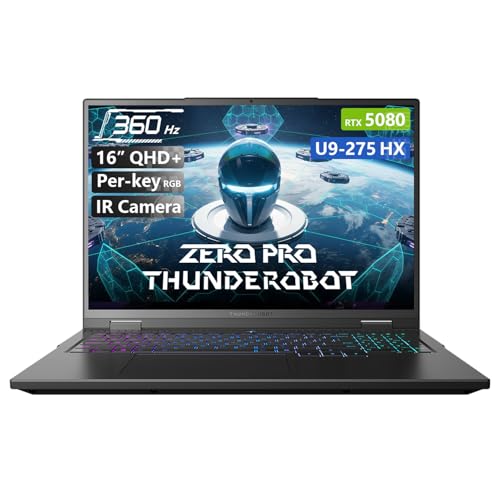
Pros
- Top-tier gaming and creative performance with RTX 5080 and Core Ultra 9
- High-refresh 360Hz QHD+ display with eye-care technology
- Massive 64GB DDR5 RAM and 2TB SSD for heavy multitasking
- Excellent cooling system for sustained high-performance gaming
- Robust build quality with extreme durability tests passed
Cons
- Premium price point around $2700 may be steep for budget-conscious gamers
- Heavier at 5.62 lbs, less portable than some ultrabooks
- Limited to 0 reviews currently, so real-world feedback is not yet available
The Thunderobot Zero 16 Pro is a high-end gaming laptop designed for serious PC gamers, competitive esports players, streamers, and content creators who need uncompromised performance. Under the hood, it pairs the latest GeForce RTX 5080 graphics with an Intel Core Ultra 9 275HX processor - a combination that handles AAA titles at max settings and accelerates video rendering, 3D modeling, and live streaming without breaking a sweat.
For competitive gaming, the 16-inch QHD+ 360Hz display is a standout feature. The ultra-fast refresh rate and 2.5K resolution deliver silky-smooth motion and crisp visuals, which can give you an edge in fast-paced shooters like Valorant or Apex Legends. The bionic eye-care technology also reduces strain during long sessions, making it a smart pick for streamers and work-from-home gamers who spend hours in front of the screen.
The sheer amount of RAM - 64GB of DDR5 - and a 2TB PCIe SSD mean you can keep dozens of browser tabs open, run resource-heavy applications, and load massive game worlds in seconds. This makes the Zero 16 Pro a versatile tool not just for gaming but also for content creation and college workloads like video editing or programming.
Build quality is a focus here. According to the product specs, the laptop has passed extensive durability tests including 180G impacts, 74cm drops, and 20kg screen pressure. The cooling solution uses dual Night Owl fans and seven heat pipes across a large 163,000mm² thermal surface, which helps maintain stable clock speeds during intense gaming without excessive noise. The laptop's chassis feels solid, and the per-key RGB backlighting adds a customizable aesthetic for RGB enthusiasts.
Setup is straightforward out of the box - Windows 11 Home comes pre-installed, and the backlit keyboard with numeric keypad is ready for gaming. Connectivity is generous with three USB-A ports, USB-C, HDMI, RJ-45, and Wi-Fi 6E for fast wireless networking. One limitation is the weight - at 5.62 pounds, it's not the lightest for frequent travel, but it's reasonable for a desktop replacement. Also, the lack of user reviews yet means you're relying on specs rather than real-world feedback.
Overall, the Thunderobot Zero 16 Pro is a top-tier gaming laptop that excels in raw power, display quality, and durability. It's best suited for competitive gamers, streamers, and creators who need a future-proof machine and have the budget. If you value high refresh rates, ample RAM, and reliable cooling, this laptop should be on your shortlist for a premium gaming rig that doubles as a workstation.
The Thunderobot Zero 16 Pro is built for gaming at the highest level. The GeForce RTX 5080 GPU and Intel Core Ultra 9 275HX processor deliver exceptional frame rates in modern titles, supporting ray tracing and DLSS for visually rich experiences. The 360Hz display ensures every frame is rendered smoothly, which is crucial for competitive shooters and racing games. With 64GB of DDR5 RAM, there's no bottleneck when multitasking between a game, Discord, and streaming software. The cooling system keeps thermal throttling at bay, allowing sustained performance during long gaming marathons.
Thunderobot claims the Zero 16 Pro is engineered to extreme standards. It has passed tests for 180G impacts, 74cm drops, and 20kg screen pressure, along with environmental resilience from -20°C to 60°C. The keyboard is rated for 200K clicks, and the power button for 40K presses. This level of durability is rare in gaming laptops and gives confidence for gamers who travel or use their rig in demanding conditions. The chassis feels premium with a black finish and minimal flex, and the per-key RGB adds a custom flair without feeling cheap.
Frequently Asked Questions About Is Gaming Laptop Worth It
nnnnDoes a gaming laptop overheat faster than a desktop?
nnnnYes, generally. Gaming laptops have limited chassis space for cooling. Models like the Thunderobot Zero Pro use dual fans and multiple heat pipes to manage 270W of heat, but sustained loads can still cause thermal throttling. Desktops with larger cases and liquid cooling dissipate heat more efficiently.
nnnnIs a gaming laptop worth it for esports in 2026?
nnnnYes, if you pick one with a high refresh rate display (144Hz or more) and a capable GPU. The MSI Thin A15 with RTX 3050 and 144Hz panel handles competitive titles like Valorant and CS2 smoothly. However, for the lowest input lag, a desktop with a high-end GPU remains the gold standard.
nnnnCan I upgrade RAM and storage on a gaming laptop?
nnnnIt depends on the model. Many gaming laptops like the NIMO 17.3″ allow RAM and SSD upgrades. Others have soldered memory. Always check the product specs. The HP Victus and ASUS TUF Gaming A15 typically support user upgrades, but some ultra-thin designs may limit access.
nnnnHow long does a gaming laptop battery last during gameplay?
nnnnUsually 1 to 2 hours under load. Laptops with RTX 5070 or 5080 GPUs draw significant power, so battery life is short. For light use, some models can last 6-8 hours. If you need longer unplugged gaming, consider a laptop with a Radeon 780M integrated graphics like the NIMO models.
nnnnIs a gaming laptop worth it for content creation?
nnnnYes, especially with powerful CPUs like Intel Core Ultra 9 or AMD Ryzen 7 and ample RAM (32GB+). The Thunderobot Zero 16 Pro with 64GB DDR5 and RTX 5080 handles 4K video editing and 3D rendering well. Just ensure the display covers a wide color gamut.
nnnnDo gaming laptops have good build quality?
nnnnIt varies. The ASUS TUF Gaming A15 meets MIL-STD-810H standards for drops and vibration. The Thunderobot Zero boasts extreme reliability tests. Budget models often use plastic chassis that flex more. Check warranty and build specs before buying.
nnnnAre gaming laptops worth it if I already have a console?
nnnnIt depends on your needs. A gaming laptop offers PC-exclusive titles, higher frame rates in competitive games, and portability. For casual gaming on a couch, consoles are simpler. But if you want mods, free online play, and multitasking, a laptop adds flexibility.
n


Write Your Review
No reviews yet. Be the first to share your experience!