


Choosing the Right Chassis and Setup for Peak Performance
Thermal throttling and cramped interior space often turn an exciting PC upgrade into a frustrating bottleneck. Modern graphics cards and multi-core processors generate substantial heat, demanding chassis layouts with high volume ventilation and smart fan positioning. Selecting the best gaming desktop case ensures proper airflow across your motherboard, graphics card, and power supply while providing sufficient clearance for liquid cooling radiators. Many builders also struggle with managing messy cabling, which restricts thermal flow and complicates future component upgrades. If you are comparing complete builds rather than assembling individual parts, checking out top desktop picks under 1500 can help you evaluate factory thermal configurations.
Chassis designs today range from high-airflow mesh towers to dual tempered glass panoramic enclosures that showcase internal lighting. Builders who require portability or easy floor access also benefit from purpose-built accessories, such as heavy-duty rolling carrying cases and ventilated tower stands. The right gaming desktop chassis keeps components clean using magnetic dust filtration, while offering modular drive bays for storage expansion. Ensuring your selected tower supports your motherboard form factor, whether standard ATX, Micro-ATX, or back-connect designs, simplifies assembly and keeps your setup running reliably under heavy gaming workloads.

Pros
- Pre-installed PWM ARGB fans save time and money, with easy motherboard sync via 3-pin RGB header.
- Opening glass door simplifies dusting and hardware upgrades, making maintenance a breeze.
- Excellent airflow potential with mesh front and side-opening design that can improve cooling by up to 76%.
- Good value for the price, offering features usually found in more expensive cases.
Cons
- No included power supply or other components, which is standard but requires separate purchase.
- Vertical GPU mount may need an additional riser cable (not included).
- Glass side panel requires careful handling to avoid fingerprints or smudges during cleaning.
If you are building a fresh gaming PC or upgrading your current setup, the MUSETEX NN8 ATX mid-tower case immediately stands out for both its looks and smart design. This is a polygonal mesh computer case that comes with six pre-installed PWM ARGB fans, making it a strong contender for gamers and setup builders who want great airflow and vibrant lighting without extra hassle. The opening tempered glass side panel adds a unique convenience that many other cases in this price range simply don not offer.
This case is best suited for PC gamers, competitive gamers, casual gamers, streamers, and RGB enthusiasts who value both performance and aesthetics. The six fans are auto-adjustable speed PWM models, meaning they can ramp up when your system gets hot and quiet down during lighter use. If your motherboard has a 3-pin RGB header, you can control the lighting through software for millions of color combinations. This kind of out-of-the-box cooling setup is ideal for long gaming sessions in FPS, MOBA, or open-world titles where consistent temperatures matter for performance.
Build quality is a highlight here. The tempered glass side door swings open with a metal pull ring and magnetic closure, giving you instant access to your components for cleaning, cable management, or swapping out a GPU. The diamond mesh front panel not only looks sharp but also allows plenty of air intake. Internally, the NN8 offers generous space for cable organization and supports up to 5 SSDs plus 2 HDDs. You can also install a top 280mm radiator without worrying about RAM clearance, which is great for those planning liquid cooling.
Setup and day-to-day use are straightforward. The pre-installed fans and clear interior layout make initial assembly smooth, especially for first-time builders. Cleaning becomes easier too thanks to the side door you can simply open and dust the radiator or GPU fans. The only minor limitation is that the vertical GPU mount requires a separate riser cable if you want to show off your graphics card that way. Also, the glass panel can attract fingerprints, but that is typical for tempered glass cases.
For streaming and content creation, the NN8 provides reliable airflow to keep your CPU and GPU cool under load, which helps maintain stable frame rates and smooth encoding. The USB 3.0 ports on the front I/O panel are handy for quick file transfers. While this case does not include a power supply or other internals, its price point leaves room in your budget to choose your own components. Overall, the MUSETEX NN8 offers a compelling mix of style, cooling performance, and easy access that many gamers and PC builders will appreciate for a mid-range build.

Pros
- Exceptional modularity with FRAME system allows future upgrades to motherboard tray, I/O panel, and more.
- Excellent pre-installed RS ARGB fans with daisy-chainable PWM and Zero RPM mode for quiet operation.
- InfiniRail mounting system offers great flexibility in fan placement for optimized airflow.
- Clean cable management options with removable side panel that doubles as a cable cover or fan mount.
- High airflow design with 3D Y-pattern front panel and support for large radiators and fans.
Cons
- Modular panels and additional accessories may require extra purchases to fully utilize the FRAME system.
- Side panel fan mounting may reduce cable management space if used.
- ATX mid-tower size may be larger than some compact builds, requiring ample desk space.
The CORSAIR 4000D RS ARGB is a modular mid-tower ATX PC case that blends high airflow with a groundbreaking FRAME modular system. Designed for PC gamers, streamers, and gaming setup builders, this case allows you to swap out components like the motherboard tray or front I/O panel, so your build can evolve over time without needing a whole new case.
Performance-wise, the 4000D RS comes with three pre-installed CORSAIR RS ARGB PWM fans, each with eight LEDs and daisy-chainable 4-pin PWM connectors. These fans support Zero RPM mode for near-silent operation during light loads, making them perfect for long gaming sessions or late-night streaming. The InfiniRail fan mounting system lets you slide fans anywhere along the rail in the front and roof, accommodating up to 200mm fans in front and 140mm on top for targeted cooling where you need it most.
Build quality is solid with a steel frame and a 3D Y-pattern airflow front panel that minimizes resistance while keeping dust out. The internal side panel near the motherboard tray is a versatile touch: use it as a clean cable cover for a tidy look, or remove it to mount additional fans or radiators for extra cooling potential. This flexibility is a boon for RGB enthusiasts and competitive gamers who want to balance aesthetics with thermal performance.
Setup is straightforward thanks to the modular design. The InfiniRail system makes fan installation tool-free in many cases, and the spacious interior leaves plenty of room for cable management behind the motherboard tray. Support for ASUS BTF, MSI Zero, and Gigabyte Stealth motherboards means you can build a nearly cable-free front side if you choose those models, which is a dream for clean desk setups.
One realistic limitation: to fully leverage the FRAME system's upgrade paths (like a billet aluminum motherboard tray or extra USB ports), you'll need to purchase those modules separately, which adds cost over time. Also, while the case is mid-tower, it's on the larger side, so ensure your desk or gaming space can accommodate its 19.2-inch height and 9.4-inch width.
Overall, the CORSAIR 4000D RS ARGB is a forward-thinking choice for anyone who loves to tweak their PC build. It's especially recommended for streamers, content creators, and PC gamers who value airflow, customization, and a case that can adapt to future hardware trends. If you're building a new rig or upgrading an existing one, this case delivers both performance and longevity.
The CORSAIR 4000D RS ARGB is built for high airflow straight out of the box. The steel front panel uses a 3D Y-pattern that creates a low-restriction path for cool air to reach your components, while the three pre-installed RS ARGB PWM fans handle intake with authority. Each fan spins up to 200mm in the front (or 140mm in the roof) thanks to the InfiniRail system, giving you precise control over your cooling setup.
The fans themselves feature eight individually addressable RGB LEDs and support Zero RPM mode, so they stop spinning under low loads for near-silent operation - ideal for quiet gaming or recording. With daisy-chainable 4-pin PWM, you can sync fan speeds across multiple units easily. For liquid cooling, the case accommodates radiators up to 360mm in the front and 280mm in the roof, making it compatible with most AIO coolers. The removable side panel also lets you mount additional fans for even more directed airflow, perfect for high-end GPUs or CPUs during extended gaming sessions.
Cable management is a strong point of the CORSAIR 4000D RS ARGB. The motherboard tray features a removable side panel that serves dual duty: it can cover cables for a clean, professional look, or be removed entirely to mount fans or radiators for improved cooling. The spacious chamber behind the tray provides ample room for routing cables, with plenty of Velcro straps and rubber grommets to keep everything organized.
For users opting for ASUS BTF, MSI Zero, or Gigabyte Stealth motherboards, the case supports hidden connectors that route cables through the back, leaving the front nearly cable-free. This is a huge plus for streamers and RGB enthusiasts who want a pristine desk setup. The InfiniRail system also keeps fan wires tidy by allowing you to clip them along the rail. Overall, this case makes building a clean, airflow-optimized PC easier than most mid-tower options.


Pros
- Sturdy metal and PS construction supports up to 88 lbs without wobbling.
- Adjustable width accommodates a wide range of PC tower sizes.
- Locking casters provide easy mobility and secure placement.
- Ventilated base improves airflow and cooling for bottom-PSU cases.
- Tool-free assembly saves time and effort.
Cons
- Width adjustment may require loosening and retightening bolts, which could be slightly tedious for frequent changes.
- The plastic base, while durable, may not feel as premium as all-metal alternatives.
- Some users might prefer a taller stand for additional clearance underneath.
The Hovadova Adjustable Mobile CPU Stand is a practical and budget-friendly accessory designed to keep your PC tower off the floor, improving airflow and protecting it from dust, spills, and carpet fibers. This is an excellent solution for PC gamers, streamers, esports players, and content creators who want to maintain a clean and organized gaming setup without breaking the bank. It's also a great fit for college gamers and work-from-home users who need a versatile, space-saving stand for their desk or floor area.
Performance-wise, this stand focuses on practicality and cooling rather than flashy features. The ventilated base is a smart design choice for towers with bottom-mounted power supplies, as it allows for better heat dissipation and airflow. While it won't directly boost your gaming performance, it helps maintain lower internal temperatures during long sessions, which can improve component longevity and reduce the risk of thermal throttling. The smooth-rolling casters make it easy to move your tower for cleaning or cable management, and the locking mechanism keeps it securely in place when you're in the middle of a competitive match.
Build quality is solid for the price point, using heavy-duty metal steel pipes and an upgraded PS panel that feels sturdy and reliable. The stand supports up to 88 lbs, which covers most standard gaming towers, and the dual guardrails prevent your PC from slipping or falling during movement. The adjustable width feature is a nice touch, accommodating cases from 7.87 to 11.81 inches wide, making it compatible with everything from compact ITX builds to full ATX towers. Assembly is completely tool-free and takes just a few minutes, which is a big plus for gamers who want to get back to gaming quickly.
In terms of comfort and convenience, the stand elevates your PC to a more accessible height, reducing the need to bend down to reach ports or power buttons. This is especially helpful for desk setups where the tower sits on the floor, as it also helps keep cables organized and reduces clutter. The casters glide smoothly over hard floors and low-pile carpet, though they may not perform as well on thick carpet. The locking wheels are reliable and hold the stand firmly in place during use.
One realistic limitation is that the stand's width adjustment involves loosening and tightening bolts, which isn't something you'll want to do frequently if you swap cases often. Also, while the plastic base is durable, it doesn't have the premium feel of an all-metal stand. Some users might prefer a taller design for even more clearance, but the 2.8-inch height is sufficient for most setups. Overall, this stand offers great value for its price, and user reviews consistently praise its ease of assembly and stable performance.
For PC gamers, streamers, or anyone building a gaming setup on a budget, the Hovadova Adjustable Mobile CPU Stand is a reliable choice that addresses common issues like dust buildup and poor airflow. It's easy to set up, fits a wide range of towers, and adds a layer of protection and organization to your gaming space. Whether you're a competitive gamer needing quick access to your ports or a casual user looking to keep your desk tidy, this stand delivers solid functionality without any unnecessary frills.

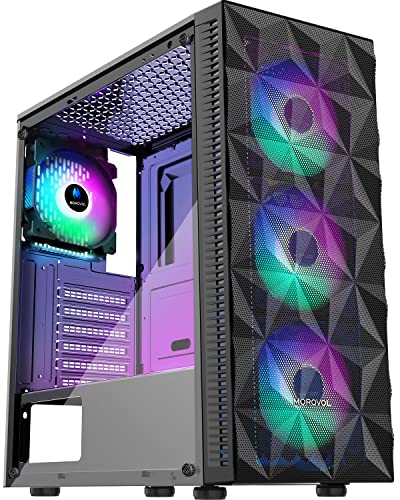
Pros
- Excellent value with four included RGB fans
- Good airflow design with mesh front
- Tempered glass side panel for aesthetics
- Supports multiple motherboard sizes
- Cost-effective for entry-level gaming builds
Cons
- RGB lighting is fixed, not addressable (no customization)
- CPU cooler height limited to 155mm may restrict some air coolers
- No included fan hub or PWM splitter; fans may run at full speed
The MOROVOL 621-N4 is a mid-tower ATX PC case that aims to deliver solid cooling and a clean aesthetic without breaking the bank. It comes pre-installed with four 120mm RGB fans, a diamond-shaped mesh front panel, and a tempered glass side window. This combination makes it an appealing option for PC gamers, gaming setup builders, and budget-conscious enthusiasts looking for a straightforward case that includes fans out of the box.
This case is best suited for first-time builders, casual gamers, or anyone assembling an entry-level to mid-range gaming PC. Its support for ATX, Micro-ATX, and Mini-ITX motherboards provides flexibility, while the 300mm GPU clearance fits most modern graphics cards. Streamers or esports players on a tight budget might also appreciate the low upfront cost, though they should note the fixed RGB lighting lacks the customization of addressable fans.
In terms of performance, the mesh front panel allows for good airflow, helping to keep components cool during extended gaming sessions. However, the pre-installed fans are non-PWM and run at a constant speed, which may result in higher noise levels than controllable fans. The fixed RGB lighting adds a dash of color but cannot be synced with other RGB components. According to product specifications, the CPU cooler height limit of 155mm may restrict some larger air coolers, so users should check compatibility.
Build quality is decent for the price point. The tempered glass panel feels sturdy and offers a clear view of the interior, making it easy to show off your components. The I/O panel includes one USB 3.0 port, two USB 2.0 ports, and HD audio jacks - convenient for connecting peripherals. Cable management space is adequate, though not generous; some user feedback suggests routing cables neatly may require patience, especially with non-modular power supplies.
Setup is straightforward thanks to the pre-installed fans and removable side panel. Cleaning the mesh front periodically is recommended to maintain airflow. A realistic limitation is the inability to control fan speeds or RGB patterns, which may disappoint those seeking a fully customizable setup. Overall, the MOROVOL 621-N4 is a practical choice for gamers and builders who want a functional case with included RGB fans at a very low cost, but it is not ideal for enthusiasts demanding advanced features like addressable lighting or fan control.

Pros
- Generous padding absorbs shock and vibration during transit.
- Plenty of pockets for peripherals and accessories.
- Comfortable to carry with padded backpack straps and chest clip.
- Fits most standard ATX and M-ATX cases.
Cons
- No handle for top carrying; backpack straps only, which may be less convenient for short trips.
- May be too large for mini-ITX or small form factor cases, leaving extra space.
- Exterior lacks water-resistant coating for rain protection.
If you regularly move your gaming desktop between dorms, LAN parties, or even on a plane, the Wigojoy computer desktop tower carrying case is a practical accessory to consider. This bag is designed specifically for transporting ATX and M-ATX tower cases, with thick padding and multiple compartments to keep your entire setup safe and organized. It's a solid choice for PC gamers who want to avoid the hassle of awkwardly carrying a bare tower or using flimsy boxes.
The build quality focuses on protection: the high-density 5mm EPE inner lining absorbs shocks, while the 600D Oxford cloth outer layer resists tears and abrasions. The bag comes with padded shoulder straps and a releasable chest strap to stabilize the load, making it much easier to carry a heavy PC than a suitcase-style handle. For gamers moving frequently, this design reduces fatigue and keeps your gear secure.
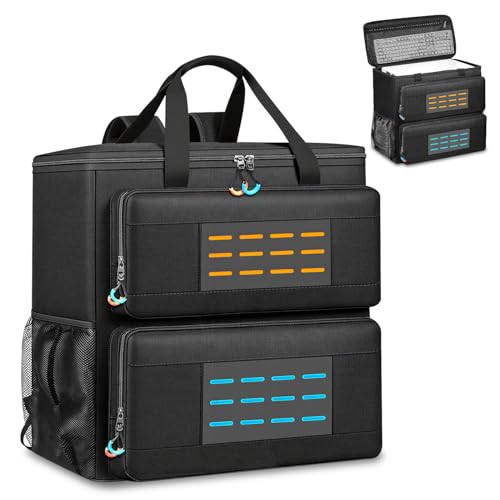
Storage is well thought out. The main compartment fits most standard-sized towers, and you can also tuck in a GPU or radiator if you remove them. Three front zippered pockets include a bottom one for a keyboard, a top-left with elastic straps for cables, and a fleece-lined right pocket for a mouse or power bank. Two side mesh pockets hold water bottles, and an interior mesh pocket offers extra space for smaller accessories. This layout means you can carry everything you need for a gaming session in one bag.
Using the bag is straightforward: just unzip the main compartment, slide your tower in, and zip it up. The padding ensures a snug fit, but if your case is on the smaller side, you might have some empty space. The backpack straps are comfortable for longer walks, though there's no top handle for quick grabs. Also, the material isn't waterproof, so you'll want to avoid heavy rain or use an additional cover.
Overall, this case is a good investment for PC gamers who need to move their tower frequently. It's especially useful for college students moving into dorms, competitive gamers attending LAN events, or anyone who travels with their gaming rig. While it might be oversized for small form factor builds, for standard ATX and M-ATX users, the protection and storage features offer real convenience at a reasonable price.
Pros
- Excellent shock protection with thick EPE foam padding
- Multiple specialized pockets keep peripherals secure and organized
- Durable 600D Oxford fabric withstands regular transport and minor abrasions
- Comfortable carry system with padded straps and chest strap for stability
- Compatible with most standard ATX and Micro-ATX towers (check dimensions)
Cons
- Interior dimensions may not fit larger full-tower or custom water-cooled cases
- Not fully waterproof - rain or spills could damage contents without a rain cover
- The bag can become heavy when fully loaded with a desktop and peripherals
The BVOMVEN Computer Desktop Tower Carrying Case is a specialized backpack designed for PC gamers, esports players, and streamers who need to move their desktop rig safely. It's built to hold your main tower alongside a keyboard, mouse, and cables in one organized, padded package.
This case is best suited for gamers who attend LAN parties, local tournaments, or need to transport their setup between home and a dorm room. It offers solid protection with an 8mm EPE foam interior that absorbs shocks and a rugged 600D Oxford exterior that resists tears and dust. The main compartment fits ATX and Micro-ATX towers up to 19.7 inches tall, so it works for most standard gaming cases.
In terms of real-world performance, the case keeps your PC secure during car rides or short walks. The padding is thick enough to guard against minor bumps, and the multiple pockets let you store peripherals like a mechanical keyboard, gaming mouse, and cables without them rattling around. It also includes side mesh pockets for a water bottle or accessories, which adds to its practicality for all-day events.
Build quality is a strong point. The Oxford fabric feels durable, and the zippers are sturdy enough for regular use. The interior foam is well-placed around the sides and bottom to protect your tower's components. The adjustable shoulder straps and chest strap make carrying a heavy load more comfortable, though the bag can get heavy once fully packed.
Setup is straightforward: you simply place your tower in the main compartment, zip up the keyboard sleeve, and tuck your mouse and cables into the designated pouches. There's no software or assembly required. However, you must check your tower's dimensions before purchase, as larger full-tower cases or those with extreme water-cooling setups may not fit.
Overall, the BVOMVEN carrying case is a practical investment for any gamer who moves their desktop regularly. It offers reliable protection, smart organization, and comfortable carry at a reasonable price. If you're a competitive player traveling to events or a college gamer moving between semesters, this bag can save you hassle and peace of mind.


Pros
- Exceptional value with 7 pre-installed PWM ARGB fans
- Stunning 270-degree dual tempered glass panel
- Includes Type-C port for modern connectivity
- Excellent cooling potential with expandable fan support up to 10
Cons
- Case width of 8.35 inches may be too wide for smaller desks
- No included radiator support specifications; liquid cooling clearance may require careful planning
- Cable management depth behind motherboard tray could be tighter for extensive builds
The MUSETEX K2 is a mid tower ATX PC case that comes ready to impress straight out of the box. With seven pre-installed PWM ARGB fans and a striking 270-degree dual tempered glass panel, this case is built for gamers and PC builders who want both performance and visual flair. Whether you're assembling a high-end gaming rig, a streaming powerhouse, or a RGB-lit showpiece, the K2 aims to deliver a balanced experience without breaking the bank.
Cooling is a clear priority here. The three side-mounted fans draw in fresh air directly onto the GPU and CPU area, while three top fans and one rear fan exhaust heat efficiently. All seven fans are PWM controlled and ARGB enabled, so you can sync lighting effects and adjust fan speeds through your motherboard software. The case also supports up to 10 fans total, giving you room to expand if needed. Magnetic dust filters on the top and bottom keep dust out while maintaining airflow, which is a thoughtful touch for long-term maintenance.
The dual tempered glass panels are the visual centerpiece. The front and left side are seamless glass, offering a clear view of your components from nearly any angle. The interior layout is clean and spacious, with plenty of room for large graphics cards and CPU coolers. Build quality is solid, with a sturdy steel frame and glass panels that feel secure. The included Type-C port on the I/O panel is a welcome addition for modern peripherals, alongside two USB 3.0 ports and audio jacks.
Setting up a build in the K2 is straightforward. The case fits ATX, Micro-ATX, and Mini-ITX motherboards, and the power supply shroud helps with cable management. There are grommets and tie-down points to route cables neatly, though the space behind the motherboard tray is a bit tight if you have many cables. The pre-installed fans already have their cables daisy-chained, which simplifies connection to the motherboard. Overall, installation should be smooth for builders with some experience.
One realistic limitation is the case width. At 8.35 inches wide, it's wider than many standard mid towers, so make sure your desk or shelf can accommodate it. Additionally, the manual doesn't specify exact radiator support dimensions, so if you plan to use a liquid cooling system, double-check the clearance before buying. The cable management area could also be deeper for very complex builds with lots of RGB controllers.
Overall, the MUSETEX K2 is a strong contender for budget-conscious PC gamers and RGB enthusiasts who want a ready-to-go cooling solution with great looks. It's especially suited for first-time builders looking to avoid the hassle of buying and installing fans separately, and for anyone who wants a clear view of their components. If you can work within its size constraints and plan your cooling setup accordingly, this case offers excellent value for a modern gaming PC build.
The MUSETEX K2 comes with seven pre-installed PWM ARGB fans that are strategically placed for balanced airflow. Three side fans act as intakes, pulling fresh air directly over the GPU and motherboard area, while three top fans and one rear fan exhaust hot air out. This positive pressure setup helps reduce dust accumulation when used with the included magnetic dust filters. All fans are PWM controllable, allowing you to fine-tune speeds for noise or performance. The case also supports up to three additional fans (two top and one rear) if you need extra cooling for high-end components.
Airflow is further enhanced by the side panel ventilation apertures, which allow the side fans to draw air efficiently. The top and bottom magnetic dust filters are easy to remove and clean, keeping maintenance simple. The case does not include a dedicated PSU shroud fan mount, but the power supply area has its own intake from the bottom filter. For most gaming builds, the stock fan configuration should provide adequate cooling. If you're pushing overclocked hardware or a high-TDP GPU, you may want to consider adding a rear exhaust fan (the included one is already there) or upgrading to a liquid cooler, though clearance for radiators should be measured carefully.
The MUSETEX K2 features a steel chassis with two tempered glass panels on the front and left side, creating a panoramic view of your components. The glass is tinted slightly dark, which complements RGB lighting nicely. The frame feels sturdy and supports standard ATX, Micro-ATX, and Mini-ITX motherboards. The I/O panel includes a Type-C port, two USB 3.0 ports, and audio jacks, all mounted on the top front for easy access. The power and reset buttons are tactile and responsive.
Inside, the layout is clean with a PSU shroud that hides cables and drives. There are two 2.5-inch SSD mounts on the shroud and one 3.5-inch HDD cage in the bottom. Cable management openings are well-placed, with Velcro straps to secure bundles. The pre-installed fans use daisy-chained connectors, simplifying cable routing. The only drawback is that the space behind the motherboard tray is limited, so thick cable bundles may bulge a bit against the side panel. Overall, the design focuses on aesthetics and ease of installation for a mid-range price point.
Frequently Asked Questions
What features define the best gaming desktop case in 2026?
Proper airflow design and component clearance are the most critical features in a gaming chassis. Look for mesh front panels, pre-installed PWM ARGB fans, and dedicated mounting rails that support multi-fan setups or radiators. Spacious mid-tower cases also provide room for long graphics cards, multiple SSD and HDD storage drives, and convenient front-panel I/O ports like USB 3.0 or Type-C.
How does motherboard form factor affect PC case compatibility?
Your chassis must match or exceed your motherboard dimensions to ensure screw standoffs and rear ports align correctly. Most mid-tower cases support standard ATX, Micro-ATX, and Mini-ITX boards, while select modern chassis also accommodate back-connect motherboards that route cables behind the tray. Verifying motherboard specifications prevents installation clearance issues with your power supply and expansion cards.
Are pre-installed case fans sufficient for high-end gaming hardware?
Pre-installed fans often provide enough baseline airflow for mid-range gaming builds, but power-heavy components benefit from additional intake and exhaust. Models equipped with four to seven PWM fans offer strong out-of-the-box cooling and speed control. If you prefer a completely assembled system with balanced cooling rather than building from scratch, reviewing prebuilt gaming desktop rigs provides a helpful benchmark for component integration.
Why should a desktop tower be elevated off carpeted floors?
Placing a PC tower directly on carpet restricts bottom power supply intake fans and draws in dust and carpet fibers. Using an adjustable mobile CPU stand with a perforated base elevates the chassis, improving lower ventilation and reducing dust accumulation. Elevated stands with locking caster wheels also make cable adjustments and port access much easier.
How do you safely transport a gaming desktop tower to LAN events or moves?
Padded carrying bags made with heavy-duty Oxford cloth and thick shock-absorbing foam protect your tempered glass and chassis frame during travel. Specialized PC backpacks and rolling tower cases feature dedicated storage compartments for keyboards, mice, and power cords. Securing the case upright and removing heavy graphics cards before long trips helps prevent internal slot damage from road vibration.






Write Your Review
No reviews yet. Be the first to share your experience!