


Hardware bottlenecks often stall a gaming rig before it ever hits peak frame rates. When an underpowered power supply or slow system memory pairs with a flagship graphics card, performance drops quickly. Upgrading to the best gaming desktop parts gives your desktop computer the balance it needs for demanding titles and heavy multitasking. You don’t want a single mismatched component choking your system during intense matches. Builders seeking a versatile setup can also review our guide on the best desktop for streaming and gaming to see how balanced builds handle simultaneous rendering and gameplay.
Processor speed, dedicated GPU memory, and reliable liquid cooling dictate how consistently your PC handles sustained gaming sessions without thermal throttling. Modern prebuilt systems and modular components now provide ATX 3.1 power compliance, PCIe 5.1 architecture, and multi-fan airflow chambers that keep hardware cool under load. Checking key specifications such as DDR5 frequencies, GPU physical clearance, and total wattage avoids expensive component mismatches. Selecting high-quality core hardware ensures your desktop PC remains dependable, quiet, and ready for future component swaps.

Pros
- Excellent overclocking headroom with hand-screened ICs and eight-layer PCB
- Low-profile design avoids clearance issues with large air coolers or small cases
- Efficient aluminum heatspreader keeps temperatures in check during long gaming sessions
- Broad compatibility tested on Intel 300-500 series and AMD DDR4 motherboards
- XMP 2.0 makes setup effortless for instant 3200MHz performance
Cons
- No RGB lighting, which may disappoint gamers seeking customizable aesthetics
- Premium pricing compared to some budget DDR4 kits with similar specs
- CL16 timings are decent but not the tightest available for extreme overclockers
The Corsair Vengeance LPX 32GB (2x16GB) DDR4 3200MHz kit is a high-performance memory solution tailored for PC gamers, esports competitors, streamers, and content creators who demand reliable speed and stability. This kit uses hand-sorted integrated circuits on a custom eight-layer PCB, ensuring consistent signal quality and generous overclocking headroom. Whether you are building a new gaming rig or upgrading an existing DDR4 system, this RAM is designed to keep up with the latest games and multitasking demands.
For competitive gamers and streamers, low latency and fast data transfer are crucial. The 3200MHz speed at CL16-20-20-38 offers a solid balance of responsiveness and bandwidth, reducing load times and improving frame pacing in CPU-bound scenarios. The low-profile 34mm height is a standout feature - it fits comfortably under large air coolers and in compact cases, making it a versatile choice for both full-tower and small-form-factor builds. The pure aluminum heatspreader effectively pulls heat away from the memory chips, keeping temperatures manageable during marathon gaming sessions or heavy rendering tasks.
Build quality is impressive. Corsair's rigorous compatibility testing covers a wide range of Intel and AMD motherboards, so you can expect hassle-free installation. The XMP 2.0 profile allows for one-click overclocking to the rated speed, which is especially convenient for gamers who want peak performance without manual voltage or timing adjustments. The eight-layer PCB also contributes to superior overclocking stability, meaning you can push the kit further if your CPU and motherboard allow.
Setup is straightforward - install the modules in the correct DIMM slots, enable XMP in the BIOS, and you are ready to game. The black heatspreaders blend into most builds, though Corsair also offers other colors if you want to coordinate your system's theme. One realistic limitation is the lack of RGB lighting; if you are building a flashy RGB showcase, this kit may not satisfy that desire. However, for performance-focused builders and those with limited space, the trade-off is worth it.
In practical use, this RAM excels in games like Call of Duty, Fortnite, and demanding open-world titles where high memory bandwidth reduces stutter. It also handles streaming and video editing well, allowing for smooth multitasking between OBS, Discord, and a game. The 32GB capacity provides headroom for future game requirements and heavy mods.
Overall, the Corsair Vengeance LPX 32GB DDR4 3200MHz kit is a reliable, high-performance upgrade for PC gamers and streamers who prioritize speed, stability, and compatibility over flashy aesthetics. It works well in esports rigs, casual gaming setups, and content creation workstations. If you need a straightforward, tested memory kit that delivers consistent performance without clearance issues, this is a strong choice.

Pros
- Full modular cabling makes cable management a breeze for clean gaming setups
- ATX 3.1 and PCIe 5.1 ready for modern graphics cards and future-proofing
- Eco mode reduces fan noise during casual gaming or desktop use
- Compact dimensions fit in most mid-tower and small form factor cases
- 10-year warranty reflects high build confidence and durability
Cons
- Pink color may not suit all gaming setups or themes
- Only 1000W capacity, which might be overkill for mid-range builds but ideal for high-end systems
- No included cable combs or custom sleeved cables; aftermarket options may be needed for perfect aesthetics
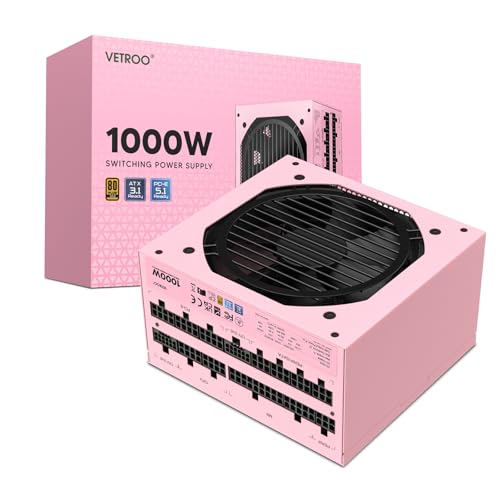
The Vetroo 1000W Pink Power Supply is a fully modular ATX 3.1 unit that combines reliable 80 Plus Gold efficiency with a compact form factor and a striking pink finish. This PSU is designed for PC gamers, streaming enthusiasts, esports players, and gaming setup builders who want both performance and aesthetics. Its 1000W capacity handles high-end GPUs and CPUs while the full modular design keeps cable clutter to a minimum, making it a great choice for tidy desk setups and RGB-heavy builds.
For competitive gamers and content creators, stable power delivery is critical. The Vetroo 1000W uses premium 105°C capacitors and meets the latest ATX 3.1 and PCIe 5.1 standards, ensuring compatibility with modern graphics cards like the RTX 40-series. The 120mm FDB fan operates quietly, and the Eco mode further reduces noise during less demanding tasks, so you can focus on gameplay or streaming without distraction. The 80 Plus Gold certification means up to 90% efficiency under typical loads, which helps lower electricity costs during long sessions.
Build quality is solid with a compact chassis measuring 5.9 x 5.5 x 3.4 inches, fitting easily into most mid-tower and even some small form factor cases. The pink color is vibrant and adds a unique touch to any gaming setup, especially for builders creating a coordinated theme. The full modular cabling includes all essential connectors (24-pin, CPU, PCIe, SATA, etc.) and allows you to use only what you need, reducing cable bulk and improving airflow for better cooling performance.
Setting up the Vetroo 1000W is straightforward thanks to clear labeling on the modular ports and included cables. The compact size also simplifies cable routing, especially in cases with limited space. While the PSU does not come with custom sleeved cables or combs, aftermarket options are widely available for those seeking a cleaner look. The 10-year warranty adds long-term value and confidence, making it a practical choice for dedicated PC builders and gamers who plan to keep their system for years.
A realistic limitation is the pink color itself – it may not fit every setup theme. Also, the 1000W rating is more than enough for most high-end builds but might be overkill for budget or mid-range systems. Overall, the Vetroo 1000W Pink Power Supply is a strong contender for gamers and streamers who prioritize aesthetic customization, reliable performance, and future-proofing in a compact, well-built package.
The Vetroo 1000W Pink PSU features a compact steel chassis with a durable powder-coated pink finish that resists scratches. Internal components include premium 105°C rated Japanese capacitors and a 120mm fluid dynamic bearing (FDB) fan for quiet, long-lasting operation. The full modular interface uses reinforced connectors that feel secure during cable attachment. The 10-year warranty indicates strong confidence in the unit's longevity and build reliability.
This power supply is ATX 3.1 compliant and PCIe 5.1 ready, natively supporting the latest GPU power requirements. It is backward compatible with PCIe 4.0 and 3.0 components. The compact dimensions (5.9 x 5.5 x 3.4 inches) fit most ATX and micro-ATX cases. All essential cables are included: 24-pin motherboard, dual 4+4 CPU, three 6+2 PCIe, four SATA, and three Molex. Ensure your case has sufficient clearance for modular connectors when routing cables.

Pros
- Top-tier 4K gaming performance with RTX 5080 and Ryzen 7 9850X3D for ultra settings
- Ample 32GB DDR5 RAM and 2TB NVMe SSD for seamless multitasking and fast load times
- Effective 360mm AIO liquid cooling for sustained performance during long sessions
- Clean, bloatware-free Windows 11 installation and free gaming keyboard and mouse included
Cons
- Wi-Fi 5 instead of Wi-Fi 6 or 6E may be a limitation for some users seeking latest wireless standards
- Limited USB port configuration; additional ports may vary which could require extra adapters
- Premium pricing at nearly $3700 may be out of reach for budget-conscious gamers
The Skytech Gaming King 95 is a prebuilt gaming desktop that packs serious hardware for anyone who demands top-tier performance. It’s powered by an AMD Ryzen 7 9850X3D processor and an NVIDIA RTX 5080 with 16GB of GDDR7 VRAM, making it a beast for 4K gaming, streaming, and content creation. This PC is geared toward PC gamers who want to run the latest titles at ultra settings, esports players looking for smooth frame rates, and streamers who need reliable performance while broadcasting.
In real-world gaming, the King 95 handles demanding games like Cyberpunk 2077, Elden Ring, and Black Myth: Wukong at 4K ultra settings with 60+ FPS, offering buttery-smooth responsiveness. The 32GB of DDR5 6000 RAM and 2TB NVMe SSD ensure quick load times and seamless multitasking, whether you’re switching between games, Discord, and streaming software. The 360mm ARGB AIO cooler keeps the CPU cool under pressure, preventing thermal throttling during long gaming sessions or heavy rendering tasks.
Build quality is solid, with the King 95 case featuring tempered glass panels and ARGB fans that look great on any gaming desk. The included free gaming keyboard and mouse are basic but functional for getting started. Setup is straightforward: plug in, connect to Wi-Fi 5, and you’re ready to go. The system comes with no bloatware, so you won’t waste time uninstalling useless software.
One realistic limitation is the Wi-Fi 5 support, which isn’t the latest standard, but it’s still fine for most home networks. The USB port configuration may also vary, so you might need a hub for multiple peripherals. At around $3700, it’s a premium investment, but for the performance offered, it delivers strong value for high-end gamers and creators who don’t want to build their own PC.
Overall, the Skytech Gaming King 95 is a powerful prebuilt that excels at 4K gaming and multitasking. If you’re a U.S. gamer, streamer, or content creator looking for a ready-to-go system with top-tier components and effective cooling, this is a solid choice. Just be mindful of the Wi-Fi and port limitations, and consider if the price fits your budget.

Pros
- Excellent value with 6 ARGB fans and a Type-C port included at this price point.
- Great airflow potential with multiple intake and exhaust fan options pre-installed.
- Easy to build in with ample space for large GPUs and CPU coolers, plus clean cable routing.
- Stunning aesthetics with dual tempered glass panels that let RGB components shine.
Cons
- The dual glass panels can show fingerprints and smudges easily, requiring occasional cleaning.
- Cable management behind the motherboard tray may be tight for very thick cables.
- Some users may prefer a mesh front panel for maximum airflow over the glass design.
The MUSETEX K2 is a mid-tower ATX gaming PC case that aims to deliver a high-impact visual experience and solid cooling straight out of the box. It comes with six pre-installed PWM ARGB fans, a pair of tempered glass side panels, and a modern front I/O that includes a USB Type-C port. For anyone building a gaming desktop, streaming station, or a showpiece RGB setup, this case offers a lot of value at its price point.
Best suited for PC gamers, competitive and casual alike, as well as esports players, streamers, content creators, gaming setup builders, and RGB enthusiasts. The generous interior can handle powerful graphics cards up to 420mm long and CPU coolers up to 178mm tall, making it compatible with most mid-range to high-end gaming hardware. The six included fans ensure good airflow right away, with three side intake fans drawing cool air directly over the GPU and CPU area. The anti-vortex blades help maintain smooth airflow, and the fans are controllable via the motherboard, allowing you to fine-tune performance and noise for long gaming sessions or quiet work-from-home use.
Build quality is respectable for this price tier. The steel frame feels sturdy, and the dual tempered glass panels are thick and well-secured. The top and bottom dust filters are a thoughtful addition that helps keep the interior cleaner, reducing maintenance frequency. The case uses a clean, rectangular design that doesn't waste desk space, and the glass panels provide a 270-degree view of your components. That said, the glass does attract smudges, so keep a microfiber cloth handy if you want it looking pristine.
Setting up the K2 is straightforward, especially if you're familiar with standard ATX builds. The included fans are already wired and mounted, saving time and cable routing. There's decent space behind the motherboard tray for cable management, though very thick cables might feel snug. The front I/O panel offers two USB 3.0 ports, a Type-C port, audio jacks, and a reset button, which covers modern connectivity needs well.
A realistic limitation is that the front panel is glass rather than mesh, which can slightly restrict airflow compared to fully open mesh designs. However, the side intake fans compensate well, and for most gaming and streaming builds, cooling performance is more than adequate. Another minor point is that the case doesn't include a built-in fan controller, so you'll need a motherboard with enough fan headers or a separate hub to control all six fans independently.
Overall, the MUSETEX K2 is a strong recommendation for gamers and setup builders who want an attractive case with plenty of RGB, good airflow, and modern connectivity without spending extra on fans or lighting. It works great for a gaming PC, a streaming rig, or even a high-visibility desktop for content creation. If you prioritize a clean look, easy build, and effective cooling, this case deserves a spot on your shortlist.
The MUSETEX K2 comes with six pre-installed PWM ARGB fans: three on the side as intake, two on the top as exhaust, and one on the rear as exhaust. This configuration creates positive air pressure, which helps minimize dust buildup. The side intake design pulls cool air directly across the motherboard and GPU area, while the top exhaust works with the rear fan to expel hot air efficiently. The anti-vortex fan blades help keep airflow smooth and reduce turbulence noise. The top and bottom magnetic dust filters are easy to remove and clean, making maintenance simple. Overall, this setup provides very good cooling for mid-range to high-end gaming components, even during extended gaming sessions or streaming workloads.
The six pre-installed ARGB fans are compatible with most motherboard RGB software, such as ASUS Aura Sync, Gigabyte RGB Fusion, MSI Mystic Light, and ASRock Polychrome. This allows you to customize lighting effects and colors easily from your desktop. The dual tempered glass panels offer a nearly 270-degree view, making your RGB components the centerpiece of your setup. The fans themselves feature vibrant LEDs that deliver bright, smooth lighting without excessive hotspots. For those who prefer a more subtle look, you can turn off the lighting entirely via software or hardware control. The included RGB controller allows limited manual color and pattern changes if your motherboard lacks ARGB headers.


Pros
- Compact and flexible placement options save desk space while maintaining good sound projection
- Plug-and-play USB power and 3.5mm connection make setup effortless for any gaming or desktop setup
- Red backlit lighting matches gaming aesthetics without being overly flashy
- Volume knob with on/off switch and headphone jack add convenience for quick audio adjustments
Cons
- Bass is decent but not room-shaking - smaller drivers may lack depth for bass-heavy genres or competitive audio cues
- USB power limits maximum volume compared to wall-powered speakers
- 31-inch cable between left and right speakers can restrict placement options on wide desks
The Redragon GS550 is a compact 2.0 channel desktop soundbar aimed at gamers, streamers, and anyone who wants to upgrade their audio without taking up too much desk space. Designed with a unique maneuverable form factor, these speakers can be positioned individually on each side of your monitor or merged together into a single unit underneath, offering flexibility for different setups.
This soundbar is best suited for casual gamers, college students, work-from-home users, and RGB setup enthusiasts who prioritize desk space and simple connectivity. The red backlit LED adds a subtle gaming vibe that complements other Redragon gear or any red-themed setup. While it won't replace a dedicated surround sound system, it provides clear dialogue and decent bass for everyday gaming, streaming, and media consumption.
Performance-wise, the GS550 delivers reliable 2.0 channel stereo audio suitable for games like Fortnite, Minecraft, or strategy titles, as well as music and YouTube. The volume knob is tactile and responsive, doubling as an on/off switch, and the inclusion of a headphone jack and mic port makes switching between speakers and headsets a breeze. The USB-powered design means you can plug into any PC or laptop port without needing an extra power brick.
Build quality is typical for budget speakers - mostly plastic but sturdy enough for daily use. The compact dimensions (about 7.3 x 6.7 x 4.3 inches per speaker) and lightweight design (1.5 pounds total) make them easy to reposition or pack for LAN parties. The 31-inch cable between speakers is adequate for close-spaced setups but might limit placement on wider gaming desks.
Setting up the GS550 is truly plug-and-play: connect the USB for power, plug the 3.5mm audio cable into your device, and you're ready to go. No drivers, software, or complex configuration needed. However, users expecting deep bass or high volume for a large room may find the sound a bit lacking; these are best for close-range desktop listening.
Overall, the Redragon GS550 is a solid choice for budget-minded PC gamers, streamers, and casual users who value space efficiency and easy connectivity. If you need a simple audio upgrade for your gaming desk, dorm room, or home office without breaking the bank, these speakers deliver good value for the price.
The Redragon GS550 uses a 2.0 channel stereo core that provides clear mids and highs with moderate bass response. For casual gaming, video calls, and music, the sound is sufficient and balanced. The small speaker size means bass is present but not overpowering, making it more suitable for near-field listening. The dedicated volume knob allows fine-tuning, and the headphone jack lets you switch to private listening without unplugging.
The GS550 features Redragon's signature red LED backlit on the front of each speaker, adding a subtle glow that matches other red-themed gaming peripherals. The design is simple but practical with a matte black finish that blends into most setups. The unique ability to separate or merge the speakers gives users flexibility to fit their monitor layout.
Setup is incredibly straightforward: just connect the USB cable to a power source (like a PC or laptop USB port) and plug the 3.5mm audio cable into your device. No drivers or software are required. Compatible with Windows, Mac, and Linux computers, as well as TVs and other devices with a 3.5mm output. The 31-inch speaker-to-speaker cable allows for basic separation, but wider setups may need careful positioning.

Pros
- Integrated power outlets and USB ports reduce cable clutter and improve desk organization for gaming peripherals.
- Thick, sturdy desktop and metal frame provide solid support for heavy gaming monitors and equipment without sagging.
- Reversible layout allows flexible placement in corners or as a standalone station, ideal for evolving gaming setups.
- Easy assembly process with included tools and numbered parts saves time and frustration for gamers building their battle station.
Cons
- No built-in cable management channels or grommets, so you may need additional clips or sleeves to keep wires tidy.
- With zero user reviews at launch, long-term durability and finish quality are unverified despite promising specs.
- The 20-inch depth may feel shallow for dual monitor arms or large gaming peripherals; measure your gear beforehand.
The Huuger 63 Inch L Shaped Desk is designed for gamers, streamers, and remote workers who crave more workspace and convenient power access without crawling under the desk. This corner desk combines a thick, 0.95-inch desktop with a reinforced steel frame, offering a stable foundation for your gaming monitors, PC tower, and peripherals. With four AC outlets, one USB port, and one USB-C port built right into the desktop, you can charge your gaming headset, phone, laptop, or stream deck without reaching for a separate power strip.
This desk shines for PC gamers who need room for a multi-monitor setup or for streamers juggling a gaming rig, capture card, and lighting gear. The reversible L-shape means you can tuck it into a corner to save space or flip it for an open layout — perfect for a dual workstation if you pair two desks together. The thick, high-density surface resists scratches and spills, so accidental coffee drips during a late-night gaming session won't ruin your workspace. With a 220 lb weight capacity, it comfortably holds a gaming PC, dual monitors, and a heavy gaming chair without wobbling, thanks to the crossbars and adjustable feet.
In real-world use, the included power outlets and USB ports are a huge convenience for keeping your gaming mouse, keyboard, and stream deck charged while eliminating messy cables. The large legroom and angled shape give your elbows proper support during long competitive matches or creative projects. Assembly is straightforward with numbered parts and clear instructions — most users can put it together in under an hour. The rustic brown finish adds a warm, professional look that fits both gaming dens and home offices.
Build quality feels solid for the price point. The metal frame and thickened legs provide a stable platform, and the desktop’s waterproof coating means easy cleaning after snacks or spills. However, there are no built-in cable management grommets or trays, so you might need to invest in adhesive cable clips or a wire management basket to keep your gaming setup looking clean. The 20-inch depth is slightly shallower than some dedicated gaming desks, so measure your monitor arms and large mouse pad to ensure a comfortable fit.
Overall, this L-shaped desk is a practical choice for college gamers setting up their dorm, streamers building a multi-purpose station, or work-from-home gamers who need a versatile corner desk. It delivers a sturdy surface with integrated power, easy assembly, and a reversible design that adapts to your room layout. While the lack of cable management features and unverified long-term durability are minor drawbacks, the value and functionality make it a strong contender for any gaming setup builder.
Frequently Asked Questions
Which components matter most when upgrading a gaming desktop PC?
The graphics card and processor directly determine baseline gaming performance and resolution capabilities. Your graphics card renders complex visuals and maintains high frame rates, while the central processor handles game logic, physics, and background operations. High-speed memory and fast NVMe solid-state storage further eliminate stuttering by quickly feeding data to the core processors.
How much system memory do modern gaming desktop computers need?
A capacity of 32GB of RAM has become the sweet spot for modern desktop computers. While 16GB can handle older titles or lightweight esports games like those featured in our best gaming desktop for League of Legends overview, newer games consume substantially more memory. Stepping up to 32GB ensures seamless multitasking, eliminates background app bottlenecks, and supports demanding gaming sessions.
Why is power supply wattage and ATX standard compliance critical?
High-end graphics cards require stable voltage lines and surge handling to avoid abrupt system shutdowns. Modern power supplies compliant with ATX 3.1 and PCIe 5.1 standards feature dedicated connectors designed for higher wattage draws without adapters. Choosing a gold-rated unit with adequate headroom protects expensive processors and components during sudden load spikes.
What role does PC case airflow play in system stability?
Proper airflow actively prevents internal components from exceeding safe thermal thresholds and throttling clock speeds. Mid-tower cases featuring pre-installed PWM ARGB fans and vented chambers draw in cool air while expelling heat generated by liquid radiators and GPUs. Maintaining positive or neutral case pressure also minimizes internal dust buildup when combined with magnetic filters.
Is liquid cooling necessary for top-tier desktop processors in 2026?
Liquid cooling is generally recommended for high-wattage desktop processors like modern Ryzen or Intel Core chips. A 360mm all-in-one liquid cooler uses a dedicated radiator and pump to disperse heat faster than standard air heatsinks, so you won’t suffer from thermal throttling during marathon sessions. Budget-friendly processors run fine on basic air coolers, but unlocked chips maintain boost clocks longer under liquid setups.



Write Your Review
No reviews yet. Be the first to share your experience!