


Matching graphics hardware with system cooling remains a primary concern for PC buyers. Prebuilt towers often pair capable processors with entry-level video cards, leaving gamers unsure about real frame rates and thermal stability. Building the best gaming desktop setup requires evaluating how the processor, dedicated graphics card, memory, and case ventilation interact. Buyers also need to evaluate multi-tasking capacity, especially when looking at the best desktop for streaming and gaming alongside everyday computing.
Memory bandwidth and fast solid-state storage directly influence overall responsiveness. Entry builds often provide 16GB of RAM and 512GB SSDs, while higher-tier configurations deliver 32GB of DDR5 and multi-terabyte NVMe storage for fast load times. Connectivity is equally important when connecting high-refresh monitors and low-latency peripherals, whether you play esports via a high FPS gaming desktop or tackle daily tasks. Reviewing the listed ports and expansion slots helps ensure your setup stays versatile.

Pros
- Budget-friendly all-in-one gaming bundle with monitor and peripherals included.
- Fast Intel Core i7 processor and 16GB RAM handle multitasking and moderate gaming well.
- 512GB SSD ensures quick load times and a responsive system feel.
- RGB front panel adds customizable lighting to your desk setup without extra cost.
- Renewed unit offers good value with warranty coverage and professional testing.
Cons
- GT 1030 is a budget GPU that struggles with modern AAA titles at higher settings.
- 24-inch monitor likely has standard 60Hz refresh rate, not ideal for competitive esports.
- Limited upgrade potential due to proprietary Dell form factor and power supply.
The Dell Gaming OptiPlex Desktop RGB Computer PC is a renewed desktop bundle aimed at PC gamers who want an affordable way to get into gaming without building a custom rig from scratch. It comes equipped with an Intel Core i7 processor, GeForce GT 1030 graphics with 2GB GDDR5 VRAM, 16GB of DDR4 RAM, and a 512GB SSD. The package also includes a 24-inch HDMI monitor, a keyboard, mouse, and headset, making it a true plug-and-play solution for casual gaming, streaming, or everyday computing.
This system is best suited for casual gamers, college students, work-from-home professionals, or anyone looking for a budget-friendly entry into PC gaming. The Core i7 processor and 16GB of RAM provide snappy performance for multitasking, web browsing, and light productivity tasks. The GT 1030, while not a powerhouse, can handle popular esports titles like CS:GO and DOTA 2 at medium settings with decent frame rates, and it can run older or less demanding games smoothly. It is not designed for high-refresh-rate competitive play or AAA gaming at ultra settings.
In terms of real-world performance, the system boots quickly thanks to the 512GB SSD, and everyday tasks feel responsive. The included monitor is a standard 1080p display, which is fine for casual gaming and general use, but its refresh rate is likely 60Hz, so competitive gamers may want to upgrade to a higher-refresh-rate monitor later. The keyboard, mouse, and headset are basic but functional for getting started. The RGB lighting on the front panel is a nice touch for gamers who enjoy a bit of flair on their desk, and the included remote makes it easy to switch between colors and effects.
Build quality is typical of renewed Dell business-class hardware, meaning the OptiPlex chassis is sturdy and reliable, but it lacks the flashy design of many modern gaming towers. The form factor may limit future upgrades, especially for the power supply and GPU size. However, for the price, the bundle delivers solid value. Setup is straightforward: plug in the monitor, connect the peripherals, and you are ready to go. The renewed status means the unit has been inspected and tested, with a 90-day warranty for added confidence.
For cable management, the compact desktop design helps keep things tidy, though the included peripherals have standard cables that may add some clutter. The system runs relatively cool and quiet during normal use, though more demanding games may cause the fan to spin up. Overall, this is a practical, no-fuss gaming PC bundle for those who prioritize affordability and convenience over cutting-edge performance.
If you are a competitive gamer needing high frame rates and low latency, this setup may not meet your expectations. But for casual players, students, or anyone seeking an affordable entry into PC gaming with everything included, the Dell OptiPlex Desktop Bundle is a solid choice. It offers a balanced mix of performance, storage, and convenience, letting you jump into gaming without the hassle of assembling components or hunting for deals.

Pros
- High-end specs at a competitive price point for a pre-built desktop.
- Excellent thermal management with four fans and an ARGB air cooler.
- Generous 32GB DDR5 RAM and 2TB NVMe SSD provide ample speed and storage.
- User-friendly RGB customization through MSI Center software.
- Compact tower design (16 x 8.38 x 19 inches) fits well on most desks.
Cons
- Limited upgradeability due to potential proprietary components common in pre-built systems.
- No mention of integrated Wi-Fi or Bluetooth in the specifications - may require a USB adapter.
- RGB lighting may not appeal to users who prefer a minimalist or stealth look.
The MSI Codex Z2 (model A8NVP-436US) is a pre-built gaming desktop that brings together a potent combination of components for PC gamers, competitive players, streamers, and content creators. At its core, it features an AMD Ryzen 7-8700F processor and an NVIDIA GeForce RTX 5070 graphics card, paired with 32GB of DDR5 RAM and a 2TB NVMe SSD. This setup is designed to tackle modern games at high settings, handle streaming workloads, and support virtual reality experiences right out of the box.
When it comes to real-world gaming performance, the RTX 5070 and Ryzen 7-8700F deliver strong results for 1440p and even 4K gaming in many titles. The 32GB of DDR5 memory ensures smooth multitasking whether you are gaming, streaming, or running creative applications. The 2TB NVMe SSD provides lightning-fast load times for games and applications, reducing downtime and keeping you in the action. As a VR-ready system, it is also well-suited for immersive experiences like Half-Life: Alyx or Beat Saber.
Cooling is handled by an ARGB air cooler paired with four system fans: three in the front pulling in cool air and one in the rear exhausting heat. This configuration helps maintain stable temperatures during long gaming sessions, which is critical for both performance and component longevity. The built-in RGB lighting can be cycled using the MSI LED button on the chassis or customized further through MSI Center software, allowing you to match the look of your gaming desk setup.
Build quality is solid for a pre-built system. The case dimensions (16 x 8.38 x 19 inches) are relatively compact for a desktop with these components, and the 21.3-pound weight makes it manageable to move if needed. Setup is straightforward: connect your monitor, keyboard, mouse, and power, and Windows 11 Home is ready to go. The inclusion of a USB-C port provides modern connectivity for peripherals and external drives. Cable management inside the case appears tidy based on the product description, but as with many pre-built PCs, some users may find internal access limited for future upgrades.
One realistic limitation is that pre-built desktops often use proprietary motherboards, power supplies, or cooling mounts, which can make it harder to upgrade individual parts down the line. The product data does not specify wireless networking, so users who need Wi-Fi or Bluetooth may need to add a USB adapter or PCIe card. Additionally, the RGB lighting is present but is not as extensive as fully customizable RGB setups in enthusiast-level cases.
Overall, the MSI Codex Z2 is a strong recommendation for gamers who want high performance without the hassle of building a PC. It works well for competitive gaming (thanks to the fast CPU and GPU), casual gaming, streaming, and even light content creation. If you value convenience, strong out-of-box performance, and a cohesive aesthetic, this desktop is worth considering for your gaming setup.
The combination of the AMD Ryzen 7-8700F and NVIDIA RTX 5070 provides excellent gaming performance for both competitive and single-player titles. In games like Call of Duty: Warzone, Fortnite, and Apex Legends, you can expect high frame rates at 1440p with medium to high settings. The 32GB of DDR5 memory helps prevent stutters during intense scenes or when running background apps like Discord or streaming software. The 2TB NVMe SSD ensures maps and levels load quickly, giving you an edge in fast-paced games. For ray tracing and DLSS supported titles, the RTX 5070 delivers crisp visuals while maintaining smooth gameplay.
The MSI Codex Z2 uses a four-fan cooling setup with an ARGB air cooler on the CPU. Three front intake fans draw cool air across the components, while one rear exhaust fan pushes hot air out. This design helps keep temperatures manageable even during extended gaming sessions. The ARGB cooler adds a touch of style while ensuring the processor stays within safe operating limits. Users who plan to push the system hard may still want to monitor CPU and GPU temperatures, but the overall airflow configuration is effective for a pre-built system in this class.

Pros
- Clear, balanced sound for the price with decent stereo separation.
- Space-saving 2-in-1 design adapts to different desk layouts.
- Easy plug-and-play setup with wide OS compatibility.
- Touch RGB lighting adds ambiance without a separate controller.
- Long cables provide flexibility for larger desks or dual-monitor rigs.
Cons
- No Bluetooth connectivity only USB and 3.5mm wired.
- Lacks deep bass ideal for casual listening but not bass-heavy genres.
- Speaker-to-speaker cable can be slightly awkward to manage without cable ties.
The OFFSIR Computer Speakers are a 2-in-1 stereo system designed for PC gamers and desktop enthusiasts who want a clean audio setup without sacrificing desk space. These compact speakers can be used separately for a wider stereo field or snapped together to form a single soundbar-like unit. This flexibility makes them a strong contender for anyone building a tidy gaming station or a minimalist home office.
Aimed at casual to moderate gamers, streamers, and RGB lovers, these speakers provide a noticeable step up from built-in laptop or monitor audio. The dual 5W drivers deliver clear mids and highs with enough volume for a small to medium room. While they won't reproduce thumping bass, the Hi-Fi stereo core offers good clarity for spoken dialogue in games, music, and video calls. For competitive esports titles where audio cues matter, they perform adequately, though a dedicated headset is still recommended for pinpoint accuracy.
Setup is truly plug-and-play. Connect the USB cable for power and the 3.5mm audio cable to your PC, laptop, or console, and you're ready. No drivers or software are required, which is great for quick installations or sharing between devices. The extended 58-inch cables give you plenty of reach even on larger desks, and the speaker-to-speaker cable is long enough to place the speakers far apart or keep them close together.
Build quality feels solid for the price point. The black plastic housing is lightweight but sturdy, and the touch-sensitive RGB lighting on top is a neat touch. You can cycle through four lighting modes (including static, breathing, and off) with a simple tap. The volume knob on the right speaker works smoothly and doubles as the power switch. It's a clean interface that avoids extra buttons or on-screen controls.
One realistic limitation is the lack of Bluetooth, which means all audio must come through the 3.5mm jack. Also, the speaker-to-speaker cable can get a bit messy if you don't have a cable management plan. But for the price and simplicity, these are minor trade-offs. They work well for Twitch streams, Discord chats, casual gaming, and everyday productivity tasks like music or YouTube.
Overall, the OFFSIR 2-in-1 speakers are an excellent budget choice for PC gamers, college students, and setup builders who want decent sound with a dash of RGB flair. They offer great value for under $25, especially if you're looking to clear desk clutter while improving audio quality. Pair them with a subwoofer later if you crave more bass, but as a standalone desktop solution, they deliver exactly what most casual users need.

Pros
- Compact, space-saving design ideal for small desks or multi-monitor gaming setups.
- Touch-controlled RGB lighting adds style without complicated software or extra cables.
- Clear, distortion-free sound at low volume, suitable for casual gaming, videos, and voice calls.
- Simple plug-and-play installation with USB-C adapter included for modern laptops.
- Affordable price point for budget-conscious gamers or streamers looking to upgrade audio.
Cons
- Limited bass response – not ideal for immersive action games or bass-heavy music genres.
- 3.5mm audio cable required – no Bluetooth or wireless connectivity for clutter-free setups.
- Touch light control lacks customization options (no colors or patterns) compared to premium RGB speakers.
The LENRUE G11 computer speakers are a compact, budget-friendly audio solution designed for desktop gamers, streamers, and casual PC users who want to add a touch of RGB flair without breaking the bank. These speakers combine a slim profile with touch-activated lights and surge stereo sound, making them a practical choice for anyone looking to upgrade their gaming setup or home office audio.
Best suited for PC gamers, casual gamers, streamers, and RGB setup enthusiasts, the G11 offers a straightforward plug-and-play experience. With a USB-C or USB-A power connection and a standard 3.5mm audio jack, compatibility is wide – from Windows PCs to MacBooks and Chromebooks. The compact design sits neatly under most monitors, helping to keep your desk tidy while delivering clear audio for dialogue, game soundtracks, and occasional multiplayer sessions.
In terms of performance, the G11 uses four amplifier horns to produce distortion-free sound at moderate volumes. While it won't shake the room with deep bass, it provides clear mids and highs suitable for esports titles like Valorant or Overwatch, where footstep clarity matters. The touch-sensitive RGB light adds a subtle glow to your setup, controlled by a single tap on the top panel – no app required. For streamers, these speakers are adequate for monitoring audio during streams or Discord calls, though a dedicated headset is better for precise audio.
Build quality is decent for the price. The plastic enclosure feels lightweight but sturdy enough for daily use. The cables are glued together to reduce clutter, which is a thoughtful touch for cable management. The top volume knob is easy to reach and turn, though it lacks a mute button. The touch light control is responsive, but the lighting is fixed to a single color pattern – no RGB customization beyond on/off.
Setup is as simple as it gets: plug the USB cable into a power source, connect the 3.5mm audio cable to your device, and you're ready to go. No drivers, no software, no fuss. Cleaning is easy with a dry cloth, and the compact size means they won't collect much dust. One limitation is the lack of Bluetooth or wireless connectivity, so cable management is necessary to keep your desk tidy. Also, the speakers are designed for near-field listening – they won't fill a large room with sound.
Overall, the LENRUE G11 is a practical, affordable upgrade for budget-conscious gamers and streamers who want better audio than built-in laptop speakers without spending a lot. They're a great fit for dorm rooms, home offices, or compact gaming setups where space is premium. If you need deep bass or wireless freedom, look elsewhere, but for everyday gaming, video watching, and voice calls, these speakers deliver solid value.
The LENRUE G11 speakers feature four amplifier horns that provide surge stereo sound with minimal distortion at low to moderate volumes. The audio profile is clear in the mids and highs, making dialogue and in-game footsteps easy to hear. However, bass response is limited – don't expect deep thumping for explosion-heavy games or EDM. For casual gaming, YouTube videos, and voice calls, the sound is perfectly adequate. At higher volumes, some distortion may creep in, so they're best used within a few feet of your ears.
The touch-activated angular game lights are a standout feature at this price point. A single tap on the top of the speaker toggles the lights on and off – no app or remote required. The lighting is a fixed color pattern (likely a multicolor cycling effect), so you can't change colors or brightness. While not as customizable as more expensive RGB speakers, the glow adds a nice ambient touch to any gaming setup, especially under the monitor.
These speakers are designed to save space. Measuring just 2.48 x 14.96 x 2.55 inches, they fit neatly under most monitors, keeping your desk surface free. The cables are glued together to reduce tangling, and the included USB-C adapter ensures compatibility with modern laptops. The top-mounted volume knob is easy to reach, and the compact footprint means you can place them without blocking your screen or keyboard. Ideal for minimalists and gamers with limited desk real estate.
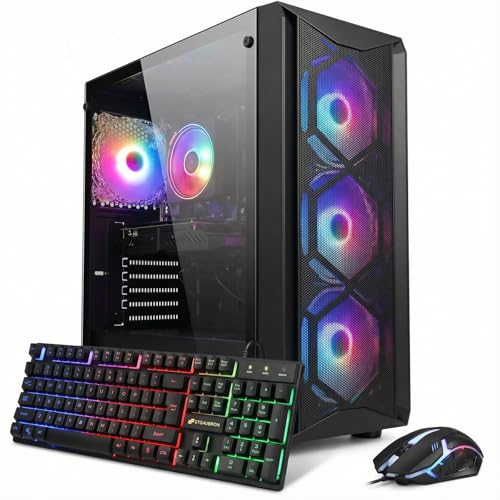
Pros
- Solid 1080p gaming performance with RTX 3050 and 16GB RAM
- Pre-built with Windows 11 Home, plug-and-play out of the box
- Wi-Fi 6 and Bluetooth 5.2 provide modern wireless connectivity
- RGB fans and included keyboard/mouse add value for budget builders
- 1-year parts and labor warranty with free lifetime tech support
Cons
- 8th Gen Intel processor is a few generations old, limiting future upgrade headroom
- 512GB SSD may fill quickly for users with large game libraries
- RTX 3050 6GB is entry-level; not ideal for 1440p or high-refresh-rate gaming
The STGAubron Gaming PC Desktop is a pre-built tower designed for gamers who want solid 1080p performance without the hassle of building their own system. Aimed at PC gamers, competitive and casual players, esports enthusiasts, streamers, content creators, work-from-home users, and college gamers, this setup delivers a balance of power and convenience right out of the box.
At the heart of this PC is an Intel Core i7-8th Gen processor, which can turbo boost up to 4.1GHz across six cores and twelve threads. Paired with an NVIDIA GeForce RTX 3050 6GB graphics card and 16GB of DDR4 RAM, it handles popular titles like Fortnite, Call of Duty Warzone, Valorant, Apex Legends, and Overwatch at 60+ FPS on medium to high settings. The 512GB SSD keeps load times snappy, and the included Wi-Fi 6 and Bluetooth 5.2 ensure low-latency online play and easy connection to wireless peripherals.
Build quality is solid for a budget pre-built. The black tower includes four RGB fans for decent airflow and a bit of visual flair. STGAubron also includes a matching RGB keyboard and mouse, which helps new gamers get started right away. The system runs Windows 11 Home, so setup is straightforward: plug in, connect to Wi-Fi, and start gaming. The compact dimensions (16.4 x 14.8 x 8.2 inches) fit well on most desks, though it's not a small form factor case.
For streaming or content creation, the 8th Gen i7 and RTX 3050 can handle light video editing and streaming at 1080p, but expect some limitations with more demanding software. The 512GB SSD is a bit tight for a large game library, but you can always add an external drive or upgrade later. The included 1-year parts/labor warranty and lifetime tech support provide peace of mind for first-time PC buyers.
One realistic limitation is the processor's age: the 8th Gen Core i7 is several generations behind current releases, so CPU-bound tasks may show slower performance compared to newer builds. Also, the RTX 3050 6GB is an entry-level card; while it runs today's esports titles well, it may struggle with ray tracing or future AAA games at higher settings. Consider this system if you primarily play competitive shooters, MOBAs, or older games on a 1080p monitor.
Overall, this STGAubron gaming PC is a practical choice for budget-conscious buyers who want a ready-to-go gaming desktop. It suits casual gamers, students, and those new to PC gaming who need an affordable, capable rig for mainstream titles and everyday tasks. With its RGB accents and included peripherals, it also adds a bit of style to any gaming desk setup.


Pros
- Strong price-to-performance ratio for entry-level to mid-range gaming
- Ample RAM and SSD storage for smooth multitasking and quick game loads
- Includes WiFi 6 and Bluetooth 5.0 for modern wireless connectivity
- Comes with RGB peripherals and four RGB fans for an immersive setup aesthetic
Cons
- Processor is a 4th-gen Intel Core i7, which may bottleneck newer AAA titles compared to modern CPUs
- Graphics card (RX 580) is an older architecture, limiting ray tracing and high-refresh gaming at 1440p
- Only 512GB SSD may require additional storage for larger game libraries
The STGAubron Gaming PC Desktop is a pre-built tower designed for gamers who want a solid entry-level to mid-range gaming experience without the hassle of building their own system. It combines an Intel Core i7 processor (4th-gen, up to 3.9GHz) with an AMD Radeon RX 580 8GB graphics card, 16GB of RAM, and a 512GB SSD. This configuration is well-suited for casual and competitive gamers, streaming enthusiasts, and even those who need a capable machine for photo/video editing, schoolwork, or day trading.
When it comes to real-world gaming, the RX 580 can handle popular titles like Fortnite, Call of Duty Warzone, Valorant, Apex Legends, and GTA V at 60+ FPS on medium to high settings. The 16GB of RAM ensures smooth multitasking, letting you run Discord, OBS, or browser tabs in the background while gaming. The 512GB SSD provides quick boot times and fast level loads, though heavy gamers may want to add a secondary drive later.
Build quality is typical for a budget-friendly pre-built: a standard tower with a tempered glass side panel (likely) and four RGB fans for decent airflow. The included RGB gaming mouse and keyboard are functional starters, but most users will eventually upgrade to more premium peripherals. The system also features WiFi 6 and Bluetooth 5.0, which means lag-free wireless connections and fast downloads if your router supports it.
Setup is straightforward: unbox, plug in the power and peripherals, connect to your monitor via HDMI or DisplayPort, and boot into Windows 11 Home. The case has minimal cable management pre-installed, and the RGB fans and case lighting can be controlled via a remote or button on the case. For cleaning, the easily removable side panel makes dusting the interior simple.
A realistic limitation is that the CPU is an older 4th-gen Core i7, which might hold back performance in CPU-heavy games or multitasking scenarios compared to newer budget processors like an i3-12100F. The RX 580 also lacks modern features like ray tracing and efficient encoding, so if you're aiming for high-refresh 1440p gaming or intensive streaming, you may want to look at higher-end options. The 512GB SSD fills up quickly, so an external or secondary drive is worth considering.
Overall, this STGAubron gaming PC offers good value for its price point, especially for gamers on a tight budget who want a turnkey system that can handle esports and mainstream titles. It's also a nice fit for college students or home office users who want a versatile desktop that can game and work. Just be aware of the older components and plan for potential upgrades down the line.

Frequently Asked Questions
How much RAM is recommended for a gaming desktop?
A baseline of 16GB of RAM handles modern games and smooth multitasking across browser tabs. Higher-end builds such as the msi Codex Z2 step up to 32GB of DDR5 memory, which benefits intensive background applications and heavy video workloads. Configurations with four DDR5 DIMM slots allow future memory expansion as system demands rise.
What role does a dedicated graphics card play in gaming?
A dedicated graphics card handles 3D rendering and dictates visual fidelity and resolution support. Entry cards like the GeForce GT 1030 run casual titles at modest settings, while GPUs like the RTX 5060 Ti support ray tracing at higher resolutions. Choosing the right GPU ensures stable frame rates across titles, from casual sandboxes in a gaming desktop for Minecraft to demanding simulations.
Are prebuilt gaming desktop PCs easy to upgrade?
Upgrade flexibility depends on the chassis dimensions, motherboard layout, and power supply wattage listed by the builder. Towers like the KOTIN PC offer three M.2 SSD slots and a 650W Gold power supply for future hardware swaps. Older refurbished cases often have limited internal space and proprietary power connectors that restrict major component upgrades.
How do NVMe solid-state drives improve gaming?
PCIe NVMe SSDs dramatically reduce system startup times and load game levels much faster than traditional spinning hard drives. Capacities from 512GB to 2TB give you room for expansive game installations. Fast storage also prevents stutter in asset-heavy titles featured in our top gaming desktop guide.
Which monitor ports should you look for on a gaming tower?
Look for DisplayPort and HDMI outputs positioned horizontally on the dedicated graphics card bracket. Connecting displays directly to GPU ports ensures you utilize the dedicated graphics rather than motherboard integrated video. Some towers also provide legacy DVI ports, ensuring compatibility across older displays without requiring separate converters.






Write Your Review
No reviews yet. Be the first to share your experience!