

Cluttered desk surfaces and awkward peripheral layouts can quickly hold back an otherwise capable battlestation. Upgrading your desk with the best gaming computer accessories delivers smoother tracking, cleaner audio, and better physical posture during long matches. Many players spend significant time upgrading internal PC parts while overlooking external hardware that directly affects responsiveness. Balancing desk space with reliable gear makes daily sessions far more comfortable, whether you match your setup with an ergonomic gaming chair under $200 or a standard workspace. Thoughtful cable paths and stable desktop surfaces provide immediate improvements without demanding complex technical adjustments.
Selecting the right peripherals requires evaluating connection stability, power delivery, and desk footprint rather than aesthetics alone. High-performance gaming mice with customizable optical sensors ensure swift cursor movements, while extended mats protect your desk surface from unwanted wear. Compact stereo speakers and under-desk foot supports round out a functional space by keeping wires organized and reducing fatigue. Reviewing dedicated setup audio and keyboard accessories helps coordinate your gear for competitive play and daily streaming tasks. Focusing on dependable materials and versatile connectivity keeps your setup clean and responsive over time.

Pros
- Large 31.5 x 12-inch size provides unified surface coverage for both keyboard and mouse
- Simple one-button control manages 14 lighting modes and brightness without software
- Power-off memory retains your chosen LED setting when restarted
- Waterproof microfiber fabric resists beverage spills and cleans easily
- Non-skid rubber base prevents sliding across smooth desk surfaces
Cons
- Requires an open USB port to power the LED lighting border
- Listing does not state the USB cable length or whether the cable is detachable
- At 12 inches deep, desk space may be tight for keyboards with large wrist rests
The DR CATCH Large RGB Mouse Pad is an extended desk mat designed for desktop computer users, office workers, students, and PC gamers who want a unified surface for both their mouse and keyboard. Measuring approximately 31.5 by 12 inches with a 0.3-inch thickness, this accessory provides substantial horizontal travel space for low-sensitivity mouse swipes while framing the desk with customizable ambient LED illumination.
Powered through a standard USB connection, the mouse pad operates on a plug-and-play basis without requiring specialized drivers, companion software, or background apps. Users simply connect the integrated or included USB plug to an available port on a computer, hub, or USB power adapter. Because the mat relies on direct USB bus power solely to illuminate the built-in LED edge strip, it does not communicate data to the host operating system or require driver compatibility checks.
The top surface is crafted from a smooth microfiber textile material engineered to promote fluid glide and consistent sensor tracking for optical and laser computer mice alike. A single push-button controller located on the pad allows users to cycle through 14 distinct lighting presets, which include static monochrome colors as well as dynamic breathing sequences. Double-clicking the control button adjusts the light brightness, while holding it for about three seconds toggles the lighting on or off. An onboard memory function also remembers the last chosen light setting after power is turned off.
Beneath the microfiber surface, the pad features a textured rubber backing that grips the desk firmly to prevent unintentional sliding or bunching during active mouse tracking. The surface is also treated for liquid resistance, helping to repel accidental spills from drinks or liquid drops so they can be wiped clean with water without causing fabric discoloration. At roughly 1.5 pounds, the mat carries sufficient heft to lay flat across wood, laminate, or glass desks.
When planning a setup, buyers should note that the product information does not specify the exact USB cable length or confirm whether the cable can be detached for travel or replacement. Additionally, with a vertical depth of roughly 12 inches, desk space from front to back is somewhat narrow compared to deeper desk pads, which might leave limited room for ergonomic keyboards with large integrated wrist rests. Prospective buyers should also verify that an open USB port is available near their workspace to power the lighting.
For users shopping for an affordable desk upgrade that combines mouse pad functionality with perimeter lighting, this DR CATCH extended mouse mat offers a practical blend of utility and atmosphere. It is particularly well-matched for gamers and remote workers who want ample side-to-side mouse clearance, simple hardware-based lighting controls, and easy-to-clean spill resistance without installing proprietary configuration software.
For daily office duties, study sessions, and web browsing, an extended mat helps protect desk finishes while offering a steady glide surface for office and productivity mice. The generous 31.5-inch width easily accommodates an office keyboard alongside the mouse, keeping peripherals resting at an even height.
The hardware-based button control means users do not need to install administrative software on work laptops to manage the lighting. If an office environment calls for a more understated setup, the illumination can be powered off entirely with a three-second button press, while the waterproof microfiber surface remains ready to guard against accidental coffee or water spills.
Built from flexible rubber and dense microfiber, the DR CATCH mouse pad weighs approximately 1.52 pounds, providing sufficient density to sit flat on work surfaces. The rubber underside provides traction against smooth surfaces such as finished wood or glass, minimizing movement during fast cursor navigation.
The edge perimeter integrates a diffuse LED light strip linked to an onboard control module. The listing notes that the pad is powered by USB and requires no drivers, though specific accessories such as a detachable cable or user guide are not detailed in the product specifications.

Pros
- Clear, balanced sound for the price with decent stereo separation.
- Space-saving 2-in-1 design adapts to different desk layouts.
- Easy plug-and-play setup with wide OS compatibility.
- Touch RGB lighting adds ambiance without a separate controller.
- Long cables provide flexibility for larger desks or dual-monitor rigs.
Cons
- No Bluetooth connectivity only USB and 3.5mm wired.
- Lacks deep bass ideal for casual listening but not bass-heavy genres.
- Speaker-to-speaker cable can be slightly awkward to manage without cable ties.
The OFFSIR Computer Speakers are a 2-in-1 stereo system designed for PC gamers and desktop enthusiasts who want a clean audio setup without sacrificing desk space. These compact speakers can be used separately for a wider stereo field or snapped together to form a single soundbar-like unit. This flexibility makes them a strong contender for anyone building a tidy gaming station or a minimalist home office.
Aimed at casual to moderate gamers, streamers, and RGB lovers, these speakers provide a noticeable step up from built-in laptop or monitor audio. The dual 5W drivers deliver clear mids and highs with enough volume for a small to medium room. While they won't reproduce thumping bass, the Hi-Fi stereo core offers good clarity for spoken dialogue in games, music, and video calls. For competitive esports titles where audio cues matter, they perform adequately, though a dedicated headset is still recommended for pinpoint accuracy.
Setup is truly plug-and-play. Connect the USB cable for power and the 3.5mm audio cable to your PC, laptop, or console, and you're ready. No drivers or software are required, which is great for quick installations or sharing between devices. The extended 58-inch cables give you plenty of reach even on larger desks, and the speaker-to-speaker cable is long enough to place the speakers far apart or keep them close together.
Build quality feels solid for the price point. The black plastic housing is lightweight but sturdy, and the touch-sensitive RGB lighting on top is a neat touch. You can cycle through four lighting modes (including static, breathing, and off) with a simple tap. The volume knob on the right speaker works smoothly and doubles as the power switch. It's a clean interface that avoids extra buttons or on-screen controls.
One realistic limitation is the lack of Bluetooth, which means all audio must come through the 3.5mm jack. Also, the speaker-to-speaker cable can get a bit messy if you don't have a cable management plan. But for the price and simplicity, these are minor trade-offs. They work well for Twitch streams, Discord chats, casual gaming, and everyday productivity tasks like music or YouTube.
Overall, the OFFSIR 2-in-1 speakers are an excellent budget choice for PC gamers, college students, and setup builders who want decent sound with a dash of RGB flair. They offer great value for under $25, especially if you're looking to clear desk clutter while improving audio quality. Pair them with a subwoofer later if you crave more bass, but as a standalone desktop solution, they deliver exactly what most casual users need.
Pros
- Easy to assemble with no tools required.
- Adjustable sizing accommodates a wide range of PC cases.
- Smooth-rolling wheels with locks keep the stand stable during use.
- Improves airflow and cooling by lifting the tower off the floor.
- Affordable price point for the value it provides.
Cons
- Wheels are functional but may feel less premium; replacements are easy to find if needed.
- Plastic corner pieces might not match high-end aesthetic preferences for some RGB-heavy setups.
- Light-duty design may not suit extremely heavy server towers or custom water-cooled rigs over 60 lbs.
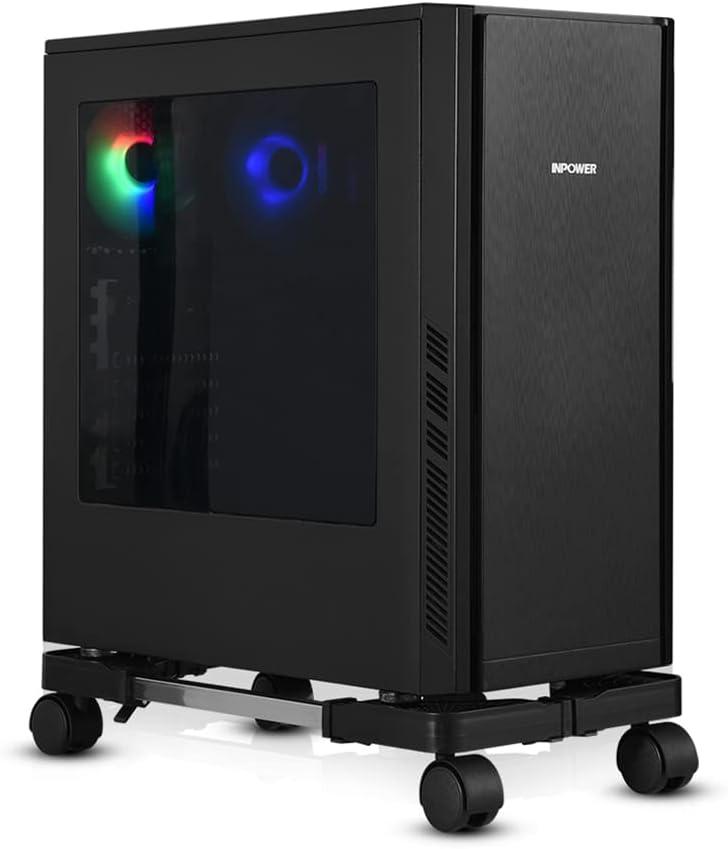
The YOSE Computer Tower Stand is a straightforward accessory that solves a common problem for PC gamers: where to place your tower for optimal airflow and easy access. This adjustable CPU stand uses rolling caster wheels and an expandable frame to fit most gaming cases, from compact builds to full-tower rigs. Based on product specifications and user feedback, it's a practical addition for anyone looking to improve their gaming setup without breaking the bank.
This stand is best suited for PC gamers, casual gamers, and gaming setup builders who want to keep their tower off the floor, especially on carpet where bottom intakes can get blocked. It's also a solid choice for college gamers in dorms, work-from-home gamers with limited desk space, and streamers who frequently move their PC for cable management or cleaning. The adjustable width (16.93-22.44 inches) and depth (9.06-14.57 inches) mean it can handle a wide variety of cases, including many popular gaming models.
In terms of real-world performance, the stand's key advantage is improving airflow and cooling. By lifting the tower a couple inches off the floor, it allows better air circulation around the case, which can help maintain lower temperatures during long gaming sessions. The four silent caster wheels rotate 360 degrees and include locks, so you can roll the stand out for easy access to ports or cables, then lock it in place. Users with heavy gaming PCs (up to 60 lbs) report that the stand feels sturdy and stable, even on carpet.
Build quality is solid for the price. The frame uses alloy steel bars with ABS plastic corners, and the wheels are functional if not top-tier. Assembly is tool-free and takes just a couple of minutes, as the bars slide into the corners and are secured with clamps. The open design provides ample ventilation, and the stand's low profile doesn't add much visual clutter to your gaming desk or floor area. Cable management is easier when you can roll the tower out to route wires behind your desk.
One realistic limitation is that the wheels, while adequate, may feel a bit basic to enthusiasts expecting premium casters. The plastic corners also might not match the aesthetic of a high-end RGB-heavy build, but the stand's black color blends well with most setups. For extremely heavy custom water-cooled rigs exceeding 60 lbs, you might want a heavier-duty option, but for the vast majority of gaming PCs, this stand handles the job well.
Overall, the YOSE Computer Tower Stand is a reliable and affordable upgrade for any gaming setup. It's easy to set up, improves cooling, and makes moving your PC a breeze. If you're a PC gamer looking to keep your tower off the floor, enhance airflow, and simplify cable management, this stand is a practical choice that delivers good value for the money.

Pros
- Exceptional value for the price - feels more premium than its budget tag suggests.
- Solid build quality with comfortable ergonomics for medium to large hands.
- Easy-to-use software for remapping buttons and adjusting DPI settings.
- Responsive optical sensor with no noticeable lag or tracking issues.
- Vibrant RGB lighting with multiple modes and on-the-fly controls.
Cons
- Click sound is louder than some silent mice, which may bother others in quiet spaces.
- Software must be downloaded from the manufacturer's website, not included on a disk or plug-and-play.
- Wired design limits mobility compared to wireless options, though the cable is flexible.
The Redragon M612 Predator is a wired optical gaming mouse that delivers a surprising amount of performance and customization for its budget-friendly price point. Aimed at PC gamers, competitive esports players, streamers, and even casual users who want reliable hardware, this mouse packs features typically found in more expensive models.
Under the hood, the M612 uses an advanced optical sensor with a maximum DPI of 8000, adjustable in five levels via a dedicated button or through Redragon's software. This allows you to tailor sensitivity for different games - from fast flicks in FPS titles to precise cursor control in MOBAs or productivity apps. User reviews consistently highlight the accurate tracking and lack of input lag, making it a dependable choice for responsive gameplay.
Build quality is where the M612 really shines for its price. The plastic shell feels solid, and the frosted coating resists fingerprints while providing a comfortable grip. The left side features a rubberized texture for extra control, and the overall ergonomic shape suits palm and claw grips equally well. The 11 programmable buttons include two side macros and a rapid fire button, all of which can be reassigned through the software. Clicks have a satisfying mechanical feel, though some users note they are louder than silent alternatives.
Setting up the mouse is straightforward: plug it into a USB port, and it works immediately. To unlock full customization, you'll need to download Redragon's software from their website - a minor step that many gamers will appreciate for the ability to remap buttons, adjust DPI in finer increments, and create macros. The RGB lighting offers five preset modes and can be controlled via the software, adding a nice visual touch to your desk without being overbearing.
One realistic limitation is the lack of wireless connectivity, but the wired design ensures zero latency and no need to charge batteries. The braided cable is durable and flexible enough for most setups. The loud click may be a concern for streamers using open microphones or those sharing a room, but it's a minor trade-off for the overall value.
Overall, the Redragon M612 Predator is an outstanding budget gaming mouse that punches well above its weight. It's ideal for competitive and casual gamers alike, offering dependable performance, extensive customization, and comfort for long sessions. If you're building a gaming PC or upgrading your peripheral setup without breaking the bank, this mouse is a smart choice.
The M612 Predator is built for responsive gaming. Its 8000 DPI optical sensor handles fast movements with ease, and the adjustable reporting rate ensures clicks register instantly. The five DPI levels can be switched on the fly, letting you adapt to different in-game scenarios without diving into menus. User feedback confirms no noticeable lag or tracking issues, making it suitable for competitive play in FPS, MOBA, and battle royale titles.
Despite its low price, the M612 feels well-constructed. The plastic body is rigid, and the frosted coating resists smudges. The rubberized thumb grip adds stability during intense sessions. The braided USB cable is durable and flexible, reducing drag on your desk. Mechanical switches under the main buttons provide a crisp, tactile response. Overall, the build quality exceeds expectations for a mouse in this price range.
Designed for medium to large hands, the M612's claw-grip shape supports natural hand positioning. The frosted surface and rubber side grip prevent slipping, even during long gaming marathons. At 4.4 ounces, it's light enough for quick flicks but still has a solid feel. Users with small hands may find it less comfortable, but for most gamers, the ergonomics reduce fatigue effectively.

Pros
- Exceptional value for the price; performs like higher-end mice.
- Long battery life eliminates need for frequent charging or battery swaps.
- Reliable LIGHTSPEED wireless with minimal latency.
- Lightweight and comfortable for extended gaming sessions.
Cons
- Uses AA battery instead of rechargeable internal battery.
- Scroll wheel feels basic and may lack durability.
- Side buttons may be accidentally pressed for some hand sizes (especially for claw grip).
The Logitech G305 Lightspeed is a wireless gaming mouse designed to deliver high performance without the hassle of cords. It features the HERO optical sensor, capable of up to 12,000 DPI with zero acceleration or smoothing, making it a solid choice for competitive gamers who need pinpoint accuracy. The LIGHTSPEED wireless technology ensures a 1ms report rate, so it feels as responsive as a wired mouse, even during fast-paced FPS or MOBA games.
At just 99 grams, the G305 is lightweight enough for quick flicks and long gaming sessions without causing fatigue. Its symmetrical design suits a variety of grip styles, including claw and fingertip, and the six programmable buttons can be customized via Logitech G HUB for macros, DPI adjustments, or media controls. The built-in storage for the nano receiver makes it easy to take on the go with a gaming laptop.
One of the standout features is the battery life: up to 250 hours on a single AA battery. In Endurance mode (via G HUB), it can last up to nine months, so you don't have to worry about charging mid-game. The mouse uses a standard AA battery, which is both a pro and a con – it's convenient to swap in a fresh battery, but some users prefer a rechargeable internal pack.
Setup is straightforward: plug the included USB receiver into your PC or Mac, and the mouse is ready to use. The Logitech G HUB software offers additional customization, but the mouse also has onboard memory to save your settings. On the downside, the scroll wheel is fairly basic and might not feel as premium as on higher-priced models, and the side buttons can be accidently pressed if you use a claw grip – though this is common with many mice.
Overall, the Logitech G305 is an excellent wireless gaming mouse at an entry-level price. It's ideal for PC gamers who want top-tier performance without spending a fortune, whether you're grinding ranked matches, streaming on Twitch, or just enjoying casual games. Its lightweight design, long battery life, and reliable sensor make it a smart addition to any gaming setup, especially for those who value affordability and practicality.


Pros
- Clear, punchy audio with noticeable bass improvement over built-in laptop speakers.
- Easy plug-and-play setup with USB power and 3.5mm aux - no software or drivers required.
- Compact size fits well on smaller desks or next to a monitor without taking much space.
- RGB lighting adds a nice gaming vibe to any PC setup, with multiple modes to choose from.
- Affordable price makes it an easy upgrade for budget-conscious gamers or those building their first gaming PC.
Cons
- Audio quality is good for the price but won't match high-end speakers - lacks deep sub-bass and may distort at max volume.
- Limited physical controls - only a small knob for volume and on/off, no separate bass or treble adjustment.
- Cable management could be better - the USB and aux cables are non-detachable and may clutter a clean desk setup.
If you're a PC gamer or streamer looking to upgrade from those tiny, tinny laptop speakers, the BUSP-HYY Computer Speakers bring a welcome boost in audio quality and aesthetics to any gaming setup. These compact desktop speakers pack dual 3W drivers that deliver a fuller sound with enhanced bass and clearer highs, making them a solid choice for casual gaming, watching movies, or listening to music at your desk.
Designed for versatility, these speakers connect via a single USB cable for power and a 3.5mm aux input for audio. The plug-and-play simplicity means you can have them running in seconds on any Windows, Mac, or Chrome OS device, even newer laptops with USB-C thanks to the included adapter. The straightforward volume knob and front-facing headphone jack add everyday convenience, letting you switch between speakers and headphones for late-night gaming sessions or Discord calls without fumbling behind your PC.
One of the standout features for any RGB enthusiast or gaming setup builder is the six colorful lighting modes. From a flowing rainbow effect to a subtle breathing pulse or solid colors, the light bar across the front adds a personalized touch that syncs easily with your existing desktop vibes. While the lighting isn't addressable per-LED or software controlled, the on-board button cycles through modes quickly, keeping things simple and effective.
Build quality is decent for the price point, with a lightweight plastic housing that won't weigh down your desk. The 31.5-inch gap between the left and right speakers provides a decent stereo separation for a compact setup, though the non-detachable cables might complicate a clean cable management approach. Still, for the casual gamer, college student, or anyone building their first gaming PC on a budget, these speakers offer a noticeable step up from integrated monitor audio, especially in immersive open-world games or during Twitch streams where clear sound matters.
That said, audio purists or competitive esports players requiring pinpoint positional audio may find the bass a bit boomy at higher volumes and the lack of a dedicated subwoofer limits deep lows. The plastic build also feels less premium than pricier alternatives, but that's expected at this price tier. For everyday gaming, video calls, and content consumption, the BUSP-HYY speakers perform admirably, making them a practical, low-risk addition to any gaming desk or dorm room setup where space and budget are tight.
Frequently Asked Questions
Do wireless gaming mice introduce noticeable latency compared to wired models?
No, modern 2.4 GHz wireless connections deliver millisecond response times on par with wired mice. Peripherals using dedicated wireless receivers, such as the Logitech G305 Lightspeed, operate with a 1 ms report rate for lag-free performance. Wired mice like the Redragon M612 Predator provide continuous power without swapping batteries, making the decision a matter of desk preference. Deciding between them depends on whether you prefer a cable-free workspace or non-stop wired power.
How much desk space does an extended RGB mouse pad require?
An extended mouse pad typically requires at least 32 inches of width and 12 inches of depth. The RGB Mousepad Led Mouse Pad measures 31.5 by 12 inches, leaving plenty of room for both your keyboard and broad mouse swipes. Measure your usable desk space before ordering to ensure monitor stands or speakers do not crowd the edges. Smooth microfiber fabric also protects your desk from scratches while keeping sensor tracking accurate.
Are USB-powered desktop speakers loud enough for PC gaming?
Yes, dual 3W or 5W drivers provide clear stereo sound for close-up desktop gaming. Compact units like the OFFSIR 2-in-1 PC speakers plug directly into standard 3.5mm aux and USB ports for quick power without external wall adapters. While they do not replace full home theater systems, nearfield stereo separation delivers crisp dialogue and distinct directional cues. Pairing them with a dedicated desktop setup keeps your audio clear without cluttering power strips.
Why should a gaming PC tower be kept off the carpet?
Elevating a PC tower off the carpet prevents dust accumulation and preserves airflow for bottom intake fans. The YOSE Computer Tower Stand uses caster wheels and an open base to lift the case away from floor fibers. This clearance helps reduce thermal buildup inside the chassis and makes moving heavy rigs for cleaning simple.
Do ergonomic footrests improve seated posture while playing?
Yes, an under-desk footrest elevates your feet to relieve thigh pressure and support neutral posture. The CasaZenith Foot Rest features a textured surface with rollers and a swingable frame to encourage active foot movement while sitting. Elevating your feet improves comfort during long sessions at any standard desk.


Write Your Review
No reviews yet. Be the first to share your experience!