


Essential Gear for Clean Gaming Setups
Managing desk space and tangled power cords often poses a greater challenge than picking your computer hardware. A cluttered table crowds your mouse hand, and you don’t want misplaced peripherals creating friction during intense matches. Investing in the best pc gaming accessories lets you streamline your battle station by keeping gamepads organized, routing audio cables neatly, and elevating your tower off dusty carpet. Proper physical organization creates plenty of room for low-DPI mouse swipes while protecting expensive components from drink spills or electrical surges.
Balanced desk setups also depend on versatile gear that fits your daily workflow. Practical accessories like boom-mounted microphones, Hall effect controllers, and multi-port surge strips deliver real utility without demanding complicated software suites. If you want to refine your sound further, reviewing a practical audio setup guide can help you integrate hardware volume faders alongside your peripherals. Pairing these utilities with an ergonomic setup ensures your gaming station won’t feel cramped during marathon sessions.

Pros
- Hall Effect sensors provide drift-free, precise analog control.
- Long 20-hour battery life supports marathon gaming sessions.
- Customizable RGB lighting adds flair to any gaming setup.
- Two programmable back buttons enhance gameplay versatility.
- Works with multiple platforms including PC, Switch, iOS, and Android.
Cons
- Not compatible with Xbox, PlayStation, or Nvidia GeForce Now.
- No included software for advanced remapping or RGB customization.
- Weight is extremely light, which may feel less substantial for some users.
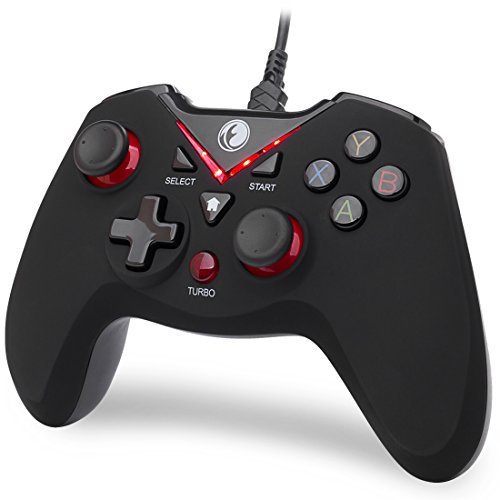
The EasySMX X15 is a wireless Bluetooth controller designed primarily for PC gamers, but it also works with Switch, Android, and iOS devices. It's a versatile gamepad that suits a wide range of players, from competitive esports enthusiasts to casual gamers who want a reliable controller for their gaming PC or mobile setup. With its Hall Effect joysticks and triggers, it promises no stick drift and no dead zones, making it an attractive option for anyone tired of traditional potentiometer-based controllers wearing out over time.
In real-world gaming, the Hall Effect sensors deliver smooth, accurate input that feels responsive and precise. Whether you're playing fast-paced FPS games, navigating open-world adventures, or racing around tracks, the controller's analog sticks and triggers provide consistent performance without the jitter or drift that can plague standard controllers. The programmable back buttons are a nice touch for assigning quick actions or combos, giving you an edge in competitive titles. The RGB lighting, with seven adjustable colors, adds a bit of personality to your desk setup, and you can turn it off if you prefer a minimalist look.
Build quality is decent for the price point. The controller feels lightweight and compact, which may be a plus for portability or for gamers with smaller hands. The button layout is standard, and the ABXY key swap function is handy if you switch between PC and Switch games. Connectivity is straightforward via Bluetooth, and the controller pairs easily with Windows, Android, and Switch. The 1000mAh battery offers up to 20 hours of gameplay, which is impressive for a controller in this price range, so you won't be tethered to a charging cable during long sessions.
Setting up the EasySMX X15 is simple: charge it, pair it via Bluetooth, and you're ready to go. There's no software to install for basic use, but that also means you can't customize the RGB or remap buttons beyond the two rear buttons. The controller works with Steam and Android games out of the box, and it's recognized as a standard gamepad on Windows. Maintenance is minimal, though the lightweight plastic build may not feel as premium as more expensive controllers.
One realistic limitation is compatibility: the X15 does not work with Xbox, PlayStation, Luna, or Nvidia GeForce Now. So if you're a console gamer or use cloud gaming services, this controller isn't for you. Also, the extremely light weight (under 1 gram listed, which seems like an error) might feel flimsy to some users who prefer a heftier, more substantial controller. The lack of a dedicated companion app means you can't fine-tune sensitivity or lighting effects beyond the built-in options.
Overall, the EasySMX X15 is a solid budget-friendly wireless controller for PC gamers, streamers, and casual players who want Hall Effect precision and long battery life without breaking the bank. It's a practical choice for a dorm room gaming setup, a home office gaming break, or as a spare controller for multiplayer sessions. If you prioritize no-drift performance, RGB flair, and multi-platform support, this controller delivers good value for the price.

Pros
- Easy to assemble with no tools required.
- Adjustable sizing accommodates a wide range of PC cases.
- Smooth-rolling wheels with locks keep the stand stable during use.
- Improves airflow and cooling by lifting the tower off the floor.
- Affordable price point for the value it provides.
Cons
- Wheels are functional but may feel less premium; replacements are easy to find if needed.
- Plastic corner pieces might not match high-end aesthetic preferences for some RGB-heavy setups.
- Light-duty design may not suit extremely heavy server towers or custom water-cooled rigs over 60 lbs.
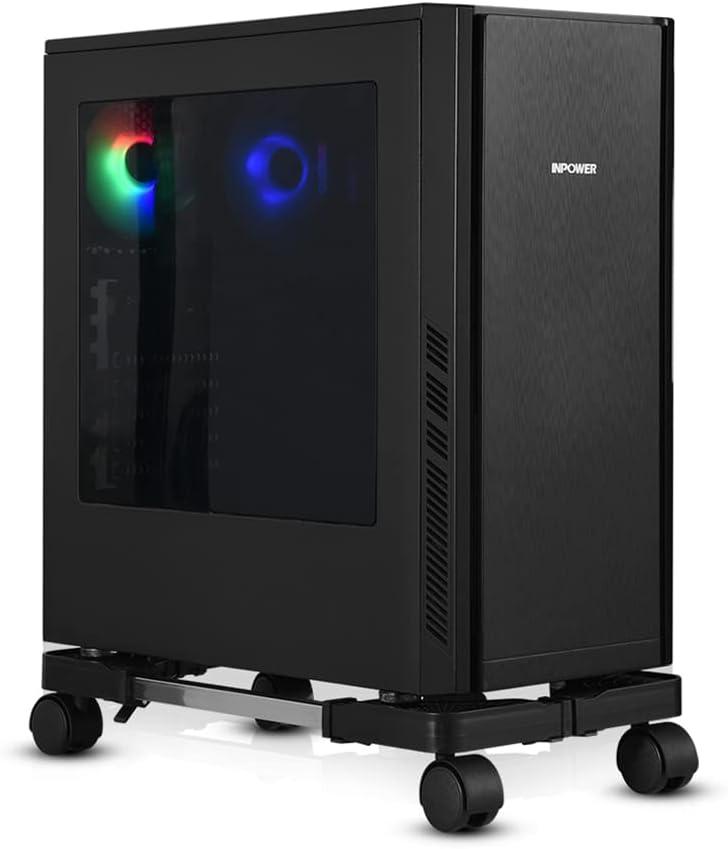
The YOSE Computer Tower Stand is a straightforward accessory that solves a common problem for PC gamers: where to place your tower for optimal airflow and easy access. This adjustable CPU stand uses rolling caster wheels and an expandable frame to fit most gaming cases, from compact builds to full-tower rigs. Based on product specifications and user feedback, it's a practical addition for anyone looking to improve their gaming setup without breaking the bank.
This stand is best suited for PC gamers, casual gamers, and gaming setup builders who want to keep their tower off the floor, especially on carpet where bottom intakes can get blocked. It's also a solid choice for college gamers in dorms, work-from-home gamers with limited desk space, and streamers who frequently move their PC for cable management or cleaning. The adjustable width (16.93-22.44 inches) and depth (9.06-14.57 inches) mean it can handle a wide variety of cases, including many popular gaming models.
In terms of real-world performance, the stand's key advantage is improving airflow and cooling. By lifting the tower a couple inches off the floor, it allows better air circulation around the case, which can help maintain lower temperatures during long gaming sessions. The four silent caster wheels rotate 360 degrees and include locks, so you can roll the stand out for easy access to ports or cables, then lock it in place. Users with heavy gaming PCs (up to 60 lbs) report that the stand feels sturdy and stable, even on carpet.
Build quality is solid for the price. The frame uses alloy steel bars with ABS plastic corners, and the wheels are functional if not top-tier. Assembly is tool-free and takes just a couple of minutes, as the bars slide into the corners and are secured with clamps. The open design provides ample ventilation, and the stand's low profile doesn't add much visual clutter to your gaming desk or floor area. Cable management is easier when you can roll the tower out to route wires behind your desk.
One realistic limitation is that the wheels, while adequate, may feel a bit basic to enthusiasts expecting premium casters. The plastic corners also might not match the aesthetic of a high-end RGB-heavy build, but the stand's black color blends well with most setups. For extremely heavy custom water-cooled rigs exceeding 60 lbs, you might want a heavier-duty option, but for the vast majority of gaming PCs, this stand handles the job well.
Overall, the YOSE Computer Tower Stand is a reliable and affordable upgrade for any gaming setup. It's easy to set up, improves cooling, and makes moving your PC a breeze. If you're a PC gamer looking to keep your tower off the floor, enhance airflow, and simplify cable management, this stand is a practical choice that delivers good value for the money.


Pros
- Affordable entry point into XLR audio for streamers and gamers on a budget
- Individual channel faders provide tactile, real-time volume control without software
- Built-in sound effects and voice changers add entertainment value for live streams
- Compact footprint saves desk space and RGB lighting enhances setup aesthetics
Cons
- XLR cable not included, and audio quality can vary based on cable quality
- Only one XLR input limits use for solo streamers or podcasters (no dual mic support)
- USB-C connection requires a computer; no standalone operation without a PC
The FIFINE AmpliGame SC3 is a gaming audio mixer that bridges the gap between basic USB microphones and full-fledged professional audio interfaces. Designed for streamers, content creators, and gamers who want to step up their audio quality, this compact mixer brings XLR microphone support, individual channel control, and a splash of RGB to your desktop setup. At its core, it's a practical tool for anyone looking to improve voice clarity during live streams, Discord calls, or game commentary without diving into complex audio software.
This mixer is best suited for solo streamers on Twitch or YouTube, podcasters recording from home, and gamers who want cleaner in-game chat. The XLR input with 48V phantom power opens up the world of condenser microphones, giving you richer, more detailed audio than typical USB mics. The four independent volume faders let you balance your microphone, line-in music, headphone monitoring, and line-out levels on the fly, which is a huge convenience during live broadcasts where every second counts. The mute and monitor buttons are placed on the front for easy access, helping you cut background noise or hear yourself in real time without distraction.
Performance-wise, the SC3 delivers reliable audio routing with low latency, so your voice stays in sync with your gameplay. The built-in sound effects, voice changing modes, and auto-tune add a layer of fun for engaging your audience, though they're more of a bonus than a necessity. The RGB lighting is vibrant but not harsh, with flowing or frozen color options that can match your gaming setup's theme. It's a nice touch that makes the mixer feel like part of the show rather than just a utility.
Build quality is solid for the price point, with a sturdy plastic chassis and smooth faders that feel responsive. The compact size (about 4.4 by 6.5 inches) means it won't eat up your entire desk, and the USB-C connection makes setup straightforward on both Windows and Mac. However, keep in mind that the XLR cable is not included, and the quality of that cable can affect your audio performance. Also, with only one XLR input, this mixer is best for solo use; if you plan to have a co-host or guest, you'll need a different solution.
Setup is truly plug-and-play: connect the mixer to your PC via USB-C, plug in your XLR microphone, and you're ready to go. The intuitive layout means you won't need to spend hours reading manuals or configuring software. For streamers using OBS or other broadcasting tools, the SC3 integrates seamlessly, allowing you to physically control audio levels instead of clicking through menus. Maintenance is minimal, just keep the faders and buttons clean, and you're set.
Overall, the FIFINE AmpliGame SC3 is a practical, affordable upgrade for gamers and streamers who want to move beyond USB microphones. It's not a professional studio mixer, but it delivers exactly what most solo creators need: clear XLR audio, tactile control, and a bit of RGB flair. If you're a casual streamer, a college gamer building your first streaming setup, or a work-from-home gamer looking to improve voice quality on calls, this mixer is a smart buy. Just be aware of its single-input limitation and factor in the cost of a good XLR cable.

Pros
- No-drill clamp installation is quick, tool-free, and desk-friendly.
- Spill-proof lines and rubber pad at the bottom keep your desk dry.
- Metal build is more durable than plastic alternatives, offering long-term reliability.
- Compatible with a wide range of cup sizes and shapes, including those with handles.
Cons
- May not fit very wide or oversized cups beyond 40 oz diameter.
- Clamp might not work on desks with thick edges over 2 inches.
- Only available in black; limited color options for those wanting customization.
If you're a PC gamer, streamer, or someone who spends long hours at a desk, keeping your workspace clean and clutter-free is essential. The OOKUU Large Desk Cup Holder Clamp is a simple yet smart accessory that helps you do just that. It's a sturdy metal clamp-on holder designed to securely cradle your drink, pen holder, or other small items right under your desk, freeing up valuable surface area for your keyboard, mouse, or gaming peripherals.
This cup holder is built for a wide range of users: competitive gamers who want to avoid spills during intense matches, casual gamers looking for a tidy setup, streamers who need easy access to drinks without leaving their chair, college gamers in dorm rooms, and work-from-home professionals who want a clean desk. The large 3.95-inch diameter fits most standard water bottles, tumblers, and even cups with handles, making it versatile for your daily hydration needs.
Performance-wise, the OOKUU holder focuses on spill prevention and stability. The bottom features spill-proof lines and a non-slip pad to keep your drink in place and catch any condensation or small drips. The clamp itself is reinforced with an anti-slip pad and a five-position adjustable bracket, allowing you to mount it at various angles. This means you can position two holders side by side without running into space issues, which is great for holding both a drink and a snack or a pen holder.
Build quality is a strong point here. The main body is made from high-quality metal, which is far more durable and tear-resistant than typical plastic cup holders. The clamp uses a metal construction with a hand-tightened knob that secures firmly without tools. Protective pads on the clamp prevent scratches on your desk edge, ensuring your gaming desk stays pristine. This robust build can handle the weight of larger 40 oz tumblers without wobbling or bending.
Setting up the OOKUU cup holder is straightforward. You don't need to drill any holes or use adhesive. Just position the clamp on your desk edge, tighten the knob by hand, and you're good to go. It's easy to remove or reposition if you rearrange your setup. Maintenance is minimal - just wipe it clean with a damp cloth if any spills occur. The U-shaped slot is especially handy for cups with handles, adding extra convenience for coffee mug users.
There are a couple of realistic limitations. The clamp may not work on desks with edges thicker than about 2 inches, so measure before buying. Also, while the diameter covers most cups, very wide bottles or mugs over 40 oz may not fit. The color is only black, which is neutral and matches most gaming setups, but those wanting RGB or other colors won't find options. For the price, this is a practical, well-built desk accessory that enhances your gaming or work area by keeping your drink secure and your desk tidy.
The OOKUU Large Desk Cup Holder Clamp is built to last. It uses a thick metal construction for both the cup holder and the clamp mechanism, which gives it a solid feel compared to flimsy plastic alternatives. The clamp features a non-slip pad on the contact points to ensure a firm grip on your desk edge without sliding or marking the surface. The protective padding also prevents scratches, so your desk stays looking new. The cup holder itself includes spill-proof ribs and a rubberized bottom pad to keep drinks stable and catch any condensation. All moving parts, like the adjustable bracket, are made from metal, ensuring long-term durability even under regular use. The hand-tightened knob is large enough to apply good torque without tools, making installation and adjustment easy. Overall, the build quality matches the needs of a daily-use gaming or office accessory.
Integrating the OOKUU cup holder into your desk setup is simple. The clamp-on design requires no drilling, adhesive, or permanent modifications. It attaches to any desk edge up to about 2 inches thick, making it compatible with most standard desks, including gaming desks, office desks, and dorm room tables. The five adjustable installation directions let you angle the holder to fit your reach and space, even allowing two holders to be mounted side by side without conflict. This is especially useful for gamers who want a drink and a snack within easy reach. The large 3.95-inch diameter accommodates a wide variety of bottle sizes - from standard 18 oz water bottles to larger 40 oz tumblers - as well as cups with handles thanks to the U-shaped slot. It can also serve as a pen holder or small accessory organizer, adding to its versatility. Whether you have a minimalist desk or a full RGB setup, this holder blends in with its black finish and stays out of the way while keeping essential items accessible.

Pros
- Clear, punchy audio with noticeable bass improvement over built-in laptop speakers.
- Easy plug-and-play setup with USB power and 3.5mm aux - no software or drivers required.
- Compact size fits well on smaller desks or next to a monitor without taking much space.
- RGB lighting adds a nice gaming vibe to any PC setup, with multiple modes to choose from.
- Affordable price makes it an easy upgrade for budget-conscious gamers or those building their first gaming PC.
Cons
- Audio quality is good for the price but won't match high-end speakers - lacks deep sub-bass and may distort at max volume.
- Limited physical controls - only a small knob for volume and on/off, no separate bass or treble adjustment.
- Cable management could be better - the USB and aux cables are non-detachable and may clutter a clean desk setup.
If you're a PC gamer or streamer looking to upgrade from those tiny, tinny laptop speakers, the BUSP-HYY Computer Speakers bring a welcome boost in audio quality and aesthetics to any gaming setup. These compact desktop speakers pack dual 3W drivers that deliver a fuller sound with enhanced bass and clearer highs, making them a solid choice for casual gaming, watching movies, or listening to music at your desk.
Designed for versatility, these speakers connect via a single USB cable for power and a 3.5mm aux input for audio. The plug-and-play simplicity means you can have them running in seconds on any Windows, Mac, or Chrome OS device, even newer laptops with USB-C thanks to the included adapter. The straightforward volume knob and front-facing headphone jack add everyday convenience, letting you switch between speakers and headphones for late-night gaming sessions or Discord calls without fumbling behind your PC.
One of the standout features for any RGB enthusiast or gaming setup builder is the six colorful lighting modes. From a flowing rainbow effect to a subtle breathing pulse or solid colors, the light bar across the front adds a personalized touch that syncs easily with your existing desktop vibes. While the lighting isn't addressable per-LED or software controlled, the on-board button cycles through modes quickly, keeping things simple and effective.
Build quality is decent for the price point, with a lightweight plastic housing that won't weigh down your desk. The 31.5-inch gap between the left and right speakers provides a decent stereo separation for a compact setup, though the non-detachable cables might complicate a clean cable management approach. Still, for the casual gamer, college student, or anyone building their first gaming PC on a budget, these speakers offer a noticeable step up from integrated monitor audio, especially in immersive open-world games or during Twitch streams where clear sound matters.
That said, audio purists or competitive esports players requiring pinpoint positional audio may find the bass a bit boomy at higher volumes and the lack of a dedicated subwoofer limits deep lows. The plastic build also feels less premium than pricier alternatives, but that's expected at this price tier. For everyday gaming, video calls, and content consumption, the BUSP-HYY speakers perform admirably, making them a practical, low-risk addition to any gaming desk or dorm room setup where space and budget are tight.

Pros
- High 4000J surge rating offers solid protection for expensive gaming equipment
- RGB lighting adds visual flair without requiring separate controllers or software
- Wide outlet spacing handles chunky power bricks commonly used by gaming monitors and consoles
- USB-C PD 20W is a convenient bonus for fast charging modern devices
- Angled cord and outlets improve cable routing and desk organization
Cons
- Only 6 outlets may be limiting for large setups with many peripherals
- RGB lighting cannot be synced with other RGB ecosystem software (standalone only)
- Relatively new product with limited user reviews to confirm long-term reliability
The Green Box Innovations 4000J Surge Protector Power Strip with RGB Lights is a gaming-themed power strip designed to bring both protection and style to your PC gaming setup. It combines six AC outlets, two USB-C ports (one with PD 20W fast charging), and a USB-A port with customizable RGB ambient lighting. This product is best suited for PC gamers, streamers, esports players, RGB setup enthusiasts, and anyone building a gaming desk who wants to keep their gear safe from power surges while adding a touch of color to their environment.
In terms of real-world performance, the 4000J surge protection and built-in EMI/RFI filter help reduce electrical noise that can interfere with sensitive gaming hardware. For competitive gamers and streamers, this means fewer unexpected shutdowns or performance hiccups during thunderstorms or in older buildings with unstable power. The PD 20W USB-C port is a practical addition for quickly charging a wireless gaming headset, controller, or smartphone without needing a separate wall charger. The RGB lighting offers four brightness levels and three modes, allowing you to match the glow to your existing setup without any software — just a simple button press on the strip itself.
Build quality and practicality are strong points here. The outlets are spaced 1.96 inches apart and angled at 10 degrees, making it much easier to plug in bulky power adapters commonly used by gaming monitors, consoles, and desktop PCs. The 60-degree angled cord helps the strip sit flush against a wall or under a desk, improving cable management. The compact dimensions (11 x 4.3 inches) mean it won't dominate your desk space, and the 2-pound weight keeps it stable. For college gamers or work-from-home gamers, this strip can easily fit into a dorm room or home office without cluttering the area.
Setup is straightforward: plug it into a wall outlet, arrange your devices, and press the RGB button to cycle through lighting modes. There is no software to install, and the included instructions are clear. Maintenance is minimal — just occasional dusting of the outlets and vents. The 18-month US-based customer service adds peace of mind, though as a relatively new product, long-term reliability is still unproven based on available feedback.
One realistic limitation is the number of outlets: six may not be enough for a fully loaded gaming setup with a PC, monitor, speakers, lamp, and multiple peripherals. You might need an additional strip or a larger unit. Also, the RGB lighting cannot be synchronized with other RGB ecosystems like Corsair iCUE or Razer Synapse, so it remains standalone — fine for casual ambiance but not for a fully integrated lighting show.
Overall, this power strip is a solid choice for gamers who want reliable surge protection, convenient USB-C fast charging, and a bit of RGB flair without breaking the bank. It works well for competitive and casual gamers, streamers, and content creators who value desk organization and cable management. If you're building a gaming PC setup or upgrading your streaming station, this strip offers practical benefits that go beyond basic power distribution.
Frequently Asked Questions
Why should you elevate a PC tower off carpet with a stand?
Yes, lifting a PC off the carpet with a dedicated stand improves airflow and prevents excessive dust intake. Carpet fibers easily choke bottom-facing power supply vents, which can trap excess heat. A rolling stand also makes it simple to move the chassis when accessing rear ports.
What are the benefits of Hall effect sensors in PC controllers?
Hall effect sensors use magnetic detection rather than physical friction to eliminate stick drift and dead zones. Because internal contacts do not wear down over time, joystick and trigger inputs remain accurate throughout long gaming sessions. Models like the EasySMX X15 also provide quick button remapping for cross-platform play.
Do gaming audio mixers work with standard USB microphones?
No, hardware mixers like the FIFINE SC3 require an XLR microphone connection rather than standard USB. Mixers provide dedicated 48V phantom power, individual channel sliders, and real-time hardware monitoring. If your setup runs on a dedicated desktop system, hardware mixing balances game chat and stream levels directly without software lag.
Can a clamp-on desk cup holder prevent liquid spills?
Yes, metal clamp-on cup holders secure beverages completely off your desktop surface to prevent accidental drink spills. Built-in handle cutouts accommodate mugs, tumblers, and bottles up to 40 ounces without wobbling. Installing a clamp with protective rubber pads keeps your desk finish intact while keeping your mouse pad dry.
What surge protection rating is ideal for PC gaming setups?
A surge protector rated between 2000 and 4000 Joules offers solid protection against electrical spikes and thunderstorms. Power strips with built-in EMI filtering reduce electrical line noise, while wide outlet spacing easily fits bulky transformer plugs without blocking adjacent ports.


Write Your Review
No reviews yet. Be the first to share your experience!