

Essential Desk Upgrades for Better Play
Cluttered desk surfaces, awkward wrist angles, and disorganized power cables quickly ruin long sessions at your battlestation. Investing in the right pc gaming accessories helps resolve these everyday friction points, turning a messy desktop into a functional, comfortable environment. Whether you need a cushioned wrist rest to soften hard edges or an extended surface for smooth mouse tracking, practical peripheral additions make a noticeable difference. Pairing solid accessories with supportive ergonomic desk seating keeps you alert and comfortable throughout long gaming marathons.
Audio clarity and cable management also play major roles in keeping your setup clean and responsive. A dedicated boom arm microphone eliminates keyboard vibrations from team comms, while compact desktop speakers deliver balanced sound without monopolizing precious monitor clearance. Just as builders look into dedicated audio gear for desk setups, adding focused gaming setup accessories like surge protectors and tower stands keeps your hardware well-ventilated and neatly powered. Focusing on dependable materials and straightforward connectivity ensures every piece integrates seamlessly into your current rig.

Pros
- Includes dedicated, matching wrist cushions for both mouse and keyboard setups
- High-density memory foam distributes wrist pressure evenly along desk edges
- Anti-skid silicone underside prevents slipping during rapid mouse movements
- Silky Lycra fabric cover offers a smooth, non-irritating surface against the skin
Cons
- This is an ergonomic accessory set only and does not include an electronic computer mouse or keyboard
- The 0.83-inch height may sit too high when paired with ultra-slim or low-profile computer mice
- Requires at least 3.15 inches of clear desk depth in front of your mouse and keyboard
The Vaydeer Wrist Rest set is an ergonomic desk accessory kit containing two separate cushions: a 17.32-inch support for computer keyboards and a 5.94-inch support for your computer mouse. Designed for office workers, students, writers, and gamers who spend long hours navigating with a mouse or typing at a desk, this set serves as an external comfort upgrade rather than an electronic input device. It is intended for anyone looking to raise their palms and wrists level with their peripherals, reducing direct friction against hard desktop edges.
Because this product is a physical wrist support accessory, it requires no cables, Bluetooth connections, USB receivers, or software drivers. In terms of hardware compatibility, the standalone mouse pad rest works alongside any wired, wireless, trackball, or ergonomic mouse regardless of operating system or computer brand. The keyboard cushion spans 17.32 inches wide, making it compatible with full-sized mechanical or membrane keyboards, compact tenkeyless boards, and standalone laptop setups.
Both pieces are constructed with dense memory foam interior padding wrapped in a breathable, diamond-patterned Lycra fabric cover. The mouse support measures 5.94 by 3.15 inches with an approximate thickness of 0.83 inches, giving your hand a dedicated resting point whether you use a claw, palm, or fingertip mouse grip. The manufacturer features a subtle concave contour across the middle, designed to support the wrist joint naturally without impeding mouse gliding. On the bottom, a textured silicone rubber base grips flat wood, laminate, or glass desks to resist unwanted shifting during active navigation.
Setup is entirely manual and takes only seconds by aligning each pad directly in front of your mouse and keyboard. The independent mouse rest allows flexible positioning, accommodating left-handed or right-handed mouse users and letting you set your preferred distance from your mouse pad. Daily maintenance is straightforward since the Lycra exterior can be wiped down gently with a damp cloth if dust or oils accumulate from regular computer sessions.
When planning your workspace, keep in mind that this accessory set requires clear desk depth of at least 3.15 inches in front of your peripherals. At roughly 0.83 inches in height, it pairs best with standard-profile or mechanical peripherals; users of slim travel mice or ultra-low-profile touchpads might find the cushion slightly elevated compared to their mouse sensor height. Furthermore, while the manufacturer markets the padding to reduce wrist stress and fatigue, an ergonomic rest does not provide medical treatment or guarantee freedom from repetitive strain.
For American computer users wanting to enhance desk comfort while working, studying, or browsing, the Vaydeer Wrist Rest combo offers a dependable physical foundation for your mouse and keyboard setup. It provides effective cushioning and non-slip stability at an accessible entry point. If your current mouse setup leaves your wrist resting uncomfortably against a hard desk surface, this two-piece memory foam accessory is a sensible addition to verify before buying a completely new mouse.
The Vaydeer wrist rest set provides specific sizing to complement desktop peripherals. The keyboard pad measures 17.32 inches long, 3.15 inches wide, and 0.83 inches thick, matching the width of standard full-size computer keyboards. The mouse support measures 5.94 inches long, 3.15 inches wide, and 0.83 inches thick, offering ample width for typical wrist movements without occupying excessive mouse mat area.
Both rests feature a subtle ergonomic concave contour down the center to cradle the wrist joints. Because the mouse cushion is entirely separate from the keyboard cushion, it adapts equally well to ambidextrous, left-handed, or right-handed mouse setups. Buyers should measure their desk space to confirm they have roughly 3.15 inches of depth available directly in front of their keyboard and mouse.
This accessory package includes two individual items: one large keyboard wrist cushion and one compact mouse wrist cushion, weighing a combined total of approximately 0.71 pounds. Both pads feature a classic black finish with an embossed diamond geometric pattern on the surface.
The build consists of responsive memory foam encased in silky smooth Lycra fabric that minimizes skin irritation during repetitive wrist contact. The underside is lined with a non-slip silicone rubber base that stays securely anchored to smooth desk materials such as glass, treated wood, and metal without leaving adhesive residue.

Pros
- Easy to assemble with no tools required.
- Adjustable sizing accommodates a wide range of PC cases.
- Smooth-rolling wheels with locks keep the stand stable during use.
- Improves airflow and cooling by lifting the tower off the floor.
- Affordable price point for the value it provides.
Cons
- Wheels are functional but may feel less premium; replacements are easy to find if needed.
- Plastic corner pieces might not match high-end aesthetic preferences for some RGB-heavy setups.
- Light-duty design may not suit extremely heavy server towers or custom water-cooled rigs over 60 lbs.
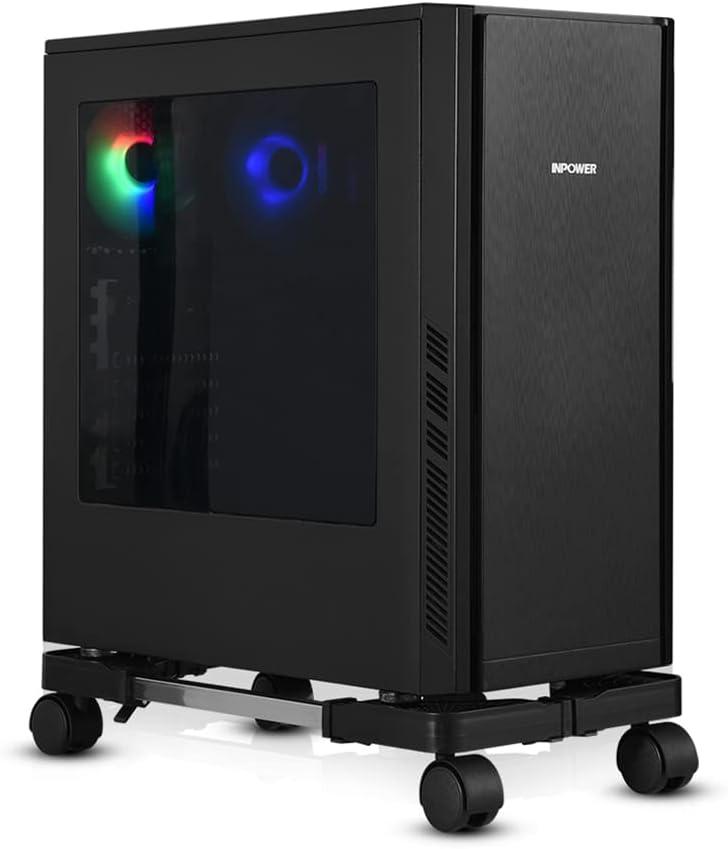
The YOSE Computer Tower Stand is a straightforward accessory that solves a common problem for PC gamers: where to place your tower for optimal airflow and easy access. This adjustable CPU stand uses rolling caster wheels and an expandable frame to fit most gaming cases, from compact builds to full-tower rigs. Based on product specifications and user feedback, it's a practical addition for anyone looking to improve their gaming setup without breaking the bank.
This stand is best suited for PC gamers, casual gamers, and gaming setup builders who want to keep their tower off the floor, especially on carpet where bottom intakes can get blocked. It's also a solid choice for college gamers in dorms, work-from-home gamers with limited desk space, and streamers who frequently move their PC for cable management or cleaning. The adjustable width (16.93-22.44 inches) and depth (9.06-14.57 inches) mean it can handle a wide variety of cases, including many popular gaming models.
In terms of real-world performance, the stand's key advantage is improving airflow and cooling. By lifting the tower a couple inches off the floor, it allows better air circulation around the case, which can help maintain lower temperatures during long gaming sessions. The four silent caster wheels rotate 360 degrees and include locks, so you can roll the stand out for easy access to ports or cables, then lock it in place. Users with heavy gaming PCs (up to 60 lbs) report that the stand feels sturdy and stable, even on carpet.
Build quality is solid for the price. The frame uses alloy steel bars with ABS plastic corners, and the wheels are functional if not top-tier. Assembly is tool-free and takes just a couple of minutes, as the bars slide into the corners and are secured with clamps. The open design provides ample ventilation, and the stand's low profile doesn't add much visual clutter to your gaming desk or floor area. Cable management is easier when you can roll the tower out to route wires behind your desk.
One realistic limitation is that the wheels, while adequate, may feel a bit basic to enthusiasts expecting premium casters. The plastic corners also might not match the aesthetic of a high-end RGB-heavy build, but the stand's black color blends well with most setups. For extremely heavy custom water-cooled rigs exceeding 60 lbs, you might want a heavier-duty option, but for the vast majority of gaming PCs, this stand handles the job well.
Overall, the YOSE Computer Tower Stand is a reliable and affordable upgrade for any gaming setup. It's easy to set up, improves cooling, and makes moving your PC a breeze. If you're a PC gamer looking to keep your tower off the floor, enhance airflow, and simplify cable management, this stand is a practical choice that delivers good value for the money.

Pros
- Large size provides ample mouse movement space without running off the edge.
- Bright, customizable RGB lighting with multiple modes and memory function.
- Non-slip rubber base holds steady even with aggressive mouse swipes.
- Smooth, waterproof surface is easy to clean and maintains mouse glide.
- Excellent value for the price with high user ratings.
Cons
- USB cable is straight rather than right-angle, which may cause cable management issues for some setups.
- Some users report minor ripples that require flattening with weight initially.
- RGB lighting is slightly brighter near the control button compared to the rest of the pad.
The BladeHawks Extra Large RGB Gaming Mouse Pad is an extended desk mat designed for PC gamers, streamers, esports players, and anyone looking to enhance their gaming setup with both functionality and style. Measuring 31.5 by 12 inches, it provides a generous surface that accommodates a full-size keyboard, mouse, and additional peripherals like a phone or tablet.
The nano-textured fabric surface is optimized for precise mouse tracking, making it suitable for fast-paced FPS games, MOBA battles, and RTS micro-management. Users report smooth glide and consistent accuracy, which is crucial for competitive gaming. The anti-slip rubber base ensures the pad stays put even during intense gaming sessions, so you can focus on your gameplay without worrying about the mat shifting.
Build quality is solid for the price point. The cloth surface is stitched with smooth edges that resist fraying over time. The rubber base has a textured pattern that grips the desk effectively. Additionally, the surface is waterproof, so accidental spills bead up and can be wiped away without damaging the pad. This makes it practical for long gaming sessions and desk work alike.
The RGB lighting offers 14 modes, including 7 static colors and 7 dynamic effects, easily controlled by a single button. The power-off memory function remembers your last setting, so you don't have to re-select each time you turn on your PC. The lighting is bright and adds a vibrant glow to your desk, perfect for RGB enthusiasts and streamers who want a visually appealing background.
Setup is straightforward: unroll the pad, connect the USB cable to your computer, and you're ready to go. One limitation is that the included cable is straight rather than right-angled, which may protrude awkwardly if your PC is on the right side. Some users also note that the pad may arrive with slight ripples that flatten after a few hours under books. Overall, these are minor inconveniences for the value offered.
For under $20, the BladeHawks Extra Large RGB Gaming Mouse Pad delivers impressive performance, ample space, and customizable lighting. It's an excellent choice for gamers on a budget, college students setting up a dorm room, streamers looking to enhance their desk aesthetics, or anyone who wants a reliable extended mouse pad without breaking the bank. With over 15,000 positive reviews, it's a proven product that meets the needs of a wide range of users.
The BladeHawks mouse pad features 14 distinct lighting modes, split between 7 static color options and 7 dynamic effects like breathing, wave, and cycling. A single button on the top-left corner lets you cycle through modes, adjust brightness, and turn the lighting on or off. The power-off memory function is a nice touch, automatically returning to your last selected mode when the pad is powered back on.
The RGB lighting is bright and evenly distributed along the edge, though some users note a slightly brighter spot near the control button. The lighting adds a vibrant accent to any gaming desk and can be synced with other RGB gear for a cohesive look. Since it's USB-powered, the lighting stays on as long as the computer is on, making it a constant part of your setup's ambiance.

Pros
- Compact, space-saving design ideal for small desks or multi-monitor gaming setups.
- Touch-controlled RGB lighting adds style without complicated software or extra cables.
- Clear, distortion-free sound at low volume, suitable for casual gaming, videos, and voice calls.
- Simple plug-and-play installation with USB-C adapter included for modern laptops.
- Affordable price point for budget-conscious gamers or streamers looking to upgrade audio.
Cons
- Limited bass response – not ideal for immersive action games or bass-heavy music genres.
- 3.5mm audio cable required – no Bluetooth or wireless connectivity for clutter-free setups.
- Touch light control lacks customization options (no colors or patterns) compared to premium RGB speakers.
The LENRUE G11 computer speakers are a compact, budget-friendly audio solution designed for desktop gamers, streamers, and casual PC users who want to add a touch of RGB flair without breaking the bank. These speakers combine a slim profile with touch-activated lights and surge stereo sound, making them a practical choice for anyone looking to upgrade their gaming setup or home office audio.
Best suited for PC gamers, casual gamers, streamers, and RGB setup enthusiasts, the G11 offers a straightforward plug-and-play experience. With a USB-C or USB-A power connection and a standard 3.5mm audio jack, compatibility is wide – from Windows PCs to MacBooks and Chromebooks. The compact design sits neatly under most monitors, helping to keep your desk tidy while delivering clear audio for dialogue, game soundtracks, and occasional multiplayer sessions.
In terms of performance, the G11 uses four amplifier horns to produce distortion-free sound at moderate volumes. While it won't shake the room with deep bass, it provides clear mids and highs suitable for esports titles like Valorant or Overwatch, where footstep clarity matters. The touch-sensitive RGB light adds a subtle glow to your setup, controlled by a single tap on the top panel – no app required. For streamers, these speakers are adequate for monitoring audio during streams or Discord calls, though a dedicated headset is better for precise audio.
Build quality is decent for the price. The plastic enclosure feels lightweight but sturdy enough for daily use. The cables are glued together to reduce clutter, which is a thoughtful touch for cable management. The top volume knob is easy to reach and turn, though it lacks a mute button. The touch light control is responsive, but the lighting is fixed to a single color pattern – no RGB customization beyond on/off.
Setup is as simple as it gets: plug the USB cable into a power source, connect the 3.5mm audio cable to your device, and you're ready to go. No drivers, no software, no fuss. Cleaning is easy with a dry cloth, and the compact size means they won't collect much dust. One limitation is the lack of Bluetooth or wireless connectivity, so cable management is necessary to keep your desk tidy. Also, the speakers are designed for near-field listening – they won't fill a large room with sound.
Overall, the LENRUE G11 is a practical, affordable upgrade for budget-conscious gamers and streamers who want better audio than built-in laptop speakers without spending a lot. They're a great fit for dorm rooms, home offices, or compact gaming setups where space is premium. If you need deep bass or wireless freedom, look elsewhere, but for everyday gaming, video watching, and voice calls, these speakers deliver solid value.
The LENRUE G11 speakers feature four amplifier horns that provide surge stereo sound with minimal distortion at low to moderate volumes. The audio profile is clear in the mids and highs, making dialogue and in-game footsteps easy to hear. However, bass response is limited – don't expect deep thumping for explosion-heavy games or EDM. For casual gaming, YouTube videos, and voice calls, the sound is perfectly adequate. At higher volumes, some distortion may creep in, so they're best used within a few feet of your ears.
The touch-activated angular game lights are a standout feature at this price point. A single tap on the top of the speaker toggles the lights on and off – no app or remote required. The lighting is a fixed color pattern (likely a multicolor cycling effect), so you can't change colors or brightness. While not as customizable as more expensive RGB speakers, the glow adds a nice ambient touch to any gaming setup, especially under the monitor.
These speakers are designed to save space. Measuring just 2.48 x 14.96 x 2.55 inches, they fit neatly under most monitors, keeping your desk surface free. The cables are glued together to reduce tangling, and the included USB-C adapter ensures compatibility with modern laptops. The top-mounted volume knob is easy to reach, and the compact footprint means you can place them without blocking your screen or keyboard. Ideal for minimalists and gamers with limited desk real estate.


Pros
- Ammonia-free formula is safe on sensitive screens and electronics
- Streak-free cleaning with anti-static properties reduces dust attraction
- Resealable pack keeps wipes moist and ready for use over time
- Compact size makes it easy to store near your desk or take to LAN parties
Cons
- Not designed for deep cleaning or removing heavy grime from textured surfaces
- Some users may prefer a spray-and-wipe method for larger areas like monitor screens
- Pack of 25 may run out quickly for heavy users who clean multiple devices frequently
If you're a PC gamer, streamer, or just someone who likes to keep their setup looking sharp, Windex Gaming Cleaning Wipes might be exactly what you need. These pre-moistened wipes are designed specifically for cleaning gaming gear and electronics, offering a quick and easy way to remove dust, dirt, smudges, and fingerprints without the need for sprays or cloths. The formula is ammonia-free, which is a big plus for those who worry about damaging delicate screens on monitors, laptops, or handheld devices.
Based on the product description, these wipes work well on a variety of gear: consoles, headsets, controllers, keyboards, screens, and more. That makes them a practical choice for gaming setup builders or RGB enthusiasts who want to keep their desk looking pristine without much effort. The anti-static property is a nice touch, as it helps prevent dust from settling back on surfaces right after cleaning. No one wants to spend time wiping down their mouse pad or PC case only to see dust reappear moments later.
For streamers and content creators, maintaining a clean background is part of the job. These wipes can quickly remove fingerprints off a monitor or smudges off a webcam lens, helping your stream look more professional. They're also great for quick cleanups between gaming sessions or after a long day of work from home. The resealable packaging means you can stash a pack in your desk drawer or backpack without worrying about the wipes drying out.
However, it's worth noting that these wipes are best for light maintenance cleaning. They may not be ideal for deep cleaning textured surfaces like some mouse pads or heavily soiled keyboard crevices. If you have a lot of gear to clean, the 25-count pack might go faster than you'd like. But for the price, they offer a straightforward solution for keeping your gaming area tidy without harsh chemicals or extra steps.
In terms of ease of use, you simply pull one out, wipe down the surface, and you're done. No need to spray, wait for drying, or worry about streaks. This convenience makes them suitable for casual gamers, competitive players, and esports athletes who want to reduce clutter and maintenance time. Overall, if you're looking for a hassle-free way to keep your gaming gear looking clean and performing well, Windex Gaming Wipes are a solid pick.
Frequently Asked Questions
How do ergonomic wrist rests improve desktop comfort during long sessions?
Ergonomic wrist rests relieve direct pressure between your forearms and hard desk edges. The Vaydeer Wrist Rest for Keyboard and Mouse uses high-density memory foam and a contoured shape to maintain neutral wrist alignment. A non-slip rubber base keeps the padding securely anchored during rapid keystrokes, which minimizes unnecessary wrist strain over time.
What should you look for in a USB gaming microphone kit?
Look for an adjustable boom arm, integrated gain controls, and a responsive tap-to-mute function. The TONOR Gaming Microphone Set provides clean vocal pickup alongside direct gain adjustment on the mic body. Connecting via standard USB-A or Type-C ensures broad compatibility with your PC without requiring complicated audio drivers or external interfaces.
Why is an extended RGB mouse pad useful for competitive games?
An extended surface offers consistent sensor tracking while protecting your desk surface from repeated friction. Measuring over 31 inches wide, the BladeHawks Extra Large RGB Gaming Mouse Pad provides ample room for both a full-sized keyboard and wide mouse swipes. Its micro-textured cloth ensures predictable glide, while the rubber backing prevents accidental movement during intense matches.
How does a mobile computer tower stand protect gaming hardware?
Yes, elevating your PC case off the carpet improves airflow and prevents excessive dust intake through the power supply vents. A rolling stand like the YOSE mobile tower stand features open ventilation channels on the bottom plate to support heat dissipation. The caster wheels also make it easy to slide your rig out for maintenance or cable adjustments.
Can desktop power strips handle multiple high-power Pc Gaming Accessories safely?
Yes, provided the power strip includes adequate surge protection ratings and heavy-duty wiring. Units like the SUPERDANNY surge protector feature 2100-joule protection, widely spaced AC outlets, and dedicated USB charging ports to handle peripherals alongside prebuilt gaming desktop setups. Built-in overload and fire-retardant protections help safeguard sensitive electronics from sudden voltage spikes.
Do blue light blocking glasses make a difference during late-night gaming in 2026?
Polycarbonate blue-blocking lenses help reduce screen-induced eye fatigue during extended evening play. Frames like Gaoye glasses filter harsh screen emissions while maintaining optical clarity and true color reproduction. Wearing lightweight frames reduces glare and helps keep your eyes relaxed throughout marathon gaming sessions.


Write Your Review
No reviews yet. Be the first to share your experience!