


Integrated graphics on compact systems often hit a hard ceiling when handling demanding modern titles or heavy 3D rendering workloads. Enthusiasts aiming for desktop-class graphical fidelity frequently run into bandwidth constraints and thermal limits inside cramped mini cases. Connecting a dedicated graphics card through high-speed expansion interfaces completely changes that dynamic. Adding the best mini pc external gpu dock allows you to bypass internal space restrictions while unlocking raw rendering throughput via modern PCIe or OCuLink connections. Pairing this setup with strong compute power, much like evaluating whether an AMD Ryzen 5 7600X is good for gaming, ensures your mobile or compact CPU keeps pace with high-tier graphics rendering.
Careful analysis of interface protocols, continuous power delivery headroom, and physical PCIe slot clearance is essential before settling on an external dock. Some enclosures come pre-fitted with dedicated mobile GPUs and integrated GaN power supplies, while open-frame designs require matching external ATX or SFX power supplies with full-length cards like an RTX 4090. Based on manufacturer specifications and builder feedback, prioritizing OCuLink 4i connections running at PCIe 4.0 x4 over older protocols minimizes bandwidth loss. Selecting the right external dock gives your small workstation or living room setup substantial graphics muscle without the acoustic noise or thermal buildup of cramming high-wattage components into a tiny enclosure.

Pros
- High bandwidth PCIe 4.0 x4 interface for demanding games and creative workloads.
- Flexible, slim OCuLink cable reduces desk clutter and cable stress.
- Works with standard ATX PSUs, so you can reuse existing power supplies.
- Compact enclosure design supports easy transport and storage.
Cons
- OCuLink does not support hot-plugging; computer must be off to connect or disconnect.
- Requires a compatible OCuLink port on your laptop or mini PC (not Thunderbolt).
- Power supply and GPU are not included, adding to overall cost.
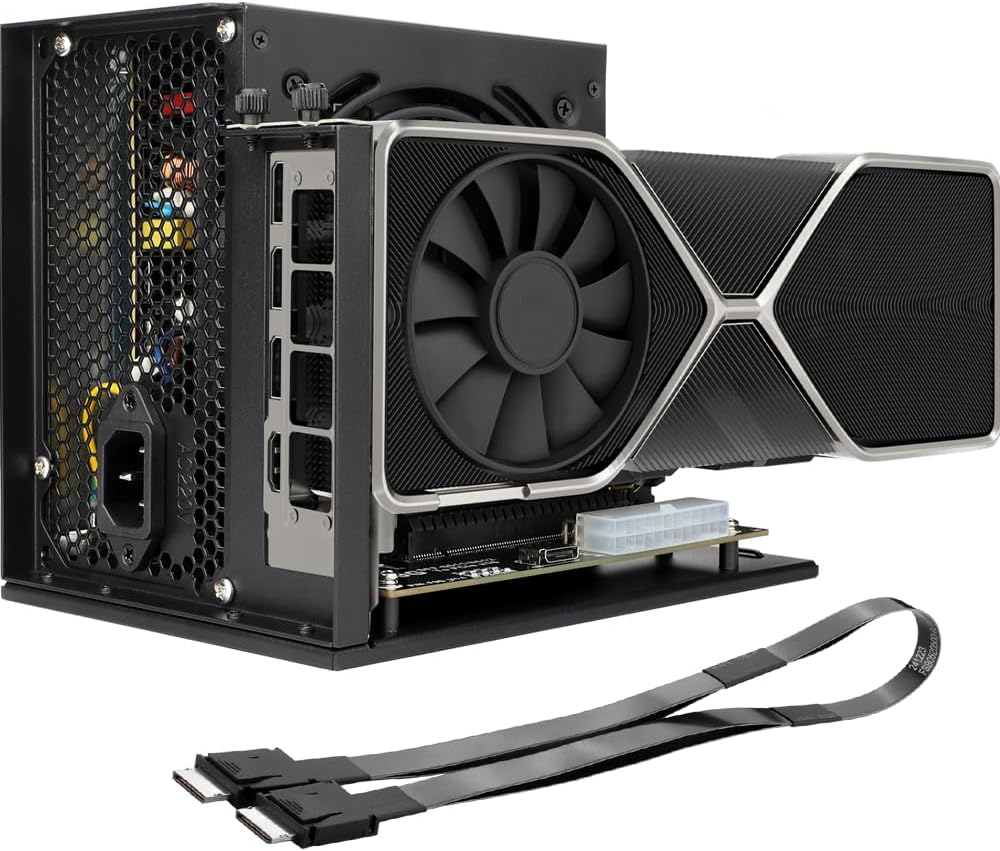
The OwlTree PCIe 4.0 x4 eGPU Dock is an external GPU enclosure designed for PC gamers and content creators who want to supercharge their laptop or mini PC with a full-size desktop graphics card. It uses an OCuLink SFF-8612 to SFF-8611 connection, delivering up to 64Gbps of bandwidth. This makes it a strong alternative to Thunderbolt-based eGPU solutions, especially for users who already have an OCuLink-equipped device or are building a compact gaming setup.
For competitive gamers and esports players, the low-latency PCIe 4.0 x4 connection helps maintain high frame rates in fast-paced titles like Valorant, Overwatch 2, and Apex Legends. Streamers and content creators will appreciate the ability to pair a powerful GPU with a portable laptop, enabling smooth 1080p or 1440p streaming and faster video rendering without being tied to a bulky desktop tower. The dock’s detachable design makes it easy to pack up for LAN events or dorm room moves.
Build quality is practical with gold-plated contacts that reduce signal degradation and a sturdy enclosure that houses a standard ATX power supply. The included OCuLink cable is notably thin and flexible, which helps with cable management in tight desk setups. However, the dock does not include a PSU or GPU, so you’ll need to supply those separately. It supports large cards like the RTX 4090 and AMD RX 7900 XTX, giving you plenty of room for high-end hardware.
Setup is straightforward: open the enclosure, mount your GPU and PSU, connect the OCuLink cable to your laptop or mini PC, and install the appropriate drivers. The LED status indicator helps confirm connection and power status. One key limitation is that OCuLink does not support hot-plugging, so you must power down before connecting or disconnecting the cable. This is a minor inconvenience but standard for this interface.
For college gamers, work-from-home professionals, or anyone with a laptop that lacks a dedicated GPU, this eGPU dock offers a cost-effective way to get desktop-level graphics performance. It’s also a great fit for mini PC enthusiasts who want to game or render without sacrificing desk space. The enclosure’s compact footprint and flat cable help keep your setup clean and organized.
Overall, the OwlTree eGPU Dock is a versatile, high-bandwidth solution for upgrading your portable system’s graphics capabilities. It shines for those who already own an ATX power supply and a GPU, and who value a slim, travel-friendly design over hot-plug convenience. Just remember to power down before swapping cables.

Pros
- Plug-and-play setup with Oculink-equipped mini PCs; no driver headaches.
- Supports the latest high-end GPUs for 4K gaming and AI workloads.
- Open-air design provides excellent airflow and keeps GPU temperatures in check.
- Compact footprint and solid metal construction feel durable and premium.
- Great value compared to Thunderbolt eGPU enclosures with similar performance.
Cons
- Requires a separate power supply and GPU, adding to total cost.
- No GPU support bracket included; heavier cards may need additional support to prevent sag.
- Only works with Oculink ports; not compatible with USB-C, Thunderbolt, or standard laptops.
The MINISFORUM DEG1 eGPU Dock is a specialized accessory designed for PC gamers, streamers, and content creators who want to supercharge their mini PC with a full-size desktop graphics card. Unlike traditional Thunderbolt enclosures, this dock uses Oculink 4i (PCIe 4.0 x4) for a direct, low-latency connection to compatible mini PCs like the MINISFORUM UM890 Pro or MS-A1. If you're a gaming setup builder looking to maximize performance in a compact form factor, this is a compelling option.
Performance-wise, the DEG1 delivers the full bandwidth of PCIe 4.0 x4, which is more than enough for gaming at 1440p and 4K with cards like the RTX 4090 or RX 7900 XTX. User reviews note that games run smoothly with high frame rates, and the open-air design keeps the GPU cool even during extended sessions. For streamers and content creators, this dock can handle demanding tasks like 4K video editing and live streaming without bottlenecking modern GPUs.
Build quality is solid with a metal frame that feels sturdy. The dock is essentially a bare-bones platform: you mount your GPU and power supply directly onto the board. While this keeps costs down, it means there's no support bracket for heavier cards. Some users have reported that the PCIe connection feels wobbly, so a third-party GPU support bracket might be necessary for long-term reliability. The included Oculink cable is adequate, but shorter aftermarket cables can help with cable management.
Setup is straightforward for anyone familiar with PC building. Simply install your GPU and PSU, connect the Oculink cable to your mini PC, and power on. The follow-start feature works seamlessly with MINISFORUM mini PCs, allowing the dock to turn on and off with the host. However, note that the Oculink interface does not support hot-plugging, so you must shut down the system before connecting or disconnecting.
A realistic limitation is compatibility: this dock only works with devices that have an Oculink port, which is primarily found on certain mini PCs and a few laptops like the ThinkBook 14 Gen 6. It won't work with Thunderbolt or USB-C. Additionally, you'll need to supply your own GPU and power supply, which adds to the overall investment. For college gamers or those with compact desks, the small footprint is a major plus, but the open design means you'll have a GPU sitting out in the open, which may not suit everyone's aesthetic.
Overall, the MINISFORUM DEG1 is an excellent value for its niche. If you own a compatible Oculink mini PC and want to game at high settings or accelerate creative workloads without building a full tower, this dock is a smart buy. Just factor in the cost of a PSU and a GPU support bracket for heavier cards. It's a practical, performance-focused solution for gamers who value flexibility and desk space.
With PCIe 4.0 x4 bandwidth, the DEG1 eGPU Dock can handle modern GPUs like the RTX 4090 and RX 7900 XTX without noticeable bottlenecks in most games. User reports show high frame rates in titles like Cyberpunk 2077 and Call of Duty at 1440p and 4K. The open-air design keeps thermals low, so GPU performance remains consistent during long gaming sessions. Competitive gamers will appreciate the low latency of the Oculink connection, which is comparable to a direct motherboard slot.
The dock features a metal chassis that feels robust and stable. The PCB is well-mounted, and the Oculink connector is secure. However, there is no GPU support bracket, so heavier cards may sag over time. Users recommend adding a third-party support to avoid strain on the PCIe slot. The overall construction is minimalist but functional, prioritizing airflow and easy access.
This eGPU dock is designed exclusively for devices with an Oculink port. It is confirmed compatible with MINISFORUM mini PCs like the UM780 XTX, UM890 Pro, and MS-A1, as well as select ThinkBook models. It does not support Thunderbolt, USB-C, or standard laptops. Always verify your device's Oculink availability before purchasing. The dock works with any standard ATX or SFX power supply and any PCIe GPU.
Frequently Asked Questions
Does an OCuLink external GPU dock bottleneck desktop graphics cards?
Yes, high-end graphics cards experience a minor performance penalty over OCuLink compared to direct motherboard PCIe x16 slots. OCuLink 4i provides PCIe 4.0 x4 bandwidth at up to 64Gbps, which easily outperforms USB4 or Thunderbolt 4 connections. While flagship cards might lose 5% to 15% performance in bandwidth-heavy scenarios, mid-range cards generally run with negligible frame rate loss.
Can you hot-plug an OCuLink external GPU into a mini PC?
No, you must always shut down your mini PC before connecting or disconnecting an OCuLink cable. Unlike Thunderbolt or standard USB Type-C connections, OCuLink links directly to PCIe lanes and does not support hot swapping. Unplugging the cable while the machine runs risks system crashes, blue screens, or potential hardware damage.
What power supply is required for an open-frame eGPU dock?
Standard ATX or SFX power supplies with dedicated PCIe power cables are required for open-frame docks like the MINISFORUM DEG1. The dock itself typically features a standard 24-pin motherboard header to trigger power delivery simultaneously with the host machine. You must calculate the continuous wattage needs of your specific graphics card, ensuring enough headroom for transient power spikes.
Is an external GPU setup better than buying a dedicated gaming desktop?
It depends on whether you prioritize portability, modularity, or raw price-to-performance value. An external dock lets you use a single ultra-compact PC for travel and plug into workstation graphics at home, but building a traditional desktop or choosing an entry gaming desktop for Minecraft or general gaming often offers better overall value per frame. The best mini pc external gpu in 2026 bridges this gap cleanly for users committed to small form factor hardware.
Does the MINISFORUM MGA1 external GPU dock require a separate power supply?
No, the MINISFORUM MGA1 includes a built-in 240W GaN power adapter directly inside the enclosure. This internal power brick supplies up to 120W to the integrated AMD Radeon 7600M XT graphics chip and provides 65W power delivery to connected displays. It provides an all-in-one footprint without requiring loose power supply bricks or bulky ATX cables on your desk.
How does OCuLink compare to Thunderbolt 4 for external graphics?
OCuLink delivers significantly higher effective bandwidth and lower latency by routing native PCIe 4.0 x4 signals at 64Gbps. Thunderbolt 4 caps PCIe data transfer at roughly 32Gbps due to display and bus protocol overhead. Builders prioritizing maximum frame rates from the best mini pc external gpu setup will see higher bandwidth efficiency and smoother frame pacing across demanding 1440p and 4K titles using OCuLink.





Write Your Review
No reviews yet. Be the first to share your experience!