


Straining to read small altimeter numbers on a cluttered instrument panel quickly ruins virtual flights. Standard lenses often introduce distracting blur, while uneven headbands create uncomfortable skull hotspots during long cross-country routes. Pilots need sharp optical clarity and smooth refresh rates to scan avionics without squinting. That is why selecting the best vr headset for flight sims requires evaluating display resolutions, lens quality, and headband balance. A balanced headset keeps you immersed in the cockpit rather than adjusting straps during a tricky crosswind landing. Pairing your visual hardware with a capable performance gaming laptop ensures your simulator runs smoothly without dropping frames.
Demanding flight simulators require both graphical throughput and comfortable gear for marathon sessions. Based on product specifications and user feedback, virtual pilots prioritize pixel density alongside weight distribution to avoid neck fatigue. High-resolution panels with glass aspheric lenses or standalone units with untethered ease serve different cockpit environments. Cockpit realism also relies on clean audio cues and balanced clamping force, ensuring you stay focused from takeoff to touchdown.

Pros
- Excellent price-to-performance ratio for a standalone VR headset
- Wireless setup is quick and easy - no PC required
- Full-color passthrough enhances mixed-reality experiences
- Includes popular Batman game and access to a growing game library
- Comfortable cushion and adjustable fit work well for extended use
Cons
- Battery life is around 2 hours, which may require a charging station or extended battery strap for longer sessions
- Default head strap may feel front-heavy for some users; aftermarket straps with counterweights can improve comfort
- Setting up game codes and syncing with the Meta Horizon app can be a bit confusing initially
The Meta Quest 3S is a standalone virtual reality headset that brings high-quality VR gaming and mixed-reality experiences without the need for a gaming PC or external sensors. Designed for gamers, streamers, and content creators who want to step into immersive worlds or blend digital content with their physical space, this headset offers a compelling package at a reasonable price point.
Powered by the Snapdragon XR2 Gen 2 processor, the Quest 3S delivers 2x the graphical processing power of its predecessor, resulting in lightning-fast load times and smooth frame rates. The 8GB of RAM ensures that even graphically intensive games run without hiccups. Whether you're playing fast-paced action games, exploring open-world environments, or using fitness apps, the responsiveness is impressive for a wireless device. The dual RGB color cameras provide high-fidelity passthrough, letting you see your surroundings in full color while staying immersed in VR.
Build quality is solid, with a lightweight design that reduces fatigue during extended sessions. The included cushion is soft and comfortable, though some users may find the default strap front-heavy. Many reviewers recommend an aftermarket strap with a rear counterweight or extended battery pack for better balance. The controllers are responsive and track well, and the headset supports hand tracking for certain interactions.
Setup is straightforward: unbox, charge, download the Meta Horizon app, and follow the on-screen instructions. The headset comes with a 3-month trial to over 40 games and includes Batman: Arkham Shadow, adding immediate value. However, redeeming codes and syncing the app with the headset can take a few extra steps, so patience is needed. Battery life is around 2 hours, which is typical for standalone VR, but you can extend playtime with an external battery strap or by plugging into a power source.
Realistic limitations include the need for a well-lit room for optimal passthrough and the occasional learning curve for hand tracking gestures. Some users report that the battery drains faster during graphically intense games. Additionally, the headset is designed for ages 10+, and parental guidance is recommended for younger users.
Overall, the Meta Quest 3S is an excellent choice for PC gamers who want to explore VR without a high-end gaming rig, streamers looking to create mixed-reality content, and casual gamers who want a fun, immersive experience. It's also a great entry point for VR newcomers. If you're willing to invest in a better head strap or battery solution, this headset offers fantastic value and a gateway to a vast library of VR experiences.
The Snapdragon XR2 Gen 2 processor provides a noticeable boost in graphical fidelity and frame rates compared to earlier Quest models. Games load quickly, and the 8GB of RAM helps maintain smooth performance even in titles with complex environments. The wireless connection means no tripping over cables during active gameplay. For competitive VR gamers, the low latency and responsive tracking are key advantages. The included Batman: Arkham Shadow showcases the headset's capabilities with detailed visuals and fluid combat. The 2+ hour battery is sufficient for most sessions, but heavy users may want to invest in an extended battery.
The Quest 3S is lightweight at under 3 pounds, but the default soft strap can cause the headset to feel front-heavy over time. Many users find that adding a third-party strap with a rear counterweight or built-in battery improves balance significantly. The face cushion is soft and breathable, and the headset accommodates glasses with a spacer. For those who wear prescription lenses, third-party inserts are available. The controllers are ergonomic and fit well in most hand sizes. Overall, comfort is good for sessions up to an hour, but adjustments or accessories can extend that comfortably.
Setting up the Quest 3S is simple: charge the headset and controllers, download the Meta Horizon app on your phone, and follow the guided setup. The headset uses inside-out tracking, so no external sensors are needed. You'll need to create or log into a Meta account. The initial game code redemption (for Batman and the 3-month trial) requires a few steps: find the code in the box, enter it in the app, then sync the headset. Some users find this process slightly confusing, but it's straightforward once you know the steps. The interface is intuitive, and you can browse the store, launch apps, and adjust settings directly from the headset. Hand tracking works well in well-lit environments, but the controllers offer more precise input for games.
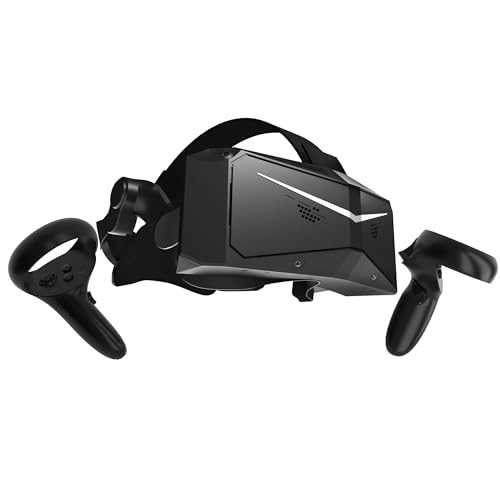
Pros
- Exceptional per-eye resolution and QLED HDR visuals create a lifelike, high-contrast image ideal for sim racing and flight sims
- Low-latency 120Hz refresh rate minimizes motion blur and input lag, critical for competitive iRacing and fast-paced VR action
- Easy room-scale setup with built-in inside-out tracking, no external sensors needed
- Glass aspheric lenses provide sharp edges with minimal chromatic aberration, improving overall immersion
Cons
- At 815 grams (28 ounces), the headset is heavier than many competitors, which may cause fatigue during very long sessions
- Inside-out tracking, while convenient, may struggle in low-light or monochrome environments compared to outside-in systems
- Premium pricing places it well above entry-level VR headsets, making it a niche choice for dedicated sim enthusiasts
The Pimax Crystal Light is a premium PC VR headset that targets sim racing and flight simulation enthusiasts who demand the highest visual fidelity. Boasting an impressive 2880x2880 resolution per eye, this headset delivers 16.6 million pixels per display, resulting in incredibly sharp images that make reading cockpit instruments or spotting distant track markers a breeze. The QLED panel with local dimming and HDR support further enhances contrast and color accuracy, pulling you deeper into your favorite virtual worlds.
This headset is best suited for competitive sim racers using iRacing or Assetto Corsa, flight sim pilots in Microsoft Flight Simulator or DCS World, and any PC gamer who prioritizes visual clarity above all else. Streamers and content creators focused on VR gameplay will also appreciate the crisp footage captured through the lens. However, casual gamers or those new to VR might find the high price and weight a bit much for less demanding experiences.
Performance-wise, the 120Hz refresh rate combined with ultra-low latency ensures that even the most rapid head movements stay smooth and responsive. The inside-out tracking system uses built-in cameras to translate your movements accurately without external base stations, simplifying your desk setup and reducing cable clutter. Paired with SteamVR compatibility, you can use your existing controllers - like the Valve Index Knuckles - and jump straight into your library without fuss.
Build quality reflects Pimax's focus on high-end VR. The glass aspheric lenses minimize distortion and deliver edge-to-edge clarity, a significant upgrade over cheaper Fresnel lenses. The headset's ergonomic design, weighing approximately 815 grams, includes a padded head strap and face cushion to distribute weight. While not the lightest option, many users may find it comfortable for hour-long sessions after adjusting the fit. For cleaning, simply wipe the lenses and face pad with a microfiber cloth - no disassembly required.
A realistic limitation is the weight. At 28 ounces, it's noticeably heavier than competitors like the Valve Index or Meta Quest 3, which could lead to neck strain during marathon sim races. Additionally, inside-out tracking, while convenient, can lose accuracy in dimly lit or featureless rooms. The price point also puts it firmly in the enthusiast category, so budget-conscious gamers may want to wait for sales or consider lower-resolution alternatives.
Overall, the Pimax Crystal Light is an outstanding choice for PC gamers who demand the best visuals for sim racing, flight sims, and immersive VR experiences. If you have a powerful gaming PC and a dedicated space for VR, this headset will elevate your virtual cockpit and track days to new levels of realism. For casual VR gaming or general entertainment, simpler and lighter headsets may offer better value.
With 2880x2880 per eye and a 120Hz refresh rate, the Pimax Crystal Light delivers exceptional visual performance for sim racing and flight sims. The high resolution allows you to see fine details like brake markers and instrument readings with crystal clarity. The QLED panel with local dimming enhances contrast, making night scenes in iRacing or dusk flights in Microsoft Flight Simulator look truly immersive. The ultra-low latency ensures that head tracking feels instantaneous, reducing motion sickness for many users.
The headset features a robust plastic chassis with a padded head strap and face cushion. The glass aspheric lenses are a highlight - they resist scratches better than plastic lenses and provide consistent sharpness across the field of view. The weight is distributed via a halo-style strap, but at 815 grams it's heavier than most. The inside-out tracking cameras are integrated seamlessly and feel durable. Overall, the build quality feels premium and designed for long-term reliability.
Setting up the Pimax Crystal Light is straightforward: plug into your PC via DisplayPort and USB, install the Pimax software, and configure your play space using the inside-out cameras. No external sensors are needed, which keeps your desk clean. Comfort is decent for a high-res headset - the padding is soft but the weight may be noticeable after two hours. Adjustment dials for IPD and strap tension help achieve a secure fit. Cleaning is simple: wipe the lenses and foam with a dry cloth.
The Pimax Crystal Light is fully compatible with SteamVR, meaning it works with hundreds of VR titles and controllers like the Valve Index Knuckles, HTC Vive wands, and more. It supports most PC VR games that use SteamVR tracking. The headset requires a DisplayPort 1.4 port and USB 3.0 for data, plus a powerful GPU - at least an RTX 3080 or equivalent is recommended for the full 120Hz experience. It also works with motion sim platforms for racing and flight setups.
Frequently Asked Questions About Flight Simulation VR
Does display resolution affect how clearly you can read flight instruments?
Yes, higher display resolution directly determines whether avionics and small instrument dials remain legible without zooming in. Devices featuring 2880×2880 per eye resolution and glass aspheric lenses eliminate the screen door effect that blurs digital flight decks. In flight simulators, high pixel density allows aviators to scan needles, read GPS displays, and check radio frequencies naturally during flight maneuvers.
Can a standalone headset run complex PC flight simulators?
Yes, standalone hardware can stream demanding desktop simulators through wired USB connections or high-speed wireless links. The Meta Quest 3S utilizes Snapdragon XR2 Gen 2 processing and 8GB of RAM for onboard tasks, but connects to your flight rig for heavy PC VR simulation. While dedicated tethered displays offer uncompressed video streams, versatile standalone headsets give simmers an accessible path into virtual cockpits.
How important is headset weight and balance during cross-country flights?
Headset weight distribution is critical for avoiding neck fatigue and skull pressure points during multi-hour flights. While an ergonomic design around 815 grams balances solidly with proper rear counterweights, poorly distributed frames cause noticeable strain. Sim pilots spending hours navigating need plush facial interfaces and even clamping force balance to stay focused on approach charts.
What refresh rate is ideal for the best vr headset for flight sims in 2026?
A refresh rate of 90Hz to 120Hz provides the smoothest visual flow and reduces motion disorientation during rapid maneuvers. High refresh rate panels ensure that runway markers and horizon lines pass by without visual stuttering when banking hard. Fast display response times keep your inner ear and eyes aligned, which is essential for low-altitude terrain navigation.
Does inside-out tracking work reliably in a seated flight sim rig?
Yes, inside-out camera tracking works well for seated flight setups because it tracks your cockpit movements without external base stations. Integrated cameras map your immediate surroundings to translate subtle head tilts and leaning motions toward the instrument console. If your desk setup also features a responsive PC gaming mouse or physical throttle quadrant, inside-out systems keep your cockpit free from extra sensor clutter.
How does local dimming improve night flight immersion in VR?
Local dimming dramatically enhances night flights by producing true deep blacks while keeping runway lights bright and sharp. Premium QLED panels with local dimming prevent dark skies from appearing as washed-out gray hazes. This contrast accuracy helps virtual pilots spot distant airport beacons, city grids, and stars against a pitch-black horizon.





Write Your Review
No reviews yet. Be the first to share your experience!