


Immersive Fit and Visual Clarity in Virtual Reality
Headband pressure points across the crown and heavy front-loading can quickly spoil an evening of immersive entertainment. Stiff foam cushions often turn what should be an exciting escape into neck strain within twenty minutes. Tracking down the best entry level vr headset requires balancing ergonomic strap designs, breathable face padding, and optical adjustments that keep visual fatigue at bay. Based on our detailed comparison of optical specifications, strap designs, and user feedback, optical alignment makes all the difference for extended wear. Pairing a comfortable headset with a capable gaming laptop lets you jump into virtual environments without frustrating frame drops or physical fatigue.
Distorted peripheral optics and narrow interpupillary adjustments can ruin immersion just as quickly as an awkward strap. Modern budget units tackle this issue by offering independent lens dials for focal depth, alongside blue-light filtering to protect your vision. Many users also seek flexible phone cradles and responsive wireless controllers to navigate menus easily. Whether you want a mobile viewer for 360-degree movies or a tethered device for PC gaming, checking lens transmittance and adjustable focal distance ensures clear visuals.



Pros
- Excellent VR library with hundreds of games and exclusive titles.
- Improved optics with reduced screen-door effect for clearer visuals.
- Comfortable Halo headband design that stays secure during intense sessions.
- Intuitive Touch controllers with realistic hand tracking.
- Room-scale tracking without external sensors for easy setup.
Cons
- Requires a Facebook account to log in, which may be a privacy concern for some users.
- PC-powered, so you need a capable gaming PC to run VR games smoothly.
- Limited to the Oculus ecosystem; not compatible with all SteamVR accessories without workarounds.
The Oculus Rift S is a PC-powered virtual reality headset that brings the immersive world of VR gaming to your desktop. Designed by Meta (formerly Facebook), this headset is built for PC gamers who want to step into a vast library of VR titles, from intense shooters to creative sandbox games. With improved optics and a sharper display, it aims to reduce the common screen-door effect, making visuals clearer and more vibrant.
This headset is best suited for PC gamers who already have a capable gaming rig and want to explore VR without breaking the bank. It's also a great choice for streamers looking to add VR content to their channels, as well as esports players who enjoy competitive VR titles. The Oculus Rift S offers a comfortable fit thanks to its Halo headband design, which uses a quick-turn wheel to adjust tightness. This is a big plus for long gaming sessions, as it reduces pressure points and keeps the headset secure during fast movements.
Performance-wise, the Rift S delivers responsive tracking with Oculus Insight, which uses inside-out cameras to map your room without external sensors. This means you can set it up in your gaming space without needing to mount base stations. The updated Oculus Touch controllers are intuitive and responsive, letting you grab, throw, and interact with objects naturally. The visual clarity is solid for its price range, with bright colors and reduced screen-door effect, though it's not as sharp as higher-end headsets like the Quest 2 or Valve Index.
Build quality is decent, with a sturdy plastic construction and a comfortable fabric interface. The headset is lightweight, which helps during extended use. However, the cable can be a bit cumbersome if you're moving around a lot, so cable management is something to consider. The audio is delivered through built-in speakers that sit near your ears, offering decent sound but lacking the immersion of over-ear headphones. You can use your own headphones via the 3.5mm jack, which is a nice touch.
Setup is straightforward: you'll need to install the Oculus software on your PC, connect the headset via DisplayPort and USB 3.0, and log in with a Facebook account. This requirement has been a point of contention for some users, as it ties your VR experience to a social media platform. The software is easy to use, with a clean interface for browsing and launching games. Maintenance is minimal, just keep the lenses clean and the sensors free of dust.
In terms of limitations, the Rift S is not wireless, so you'll be tethered to your PC. The field of view is average, and the lack of adjustable IPD (interpupillary distance) can be a problem for some users. Also, the controller's tracking can sometimes lose sight of the cameras if you move your hands behind your back. Despite these drawbacks, the Oculus Rift S remains a strong entry-level VR headset for PC gamers who want a reliable, comfortable, and feature-rich experience. If you're looking to dive into VR gaming without spending a fortune, this is a solid choice.


Frequently Asked Questions
Can you wear prescription glasses inside an entry-level VR headset?
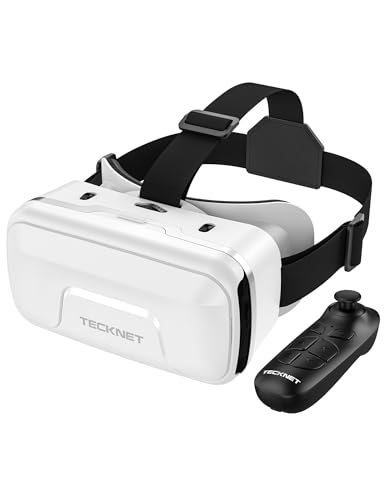
Yes, several entry-level models feature recessed interior cavities and independent focal adjustment dials designed for glasses wearers. Headsets like the Wennedalyn VR Headset and TECKNET VR Headset provide generous frame clearance alongside dual interpupillary distance (IPD) dials to prevent lenses from rubbing. Certain mobile units even support naked-eye viewing for users with myopia up to 600 degrees.
What is the main difference between a smartphone VR viewer and a standalone headset?
A smartphone VR viewer relies on your mobile device for display and processing, while a standalone headset includes its own built-in screen and computing hardware. Mobile holders like the DESTEK V5 or TECKNET VR Headset offer an affordable way to watch 360-degree videos using your existing phone screen. In contrast, dedicated devices such as the Meta Quest 3S feature onboard processors and spatial tracking cameras for interactive virtual environments.
How do wireless controllers connect to a mobile VR headset?
Most mobile VR controllers connect to your smartphone using Bluetooth rather than pairing with the headset itself. Headsets like the VR Headset for Phone with Controller include handheld remotes that pair directly to Android or iOS devices for media navigation. Keep in mind that iOS may limit third-party Bluetooth controllers to basic media and YouTube playback controls rather than full gaming inputs.
Does a PC-powered VR headset require high-end computer hardware?
Yes, tethered headsets like the Oculus Rift S depend directly on your computer graphics card and processor to render smooth 3D visuals. Connecting a PC-based VR headset requires a dedicated display port, high-speed USB ports, and strong graphical processing to prevent latency. If you already run a setup with a responsive PC gaming mouse and a capable graphics card, a tethered headset unlocks access to massive desktop gaming libraries.
How does blue-light protection help during long virtual reality sessions?
Anti-blue light coatings on optical lenses filter harsh high-energy wavelengths to minimize eye fatigue during prolonged viewing. Many models in the Best Entry Level Vr Headset category for 2026, including the Xiaokeis 3D VR Glasses and TECKNET headsets, incorporate coated aspheric lenses that maintain high light transmittance while reducing glare. This layer helps keep your eyes comfortable when streaming extended 3D movies.




Write Your Review
No reviews yet. Be the first to share your experience!