


Excessive headband pressure points across your skull can ruin an exciting session faster than weak battery runtime. Heavy front-loaded visors often press against cheekbones and pinch glasses frames, turning an escape into an uncomfortable chore. Tracking down the Best Virtual Reality Headsets of 2026 means balancing weight distribution with responsive 3D positional audio and low-latency tracking. Clear visual immersion requires sharp optics, while your ears depend on dynamic speakers and breathable facial interfaces to stay comfortable. If you want seamless power for tethered VR gaming, pairing your setup with a performance gaming laptop keeps frame rates smooth without annoying visual stutter.
Careful analysis of hardware specifications and user feedback reveals that balance matters just as much as graphical processing power. Modern mobile chipsets deliver crisp resolutions, but rigid straps with poor weight distribution quickly cause neck fatigue. Many enthusiasts prefer headsets with adjustable knuckle straps, balanced clamping force, and full-color passthrough cameras to keep physical boundaries clear. Whether you play standing up or sit by a desk with a textured desk mat for flight simulators, selecting well-balanced gear keeps you immersed for hours.

Pros
- Exceptional visual clarity with sharp, high-resolution display
- Powerful Snapdragon processor ensures smooth, responsive performance
- Wireless freedom eliminates cord tangles and enhances immersion
- Generous 512GB storage for many games and content
- Color passthrough cameras allow seamless mixed reality interaction
- Comfortable fit for extended play sessions according to user feedback
Cons
- Battery life around 2 hours may require breaks for longer gaming marathons
- Some users may find the standalone library less extensive than PC VR options
- Premium pricing for the 512GB model, though it offers ample storage
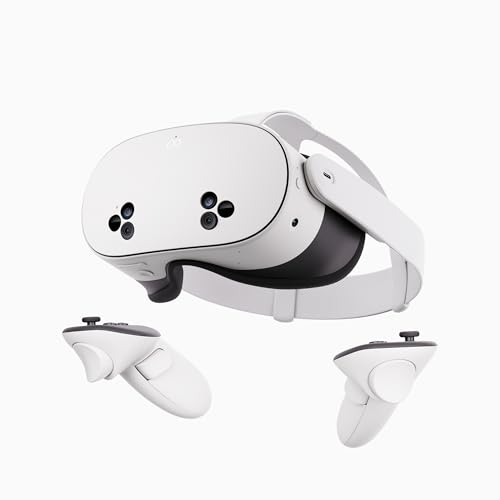
The Meta Quest 3 512GB is a standalone virtual reality headset that brings together high-resolution visuals, powerful processing, and a completely wireless design. It's built for PC gamers, streamers, esports enthusiasts, content creators, and anyone who wants to dive into immersive VR gaming without the hassle of cables. With nearly 30% sharper resolution than its predecessor and a 4K Infinite Display, every scene pops with detail—from the textures in open-world adventures to the fast-paced action of competitive shooters.
For gamers who prioritize responsiveness, the Snapdragon XR2 Gen 2 processor delivers 2X the graphical power, resulting in lightning-fast load times and smooth frame rates. The 8GB of RAM ensures that multitasking and complex scenes remain fluid, while the 512GB storage gives you plenty of room for a growing library of games and experiences. The wireless freedom is a game-changer for room-scale VR, letting you move naturally without tripping over cords, and the improved battery provides about 2 hours of playtime—enough for most sessions.
Build quality is solid, with a lightweight design (under 0.9 pounds) and comfortable padding that many users find suitable for extended use. The dual RGB color cameras enable high-fidelity passthrough, letting you blend virtual objects with your real environment for mixed reality applications. Setup is straightforward: just power on, connect to Wi-Fi, and start exploring the included 3-month trial of Meta Horizon+, which grants access to over 40 games.
In terms of practicality, the Quest 3 works well for both casual and competitive gamers. Its high resolution and low-latency performance make it great for fast-paced VR games, while the wireless aspect is ideal for fitness titles or social experiences. Streamers can use the built-in casting feature to share gameplay on Twitch or YouTube, and content creators will appreciate the ability to capture mixed reality footage. The headset also integrates with PC VR via Link cable or Air Link, expanding its library to include PC VR titles—though that requires additional setup.
One realistic limitation is battery life: at around 2 hours, you may need to take breaks or keep a power bank handy for longer sessions. Additionally, while the standalone library is impressive and growing, it may not match the depth of PC VR offerings. The premium price for the 512GB model is justified by the storage capacity, but budget-conscious buyers might consider the 128GB version.
Overall, the Meta Quest 3 512GB is an excellent choice for gamers and streamers who want high-quality, wireless VR with minimal setup. Its sharp display, powerful processor, and comfortable design make it a versatile addition to any gaming setup—whether you're a seasoned VR enthusiast or new to the medium. For those who prioritize immersion and freedom of movement, this headset delivers a compelling experience.
The Meta Quest 3 excels in gaming performance thanks to the Snapdragon XR2 Gen 2 chipset, which provides 2X the graphical processing power of its predecessor. This translates to smoother frame rates, faster load times, and the ability to handle graphically intense VR titles. The 4K Infinite Display (nearly 30% sharper) ensures crisp visuals with minimal screen-door effect, enhancing immersion in racing games, shooters, and open-world adventures. With 8GB of RAM, multitasking and complex scenes remain responsive, and the 512GB storage gives you ample space for a large game library.
Weighing just under 0.9 pounds and featuring a well-padded interface, the Quest 3 is designed for comfort during extended sessions. The adjustable head strap and soft facial interface help distribute weight evenly, reducing pressure points. The build quality feels robust, with durable materials that can withstand regular use. Users report that it remains comfortable for hour-long gameplay, though individual fit may vary. The lightweight design also minimizes neck strain during active VR experiences.
Setting up the Quest 3 is remarkably simple: power on, follow the on-screen instructions, connect to Wi-Fi, and you're ready to explore. The headset supports both standalone operation and PC connectivity via Link cable or Air Link (wireless). For PC VR gaming, you'll need a compatible gaming PC and a USB-C cable or 5GHz Wi-Fi network. The wireless streaming works well in most home environments, though latency may vary depending on network conditions. The dual RGB cameras also enable full-color passthrough, making it easy to see your surroundings without removing the headset.


Pros
- Wireless freedom and easy setup right out of the box
- Impressive library of exclusive VR games and social apps
- Comfortable fit for moderate sessions, with adjustable straps
- Hand tracking and intuitive controllers enhance immersion
Cons
- Battery life may require recharging after a few hours of heavy use
- Graphics and processing power are limited compared to PC-tethered VR
- Some users may prefer a higher-resolution display for sharper visuals
The Meta Quest 2 is a standalone all-in-one virtual reality headset that brings immersive gaming and social experiences to your living room or gaming den without the need for a powerful PC or console. With 128GB of storage, a built-in battery, and wireless operation, this headset is designed for gamers who want to step into blockbuster fantasies, compete in multiplayer arenas, or simply enjoy unique VR content with ease.
This headset is best suited for PC gamers who want to explore VR without a tethered setup, casual gamers looking for accessible entertainment, streamers wanting to share their in-game perspective, and content creators experimenting with virtual worlds. It’s also a great entry point for college gamers or anyone building a versatile gaming setup that includes both flat-screen and VR experiences.
Performance-wise, the Quest 2 delivers a smooth and responsive experience thanks to its custom processor and immersive graphics. The 3D positional audio and hand tracking make interactions feel natural, while the intuitive controllers offer accurate input for fast-paced games. The wireless design means you can move freely within your play space, and the built-in guardian system helps you avoid obstacles for safer gameplay.
Build quality is solid with a lightweight white plastic shell and adjustable straps that offer a comfortable fit for most head shapes. The included controllers have good ergonomics and haptics, and the included glass spacer accommodates glasses. The headset is easy to set up with no PC or console needed; you just put it on and download games from the Meta Store. Charging is straightforward via USB-C, and the battery typically lasts a couple of hours depending on usage.
One limitation is the battery life – for longer sessions, you may need to plug in a power bank or take breaks. The graphics, while impressive for standalone VR, don’t match the fidelity of high-end PC-tethered headsets like the Valve Index or HTC Vive Pro. Some users also report slight discomfort after extended use, but this varies by individual fit.
Overall, the Meta Quest 2 is a practical recommendation for gamers, streamers, and content creators who want a versatile, affordable VR headset that works out of the box. It excels in casual and social VR experiences, fitness games, and titles that don’t demand the absolute highest graphical fidelity. For PC gamers looking to expand their gaming setup with wireless VR, this is a solid choice that combines convenience, a large content library, and a premium feel.


Pros
- Offers high-quality VR experience at a lower renewed price point
- 256GB storage is generous for a VR headset, suitable for many games
- Comfortable design with adjustable straps and silicone grip covers
Cons
- Some users report tricky initial setup, especially with app compatibility
- Green light charging indicator can be confusing for new users
- Renewed product may have minor cosmetic wear or require troubleshooting
The Meta Quest 2 is a standalone VR headset that works well for PC gamers who want to step into virtual reality without breaking the bank. This renewed model comes with 256GB of storage, which is plenty for installing several games and apps. It's designed for casual gamers, competitive players exploring VR esports, and streamers looking to add immersive content to their channels.
When it comes to performance, the Quest 2 features a fast processor and a high-resolution display at 1832 x 1920 pixels per eye. This delivers clear visuals and smooth motion, which is great for VR gaming like Resident Evil or Beat Saber. The anti-slip controller grips help reduce sweat buildup, and the knuckle straps let you move freely without dropping the controllers. Many users report that the headset feels comfortable for longer sessions, though it does have a bit of weight to it.
Build quality is solid for a renewed item. The headset is mostly white plastic, but it feels sturdy enough for regular use. The included silicone grip covers add durability to the controllers, and the knuckle straps use a velcro design for easy adjustment. Connectivity is via Bluetooth, making it simple to pair with a PC for PC VR titles, though you may need the Meta Horizon app for full functionality.
One practical aspect is setup: several users mention that getting the Quest 2 working can be tricky. You need the right app (either Meta Horizon or Oculus), and some phones may not be compatible. The green light indicator that shows charging is not always intuitive, so expect a bit of a learning curve. Once set up, though, it's easy to navigate and operate.
There are realistic limitations to consider. The renewed nature means you might get a unit with minor cosmetic flaws, and some users reported units that didn't work out of the box. It requires batteries for the controllers (included), and the field of view is 90 degrees, which is standard but could feel narrow for some. Battery life is generally good for a VR headset, lasting through several gaming sessions.
Overall, the Meta Quest 2 renewed is a practical choice for PC gamers who want VR on a budget. It's best for casual and competitive gamers who don't mind some setup hassle, and for streamers who want to create VR content. If you're patient with initial setup and value storage space, this is a worthwhile addition to your gaming setup.


Frequently Asked Questions About Best Virtual Reality Headsets
Do the Best Virtual Reality Headsets of 2026 require a powerful gaming PC?
No, standalone virtual reality headsets operate untethered without requiring an external computer or console. Units like the Meta Quest 3 and Quest 3S pack onboard Snapdragon XR2 Gen 2 processors, integrated memory, and internal batteries to run titles independently. You can still connect them to a gaming PC using a link cable or wireless streaming for high-end simulators.
Can you wear eyeglasses comfortably inside virtual reality headsets?
Yes, most modern virtual reality headsets fit over standard prescription glasses using built-in spacers or adjustable focal depth knobs. Headsets like the Destek V5 and Meta Quest series provide broad facial interfaces that prevent eyeglass frames from scratching delicate optical lenses. Many players also install magnetic prescription lens inserts to eliminate glasses pressure completely.
How does integrated spatial audio work on standalone VR headsets?
Integrated spatial audio uses rigid strap speakers located right above your ears to deliver 3D directional soundscapes without bulky earcups. These acoustic drivers direct audio cues toward your ears while keeping you aware of real-world surroundings. You can also connect wired earbuds via a 3.5mm jack for complete passive isolation.
What battery life should you expect from standalone Best Virtual Reality Headsets?
Two to three hours of continuous gameplay is typical for most standalone headsets on a full charge. Driving bright high-resolution screens and full-color passthrough cameras requires substantial energy from the internal battery. Connecting an external power pack or a battery-equipped head strap easily extends your playtime during marathon sessions.
Can you use a desktop mouse with virtual reality headsets for PC gaming?
Yes, you can pair desktop peripherals via Bluetooth or access them directly while streaming PC games. When navigating virtual screens or hybrid tabletop games, a precise PC gaming mouse makes selecting interface menus and tactical controls effortless. Built-in passthrough cameras also let you locate your desk gear without removing the headset.






Write Your Review
No reviews yet. Be the first to share your experience!