


Cable Routing and Multi-Display Expansion
Desk clutter builds up quickly when you hook external gaming monitors, wired peripherals, and power bricks directly into a portable rig. Routing every cable into the chassis strains port clearance and leaves mouse cords snagging on power adapters. Adding the Best Gaming Laptop Docking Station to your desk solves this bottleneck by channeling multi-screen outputs, wired network stability, and USB peripheral connections through a single unified cable. Reliable docks from brands like Anker, ALL- LUCKY keep your station tidy while delivering stable pass-through power. Whether you configure a dedicated display output for a best laptop for 1440p gaming or route heavy cords away from mouse pads, expanding port options keeps your desk neat.
Port configuration also dictates how smoothly your external hardware responds during intense gameplay. When you balance high-bandwidth display feeds with external audio and wired gigabit connectivity, dedicated hubs prevent peripheral bottlenecks. Proper cable routing ensures you have enough clearance on your desk mat so you can learn how to configure and use gaming mouse settings without physical drag. Modern docking solutions across $29.99 – $109.99 give you choices between compact portable hubs and stationary power-brick setups with ample USB ports.


Pros
- Integrated 1 Gbps Ethernet port provides a reliable hardwired connection for gaming laptops.
- Dual USB-A 3.0 ports easily accommodate standard desktop peripherals like keyboards and mice.
- Up to 85W power pass-through reduces the need for multiple power bricks when using a compatible 100W adapter.
- Compact, lightweight build fits easily into desk cable trays or laptop travel bags.
Cons
- Dual display output drops to 4K at 30Hz, which is restrictive for fast-paced gaming monitors.
- Does not include the required 100W PD wall charger or USB-C to USB-C charging cable.
- macOS does not support Multi-Stream Transport (MST), forcing dual external monitors to mirror identical images.
The Anker PowerExpand 8-in-1 USB-C PD Media Hub (Model A8380) is a compact connectivity accessory built for laptop users seeking to expand a single USB-C, USB4, or Thunderbolt port into a multi-port workstation. For PC gamers using a modern laptop as their primary battle station, this hub provides a centralized way to hook up external displays, high-speed networking, and essential peripherals without juggling multiple cables on the laptop chassis itself. It is particularly well-suited for hybrid setups where users regularly alternate between mobile use and docked desktop gaming.
When evaluating this hub for gaming setup connectivity, display output and peripheral management are the critical factors. The hub provides two USB-A 3.0 data ports rated up to 5 Gbps, making them practical for connecting wired gaming mice, mechanical keyboards, or 2.4 GHz wireless peripheral receivers. It also integrates a dedicated 1 Gbps Gigabit Ethernet port, ensuring a stable wired network connection that avoids the potential interference of household Wi-Fi. Video output is handled through two HDMI ports. A single monitor setup supports up to 4K resolution at 60Hz on DisplayPort 1.4 systems. However, hooking up dual external displays caps each output at 4K at 30Hz on Windows. For fast-paced competitive gaming, a 30Hz refresh rate will feel noticeably choppy, making this dual-display configuration far better suited for secondary chat or stream-monitoring screens rather than active gameplay displays.
In terms of physical design, the hub measures 4.65 by 2.01 by 0.69 inches and weighs approximately 3.2 ounces, giving it a lightweight profile that easily rests on a desk mat or behind a monitor stand. The gray exterior houses ports along both long edges, while an integrated USB-C cable extends from one end to connect to the computer. Compatibility covers Windows 10 and 11, ChromeOS, and macOS laptops that support DisplayPort Alt Mode and USB Power Delivery. The hub is explicitly incompatible with Linux, Nintendo Switch, and external optical drives like the Apple USB SuperDrive.
Setting up the hub requires consideration of desk ergonomics and power distribution. The unit supports up to 85W pass-through charging to the connected laptop, but it requires a separate 100W USB-C Power Delivery wall charger and a compatible cable to reach that output, as no power supply is included in the box. User feedback highlights that the short integrated host cable can cause the lightweight hub to hang suspended if your laptop is elevated on a tall cooling pad or vertical stand. Several user reviews also note that the enclosure tends to become warm during prolonged sessions running dual displays and continuous peripheral data transfer.
Operating system constraints represent another realistic limitation. While Windows systems use Multi-Stream Transport (MST) to extend independent desktop spaces across both HDMI monitors, macOS does not support MST over this hub. On a Mac, dual connected HDMI monitors will simply mirror each other, displaying the exact same image. In addition, user feedback indicates that the two USB-A ports sit close to one another, which can cause physical interference if you use a wide flash drive alongside a standard peripheral cable.
The Anker PowerExpand 8-in-1 hub offers a dependable, space-saving docking option for laptop gamers who need a hardwired Gigabit Ethernet port, SD card slots, and USB peripheral consolidation in one unit. Before purchasing, verify that your laptop supports DisplayPort Alt Mode over USB-C, assess whether the 30Hz refresh rate ceiling on dual monitors fits your gaming needs, and make sure you have an external 100W PD charger on hand if you plan to power your machine through the hub.
The Anker PowerExpand 8-in-1 hub connects to host laptops via a short integrated USB-C cable compatible with standard USB-C, USB4, and Thunderbolt ports. Full video and charging functionality requires host hardware support for DisplayPort Alt Mode and USB Power Delivery. The hub is officially supported on Windows 10 and 11, ChromeOS, and macOS, while Linux distributions and the Nintendo Switch are not supported.
Display capabilities depend on the DisplayPort version supported by your host machine CPU or dedicated GPU. Systems with DisplayPort 1.4 support single display outputs up to 4K at 60Hz and dual displays up to 4K at 30Hz. Dual extended monitors are supported on Windows via Multi-Stream Transport, but macOS devices will mirror the same external image across both HDMI screens.
This hub operates via plug-and-play functionality across supported operating systems without requiring third-party software drivers for basic peripheral or display detection. Because the integrated host cable is roughly six inches long, positioning the laptop on an elevated vertical stand or monitor riser may leave the hub suspended unless you place the laptop close to the desk surface.
To take advantage of the 85W pass-through laptop charging, users must connect a standalone 100W USB-C Power Delivery charger and USB-C to USB-C cable directly into the hub PD-IN port. According to user reviews, the hub generates noticeable warmth when simultaneously running dual HDMI monitors and active network transfers, so maintaining clear airflow around the unit on your desk is recommended.
Model Number: A8380 (PowerExpand 8-in-1 USB-C PD Media Hub). Dimensions: 4.65 x 2.01 x 0.69 inches. Product Weight: 3.2 ounces. Exterior Color: Gray.
Ports include: two HDMI ports supporting 4K at 60Hz single or 4K at 30Hz dual display; one 1 Gbps Gigabit Ethernet port; two 5 Gbps USB-A 3.0 data ports; one SD card reader; one microSD card reader; and one USB-C Power Delivery input port supporting up to 85W host charging. Package includes the hub, welcome guide, and an 18-month warranty.
Pros
- Versatile dual-form design: full dock for desk setup, detachable hub for travel
- Triple 4K display capability enhances productivity and gaming immersion
- High 100W power delivery supports demanding gaming laptops
- Fast 10 Gbps data transfer speeds reduce wait times for large files
- Comprehensive port selection eliminates need for multiple adapters
Cons
- Some laptops may have port alignment issues where the hub blocks adjacent ports
- macOS users face mirrored displays on external monitors, not extended desktops
- USB-C upstream port does not support video output, limiting some configurations
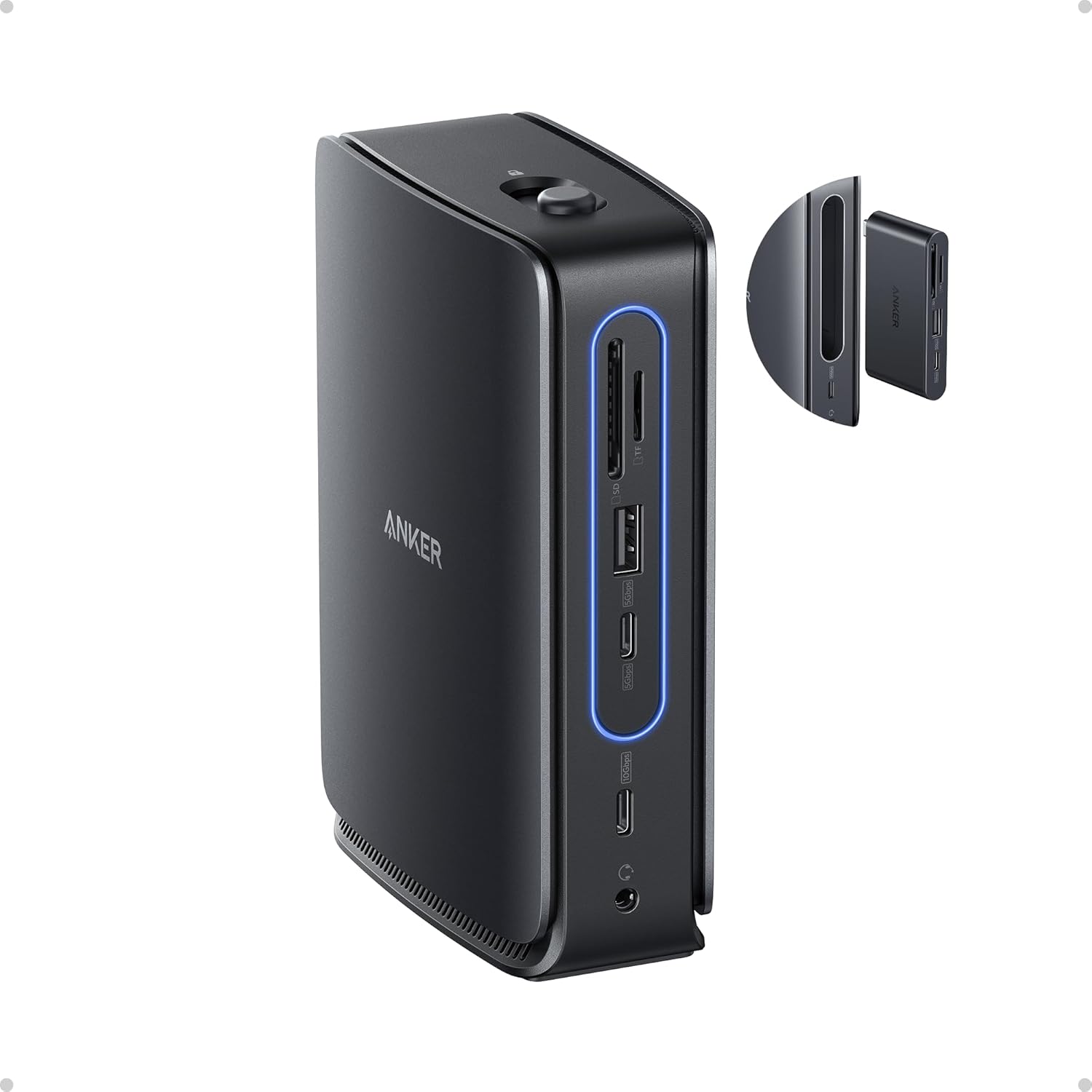
The Anker Nano Laptop Docking Station (13-in-1, Triple Display, Built-In Removable Hub) is a smart addition for any PC gamer, streamer, or gaming setup builder looking to simplify connectivity. This dock combines a full-featured 13-port station with a detachable 6-port hub, letting you maintain a clean desk while staying flexible for on-the-go use. It's designed for USB-C laptops and works with Windows 10/11 and macOS 13.5 or above, making it a practical choice for diverse setups.
Who is this for? It's ideal for PC gamers who want to hook up multiple monitors for immersive gameplay or streamers juggling a gaming PC, capture card, and streaming peripherals. Competitive gamers will appreciate the reliable Ethernet port for low-latency connections, while content creators can benefit from the SD/TF card slots and fast USB-C data transfers. Casual gamers and college gamers will find the compact form factor perfect for dorm rooms or small desks.
Real-world performance stands out with triple display support via 2 HDMI and 1 DisplayPort, allowing up to 4K resolution on each screen. This is great for racing games, open-world titles, or multitasking with Discord, OBS, and game overlays. The 100W Power Delivery keeps your laptop charged during long sessions, and the 10 Gbps USB-C ports handle high-speed data from external SSDs or gaming mice. The detachable hub retains all dock functions when removed, so you can quickly grab your laptop without unplugging everything.
Build quality is solid with a compact aluminum-like finish and a sleek light strip that glows blue when connected. The included 140W power adapter and 3 ft USB-C cable are well-made, though the cable length may be short for some desk arrangements. The dock's 3.74 x 1.57 x 5.51 inch footprint is small enough to fit beside a monitor stand or under a desk mount. Setup is plug-and-play on Windows, but macOS users should note that external monitors mirror content rather than extend the desktop.
Ease of use is a highlight: just connect the USB-C upstream cable to your laptop, attach the power adapter, and you're ready. The detachable hub clicks in and out with a button, making it simple to switch between desk and mobile modes. Cable management is straightforward with the compact power brick and included cable. One realistic limitation is that some laptops with side USB-C ports may have the hub block adjacent ports, so checking dimensions beforehand is wise. Also, the USB-C port does not support video output, so you'll rely on HDMI and DisplayPort for monitors.
Overall, the Anker Nano Docking Station is a practical investment for gamers and creators who need a reliable, space-saving dock with flexible connectivity. It's especially useful for those with a single USB-C laptop who want to expand to a triple-monitor gaming setup or streamline their streaming gear. If you prioritize clean desk organization and versatility without sacrificing performance, this dock is worth considering.
This dock offers 13 ports in total: 2 HDMI, 1 DisplayPort, 2 USB-C data ports (10 Gbps), 3 USB-A data ports, Ethernet, audio jack, SD and TF card slots, and a DC input. The detachable hub adds 6 essential ports for mobile use. All ports work simultaneously, though macOS limits external displays to mirroring. The Ethernet port provides stable wired internet for competitive gaming or streaming.
The Anker Nano features a sturdy plastic and metal construction with a compact footprint. The light strip indicates connection status and adds a modern look. The detachable hub mechanism feels secure with a click-in design. Included accessories: a 140W power adapter with built-in 5 ft cord and a 3 ft USB-C to USB-C cable. The overall build is durable enough for daily desk use and occasional travel.
Frequently Asked Questions
Can a best gaming laptop docking station handle dual 4K monitors for gaming?
Yes, but refresh rates depend on dock bandwidth and monitor resolution support. For example, the Anker Laptop Docking Station Dual Monitor supports a single display at 4K@60Hz, but drops to 4K@30Hz when two HDMI screens run together. The Anker Nano Laptop Docking Station with Detachable offers triple display output via dual HDMI and DisplayPort connections. If you prioritize higher refresh rates, verify your laptop’s USB-C port supports DisplayPort 1.4 Alt Mode.
Does pass-through charging provide enough power for high-performance laptops?
It depends on your laptop’s power draw and the dock’s maximum wattage specification. Compact docks like the 12-in-1 USB C Docking Station with Dual Monitor support up to 100W USB-C Power Delivery pass-through. High-wattage gaming laptops drawing 180W to 300W under load may still require their original power adapter to prevent battery drain. The Anker Nano Laptop Docking Station with Detachable supplies up to 100W using an included 140W dedicated wall adapter.
Will connecting a gaming keyboard through a dock cause noticeable input delay?
No, standard USB ports on quality docking stations provide reliable polling for gaming peripherals. Dedicated docks feature USB-A slots designed to handle mice, external sound devices, and your best type of keyboard for gaming without dropouts. Docks like the 12-in-1 hub from ALL- LUCKY include 5Gbps USB 3.0 and USB 2.0 sockets to balance external storage with responsive peripheral inputs.
Do macOS laptops support extended multi-monitor displays on these docking stations?
No, macOS does not support Multi-Stream Transport (MST) over standard USB-C connections. Specifications for both Anker and ALL- LUCKY docks state that macOS mirrors external displays instead of extending them into independent workspaces. Windows 10 and 11 machines natively support MST extended desktop across dual HDMI or DisplayPort outputs.
Is a wired gigabit Ethernet port necessary on a best gaming laptop docking station in 2026?
Yes, a physical 1000Mbps Ethernet connection delivers lower latency and avoids wireless signal interference. Each featured model includes a dedicated Gigabit Ethernet RJ45 port. Hardwiring directly to the dock bypasses home Wi-Fi congestion. This wired stability helps maintain consistent latency during competitive multiplayer matches.


Write Your Review
No reviews yet. Be the first to share your experience!