


Background desk noise like rapid switch clicks, loud cooling fans, and room reverberation can bleed directly into voice channels during ranked matches. Quality audio gear fixes this frustration by isolating speech while suppressing ambient room commotion. Selecting the best gaming microphone noise cancelling equipment helps your teammates hear sharp tactical callouts instead of unwanted room sounds. Modern desktop setups benefit greatly from unidirectional pickup designs and tuned sound cards that reject peripheral distractions.
Whether your desk suits a dedicated standalone condenser like the CMTECK USB Computer Microphone G009 or an all-in-one headset such as the JBL Quantum 810, audio isolation cleans up your voice instantly. Pairing clear vocal pickup with quieter gaming keyboard options keeps clatter to a minimum during late-night Discord sessions. Many modern units feature cardioid polar patterns or integrated hardware filters that block off-axis hums, connecting right into standard USB ports or console jacks without demanding extra preamps. This setup ensures you stay audible and focused during fast-paced multiplayer sessions.

Pros
- Affordable price point for a USB mic with noise-cancelling feature
- Simple plug-and-play setup compatible with multiple platforms
- Mute button with visual indicator adds convenience during live streams or calls
- Adjustable gooseneck allows flexible positioning on crowded desks
Cons
- Not compatible with Linux, Android, or Raspberry Pi limiting cross-platform use
- Small size may not pick up audio as well from a distance compared to larger mics
- Plastic build may feel less durable over long-term use
The CMTECK G009 USB Computer Microphone is a compact and budget-friendly desktop mic designed for PC gamers, streamers, content creators, and anyone who needs clear audio for online communication. It fits neatly into a gaming setup without taking up much desk space, making it a practical addition for casual gamers, college gamers, and work-from-home users alike.
At its core, the G009 uses a cardioid polar pattern with active noise-cancelling technology to focus on your voice while reducing unwanted background noise. This is especially useful during competitive gaming sessions where clear communication with teammates can make a difference, or when streaming on Twitch or YouTube where audio quality matters. The built-in pop filter also helps minimize plosives, so your speech sounds cleaner in recordings or live chats.
Setup is as simple as it gets: just plug the microphone into a USB port on your PC, laptop, or PS4, and it works without any drivers or external power. The mute button with LED indicator (green when active, red when muted) gives you quick control, which is handy during intense gameplay or when you need to cough without broadcasting it. The flexible gooseneck allows 360-degree adjustment, so you can position the mic close to your mouth for optimal pickup, even on a cluttered desk.
Build quality is decent for the price, with a lightweight plastic body and a stable base that won't slide around easily. However, the small size means the mic works best when placed within a few inches of your face - it's not ideal for room-wide pickup. Also, compatibility is limited to Windows, Mac, and PS4, so Linux or Android users will need to look elsewhere.
For gamers and streamers on a tight budget, the CMTECK G009 offers a solid entry-level solution for improving audio clarity in Discord calls, game chats, or simple recordings. While it won't replace a professional XLR mic, its noise-cancelling performance and ease of use make it a worthwhile upgrade over a built-in laptop mic. If you're building a starter streaming setup or just want better voice quality for online gaming, this mic is a practical and affordable choice.

Pros
- Affordable price point for an entry-level gaming headset with 7.1 surround sound support.
- Plug-and-play USB connection works seamlessly on PC, PS4, and PS5 without additional software.
- Noise-cancelling microphone performs well for in-game chat and Discord calls, reducing ambient noise.
- Memory foam ear cushions and lightweight design offer good comfort for extended gaming sessions.
- Long 2.2-meter cable provides flexibility for desk setups and couch console gaming.
Cons
- Not compatible with console game controllers (only PS4/PS5 USB port) – no Xbox support.
- Lacks dedicated software for EQ customization or surround sound tuning – relies on system defaults.
- Build materials feel mostly plastic, which may not hold up as well as more expensive headsets over time.
The EKSA E1000 is a USB gaming headset designed for PC gamers and console players who want a budget-friendly way to step into virtual surround sound. It plugs directly into a USB port on your computer, PS4, or PS5, and instantly delivers 7.1-channel audio without any drivers or software installation. This makes it a practical choice for anyone who values simplicity and low cost over advanced customization.
This headset is best suited for casual PC gamers, college students, work-from-home gamers, and those just starting to build their gaming setup. It's also a fine option for streamers or content creators who need a reliable backup mic, thanks to the noise-cancelling microphone that helps keep background chatter out of your broadcasts or Discord calls. However, competitive esports players may want to look for a headset with more precise sound imaging and a lighter weight.
In terms of audio performance, the 50mm neodymium drivers provide clear mids and decent bass, while the 7.1 surround sound creates a more immersive experience in games like shooters or RPGs. The microphone uses omnidirectional noise reduction to pick up your voice clearly and filter out ambient noise, though it may not match dedicated condenser mics in quality. For everyday gaming and voice chat, it gets the job done well.
Comfort is a strong point: the memory foam earmuffs are soft and breathable, and the adjustable headband distributes weight evenly, reducing pressure during long sessions. The 2.2-meter cable is generous for desktop setups and even gives you some room to lounge while gaming on a console nearby. The RGB lighting on the ear cups adds a subtle glow that enhances your desk aesthetic without being distracting.
A realistic limitation is that the EKSA E1000 is not compatible with console game controllers, only with USB ports on the console itself. That means no plugging into a PS5 controller for voice chat – you'll need to use the console's USB port. Also, there is no software EQ or surround sound tuning, so you're limited to the default sound profile. The all-plastic build feels a bit lightweight, but for the price, that's expected.
Overall, the EKSA E1000 is a great entry-level gaming headset for PC gamers on a tight budget, console players who can use USB audio, and anyone who needs a spare headset for their gaming desk or dorm room. It delivers solid comfort, an easy setup, and adequate audio for most casual and competitive gaming scenarios. Backed by a 2-year warranty, it's a low-risk purchase for those seeking value without breaking the bank.



Frequently Asked Questions
How does a cardioid polar pattern reduce background noise?
Cardioid polar patterns capture sound directly in front of the capsule while dampening noise from the sides and rear. This directional focus ensures your voice takes priority over mechanical keyboard clicks, desk bumps, and case fans behind the microphone. Units like the CMTECK USB Computer Microphone G009 use this design along with internal noise reduction chips to keep outgoing communication crisp and isolated.
Is a standalone microphone better than a headset boom mic?
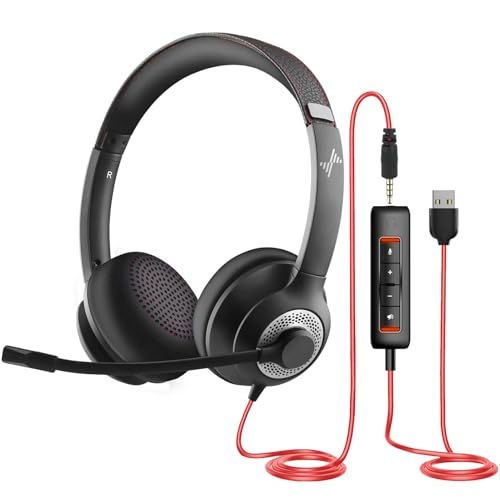
Standalone desktop microphones typically offer larger capsules, while headset boom mics keep the audio receiver at a consistent distance from your mouth. A dedicated desktop microphone leaves your head free of extra bulk, which works well if you already have separate listening gear. Headsets like the EKSA E1000 USB Gaming Headset for PC combine directional voice pickup and surround sound into one cable, saving space on compact gaming desks.
Do noise cancelling gaming microphones require extra software to work?
No, most plug-and-play USB and analog microphones operate without custom software or extra downloads. Hardware-level noise cancellation functions straight out of the box using built-in chipsets or directional acoustic capsules. You simply plug the accessory into your PC or console, verify the input settings in your operating system, and begin speaking with clear transmission.
Can noise cancelling microphones eliminate mechanical keyboard clicks?
Yes, directional microphones effectively suppress keyboard chatter when placed properly relative to your input peripherals. Positioning a unidirectional boom mic close to your mouth or angling a cardioid desktop mic away from your keys isolates vocal frequencies. As you balance your peripherals and configure your gaming mouse layout, keeping the mic pointed toward your mouth reduces peripheral clatter considerably.
What is the difference between active noise cancelling and directional microphone filtering?
Directional filtering relies on physical capsule geometry to ignore off-axis sound, whereas active noise cancellation uses digital processing chips to filter out continuous hums. Headsets such as the JBL Quantum 810 pair acoustic boom isolation with active background cancellation to keep audio clear in noisy rooms. Both methods work together to ensure your voice remains intelligible across Discord and in-game party chats.


Write Your Review
No reviews yet. Be the first to share your experience!