


Desk ergonomics often force southpaw gamers to compromise on sensor precision, grip comfort, and accessible thumb controls. Most standard peripheral shapes favor right-handed users, leaving left-handed players wrestling with awkward button layouts or settling for office mice that lack gaming-grade polling rates. Selecting the Best Left Handed Gaming Mice requires examining whether an ambidextrous shell with modular side buttons or a dedicated left-handed ergonomic chassis fits your desk space. A properly fitted peripheral prevents wrist fatigue during intense competitive matches and keeps your tracking smooth across the mouse pad surface.
Cable drag and wireless transmitter placement also influence how cleanly your mouse glides during fast flicks and tracking motions. While wired connections eliminate charging routines and reduce weight, wireless models operating over 2.4 GHz USB dongles keep desktop clutter minimal and provide total freedom of movement. If you want to refine tracking response and remap secondary inputs, learning how to configure and use a gaming mouse helps tailor polling rates and DPI steps to your specific grip style. Whether you lean toward lightweight shells, high DPI optical sensors, or multi-button thumb grids for complex macros, balancing form factor with setup compatibility ensures lasting comfort.

Pros
- Exceptional sensor accuracy with HERO 25K for competitive edge
- Fully customizable weight and balance for personalized feel
- 11 programmable buttons with on-board memory for on-the-go profiles
- Durable mechanical switch tensioning for reliable clicks
- Great value for the feature set at this price point
Cons
- Wired design may not suit gamers who prefer wireless freedom
- Requires Logitech G Hub software for full RGB and macro customization
- Weight of 121g (plus optional weights up to 140g) may feel heavy for some FPS players
The Logitech G502 Hero is a well-known wired gaming mouse that has been a staple in the PC gaming community for years. With the latest HERO 25K sensor, it offers impressive tracking performance up to 25600 DPI without any smoothing, filtering, or acceleration. This makes it a solid choice for competitive gamers who need precise aim in FPS titles like Valorant or Call of Duty, as well as for streamers and content creators who want reliable cursor control for editing or multitasking.
What sets the G502 Hero apart is its versatility. You get 11 programmable buttons, including a dual-mode hyper-fast scroll wheel that can free-spin for rapid scrolling or click through with notches for precise steps. This is especially handy for MOBA and MMO players who need quick access to abilities, or for productivity users who want shortcuts for copy-paste and app switching. The adjustable weight system allows you to add or remove up to five 3.6g weights to tweak the balance and heft, letting you dial in the perfect feel for your grip style.
Build quality is robust with a textured rubber grip on the sides and a durable braided cable that resists tangling. The mechanical switch button tensioning system uses metal springs to deliver crisp, consistent clicks with minimal pre-travel, which is crucial for rapid-fire shooting in games like Apex Legends. The LIGHTSYNC RGB lighting is fully customizable via Logitech G Hub software, and you can sync it with other Logitech G peripherals or game events for an immersive setup.
Setting up the G502 Hero is straightforward: plug it in via USB, and it works out of the box with default settings. For advanced customization, the Logitech G Hub software is required, which some users find a bit bloated, but it offers deep control over DPI steps, button mapping, lighting effects, and surface tuning. The on-board memory stores up to three profiles, so you can bring your settings to LAN parties or tournaments without needing the software installed.
One limitation is that the mouse is wired, which may be a drawback for those who prefer the clutter-free feel of wireless mice. Also, at around 121g without weights, it is heavier than some lightweight competitors favored by fast-paced FPS players. However, many users appreciate the solid feel and the ability to adjust weight. The shape is ergonomic and comfortable for palm and claw grips, though those with very small hands might find it a bit large.
Overall, the Logitech G502 Hero is a fantastic wired gaming mouse that balances performance, customization, and comfort at a reasonable price. It's ideal for PC gamers who want a feature-rich mouse for a variety of genres, competitive gamers who value sensor accuracy, and streamers who need extra buttons for OBS controls. If you don't mind the wire and prefer a customizable, weight-adjustable mouse, this is one of the best options available.
The G502 Hero's HERO 25K sensor is one of the most accurate on the market, capable of detecting movements at the sub-micron level. In real-world gaming, this translates to smooth, responsive tracking with no jitter or acceleration, even at the highest DPI settings. The sensor's 400+ inches per second (IPS) tracking speed ensures you won't experience spin-out during fast flicks in games like Overwatch or Rainbow Six Siege.
The 11 programmable buttons are well-placed for quick access without accidental presses. The dual-mode scroll wheel is especially useful in games where you need to switch weapons or abilities rapidly, or for browsing inventory. The mechanical switch tensioning provides a tactile, audible click that gives you confidence in every input. For competitive play, the on-board memory allows you to store your DPI and button configurations so you can maintain consistency across different PCs.
While the weight is higher than some dedicated lightweight mice, many players find the G502 Hero's balance and adjustable weight system help with stability and control. The PTFE feet glide smoothly on most mouse pads, and the braided cable minimizes drag. Overall, this mouse delivers top-tier performance for a wide range of gaming styles.
The Logitech G Hub software provides comprehensive control over the G502 Hero. You can adjust DPI settings in increments of 50 (up to 25600), assign macros to any of the 11 buttons, and create custom lighting effects using the LIGHTSYNC engine. The software also supports game-specific profiles that automatically switch when you launch a title, and you can sync lighting across all your Logitech G devices.
One of the standout features is the surface tuning tool, which optimizes the sensor for different mouse pad textures. This is a nice bonus for gamers who use a variety of surfaces. The on-board memory can store up to three profiles, so you can use the mouse on other computers without losing your settings. However, note that the software is required for initial profile setup, and some users report it being resource-heavy. Still, once configured, the mouse works independently.
For RGB enthusiasts, the lighting can be set to static colors, breathing, cycling, or reactive effects that respond to in-game actions like kills or health status. Overall, the software offers deep customization that caters to both competitive players and those who want a personalized aesthetic.

Pros
- Purpose-built ergonomic shape specifically engineered for left-handed thumb navigation
- Dual DPI switch (750/1500) provides quick hardware-level cursor pacing adjustments
- Customizable six-button layout supported by downloadable manufacturer software
- Includes a starter AA battery and features an onboard battery remaining indicator lamp
Cons
- Requires a standard USB port for the 2.4 GHz wireless receiver and does not support Bluetooth
- Manufacturer notes that horizontal scrolling is unsupported on Windows RT 8.1
- Asymmetrical form factor is strictly for left-handed use and cannot be operated comfortably with the right hand
The ELECOM EX-G M-XT4DRBK-G is an ergonomic wireless trackball mouse designed specifically for left-handed computer users. Because finding left-handed computer peripherals can be difficult, this model serves as a practical option for left-handed individuals replacing a lost or failing mouse, as well as those looking for stationary thumb navigation for daily office work, browsing, or academic study. With the trackball stationary on your desk, cursor navigation is controlled entirely by the thumb, keeping the wrist and arm still.
In terms of connection and compatibility, this model uses a 2.4 GHz wireless USB receiver to deliver a cable-free experience. The manufacturer documents compatibility with Windows Vista, Windows 7, Windows 8, Windows 10 or later, alongside macOS 10.10 or later. Note that the horizontal scrolling function is explicitly listed as unsupported on Windows RT 8.1. Since the connection requires a standard USB-A port for the wireless dongle, laptop owners with only USB-C ports will need a compatible adapter to connect the receiver.
Handling and physical controls are oriented around a contoured left-handed chassis measuring 3.7 inches wide, 4.9 inches long, and 1.9 inches high, with a bare weight of approximately 4.5 ounces. Tracking is driven by an optical sensor paired with a high-visibility red ball designed to capture subtle thumb movements. A built-in DPI toggle switch allows users to shift between 750 DPI for slower, more deliberate navigation and 1500 DPI for faster screen traversal. The device is outfitted with six functional buttons that can be remapped to custom shortcuts via the downloadable ELECOM Mouse Assistant software.
Power is provided by a single AA battery, which is included in the package so users can set up right away. The mouse includes a battery remaining indicator lamp, helping you monitor power levels before the battery runs out during critical tasks. Day-to-day setup is straightforward: simply insert the battery, connect the USB receiver to an open computer port, and place the mouse on any flat surface. Maintenance generally involves occasionally popping out the red ball to clear dust from the internal sensor cavity.
There are some realistic limitations to keep in mind. This mouse is strictly left-handed, making it unsuitable for right-handed users or shared household workstations. In addition, it does not support Bluetooth, meaning the wireless receiver must occupy a physical USB port at all times. Unlocking full button remapping also requires downloading the optional ELECOM software from the manufacturer website, which may not be feasible on strictly managed corporate machines.
For left-handed computer users seeking dedicated thumb-trackball control, the ELECOM EX-G M-XT4DRBK-G represents a targeted peripheral. If your computer features a compatible USB port, runs a supported Windows or macOS version, and you want stationary cursor management tailored to your left hand, this trackball offers a balanced set of verified features.
The mouse communicates using 2.4 GHz wireless technology through an included USB receiver, eliminating desktop cable clutter while maintaining a dedicated wireless link. It is designed to work with computers running Windows Vista, Windows 7, Windows 8, Windows 10 or later, as well as macOS 10.10 or later.
Users running Windows RT 8.1 should note the documented limitation that horizontal scrolling does not function on that specific operating system. Because this mouse does not feature Bluetooth, your device must have an accessible USB port or an appropriate adapter to accept the 2.4 GHz receiver.
The ELECOM EX-G M-XT4DRBK-G features an asymmetrical, ergonomic body crafted solely for left-handed users. The casing places the red optical trackball directly under the left thumb, allowing your fingers to rest naturally over the primary click buttons and scroll wheel.
The unit measures 3.7 inches wide (94.7 mm), 4.9 inches long (124.4 mm), and 1.9 inches tall (47.9 mm), weighing approximately 4.5 ounces without the AA battery installed. Because the mouse remains stationary on your desk during operation, it can be particularly convenient for compact or cluttered workstations where standard mouse gliding is difficult.
This trackball features six functional buttons along with an optical tracking system powered by a gaming-style sensor and lens. A dedicated hardware toggle switch lets you switch between 750 DPI (low) and 1500 DPI (high) to adjust pointer sensitivity to your preferences.
To configure custom actions, shortcuts, or functions on the buttons, users can download the ELECOM Mouse Assistant software directly from the ELECOM NET website. This utility allows left-handed users to tailor the button layout for productivity programs, browsing navigation, or routine desktop tasks.

Pros
- Modular magnetic side buttons allow genuine left-handed or right-handed customization
- Modern USB-C charging port replaces older proprietary or micro-USB formats
- High-tier HERO 2 sensor specifications supporting up to 44,000 DPI and rapid tracking
- Solid battery life rated for up to 95 hours of continuous movement
Cons
- Reaching the maximum 8 kHz polling rate requires a specialized receiver that is sold separately
- No Bluetooth connection mode is listed, requiring an available USB port for wireless receiver use
- Full access to button assignments and advanced tracking settings requires Logitech G HUB software
The Logitech G PRO 2 Lightspeed is a high-performance wireless gaming mouse built around a symmetrical, ambidextrous shell. Engineered to serve competitive players and everyday computer users alike, it addresses a common problem in the gaming peripheral market: the lack of truly versatile left-handed options. Thanks to modular, switchable magnetic side buttons, users can configure physical buttons on either side, both sides, or remove them entirely to prevent accidental clicks.
In terms of connectivity, the mouse relies on Logitech's proprietary LIGHTSPEED wireless protocol. A wireless USB receiver is provided with the mouse to plug directly into a compatible computer port. While standard out-of-the-box wireless performance is tuned for low latency, the hardware can scale up to an 8 kHz polling rate if paired with the standalone PRO LIGHTSPEED RECEIVER, which is sold separately. Note that the product listing does not indicate Bluetooth support, so your computer or laptop will need an open USB port to accommodate the wireless receiver.
Physical handling centers on a balanced, medium-sized chassis measuring roughly 4.92 inches long, 2.50 inches wide, and 1.57 inches tall. Weighing approximately 0.176 pounds (around 80 grams), it offers agile movement across desk surfaces without feeling excessively hollow. Under the hood, Logitech includes LIGHTFORCE switches, which combine the actuation speed and durability of optical mechanisms with the familiar tactile click of mechanical switches. Tracking is managed by the HERO 2 sensor, which supports up to 44,000 DPI, over 888 IPS tracking speed, and up to 88g acceleration.
Power management is streamlined with internal rechargeable power that delivers up to 95 hours of battery life in continuous motion. Real-world runtime will naturally depend on personal usage patterns, motion duration, and configuration settings. When it is time to recharge, the mouse connects via an updated USB-C port, providing a reliable and modern charging interface. Initial setup is straightforward, though unlocking advanced button remapping, DPI stepping, and sensor calibration requires downloading the Logitech G HUB software.
A few realistic limitations should be considered before purchase. Achieving the top-tier 8 kHz polling rate requires an additional equipment expense since that receiver does not come standard in the box. Furthermore, high DPI ceilings like 44,000 DPI are technical limits rather than daily necessities, as most players operate at much lower sensitivity ranges. Users who require multi-device Bluetooth toggling for quick switching between office laptops and tablets will also find this USB-receiver-focused model restrictive.
For gamers and general PC users seeking a clean, ambidextrous shape backed by dependable wireless engineering, the Logitech G PRO 2 Lightspeed offers substantial value. Its modular button layout is especially beneficial for left-handed users who frequently struggle to find high-end gaming mice. As long as your setup has an available USB port and you do not require native Bluetooth, this mouse presents a refined, highly adjustable package.
The Logitech G PRO 2 Lightspeed incorporates the HERO 2 optical sensor, representing Logitech's latest tracking technology for competitive gaming. Documented specifications highlight a sensitivity ceiling reaching up to 44,000 DPI, tracking speeds exceeding 888 inches per second (IPS), and acceleration ratings up to 88g. These figures ensure that the sensor can register fast flicks and rapid hand maneuvers without losing tracking accuracy.
Manufacturer testing for these sensor capabilities is documented using the Logitech G640 mousepad. While the hardware offers extraordinarily high sensitivity ceilings, practical accuracy in everyday play relies on choosing a comfortable DPI setting that matches your display resolution and play style. Configuring specific DPI levels, lift-off parameters, and sensitivity profiles requires downloading Logitech G HUB software onto your computer.
One of the primary highlights of the G PRO 2 Lightspeed is its modular ambidextrous button architecture. The mouse features swappable, magnetic side buttons that can be installed or blanked out on either the left or right flank. This allows left-handed players to have natural thumb access, right-handed players to maintain traditional controls, or power users to access buttons on both sides simultaneously.
For the primary left and right click controls, the mouse utilizes hybrid LIGHTFORCE switches. This design merges optical actuation-delivering rapid response and eliminating mechanical debounce delay-with mechanical switch components to retain a tactile, satisfying click feeling. Customizing macro assignments, secondary functions, and button layouts is managed through Logitech G HUB software.
Power is supplied by an internal rechargeable battery documented to provide up to 95 hours of runtime during constant motion. Stated battery performance can vary based on computing conditions, environment, and user movement habits, but it offers ample longevity between charges for both workdays and extended gaming sessions.
Recharging is handled through a built-in USB-C port, replacing older micro-USB standards found on prior generations. This allows users to recharge the mouse using common modern cables. For optimal power maintenance, follow the manufacturer guidelines regarding compatible USB charging sources.

Pros
- Versatile dual-mode connectivity supports both wireless freedom and uninterrupted wired use while charging
- Symmetrical ergonomic shape fits both left-handed and right-handed users comfortably
- High level of control customization with 8 programmable buttons and 6 switchable DPI steps
- Dedicated internal storage slot under the back cover keeps the USB-A receiver secure
Cons
- Does not support Bluetooth, requiring an available USB-A port or compatible adapter for all connections
- Advanced settings such as macro creation, custom DPI stepping, and sleep timers require driver software
- Automatic sleep mode cannot be entirely disabled, though the idle timer is adjustable
The Acer Dual-Mode Gaming Mouse is an optical computer mouse designed for PC and laptop users who need flexible connectivity for gaming, work, or daily computer tasks. Built with a medium symmetrical body, it caters to both right-handed and left-handed users looking for an ambidextrous shape. It features an optical sensor capable of reaching up to 24,000 DPI, an adjustable 1000Hz polling rate, and dynamic RGB illumination, making it a capable option for desk setups requiring responsive tracking and configurable inputs.
For connectivity, this model supports dual modes consisting of a 2.4GHz wireless link and a traditional USB-A wired connection. The included USB-A dongle manages the wireless connection and stores neatly under the back cover when not in use. It is critical to recognize that this mouse does not support Bluetooth. Users must have an open USB-A port on their PC or laptop, or supply their own adapter if using a device with only USB-C ports. The listing specifically notes PC and laptop support, but full customization depends on installing the manufacturer driver software outlined in the product manual.
In terms of controls and ergonomics, the mouse features 8 programmable buttons, including dedicated forward and back navigation buttons along the side. The symmetrical shape gives it a balanced feel for various grips across either hand. Tracking is driven by an optical sensor with 35G acceleration and six preset DPI levels ranging from 1200 to 24000 DPI, with a default setting of 2400 DPI. For advanced macro programming, precise sensitivity stepping, and custom lighting profiles across 9 RGB modes, users will need to apply their changes within the companion software.
Everyday power is supplied by an internal 650mAh rechargeable battery, which the manufacturer states provides up to 40 hours of playtime. A practical feature is the ability to operate the mouse as a standard wired gaming mouse while it recharges, avoiding downtime during long work or gaming sessions. To preserve battery life, smart power management initiates light sleep that wakes upon movement, followed by deep sleep that wakes with a button click. The idle timer can be configured between 1 and 9 minutes in the driver, though sleep mode itself cannot be turned off.
There are a few documented limitations to keep in mind before purchasing. The absence of Bluetooth means you cannot pair it directly with phones, tablets, or laptops lacking a USB-A port without extra hardware adapters. Additionally, while the mouse functions for basic pointing out of the box, key features such as macro assignments, RGB customization, and specific DPI adjustments rely on driver installation. Buyers should also verify their operating system compatibility for the software beforehand.
Overall, the Acer Dual-Mode Mouse offers solid practical value for desktop and laptop users who want the versatility of both wireless freedom and wired charging. It is especially well-suited for gamers and everyday computer users who want an ambidextrous mouse with multiple programmable buttons and a high-resolution sensor without paying a premium price. If you have an available USB-A port and do not require Bluetooth, this mouse presents a well-rounded set of verified hardware features.
This mouse provides two connection methods: low-latency 2.4GHz wireless and a wired connection using a USB-A cable. The wireless connection relies on a compact USB-A receiver stored under the back cover of the mouse, protecting it from being misplaced when you are on the go.
The listing states that this mouse does not support Bluetooth. Computer users must have a standard USB-A port available on their PC or laptop to plug in the receiver or the wired cable. If your laptop only features USB-C ports, an external USB-A adapter or hub will be required for both wired and wireless operation.
The mouse is equipped with 8 programmable buttons, which include standard primary clicks, a scroll wheel, dedicated DPI switching, and side forward and back navigation buttons. Users can remap button actions and record macros by installing the official driver software referenced in the installation manual.
Lighting customization includes 9 dynamic RGB modes with 16.8 million colors. Users can alter lighting patterns, speed, and brightness inside the driver, or cycle through modes manually by holding the front side button while scrolling. The driver also lets you customize the 6 onboard DPI presets between 1200 and 24000 DPI.
Power is delivered via an integrated 650mAh rechargeable battery rated for up to 40 hours of playtime. When the battery runs low, the mouse can be plugged in via USB-A to function continuously in wired mode while charging, eliminating battery-related downtime.
The smart power management system includes two sleep states: light sleep, which wakes instantly upon moving the mouse, and deep sleep, which wakes after a button click. The idle timer before sleep begins can be adjusted from 1 to 9 minutes via the driver software, although sleep mode itself cannot be completely disabled.

Pros
- Exceptional value for the price; performs like higher-end mice.
- Long battery life eliminates need for frequent charging or battery swaps.
- Reliable LIGHTSPEED wireless with minimal latency.
- Lightweight and comfortable for extended gaming sessions.
Cons
- Uses AA battery instead of rechargeable internal battery.
- Scroll wheel feels basic and may lack durability.
- Side buttons may be accidentally pressed for some hand sizes (especially for claw grip).
The Logitech G305 Lightspeed is a wireless gaming mouse designed to deliver high performance without the hassle of cords. It features the HERO optical sensor, capable of up to 12,000 DPI with zero acceleration or smoothing, making it a solid choice for competitive gamers who need pinpoint accuracy. The LIGHTSPEED wireless technology ensures a 1ms report rate, so it feels as responsive as a wired mouse, even during fast-paced FPS or MOBA games.
At just 99 grams, the G305 is lightweight enough for quick flicks and long gaming sessions without causing fatigue. Its symmetrical design suits a variety of grip styles, including claw and fingertip, and the six programmable buttons can be customized via Logitech G HUB for macros, DPI adjustments, or media controls. The built-in storage for the nano receiver makes it easy to take on the go with a gaming laptop.
One of the standout features is the battery life: up to 250 hours on a single AA battery. In Endurance mode (via G HUB), it can last up to nine months, so you don't have to worry about charging mid-game. The mouse uses a standard AA battery, which is both a pro and a con – it's convenient to swap in a fresh battery, but some users prefer a rechargeable internal pack.
Setup is straightforward: plug the included USB receiver into your PC or Mac, and the mouse is ready to use. The Logitech G HUB software offers additional customization, but the mouse also has onboard memory to save your settings. On the downside, the scroll wheel is fairly basic and might not feel as premium as on higher-priced models, and the side buttons can be accidently pressed if you use a claw grip – though this is common with many mice.
Overall, the Logitech G305 is an excellent wireless gaming mouse at an entry-level price. It's ideal for PC gamers who want top-tier performance without spending a fortune, whether you're grinding ranked matches, streaming on Twitch, or just enjoying casual games. Its lightweight design, long battery life, and reliable sensor make it a smart addition to any gaming setup, especially for those who value affordability and practicality.

Pros
- Optical sensor offers six distinct DPI presets up to 12,800 DPI for sensitivity adjustments
- Listed 1KHz report rate provides fast and responsive communication with the host computer
- Symmetrical design comfortably accommodates both claw and palm grip styles
- Hardware micro switches are built with a stated lifespan exceeding 20 million clicks
- Built-in RGB illumination enhances desk aesthetics
Cons
- The listing details do not specify the exact connection type or cable specifications
- Supported operating systems and companion software requirements are omitted from the product data
- The documented product dimensions contain clear clerical errors regarding unit height
The MSI Forge GM320 is a dedicated optical gaming mouse engineered around an ambidextrous, balanced form factor. Its symmetrical profile caters to both left-handed and right-handed users, making it a flexible contender for gamers, students, and home office workers looking for an agile desktop pointer. Whether you are replacing a worn-out office mouse or seeking an entry-level gaming peripheral, the GM320 is designed to support both palm and claw grip techniques without forcing your hand into an aggressive ergonomic mold.
Shoppers evaluating connection requirements should observe that the provided listing documentation does not explicitly detail the exact connection method, such as a fixed USB cable or wireless protocol, nor does it confirm operating-system compatibility for platforms like Windows, macOS, or ChromeOS. Before completing a purchase, prospective buyers should verify their available computer ports and confirm driver support directly with the manufacturer to ensure seamless hardware integration.
Under the hood, tracking functionality is driven by an optical sensor capable of reaching up to 12,800 DPI. MSI integrates six preset sensitivity levels, giving users the ability to toggle tracking speed on the fly depending on monitor resolution or task complexity. To maintain responsive tracking, the mouse features a listed 1KHz report rate, indicating that data is transmitted to the host computer up to 1,000 times per second. Physical responsiveness is handled by internal micro switches rated for over 20 million clicks, providing dependable feedback for repetitive clicking tasks.
Handling is aided by a lightweight construction documented at 0.15 pounds, allowing for swift gliding across mouse pads with minimal wrist resistance. The listed dimensions indicate a length of 5.4 inches and a width of 3.8 inches, though the recorded height figure appears inconsistent with standard mouse measurements. In everyday use, the symmetrical exterior avoids restrictive finger grooves, enabling users to switch between a relaxed palm grip during casual browsing and an alert claw grip during gaming sessions.
Despite its versatile design, a practical evaluation reveals important informational gaps in the product specifications. Details regarding power sourcing, onboard memory, lighting customization, and software programmability are not clearly established in the listing. Shoppers should treat these missing specifications as items to clarify rather than confirmed physical flaws, keeping in mind that basic pointer functionality remains intact.
The MSI Forge GM320 offers a solid feature set for buyers who value a symmetrical design, multi-stage DPI adjustability, durable switch ratings, and subtle RGB styling. If you need a straightforward, ambidextrous pointing device and take a moment to confirm port and operating-system requirements, this model represents a practical, functional peripheral choice.
The tracking performance of the MSI Forge GM320 centers on an optical sensor with a maximum resolution of 12,800 DPI. Rather than locking users into a single sensitivity curve, the mouse includes six onboard DPI presets. This tiered arrangement allows you to adjust cursor speed across different display resolutions, switching from slower, controlled tracking to rapid desktop sweeps.
Alongside sensitivity settings, the GM320 features a documented 1KHz report rate. This specification means the peripheral reports its position to the connected system up to 1,000 times every second. While higher polling rates and DPI numbers do not automatically guarantee improved gaming success, they provide the technical headroom necessary for smooth cursor motion on compatible modern monitors.
Designed with a symmetrical layout, the MSI Forge GM320 addresses one of the most common challenges for left-handed computer users by providing a neutral, ambidextrous chassis. The exterior curves are shaped to support both palm and claw grip preferences, offering balanced surface contact without asymmetrical thumb shelves that favor one hand over the other.
Weighing in at a listed 0.15 pounds, the mouse is relatively light, which may reduce physical effort during rapid mouse swipes. Buyers should keep in mind that hand size and grip preference strongly influence comfort, and checking physical workspace measurements against the listed 5.4-inch length will help determine whether this mouse fits your desk setup.
Pros
- Rare, dedicated ergonomic design built specifically for left-handed PC users
- Extensive input layout with 12 programmable thumb buttons and a tilt-click scroll wheel
- Adjustable 8,200 DPI 4G laser sensor for flexible cursor sensitivity
- Onboard 32-bit ARM processor to handle complex macros and fast button computing
Cons
- The listing details do not specify whether the connection is wired USB or wireless, requiring buyer verification
- Operating system compatibility and software system requirements are not detailed in the product information
- Asymmetrical ergonomic shell is exclusively for left-handed users and cannot be used right-handed
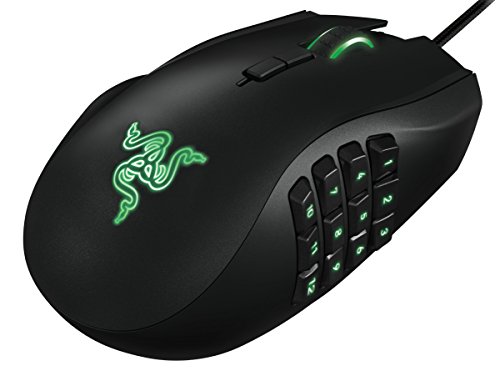
The Razer Naga Left-Handed is a purpose-built ergonomic MMO gaming mouse created specifically for left-handed PC users. While most specialized gaming mice cater strictly to right-handed players or offer compromised ambidextrous shells, this model features a dedicated left-handed chassis with an array of secondary controls under the thumb. It is primarily geared toward MMO and MOBA players who need quick access to an extensive assortment of macros, action bars, and keybindings directly from their mouse hand.
Regarding connection and compatibility, the listing details do not explicitly confirm whether this specific unit connects through a wired USB cable or a wireless interface. Additionally, supported operating systems and required software environments are not detailed in the product data. Shoppers replacing an existing peripheral or setting up a new workstation should confirm the physical connection type and verify software compatibility with their operating system before making a purchase.
The physical layout is defined by its ergonomic shape, measuring 4.87 inches long, 2.94 inches wide, and 1.69 inches tall, with a listed weight of 0.3 pounds. The manufacturer describes the form factor as an all-new one-size-fits-all ergonomic design intended to seat the hand snugly. In terms of inputs, the mouse includes a 12-button mechanical thumb grid alongside a multi-directional scroll wheel that tilts left and right in addition to standard vertical scrolling and clicking. Tracking is handled by an 8,200 DPI 4G laser sensor, supported by an onboard 32-bit ARM processor designed to execute complex calculations and commands quickly.
Configuration revolves around an intuitive mouse configurator that features an in-game overlay, enabling users to rebind buttons, assign macros, and adjust hotkeys without exiting compatible game environments. Because the specifications do not specify battery requirements or charging hardware, everyday power and setup will depend on whether your setup utilizes standard USB bus power or an unlisted battery system. Reviewing the manufacturer manual upon receipt is recommended to ensure correct driver installation and profile configuration.
A primary limitation of this device is its specialized nature. The sculpted form factor is strictly built for the left hand and cannot be used comfortably by right-handed players. Furthermore, the lack of explicit data on connection type, cable length, wireless status, or operating system support represents an informational gap that buyers must verify independently. Users who play fast-paced shooters may also find the 12-button side panel more complex than necessary for basic control schemes.
For left-handed gamers seeking an MMO-oriented mouse with comprehensive macro options and a dedicated ergonomic grip, the Razer Naga Left-Handed offers a unique feature set that few alternatives provide. As long as you confirm your device has the appropriate connection port and supports the configuration software, it represents a capable option for skill-heavy PC titles and macro-intensive desktop tasks.
The primary feature of this mouse is its 12 programmable thumb buttons arranged on the side of the chassis to sit naturally beneath a left-handed user's thumb. This cluster is designed to replicate numerical keypads, action bars, and complex multi-key macro strings without taking fingers off standard directional keys.
In addition to the thumb cluster, the scroll wheel provides extended functionality. It tilts left and right while retaining conventional up, down, and inward click inputs. This tilt-click design adds extra direct hardware commands, making it useful for horizontal scrolling, quick skill mapping, or rapid document navigation.
All button assignments and macro sequences are managed through the mouse configurator. The software includes an in-game overlay designed to let players modify hotkeys and profiles on the fly without minimizing active full-screen applications.
Designed from the ground up for southpaw users, the Razer Naga Left-Handed features a sculpted body with dimensions of 4.87 by 2.94 by 1.69 inches and an overall listed weight of 0.3 pounds. The curvature is tailored to support the palm and fingers of the left hand.
The manufacturer highlights an all-new one-size-fits-all ergonomic form factor intended to provide a snug fit across different hand sizes. However, individual comfort naturally varies depending on personal grip styles, such as palm, claw, or fingertip grips, as well as hand dimensions.
Frequently Asked Questions
Can left-handed gamers use symmetrical ambidextrous mice effectively?
Yes, symmetrical ambidextrous mice work well for southpaw players if the side buttons are placed appropriately or can be swapped. Models like the Logitech G PRO 2 Lightspeed feature modular, magnetic side buttons that you can attach to the right side of the shell or remove completely. True symmetrical designs prevent accidental clicks while maintaining an identical grip profile for either hand. If side buttons are fixed on the left side only, left-handed users may find them difficult to reach with their pinky or ring finger.
What is the difference between a dedicated left-handed mouse and an ambidextrous mouse?
A dedicated left-handed mouse is shaped specifically to contour to the left palm and thumb, whereas an ambidextrous mouse uses a neutral, mirrored shape. Peripherals like the Razer Naga Left-Handed edition offer sculpted ergonomic curves and dedicated 12-button thumb grids designed strictly for the left hand. Symmetrical mice rely on an even contour suitable for both palm and claw grips. Dedicated designs provide tailored palm support, but ambidextrous options offer greater flexibility across different setups. Gamers comparing broader desktop options can evaluate other best mouse for PC configurations to decide between specialized and universal contours.
How does wireless connectivity compare to wired connections in gaming mice?
Low-latency 2.4 GHz wireless connections deliver tournament-grade responsiveness comparable to standard wired setups without desktop cable clutter. Wireless technologies operate with high report rates to eliminate noticeable input lag during fast gaming sessions. Wired connections remain convenient for players who prefer continuous power without monitoring battery levels or managing USB charging cables. Many modern mice also offer dual-mode operation, letting you game over a USB cable while the battery recharges.
Is a trackball mouse suitable for fast-paced PC gaming?
Trackballs are generally better suited for casual gaming, strategy titles, and productivity than competitive first-person shooters. Left-handed trackball models utilize an optical sensor tracking a thumb-controlled ball to navigate screens with minimal arm movement. This design significantly reduces wrist motion on compact desks where sweeping mouse movements are difficult. However, fast-paced shooters usually benefit more from conventional optical mice that allow full-arm adjustments and quick micro-flicks.
What DPI range is ideal when setting up a Best Left Handed Gaming Mice profile?
A DPI setting between 800 and 1600 DPI provides an optimal balance of tracking precision and cursor speed for most desktop displays. Sensors on modern gaming mice can reach exceptionally high DPI numbers, but extreme sensitivities are rarely necessary for standard competitive play. Lower DPI steps paired with high polling rates deliver predictable crosshair tracking across your desk. Most peripheral software suites allow you to store multiple DPI stages on internal memory, making on-the-fly adjustments simple during gameplay.
How do hand size and grip style influence mouse selection for southpaw players?
Palm grip users require higher ergonomic palm arches, while claw and fingertip grip players prefer lower, lightweight shells. Gamers with larger hands who rest their entire palm on the chassis often gravitate toward contoured mice or a best large PC mouse profile to avoid cramping. Compact symmetrical mice give claw and fingertip grip users better agility for quick directional resets. Checking listed chassis dimensions ensures the mouse matches your hand span before you commit to a purchase.



Write Your Review
No reviews yet. Be the first to share your experience!