


Desk real estate disappears fast once you arrange a monitor stand, a wide mouse pad, and a best type of keyboard for gaming. Bulky computer cases consume valuable floor or surface area, leaving very little room for clean cable routing and everyday work accessories. Setting up the best micro pc solves this layout problem by condensing capable desktop computing into an ultra-small form factor. These miniature units tuck discreetly beside a monitor arm or mount out of sight, keeping your workstation open, organized, and free of unnecessary bulk.
Modern workstation efficiency depends heavily on responsive hardware and practical peripheral connections rather than oversized chassis designs. Compact systems such as renewed Dell OptiPlex micro desktops provide multi-core Intel Core processors alongside essential inputs like DisplayPort, USB 3.0, Ethernet, and built-in wireless networking. This setup leaves plenty of physical clearance on your desk to connect dedicated audio gear, webcams, or external storage drives. Selecting a reliable compact desktop computer gives you the processing power you need while maintaining a clean, minimalist environment.
Pros
- Space-saving Micro Form Factor fits in crowded desk setups without cluttering the workspace.
- Solid everyday performance for light gaming, web browsing, and office applications thanks to the quad-core i5 and SSD.
- Fully equipped with Windows 11 Pro, USB 3.0, and DisplayPort for modern connectivity and security features.
- Quiet and low-power operation makes it suitable for long streaming sessions or late-night gaming in a shared space.
Cons
- Integrated graphics limit gaming to older or less demanding titles - not suitable for modern AAA games at high settings.
- Only 8GB of RAM may feel tight for heavy multitasking or memory-intensive games; upgrading requires compatible modules.
- No dedicated GPU slot means you cannot add a graphics card for improved gaming performance; this is a fixed limitation.
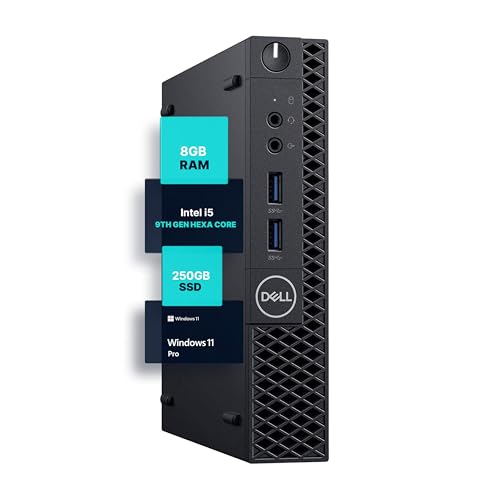
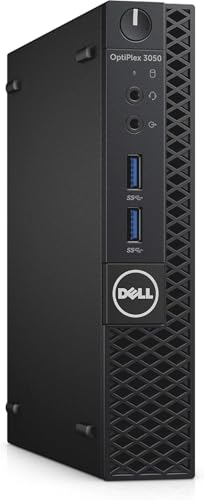
The Dell OptiPlex 3050 Micro is a renewed desktop PC that targets a very specific niche: budget-conscious PC gamers, streamers, and productivity users who value a tiny footprint over raw gaming horsepower. This Micro Form Factor machine is essentially a business-grade ultra-compact PC, but with its Intel Core i5-7500T processor and a fast 256GB SSD, it can handle entry-level gaming, light streaming, and everyday tasks without breaking a sweat.
For PC gamers on a tight budget or those building a secondary gaming setup for a dorm room or home office, the OptiPlex 3050 Micro offers surprising versatility. The quad-core i5-7500T (2.7GHz base) is efficient and quiet, making it a great match for casual games like Minecraft, Rocket League, or older titles. The 8GB of DDR4 RAM is enough for light multitasking, though power users may want to upgrade (the system supports up to 16GB). The 256GB SSD ensures fast boot times and quick loading of games and applications, which reduces downtime during intense gaming sessions.
When it comes to real-world performance, this desktop focuses on responsiveness rather than high frame rates. Integrated Intel HD Graphics 630 can handle esports titles like Valorant or CS:GO at low settings and reasonable resolutions, but don’t expect to run AAA games at 60fps. For streamers or content creators, the machine is adequate for OBS-based streaming of casual games, though encoding will rely on the CPU. The compact design also means minimal noise and heat output, which is a plus for quiet streaming environments or shared workspaces.
Build quality is typical Dell business-class: the chassis is sturdy metal and plastic, designed to survive office environments. The small dimensions (7.1 x 1.3 x 7 inches) allow it to sit almost anywhere - under a monitor, on a shelf, or even mounted behind a display using a VESA bracket (not included). Setup is plug-and-play with Windows 11 Pro preinstalled and fully activated. You’ll need a monitor, keyboard, and mouse, but connectivity is ample with USB 3.0, DisplayPort, and WiFi. Cable management is simple due to the small size; you can hide the power brick easily.
Realistic limitations are clear: no dedicated graphics, limited upgrade potential (no PCIe slot for a GPU), and only 8GB RAM in the base configuration. This isn’t a gaming rig for competitive esports or high-resolution streaming. However, for budget gamers, college students, or anyone needing a second PC for light gaming and productivity, the OptiPlex 3050 Micro delivers solid value. Its renewed status means it’s been tested and refurbished, offering a cost-effective entry point into PC gaming without the hassle of building from scratch.
Our recommendation: buy this if you need a tiny, reliable desktop for casual gaming, office work, or as a dedicated streaming encoder. Avoid it if you plan to play modern AAA titles or require a dedicated graphics card. For the price, the OptiPlex 3050 Micro is a practical, space-saving solution for a wide range of users, from WFH gamers to content creators looking for an affordable secondary system.
For its size and price, the Dell OptiPlex 3050 Micro delivers decent entry-level gaming performance. The integrated Intel HD Graphics 630 paired with the i5-7500T can handle older titles, indie games, and esports titles like League of Legends or Fortnite at low settings and around 30-60fps depending on resolution. It’s not a gaming powerhouse, but for casual gamers or those on a tight budget, it’s a capable little machine. The 256GB SSD helps with fast level loading and system responsiveness, reducing stutter in open-world games. Keep expectations realistic - this is not for AAA gaming at high settings.
The OptiPlex 3050 Micro comes with USB 3.0 ports, DisplayPort 1.2, WiFi (802.11ac), and Gigabit Ethernet. This gives you flexibility to connect multiple monitors, mice, keyboards, and even a capture card for streaming. Setup is straightforward: plug in power, connect a monitor via DisplayPort or HDMI (adapter may be needed), and you’re good to go. Windows 11 Pro is preinstalled and activated, so you can start gaming or working immediately. The included VESA mount kit would be a nice addition, but not included; you can purchase one separately for a cleaner desk setup.

Frequently Asked Questions
Can a micro PC handle multiple monitor displays?
Yes, most micro desktop units support multiple displays through integrated video outputs. The Dell OptiPlex micro models feature DisplayPort outputs alongside standard video ports to connect external monitors. You can extend your desktop across dual screens for multitasking as long as your monitors and display cables match the available outputs on the rear panel.
How much desk space does a micro PC save compared to a standard tower?
Micro form factor PCs reduce desk footprint significantly compared to traditional mid-tower cases. These ultra-small systems measure only a few inches across, allowing them to sit flat under a monitor riser or mount directly behind a compatible display. This compact design frees up valuable surface area so you can place an oversized desk pad or master how to configure and use gaming mouse software without feeling cramped.
Are micro PCs loud during heavy daily workloads?
No, micro PCs generally operate with low acoustic output during regular office tasks. The compact chassis utilizes energy-efficient processors like Intel T-series or standard desktop chips with optimized cooling fans designed for quiet office environments. You will barely notice system noise while browsing, handling spreadsheets, or streaming media at your desk.
Can you connect standard USB peripherals to a Dell OptiPlex micro PC?
Yes, Dell OptiPlex micro desktops come equipped with multiple standard USB 3.0 ports. You can plug in any wired or wireless keyboard, webcam, headset, or the best mouse for PC setups directly into the front and rear panels. If you use a high number of USB accessories simultaneously, adding a powered external USB hub ensures adequate port availability.
Is an Intel Core i5 processor sufficient for everyday multitasking in a micro PC?
Yes, an Intel Core i5 processor provides plenty of performance for standard productivity, web applications, and media playback. The supplied 6-core and quad-core Intel i5 processors easily manage multiple open browser tabs, document editing, and background utilities. Pairing this processing power with solid state drive storage ensures fast boot sequences and responsive application load times.
Can you upgrade the RAM and storage in a renewed micro PC?
Yes, most Dell OptiPlex micro systems allow users to service or upgrade internal components like DDR4 memory and storage drives. These units feature accessible chassis designs where you can swap or expand the existing solid state drive or add additional RAM modules up to supported motherboard limits. Always check the specific model documentation before purchasing upgrade parts to confirm form factor compatibility.


Write Your Review
No reviews yet. Be the first to share your experience!