


Clear Voice Communication for Desktop Audio Setups
Background keyboard clatter and poor microphone positioning can quickly ruin team coordination during multiplayer matches. Investing in reliable desktop gear ensures teammates catch every tactical callout without distracting room noise. Selecting the best headset microphone for pc games requires balancing microphone pickup patterns, inline controls, and overall headset weight. Models featuring directional noise-isolating microphones help eliminate mechanical keystroke noise, especially when paired alongside the best type of keyboard for gaming. Proper acoustic isolation keeps your communications crisp while maintaining comfortable ear cup padding for long sessions.
Connectivity also dictates how neatly an accessory integrates into your desk setup. Options with a 3.5mm jack offer plug-and-play simplicity across sound cards, whereas dedicated USB headsets often integrate digital sound chips and customizable lighting controls. If your desktop already has crowded ports, routing a long braided cable prevents tension when you’re moving around. Learning how to properly configure your gaming mouse alongside audio hotkeys gives you quick access to mute toggles and game chat balance. Prioritizing flexible microphone booms, balanced drivers, and breathable ear cushions ensures your communication gear complements your entire setup.
Pros
- Lightweight and comfortable for hours of gaming
- Clear audio for both game sound and voice chat
- Works with nearly every platform thanks to 3.5mm connection
- Removable mic adds flexibility for music or casual use
- Easy plug-and-play setup with no software needed
Cons
- Basic build quality may not withstand heavy wear and tear
- No surround sound or advanced audio features
- In-line controls are functional but feel a bit cheap
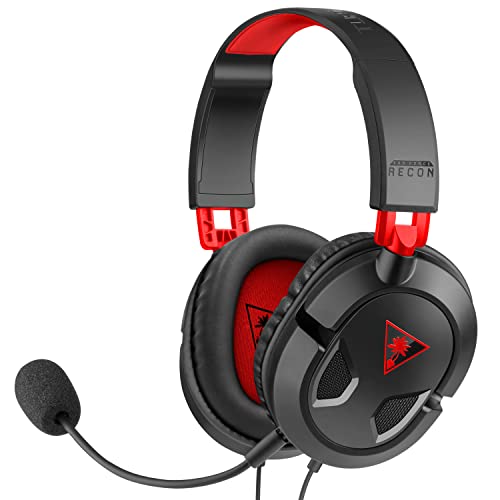
The Turtle Beach Recon 50 is a wired gaming headset designed for gamers who want a reliable, no-fuss audio solution without breaking the bank. It features 40mm speakers, a removable microphone, and in-line controls, all packed into a lightweight frame that weighs less than half a pound. This headset is compatible with PC, Mac, PlayStation, Xbox, and mobile devices, making it a versatile choice for anyone with multiple gaming platforms.
This headset is best suited for casual gamers, college gamers, and those building a budget-friendly gaming setup. It also works well for streamers and content creators who need a basic headset for Discord chats or monitoring audio. The lightweight design and soft ear cushions help reduce fatigue during long sessions, which is a plus for both gaming and work-from-home use.
In terms of performance, the 40mm speakers deliver clear audio for game sounds, music, and voice chat. The microphone provides crisp voice pickup for team communication or streaming, and it can be removed when not needed. The in-line controls let you adjust volume and mute quickly, which is handy during intense gameplay. While it lacks virtual surround sound or advanced EQ settings, the audio quality is solid for its price range.
Build quality is decent for a budget headset, with a plastic frame that feels lightweight but not overly fragile. The ear cushions are comfortable, though they may not be as plush as higher-end models. The removable mic is a practical feature, and the 3.5mm connection ensures wide compatibility without needing adapters. Setup is truly plug-and-play, so you can start using it right out of the box.
One realistic limitation is the lack of advanced features like surround sound, noise cancellation, or software customization. The build quality, while adequate, may not survive rough handling over time. The in-line controls are functional but have a plastic feel that might not appeal to everyone.
Overall, the Turtle Beach Recon 50 is a practical choice for casual gamers, students, or anyone needing a versatile, affordable headset for gaming, streaming, or everyday use. It's easy to recommend for its comfort, compatibility, and clear audio, especially if you don't need premium features. For competitive gamers or those seeking high-end audio, a more advanced headset might be worth the investment.

Pros
- Affordable price point that doesn't compromise on core audio and mic quality
- Wide compatibility across gaming consoles, PC, and mobile devices
- Comfortable padding and lightweight frame for long sessions
- Easy plug-and-play setup with no additional software required
Cons
- RGB lighting is not customizable and may feel basic to setup enthusiasts
- Build materials may not feel as premium as higher-end headsets
- Microphone noise isolation is decent but not studio-grade
The IMYB Gaming Headset is a wired stereo headset designed for gamers who need a reliable, budget-friendly audio solution across multiple platforms. It connects via a standard 3.5mm jack, making it compatible with PC, PS4, PS5, Xbox One, Series X/S, Nintendo Switch, and mobile devices. This headset is best suited for casual PC gamers, console players, streamers on a budget, college gamers, and anyone building a gaming setup without spending a fortune.
Performance-wise, the 50mm neodymium drivers provide clear stereo sound with a noticeable bass presence, which helps with in-game audio cues like footsteps and explosions. While it doesn't offer virtual surround sound, the audio clarity is solid for competitive play in FPS and MOBA titles. The noise-isolating microphone does a good job filtering out background noise during team chat or streaming, though it won't match the quality of dedicated USB mics.
Comfort is a strong point here. The over-ear design uses soft, skin-friendly ear cushions and a padded headband, and at just 0.77 pounds, the headset remains comfortable during long gaming sessions. The flexible headband adjusts easily, and the lightweight build reduces pressure on the head and ears.
Build quality is practical for the price. The frame uses plastic, which keeps weight down, and the braided cable is 6.5 feet long, anti-tangle, and includes inline volume control and a mute button. The RGB lighting adds a visual pop but is not customizable - it simply cycles through colors. Setup is plug-and-play with no software or drivers needed, and the headset works immediately with most devices.
A realistic limitation is the lack of advanced features like virtual surround sound, EQ tuning, or premium materials. The microphone is good for basic communication but won't satisfy serious streamers or content creators. Also, the RGB lighting may feel basic for enthusiasts who prefer software-controlled effects.
Overall, if you're a PC gamer or console player looking for a functional, comfortable headset with decent audio and mic quality at an entry-level price, the IMYB Gaming Headset is a smart choice. It's especially practical for casual gaming, Discord calls, or as a backup headset. For those who need higher fidelity or more customization, investing in a pricier model may be worthwhile.

Pros
- 7.1 surround sound enhances immersion in FPS and open-world games.
- 11 RGB lighting modes allow personalization to match your setup.
- Comfortable memory foam padding for long gaming sessions.
- No software needed - true plug-and-play on multiple platforms.
- Affordable price point for the features offered.
Cons
- Not compatible with Xbox consoles.
- Microphone quality is decent but not on par with dedicated USB mics for streaming.
- Plastic build may feel less premium than higher-end metal headsets.
The FIFINE AmpliGame H13BP is a wired USB gaming headset that aims to deliver immersive audio and flashy RGB lighting without breaking the bank. Designed for PC gamers, streamers, and console players on PS5 and PS4, this headset packs 50mm drivers with 7.1 surround sound support, plus a noise-canceling microphone for clear communication. The standout feature is its rhombus-frame design with transparent earcups and customizable RGB lighting - perfect for gamers who want their headset to match their desktop aesthetic.
In terms of audio performance, the 7.1 surround sound creates a convincing sense of space in games. Footsteps in FPS titles like Valorant or Call of Duty become easier to pinpoint, while the bass response adds rumble to explosions and engine sounds in racing games. The 50mm drivers deliver a balanced sound profile with decent clarity across highs and mids, though audiophiles may find the bass a touch elevated. For a sub-$50 headset, the audio quality is impressive and should satisfy most casual and competitive gamers.
Comfort is a strong suit. The protein leather ear pads are filled with memory foam that conforms to your ears without excessive clamping force. The adjustable headband ensures a snug fit for different head sizes. During long gaming sessions - four to six hours - the headset remains comfortable, though some users might notice slight warmth buildup due to the closed-back design. The passive noise isolation from the ear cups helps block out ambient distractions, keeping you focused on the game.
The control box integrated into the cable is a practical addition. It lets you toggle 7.1 surround sound on/off, adjust volume, switch between EQ modes, balance game and chat audio, and mute the microphone with a single button. The mic mute indicator glows red when muted, which is handy. The noise-canceling mic does a solid job of reducing background hum, making it suitable for Discord calls and streaming - just don't expect studio-quality sound.
Setup is effortless - simply plug the USB-A connector into your PC, PS5, PS4, or Mac, and it's recognized immediately. No driver installation or software is needed, which is great for console gamers. The 7.55-foot braided cable offers plenty of length for desktop setups. One limitation: this headset does not work with Xbox consoles, so console players on that platform will need to look elsewhere.
Overall, the FIFINE AmpliGame H13BP is a well-rounded gaming headset that checks the important boxes: good audio, comfortable fit, useful controls, and eye-catching RGB. It's ideal for PC gamers building a themed setup, streamers who want a lit headset on camera, or PS5/PS4 players who need a simple plug-and-play solution. While the build is mostly plastic and the mic isn't pro-grade, the value at this price point is hard to beat. If you're looking for an affordable headset with style and substance, this is a strong contender.
The FIFINE H13BP uses 50mm dynamic drivers that deliver a sound signature tuned for gaming. The 7.1 surround sound simulation creates a wide soundstage, making it easier to detect directional cues in shooters. The frequency response covers bass, mids, and highs adequately, with a slight emphasis on low frequencies for impactful explosions and deep footsteps. While not intended for critical music listening, it provides an enjoyable gaming audio experience. The EQ modes accessible via the control box allow you to tweak the sound profile for different game genres - for instance, a "shooter" mode that emphasizes highs for clearer footsteps.
The rhombus-frame design with transparent earcups houses dynamic RGB lighting that can be toggled on or off via a long press of the headphone button. With 11 lighting modes including static, breathing, and color cycling, you can match the glow to your keyboard, mouse, or overall setup. The lights are bright enough to be visible on camera, making this headset a great choice for streamers who want to add visual flair to their stream. The ability to turn off the RGB completely is a nice touch for when you prefer a more subtle look.

Pros
- Affordable price point for an entry-level gaming headset with 7.1 surround sound support.
- Plug-and-play USB connection works seamlessly on PC, PS4, and PS5 without additional software.
- Noise-cancelling microphone performs well for in-game chat and Discord calls, reducing ambient noise.
- Memory foam ear cushions and lightweight design offer good comfort for extended gaming sessions.
- Long 2.2-meter cable provides flexibility for desk setups and couch console gaming.
Cons
- Not compatible with console game controllers (only PS4/PS5 USB port) – no Xbox support.
- Lacks dedicated software for EQ customization or surround sound tuning – relies on system defaults.
- Build materials feel mostly plastic, which may not hold up as well as more expensive headsets over time.
The EKSA E1000 is a USB gaming headset designed for PC gamers and console players who want a budget-friendly way to step into virtual surround sound. It plugs directly into a USB port on your computer, PS4, or PS5, and instantly delivers 7.1-channel audio without any drivers or software installation. This makes it a practical choice for anyone who values simplicity and low cost over advanced customization.
This headset is best suited for casual PC gamers, college students, work-from-home gamers, and those just starting to build their gaming setup. It's also a fine option for streamers or content creators who need a reliable backup mic, thanks to the noise-cancelling microphone that helps keep background chatter out of your broadcasts or Discord calls. However, competitive esports players may want to look for a headset with more precise sound imaging and a lighter weight.
In terms of audio performance, the 50mm neodymium drivers provide clear mids and decent bass, while the 7.1 surround sound creates a more immersive experience in games like shooters or RPGs. The microphone uses omnidirectional noise reduction to pick up your voice clearly and filter out ambient noise, though it may not match dedicated condenser mics in quality. For everyday gaming and voice chat, it gets the job done well.
Comfort is a strong point: the memory foam earmuffs are soft and breathable, and the adjustable headband distributes weight evenly, reducing pressure during long sessions. The 2.2-meter cable is generous for desktop setups and even gives you some room to lounge while gaming on a console nearby. The RGB lighting on the ear cups adds a subtle glow that enhances your desk aesthetic without being distracting.
A realistic limitation is that the EKSA E1000 is not compatible with console game controllers, only with USB ports on the console itself. That means no plugging into a PS5 controller for voice chat – you'll need to use the console's USB port. Also, there is no software EQ or surround sound tuning, so you're limited to the default sound profile. The all-plastic build feels a bit lightweight, but for the price, that's expected.
Overall, the EKSA E1000 is a great entry-level gaming headset for PC gamers on a tight budget, console players who can use USB audio, and anyone who needs a spare headset for their gaming desk or dorm room. It delivers solid comfort, an easy setup, and adequate audio for most casual and competitive gaming scenarios. Backed by a 2-year warranty, it's a low-risk purchase for those seeking value without breaking the bank.
Pros
- Excellent value for money with solid audio and mic quality at a budget price
- Comfortable memory foam ear cups suitable for extended gaming marathons
- Works across nearly all modern gaming platforms including PC, PlayStation, and Xbox
Cons
- Microphone durability concerns noted in some user reviews after several months of use
- LED lights only function when connected via USB, limiting their use with consoles when plugged into the controller
- Headset feels slightly heavier than some competitors, which may cause minor discomfort over very long sessions
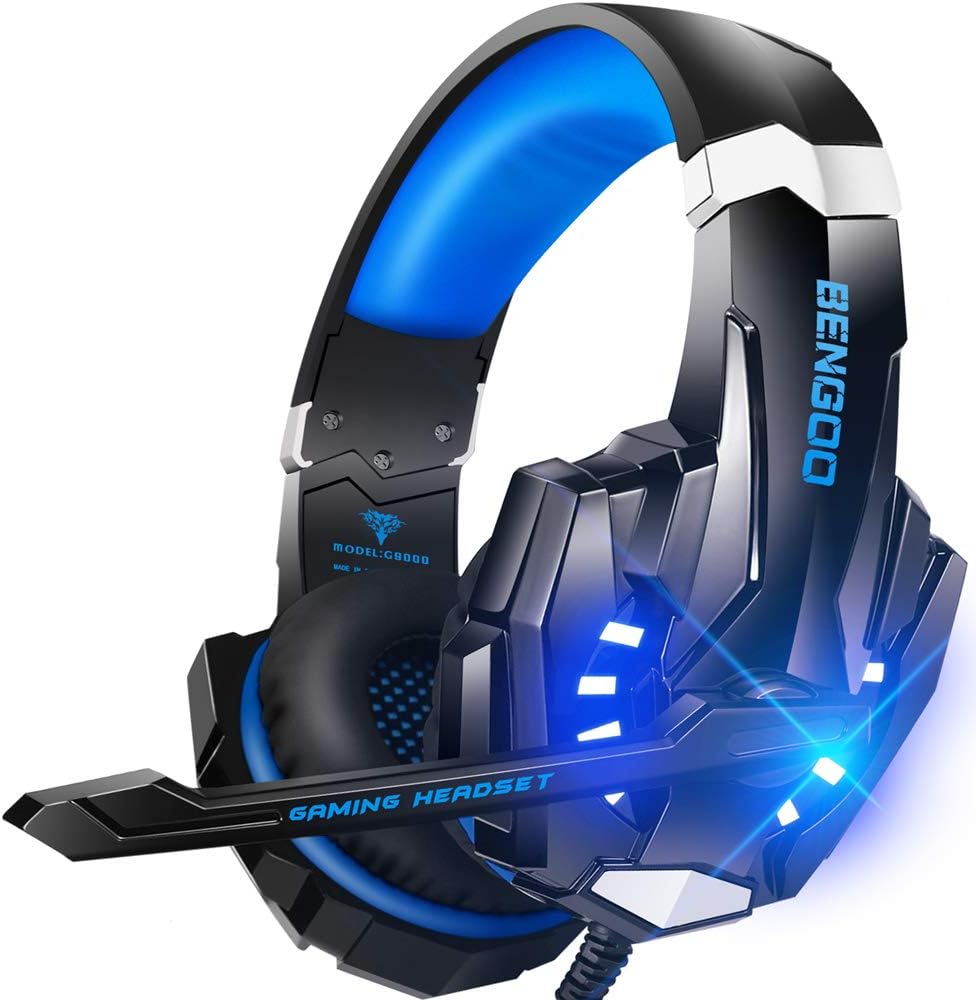
The BENGOO G9000 is a wired stereo gaming headset designed to deliver a budget-friendly yet feature-rich experience for a wide range of gamers. It combines noise-cancelling microphone technology, simulated 7.1 surround sound, and flashy LED lighting into a package that costs under $20. Based on product specifications and user feedback, this headset is best suited for PC gamers, console players on PS4, PS5, Xbox One, and Nintendo Switch, as well as casual streamers and gamers who prioritize affordability without sacrificing core audio features.
In terms of real-world performance, the 40mm neodymium drivers provide clear audio with decent bass and spatial awareness. The simulated 7.1 surround sound helps with directional cues in competitive titles like Call of Duty or Overwatch, though it's not a true hardware surround system. The omni-directional microphone does a good job filtering out background noise, making voice chat on Discord or in-game clear and reliable. Many users report that the overall sound quality surpasses expectations for the price, offering solid clarity for both gaming and voice calls.
Build quality is a mix of practicality and compromise. The headset uses a stiff but durable plastic frame with a metal-reinforced headband, and the faux leather ear pads are filled with memory foam that remains comfortable for a few hours of use. The braided USB cable is a nice touch, reducing tangles and adding longevity. However, some users note the microphone can become less responsive after several months, and the lighting only works via USB - which means console players who plug into their controller won't get the glow. The headset's weight, while not excessive, is slightly higher than some alternatives, but the padding helps offset this.
Ease of setup is about as simple as it gets: plug the 3.5mm jack into your device, and if you want LED lighting, connect the USB power cable. The inline remote offers a rotary volume wheel and a one-key mute button, which is convenient during gameplay. There's no proprietary software needed, making it truly plug-and-play. For maintenance, the ear pads can be wiped clean with a damp cloth, and the cable's braiding helps prevent wear.
The main limitations revolve around long-term durability and the LED dependency. A handful of reviews mention the mic failing after six months, and the lack of USB-C or a detachable cable might be a dealbreaker for some. That said, the headset's compatibility with nearly every platform and its comfortable fit make it a versatile backup or primary headset for budget-conscious gamers. It's a practical choice for college gamers, work-from-home gamers on a budget, or anyone building a secondary gaming setup on a shoestring.
For PC gamers, esports players on a tight budget, or casual gamers who want a reliable headset that covers the basics without breaking the bank, the BENGOO G9000 is a strong recommendation. It delivers on the core promises of decent audio, a functional mic, and comfort, while the LED lighting adds a touch of gaming flair to any desk. Users seeking premium build quality or a wireless option should look elsewhere, but for the price, this headset offers remarkable value.

Pros
- Exceptional battery life of 70 hours minimizes downtime and recharging.
- Dolby Atmos delivers immersive, accurate spatial audio for gaming and movies.
- Versatile dual wireless connectivity works across PC, consoles, and mobile.
- Lightweight and comfortable for marathon gaming sessions.
- Fast charging provides 6 hours of use from just 15 minutes of charge.
Cons
- NVIDIA Broadcast noise cancellation requires a compatible NVIDIA GeForce RTX graphics card, limiting its use on older systems.
- The headset lacks RGB lighting, which may disappoint gamers who want customizable aesthetics.
- One-size-fits-all design may not be ideal for all head shapes, and the clamping force could feel tight for some users.
The Corsair Void v2 Wireless Gaming Headset is a versatile audio solution designed for PC gamers, console players, and streamers. It combines the freedom of wireless connectivity with the clarity of Dolby Atmos spatial audio, making it a strong contender in the mid-range gaming headset market. With support for both 2.4GHz low-latency wireless and Bluetooth, this headset works seamlessly across PC, PS5, PS4, Nintendo Switch, and mobile devices.
Performance is where the Void v2 shines. The ultra-fast 2.4GHz wireless connection delivers lag-free audio that competitive gamers will appreciate in fast-paced FPS titles like Call of Duty or Valorant. Dolby Atmos enhances directional awareness, letting you pinpoint footsteps, gunfire, and environmental cues with impressive accuracy. The 70-hour battery life is a standout feature - you can game for days without worrying about recharging. When you do need power, a 15-minute charge provides 6 more hours of gameplay, so you are never sidelined for long.
Build quality is practical and lightweight. At just 0.67 pounds, the headset reduces neck strain during extended sessions. The memory foam ear cushions and adjustable headband offer a comfortable fit, though the one-size design may not suit every head shape equally. The omni-directional microphone delivers clear voice chat, especially when paired with NVIDIA Broadcast technology for background noise reduction. Keep in mind that this feature requires a compatible NVIDIA GeForce RTX graphics card, which might limit its effectiveness on older PCs.
Setup is straightforward: plug in the USB wireless adapter for 2.4GHz or pair via Bluetooth, and you are ready to go. Switching between devices is instant with a dedicated button, ideal for gamers who move between PC and console. The headset works with iCUE software for equalizer adjustments and Dolby Atmos settings, though the software is optional for basic use. Cleaning is simple with a damp cloth on the ear pads, and the fold-flat design makes storage easy.
A realistic limitation is the lack of RGB lighting, which might be a downside for those building a fully illuminated gaming setup. Additionally, the microphone boom is non-detachable, so it stays attached even when not in use. For most gamers, however, these are minor trade-offs for the stellar battery life and audio performance. The Void v2 excels as a do-it-all wireless headset for multi-platform gaming, streaming, and casual use.
Overall, if you are a PC or console gamer seeking reliable wireless audio with long battery life and accurate spatial sound, the Corsair Void v2 is a solid choice. It fits well into a gaming desk setup, handles competitive and casual play equally well, and offers enough versatility for content creation and work-from-home calls. For users who prioritize battery longevity and dual connectivity over RGB flash, this headset delivers exceptional value.
The Corsair Void v2 features 50mm neodymium drivers that produce rich, balanced sound with clear highs and decent bass. Dolby Atmos support elevates the experience by providing virtualized 3D audio, which is particularly effective in games like Overwatch or Apex Legends where spatial awareness is crucial. The soundstage is wide enough to distinguish between distant and nearby sounds, though audiophiles may prefer a more neutral tuning. For gaming, the audio profile is punchy and immersive without being overwhelming.
The omni-directional microphone captures voice clearly in quiet environments. With NVIDIA Broadcast technology (requires an RTX GPU), background noise like keyboard clatter or room ambience is suppressed effectively, making it suitable for streaming or Discord calls. Without NVIDIA Broadcast, the mic still performs well, but some ambient noise may bleed through. The mic arm is flexible and stays in position, though it is not detachable.
This headset supports PC, PS5, PS4, Nintendo Switch, and mobile devices via Bluetooth or 2.4GHz wireless. The USB adapter works with PC and PlayStation consoles, while Bluetooth handles Switch and mobile. Switching between sources is seamless with a single button press. Note that Dolby Atmos requires Windows 10/11 with the Dolby Access app, and the NVIDIA Broadcast feature is limited to PCs with compatible RTX graphics cards.
With up to 70 hours of battery life, the Void v2 easily lasts through a week of heavy gaming. Fast charging is a key advantage: a 15-minute top-up provides 6 hours of use, so a quick break between matches can keep you going. The headset uses USB-C charging, and a low-battery indicator alerts you when power is running low. Battery life may vary with volume levels and Dolby Atmos usage, but even in the worst case, it outperforms many competitors.
Frequently Asked Questions
Does a USB gaming headset provide clearer voice chat than a 3.5mm connection on PC?
USB connections often deliver cleaner microphone audio on PC because they utilize dedicated internal sound processing chips rather than relying on unshielded motherboard audio ports. Analog 3.5mm jacks can occasionally pick up electrical hum or motherboard interference. USB models like the EKSA E1000 bypass onboard sound hardware entirely through direct digital input. If you prioritize easy plug-and-play voice chat without needing an audio splitter, a USB headset is typically the more convenient accessory.
Can a headset microphone block out mechanical keyboard clicks during PC games?
Yes, models equipped with directional noise-isolating microphones or dedicated noise reduction technology significantly reduce background keystrokes. Omni-directional microphones with noise filters attenuate ambient room chatter, keeping the primary focus on your vocal register. Positioning the flexible boom microphone slightly to the side of your mouth also prevents breathing pops and mechanical switch noise from bleeding into team chat.
Is a wireless headset microphone fast enough for competitive PC gaming in 2026?
Yes, modern 2.4GHz wireless gaming headsets transmit audio and voice signals with virtually zero perceptible latency. Low-latency 2.4GHz wireless dongles provide stable bandwidth for both outgoing chat and incoming directional audio. While Bluetooth can introduce slight delays, dual-wireless models like the Corsair Void v2 let you switch to dedicated 2.4GHz mode for gaming. Just ensure your battery stays charged to prevent sudden disconnections mid-match.
Why do some PC gaming headsets require a 3.5mm splitter cable?
Many desktop computer cases feature separate 3.5mm audio-out and microphone-in jacks rather than a single combined port. Headsets equipped with a single 4-pole 3.5mm audio plug combine both signals into one physical jack. While laptops support this unified connection, standard desktop towers need a Y-splitter cable to route the microphone line properly. Verifying whether your selected headset includes this splitter prevents setup delays on arrival.
How do inline controls help manage voice communication during gameplay?
Inline controls let you adjust master volume and toggle hardware microphone mute without minimizing your game window. Physical switches provide instant confirmation that your microphone is muted during private conversations or background interruptions. Pairing an accessible headset with the best mouse for PC ensures smooth control over both navigation and audio settings without interrupting your match.


Write Your Review
No reviews yet. Be the first to share your experience!