


Balancing thermal management, physical card clearance, and motherboard compatibility often complicates assembling a high-performance desktop setup. Many gamers find that selecting the right hardware configuration requires careful attention to connector placement, clock speeds, and case airflow. When configuring the best geforce rtx 4070 ti super pcs, evaluating the exact physical features of each component ensures your desktop runs smoothly. A thorough step-by-step gaming PC building guide helps you organize your internal layout and prevent spacing issues. Paying attention to these specifications prevents costly build mistakes before purchasing components.
Hardware configurations in this tier showcase varied cooling designs, ranging from triple-fan setups to specialized hidden-cable connections that require compatible motherboards. ASUS BTF models draw power through proprietary motherboard slots, whereas conventional PCIe cards rely on standard power adapters and multi-display outputs. Maintaining clean airflow and dust-free internal parts remains essential for component longevity, which is why a practical PC maintenance routine protects your investment. Comparing memory specifications and boost clocks will help you assemble a balanced gaming desktop.



Frequently Asked Questions
What video memory capacity do GeForce RTX 4070 Ti Super cards feature?
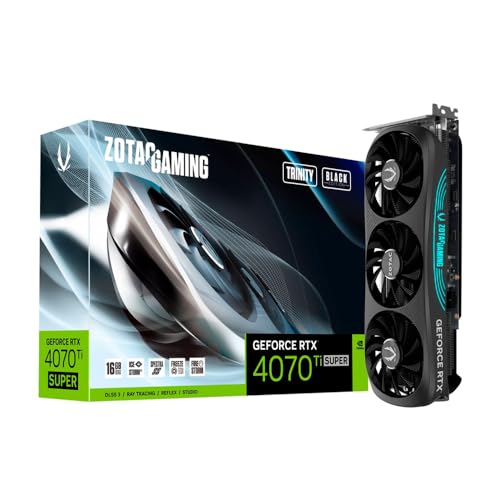
Every listed GeForce RTX 4070 Ti Super model features 16GB of GDDR6X video memory across a 256-bit interface. This configuration delivers memory speeds up to 21 Gbps for demanding graphical assets. The 16GB capacity remains identical across all partner editions, providing consistent texture handling for modern gaming setups.
What motherboard is required for ASUS BTF graphics cards?
ASUS BTF graphics cards require compatible ASUS BTF motherboards, such as the TUF GAMING Z790-BTF WIFI or ROG MAXIMUS Z790 HERO BTF. These cards draw power directly through a high-power gold finger slot rather than standard external cables. Standard motherboards lack this slot and cannot power BTF graphics cards.
How do boost clock speeds differ among these models?
Factory boost clock speeds vary between 2625 MHz and 2685 MHz depending on the manufacturer tuning. For instance, the MSI Gaming Expert lists an extreme clock of 2685 MHz, while the Gigabyte WINDFORCE OC operates at 2625 MHz. Higher factory clock profiles offer slightly elevated frequencies without manual configuration.
What video output ports are available on these systems?
Most models include three DisplayPort 1.4a connections and one HDMI 2.1a port for multi-monitor setups. Certain models, like the MSI Ventus 3X Black, supply two DisplayPort and two HDMI ports instead. These configurations accommodate multiple high-resolution displays or gaming monitors.
Does network hardware influence online desktop gaming?
Network hardware does not alter internal graphics processing, but connection stability directly influences online multiplayer responsiveness. Determining whether Wi-Fi 6 is good for gaming in your setup helps prevent latency spikes and dropped packets. Reliable networking ensures smooth communication during multiplayer sessions.







Write Your Review
No reviews yet. Be the first to share your experience!