


Hardware Compatibility and Cloud Play Solutions
Checking whether a laptop has upgradeable memory or soldered RAM is often the initial hurdle for mobile players facing performance bottlenecks. Ultrabooks featuring soldered modules or single-channel configurations cannot accept physical hardware expansion for demanding games. Adopting Xbox Cloud Gaming allows players to bypass local system limits and stream console titles directly across connected screens. Streaming shifts the rendering workload off physical hardware onto remote cloud infrastructure. Stable network connections, compatible controllers, and suitable display interfaces ensure fluid sessions without opening your computer chassis.
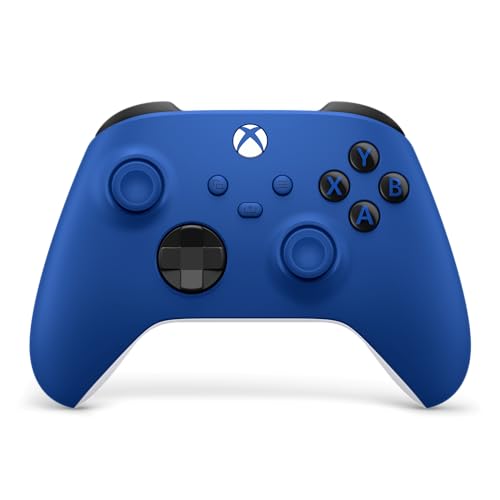
Selecting suitable accessories and service tiers depends heavily on how you prefer to play. Traditional configurations often require laptop DDR4 memory upgrades to run software locally, while cloud platforms prioritize steady network bandwidth and responsive input hardware. Dedicated devices like the OnePro Cloud Handheld Portable Remote Play combine controls and screens for travel. Standard setups pair an XBOX Wireless Gaming Controller | Shock Blue with existing mobile displays. Evaluating official hardware options and active subscription plans helps you configure a functional portable station.

Pros
- Excellent cloud gaming performance with GeForce NOW and Xbox Cloud Gaming, even on mid-range home Wi-Fi
- Comfortable ergonomics and light 430g build reduce fatigue during long portable play sessions
- Flexible input options with digital joysticks and gyroscope support for fine-tuned aiming and movement
- Bright 1080P 7-inch screen with good color accuracy makes games look sharp on the go
Cons
- Requires separate subscriptions for Xbox Cloud Gaming, GeForce NOW, or PlayStation Plus Premium to access most AAA titles
- Android app compatibility can be limited for some resource-heavy local games
- Emulation performance on PS2 and GameCube titles may vary depending on game optimization
The abxylute OnePro Cloud Handheld is a purpose-built portable console designed for PC gamers, streamers, and casual players who want to access their game library from nearly anywhere. Rather than a traditional console that runs games locally, this device shines as a cloud gaming and remote play hub. It streams titles from services like Xbox Cloud Gaming, NVIDIA GeForce NOW, Amazon Luna, and PlayStation Plus Premium, and can also connect to your home PC via Moonlight or Steam Link. For retro enthusiasts, it runs emulators for PS2 and GameCube, and it supports Android games from Google Play. This makes it a handy companion for college gamers, content creators on set, or anyone who wants to keep playing during travel.
Performance is driven by the MediaTek Genio 510 chipset, which abxylute claims offers a 300% improvement over the first-gen model. In practice, that means smoother streaming with less stutter and faster app loading. The built-in 2T2R MU-MIMO Wi-Fi module helps maintain a stable connection, which is critical for cloud gaming where input lag can ruin the experience. According to the product specs, you'll want at least 5Mbps broadband Wi-Fi for remote play. The 7-inch 1080P touchscreen delivers a sharp image with decent brightness, making it usable both indoors and in moderate outdoor light. For those times you want a bigger view, the USB-C port supports 4K video output to an external monitor or AR glasses.
Controls are a standout feature. The OnePro is the first handheld to use capacitor digital joysticks that are taller and larger than typical sticks. You can switch between Circle Mode for 0.2% precise tracking (great for sniping in FPS games) and Square Mode for broader input (useful for fighting games or menu navigation). The handheld also includes haptics, a gyroscope, and responsive face buttons. At just 430 grams, it's light enough for extended sessions without hand strain. The ergonomics are good, with a grip that fits average hands comfortably. Battery life is rated above 8 hours, which is solid for a device this size, and fast charging gets you back in the game quickly.
Build quality feels solid for the price point. The black transparent shell shows off the internal components, which appeals to gamers who like tech aesthetics. The dual speakers have upgraded drivers that deliver clearer vocals and decent immersion, though you'll still want a good pair of gaming headphones for competitive play. Setup is straightforward: you install the required apps (Xbox Game Pass, GeForce NOW, or any remote play app), log in with your subscriptions, and start streaming. There's no complex software to configure, and the Android interface is familiar to anyone who has used a smartphone. Cleaning is simple with a microfiber cloth, and there are no moving parts to worry about.
Realistic limitations are important to mention. This is not a standalone console that runs AAA games locally. It relies heavily on a stable, fast internet connection. If your home Wi-Fi is spotty or you're on a hotel network with restrictions, you may experience lag or disconnects. Also, you need subscriptions for most cloud services, which adds ongoing cost. Emulation for PS2 and GameCube can be hit or miss depending on the title and power of the chipset - some games run well, others may have slowdown. Lastly, the Android app library is large but not every game will support the controller perfectly without remapping.
Who should buy the abxylute OnePro? If you're a PC gamer who already has Game Pass Ultimate or GeForce NOW, and you want to play your library on the couch, in bed, or during a commute, this is a solid investment. Streamers who want to check in on their setup while away, or casual gamers who want access to a huge variety of games without buying a dedicated gaming laptop, will find it useful. It's not a replacement for a gaming PC, but it's a versatile companion that fills the gap between mobile gaming and desktop power. For enthusiasts looking for a lightweight, full-featured cloud gaming handheld with excellent controls and a sharp screen, the OnePro is worth considering.
The abxylute OnePro is built around the MediaTek Genio 510 chipset with a dedicated 2T2R MU-MIMO Wi-Fi module, which helps maintain a stable connection to cloud gaming servers. In real-world use, streaming from Xbox Cloud Gaming and GeForce NOW is smooth at 1080P resolution, provided you have a reliable 5-15Mbps connection. Input latency is low enough for casual play and even some competitive shooters when using Circle Mode on the digital joysticks. The device supports multiple cloud services out of the box, including Amazon Luna, Boosteroid, and PlayStation Plus Premium. For PC remote play, Moonlight and Steam Link work well with local network streaming. Keep in mind that cloud gaming quality heavily depends on your internet speed and proximity to data centers. This handheld performs best in homes with solid Wi-Fi 5 or 6 coverage.
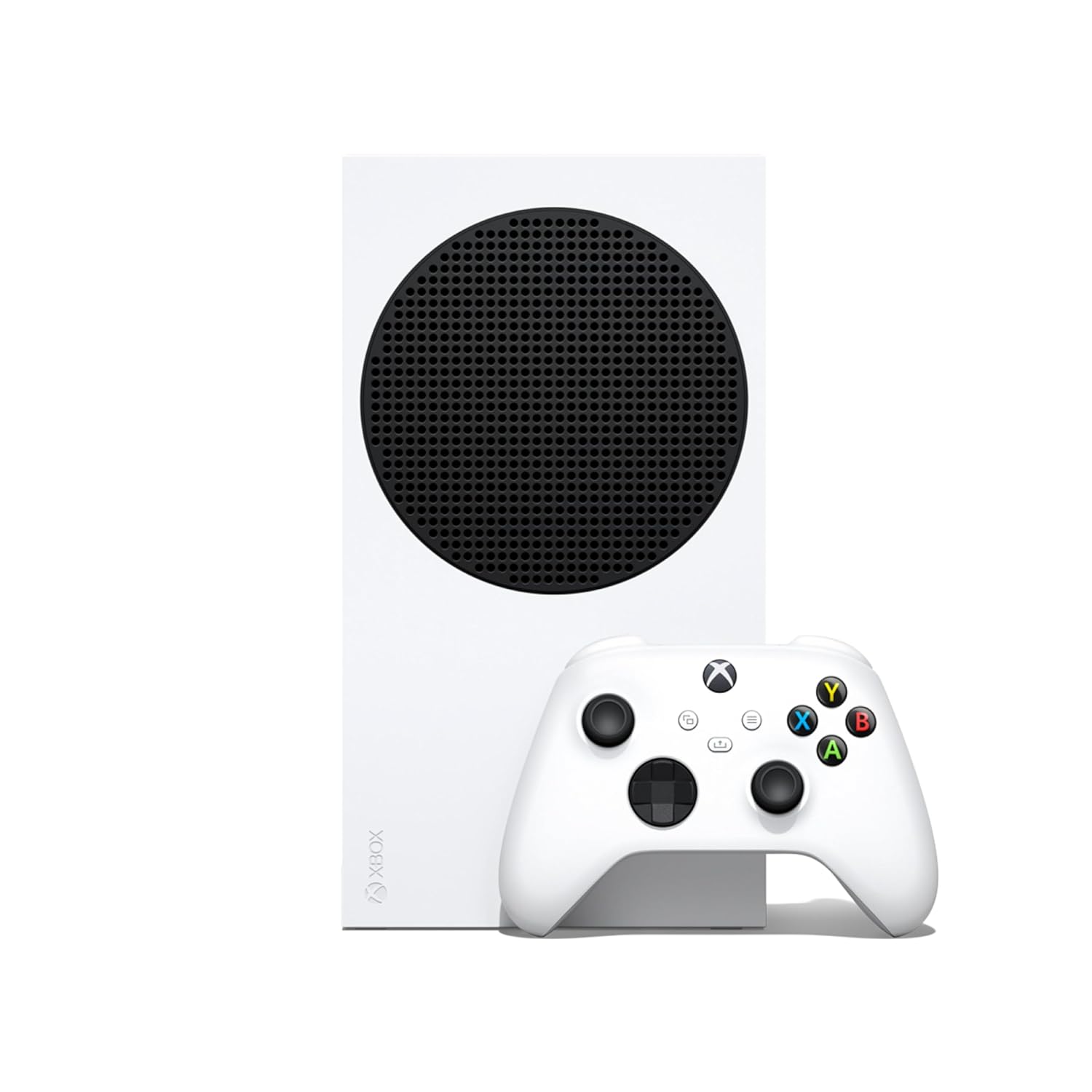
Pros
- 120FPS support delivers smooth, responsive gameplay for competitive and casual titles.
- Quick Resume feature saves time and keeps you in the action across multiple games.
- Backward compatibility with thousands of games from four Xbox generations adds huge value.
- Compact, lightweight design is easy to place in tight desk setups or travel with.
- Game Pass Ultimate integration provides a vast library of games for a low monthly cost.
Cons
- 512GB SSD fills up quickly with modern games; an external drive may be needed.
- All-digital design requires a stable internet connection for game downloads and updates.
- No disc drive limits access to physical game sales and used games.
The Xbox Series S is a compact, all-digital gaming console designed for gamers who want high performance without breaking the bank. It's a great fit for casual gamers, college students, and anyone building a budget-friendly gaming setup who still wants smooth 120FPS gameplay and fast load times. The console's small footprint makes it easy to slide into a desk setup or entertainment center, and its robot white finish looks clean in any room.
Performance-wise, the Series S delivers up to 120FPS in supported titles, which is a big deal for competitive games like Call of Duty or racing sims where every frame counts. The Quick Resume feature is a standout - you can jump between multiple games instantly without waiting for loading screens. Load times are lightning fast thanks to the custom SSD, so you're in the action within seconds. Backward compatibility with four generations of Xbox games means you can play older favorites, and many titles get visual and performance boosts when optimized for Series S.
Build quality is solid for a console in this price range. The unit feels sturdy, and the included wireless controller has a comfortable ergonomic design with responsive buttons and triggers. The controller uses standard AA batteries, which some may prefer for easy replacement, though rechargeable packs are available separately. The console runs quietly and stays cool even during long sessions, which is a plus for dorm rooms or shared spaces.
Setup is straightforward: plug in the HDMI cable, power cord, and connect to Wi-Fi. The interface is clean and easy to navigate, and Game Pass integration is seamless. One limitation is the 512GB SSD - after system files, you have around 364GB for games. Modern titles can take 50-100GB each, so you'll likely need to manage storage or add an external drive. Also, since it's all-digital, you need a stable internet connection for downloads and updates.
For streamers or content creators, the Series S can capture gameplay clips and stream via Twitch, but it lacks the raw power of a gaming PC for heavy multitasking. It's best as a dedicated gaming machine for those who prioritize value and convenience. Casual gamers, college students, and families will appreciate the low entry price and Game Pass library.
Overall, the Xbox Series S is a smart buy for anyone wanting a modern console experience without the high cost. It's perfect for quick gaming sessions, multiplayer with friends, and exploring hundreds of games through Game Pass. Just be ready to manage storage and rely on digital purchases.

Pros
- Massive game library with frequent new additions and day one releases
- Cloud gaming lets you play on mobile, tablet, TV, or VR without downloads
- Fortnite Crew and EA Play included at no extra cost
- Microsoft Rewards program offers cashback on gameplay and purchases
Cons
- Requires a recurring subscription fee to maintain access
- Cloud gaming quality depends on internet connection speed and stability
- Some games may rotate out of the library over time
Xbox Game Pass Ultimate is a subscription service that delivers a massive library of over 500 games across PC, Xbox console, and cloud streaming devices. For PC gamers, it's one of the best deals in gaming, offering access to blockbuster titles, indie gems, and day one releases from Xbox Game Studios, Bethesda Softworks, and Activision Blizzard. Whether you are a casual player who enjoys exploring single-player campaigns or a competitive gamer diving into multiplayer matches, this subscription covers a wide range of tastes and playstyles.
This service is ideal for PC gamers who want to try many games without buying each one individually. Streamers and content creators will appreciate the variety for streaming fresh content on Twitch or YouTube. Esports players can benefit from the included EA Play membership for sports titles and the online console multiplayer feature. Even college gamers on a budget can get great value from the huge selection and the Microsoft Rewards program that lets you earn up to $50 a year just by playing.
In terms of performance, the cloud streaming feature has improved significantly, offering high-quality visuals and low latency on supported devices. You can skip downloads and play directly on your PC, tablet, phone, or even a VR headset. The Fortnite Crew inclusion is a nice bonus for fans of Fortnite, giving you the current Battle Pass, OG Pass, LEGO Pass, Music Pass, Rocket Pass Premium, and 1,000 V-Bucks each month. EA Play adds a solid library of sports and action games, while Ubisoft+ Classics brings more variety.
Build quality isn't applicable here since it's a digital code, but the reliability of the service is strong. Redeeming the code is straightforward through the Microsoft Store or Xbox app on Windows 10/11. The subscription auto-renews unless canceled, so managing it via your Microsoft account is easy. The main practical considerations are your internet connection for cloud gaming and the recurring cost. Some users may find that games they enjoy leave the library, though Microsoft typically gives advance notice.
Limitations include the need for a stable internet connection for cloud streaming and online multiplayer. While the library is huge, not every game is available on PC specifically; some are console-only. The subscription model means you don't own the games permanently, so if you cancel, you lose access. However, for most PC gamers, the sheer value and convenience outweigh these drawbacks.
Overall, Xbox Game Pass Ultimate is a smart choice for any PC gamer looking to expand their library without breaking the bank. It works well for casual gaming sessions, competitive play, streaming, and even light content creation. For the price of a single game every few months, you get a constantly rotating selection of top-tier titles. If you enjoy variety and want to play the latest releases on day one, this subscription is hard to beat.


Pros
- Hall Effect joysticks eliminate drift issues common with traditional potentiometer sticks.
- Two back paddles offer customizable shortcuts for complex inputs.
- Officially licensed by Xbox and Apple for guaranteed compatibility.
- Stretchable design fits a wide range of phone sizes securely.
- Affordable price point for a feature-rich mobile controller.
Cons
- No built-in headphone jack or audio pass-through; must use phone's own port or wireless audio.
- Stretchable design may leave larger phone cases incompatible; cases may need removal for a snug fit.
- Battery life is not specified; potential for shorter sessions compared to dedicated console controllers.
The 8Bitdo Ultimate Mobile Gaming Controller is a Bluetooth gamepad designed specifically for mobile and cloud gaming on iPhone, Android, and Xbox Cloud Gaming. It's ideal for competitive gamers who want console-like controls on their phone, casual gamers playing on the go, streamers using mobile streaming apps, and PC gamers who occasionally play via remote play or cloud services. With its compact size and stretchable phone mount, this controller fits easily into a gaming desk setup or travel bag.
At the heart of this controller are Hall Effect joysticks and triggers, which use magnetic sensors to provide precise input without the mechanical wear that causes stick drift. This means better accuracy in FPS games like Call of Duty Mobile or Genshin Impact, and consistent throttle control in racing titles. The two pro back buttons add extra buttons for jumping, reloading, or building without interrupting your aim. Tactile bumpers and a responsive D-pad round out a very capable control scheme for any genre.
Build quality is solid for a mobile controller. The stretchable clamp securely holds phones between 100mm and 170mm in length, and metal rings around the joysticks reduce wear. The rubberized grips help prevent slipping during long sessions. While it lacks the ergonomic handles of a full-size controller, it feels balanced in hand and comfortable for extended use. The D-pad is particularly crisp, great for retro games and fighting games.
The 8BitDo Ultimate Software V2 on mobile gives you full control over button mapping, analog stick sensitivity, and trigger dead zones. You can save custom profiles for different games, which is handy for switching between a shooter and a platformer. The software is user-friendly and doesn't require a PC, making it easy to tweak settings on the fly.
Compatibility is broad: officially licensed by Xbox, supported by Apple, and works with Android. It connects via Bluetooth with low latency for cloud gaming. However, it lacks a headphone jack, so you'll need wireless earbuds or a separate audio solution. Also, if you use a bulky phone case, you may need to remove it for the clamp to grip properly. Battery life isn't specified, but typical 8Bitdo controllers run for many hours.
Overall, the 8Bitdo Ultimate Mobile Gaming Controller offers a compelling package for anyone who plays games on their phone, especially through Xbox Cloud Gaming or Apple Arcade. Its Hall Effect sticks and back buttons set it apart from cheaper alternatives, and the official licensing ensures solid compatibility. If you are a PC gamer who also enjoys mobile gaming or wants a portable companion for cloud gaming, this controller is a worthwhile investment. It's also a great gift for college gamers or streamers who need a reliable mobile gamepad.
The 8Bitdo Ultimate Mobile Gaming Controller is officially licensed by Xbox and fully supported by Apple, giving you plug-and-play compatibility with Xbox Cloud Gaming on iOS and Android, Apple Arcade, and thousands of native mobile games. The Bluetooth connection is stable with low latency for cloud streaming. The 8Bitdo Ultimate Software V2 mobile app lets you remap buttons, adjust analog stick sensitivity, trigger dead zones, and save multiple profiles. This level of customization is rare in mobile controllers and makes it easy to tailor controls for different genres or personal preferences.
Pros
- Large rotating library of 50+ games covering multiple genres – keeps gameplay fresh for casual and competitive gamers.
- Cloud gaming support means you can stream games on mobile, tablet, or even VR headsets – great for streaming or quick sessions.
- Online multiplayer on Xbox console is included – essential for esports players and friends who play together.
- Microsoft Rewards integration lets you earn points toward purchases – adds long-term value for regular users.
- Easy digital delivery – code arrives via email and redeems in minutes with no disc or download required.
Cons
- Game library is curated and rotates – titles may leave, so you don't permanently own any games unless you buy them separately.
- Cloud gaming requires a strong, stable internet connection – not ideal for areas with poor connectivity or for competitive play requiring low latency.
- No free next-day access to major new releases – that requires Game Pass Ultimate (higher tier).
Xbox Game Pass Essential is a 12-month membership subscription that provides access to a curated library of over 50 games, online console multiplayer, and a set of exclusive member perks. This is a digital code product, so you just redeem it to your Microsoft account and the benefits activate immediately – no physical packaging or discs to worry about. For PC gamers, this subscription works across Windows PC via the Xbox app, as well as Xbox consoles, and supports cloud streaming on mobile, tablet, TV, and VR headsets.
Who is it best suited for? PC gamers who want a broad selection of games to dip into without committing to individual purchases – perfect for casual gamers, college students building a gaming setup, or content creators looking for variety in their streams. Competitive and esports players will appreciate the included online multiplayer on Xbox (though PC multiplayer is free) and the in-game perks for titles like League of Legends, Call of Duty: Warzone, and Rainbow Six Siege. Streamers and work-from-home gamers can take advantage of cloud gaming to play on different devices around the house or during breaks.
Performance-wise, the core benefit here is the game library and instant access. You don't need to worry about frame rates or refresh rates from the subscription itself – it's the games that matter. According to user feedback, the library includes fan favorites like Fallout 76, Hades, and Stardew Valley, and new titles rotate in and out regularly. For PC gaming, the Xbox app integration is smooth, and cloud gaming quality depends on your internet connection – a stable 20 Mbps is recommended for 1080p streaming. Many users find it reliable for single-player and casual multiplayer, but for competitive FPS, direct download is better to minimize latency.
Build quality and practicality are about the service itself. The digital code is delivered instantly via email, so setup takes just a few minutes – redeem through the Microsoft Store or Xbox app. There's no hardware to install, no cable management issues, and no software to configure beyond signing into your account. Maintenance is zero: just keep your subscription active. For gaming setup builders and RGB enthusiasts, this subscription adds value without cluttering your desk. It's also a practical choice for cable management purists – no additional wires or boxes.
Realistic limitations: the game library rotates, so titles may leave after a few months – you don't own them permanently. Cloud gaming requires a consistent internet connection, which can be a bottleneck for some users. Also, unlike the Game Pass Ultimate tier, Essential doesn't include EA Play or day-one access to new Xbox Game Studios releases. If you want the latest titles immediately, you'll need to upgrade. But for a budget-friendly entry point to a large game library, this 12-month code is hard to beat.
Overall recommendation: Xbox Game Pass Essential is an excellent choice for PC gamers who want value and variety without buying each game. It works great for casual gaming sessions, streaming variety content, and building a diverse game library. For competitive esports players who only play a few titles, the value might be lower, but the online multiplayer inclusion and perks still add up. If you're a gaming PC buyer setting up a new rig, this subscription fills your library instantly – just redeem and start downloading. Highly recommended for anyone looking to expand their gaming options affordably.
Frequently Asked Questions
Can streaming replace a physical laptop memory upgrade?
Streaming can bypass memory limits for heavy games without opening your laptop. Remote cloud servers handle rendering instead of local RAM modules, letting older machines run demanding releases. However, general multitasking and offline programs still depend on installed memory. Verifying laptop specifications remains necessary if everyday computing feels slow.
Does Xbox Cloud Gaming require a dedicated console?
No console hardware is required to stream games across your devices. A plan like the XBOX Game Pass Ultimate | 1 Month Membership enables streaming directly to phones, tablets, PCs, and handhelds. While the Xbox Series S – All Digital Gaming Console offers local downloads, cloud play works independently through supported browsers and apps.
Which controllers work best for portable cloud play?
Officially licensed controllers with Bluetooth deliver dependable connection stability across mobile platforms. The 8Bitdo Ultimate Mobile Gaming Controller features phone grips and Hall Effect sensors, while the XBOX Wireless Gaming Controller | Shock Blue connects to laptops and tablets. Desktop users can also utilize wireless gaming mouse options for navigation.
How does internet bandwidth affect streaming compared to local RAM?
Network bandwidth dictates stream stability rather than local memory data rates. Local gaming relies on physical RAM speed, but cloud streaming needs steady 5 GHz Wi-Fi or Ethernet to prevent video stutter. Modern handhelds utilize multi-antenna Wi-Fi modules to keep latency minimal during gameplay. Verifying home network speed is more critical for cloud streaming than expanding system memory.
What is the primary difference between Game Pass Essential and Ultimate?
Game Pass Ultimate includes cloud streaming across devices, whereas Essential centers on online console multiplayer with a smaller library. Options like the XBOX Game Pass Essential | 12 Month Membership suit standard multiplayer gaming. Ultimate is required if you want to stream games to handhelds, phones, or low-spec laptops without local installation.




Write Your Review
No reviews yet. Be the first to share your experience!