


Evaluating desktop hardware can feel overwhelming when deciding whether are corsair prebuilts good for your target titles and performance goals. Corsair has earned widespread recognition across PC gaming for power supplies, memory modules, liquid coolers, and cases, which shapes how the brand approaches complete desktop configurations. Instead of using proprietary motherboards or non-standard power units, Corsair systems typically rely on standard off-the-shelf parts that offer clear upgrade paths. Understanding how these desktop rigs balance airflow, component selection, and build quality helps buyers determine whether an integrated build matches their expectations.
A central question for players centers on component balance and whether the overall build justifies choosing an integrated machine over a custom assembly. Systems configured with capable hardware depend heavily on balanced desktop gaming processor choices alongside appropriate graphics cards to avoid thermal throttling and bottlenecking during intense gameplay. When comparing mainstream prebuilt gaming desktop selections, buyers need to inspect airflow management, cooling configurations, and expansion potential. Reviewing these practical aspects reveals whether Corsair machines deliver the reliability and long-term stability needed for modern gaming.

Evaluating Corsair Prebuilt Desktops: Build Quality, Components, and Upgradability
Desktop buyers frequently ask whether Corsair prebuilts provide dependable performance, and the short answer is that they rank among the most standard-compliant systems in the prebuilt market. Many mainstream prebuilt computers rely on customized motherboards and odd power supply shapes that make future part replacements almost impossible. Corsair differentiates its prebuilt desktop catalog by assembling systems using standard off-the-shelf retail components. This architectural approach gives buyers clear hardware transparency, standard cable routing, and reliable thermal dynamics out of the box.
Retail Component Philosophy Versus Proprietary Limitations
Prebuilt gaming desktops often suffer from a poor reputation due to proprietary manufacturing shortcuts. Large original equipment manufacturers frequently design custom motherboards with non-standard screw layouts or proprietary front-panel connectors that cannot transfer into a new case. Corsair avoids these pitfalls by utilizing standard ATX and Micro-ATX form factors across its major desktop lines. Standard components mean that replacement parts can come from any major hardware supplier rather than requiring costly proprietary replacements from the original vendor.
Standardized power supply connections represent another major advantage for long-term ownership. Many budget prebuilt desktops use unusual power connectors that lack conventional twenty-four-pin ATX or standard eight-pin PCIe power cables. Corsair systems utilize standard modular or semi-modular power supplies equipped with industry-standard cabling. This hardware choice ensures that installing a newer graphics card years down the road remains a straightforward task rather than an engineering headache.
Case Engineering, Airflow Dynamics, and Thermal Management
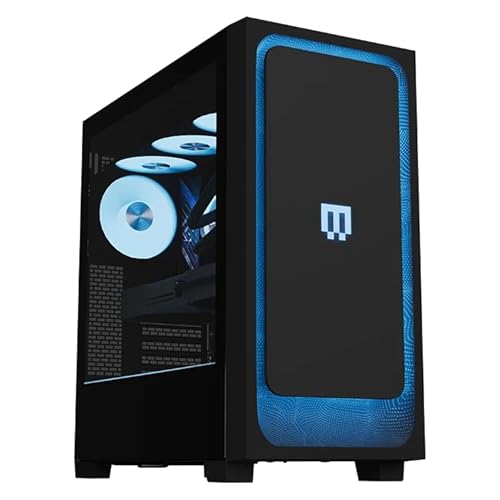
Thermal regulation directly governs sustained clock speeds and hardware longevity inside any gaming chassis. Budget prebuilts frequently trap heat behind solid acrylic or unventilated glass panels, causing processors and graphics cards to thermal throttle during long gaming sessions. Corsair builds its desktops inside proven case architectures that prioritize perforated steel front panels and direct fan channels. By encouraging uninhibited airflow across the graphics card and processor radiator, these chassis keep operating temperatures well within safe manufacturer limits.
Liquid cooling integration plays a prominent role in Corsair desktop configurations. Liquid all-in-one coolers dissipate heat directly out of the top or front of the chassis through dedicated radiators, keeping ambient internal air cooler for surrounding components. Proper radiator mounting also shields the motherboard voltage regulator modules and storage drives from excessive heat buildup. Maintaining disciplined airflow protects delicate silicon from prolonged heat degradation while reducing distracting acoustic spikes under heavy gaming loads.
Processing Power and Graphics Card Balancing
Achieving stable frame rates requires a balanced configuration between the central processor and the graphics card. An oversized processor paired with a weak graphics card leaves visual rendering starved for performance, while an underpowered processor bottlenecks high-end visual cards. Corsair designs desktop configurations across various tiers, matching processor capabilities to specific visual resolutions. Players evaluating high-end gaming computer setups need sufficient multi-threaded compute power to handle intense background tasks alongside rendering modern ray-traced game worlds.
Target display resolution remains the primary compass for selecting an appropriate configuration. Running competitive games at 1080p places high demand on raw CPU single-core clock frequencies to sustain high refresh rates. Stepping up to 1440p or 4K shifted the primary workload onto the graphics card VRAM and compute pipeline. Comparing modern prebuilts against entry-level graphics card choices shows that spending extra resources on graphics performance usually yields larger visual improvements than overspending on excess processor cores.
Motherboard Architecture and Memory Configuration
Motherboards serve as the operational backbone for all connected hardware, dictating data transfer speeds and peripheral connectivity. Corsair generally equips its desktop lines with reputable enthusiast chipsets from major motherboard partners rather than unbranded circuit boards. These boards provide functional BIOS menus with unlocked memory overclocking profiles such as Intel XMP or AMD EXPO. Having access to standard BIOS settings allows users to optimize memory timings, update firmware safely, and adjust fan curves without restrictive manufacturer locks.
Memory configuration significantly influences real-world frame pacing and general desktop responsiveness. Operating memory in a single-channel configuration can cut bandwidth in half, resulting in sudden frame drops and micro-stuttering in modern open-world games. Corsair systems virtually always arrive with dual-channel memory kits installed in the correct dual-slot layout. Utilizing high-speed DDR4 or DDR5 Vengeance memory modules gives the processor immediate access to low-latency memory bandwidth, helping maintain consistent minimum frame rates during demanding multiplayer action.
Storage Performance and Drive Expansion
Modern game installations routinely demand upwards of one hundred gigabytes of storage space per title. Solid-state drive technology has transformed how quickly game assets load into memory, rendering mechanical hard drives obsolete for primary game libraries. Corsair prebuilts leverage fast PCIe NVMe M.2 solid-state drives that mount directly to the motherboard, minimizing loading screens and eliminating asset streaming hitches. The absence of drive cables also leaves the interior chamber clean and unobstructed for superior airflow dynamics.
Storage expansion capacity is equally vital for long-term ownership as game libraries inevitably expand over time. Many Corsair configurations include secondary M.2 slots covered by aluminum heatsinks, along with dedicated mounting trays for standard 2.5-inch SATA solid-state drives. Accessing these expansion bays requires simple thumb-screw removal on the side panel rather than dismantling complex chassis brackets. This modular layout permits painless storage upgrades whenever your install directory approaches full capacity.
Power Supply Quality and Electrical Headroom
Power supplies are the most frequently compromised component in cheap prebuilt desktop computers. Unbranded power supplies with low efficiency ratings can deliver unstable voltage, generate excess heat, and trigger sudden system shutdowns under heavy graphic spikes. Corsair built its initial brand reputation on power supply engineering, which translates directly into reliable internal power units for its prebuilt systems. These units typically feature 80 Plus Gold efficiency certifications, high-grade Japanese capacitors, and quiet fan profiles that keep electrical delivery clean and stable.
Electrical wattage headroom is another critical factor when evaluating system longevity. Modern enthusiast graphics cards frequently produce momentary power transients that briefly exceed standard operating wattages. Having a power supply that provides ample headroom prevents protective trigger shutdowns during sudden in-game explosions or intensive render passes. Reliable power delivery protects sensitive silicon against voltage fluctuations, extending the operational life of every connected component inside the case.
Operating System Environment and Software Management
Software environments significantly influence the day-to-day experience of operating a gaming PC. Many mass-market system integrators install intrusive trial software, promotional applications, and unnecessary background utilities that consume processor cycles and storage space. Corsair delivers relatively clean Windows installations focused on core functionality rather than third-party marketing bloat. A lean operating system ensures that system memory and background threads remain fully dedicated to active games and user applications.
The primary proprietary software present on Corsair systems is the iCUE control ecosystem. This unified management tool coordinates RGB lighting, monitors internal temperatures, and controls fan curves and liquid cooling pump speeds. While running complex lighting patterns can consume modest background resources, iCUE provides valuable diagnostic insight into hardware health. Users can easily customize thermal profiles to prioritize silent operation during desktop productivity or maximum cooling during extended gaming marathons.
Prebuilt Convenience Versus Custom Assembly Trade-Offs
Deciding between purchasing a prebuilt machine and building a custom computer involves weighing convenience against individual customization. Assembling a custom desktop from scratch allows complete control over every single screw, bracket, and connector, but it also requires hours of research, physical assembly, and troubleshooting. A Corsair prebuilt provides professional assembly, tidy cable management, and extensive factory stability testing right out of the box. For players who value their time or lack hardware assembly confidence, prebuilt convenience offers immense peace of mind.
Warranty coverage represents another fundamental distinction between prebuilts and custom projects. When building a computer by hand, every individual part carries a separate manufacturer warranty with different claim procedures and shipping requirements. Corsair prebuilts come backed by a single unified system warranty covering the entire machine. If a component fails or technical instability arises, customers interact with one support team rather than diagnosing fault isolated across multiple distinct vendors.
Peripherals and the Broader Hardware Ecosystem
PC gaming extends beyond the desktop tower to include input devices and interactive accessories. Corsair manufactures an extensive line of gaming peripherals, including mechanical keyboards, wireless mice, and spatial audio headsets. The Corsair K70 PRO Mini Wireless represents a compact sixty-percent mechanical keyboard option featuring hot-swappable switches and low-latency wireless connectivity. While high-grade input devices enhance tactile responsiveness and desk space organization, peripherals remain an adjacent hardware category that does not determine core graphics performance or system frame rates.
Pairing a Corsair desktop with brand-matched peripherals does offer unified software synchronization through iCUE. A single software interface can synchronize lighting profiles, remap macros, and monitor battery levels across your keyboard, mouse, and desktop tower. However, buyers should never let peripheral branding dictate their choice of core computer hardware. Desktop selection should always prioritize the graphics card, processor, cooling architecture, and power supply before considering optional desktop accessories.
Routine Maintenance and Upgrade Flexibility
Maintaining peak operational efficiency over several years requires basic preventative maintenance. Dust accumulation on intake fans, radiator fins, and power supply filters restricts airflow and elevates component temperatures over time. Corsair cases feature removable magnetic dust filters on the top, front, and bottom panels that simplify regular cleaning. Rinsing or wiping these filters every few months ensures uninterrupted airflow without requiring complex disassembly tools.
Upgrade flexibility remains one of the strongest arguments in favor of Corsair desktop computers. Because the motherboard, power supply, and chassis conform to standard ATX specifications, swapping components down the road feels identical to upgrading a custom-built PC. Adding extra system memory takes mere seconds, while installing a faster graphics card requires only removing standard PCIe thumb screws and attaching existing power cables. This modularity protects your initial investment by enabling gradual hardware upgrades as gaming requirements evolve.
Final Practical Verdict for Desktop Shoppers
Corsair prebuilts distinguish themselves in a crowded marketplace by combining the convenience of factory assembly with the repairability of custom DIY computers. Instead of trapping buyers in closed proprietary ecosystems, Corsair uses standard form factors, proven cooling cases, and high-efficiency power supplies. While prebuilt systems inherently carry a modest assembly and warranty markup over purchasing loose parts, the hardware quality and structural transparency make Corsair desktops a genuinely reliable choice for modern PC gaming.





Write Your Review
No reviews yet. Be the first to share your experience!