


Planning a dedicated gaming station begins with the physical machine responsible for processing your games rather than desk decorations or ambient lighting. When deciding what do you need for gaming setup, your primary focus belongs on the desktop tower, because the graphics card, processor, and system memory establish the exact resolution and visual settings your system can maintain. Many first-time buyers wonder whether a basic office computer can handle demanding titles or whether a purpose-built gaming rig is required. Reviewing key gaming processor considerations and dedicated graphics hardware early helps clarify how hardware balances gaming workloads alongside background applications.
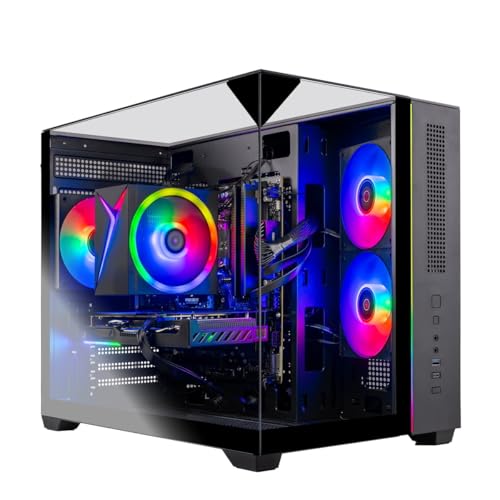
A balanced gaming rig pairs a capable graphics processing unit with a matching multi-core processor to prevent processing bottlenecks during demanding gameplay. While monitors, keyboards, and mice are necessary peripheral tools to interact with your system, the internal desktop hardware determines your actual frame rates, storage speeds, and thermal stability. Exploring complete systems like those from Skytech Gaming illustrates how modern components come together in ready-to-run configurations. Understanding these core hardware requirements ensures that your budget targets the internal components that truly impact gaming performance.


Essential Components and Hardware Requirements for a Gaming Setup
Building an operational gaming station requires understanding the fundamental hardware components that allow modern games to run smoothly. While monitors, desks, and input peripherals serve as necessary physical interfaces, the desktop computer represents the central computational engine of the entire arrangement. A capable gaming system requires a coordinated balance of graphics rendering, processing power, high-speed system memory, rapid solid-state storage, and reliable electrical delivery to function properly. Identifying what hardware components match your intended visual settings and display resolution prevents both performance bottlenecks and unnecessary equipment mismatches.
The Graphics Processing Unit as the Visual Engine
The graphics card handles the intensive mathematical calculations needed to generate complex 3D environments, character geometry, and realistic lighting effects. Dedicated video memory capacity plays a major role in determining how well a computer manages high-resolution texture packs without introducing frame rate stutter. Modern desktop configurations feature dedicated graphics cards equipped with either 8GB or 16GB of high-speed memory using GDDR6 or GDDR7 standards. Buyers targeting 1080p display resolutions can often achieve smooth performance with an 8GB card, whereas 1440p and 4K resolutions demand 16GB of video memory to handle expansive texture buffers.
High-end desktop models like the Skytech Gaming O11 Vision utilize an NVIDIA GeForce RTX 5070 Ti with 16GB of GDDR7 memory to handle demanding visual workloads. Similarly, the Skytech Azure configuration incorporates an AMD Radeon RX 9070 XT graphics card featuring 16GB of GDDR6 memory to drive intensive display resolutions. For users focusing on mainstream 1080p monitors, an NVIDIA GeForce RTX 5060 Ti with 8GB of memory offers a balanced starting point for smooth frame delivery. Exploring different dedicated gaming graphics options helps clarify how individual graphics card specifications align with specific display monitors.
The Central Processor and Multi-Threaded Performance
The central processing unit acts as the primary brain of the gaming desktop, coordinating system tasks and calculating underlying simulation mechanics. Modern game titles rely heavily on multi-threaded processor designs to handle game logic, artificial intelligence routines, physics calculations, and background operating system services. A processor with insufficient core counts or slow clock speeds can restrict graphics card output by failing to prepare frames quickly enough. Selecting a capable modern multi-core processor ensures that your graphics card operates at its full potential without experiencing frame pacing interruptions.
Desktops equipped with the AMD Ryzen 7 9850X3D processor deliver 4.7GHz base frequencies and boost speeds reaching up to 5.6GHz, leveraging specialized cache architecture designed specifically for gaming efficiency. This high-capacity cache reduces memory latency by keeping critical game instructions closer to the processing cores during intense scenes. In contrast, mainstream systems often utilize processors like the AMD Ryzen 7 7700 with a 3.8GHz base clock and a 5.3GHz boost frequency. Both processor options provide eight cores and sixteen threads, giving players sufficient processing resources to run modern games alongside voice chat and recording tools.
System Memory and High-Speed Data Access
System RAM temporarily holds active game assets and operational code that the processor must retrieve instantly during active gameplay sessions. Insufficient memory forces the operating system to swap active data onto slower storage drives, resulting in severe frame rate drops and noticeable system stutter. While older setups frequently operated on 16GB of older memory standards, contemporary gaming desktop configurations increasingly establish 32GB as the practical benchmark. Having 32GB of system memory allows demanding titles to load expansive open-world environments without consuming all available system resources.
The current standard for high-performance desktop rigs utilizes DDR5 memory running at speeds such as 5600MHz to maximize data transfer rates across the system bus. Memory modules equipped with aluminum heat spreaders help dissipate thermal energy during extended gaming sessions, maintaining electrical stability. Dual-channel memory configurations ensure that data moves across two independent channels, effectively doubling memory bandwidth compared to a single stick of RAM. This memory headroom proves especially beneficial for players who run web browser tabs, voice communication software, and streaming applications simultaneously while playing.
High-Speed Storage and Game Installation Needs
Storage hardware directly influences how quickly your computer boots up, how fast levels load, and how seamlessly open-world environments stream background assets. Traditional mechanical hard disk drives have largely become obsolete for primary gaming installations due to their slow mechanical seek times and low read speeds. Solid-state drives utilizing the NVMe protocol connect directly to the motherboard via PCI Express lanes, delivering significantly faster data throughput. Fast NVMe drives virtually eliminate lengthy loading screens and prevent asset pop-in during fast travel in expansive open-world titles.
Modern game installations routinely exceed 100GB in file size, making storage drive capacity a critical consideration when planning your computer setup. A 1TB NVMe M.2 solid-state drive provides adequate space for the operating system and a modest rotation of several large games. However, opting for a 2TB Gen4 NVMe drive offers greater convenience by accommodating larger digital game libraries without requiring frequent uninstalls. Gen4 solid-state drives also support modern storage features like DirectStorage in Windows 11, which offloads asset decompression directly to the graphics hardware for faster level transitions.
Thermal Management: Liquid Cooling Versus Air Cooling
High-performance processors and graphics cards generate significant heat during sustained operational loads, requiring robust thermal dissipation systems. If internal temperatures climb too high, modern hardware automatically reduces its operating clock speeds to prevent hardware damage, causing sudden frame rate dips. Effective thermal management maintains consistent operating temperatures so that components can sustain their rated boost frequencies throughout long play sessions. Buyers must choose between closed-loop liquid cooling assemblies and traditional fin-stack air coolers based on their processor requirements and enclosure design.
Liquid cooling solutions, such as the 360mm all-in-one liquid CPU coolers featured in the Skytech O11 Vision and Azure builds, utilize liquid coolant circulated through a large radiator. These liquid systems efficiently draw thermal energy away from high-wattage processors like the Ryzen 7 9850X3D, exhausting warmth through multiple fans. Alternatively, high-performance tower air coolers equipped with dense fin arrays and high-airflow fans provide dependable, low-maintenance thermal regulation for processors like the Ryzen 7 7700. Proper case fan orientation ensures balanced airflow, drawing fresh intake air while quickly expelling hot exhaust.
Power Supply Architecture and Stable Electrical Delivery
The power supply unit converts alternating current from your wall outlet into regulated direct current required by sensitive computer components. Modern graphics cards frequently experience brief transient power spikes, which can overwhelm inadequate power supplies and trigger sudden system shutdowns. An 850W Gold-certified ATX 3.0 power supply provides both the continuous wattage and modern electrical compliance needed for hardware like the RTX 5070 Ti. High-efficiency ratings also ensure less electricity is wasted as excess heat inside the chassis during heavy gaming sessions.
Stable power delivery protects delicate silicon components against voltage fluctuations and electrical noise over years of ownership. Modular cabling designs allow builders and assemblers to connect only the necessary power leads, reducing internal cable clutter and improving overall airflow. Users should always follow manufacturer guidelines and avoid attempting internal repairs on a power supply unit due to high internal voltages. Investing in an adequate wattage baseline also provides headroom for potential future component upgrades without requiring a complete power system replacement.
Operating System Integration and Clean Software Setup
A gaming PC requires an operating system that supports modern graphics application programming interfaces and efficient hardware scheduling. Windows 11 Home 64-bit serves as the current standard operating platform for desktop PC gaming, offering built-in support for DirectX 12 Ultimate. This platform enables visual features such as hardware-accelerated ray tracing, variable rate shading, and Auto HDR for compatible gaming monitors. The operating system also coordinates thread scheduling across modern processor cores to prioritize active game windows over background system tasks.
Maintaining a clean operating environment free from unwanted third-party software and background bloatware is essential for consistent frame times. Systems configured with clean operating system installations ensure that system resources remain dedicated entirely to gaming tasks. Regularly updating graphics drivers directly from GPU manufacturers ensures that your system receives specific optimizations for newly released game titles. Proper network configuration, whether utilizing high-speed Ethernet or modern Wi-Fi connectivity, also plays an important role in minimizing latency during multiplayer matches.
Prebuilt Desktop Convenience Versus Custom Building
Deciding between purchasing an assembled prebuilt system and constructing a custom rig depends on your technical comfort, available time, and troubleshooting preferences. Building a desktop PC requires researching individual component compatibility, handling delicate silicon during assembly, and managing wiring pathways manually. In contrast, prebuilt machines arrive fully assembled, configured with operating systems, and supported by single-source manufacturer warranties covering parts and labor. Reviewing established prebuilt desktop configurations allows prospective buyers to assess turnkey systems that eliminate the risk of assembly mistakes.
Prebuilt systems from manufacturers like Skytech Gaming assemble components in North America and include dedicated technical support services to assist with initial setup. These computers arrive with pre-installed operating systems, validated BIOS settings, and essential connectivity ports ready for immediate use. While custom building offers complete component customization, prebuilt systems provide peace of mind through unified warranty coverage and professional cable management. First-time PC owners often appreciate avoiding the complex diagnostic process required when an individually assembled system fails to boot properly.
Balancing Hardware Specifications Against Target Resolutions
Matching your desktop hardware to your intended monitor resolution and refresh rate prevents overspending on unneeded power or underperforming in demanding games. A system featuring an RTX 5060 Ti paired with a Ryzen 7 7700 is well suited for high-refresh 1080p Full HD gaming at high visual settings. Stepping up to 1440p Quad HD gameplay requires greater graphics horsepower and memory bandwidth, which configurations utilizing the RTX 5070 Ti can comfortably supply. Players targeting 4K Ultra HD monitors must prioritize high-tier GPUs like the RX 9070 XT to sustain smooth frame rates across dense pixel counts.
Frame rate expectations also dictate how powerful your internal hardware needs to be for competitive or cinematic gameplay experiences. Competitive esports titles often benefit from pairing fast multi-core processors with high-refresh monitors to minimize input latency, even at modest visual settings. Cinematic story-driven games place heavy loads on the graphics card, requiring expansive VRAM pools and advanced upscaling technologies to maintain fluid frame delivery. Balancing your processor, graphics card, and memory against your actual performance goals ensures a satisfying gaming experience across all of your favorite titles.
Determining what you need for a gaming desktop ultimately comes down to balancing graphics capability, processing speed, memory volume, and reliable thermal design. Prioritizing core computational hardware inside the computer tower creates a durable foundation capable of running modern releases smoothly. While external peripherals complete your physical workstation, the internal desktop components dictate your actual gameplay fidelity, visual responsiveness, and long-term upgrade potential. Selecting a balanced hardware configuration tailored to your target resolution ensures your gaming setup provides stable performance right from the start.



Write Your Review
No reviews yet. Be the first to share your experience!