


Selecting the central processing unit often dictates whether a custom desktop or prebuilt rig delivers steady frame pacing or encounters irritating frame drops. Many PC builders and gamers regularly ask is an i5 processor good for gaming, especially when attempting to balance hardware budgets between raw graphics power and computational capability. The modern Intel Core lineup has evolved significantly beyond older quad-core limitations, introducing hybrid designs that handle complex gameplay and background applications simultaneously. Investing in balanced hardware ensures that your graphics card operates at its full potential without unnecessary performance bottlenecks.
Evaluating system balance requires understanding how modern games utilize multi-threaded architectures alongside individual core clock speeds. Today, an Intel Core i5 often hits the sweet spot for enthusiast value by providing ample horsepower for modern releases without the extreme pricing of flagship silicon. Anyone researching a dedicated gaming PC processor selection will notice that modern mid-tier platforms support high-speed memory and fast storage interfaces. This foundational capability makes a well-chosen processor an excellent cornerstone for immersive 1080p and high-fidelity 1440p gaming configurations.

Pros
- Strong 1080p gaming performance with RTX 5060 and i5 14400F for modern titles at high settings.
- Fast DDR5 RAM and NVMe SSD provide snappy system responsiveness and quick game loads.
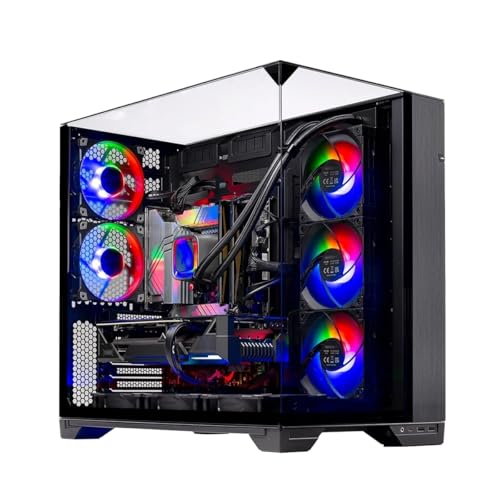
- Clean white build with tempered glass and ARGB fans looks great on any desk or gaming station.
- Comes with a free keyboard and mouse, and no bloatware for a hassle-free setup experience.
Cons
- Graphics card brand may vary, which could affect aesthetics or warranty consistency.
- Only 8GB of VRAM on the RTX 5060 may limit performance at higher resolutions or with heavy texture mods.
- Air cooler, while effective, may not match the cooling capacity of high-end liquid cooling for extreme overclocking.
The Skytech Gaming Archangel 5 is a pre-built gaming desktop designed for PC gamers who want a reliable system without the hassle of building one themselves. It combines an Intel Core i5 14400F processor with an NVIDIA GeForce RTX 5060 graphics card, 16GB of DDR5 RAM, and a 1TB NVMe SSD, all housed in a white tempered glass case with ARGB fans. This setup is tailored for competitive gamers, casual players, streamers, and content creators who need a balanced machine for 1080p gaming and everyday productivity.
In real-world use, this PC handles popular titles like Call of Duty, Fortnite, Valorant, and Apex Legends at Ultra settings with smooth 60+ FPS gameplay. The RTX 5060's 8GB of GDDR7 memory provides solid visual clarity and low-latency performance, making it suitable for esports and fast-paced shooters. The 1TB NVMe SSD ensures quick load times, so you spend less time waiting and more time playing. For streamers, the system can handle light streaming tasks alongside gaming, though heavier encoding may benefit from a dedicated capture card.
Build quality is a highlight here. The white Archangel 5 case features a tempered glass side panel that shows off the internal components and RGB lighting. The high-performance air cooler with ARGB fans maintains good airflow and keeps temperatures in check during long sessions. The 750W Gold-rated PSU provides stable power delivery, and the system is assembled in the USA with a 1-year warranty on parts and labor. Cable management is tidy, and the case has a compact footprint that fits well on most desks.
Setup is straightforward: plug in the included keyboard and mouse, connect to Wi-Fi, and you're ready to game. The system comes with Windows 11 Home and no bloatware, so you won't have to uninstall unnecessary software. The free keyboard and mouse are basic but functional for getting started. For those who want to customize further, the case offers room for additional storage or fans, and the ARGB lighting can be controlled via the motherboard software.
One limitation to consider is that the graphics card brand may vary, which could affect the look or warranty support. Additionally, the 8GB VRAM on the RTX 5060 may struggle with 1440p gaming or heavy texture packs in some titles. The air cooler is effective for stock settings but may not be ideal for aggressive overclocking. However, for most gamers targeting 1080p, these are minor concerns.
Overall, the Skytech Gaming Archangel 5 is a practical choice for PC gamers, esports players, and streamers who want a ready-to-use system with strong 1080p performance. It's also a great option for college gamers or work-from-home users who need a versatile desktop for both gaming and productivity. If you prefer a pre-built with no assembly required and a clean white aesthetic, this PC delivers solid value and reliable performance.


Pros
- Excellent single-core and gaming performance for the price
- Power-efficient 65W TDP with included cooler keeps temperatures manageable
- Unlocked multiplier allows easy overclocking for extra speed
- Wide AM4 motherboard compatibility with upgrade path options
Cons
- Stock cooler is adequate but may limit overclocking headroom under heavy loads
- 6 cores may be limiting for heavy multi-threaded workloads like 4K video rendering
- Requires a dedicated GPU for gaming as no integrated graphics
The AMD Ryzen 5 5600X is a 6-core, 12-thread unlocked desktop processor built on the Zen 3 architecture. It's designed for PC gamers, competitive esports players, streamers, content creators, and gaming setup builders who want a high-performance CPU without breaking the bank. With a 3.7 GHz base clock and 4.6 GHz max boost, this chip delivers snappy responsiveness and smooth frame rates in today's most demanding titles.
In real-world gaming, the 5600X excels at both 1080p and 1440p resolutions. Pair it with a mid-range GPU like an RTX 3060 Ti or RX 6700 XT, and you'll see well over 100 FPS in popular shooters, MOBAs, and open-world games. The single-core performance is among the best in its class, which translates to low input latency and consistent frame pacing - critical for competitive play. For streamers, the 12 threads handle game encoding and Discord calls simultaneously without stuttering.
Build quality is solid with AMD's reliable manufacturing. The included Wraith Stealth cooler is quiet and keeps temperatures under 75°C under stock loads, though overclockers may want an aftermarket cooler for lower noise and headroom. The 65W TDP means it runs cool even in smaller cases, making it a great fit for compact gaming builds. The AM4 socket ensures broad motherboard compatibility, including budget B450 boards after a BIOS update, and PCIe 4.0 support on X570/B550 for fast SSDs and GPUs.
Setup is straightforward: drop it into an AM4 motherboard, apply thermal paste (pre-applied on stock cooler), and you're ready. The stock cooler's push-pin mechanism is easy to install, though cable management around the CPU area is minimal. Overclocking via Ryzen Master is user-friendly, but the stock cooler limits aggressive voltage increases. For most gamers, stock performance is more than enough.
One limitation is the lack of integrated graphics - you'll need a dedicated GPU for display output. Also, while 6 cores are great for gaming, heavy multitaskers or those doing 4K video editing may want an 8-core option. But for its price, the 5600X offers incredible value for gaming-focused builds.
Overall, the AMD Ryzen 5 5600X is a top recommendation for PC gamers building a mid-range rig. It balances performance, efficiency, and cost perfectly, making it ideal for competitive gamers, casual players, streamers, and anyone assembling a gaming PC for 1080p or 1440p gaming. If you want a reliable, fast CPU that won't bottleneck modern GPUs, this is a smart choice.
The Ryzen 5 5600X delivers exceptional gaming performance thanks to its Zen 3 architecture. In CPU-bound titles like CS:GO, Valorant, and Fortnite, it easily pushes over 200 FPS at competitive settings. For AAA games like Cyberpunk 2077 or Shadow of the Tomb Raider, expect 90-140 FPS at 1080p Ultra with a mid-range GPU. The 4.6 GHz boost clock ensures low latency and smooth gameplay even in crowded scenes. It's an ideal match for 1440p gaming, where the GPU is often the bottleneck, providing consistent frame times without stuttering.
AMD's build quality is reliable, with the 5600X featuring a robust IHS and durable construction. The included Wraith Stealth cooler is adequate for stock operation, but enthusiasts may upgrade to a tower cooler for lower temperatures. The CPU is compatible with a wide range of AM4 motherboards, including B450, B550, and X570 chipsets. PCIe 4.0 support on B550/X570 allows for faster NVMe SSDs and future-proofing. The 65W TDP makes it easy to cool in small form factor cases, and the unlocked multiplier lets you squeeze out extra performance with proper cooling.
At its price point, the Ryzen 5 5600X offers unbeatable value for gaming-focused builds. It outperforms similarly priced Intel alternatives in single-core tasks while consuming less power. The included cooler saves additional cost, and the AM4 platform provides an upgrade path to Ryzen 5000 series or even 4000 series APUs. For gamers on a budget who still want high FPS and smooth multitasking, this CPU is a no-brainer. It's also a great choice for college gamers or anyone building a compact gaming PC for dorm rooms or home offices.

Pros
- Excellent price-to-performance ratio for budget gaming builds.
- Unlocked overclocking headroom for extra performance.
- 6 cores and 12 threads handle modern games and multitasking smoothly.
- Included Wraith Stealth cooler is quiet and sufficient for stock operation.
- Compatible with existing AM4 motherboards and DDR4 RAM for easy upgrades.
Cons
- Requires a discrete graphics card; no integrated GPU for basic display output.
- L3 cache is reduced compared to other Ryzen 5000 models, which may impact performance in cache-sensitive tasks.
- Stock cooler is adequate but may limit overclocking potential; aftermarket cooling recommended for heavy OC.
The AMD Ryzen 5 5500 is a 6-core, 12-thread unlocked desktop processor designed specifically for gamers and PC builders who want strong performance without breaking the bank. As part of the Ryzen 5000 series, it brings Zen 3 architecture to the budget segment, delivering excellent gaming responsiveness and multitasking capability. This CPU is best suited for budget-conscious PC gamers, esports players, and streamers who plan to pair it with a dedicated graphics card.
Based on product specifications and user feedback, the Ryzen 5 5500 can deliver over 100 FPS in many popular titles when combined with a capable GPU like an RTX 3060 or RX 6600. The 4.2 GHz max boost clock ensures snappy responsiveness in fast-paced games, while the 12 threads handle background tasks like Discord, OBS, and browser tabs without stutter. For competitive gamers, the low-latency performance helps maintain smooth gameplay in FPS and MOBA titles.
Build quality is solid, with AMD's proven Socket AM4 platform offering broad compatibility with B450, B550, and X570 motherboards. The bundled Wraith Stealth cooler is a capable air cooler for stock operation, keeping temperatures in check during long gaming sessions. However, if you plan to overclock heavily, consider an aftermarket cooler. The processor itself features a compact ceramic gray design that fits easily into any ATX or mini-ITX build.
Setup is straightforward: simply install it into an AM4 motherboard, apply thermal paste (pre-applied on the cooler), and secure the cooler with the included mounting hardware. The unlocked multiplier allows easy overclocking through BIOS or Ryzen Master software, giving enthusiasts the ability to squeeze out extra performance. For most users, stock settings provide plenty of power.
A realistic limitation is the lack of integrated graphics, which means you must have a discrete GPU to get any display output. This isn't an issue for gamers who already own a graphics card, but it excludes budget builds that rely on integrated graphics for temporary use. Additionally, the Ryzen 5 5500 has a smaller L3 cache compared to the Ryzen 5 5600, which can affect performance in some cache-sensitive applications, though gaming remains strong.
Overall, the AMD Ryzen 5 5500 is a fantastic choice for budget gaming PC builders, esports players, and streamers who want reliable performance at a low cost. It pairs well with mid-range graphics cards and DDR4 memory, making it a practical foundation for a high-value gaming rig. For college gamers, work-from-home users, and casual builders, this CPU offers a smart balance of price, performance, and upgrade flexibility.
The Ryzen 5 5500 excels in gaming scenarios where a discrete GPU is present. Its 6 cores and 12 threads are well-matched for modern games, providing smooth frame rates in titles like Fortnite, Valorant, and Call of Duty Warzone. The 4.2 GHz boost clock ensures low input latency and responsive gameplay, crucial for competitive esports. With a compatible GPU, users can expect stable 100+ FPS at 1080p high settings, making it a solid choice for budget gaming setups.
Compatibility is a strong point for this AMD processor. It supports Socket AM4, which is compatible with a wide range of motherboards from B350 to X570 (with a BIOS update). DDR4-3200 RAM support ensures good memory bandwidth without needing expensive upgrades. The included Wraith Stealth cooler fits most standard cases, and the CPU works seamlessly with Windows 10 and 11. This broad compatibility makes it an easy drop-in upgrade for existing AM4 systems.


Pros
- Strong price-to-performance ratio with RTX 4050 and 165Hz display
- AI-powered graphics and DLSS 3.5 support for modern games
- Easy RAM upgrade path to overcome the 8GB bottleneck
- Solid connectivity including Thunderbolt 4 and Wi-Fi 6
- Effective cooling system with customizable fan profiles
Cons
- 8GB RAM is insufficient for many modern AAA titles out of the box
- Some user reports of screen ghosting at high refresh rates
- Fan noise can be noticeable under heavy load in performance mode
The Acer Nitro V 15 (model ANV15-52-586Z) is a budget-friendly gaming laptop that aims to deliver solid performance without breaking the bank. It's powered by an Intel Core i5-13420H processor and an NVIDIA GeForce RTX 4050 laptop GPU, which together provide enough muscle for esports titles, popular battle royale games, and even some AAA experiences at medium settings. The 15.6-inch Full HD IPS display with a 165Hz refresh rate is a standout feature at this price point, offering smooth motion and decent color reproduction for both gaming and content consumption.
This laptop is best suited for PC gamers on a tight budget, college gamers looking for a portable rig, and casual gamers who want to play modern titles without spending a fortune. It also works well for light content creation or streaming, thanks to the RTX 4050's AI capabilities and DLSS 3.5 support. However, it's not a turn-key solution for demanding users right out of the box, as the 8GB of DDR5 RAM is a clear bottleneck. Many user reviews highlight that upgrading to 16GB or 32GB significantly improves performance and eliminates stuttering in games like Hogwarts Legacy.
In terms of real-world gaming performance, the RTX 4050 handles most games at 1080p with high settings, and the 165Hz screen makes fast-paced shooters feel responsive. The dual-fan cooling system does a good job keeping temperatures in check, though the fans get loud in performance mode. The keyboard is comfortable for gaming with a backlit layout and numeric keypad, but the spacebar lacks backlighting, which some users may find odd. Build quality is typical for this price range: mostly plastic with a sturdy feel, and the laptop weighs 4.66 pounds, making it portable enough for a backpack.
Connectivity is a strong point, with Thunderbolt 4, HDMI 2.1, three USB 3.2 Gen 1 ports, and Wi-Fi 6. This makes it easy to connect to external monitors, high-speed storage, or a gaming dock. The Acer PurifiedVoice noise reduction technology helps with in-game chat and Discord calls, though the built-in microphone is average. Setting up the laptop is straightforward, but you'll want to update drivers and consider a fresh Windows install if you encounter any pre-installed software issues, as some users reported.
The biggest limitation is the 8GB RAM, which causes stuttering and high memory usage even on the desktop. Upgrading the RAM is simple (two DDR5 slots), and many users recommend doing it right away. Another potential issue is screen ghosting at 165Hz, which may be noticeable in fast-paced games. Fan noise under load is also worth noting if you play in a quiet room. Despite these drawbacks, the Acer Nitro V 15 offers excellent value for its price, especially after a RAM upgrade.
If you're a budget-conscious gamer, a college student, or someone building their first gaming setup, this laptop is a practical choice. It's not perfect out of the box, but with a small investment in more RAM, it becomes a very capable machine for gaming, streaming, and everyday use. For esports players or those who prioritize competitive performance, the 165Hz display and RTX 4050 provide a smooth experience in games like Valorant, Fortnite, and Overwatch 2. Just be prepared to spend a little extra time and money to unlock its full potential.
The Acer Nitro V 15's RTX 4050 GPU and Intel i5 processor deliver solid 1080p gaming performance. In esports titles like CS:GO and Valorant, you can expect well over 100 FPS on high settings, taking full advantage of the 165Hz display. For more demanding games like Cyberpunk 2077, DLSS 3.5 and frame generation help maintain playable frame rates at medium settings. The 8GB RAM is a bottleneck here, causing occasional stutters in open-world games; upgrading to 16GB resolves this. The dual-fan cooling system keeps the CPU and GPU from throttling during long sessions, though the fans become audible in performance mode. Overall, this laptop offers great gaming value once you address the memory limitation.
The Acer Nitro V 15 features a dark, understated design with a glossy Acer logo on the lid and subtle gradient accents. The chassis is primarily plastic but feels sturdy enough for daily use. At 4.66 pounds and 0.93 inches thick, it's reasonably portable for a 15.6-inch gaming laptop. The keyboard includes a backlit layout with a numeric keypad, though the spacebar lacks illumination. The touchpad is responsive, but most gamers will use an external mouse. The display has thin bezels on the sides, giving an 82.64% screen-to-body ratio, and the hinge feels solid. Port placement is practical, with USB ports on both sides and the HDMI and Thunderbolt 4 on the rear. Overall, the build quality meets expectations for the price range, with no major creaking or flex during normal use.
Analyzing Intel Core i5 Gaming Capabilities and System Synergy
The Direct Verdict on Core i5 Gaming Viability
Modern Intel Core i5 processors provide more than enough performance for mainstream and high-refresh PC gaming. A modern Core i5 easily satisfies the computational requirements of current blockbuster titles and competitive multiplayer games. Rather than being an entry-level compromise, the current Core i5 family represents a well-balanced mid-tier segment that delivers high single-core frequencies and capable multi-threaded throughput. For most desktop configurations, choosing an i5 leaves plenty of budget room to prioritize a faster graphics card.
Earlier generations of desktop processors were often limited to four physical cores and lacked hyperthreading, which created stuttering issues in newer games. Modern iterations have expanded dramatically to handle complex physics calculations, expansive open-world rendering, and heavy asset decompression. Players no longer need to purchase flagship silicon simply to avoid frame-rate stuttering in demanding titles. A properly paired Core i5 system provides smooth frame rates across the vast majority of gaming genres.
Hybrid Architecture: How P-Cores and E-Cores Function in Games
Starting with the 12th generation and continuing through the 14th generation, Intel introduced a hybrid architecture combining Performance cores and Efficient cores. Performance cores handle heavy foreground tasks like the main game loop, draw calls, and physics engines. Efficient cores manage secondary background operations such as voice communication software, operating system utilities, and web browser audio. This architectural division prevents ambient system tasks from interrupting real-time gaming computations.
The unlocked Intel Core i5-14600KF illustrates the strength of this hybrid design by featuring 14 cores, split between 6 Performance cores and 8 Efficient cores with 20 total threads. With max boost clock speeds reaching up to 5.3 GHz, this unlocked processor handles intense gaming scenarios with minimal frame-rate variance. Meanwhile, mainstream locked models like the Intel Core i5-14400F provide a 10-core configuration featuring 6 Performance cores and 4 Efficient cores with 16 processing threads. Both configurations ensure modern games have uninterrupted access to dedicated high-speed physical cores.
Resolution Dynamics and Graphic Card Bottlenecking
Understanding how resolution impacts processor workload is essential when assessing whether an i5 processor is suitable for your gaming setup. At a 1080p Full HD resolution, game engines frequently demand rapid frame delivery from the CPU to keep up with fast rendering pipelines. In this scenario, high single-core clock speeds are critical for maintaining high frame rates in esports titles like Counter-Strike 2 or Valorant. A modern Core i5 delivers sufficient single-thread performance to drive high-refresh monitors effectively.
When shifting to 1440p Quad HD or 4K Ultra HD resolutions, the primary performance bottleneck moves toward the graphics processing unit. At these higher pixel counts, the graphics card spends more time shading and rendering each frame, which reduces the immediate processing pressure on the central CPU. Prebuilt desktops like the Skytech Gaming Rampage pair an Intel Core i5-14400F with a powerful NVIDIA GeForce RTX 5070 graphics card and 12GB of video memory. In such systems, the graphics card handles the dense visual load while the i5 processor steadily feeds geometry and simulation data.
K-Series Versus Locked F-Series: Choosing the Right Variant
Intel segments its desktop Core i5 product line using specific model suffixes that indicate power limits and feature sets. Processors ending with the letter K feature an unlocked multiplier, permitting manual overclocking when paired with compatible motherboards. The Intel Core i5-14600KF is an example of an unlocked chip that operates at higher base and boost clocks right out of the box. These unlocked variants often require robust aftermarket air cooling or closed-loop liquid coolers to sustain peak frequencies under sustained gaming loads.
Processors with the F suffix, such as the Core i5-14400F, lack integrated graphics, meaning they require a discrete dedicated graphics card to display video output. Because gaming desktops always use a standalone graphics card, choosing an F-variant provides an efficient hardware pathway without paying for unused display silicon. Locked processors also operate within conservative power envelopes, generating less ambient heat inside the computer case. This lower thermal output allows systems like the Skytech Gaming Archangel 5 to maintain stable thermals using standard high-performance air coolers.
Core i5 Versus AMD Ryzen 5: Architectural and Platform Differences
When evaluating mainstream gaming CPUs, the Intel Core i5 faces direct competition from the AMD Ryzen 5 family. Popular alternatives like the AMD Ryzen 5 5600X and AMD Ryzen 5 5500 utilize the established Socket AM4 platform. These AMD processors feature a conventional 6-core and 12-thread layout without utilizing hybrid efficiency cores. For budget-conscious desktop builders, the Ryzen 5 5500 offers accessible entry-level gaming on DDR4 memory, while the Ryzen 5 5600X includes a larger 35MB cache pool and PCIe 4.0 support for improved gaming throughput.
Intel LGA1700 platforms provide unique versatility by supporting either DDR4 or DDR5 memory configurations across 600-series and 700-series motherboards. This flexibility allows gamers to transition to faster DDR5 memory speeds, such as 6000 MHz memory modules, while maintaining broad motherboard compatibility. When comparing hardware options against modern entry-level graphics card builds, an Intel Core i5 setup gives users access to newer high-bandwidth platforms. Both AMD and Intel offer capable mid-range alternatives, but Intel holds an advantage in total thread count due to its hybrid architecture.
Desktop i5 Processors Compared to Mobile Laptop Variants
Mobile gaming platforms also carry Core i5 branding, but their underlying performance profiles differ from desktop towers. The Acer Nitro V gaming laptop utilizes an Intel Core i5-13420H processor paired with an NVIDIA GeForce RTX 4050 mobile GPU. Mobile processors are engineered for strict thermal and battery constraints, operating within tighter wattage limits than their desktop counterparts. While an H-series mobile chip delivers portable gaming power, its sustained clock speeds depend heavily on the laptop cooling solution.
Desktop configurations have the distinct advantage of larger heatsinks, multiple chassis intake fans, and unconstrained electrical delivery. A desktop processor like the Core i5-14400F or i5-14600KF can sustain high turbo boost speeds without aggressive thermal throttling. Desktop motherboards also offer straightforward expansion paths for memory and storage upgrades over time. Gamers who prioritize raw processing stability and long gaming sessions generally benefit from the superior thermal headroom found in a dedicated desktop tower.
Memory Speed, Storage, and System Synergy
A central processor cannot achieve optimal gaming performance without adequate system memory and rapid storage. Modern prebuilt systems demonstrate this synergy by pairing the Core i5-14400F with 16GB or 24GB of high-speed DDR5 memory running at 6000 MHz. Higher memory frequencies expand data bandwidth, enabling the processor to retrieve game assets rapidly during intense scene transitions. Running dual-channel memory configurations ensures that the CPU memory controller operates at peak efficiency, avoiding microstuttering in memory-sensitive game engines.
Storage architecture also plays an essential role in how quickly games load and stream background textures. Modern desktop builds rely on Gen4 NVMe solid-state drives that interface directly with processor PCIe lanes. This rapid interface drastically shortens level load times and supports modern asset-streaming technologies in complex open-world games. Combining an Intel Core i5 with high-speed DDR5 memory and a Gen4 NVMe drive creates a cohesive system where no single component slows down the gaming pipeline.
Multitasking, Streaming, and Content Creation Demands
Many modern gamers participate in live streaming, Discord voice communication, and background video recording while playing their favorite games. With up to 14 cores and 20 threads on models like the Core i5-14600KF, modern i5 processors handle multiple simultaneous software tasks without choking game performance. The operating system thread scheduler directs background utilities to the Efficient cores, preserving the primary Performance cores for uninterrupted gameplay. This core division ensures smooth frame rates even when broadcasting over popular streaming platforms.
Gamers who frequently perform professional 4K video rendering, heavy 3D animation, or unconstrained production rendering may still find value in higher-tier Intel Core i9 desktop builds. Flagship processors offer higher core counts and expanded cache pools designed for continuous heavy compute workloads. However, for dedicated gaming and casual streaming, an Intel Core i5 delivers exceptional balance without demanding excessive power supplies or premium cooling gear. It represents a practical sweet spot where additional expenditure yields diminishing returns in pure gaming frame rates.
Prebuilt Desktops Versus Custom DIY Builds
Deciding between a preassembled desktop and a custom-built computer depends on your technical comfort, assembly interest, and warranty preferences. Prebuilt configurations like the Skytech Gaming Archangel 5 arrive fully assembled, featuring preinstalled Windows 11 Home, cable management, and dedicated customer support. These systems undergo factory integration, ensuring that components such as the 750W Gold power supply, motherboard, and cooling fans work cohesively out of the box. For buyers who prefer plug-and-play convenience, prebuilt desktops eliminate the risk of hardware assembly mistakes.
Building a custom desktop around an unlocked processor like the Intel Core i5-14600KF gives enthusiasts complete control over component selection. Custom builders can handpick specific motherboard chipsets, premium thermal paste, modular power supplies, and personalized case airflow layouts. DIY building also simplifies future component swaps, allowing you to upgrade individual parts whenever newer hardware generations arrive. Both pathways remain viable options for assembling a reliable Core i5 gaming rig, depending on whether you value immediate convenience or hardware customization.
Long-Term Viability, Cooling Requirements, and Upgrade Paths
Ensuring your Core i5 system maintains longevity requires paying careful attention to thermal management and power delivery. Processors with modest thermal ratings, like the 65-watt base power Core i5-14400F, run efficiently with standard high-performance air coolers and mesh-front cases. Conversely, unlocked chips like the Core i5-14600KF draw significantly more wattage during peak turbo boost periods, necessitating dual-tower air coolers or 240mm liquid radiators. Maintaining proper airflow prevents thermal throttling and protects the lifespan of surrounding motherboard voltage regulator modules.
An Intel Core i5 processor remains one of the safest investments for contemporary gaming rigs when paired with an appropriate graphics card and power supply. Investing in a robust 750W or 850W Gold-rated power supply ensures sufficient electrical headroom for future graphics card upgrades. Because modern games continue to prioritize graphics horsepower, a balanced Core i5 system will remain capable for years of upcoming releases. By verifying component compatibility and cooling requirements, gamers can build or buy an i5 rig that delivers reliable, stutter-free performance across all their favorite titles.







Write Your Review
No reviews yet. Be the first to share your experience!