


Evaluating hardware configurations, thermal designs, and screen technologies often presents a major challenge when shopping for a portable computer. Learning how to choose a good gaming laptop requires looking past flashy chassis designs and marketing slogans to understand how individual components work together under heavy gaming sessions. Many prospective buyers find themselves overwhelmed by the sheer variety of processor generations, graphics solutions, and memory types available on the modern market. Exploring balanced value-focused gaming machines can help clarify what realistic performance looks like across different budget tiers. Making an informed choice begins by identifying your personal computing priorities, whether you need raw processing capability, ultra-low weight, or dependable battery life for daily travel.
Selecting the right balance between processing muscle and day-to-day portability ensures that your device remains practical beyond just evening entertainment. While high-end components demand robust cooling solutions and hefty chassis builds, lighter configurations offer greater flexibility for classroom tasks, office productivity, and casual play. Anyone interested in frequent travel should explore dedicated portable gaming laptop options that emphasize manageable dimensions and efficient battery consumption. The following breakdown highlights essential hardware factors, memory considerations, and realistic graphics expectations to help you select a dependable machine tailored to your favorite gaming library and everyday workflow.


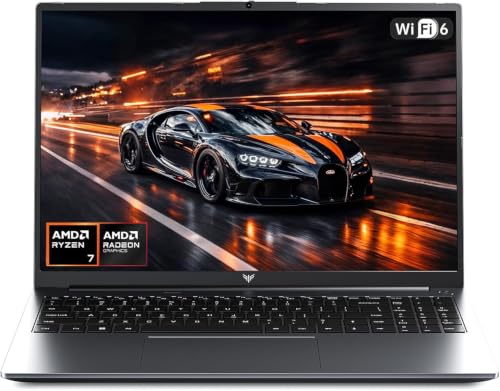
Essential Criteria for Choosing a Dependable Gaming Laptop
Finding an appropriate portable gaming computer requires balancing raw computational performance with thermal efficiency and daily usability. Buyers often struggle to determine whether a specific hardware configuration can support their favorite entertainment titles alongside work or study tasks. Making the right decision involves looking past marketing labels and evaluating real hardware components such as the processor, graphics architecture, system memory, and storage drives. A careful inspection of hardware specifications ensures you invest in a machine that satisfies your expectations without introducing unexpected bottlenecks.
Matching Processor Architecture to Your Daily Gaming Needs
The central processing unit acts as the primary brain of your computer, coordinating game logic, background applications, and system tasks simultaneously. Modern mobile processors like the AMD Ryzen 7430U feature multi-core and multi-thread architectures that deliver clock speeds reaching up to 4.3GHz. These specifications provide a noticeable leap over basic entry-level chips, allowing the system to handle demanding productivity workloads and gaming routines smoothly. When a processor features ample cores, it distributes computing threads evenly, which prevents sudden frame drops and system stuttering during active gameplay.
Power efficiency represents another vital consideration when evaluating mobile processors for gaming and everyday computing. Processors designated with a U-series suffix focus heavily on balanced power consumption, generating less heat while maintaining strong multi-threaded capabilities. This thermal balance allows laptop manufacturers to create thinner chassis profiles without requiring massive, noisy fan assemblies. If your gaming routine centers on casual titles, competitive esports, or retro emulation, an efficient multi-core processor provides plenty of computational strength for steady performance.
Dedicated Versus Integrated Graphics Solutions
Graphics rendering capability dictates visual fidelity, supported display resolutions, and real-time frame rates in PC games. Shoppers should understand the fundamental differences between dedicated graphics cards and integrated graphics processing units before purchasing. Integrated solutions, such as AMD Radeon graphics running at frequencies up to 1200MHz, share memory with the system processor to deliver efficient visual output. These integrated chips handle lightweight titles, popular esports games, indie adventures, and media playback with remarkable energy efficiency.
Demanding modern blockbuster titles with ray tracing and complex 3D environments typically require specialized dedicated graphics hardware with high thermal limits. However, dedicated graphics chips consume significantly more electricity, requiring larger cooling radiators and heavier chassis constructions. Integrated graphics configurations provide a compelling alternative for gamers who prioritize portability, quieter fan operation, and extended battery runtimes. Setting realistic visual expectations and adjusting in-game resolution parameters allows modern integrated graphics to deliver enjoyable gaming sessions on a portable budget.
System Memory Capacity and Multitasking Headroom
System memory directly influences how smoothly a laptop transitions between active gameplay, web browsers, and background operating system services. A modern gaming laptop should feature at least 16GB of DDR4 RAM to prevent out-of-memory errors and aggressive caching to the primary drive. Large memory reserves reduce read latency, optimize processor utilization, and provide a substantially smoother computing experience compared to outdated DDR3 memory standards. Having sufficient memory ensures that your computer stays responsive even when you keep voice chat, game launchers, and web tabs running in the background.
Memory configuration and upgrade paths also warrant close inspection before you finalize any laptop purchase. Laptops equipped with removable SODIMM memory slots offer greater long-term flexibility than designs with permanently soldered modules. Operating memory in dual-channel configurations enhances memory bandwidth, which directly benefits integrated graphics processors that rely on system memory for visual rendering. Confirming that your laptop includes a healthy 16GB memory baseline guarantees reliable headroom for upcoming software updates and heavier multitasking workflows.
Solid-State Storage Speed and Expandability Options
Modern computer games require massive storage allocations, making drive capacity and read speeds critical factors for any prospective buyer. Solid-state drives utilizing the M.2 NVMe protocol provide lightning-fast boot times, swift operating system response, and rapid game level loading compared to mechanical hard drives. A standard 512GB SSD accommodates the operating system alongside a respectable rotation of favorite games and productivity tools. Selecting a fast solid-state drive eliminates tedious loading screens and ensures that your files transfer quickly across internal directories.
Storage upgradeability represents an essential feature that protects your investment as your personal gaming library continues to grow. Many high-value laptops feature accessible M.2 storage slots that support replacement drives with capacities reaching up to 2TB. Secondary expansion through integrated TF or micro SD card slots also gives users a practical method for storing video files, photos, and document backups. Checking storage expansion specifications before buying ensures that you will not run out of room when large seasonal game patches arrive.
Display Dimensions, Resolution, and Visual Clarity
The visual interface serves as your primary window into every virtual world, making panel quality a central consideration when shopping. A 15.6-inch or 16.0-inch display offering Full HD 1920×1080 resolution strikes an ideal balance between sharp image clarity and manageable system workload. Thin-bezel screen designs maximize viewable display territory while keeping the overall laptop footprint compact enough for standard backpacks. Clear panels with wide viewing angles ensure that colors remain vibrant and consistent, whether you sit directly centered or view the screen from an angle.
Shoppers should also consider display coatings, aspect ratios, and surface finishes when choosing their preferred machine. While some users appreciate versatile touchscreen laptop displays for creative navigation, traditional anti-glare gaming screens reduce distracting reflections in brightly illuminated rooms. A crisp 1080p display allows mid-tier and integrated hardware to maintain playable frame rates without straining internal components. Prioritizing color accuracy and panel brightness ensures that in-game environments look immersive during long evening sessions.
Thermal Management and Sustained System Cooling
Sustained gaming performance depends heavily on a laptop’s ability to dissipate heat and regulate electrical power under continuous load. When internal components reach elevated temperatures, thermal throttling mechanisms lower processor clock speeds to protect hardware integrity, which causes noticeable in-game stutter. Efficient cooling designs utilize internal copper heat pipes and dedicated intake vents to direct warm air away from critical processing cores. Keeping the laptop elevated on a flat, solid surface ensures optimal airflow and maintains consistent performance throughout extended gaming sessions.
Fan noise profiles often correlate directly with thermal management intensity across different operating modes. Many modern laptops allow users to toggle between silent, balanced, and performance profiles depending on current workload demands. Operating in balanced mode during everyday tasks keeps fan noise minimal, while performance mode increases fan speeds to handle heavier gaming workloads. Regular maintenance, such as gently clearing dust from intake grilles with compressed air, helps preserve factory cooling efficiency over years of ownership.
Battery Capacity and Mobile Power Limitations
Battery capacity represents another crucial metric for gamers who plan to use their laptop away from electrical outlets. Portable laptops typically feature battery sizes ranging from 38Wh to 54.72Wh, delivering flexible operation for several hours of lightweight office productivity or video playback. Running intensive games on battery power triggers aggressive power-saving profiles that reduce performance to preserve electrical charge. For peak frame rates and uncompromised visual rendering, users should always connect their laptop to the provided power adapter during gaming.
Understanding battery chemistry and charging habits can significantly extend the usable lifespan of your laptop power cell. Modern lithium batteries perform best when kept within reasonable temperature ranges and avoided from sustained deep discharges. Using the original manufacturer charging adapter ensures stable voltage delivery and prevents electrical stress on internal charging circuitry. When traveling, carrying a compact power adapter allows you to quickly recharge between work sessions and gaming breaks.
Chassis Durability, Daily Ergonomics, and Built-in Controls
Chassis construction influences both physical durability and how comfortably you can transport your laptop between work, home, and travel destinations. Lightweight composite materials and slim profiles allow 15.6-inch and 16.0-inch laptops to slip easily into commuter bags without causing shoulder fatigue. A rigid lid and sturdy display hinges protect the sensitive liquid crystal panel from flex and pressure damage during daily transit. Inspecting build materials helps guarantee that your laptop can withstand the physical rigors of regular mobile use.
Ergonomic design considerations extend to the keyboard, trackpad, and integrated privacy features built into the machine. A full-sized keyboard with a numeric keypad provides convenience for productivity and hotkey assignment, while a smooth trackpad allows accurate navigation on the go. Integrated physical webcam cover slides offer immediate peace of mind by mechanically blocking the camera sensor when video calls conclude. Combining sturdy build materials with thoughtful input ergonomics ensures a comfortable computing experience throughout long gaming or study sessions.
Essential Ports, Peripheral Support, and Wireless Connectivity
A versatile selection of input and output ports allows a gaming laptop to transform into a full desktop workstation at a moment’s notice. Having access to USB 3.2 ports, modern Type-C connections, and dedicated HDMI ports enables seamless connections to external monitors, high-speed storage drives, and gaming headsets. Integrating reliable wireless gaming peripherals eliminates cable clutter and enhances comfort during fast-paced competitive matches. Checking port placement along the chassis sides helps prevent cables from interfering with your external mouse movement.
Wireless network stability plays a decisive role in online multiplayer performance, where latency spikes can disrupt an entire match. Equipping a laptop with WiFi 6 and Bluetooth 5.2 hardware ensures robust wireless signals, lower ping times, and rapid file download speeds across congested home networks. Modern wireless protocols handle multiple connected devices efficiently, preventing bandwidth bottlenecks when other family members stream high-definition video. Verifying that a laptop includes modern wireless standards ensures compatibility with modern network routers and low-latency audio accessories.
Practical Operating System Setup and Game Performance Optimization
Configuring operating system settings correctly can unlock noticeable performance gains on entry-level and mid-range gaming laptops. Manufacturers often recommend closing unnecessary background programs, browser windows, and cloud sync utilities before launching hardware-intensive games. Modern operating systems like Windows 11 include dedicated gaming modes that prioritize system resources and processor threads for active full-screen applications. Taking a few moments to adjust these internal software settings helps maximize available memory and processor headroom for smoother gameplay.
Keeping graphics drivers and system firmware up to date represents another straightforward method for maintaining system stability and performance. Hardware manufacturers regularly publish driver patches that resolve software conflicts, optimize new game releases, and refine thermal control algorithms. Adjusting in-game graphics options, such as lowering shadow resolution and disabling motion blur, can significantly improve frame rate stability without sacrificing visual clarity. Experimenting with balanced power profiles inside system management software allows you to find the ideal compromise between fan noise and processing speed.
Evaluating Manufacturer Warranties and Technical Support Channels
Warranty coverage and technical support availability provide essential protection against unforeseen hardware defects and component failures. When evaluating laptop brands like KAIGERR, checking for standard 12-month repair policies and unlimited customer support guarantees reliable assistance if technical issues arise. Responsive customer service teams that address inquiries within clear timeframes can save substantial frustration during initial system setup and driver configuration. Knowing that replacement options and repair facilities exist gives buyers confidence when investing in a new mobile gaming computer.
Examining user feedback and customer service reputations can reveal valuable insights into long-term hardware reliability and build quality. While individual user reports should not be treated as definitive scientific studies, they often highlight practical details regarding hinge durability, keyboard responsiveness, and real-world thermal behavior. Verifying that a brand stands behind its hardware with accessible communication channels ensures that you receive prompt assistance if replacement parts or troubleshooting guidance are required. Prioritizing reliable support policies safeguards your computer purchase throughout its operational lifespan.
Choosing a suitable gaming laptop ultimately comes down to understanding your specific entertainment goals, software requirements, and portability preferences. By carefully analyzing processor capabilities, memory headroom, fast storage options, and panel characteristics, you can identify a dependable machine that handles your favorite titles with ease. Balancing hardware performance against thermal efficiency and connectivity options ensures that your laptop remains a versatile companion for both intense gaming sessions and daily productivity. Verifying manufacturer specifications and warranty protections before buying guarantees a satisfying computing experience that fits your lifestyle.



Write Your Review
No reviews yet. Be the first to share your experience!