


Comparing ASUS ROG and HP OMEN Gaming Systems
Selecting a dedicated rig often comes down to balancing cooling efficiency against fast display panels. Buyers frequently struggle with thermal limits when matching high-powered components with portable laptop chassis. In this matchup, evaluating an asus vs omen gaming laptop clarifies how system designs handle demanding modern titles. ASUS builds usually emphasize multi-fan cooling and liquid metal, while HP focuses on Tempest Cooling and understated designs. Gamers researching portable gaming laptop picks will find that thermal design directly shapes sustained frame delivery.
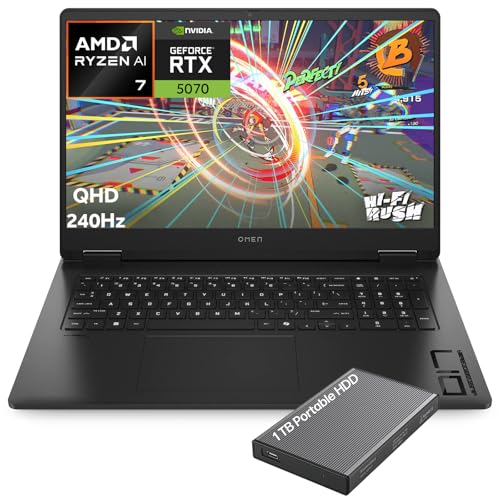
Hardware configurations across both brands feature capable graphics cards ranging from NVIDIA RTX 5050 chips up to high-end RTX 5080 GPUs. ASUS ROG Strix configurations frequently feature ROG Nebula displays, high refresh rates, and MUX switches with Advanced Optimus. HP OMEN models counter with sharp Quad HD panels, fast DDR5 memory, and capable AMD Ryzen AI or Intel Core Ultra processors. Comparing these specifications helps you select the best hardware setup for your intended gaming sessions and creative workloads.


Pros
- Outstanding raw performance for AAA gaming, esports, and creative workloads.
- High-refresh-rate 2.5K display with excellent color and contrast for both gaming and content creation.
- Robust cooling system that keeps thermals in check during extended sessions.
- Plenty of RAM and fast SSD storage for seamless multitasking and quick load times.
- Immersive RGB lighting with useful Stealth Mode for professional environments.
Cons
- Premium price point may not suit budget-conscious gamers.
- At 6.02 pounds, it is heavier than some ultraportable gaming laptops.
- Battery life may be limited under heavy gaming loads, typical for high-performance gaming laptops.
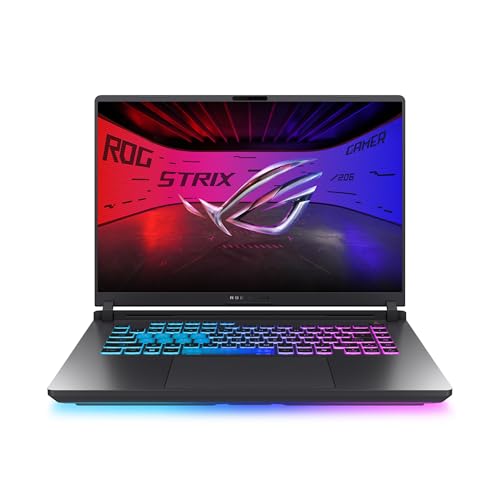
The ASUS ROG Strix G16 (2025) is a high-performance gaming laptop designed for PC gamers who demand top-tier speed and visuals. It is powered by an Intel Core Ultra 9 275HX processor and an NVIDIA GeForce RTX 5070 Ti laptop GPU, built on the Blackwell architecture with DLSS 4 and Max-Q technologies. This combination makes it a strong choice for competitive esports players, streamers, and content creators who need reliable power for gaming, editing, and multitasking.
In real-world gaming, the ROG Strix G16 excels with its 16-inch ROG Nebula display, which offers a 2560x1600 resolution and a blazing 240Hz refresh rate with a 3ms response time. The screen uses an ACR film to enhance contrast and reduce glare, providing clear visuals even in bright rooms. Whether you are playing fast-paced FPS games, exploring open-world titles, or editing video, the display delivers smooth motion and vibrant colors. The 32GB of DDR5-5600MHz RAM and 1TB PCIe 4.0 SSD ensure quick load times and seamless multitasking, so you can switch between games, streaming software, and productivity apps without lag.
Build quality is solid, with a sleek black chassis that feels durable and premium. The keyboard is designed for esports, with responsive keys and per-key RGB lighting that syncs with the full-surround light bar. You can customize the lighting through ASUS software, and the Stealth Mode turns off all lights for a more professional look in meetings or classes. The laptop measures 13.94 x 10.55 x 0.9 inches and weighs 6.02 pounds, which is typical for a gaming laptop of this power. It may not be the most portable option, but it fits well on a desk or in a backpack for occasional travel.
Cooling is handled by ROG Intelligent Cooling, which includes an end-to-end vapor chamber, tri-fan technology, and Conductonaut extreme liquid metal on the CPU. This system keeps temperatures under control during long gaming sessions, maintaining performance without excessive fan noise. The laptop also features Wi-Fi 7 for fast, low-latency online gaming and streaming, along with three USB 3.0 ports and other connectivity options for peripherals and external monitors.
Setting up the ROG Strix G16 is straightforward: it runs Windows 11 Home out of the box, and you can easily upgrade the RAM and SSD if needed. The included 3-month PC Game Pass gives you access to a library of games to test its capabilities. One limitation to consider is the premium price, which reflects the high-end components. Additionally, battery life will be shorter during heavy gaming, so you will likely want to keep it plugged in for extended sessions. Overall, this laptop is an excellent investment for gamers and creators who want a powerful, well-built machine that can handle demanding tasks and deliver an immersive gaming experience.
The ASUS ROG Strix G16 (2025) is built for serious gaming performance. The Intel Core Ultra 9 275HX processor and NVIDIA RTX 5070 Ti GPU provide ample power for modern AAA titles at high settings, as well as competitive esports games at maximum frame rates. The 240Hz display ensures smooth, tear-free visuals, while DLSS 4 and Max-Q technologies optimize performance and efficiency. Whether you are playing demanding open-world games or fast-paced shooters, this laptop delivers responsive, immersive gameplay.
The ROG Strix G16 features a robust black chassis that feels sturdy and well-constructed. The keyboard is designed for esports, with responsive keys and per-key RGB lighting. The full-surround RGB light bar adds a customizable aesthetic, and the Stealth Mode allows you to disable lighting for a more professional appearance. The laptop weighs 6.02 pounds and measures 0.9 inches thin, making it a solid but portable desktop replacement.
ROG Intelligent Cooling keeps the Strix G16 running cool under pressure. The system uses a vapor chamber, tri-fan technology, and liquid metal on the CPU to efficiently dissipate heat. This allows the laptop to maintain high performance during long gaming sessions without excessive fan noise or thermal throttling. The cooling design is a key advantage for users who push their hardware to the limit.
The 16-inch ROG Nebula display is a standout feature, offering a 2560x1600 resolution, 240Hz refresh rate, and 3ms response time. The ACR film enhances contrast and reduces glare, making it suitable for brightly lit rooms. Colors are vibrant, and motion handling is excellent for gaming and content creation. This screen is ideal for both competitive play and creative work.
The ROG Strix G16 includes Wi-Fi 7 for ultra-fast wireless connectivity, along with three USB 3.0 ports and other standard connections. This allows you to easily connect gaming mice, keyboards, headsets, and external monitors. The laptop also supports Bluetooth for wireless peripherals. Overall, connectivity is robust and future-proof for online gaming and streaming.



Frequently Asked Questions
Which brand offers better cooling between ASUS ROG and HP OMEN?
Both brands provide dedicated thermal solutions designed to prevent thermal throttling. ASUS ROG Strix models feature Conductonaut liquid metal, tri-fan setups, and vapor chambers on select models. HP OMEN laptops utilize Tempest Cooling with slim fan blades and expansive exhaust vents. Sustained temperatures depend on individual chassis thickness and GPU wattage settings.
Do ASUS and HP OMEN laptops include a MUX switch?
Yes, many models from both manufacturers incorporate advanced graphics switching. ASUS ROG Strix devices include a MUX switch with NVIDIA Advanced Optimus to bypass integrated graphics for reduced latency. HP OMEN units manage GPU switching through the OMEN Gaming Hub software. These tools improve frame delivery while preserving battery life during basic productivity.
Can you upgrade the RAM and storage on an asus vs omen gaming laptop?
Yes, both laptop lines generally support memory and storage upgrades. Several ASUS ROG models offer tool-free bottom panel access for quick installation of M.2 SSDs and DDR5 memory. HP OMEN systems also provide expandable slots for dual-channel RAM and high-speed NVMe drives. Always verify the specific internal slot configuration before buying upgrade parts.
How do display options compare between ASUS and HP gaming laptops?
Both manufacturers offer high-refresh screens ranging from 144Hz up to 240Hz. ASUS ROG laptops use Nebula displays featuring fast response times and anti-glare coatings. HP OMEN machines provide crisp Quad HD panels with 100 percent sRGB color accuracy. For tighter spending limits, checking budget-friendly gaming laptops shows how display resolutions vary across price tiers.
Which lineup is better suited for travel and work?
HP OMEN models typically feature a more minimalist aesthetic that blends easily into office or classroom settings. ASUS ROG Strix devices feature prominent RGB lightbars and sportier gaming accents, though stealth modes can disable lighting. Both brands provide powerful performance for 2026, but heavy power bricks and demanding processors limit unplugged battery longevity.


Write Your Review
No reviews yet. Be the first to share your experience!