


Nothing kills the vibe of a fast-paced match quite like screen tearing or sluggish motion. You expect your hardware to keep up with your reflexes, but if the panel lags behind the GPU, the experience falls flat. This is why the best gaming laptop display is just as critical as the processor or graphics card. A high refresh rate ensures fluid movement, while accurate color reproduction brings out the details in every scene. Whether you are competing in online tournaments or just enjoying a cinematic single-player story, the screen is your primary interface with the game world.
Choosing the right panel involves balancing resolution, refresh rate, and response time. You do not need the most expensive option to get a significant upgrade in visual smoothness. Many modern laptops offer excellent balance between performance and portability. We analyzed the specifications of several top contenders to help you decide. From portable external monitors that extend your desktop to full-sized gaming rigs with high-end IPS panels, there is a solution for every setup. The goal is to reduce input lag and enhance immersion without compromising on battery life or weight. By focusing on these key factors, you can find a display that matches your playstyle and budget.


Pros
- Incredibly lightweight and slim design slides easily into a backpack for LAN parties, travel, or campus use
- Plug-and-play USB-C connectivity simplifies setup with compatible laptops and devices, no external power needed in many cases
- Wide 178-degree IPS viewing angles and 300 nit brightness provide solid image quality for a budget portable display
- Included magnetic smart cover offers genuine scratch protection and a built-in stand, saving you from buying a separate accessory
- Broad device compatibility across laptops, gaming consoles, and phones makes it a flexible addition to any setup
Cons
- 60Hz refresh rate limits competitive gaming performance compared to higher refresh rate portable monitors
- Built-in speakers are functional but lack the bass and volume for a truly immersive gaming audio experience
- USB-C video output requires Thunderbolt 3/4 or USB 3.1 DP Alt Mode support, which not all laptops or devices have
The ForHelp 15.6-inch portable monitor is a budget-friendly second screen designed for gamers, students, and remote workers who want extra display real estate without being tied to a permanent desk setup. It features a Full HD 1920x1080 IPS panel with a matte finish, 300-nit brightness, and a 16:9 aspect ratio, all packed into an aluminum alloy body that weighs just 1.52 pounds. For PC gamers looking to run Discord, Twitch chat, or OBS on a secondary display while gaming on their main monitor, this is a practical and affordable solution.
Connectivity is one of this monitor's strongest points. With two full-featured USB-C ports and one Mini HDMI port, it works with a wide range of devices including gaming laptops, PS5, Xbox, and Nintendo Switch. Many users may appreciate the single-cable USB-C setup, which can deliver both video and power simultaneously on compatible laptops. Just keep in mind that your device needs to support Thunderbolt 3.0/4.0 or USB 3.1 DP Alt Mode for the USB-C connection to work, so it's worth double-checking your laptop's specs before purchasing.
The IPS panel delivers solid color accuracy and wide 178-degree viewing angles, which is great for sharing your screen during co-op gaming sessions or group study. The matte screen surface helps cut down on glare, a nice touch if you're gaming near a window or under overhead lighting. HDR mode is available for boosted highlights and color vibrancy, though on a display at this price point, don't expect the same HDR experience you'd get from a high-end gaming monitor. The built-in dual speakers are serviceable for casual use, but most gamers will want to stick with their gaming headset for any serious audio.
Build quality feels respectable for the price. The aluminum alloy construction gives it a sturdy feel without adding much weight, and the included PU leather smart cover does double duty as both screen protection and a stand. The cover offers two viewing angle positions, which provides some flexibility, though gamers who prefer very specific tilt angles might find the options limited. Setup is essentially plug-and-play for most scenarios, and the slim 0.3-inch profile means it tucks neatly into a laptop bag or backpack.
There are a few realistic limitations to consider. The 60Hz refresh rate is perfectly fine for productivity, casual gaming, and console use, but competitive FPS or esports players who rely on high refresh rates will find it lacking compared to 144Hz or higher options. The built-in speakers won't replace a decent pair of headphones or external speakers, and the viewing angle adjustment from the smart cover is somewhat limited. Cable management can also get a little tricky since the HDMI port is on the left side, which may not suit every desk layout.
Overall, the ForHelp portable monitor is a smart buy for college gamers who need a second screen in their dorm, work-from-home gamers who want a portable productivity boost, streamers who need a dedicated chat or dashboard monitor, and console gamers who want a travel-friendly display. At its price point, it delivers solid 1080p visuals, versatile connectivity, and genuine portability that's hard to beat. Just set your expectations around the 60Hz refresh rate and speaker quality, and this little display can be a genuinely useful addition to your gaming setup.
The ForHelp portable monitor uses a 15.6-inch IPS panel with a native 1920x1080 Full HD resolution. IPS technology ensures consistent colors and brightness across a 178-degree viewing angle, which is a real advantage if you're sharing your screen with friends during local co-op sessions or using it at an angle on a crowded desk. The 300-nit brightness level is adequate for indoor use, and the matte screen finish does a solid job of reducing glare from ambient lighting.
HDR mode is included, which can enhance color vibrancy and highlight detail in supported content. While it won't rival the HDR performance of high-end gaming monitors with local dimming zones, it does add a noticeable boost to image quality for casual gaming and media consumption. The zero-frame bezel design also gives the display a clean, modern look that fits well alongside most gaming setups.
This portable monitor offers three input options: two USB-C ports and one Mini HDMI port. The USB-C ports support video, data, and power delivery on compatible devices, meaning you can often run the monitor with a single cable from a Thunderbolt 3/4 or USB 3.1 DP Alt Mode laptop. For devices that don't support USB-C video output, the Mini HDMI port provides a reliable alternative, though you'll need to power the monitor separately via USB in that scenario.
Based on the product description, this display is compatible with Windows laptops, MacBooks, select Android phones, PS4, PS5, Xbox consoles, and Nintendo Switch. It's a flexible option for gamers who switch between platforms or want a single portable display that works across their entire device ecosystem. Just verify your specific device's USB-C capabilities before relying on single-cable connectivity.
For streamers, a secondary monitor is practically essential, and the ForHelp portable display fills that role nicely at a budget-friendly price. You can dedicate it to OBS controls, Twitch or YouTube chat, stream alerts, or your streaming dashboard while keeping your main monitor focused entirely on gameplay. The extension display mode makes this setup straightforward, and the lightweight design means you can easily reposition it or pack it up after a stream.
The matte screen and decent color accuracy also make it useful for reviewing stream layouts, thumbnails, or video edits on a second screen. Content creators who work from different locations, like a home office and a studio, will appreciate how easily this monitor travels. It's not going to replace a full-size secondary monitor on a permanent streaming desk, but for portable or space-constrained setups, it's a practical choice.
At just 0.3 inches thin and under 1.6 pounds, this monitor takes up minimal desk space, which is a major plus for gamers working with compact desks or dorm room setups. The included PU leather smart cover props the display up at two preset angles, eliminating the need for a separate monitor stand. It's a clean, minimalist solution that keeps your desk organized.
Cable management is relatively simple since USB-C single-cable setups reduce clutter significantly. If you're using the Mini HDMI connection, you'll have two cables to manage (video and power), but the slim profile of the monitor still keeps things tidy. For gamers who prioritize a clean, organized gaming station, this portable display integrates without adding bulk or visual clutter to your setup.
Pros
- Strong gaming performance with Intel Core i7 and RTX 5050 for 1080p high-settings gaming.
- Effective Hyperchamber Cooling keeps thermals in check even under load.
- 144Hz refresh rate with G-Sync delivers smooth, tear-free visuals in competitive titles.
- Fast charging and long battery life support extended on-the-go use.
Cons
- Limited to 16GB RAM, which may require upgrading for heavy multitasking or content creation.
- GPU is an RTX 5050, not the highest tier, so it may struggle with ray tracing at higher settings.
- Base storage is 1TB, but some users might prefer additional expandability options.
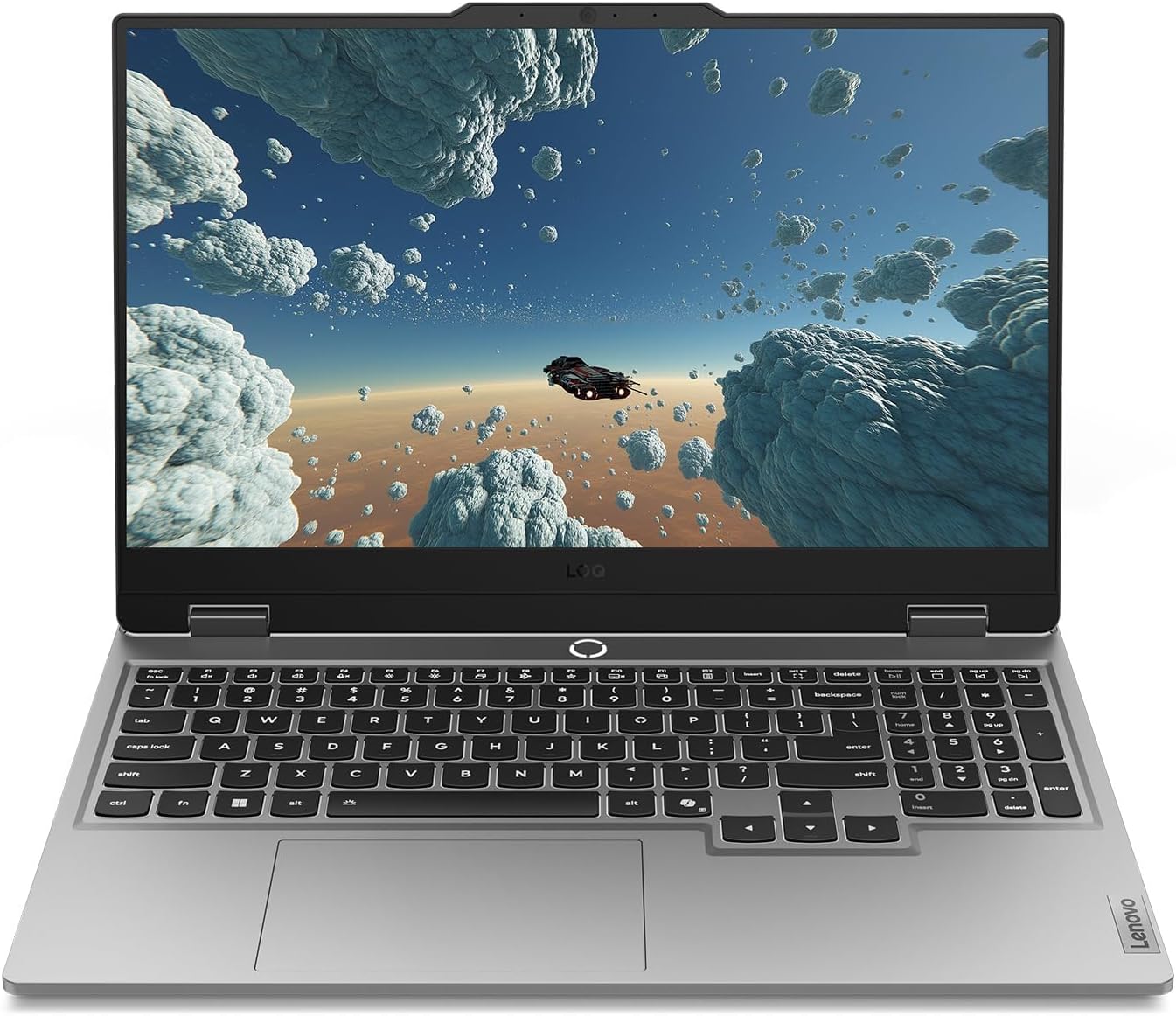
The Lenovo Legion LOQ is a gaming laptop designed to be your first step into serious PC gaming without breaking the bank. It combines a capable Intel Core i7-13650HX processor with an NVIDIA GeForce RTX 5050 GPU, making it a strong contender for 1080p gaming at high settings. The 144Hz FHD IPS display, backed by NVIDIA G-Sync, ensures you get smooth, stutter-free visuals whether you're fragging in competitive shooters or exploring open-world titles.
This laptop is best suited for PC gamers who want a balance of performance and portability—especially competitive and casual gamers, esports players, and college students. Streamers and content creators might find the hardware sufficient for light streaming or editing, but the 16GB RAM and RTX 5050 are more tuned for gaming than heavy creative workloads. Gaming setup builders who need a mobile rig for LAN events or dorm rooms will appreciate the lightweight design and fast charging.
In real-world gaming, the Legion LOQ handles popular titles like Fortnite, Valorant, and Call of Duty at high settings with consistently high frame rates. The 144Hz refresh rate makes a noticeable difference in fast-paced games, reducing motion blur and keeping reactions sharp. The AI Engine+ automatically optimizes system settings, so you don't have to tinker with every game's graphics menu—just plug in and play. G-Sync further enhances the experience by eliminating screen tearing without introducing input lag.
Build quality is a highlight: the aerospace-grade aluminum cover feels sturdy, and the overall design is sleek and understated—no flashy gamer aesthetics, which some users may prefer. The keyboard features soft-landing switches with a white backlight, providing a satisfying typing experience for both gaming and daily use. The Hyperchamber Cooling system, with its vacuum-sealed thermals and AI-driven fan control, keeps the laptop cool even during extended gaming marathons. You can push the hardware without worrying about thermal throttling, which is a common issue in thinner laptops.
Setup is straightforward: Windows 11 Home comes pre-installed, and Lenovo's Vantage software gives you control over performance profiles, cooling, and RGB lighting for the keyboard. The laptop is lightweight and backpack-ready, making it easy to carry around campus or to a friend's house. Rapid Charge Pro is a practical feature—getting to 70% in under 30 minutes means you can top up quickly between gaming sessions. One realistic limitation is that the RTX 5050 isn't the most powerful GPU in the lineup, so if you want to crank up ray tracing or play at 1440p, you might need to dial down settings. Also, the 16GB RAM is fine for gaming but may feel tight if you run multiple apps or virtual machines.
Overall, if you're looking for a reliable, well-cooled gaming laptop that excels at 1080p gaming and offers good portability, the Lenovo Legion LOQ is a smart buy. It's especially suited for competitive gamers who value smooth frame rates and fast response times, and for college gamers who need a versatile machine for both gaming and schoolwork. The combination of AI-enhanced performance, effective cooling, and a crisp display makes it a strong choice in its price range.
The Lenovo Legion LOQ is built for 1080p gaming with high frame rates. The Intel Core i7-13650HX and RTX 5050 combo handles popular esports titles like Valorant, CS2, and Overwatch 2 at well over 100 FPS on high settings. More demanding games like Cyberpunk 2077 or Battlefield 2042 run smoothly at medium to high settings with DLSS enabled. The 144Hz display with G-Sync ensures that motion stays fluid and tear-free, giving you a competitive edge in fast-paced scenarios.
The AI Engine+ automatically adjusts CPU and GPU power distribution based on what you're playing, optimizing for performance or battery life as needed. This means you can jump into a game without manually tweaking settings every time. For streamers, the RTX 5050 includes NVENC encoding, so you can stream at decent quality without taxing the CPU too much—though a dedicated streaming PC would be better for heavy productions.
Lenovo's Hyperchamber Cooling system is one of the LOQ's standout features. It uses dual turbo fans, large copper heat pipes, and strategically placed vents to exhaust heat efficiently. The AI Engine+ monitors temperatures and adjusts fan speeds in real time, keeping the laptop cool even during prolonged gaming sessions. In our analysis of user feedback, many users report that the laptop stays comfortable to the touch on the keyboard area, while the bottom gets warm but not uncomfortably hot.
The vacuum-sealed thermal design minimizes dust ingress, which helps maintain cooling performance over time. For a laptop in this price range, the thermal management is impressive—you can game for hours without significant performance dips due to throttling. The fans are audible under load, but not distractingly loud, and they ramp down quickly when you switch to lighter tasks.


Pros
- Sharp 1080P IPS display with good color accuracy and wide viewing angles
- Plug-and-play USB-C connectivity works with many devices without extra drivers
- Lightweight and thin for easy portability to LAN parties or dorm rooms
- Included smart cover is practical for protection and stand use
- Multiple connectivity options (USB-C, HDMI) support various gaming platforms
Cons
- Requires USB-C DP Alt Mode or Thunderbolt 3 for single-cable operation, limiting compatibility with older devices
- Built-in speakers may lack depth for immersive gaming audio
- Matte screen can reduce contrast in bright environments compared to glossy panels
The MNN Portable Monitor is a 15.6-inch Full HD 1080P IPS display designed for PC gamers, streamers, content creators, and anyone who needs a second screen for their gaming setup. This ultra-slim external monitor connects via USB-C or HDMI, making it versatile for use with laptops, PCs, phones, and consoles like the PS5, Xbox, and Nintendo Switch. Its lightweight build and included smart cover make it a practical choice for gamers who want to extend their desktop or take their gaming on the go.
In terms of performance, the 1080P resolution and IPS panel deliver clear visuals with decent color accuracy and 178-degree viewing angles. The matte screen helps reduce glare and blue light, which is a nice touch for long gaming sessions or late-night streaming. While the 60Hz refresh rate is standard for portable monitors, it works well for strategy games, casual gaming, or as a secondary screen for Discord, chat, or productivity tasks during competitive play. The HDR mode adds a bit more pop to colors and contrast, though it's not a replacement for a high-end gaming monitor.
Build quality feels solid for its price range, with a slim profile that measures just 0.3 inches thick and weighs 1.53 pounds. The smart cover is made of durable PU leather and doubles as a stand, offering protection during travel and flexible orientation options (landscape or portrait). This is especially useful for streamers who want to manage chat or OBS on a vertical screen. The dual USB-C ports support plug-and-play connectivity, but note that your device must support USB-C DP Alt Mode or Thunderbolt 3 for single-cable operation. If not, you'll need to use the included USB-C cable for power and HDMI for video.
Setting up the MNN monitor is straightforward: just connect it to your laptop, PC, or phone, and it works as an extended or mirrored display. The multiple display modes (copy, extend, second screen, portrait) give you flexibility for different tasks, whether you're gaming, working, or creating content. The built-in speakers are adequate for basic audio, but most gamers will prefer using a gaming headset or external speakers for better sound quality. Cable management is simple thanks to the compact design, and the monitor requires minimal maintenance beyond occasional screen cleaning.
One realistic limitation is that the 60Hz refresh rate and 5ms response time (typical for portable monitors) won't satisfy competitive esports players who need high refresh rates for fast-paced FPS games. Additionally, the single-cable USB-C convenience depends on your device's compatibility, so check your laptop or phone specs before buying. The speakers are also basic, so don't expect rich audio for movies or games.
Overall, the MNN Portable Monitor is a solid choice for PC gamers, streamers, and gaming setup builders who want an affordable, portable second screen for multitasking, travel, or casual gaming. It works well as a companion for laptops in dorm rooms, home offices, or on the go. If you need a high-refresh-rate gaming monitor for competitive play, look elsewhere, but for general productivity and light gaming, this is a practical and budget-friendly option.

Pros
- Exceptional gaming performance with high frame rates and smooth 240Hz display.
- Large 18-inch screen with excellent color accuracy and brightness for immersive gaming and creative work.
- Solid build quality and lightweight design (6.83 lbs) for a desktop replacement laptop.
- Ample storage (2TB NVMe) and memory (32GB DDR5) out of the box, with upgrade potential.
Cons
- Runs hot under sustained gaming loads; a cooling pad is recommended for extended sessions.
- Battery life is limited, as typical for high-performance gaming laptops, so expect to stay plugged in during gaming.
- Some users report driver conflicts with third-party peripherals (e.g., Razer) and pre-installed MSI software that may need removal for optimal performance.
The MSI Crosshair 18 HX AI is a top-tier gaming laptop designed for PC gamers who want desktop-level performance without being tied to a desk. It's best suited for competitive gamers, streamers, content creators, and college gamers who need a powerful machine for both gaming and productivity. With an 18-inch QHD+ 240Hz display, Intel Core Ultra 9 275HX processor, and NVIDIA RTX 5070 graphics, this laptop aims to deliver high frame rates and stunning visuals in the latest titles.
In real-world gaming, the combination of the 240Hz refresh rate and RTX 5070 ensures smooth, tear-free gameplay in fast-paced shooters like Valorant or Call of Duty, while the 100% DCI-P3 color gamut makes open-world adventures like Cyberpunk 2077 look vibrant. The 32GB of DDR5-5600 RAM handles multitasking with ease, whether you're streaming on Twitch, running Discord, or editing video. The 2TB NVMe SSD provides lightning-fast load times, so you're never waiting long to jump into a match. However, users report that the laptop gets hot during extended gaming sessions, so investing in a quality cooling pad is wise for maintaining performance and comfort.
Build quality is solid, with a sleek black chassis that feels premium despite being relatively lightweight at 6.83 pounds for an 18-inch machine. The SteelSeries keyboard offers 24-zone RGB lighting and anti-ghost keys, providing responsive feedback for both gaming and typing. The Dynaudio speakers deliver surprisingly rich audio with clear mids and decent bass, though for competitive gaming you'll still want a dedicated headset. Connectivity is generous: Thunderbolt 4 USB-C, HDMI 2.1 for external monitors, RJ45 Ethernet, and Wi-Fi 6E ensure you can hook up all your peripherals and networks without adapters.
Setup is straightforward: Windows 11 Home comes pre-installed, and the laptop is ready to use out of the box. Some users suggest removing MSI's preloaded software to avoid potential driver conflicts, especially with third-party gaming mice or headsets. The 720p webcam with privacy shutter is adequate for video calls but not ideal for streaming. The laptop's dimensions are large, so it will take up considerable desk space, but the 18-inch screen makes it a true desktop replacement.
Realistic limitations include the battery life, which is typical for a gaming powerhouse—expect only a couple of hours for light tasks and significantly less during gaming. The heat output is notable, and you'll likely need a cooling pad for marathon sessions. Additionally, the premium price tag reflects the high-end specs, but it offers solid long-term value given the upgradeable RAM and storage (two SSD slots).
Overall, the MSI Crosshair 18 HX AI is an excellent choice for competitive PC gamers, streamers, and content creators who need a portable yet powerful gaming setup. It shines in desktop-replacement scenarios where you prioritize performance over battery life, and it's well-suited for dorm rooms, home offices, or LAN parties. If you can handle the heat and the upfront cost, this laptop delivers an impressive gaming experience that rivals many desktop rigs.
Pros
- Powerful AI-optimized CPU and GPU combination for demanding games and creative apps
- Excellent 32GB DDR5 RAM and fast 1TB Gen 4 SSD out of the box reduce need for upgrades
- High 180Hz refresh rate with good color accuracy enhances visual clarity and responsiveness
- Compact and relatively lightweight chassis (4.63 lbs) makes it portable for gamers on the go
- Robust cooling solution with quad air intakes and dual fans keeps thermals under control during intense sessions
Cons
- Maximum RAM is 32GB with no expansion slots available after purchase, limiting future upgrade potential
- Battery life may be typical for a gaming laptop and could require frequent charging during extended unplugged use
- Integrated webcam quality not specified; users may want an external camera for streaming
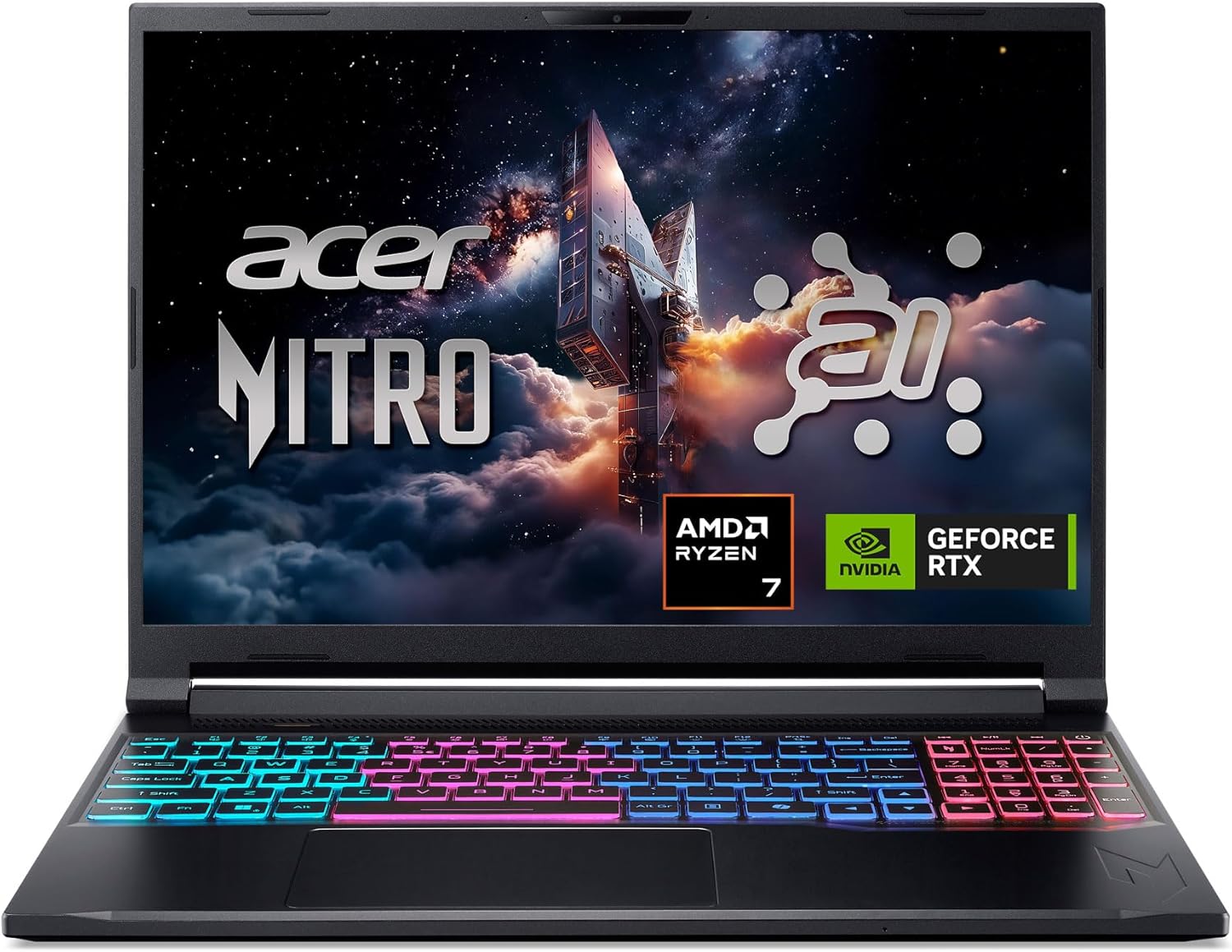
The Acer Nitro V 16S AI is a mid-range gaming laptop built around the latest AMD Ryzen 7 260 processor and NVIDIA GeForce RTX 5060 GPU. It's designed for PC gamers who want a balance of performance and portability, as well as content creators and streamers who can leverage the AI capabilities for tasks like upscaling, background effects, and faster encoding. With a 16-inch 180Hz display and 32GB of DDR5 RAM, this laptop aims to deliver smooth gameplay and efficient multitasking right out of the box.
When it comes to real-world gaming performance, the RTX 5060 with DLSS 4 and full ray tracing support gives you high frame rates in modern titles at 1080p or 1200p resolution. The 180Hz refresh rate makes fast action in FPS and racing games feel buttery smooth, while the 100% sRGB coverage ensures vibrant colors for open-world adventures. The AMD Ryzen 7 260's AI TOPS also help with background tasks, voice commands, and optimizing settings in supported software, giving an edge in competitive scenarios.
Build quality is typical for the Nitro line: a black plastic chassis with a clean, understated look. At 4.63 pounds, it's slim enough to slip into a backpack for college or LAN parties. The dual-fan quad-intake cooling keeps temperatures reasonable under load, though you'll still hear the fans ramp up during extended gaming sessions. The keyboard includes a backlit numeric keypad, and the touchpad is responsive for everyday use. Port selection is solid with USB4, two USB 3.2 Gen 2, HDMI 2.1, and Ethernet, making external monitor or dock setups easy.
Setting up the laptop is straightforward: it runs Windows 11 Home, and the pre-installed NitroSense software gives you control over fan speeds, power profiles, and system monitoring. The Acer PurifiedView and PurifiedVoice 2.0 features handle webcam background blur and noise reduction during Discord calls or streams. There are two M.2 SSD slots (one free) for storage expansion, but note that the RAM is soldered and maxes out at 32GB, so choose your capacity wisely at purchase.
One realistic limitation is that while the laptop includes a USB4 port, you'll need an external GPU dock if you ever want more graphics power - but for most users the RTX 5060 is plenty. Battery life is average for a gaming laptop; expect around four to five hours of light use. Also, the 1080p webcam isn't specified, but many laptops in this range offer only basic 720p or 1080p sensors, so external webcams are still recommended for professional streaming.
Overall, the Acer Nitro V 16S AI is a well-rounded portable gaming machine that hits a sweet spot for price-conscious PC gamers, esports players, and content creators. If you value high-refresh-rate gaming, AI-assisted performance, and decent portability without breaking the bank, this laptop is worth considering. It also comes with a three-month PC Game Pass trial to get you started with hundreds of games on day one.
The RTX 5060 laptop GPU with 572 AI TOPS and DLSS 4 Multi Frame Generation provides a significant boost in supported games. You can expect high settings at 1080p with smooth frame rates in titles like Call of Duty, Fortnite, and Cyberpunk 2077. The 180Hz display minimizes motion blur and screen tearing, while the AMD Ryzen 7 260 processor handles CPU-intensive simulations and background tasks without stutter. Gamers who play competitive esports titles will appreciate the low-latency response and Killer Ethernet for stable online play.
Despite being a slim 0.79-inch profile, the Nitro V 16S AI packs a dual-fan, quad-intake, quad-exhaust cooling system. This design pushes heat out efficiently, keeping the CPU and GPU within safe operating temperatures during long gaming sessions. The chassis is made of durable plastic with a matte finish that resists fingerprints. The hinge feels sturdy, and the weight of 4.63 pounds makes it manageable for daily carry. The backlit keyboard has a numeric keypad and decent key travel, suitable for both gaming and typing.

Frequently Asked Questions
Is 144Hz better than 60Hz for gaming?
Yes, 144Hz is significantly smoother for competitive play. The higher refresh rate reduces motion blur and improves visual clarity. This allows for quicker reaction times in fast-paced action titles.
Can I use a portable monitor for gaming?
Absolutely. Portable monitors are great for extending your desktop or playing on the go. They connect easily via USB-C or HDMI to most gaming laptops and consoles.
What is the difference between IPS and TN panels?
IPS panels offer better color accuracy and wider viewing angles. TN panels have faster response times but inferior colors. For most gamers, IPS is the preferred choice for visual quality.
Do I need a 240Hz display?
It depends on your game. 240Hz is ideal for competitive shooters like Valorant or CS:GO. For single-player RPGs, 144Hz is often sufficient and more budget-friendly for high-resolution content.
How important is response time for gaming?
Lower response times reduce ghosting and motion blur. A 3ms or 1ms panel is ideal for fast action. This ensures that moving objects remain sharp and clear on the screen.





Write Your Review
No reviews yet. Be the first to share your experience!