


Buying a high-end machine often means weighing raw power against practical daily use. You might expect the most expensive model to deliver flawless frame rates, but thermal throttling can still limit performance during long sessions. This is why careful analysis of cooling designs and component specs matters more than just the sticker price. We have analyzed the specifications of the top contenders in the Best And Most Expensive Gaming Laptop category to help you navigate these complex hardware decisions.
These premium laptops feature powerful processors like the Intel Core i9 or AMD Ryzen 9, paired with discrete GPUs such as the RTX 5070. While the hardware is impressive, the user experience depends heavily on display refresh rates and keyboard comfort. Some buyers prioritize a 240Hz screen for competitive play, while others value color accuracy for creative work. By reviewing the listed configurations and user feedback, you can identify which top performance pick aligns best with your specific workflow and budget.

Pros
- Exceptional display: 240Hz, 100% DCI-P3, and G-SYNC provide vivid colors and buttery-smooth gameplay.
- Top-tier performance: Intel Ultra 9 and RTX 5070 handle demanding games and creative tasks without breaking a sweat.
- Generous memory and storage: 32GB RAM and 2TB SSD mean zero lag and plenty of space for games and files.
- Solid connectivity: Thunderbolt 4, Wi-Fi 7, and HDMI 2.1 cover all modern peripheral and display needs.
Cons
- Single-zone RGB keyboard may disappoint enthusiasts wanting per-key customization.
- At 5.66 lbs, it's on the heavier side for daily carry, better suited for a semi-portable desktop replacement.
- Premium price point may be a barrier for budget-conscious gamers, though it reflects the high-end specs.
The Dell Alienware 16X Aurora is a high-performance gaming laptop designed for PC gamers, esports players, streamers, and content creators who demand desktop-level power in a portable form. It combines Intel's latest 24-core Ultra 9 275HX processor with NVIDIA's RTX 5070 graphics, making it a capable machine for competitive gaming at high frame rates and for handling creative workloads like video editing and 3D rendering.
Gaming performance is where this laptop truly shines. The 16-inch WQXGA display refreshes at 240Hz and covers 100% of the DCI-P3 color gamut, ensuring vivid, accurate colors and incredibly fluid motion. G-SYNC support eliminates screen tearing, giving you a competitive edge in fast-paced shooters like Valorant or Call of Duty. Paired with 32GB of DDR5 RAM and a 2TB PCIe SSD, load times are minimal, and multitasking between a game, Discord, and streaming software feels effortless.
The build quality is typical Alienware: sturdy, with a premium feel despite the plastic chassis. The 1-zone RGB backlit keyboard offers decent travel and satisfying feedback, though it lacks per-key lighting. The FHD RGB-IR camera is a plus for streamers who need a built-in webcam with decent quality for live streams or video calls. Port selection includes two USB-A 3.2, one USB-C 3.2, Thunderbolt 4, HDMI 2.1, and an RJ45 Ethernet port, covering all your connectivity needs for a gaming desk setup.
Setting up the laptop is straightforward with Windows 11 Pro pre-installed, and Copilot integration offers smart assistance for tasks like organizing notes or adjusting settings. Wi-Fi 7 ensures fast wireless speeds for online gaming and large downloads. The laptop runs the latest Alienware Command Center software for performance tuning and lighting control, though some users may find the interface less intuitive than third-party alternatives.
One realistic limitation is the battery life. Like most gaming laptops, this machine is designed to be plugged in for full performance, so expect around 3-4 hours of light use on a charge. The weight of 5.66 lbs also makes it less ideal for frequent travel but fine for moving between rooms or taking to a LAN party. Additionally, the single-zone RGB lighting is a minor letdown for those who want per-key effects.
Overall, the Dell Alienware 16X Aurora is an excellent choice for gamers and streamers who prioritize raw performance and a stunning display. It works well as a desktop replacement for competitive gaming, content creation, and home office tasks. If you're a PC gamer seeking high frame rates, a vibrant screen, and enough power to handle both gaming and productivity, this laptop delivers on all fronts.

Pros
- Exceptional OLED display with 165Hz refresh rate and 1100 nits peak brightness for HDR gaming.
- Powerful AMD Ryzen 7 CPU and RTX 5060 GPU handle modern games and creative workloads with ease.
- Generous 32GB RAM and 1TB SSD provide fast load times and smooth multitasking.
- Robust build quality with a sleek black design and RGB keyboard for a premium feel.
- Versatile port selection including USB-C with DisplayPort and HDMI 2.1 for multi-monitor setups.
Cons
- At 5.07 pounds, it's heavier than some ultraportable gaming laptops, which may affect portability.
- Battery life under heavy gaming load may be limited, typical for high-performance gaming laptops.
- No Thunderbolt support due to AMD processor, but USB-C with DisplayPort 2.1 covers most needs.
The Lenovo Legion 5 Pro is a high-performance gaming laptop built for PC gamers, competitive esports players, streamers, and content creators who demand top-tier specs in a portable package. With an AMD Ryzen 7 8745HX processor and NVIDIA GeForce RTX 5060 graphics, this machine is designed to handle the latest AAA games, intensive streaming workflows, and creative tasks like video editing or 3D rendering.
Performance is where the Legion 5 Pro shines. The 8-core Ryzen 7 8745HX can boost up to 5.1GHz, providing snappy responsiveness in CPU-bound games like CS2 or Valorant. Paired with the RTX 5060's 8GB GDDR7 VRAM, you can expect smooth frame rates at high settings on a 1440p display. The 32GB of DDR5 RAM ensures you can keep multiple tabs, Discord, and OBS open without hiccups, while the 1TB SSD offers fast load times and plenty of space for your game library.
The display is a standout feature: a 16-inch WQXGA OLED panel with a 165Hz refresh rate and 1100 nits peak brightness. This delivers incredibly vibrant colors, deep blacks, and fluid motion, making it ideal for competitive gaming where every millisecond matters. The 100% DCI-P3 coverage also benefits content creators who need accurate color reproduction. The 24-zone RGB backlit keyboard adds a touch of personalization, and the Nahimic audio by HARMAN provides clear, immersive sound for gaming or streaming.
Build quality is solid, with a sleek black chassis that feels sturdy despite its 5.07-pound weight. Connectivity is generous: you get USB-A, USB-C with Power Delivery and DisplayPort 2.1, HDMI 2.1 (supporting up to 8K at 60Hz), and Ethernet. Wi-Fi 7 ensures fast wireless speeds for online gaming and large downloads. The laptop also includes a privacy camera and Windows 11 Pro, which is useful for professionals who need advanced security features.
Setting up the Legion 5 Pro is straightforward – it comes preloaded with Windows 11 Pro, and Lenovo's Vantage software lets you manage performance profiles, RGB lighting, and system updates. While the laptop is thicker than some ultrabooks, the cooling system (with dual fans and multiple heat pipes) keeps temperatures manageable during long sessions. One realistic limitation is battery life; under heavy gaming load, you'll likely need to stay plugged in, but that's common for this class of machine. Also, the weight might be a factor if you frequently carry it to LAN parties or classes.
Overall, the Lenovo Legion 5 Pro is a fantastic choice for gamers and creators who want a powerful, portable workstation with a world-class display. If you prioritize a high-refresh OLED screen, raw CPU/GPU performance, and ample RAM, this laptop delivers excellent value. It's less suited for those seeking extreme portability or all-day battery life, but for a dedicated gaming rig that can double as a productivity powerhouse, it's a strong contender.
The AMD Ryzen 7 8745HX and RTX 5060 combination provide excellent performance for modern gaming. In titles like Call of Duty: Modern Warfare III or Cyberpunk 2077, you can expect high frame rates at 1440p with ray tracing enabled. The 165Hz OLED display ensures smooth, tear-free visuals, giving you a competitive advantage in fast-paced shooters.
For streamers, the 32GB of RAM and powerful CPU allow for seamless multitasking – you can game, stream, and run chat overlays without stuttering. The RTX 5060's NVENC encoder also offloads video encoding, keeping in-game performance high. The laptop's thermal design, while not silent, effectively dissipates heat during extended sessions, so you won't experience throttling in most scenarios.
Content creators will appreciate the color-accurate OLED display and fast storage. The 1TB SSD provides quick access to large project files, and the USB-C port supports fast data transfer. Overall, this laptop is a versatile tool for gaming, streaming, and creative work, making it a solid investment for those who need a do-it-all machine.
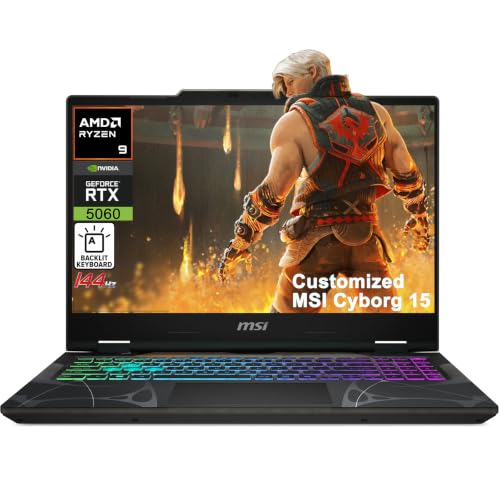


Pros
- High-refresh 240Hz display with excellent color accuracy and fast response times for competitive edge.
- Powerful Intel Ultra 9 and RTX 5070 combo handles demanding games and creative workloads with ease.
- Large 18-inch screen provides immersive gaming experience without sacrificing portability.
- Ample 32GB RAM and 1TB SSD deliver snappy performance and plenty of storage out of the box.
- Rich connectivity options including Thunderbolt 4, HDMI 2.1, and Wi-Fi 7 future-proof your setup.
Cons
- Premium price point may be steep for budget-conscious gamers.
- Large 18-inch chassis reduces portability and may require a spacious desk setup.
- Limited user reviews available, so long-term reliability and real-world performance are not yet widely confirmed.
The ASUS ROG Strix G18 G815 is a premium gaming laptop designed for enthusiasts who demand desktop-class performance in a portable form. Featuring an 18-inch 2560x1600 IPS display with a 240Hz refresh rate and 100% DCI-P3 color gamut, this laptop is built to deliver smooth, vibrant visuals for competitive gaming and content creation. Under the hood, it packs an Intel 24-core Ultra 9 275HX processor and an NVIDIA GeForce RTX 5070 GPU with 8GB GDDR7 memory, making it a beast for modern games, streaming, and multitasking.
For serious PC gamers, especially those into fast-paced esports titles like Valorant or Call of Duty, the 240Hz panel combined with a 3ms response time offers near-instantaneous visual feedback, reducing motion blur and giving you a competitive advantage. The high core-count processor also handles streaming and recording without hiccups, making it a solid choice for Twitch streamers and YouTube content creators. Casual gamers and open-world explorers will appreciate the large screen and vivid colors for immersive single-player experiences.
Build quality is typical of ASUS ROG's Strix lineup: a robust chassis with a sleek black finish, a 4-zone RGB backlit keyboard for customizable lighting, and a comprehensive port selection including Thunderbolt 4, HDMI 2.1 FRL, three USB-A 3.2 ports, and a USB-C 3.2 port. Wi-Fi 7 ensures fast wireless connectivity, while the included Windows 11 Pro and Copilot AI features enhance productivity. The 32GB of RAM and 1TB SSD mean you can jump straight into gaming without worrying about upgrades.
Setting up this laptop is straightforward: it comes with Windows 11 Pro pre-installed, and the ROG Armoury Crate software allows easy customization of performance profiles, RGB lighting, and cooling fans. The large 18-inch screen does require a spacious desk, but the anti-glare coating helps reduce reflections during long sessions. Maintenance is simple, with accessible panels for future RAM or SSD upgrades, though many users may not need them immediately.
One realistic limitation is the price: at over $2300, it's a significant investment. The laptop's size also makes it less portable than 15- or 16-inch models, so it's best suited for gamers who primarily use it at a dedicated desk. Additionally, since there are no user reviews yet, long-term reliability and thermal performance under heavy load remain unverified by the community.
Overall, the ASUS ROG Strix G18 G815 is a compelling choice for competitive gamers, streamers, and creators who want a large, high-refresh-rate display and top-tier internal specs. It's less ideal for those on a tight budget or who need maximum portability. If you're building a high-end gaming setup and want a laptop that can double as a powerhouse desktop replacement, this model deserves serious consideration.
The 18-inch 2560x1600 IPS display on the ASUS ROG Strix G18 G815 is a standout feature for gamers and content creators. With a 240Hz refresh rate and 3ms response time, it delivers exceptionally smooth motion in fast-paced games, reducing ghosting and input lag. The 100% DCI-P3 color coverage ensures vibrant, accurate colors, making it suitable for photo and video editing as well. The anti-glare coating helps maintain visibility in brightly lit rooms, and the 16:10 aspect ratio provides extra vertical screen real estate for productivity tasks. For competitive players, the high refresh rate and quick response give a clear edge in titles where every millisecond counts.
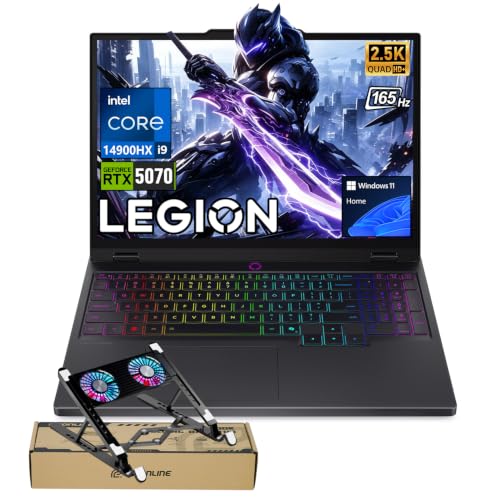


Frequently Asked Questions
Is 16GB RAM enough for modern gaming?
Most premium models listed here include 32GB of RAM, which is ideal for heavy multitasking. While 16GB handles current games, higher capacity helps with streaming and background apps. This extra memory ensures smoother performance during intensive workloads and future-proofing.
Can I upgrade the SSD or RAM?
Upgradeability varies significantly by model, so you must check the specific chassis design. Some laptops have soldered RAM, making upgrades impossible, while others allow easy SSD replacement. Always verify the internal layout before purchasing if you plan to expand storage later.
What is the difference between 144Hz and 240Hz?
A 240Hz display offers smoother motion and lower input lag compared to 144Hz. This difference is most noticeable in fast-paced competitive titles where reaction time is critical. For casual gaming, 144Hz is often sufficient, but 240Hz provides a sharper visual experience.
How loud are the fans under load?
Fan noise depends on the cooling system design and your chosen performance profile. Some models with triple-fan setups manage heat more quietly, while others prioritize maximum cooling. Users often report audible fan noise during heavy gaming sessions, which is normal for high-performance hardware.
Is the screen bright enough for outdoor use?
Brightness levels vary, with some models reaching 500 nits or higher. This level is generally suitable for indoor use but may struggle in direct sunlight. If you plan to use the laptop in bright environments, check the specific nits rating in the product description.





Write Your Review
No reviews yet. Be the first to share your experience!