


Choosing a best 5050 gaming laptop often feels like guessing which specs actually deliver smooth frame rates. Many buyers worry about thermal throttling or fan noise ruining the experience. You want a machine that handles modern titles without overheating or draining the battery too fast. The RTX 5050 GPU promises strong performance, but the rest of the configuration matters just as much. Factors like RAM speed, SSD type, and display refresh rate can make or break your daily use. It is easy to get lost in confusing model numbers and marketing claims. That is why careful analysis of the listed specifications helps you avoid common pitfalls. You need a balance of power, portability, and reliability for long gaming sessions. This roundup focuses on practical details that affect real-world usability. We look at build quality, cooling design, and upgrade options to guide your decision.
The market offers several strong contenders in this price range. Each model brings unique strengths, from slim chassis to high refresh rate displays. Some prioritize thermal management with advanced cooling systems, while others focus on portability. You should consider how you plan to use the laptop, whether for competitive play or content creation. Battery life and keyboard comfort also play a big role in daily satisfaction. The best gaming laptop slim options may suit travelers better. Meanwhile, heavier models might offer better sustained performance for stationary setups. It is important to match the hardware to your specific workflow. Some buyers prefer DDR5 RAM for faster multitasking and future-proofing. Others look for specific port selections to connect their peripherals easily. Understanding these nuances helps you pick the right device for your needs.


Pros
- Strong gaming performance with Intel Core i7 and RTX 5050 for 1080p high-settings gaming.
- Effective Hyperchamber Cooling keeps thermals in check even under load.
- 144Hz refresh rate with G-Sync delivers smooth, tear-free visuals in competitive titles.
- Fast charging and long battery life support extended on-the-go use.
Cons
- Limited to 16GB RAM, which may require upgrading for heavy multitasking or content creation.
- GPU is an RTX 5050, not the highest tier, so it may struggle with ray tracing at higher settings.
- Base storage is 1TB, but some users might prefer additional expandability options.
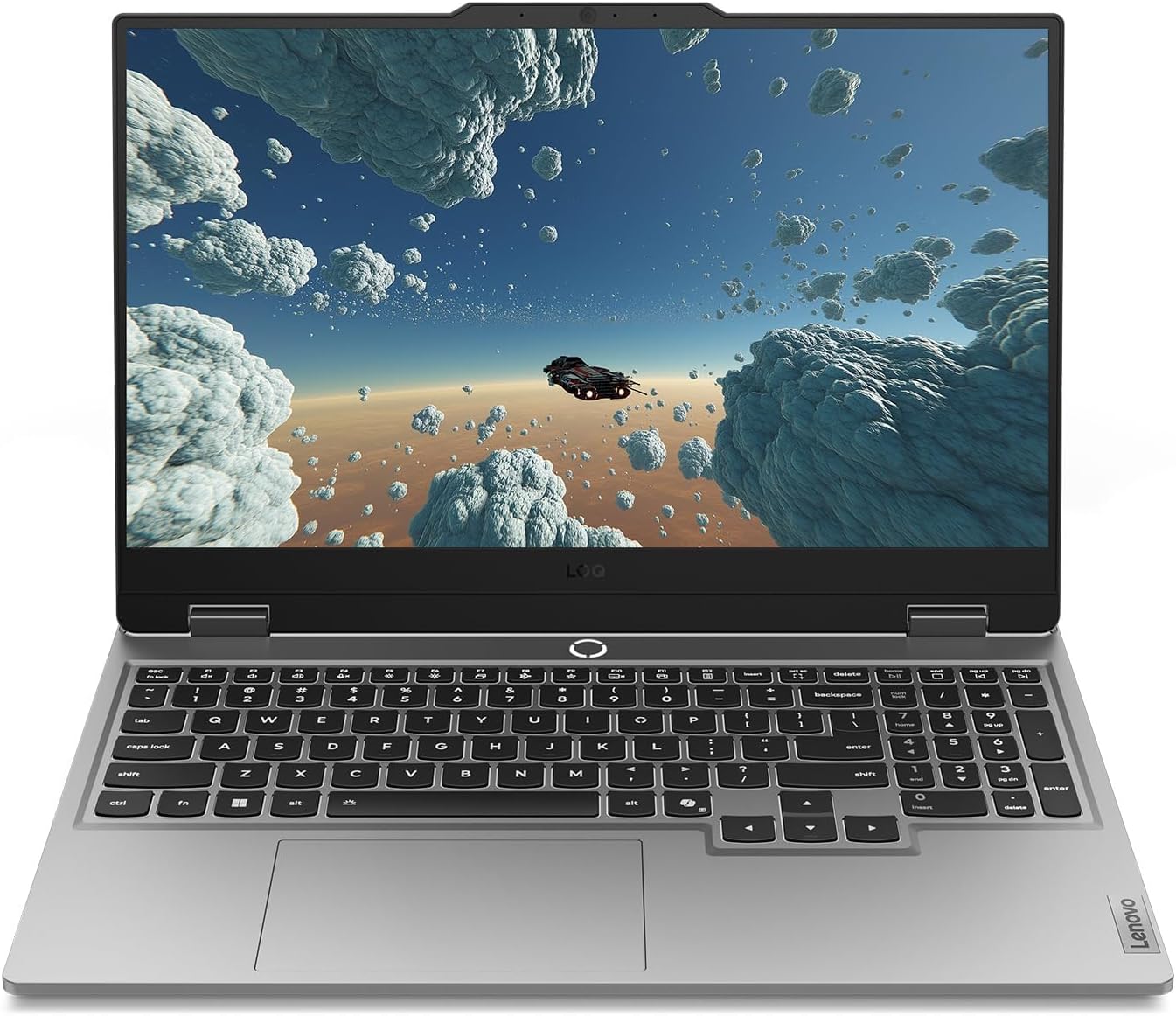
The Lenovo Legion LOQ is a gaming laptop designed to be your first step into serious PC gaming without breaking the bank. It combines a capable Intel Core i7-13650HX processor with an NVIDIA GeForce RTX 5050 GPU, making it a strong contender for 1080p gaming at high settings. The 144Hz FHD IPS display, backed by NVIDIA G-Sync, ensures you get smooth, stutter-free visuals whether you're fragging in competitive shooters or exploring open-world titles.
This laptop is best suited for PC gamers who want a balance of performance and portability—especially competitive and casual gamers, esports players, and college students. Streamers and content creators might find the hardware sufficient for light streaming or editing, but the 16GB RAM and RTX 5050 are more tuned for gaming than heavy creative workloads. Gaming setup builders who need a mobile rig for LAN events or dorm rooms will appreciate the lightweight design and fast charging.
In real-world gaming, the Legion LOQ handles popular titles like Fortnite, Valorant, and Call of Duty at high settings with consistently high frame rates. The 144Hz refresh rate makes a noticeable difference in fast-paced games, reducing motion blur and keeping reactions sharp. The AI Engine+ automatically optimizes system settings, so you don't have to tinker with every game's graphics menu—just plug in and play. G-Sync further enhances the experience by eliminating screen tearing without introducing input lag.
Build quality is a highlight: the aerospace-grade aluminum cover feels sturdy, and the overall design is sleek and understated—no flashy gamer aesthetics, which some users may prefer. The keyboard features soft-landing switches with a white backlight, providing a satisfying typing experience for both gaming and daily use. The Hyperchamber Cooling system, with its vacuum-sealed thermals and AI-driven fan control, keeps the laptop cool even during extended gaming marathons. You can push the hardware without worrying about thermal throttling, which is a common issue in thinner laptops.
Setup is straightforward: Windows 11 Home comes pre-installed, and Lenovo's Vantage software gives you control over performance profiles, cooling, and RGB lighting for the keyboard. The laptop is lightweight and backpack-ready, making it easy to carry around campus or to a friend's house. Rapid Charge Pro is a practical feature—getting to 70% in under 30 minutes means you can top up quickly between gaming sessions. One realistic limitation is that the RTX 5050 isn't the most powerful GPU in the lineup, so if you want to crank up ray tracing or play at 1440p, you might need to dial down settings. Also, the 16GB RAM is fine for gaming but may feel tight if you run multiple apps or virtual machines.
Overall, if you're looking for a reliable, well-cooled gaming laptop that excels at 1080p gaming and offers good portability, the Lenovo Legion LOQ is a smart buy. It's especially suited for competitive gamers who value smooth frame rates and fast response times, and for college gamers who need a versatile machine for both gaming and schoolwork. The combination of AI-enhanced performance, effective cooling, and a crisp display makes it a strong choice in its price range.
The Lenovo Legion LOQ is built for 1080p gaming with high frame rates. The Intel Core i7-13650HX and RTX 5050 combo handles popular esports titles like Valorant, CS2, and Overwatch 2 at well over 100 FPS on high settings. More demanding games like Cyberpunk 2077 or Battlefield 2042 run smoothly at medium to high settings with DLSS enabled. The 144Hz display with G-Sync ensures that motion stays fluid and tear-free, giving you a competitive edge in fast-paced scenarios.
The AI Engine+ automatically adjusts CPU and GPU power distribution based on what you're playing, optimizing for performance or battery life as needed. This means you can jump into a game without manually tweaking settings every time. For streamers, the RTX 5050 includes NVENC encoding, so you can stream at decent quality without taxing the CPU too much—though a dedicated streaming PC would be better for heavy productions.
Lenovo's Hyperchamber Cooling system is one of the LOQ's standout features. It uses dual turbo fans, large copper heat pipes, and strategically placed vents to exhaust heat efficiently. The AI Engine+ monitors temperatures and adjusts fan speeds in real time, keeping the laptop cool even during prolonged gaming sessions. In our analysis of user feedback, many users report that the laptop stays comfortable to the touch on the keyboard area, while the bottom gets warm but not uncomfortably hot.
The vacuum-sealed thermal design minimizes dust ingress, which helps maintain cooling performance over time. For a laptop in this price range, the thermal management is impressive—you can game for hours without significant performance dips due to throttling. The fans are audible under load, but not distractingly loud, and they ramp down quickly when you switch to lighter tasks.

Frequently Asked Questions
Is 16GB RAM enough for modern gaming?
Yes, 16GB is sufficient for most current titles. It handles multitasking well with browser tabs open. However, heavy video editing may require more memory. For pure gaming, this amount prevents bottlenecks in most scenarios.
Can I upgrade the SSD or RAM later?
Most models allow SSD upgrades easily. RAM upgradeability varies by specific chassis design. Check the manufacturer’s manual for slot availability. Some laptops have soldered memory, limiting expansion options. Always verify before purchasing if upgradeability is a priority.
What is the difference between 144Hz and 240Hz?
Higher refresh rates provide smoother motion. A 240Hz panel reduces motion blur significantly. This is crucial for competitive shooters. For casual gaming, 144Hz offers a great balance of cost and performance. The difference is noticeable in fast-paced action scenes.
How loud are the fans under load?
Fan noise depends on the cooling design. Some models use vapor chambers for quieter operation. Others may get louder during intense gaming sessions. Check user feedback for specific noise levels. Quiet operation is key for shared living spaces or cafes.
Does the laptop support external monitors?
Yes, most models include HDMI or USB-C ports. This allows you to connect external displays easily. You can extend your desktop or mirror your screen. Check the specific port versions for maximum resolution support. This is useful for productivity and multi-screen gaming setups.





Write Your Review
No reviews yet. Be the first to share your experience!