


You finally unbox that shiny new gaming monitor, plug in your console or PC, and… silence. No audio, no built-in speakers, just a blank audio jack staring back at you. That moment of frustration is all too common. Most gaming monitors skip integrated speakers to cut costs, reduce thickness, and keep input lag low. But that doesn’t mean you have to play in silence. Whether you’re into competitive shooters or open-world RPGs, missing audio kills immersion. So why do gaming monitors not have speakers in the first place? Manufacturers prioritize fast response times and high refresh rates over audio hardware. A thin bezel and lightweight build leave little room for decent drivers. The result: you either buy a monitor with built-in speakers or grab a separate set of desktop speakers. For those with tight desk space, a monitor that includes speakers can be a lifesaver. Before you decide, check out our guide on whether a 24 inch monitor is good for gaming to see if size matters for your setup. Also, if you’re on a budget, our roundup of best curved gaming monitors under $200 covers affordable options that often include audio.

Pros
- 240Hz refresh rate and 1ms MPRT deliver exceptional responsiveness for competitive gaming.
- VA panel provides high contrast and no backlight bleed common with IPS panels.
- Wide color coverage (130% sRGB) and HDR10 support for vibrant visuals.
- Built-in speakers are convenient for casual use or when desk space is limited.
- Affordable price point for a 27-inch curved gaming monitor with these specs.
Cons
- 1080p resolution on a 27-inch screen results in lower pixel density compared to 1440p or 4K monitors.
- Built-in speakers are basic 2W units - not ideal for immersive audio or streaming without dedicated speakers.
- No height adjustment or USB ports included, limiting ergonomic flexibility and peripheral connectivity.
The Amzfast 27-inch 240Hz curved gaming monitor is designed for PC gamers who want a high-refresh-rate display without spending a fortune. With a 240Hz refresh rate and 1ms MPRT (Moving Picture Response Time), this monitor aims to deliver smooth, tear-free gameplay in fast-paced titles like Valorant, Call of Duty, and Fortnite. The 1500R curvature adds a wraparound feel that can enhance immersion in open-world games or cinematic experiences.
This monitor is best suited for competitive gamers, esports players, and casual gamers who prioritize motion clarity over resolution. Streamers and content creators may also appreciate the 130% sRGB coverage and HDR10 support for editing photos or videos, though the 1080p resolution may limit detail compared to higher-resolution panels. College gamers and gaming setup builders on a budget will find the combination of 240Hz and VA contrast appealing for both gaming and general use.
Performance-wise, the fast VA panel offers a 4000:1 contrast ratio, which delivers deep blacks and vivid colors without the backlight bleed common on IPS monitors. This makes it a strong choice for dark scenes in horror games or movies. The Adaptive-Sync feature helps reduce screen tearing when paired with compatible graphics cards, though the monitor does not carry official G-Sync or FreeSync certification according to the product listing. The 300 nits brightness is adequate for indoor gaming, but may struggle in very bright rooms.
Build quality is typical for budget monitors: the stand offers basic tilt but no height or swivel adjustments, and the plastic construction feels sturdy enough for desk use. The thin bezels and curved design give it a modern look that fits well in gaming setups. The built-in 2W speakers are a practical addition for users who don't want external speakers, but they lack bass and volume for immersive audio - external speakers or a headset are recommended for proper gaming sound.
Setup is straightforward: the 27-inch panel attaches to the stand via VESA 100x100mm, and the included DP cable gets you 240Hz out of the box. The on-screen display (OSD) offers gaming presets like FPS, RTS, and RPG modes, plus crosshair overlays and black level adjustment. While there are no USB ports, the HDMI 2.0 and DP 1.4 inputs cover most modern PCs and consoles.
Realistically, the main limitation is the 1080p resolution on a 27-inch screen - text and fine details won't be as sharp as on a 24-inch 1080p or 27-inch 1440p monitor. Also, with zero user reviews at the time of writing, the actual longevity and quality control remain to be seen. However, the 1-year zero-bright-dot warranty is a positive sign for peace of mind. For a budget-conscious gamer who wants 240Hz without compromising on contrast or spending a lot, this monitor is a practical option worth considering.
The Amzfast 27-inch 240Hz curved monitor is built for speed. The 240Hz refresh rate and 1ms MPRT significantly reduce motion blur, making fast-moving targets appear clearer in competitive shooters like Overwatch and Apex Legends. Adaptive-Sync helps eliminate screen tearing when paired with modern GPUs, though the monitor lacks official G-Sync or FreeSync branding. The VA panel's 4000:1 contrast ratio ensures deep blacks and good dark-room visibility, which is useful for games with shadowy environments. While 1080p resolution is standard, the size and curvature can enhance peripheral vision in racing or flight sims. Overall, this monitor delivers responsive gameplay that meets the demands of most PC gamers.
The Amzfast monitor uses a fast VA panel that covers 130% sRGB and supports HDR10, providing vibrant colors and decent contrast for a budget display. The 4000:1 contrast ratio is a standout feature - it produces deeper blacks than typical IPS panels, which is great for watching movies or playing dark-themed games. The 300 nits brightness is sufficient for typical indoor lighting but may not be ideal for very bright rooms. The 1500R curvature matches the natural curve of the human eye, creating a more immersive viewing experience. However, at 27 inches and 1080p, the pixel density is lower than higher-resolution alternatives, so text and fine details may not be as crisp. For gamers who prioritize fluidity and contrast over razor-sharp clarity, this panel strikes a good balance.

Pros
- Clear, punchy audio with noticeable bass improvement over built-in laptop speakers.
- Easy plug-and-play setup with USB power and 3.5mm aux - no software or drivers required.
- Compact size fits well on smaller desks or next to a monitor without taking much space.
- RGB lighting adds a nice gaming vibe to any PC setup, with multiple modes to choose from.
- Affordable price makes it an easy upgrade for budget-conscious gamers or those building their first gaming PC.
Cons
- Audio quality is good for the price but won't match high-end speakers - lacks deep sub-bass and may distort at max volume.
- Limited physical controls - only a small knob for volume and on/off, no separate bass or treble adjustment.
- Cable management could be better - the USB and aux cables are non-detachable and may clutter a clean desk setup.
If you're a PC gamer or streamer looking to upgrade from those tiny, tinny laptop speakers, the BUSP-HYY Computer Speakers bring a welcome boost in audio quality and aesthetics to any gaming setup. These compact desktop speakers pack dual 3W drivers that deliver a fuller sound with enhanced bass and clearer highs, making them a solid choice for casual gaming, watching movies, or listening to music at your desk.
Designed for versatility, these speakers connect via a single USB cable for power and a 3.5mm aux input for audio. The plug-and-play simplicity means you can have them running in seconds on any Windows, Mac, or Chrome OS device, even newer laptops with USB-C thanks to the included adapter. The straightforward volume knob and front-facing headphone jack add everyday convenience, letting you switch between speakers and headphones for late-night gaming sessions or Discord calls without fumbling behind your PC.
One of the standout features for any RGB enthusiast or gaming setup builder is the six colorful lighting modes. From a flowing rainbow effect to a subtle breathing pulse or solid colors, the light bar across the front adds a personalized touch that syncs easily with your existing desktop vibes. While the lighting isn't addressable per-LED or software controlled, the on-board button cycles through modes quickly, keeping things simple and effective.
Build quality is decent for the price point, with a lightweight plastic housing that won't weigh down your desk. The 31.5-inch gap between the left and right speakers provides a decent stereo separation for a compact setup, though the non-detachable cables might complicate a clean cable management approach. Still, for the casual gamer, college student, or anyone building their first gaming PC on a budget, these speakers offer a noticeable step up from integrated monitor audio, especially in immersive open-world games or during Twitch streams where clear sound matters.
That said, audio purists or competitive esports players requiring pinpoint positional audio may find the bass a bit boomy at higher volumes and the lack of a dedicated subwoofer limits deep lows. The plastic build also feels less premium than pricier alternatives, but that's expected at this price tier. For everyday gaming, video calls, and content consumption, the BUSP-HYY speakers perform admirably, making them a practical, low-risk addition to any gaming desk or dorm room setup where space and budget are tight.

Pros
- Excellent value for a curved 120Hz monitor under $100
- Smooth 120Hz performance for casual and competitive gaming at 1080p
- Built-in speakers save desk space and simplify cable management
- VESA mount compatible for flexible desk or wall mounting
- 98% sRGB coverage provides accurate colors for media consumption
Cons
- Limited to HDMI for 120Hz input; VGA maxes out at 60Hz
- Built-in speakers are basic and lack bass for immersive audio
- 3000R curve is mild and may not feel as immersive as tighter curves
The Gawfolk 24.5-inch curved gaming monitor is a budget-friendly option designed for PC gamers who want a smooth, immersive display without breaking the bank. With a 3000R curvature, Full HD 1080p resolution, and a 120Hz refresh rate, this monitor aims to deliver fluid visuals for casual gaming, streaming, and everyday use.
This monitor is best suited for casual gamers, college students on a budget, work-from-home users, and those building a secondary gaming setup. While competitive esports players may prefer higher refresh rates or faster response times, the 120Hz panel combined with 1ms MPRT response provides a noticeable upgrade over standard 60Hz monitors, especially in fast-paced titles like Fortnite, Apex Legends, or racing games. The 1080p resolution keeps performance light, making it a good match for mid-range PCs or laptops.
In terms of real-world performance, the VA panel delivers strong contrast (3500:1) and decent color coverage (98% sRGB), so games and movies look vibrant and deep. The 120Hz refresh rate works via HDMI 2.0, while the VGA port is limited to 60Hz, so make sure to use HDMI for the best experience. The built-in speakers are convenient for basic audio, but they lack bass and volume, so dedicated speakers or a headset are recommended for serious gaming sessions.
Build quality is typical for an entry-level monitor – a sturdy plastic frame, a simple tilt-adjustable stand, and VESA 75x75mm compatibility for wall or arm mounting. The monitor is lightweight (just over 6 pounds) and easy to set up out of the box. Cable management is minimal since the monitor only has two video inputs and a power port, but you’ll still want to keep cables tidy behind your desk.
One realistic limitation is the lack of DisplayPort, which means you can’t push 120Hz on some modern GPUs without HDMI. The 3000R curve is subtle, so it won’t give you the full wraparound feel of a tighter curve, but it helps reduce reflections and adds a slight immersive touch. The built-in speakers are fine for system sounds or YouTube, but not for competitive audio cues.
Overall, the Gawfolk 24.5-inch curved monitor is a solid choice if you’re after a low-cost, high-refresh-rate display for casual gaming, dual-monitor productivity, or a budget gaming PC build. It’s not meant for hardcore esports or color-critical work, but for everyday gaming and media, it delivers great value. If you need a curved monitor that won’t empty your wallet, this is worth considering.

Pros
- Excellent 200Hz refresh rate at a budget-friendly price point, ideal for competitive gamers.
- 1500R curvature enhances immersion without distracting reflections.
- Includes an HDMI cable and supports both HDMI and DisplayPort for easy connectivity.
- Metal stand feels sturdy and stable once assembled, with 5-15 degree tilt for basic ergonomics.
- 130% sRGB color gamut and HDR support provide vibrant colors out of the box.
Cons
- Built-in speakers are adequate for casual use but lack bass and volume for immersive gaming or streaming.
- Stand offers tilt only, no height or swivel adjustment, which may require a VESA arm for optimal posture.
- FHD 1080P resolution is less sharp than 1440p or 4K, especially for productivity and content creation tasks.
The SANSUI 27-inch curved gaming monitor is a practical choice for PC gamers who want a high refresh rate without breaking the bank. With a 200Hz refresh rate and 1ms MPRT response time, this monitor is well-suited for competitive titles like Call of Duty, Valorant, and Apex Legends, where smooth motion and quick reactions matter. The 1500R curvature wraps around your peripheral vision, making it easier to stay immersed during long gaming sessions or when exploring open-world environments.
This monitor is best suited for budget-minded PC gamers, casual players, esports enthusiasts, and streamers who need a fast display for both gaming and daily multitasking. The inclusion of FreeSync helps eliminate screen tearing when paired with compatible AMD or NVIDIA graphics cards. While the built-in 2x2W speakers won't replace a dedicated headset or desktop speakers, they work fine for system sounds, YouTube, or quick game sessions without additional amplification.
Build quality is solid for the price point. The metal stand feels stable and the 27-inch VA panel delivers a 3000:1 contrast ratio, producing deeper blacks than many IPS monitors in this range. The 130% sRGB color gamut and Delta E less than 2 ensure reasonably accurate colors for photo editing or content creation, though the FHD resolution limits sharpness compared to higher-res options. The monitor also includes low blue light and anti-glare coatings to reduce eye fatigue during hours of use.
Setup is straightforward thanks to plug-and-play compatibility. The included HDMI cable is convenient, though you may want to use a DisplayPort cable for full 200Hz support on some GPUs. The monitor automatically detects input signals, so switching between PC and console is hassle-free. VESA mount support (100x100mm) gives you the flexibility to use a monitor arm or wall mount if the tilt-only stand doesn't suit your desk arrangement.
A realistic limitation is the lack of height or swivel adjustment on the stock stand. If you need precise ergonomic positioning, you'll likely need to invest in a VESA arm. Additionally, the 1080P resolution is less ideal for productivity tasks like video editing or large spreadsheets, where a higher pixel density helps. But for the price, the trade-off is understandable.
Overall, the SANSUI 27-inch curved gaming monitor is a strong recommendation for gamers who prioritize high refresh rates and smooth gameplay over resolution. It's a smart addition to a gaming setup on a budget, whether for a dorm room, home office, or dedicated streaming station. If you can work around the basic ergonomics and modest speakers, this monitor offers impressive speed and value for the money.

Pros
- 120Hz refresh rate for smoother motion in gaming and everyday use.
- Affordable price point for budget-conscious PC gamers.
- Built-in speakers reduce need for external audio.
- VESA mount compatible for flexible desk setup.
- White aesthetic fits well with white-themed gaming rigs.
Cons
- Only 1080p resolution; not suitable for high-end 4K gaming.
- Limited connectivity (HDMI 2.0 and VGA, no DisplayPort).
- Curved 3000R may not appeal to users preferring flat panels for competitive gaming.
The Gawfolk 24.5-inch curved gaming monitor is a budget-friendly option designed for casual PC gamers, streamers, and college students who want a smoother visual experience without spending a lot. With a 120Hz refresh rate and Full HD 1080p resolution, it aims to deliver fluid motion and decent clarity for everyday gaming, video streaming, and productivity tasks.
When it comes to real-world gaming performance, the 120Hz panel significantly reduces motion blur compared to standard 60Hz monitors. This makes a noticeable difference in fast-paced titles like Overwatch or Apex Legends, where quick reactions matter. The 3000R curvature wraps around your field of view, adding a subtle sense of immersion during open-world games or movie nights. The 3500:1 contrast ratio also helps produce deeper blacks and brighter highlights, making dark scenes in horror games or films look more detailed.
Build quality is typical for an entry-level monitor. The white plastic housing has a clean aesthetic that matches white-themed PC builds. It includes built-in stereo speakers, which are adequate for casual listening or quick YouTube videos but won't replace dedicated desktop speakers for immersive audio. The VESA 75x75mm mounting pattern allows you to attach it to a monitor arm or wall bracket, freeing up desk space and improving ergonomics. The screen also tilts 5 to 15 degrees for a better viewing angle.
Setting up the monitor is straightforward. It comes with an HDMI 2.0 cable and a VGA cable, so you can connect modern gaming consoles and laptops as well as older PCs. The on-screen display menu is easy to navigate for adjusting brightness, contrast, and color settings. A potential limitation is the lack of DisplayPort, which some PC gamers may prefer for higher refresh rates at lower latencies. Additionally, the 1080p resolution means you won't get the sharpest details for productivity or high-end gaming, but it's perfectly fine for casual use.
Overall, the Gawfolk 24.5 curved monitor is a solid entry-level choice for budget-conscious gamers and streamers building their first gaming setup. Its 120Hz refresh rate and curved screen offer tangible gaming improvements over basic office monitors. However, competitive esports players or those seeking a higher resolution or faster response times should consider more premium options. For casual gaming, media consumption, and light productivity, this monitor delivers good value at an attractive price.
The Gawfolk monitor features a 24.5-inch VA panel with 1920x1080 Full HD resolution. The 120Hz refresh rate ensures smooth scrolling and reduced motion blur in games and daily tasks. Color reproduction is decent for the price, with the 3500:1 contrast ratio giving good depth to dark and bright scenes. Viewing angles are average - typical for VA panels - some color shift occurs when viewing from extreme angles. The 3000R curvature is mild enough to minimize distortion while adding a pleasant wraparound feel.
The monitor includes one HDMI 2.0 port and one VGA port, allowing connection to modern PCs, consoles, and older devices. A 3.5mm audio jack is present for headphones as the built-in speakers are basic. The VESA 75x75mm mount enables arm or wall mounting. Setup takes minutes - simply connect the included cables and adjust tilt from 5 to 15 degrees. The OSD control buttons are located on the bottom edge for adjusting settings.

Pros
- Very affordable entry point for adding sound and RGB to a gaming setup.
- Simple and intuitive controls for volume and lighting.
- Compact footprint ideal for small desks or cluttered battlestations.
- No external power brick needed – powered entirely by USB.
Cons
- Only 10W total output; not suitable for filling a large room or serious bass needs.
- No Bluetooth or wireless connectivity – relies on 3.5mm AUX cable.
- Build feels lightweight and may not be as sturdy as higher-end speakers.
The OROW 10W RGB Computer Speakers (model S201) are an ultra-budget-friendly option for PC gamers and desktop users looking to add both sound and style to their setup without spending a lot. These compact speakers pack a pair of 5W drivers and a bass diaphragm for low-frequency enhancement, delivering clear stereo audio that works well for casual gaming, YouTube videos, music, or even Discord calls. The standout feature is the dynamic RGB lighting, which can be toggled on or off with the volume knob – a nice touch for gamers who want to match their desk's aesthetic or go minimalist.
These speakers are best suited for casual gamers, college gamers, work-from-home users, or anyone building a budget gaming setup. If you're a competitive esports player relying on pinpoint audio cues, you'll want something more powerful, but for everyday use and immersive game atmospheres, the OROW speakers get the job done. The plug-and-play setup is a major plus: just plug the USB into your computer for power, connect the 3.5mm AUX cable to your device, and you're good to go. No drivers or software required.
In real-world use, the sound quality is decent for the price. The dual drivers produce clear mids and highs, and the bass diaphragm adds a bit of thump without distortion at moderate volumes. However, don't expect earth-shaking lows – these are not meant to replace a dedicated subwoofer. The compact size means they fit easily on even a cluttered desk, and the volume knob is conveniently placed on the right speaker for quick adjustments during a gaming session. Many users appreciate being able to turn off the RGB lighting with a simple press of the knob, which is handy when you want to watch a movie in a dark room.
Build quality is adequate for the price point. The ABS varnish finish looks sleek and resists scratches, but the overall construction feels lightweight and plastic. That's expected at this price, but it means you should handle them with care. The 3.5mm AUX connection is universal, so you can plug them into any device with a headphone jack – PCs, laptops, tablets, smartphones, and even some game consoles (though you'll need a USB power source for the speakers). One limitation is the lack of Bluetooth, so you're tethered by the cable. Also, the speakers are only 10W total, so they won't fill a large room; they're best for close-range listening at a desk.
Setup and maintenance are as simple as it gets. No software to install, no complicated wiring – just place the speakers, connect the cables, and adjust the volume. Cleaning is easy thanks to the smooth finish; just wipe with a dry cloth. The speakers also have a rubber base to prevent slipping. For a $20 pair of gaming speakers, the OROW S201 offers surprising value for those who prioritize convenience and RGB aesthetics over raw power.
If you're a budget-minded PC gamer, a streamer just starting out, or someone who wants to add a bit of life to your desktop without breaking the bank, the OROW 10W RGB Computer Speakers are a practical purchase. They complement a gaming setup nicely, especially for users who already have good headphones but want some desk sound for casual use. Just keep your expectations realistic – these are entry-level speakers that focus on affordability and looks, not audiophile-grade performance. For the price, they deliver exactly what they promise: simple, colorful, desktop audio.
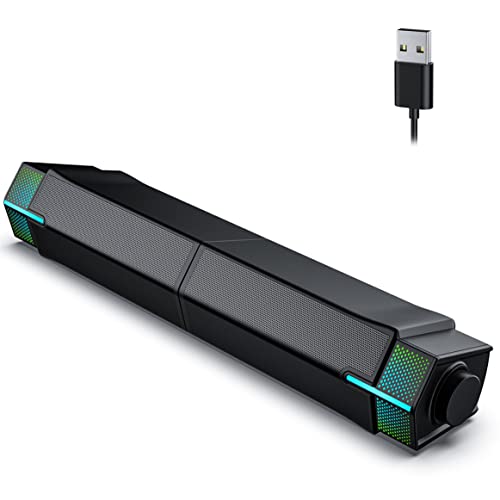
Pros
- Affordable price point makes it accessible for budget-conscious gamers and streamers.
- Compact design saves desk space and can be configured to fit various monitor setups.
- Easy plug-and-play installation with no software required.
- Gradient RGB lighting adds visual flair to any gaming or streaming setup.
Cons
- Limited 10W total output may not fill a large room with sound.
- USB cable provides both power and audio, which may limit placement options.
- Some users may prefer a dedicated subwoofer for deeper bass in games.
The Jeecoo M20 Bluetooth Computer Speakers are a versatile audio solution designed for PC gamers, streamers, and anyone looking to enhance their desktop setup without breaking the bank. These compact speakers function as a sound bar that can be split into two separate units thanks to a clever slideway at the base. This design allows you to customize your desk layout by either combining them for a unified look or separating them for wider stereo separation.
For gaming and streaming, the M20 delivers clear and crisp stereo sound with a total output of 10W (5W per channel). While it won't rattle the walls, it provides enough volume and clarity for casual gaming sessions, Discord calls, and background music during streams. The gradient RGB lighting adds a nice visual touch, cycling through colors to match your gaming setup's aesthetic. You can also turn the lighting off if you prefer a cleaner look.
Connectivity is straightforward with Bluetooth V5.3 for wireless pairing with phones or tablets, and a USB cable that handles both power and audio when connected to a computer. The single-cable solution keeps your desk tidy, though it does mean the speakers need to stay near a USB port. The one-button control is intuitive: long press for power, single click to cycle RGB modes, double click to switch between Bluetooth and wired mode, and a rotary knob for volume.
Setup is truly plug-and-play with no extra software required. Just plug the USB into your PC or laptop, adjust the audio settings in your system, and you're good to go. This makes it ideal for college gamers or anyone who wants a quick audio upgrade without dealing with complicated installations.
One limitation is the overall power output. For competitive gamers who rely on immersive audio cues in FPS games like Valorant or Call of Duty, the M20 may lack the depth and bass needed for precise directional sound. Similarly, streamers looking for rich, room-filling audio might want to consider a more powerful system. However, for casual gaming, YouTube, and everyday desktop use, the M20 performs admirably.
In summary, the Jeecoo M20 is a practical and affordable choice for PC gamers, streamers, and content creators who want a compact, customizable audio solution with RGB flair. It's especially well-suited for small desk setups, dorm rooms, or home offices where space is at a premium. If you're looking for a budget-friendly way to upgrade your desktop audio with a touch of style, the M20 is worth considering.
Frequently Asked Questions
Do gaming monitors have built-in speakers?
Yes, some do, but it’s not standard. Most gaming monitors focus on fast panels and low input lag, leaving out speakers to save space and cost. Models like the SANSUI 27-inch and Gawfolk 24.5-inch include basic drivers, but audio quality is limited. If you want decent sound, external speakers or headphones are usually better. For more on monitor features, read our best 240Hz OLED gaming monitor guide.
Can I use a monitor without speakers?
Absolutely. Just connect external speakers or a headset to your PC, console, or monitor’s audio out jack. Many gaming PCs have 3.5mm ports or USB, and consoles can use optical or HDMI audio. The monitor itself doesn’t produce sound, but you can still get audio through other devices. That’s the whole reason why do gaming monitors not have speakers matters: you need a plan for audio.
What is the best cheap solution for monitor audio?
A pair of USB-powered desktop speakers is the cheapest fix. Products like the Jeecoo M20 or OROW 10W RGB speakers cost under $20 and plug directly into your PC. They take up little desk space and often include RGB lighting to match your setup. If you need something even simpler, some monitors with built-in speakers exist in the $13.99 to $139.89 range.
Are monitor speakers good enough for gaming?
For casual games and basic system sounds, yes. But for competitive titles or immersive story games, built-in monitor speakers usually lack bass and clarity. They’re typically 2W to 5W drivers that distort at higher volumes. If you’re serious about esports or AAA gaming, invest in a dedicated gaming headset or a soundbar. That said, monitors with upgraded speakers (like the Amzfast 27-inch with 2x2W) can work in a pinch.
Why don’t high-end gaming monitors include speakers?
High-end monitors target competitive players who use external audio anyway. Including speakers adds weight, cost, and can cause vibration that affects panel performance. Instead, manufacturers put money into faster response times, higher refresh rates, and better HDR. So the answer to why do gaming monitors not have speakers on flagship models is simple: they’re built for pure performance, not multimedia.


Write Your Review
No reviews yet. Be the first to share your experience!