


Dropping into a high-stakes Warzone circle demands hardware that won’t flinch during crowded firefights or sudden smoke grenade drops. Frame drops and micro-stutters don’t just ruin your immersion; they cost you critical gunfights when milliseconds decide who visits the Gulag. Securing the best gaming desktop for call of duty means locking in fluid frame pacing, fast asset streaming, and dependable cooling so your system never throttles under heavy load. A balanced rig pairing modern multi-core processing with capable graphics ensures your 1% low framerates stay well above the refresh rate of your monitor.
Based on our careful analysis of manufacturer specifications and user feedback, thermal headroom and fast NVMe storage make a world of difference for modern tactical shooters. Large map updates and high-resolution texture streaming quickly bog down sluggish drives, making high-speed NVMe SSD storage and dual-channel memory essential for responsive gameplay. Whether you want an entry-level battlestation or a dedicated air-cooled gaming PC designed to keep temperatures steady across marathon sessions, system synergy matters more than chasing flashy aesthetics. Investing in a properly balanced build eliminates hardware bottlenecks so your focus stays squarely on target acquisition and tactical movement.

Pros
- Solid 1080p gaming performance for popular titles at medium to high settings
- Large 1TB SSD provides fast boot times and ample storage for games and media
- Modern connectivity with WiFi 6 and Bluetooth 5.2 for low-latency online play
- Attractive white case with four RGB fans enhances any gaming desk setup
- Includes Windows 11 Home and a 1-year support warranty for hassle-free ownership
Cons
- Radeon RX 6500 4G GPU may struggle with newer AAA titles at higher settings or resolutions above 1080p
- Only 16GB of DDR4 RAM is decent but not future-proof for heavy multitasking or content creation
- Limited upgrade potential due to proprietary components and case design
The STGAubron Gaming PC Desktop (model ABR1722) is a pre-built tower designed for gamers who want a straightforward, no-fuss entry into PC gaming without the hassle of building their own system. Powered by an AMD Ryzen 5 5600GT processor and a Radeon RX 6500 4G dedicated graphics card, this rig targets 1080p gaming at solid frame rates. It comes with 16GB of DDR4 RAM, a 1TB SSD, and Windows 11 Home pre-installed, making it a complete package right out of the box.
This PC is best suited for casual gamers, college students, and budget-conscious buyers who play popular titles like Fortnite, Valorant, Apex Legends, and Minecraft. It can handle these games at medium to high settings with 60+ FPS, according to the product description. The Ryzen 5 5600GT's six cores and twelve threads also make it capable for light productivity tasks like video editing, streaming, or day trading, though the RX 6500 GPU is the main limiting factor for more demanding AAA games or higher resolutions.
Build quality is typical for a budget pre-built: a white steel case with a tempered glass side panel and four pre-installed RGB fans that provide decent airflow and a flashy look. The RGB fans are controlled via a simple remote or motherboard header, letting you customize the lighting to match your setup. The case includes basic cable management, but the interior may feel a bit cramped for future upgrades. Connectivity is a strong point, with WiFi 6 and Bluetooth 5.2 built in, plus one HDMI and one DisplayPort output for your monitor.
Setting up this PC is as simple as plugging in your monitor, keyboard, and mouse, then powering it on. Windows 11 Home handles the rest, and the included RGB keyboard and mouse are functional for immediate use. The 1TB SSD ensures fast boot times and quick game loads, while the 16GB of RAM is enough for most gaming and multitasking scenarios. Maintenance involves occasional dusting of the fans and case vents to keep airflow optimal.
One realistic limitation is the graphics card: the Radeon RX 6500 4G is entry-level, so don't expect to run Cyberpunk 2077 at ultra settings or game at 1440p. The 16GB of RAM is adequate now but may feel limiting in a few years as games demand more memory. Also, the proprietary power supply and motherboard may restrict future upgrades, so this is best viewed as a complete system rather than a platform for heavy modification.
Overall, the STGAubron Gaming PC offers good value for its price point, especially for gamers who want a white-themed, RGB-lit desktop that's ready to play popular titles right away. It's a practical choice for dorm rooms, home offices, or casual gaming setups where convenience and aesthetics matter more than raw performance. If you're a competitive esports player or a content creator needing more GPU power, you might want to look at higher-end options, but for most casual and college gamers, this PC gets the job done.

Pros
- Unique collectible that actually serves a practical purpose
- Sturdy build with a weighted base for reliable device support
- Officially licensed by Activision with authentic Monkeybomb design
- Compatible with most smartphones, small tablets, and standard controllers
- Compact footprint - fits easily on crowded desks or shelves
Cons
- Limited to one specific character design - may not fit all gaming room themes
- May not accommodate large tablets or non-standard controller shapes
- Figure is non-adjustable - device placement depends on the fixed arm position
The Exquisite Gaming Call of Duty Monkeybomb stand is a clever crossover between a collectible figure and a practical desk accessory. Designed as a mini replica of the iconic exploding monkey from the game, this 8.5-inch PVC figure serves as a holder for your phone, controller, or small tablet. It's a niche product that blends fandom with everyday organization, making it a solid pick for PC gamers who want their gaming setup to reflect their favorite titles.
This stand is best suited for Call of Duty enthusiasts, casual gamers, and collectors who value themed decor. If you have a gaming desk that already features other game-inspired peripherals or RGB accents, the Monkeybomb adds a playful focal point. It's also a great conversation starter for streamers or content creators who want a recognizable prop on camera. That said, it's not a high-performance accessory - its job is to hold your gear safely, not to enhance gaming responsiveness or input speed.
When it comes to real-world performance, the stand delivers exactly what it promises. The heavy-duty PVC construction feels solid, and the wide base keeps devices from tipping over during aggressive gameplay or accidental bumps. Your phone or controller sits securely in the figure's grip, and you can easily retrieve it without any wobble. While it won't affect your gaming latency or refresh rate, it does help clear desk clutter, which can improve your overall setup's comfort and cable management.
Build quality is decent for the price point. The PVC material is durable and should hold up well over time, though it's not as premium as resin or metal collectibles. The paint job is clean, and the licensed design matches the in-game monkey bomb accurately. One practical limitation is the fixed arm position - you'll need to center your device carefully, and larger tablets or unusually shaped controllers might not fit. Also, because it's a single figure, you can't adjust the angle or height of the holder.
Setup couldn't be simpler: just unpack it, place it on your desk, and drop your device into the holder. No software, cables, or assembly required. Cleaning is easy too - a quick wipe with a microfiber cloth keeps it dust-free. The main maintenance concern is avoiding direct sunlight, which could fade the paint over time.
In summary, the Monkeybomb stand is a fun, functional accessory that's best for themed gaming setups. It won't revolutionize your gaming performance, but it will organize your essentials while showing off your love for Call of Duty. If you're a collector or a casual gamer who enjoys unique desk items, it's worth the modest investment. For competitive gamers or those with minimal desk space, a simple adjustable stand might be more practical. But for the right person, this figure adds genuine character to any PC gaming corner.

Pros
- Delivers 60+ FPS in most current games at 1080p
- Good value for a complete pre-built system
- Includes RGB peripherals and modern WiFi 6
- Lifetime tech support adds peace of mind
Cons
- RTX 3050 6GB may struggle with ray tracing at higher settings
- 512GB SSD fills up quickly with modern games
- No details on RAM speed or motherboard quality
The STGAubron Gaming PC Desktop is a budget-friendly pre-built system designed for gamers who want a plug-and-play experience without building their own rig. It's best suited for casual gamers, college students, work-from-home gamers, and anyone looking to jump into PC gaming without a high upfront cost. This system aims to deliver solid 1080p performance at a reasonable price point.
Under the hood, the Intel Core i7 processor (up to 3.9 GHz) and NVIDIA GeForce RTX 3050 6GB graphics card handle popular titles like Fortnite, Call of Duty Warzone, Escape from Tarkov, and Elden Ring at 60+ FPS. The 16GB of RAM and 512GB SSD ensure fast boot times and smooth multitasking for gaming alongside Discord or streaming. WiFi 6 and Bluetooth 5.0 provide reliable wireless connectivity, while the six pre-installed RGB fans offer decent airflow and a customizable aesthetic.
Build quality is typical for a budget pre-built. The case is functional with a black finish, and the included RGB mouse and keyboard are basic but serviceable for getting started. The six RGB fans add visual flair and adequate cooling for the components, but don't expect premium materials or extensive cable management. The system is also equipped with multiple display outputs (HDMI, DisplayPort, DVI) for easy monitor setup.
Setup is straightforward: unbox, connect peripherals and monitor, plug in power, and boot into Windows 11 Home. The system is ready to go within minutes. However, the 512GB SSD is on the smaller side for storing multiple large games, and the RTX 3050 6GB is not ideal for ray tracing or high-refresh-rate 1440p gaming. The RAM configuration and power supply quality are not specified, which may concern some enthusiasts.
For its price, this STGAubron PC is a practical entry point for 1080p gaming and everyday productivity. It can handle streaming and light content creation, but heavy video editing or 3D rendering may push its limits. If you're a beginner gamer or want a spare system for a dorm room or home office, this desktop offers good value. More experienced gamers may prefer a custom build with faster storage and a stronger GPU.

Pros
- Generous 16GB RAM and 512GB NVMe SSD for fast performance.
- Includes keyboard, mouse, and mouse pad for a complete starter setup.
- RGB fans and case lighting add visual appeal without extra cost.
- WiFi connectivity eliminates need for wired Ethernet.
- Affordable price point for entry-level gaming.
Cons
- RX550 graphics card is entry-level and may struggle with demanding modern AAA titles at higher settings.
- Only 512GB storage may fill up quickly with large game files; consider adding more storage later.
- Limited to 4GB VRAM, which could be a bottleneck in texture-heavy games.
The abytespark Prebuilt Gaming PC Desktop is a budget-friendly tower designed for gamers who want a straightforward, ready-to-play system without the hassle of building their own. Featuring an Intel Core i5 processor, AMD Radeon RX550 GPU with 4GB GDDR5 memory, 16GB of RAM, and a 512GB NVMe SSD, this white case setup also includes four RGB fans and comes with Windows 11 pre-installed. It's best suited for casual gamers, streamers just starting out, college students, or anyone working from home who needs a capable PC for both productivity and light gaming.
In terms of real-world gaming performance, this PC can handle popular titles like Fortnite, Apex Legends, Overwatch, CSGO, and League of Legends at 50+ FPS on medium settings. The RX550 is not a powerhouse, but it delivers smooth framerates for esports and older games. For competitive gamers focused on low-latency responsiveness, the combination of the i5 and 16GB RAM ensures minimal stutter during gameplay. However, don't expect to run Cyberpunk 2077 or modern AAA games at high settings - this PC is built for accessibility, not high-end graphics.
Build quality is decent for the price point. The white tower is compact and lightweight at 13 pounds, making it easy to move or fit in a dorm room. The four RGB fans provide adequate airflow for the components, and the included RGB case lighting adds a nice touch for setup aesthetics. The package also comes with a basic gaming keyboard, mouse, and mouse pad, so you can start gaming right away. Connectivity is solid with WiFi 5, 2x USB 3.0, 6x USB 2.0, HDMI, DisplayPort, and DVI outputs.
Setup is incredibly simple - just plug in the power, connect your monitor and peripherals, and you're ready to go. The included Windows 11 Home 64-bit means no OS installation is needed. Cable management inside the case is adequate, though you may want to tidy up a bit for optimal airflow. The lifetime free technical support is a nice bonus for new PC users who might need help with software or upgrades.
Realistically, the main limitations are the RX550's 4GB VRAM and the 512GB SSD, which can fill up fast with modern game installations. If you plan to play many AAA titles or store large media files, you'll want to add a secondary hard drive or external storage. Additionally, the included peripherals are basic - serious gamers may want to upgrade to a better mouse and keyboard for improved comfort and precision.
Overall, the abytespark Prebuilt Gaming PC is a great choice for budget-conscious gamers, students, or anyone new to PC gaming who wants a functional, attractive system without breaking the bank. It handles esports and casual titles well, looks good on a desk, and comes with everything needed to get started. If you're a competitive gamer aiming for high refresh rates or max settings, you'll want to look at a more powerful rig, but for entry-level use, this PC delivers solid value.

Pros
- Great value for entry-level 1080p gaming with included peripherals
- Ample 16GB RAM and 512GB SSD for smooth multitasking and fast boot times
- RGB lighting and four fans add visual flair and decent airflow
- Lifetime technical support is a nice bonus for beginners
Cons
- RX 560 is an older GPU; won't run demanding AAA titles at high settings
- Only 4GB VRAM may limit texture quality in newer games
- WiFi 5 is outdated; WiFi 6 would be better for modern streaming and downloads
The Tisukisu prebuilt gaming PC is a budget-friendly tower designed for gamers who want a no-fuss entry into PC gaming. It pairs an Intel Core i5 processor (up to 3.6GHz) with an AMD Radeon RX 560 4GB graphics card, 16GB of RAM, and a 512GB SSD. This combination targets 1080p gaming at medium settings for popular titles like Fortnite, Apex Legends, and Overwatch, with the manufacturer claiming 50+ FPS in many of these games. It's best suited for casual gamers, college students on a budget, or anyone looking for a ready-to-play desktop without building their own.
In real-world use, the system should handle everyday tasks like web browsing, streaming video, and office work with ease thanks to the 16GB RAM and SSD. For gaming, the RX 560 is an older entry-level card, so you'll want to stick to less demanding titles or lower graphics presets. Competitive gamers playing esports titles like CSGO or League of Legends will likely see smooth frame rates, but don't expect to run Cyberpunk 2077 or modern AAA games at high settings. The included 512GB SSD is fast for booting and loading games, but you may need to add more storage for a large library.
Build quality is typical for a budget prebuilt: a compact tower with a side panel window and four RGB fans for decent airflow. The case is lightweight at 7 pounds, making it easy to move around. The RGB lighting is a nice touch for gamers who want a colorful setup without extra work. Connectivity includes 2x USB 3.0, 6x USB 2.0, HDMI, DisplayPort, DVI, and WiFi 5. WiFi 5 is adequate for most households, but if you have a fast internet plan, you might miss WiFi 6 for faster downloads.
Setup is incredibly straightforward: plug in the included keyboard, mouse, and monitor, connect to WiFi, and you're gaming in minutes. The included peripherals are basic but functional, so you can start playing immediately. The lifetime free technical support is a standout feature for less experienced users who might need help with software or upgrades. Maintenance is simple thanks to the tool-less side panel access to internals.
Realistic limitations include the older GPU and only 4GB VRAM, which will struggle with modern AAA titles at higher settings. The case is compact, so upgrading to a larger graphics card may be tight. The 512GB SSD fills up quickly with modern games. WiFi 5 is fine for casual use but not ideal for competitive online gaming where low latency matters. The included keyboard and mouse are basic membrane units, not mechanical, so serious gamers may want to upgrade.
Overall, the Tisukisu prebuilt gaming PC is a solid value for its price point, offering a complete package for casual gaming and everyday computing. It's a great choice for a first gaming PC, a dorm room setup, or a secondary system for light gaming and work. If you're a competitive gamer or want to play the latest AAA titles, you'll want to invest in a more powerful GPU. But for budget-conscious buyers who just want to play popular games without fuss, this PC delivers.
Pros
- Solid 1080p gaming performance with RTX 2060 at 60+ FPS in popular titles
- Generous 16GB DDR4 RAM and 512GB SSD for fast multitasking and storage
- Built-in WiFi and Bluetooth for easy wireless connectivity without dongles
- Four RGB fans offer good cooling and customizable lighting aesthetics
- Comes with Windows 11 Home, RGB keyboard, and mouse for a complete out-of-box setup
Cons
- Older Ryzen 5 2600 CPU may bottleneck newer GPUs in CPU-intensive games
- Only 512GB SSD may fill quickly with modern games; additional storage may be needed
- Case design and cooling may not support heavy overclocking or high-end upgrades
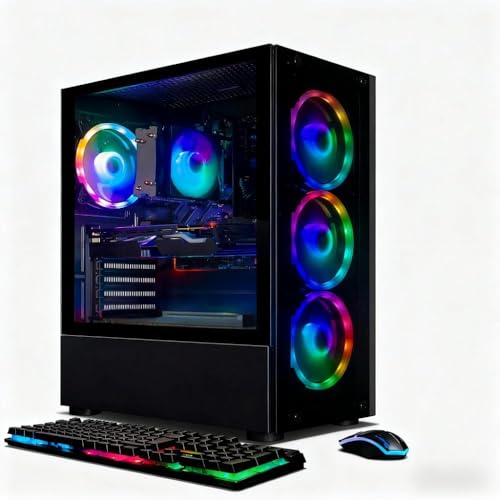
The STGAubron Gaming PC Desktop is a prebuilt tower designed for PC gamers, streamers, esports players, and content creators who want a capable system without the hassle of building one from scratch. Powered by an AMD Ryzen 5 2600 processor (up to 3.9GHz) and an NVIDIA GeForce RTX 2060 6GB graphics card, this desktop is aimed at delivering smooth 60+ FPS performance in popular titles like Fortnite, Call of Duty Warzone, Valorant, Apex Legends, and GTA V. It also handles lighter tasks like schoolwork, photo editing, and streaming on Twitch or YouTube without breaking a sweat.
For competitive gamers, the RTX 2060 provides solid 1080p gaming responsiveness and low-latency input, making it a good fit for fast-paced esports titles. Casual gamers will appreciate the ability to run open-world games like Minecraft or Elden Ring at playable settings. Streamers and content creators get a capable CPU and GPU combo for encoding and editing, though the Ryzen 5 2600 is an older chip that may show its age in CPU-heavy workloads. The 16GB of DDR4 RAM ensures smooth multitasking, while the 512GB SSD offers quick load times for games and applications.
Build quality is typical for a budget prebuilt: a standard black tower with a tempered glass side panel and four RGB fans for airflow and aesthetics. The RGB lighting adds a customizable touch for RGB setup enthusiasts, and the included wired RGB keyboard and mouse get you started right away. Connectivity is decent with 600M WiFi, Bluetooth 5.0, and multiple USB ports, making it easy to connect peripherals, monitors, and a headset. Cable management inside the case is basic but functional for most users.
Setup is straightforward: plug in the power, connect to a monitor via HDMI or DisplayPort, and boot into Windows 11 Home. The system comes with a 1-year warranty and free lifetime tech support, which adds peace of mind for buyers who prefer not to build their own PC. However, the 512GB SSD can fill up quickly with modern game installations, so you may want to add a secondary hard drive or external storage down the line. The older CPU also limits upgrade potential for future high-end GPUs.
Overall, this STGAubron gaming PC is a practical choice for college gamers, work-from-home users, or anyone looking for a budget-friendly prebuilt that can handle 1080p gaming and everyday productivity. It's not the most powerful or future-proof system, but it offers good value for the price. If you're a competitive esports player or streamer on a tight budget, this desktop will serve you well for current titles without breaking the bank.
Pros
- Solid 1080p gaming performance with the new RTX 5060 GPU
- Fast 1TB NVMe SSD for quick boot and game loads
- Clean, bloatware-free Windows 11 installation
- Mesh front panel and ARGB fans for great airflow and aesthetics
- Includes free gaming keyboard and mouse
Cons
- 16GB DDR4 RAM is good but some newer titles may benefit from 32GB down the road
- Only one HDMI and one DisplayPort output on GPU (additional ports may vary)
- Ryzen 5 5500 is not the latest generation, so CPU upgrade path is limited
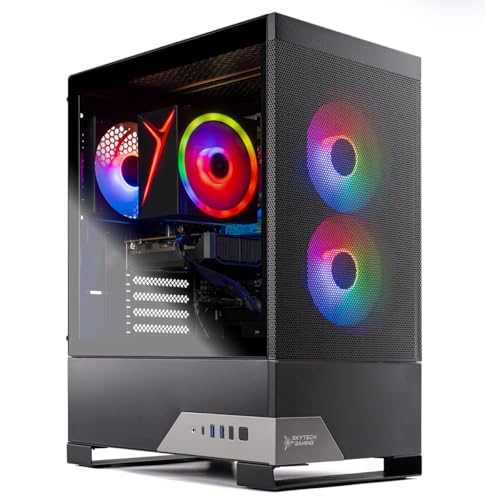
The Skytech Gaming Nebula 2 is a pre-built gaming desktop that aims to deliver strong 1080p performance without the hassle of building your own PC. At its core, you get an AMD Ryzen 5 5500 processor and an NVIDIA GeForce RTX 5060 with 8GB of GDDR7 memory, paired with 16GB of DDR4-3200 RAM and a 1TB NVMe SSD. This combination is well-suited for competitive gamers, casual players, streamers, and even college gamers who want a reliable system for both work and play.
In real-world gaming, this PC can handle popular titles like Call of Duty, Fortnite, Valorant, Apex Legends, and Elden Ring at high or ultra settings in 1080p while maintaining smooth 60+ FPS. The RTX 5060 also supports ray tracing and DLSS, which gives you visual polish in supported games without sacrificing frame rates. For esports players, the fast NVMe SSD and responsive CPU mean quick load times and snappy input response, which matters in fast-paced shooters and MOBAs.
Build quality is solid for a pre-built system. The Nebula 2 comes in a black mid-tower with a mesh front panel and includes ARGB fans, which provide good airflow and customizable lighting that any RGB setup enthusiast will appreciate. The 650W Gold-rated PSU offers reliable power and headroom for future upgrades. Cable management looks tidy inside, and the case has enough room for simple maintenance down the line.
Setup is straightforward: just plug in the included keyboard and mouse, connect your monitor via HDMI or DisplayPort, and you are ready to go. The clean Windows 11 installation means no bloatware to remove, which saves time and keeps system performance up. For streamers, the system can handle OBS encoding for 1080p60 streams while gaming, though you might want extra RAM if you run many apps simultaneously.
One limitation is that the Ryzen 5 5500 is based on older Zen 3 architecture and lacks PCIe 4.0 support, which can slightly limit storage speeds and GPU bandwidth compared to newer platforms. Also, the RTX 5060 only offers one HDMI and one DisplayPort out of the box, so multi-monitor setups may require adapter workarounds. Users who plan to upgrade later will find the motherboard and PSU are standard parts, but the CPU socket (AM4) is a dead end for future Ryzen generations.
Overall, the Skytech Gaming Nebula 2 is a well-rounded gaming desktop for anyone who wants to jump straight into 1080p gaming without building a PC. It is especially good for competitive and casual gamers, content creators on a budget, and streamers who need a dependable system for mid-tier streaming. If you prioritize plug-and-play convenience, clean software, and solid performance for today's most played games, this is a setup worth considering.

Pros
- Strong CPU and GPU combo for 1080p gaming at high settings
- Fast NVMe SSD and ample RAM for smooth multitasking
- Easy setup out of the box with minimal bloatware reported
- Upgradable components like RAM and GPU for future-proofing
- Good value compared to building a similar spec yourself
Cons
- Some users reported missing internal parts or accessories on arrival, suggesting possible QC inconsistencies
- Included keyboard and mouse are basic and may not meet expectations for RGB or build quality
- 16GB RAM may be limiting for heavy multitasking or future AAA titles; upgrading is recommended
The Skytech Gaming Storm Desktop PC is a pre-built gaming system designed for players who want a powerful rig without the time or expertise required to build one themselves. It pairs an AMD Ryzen 7 5700 processor with an NVIDIA RTX 5060 Ti graphics card, making it well-suited for 1080p gaming at high to ultra settings in popular titles like Call of Duty, Fortnite, Valorant, and Apex Legends. This combination also handles streaming, light content creation, and everyday productivity tasks with ease.
This PC is best suited for PC gamers who prioritize convenience and reliability. Casual gamers, competitive esports players, and streamers will appreciate the out-of-the-box performance, while college gamers or work-from-home users benefit from the quiet operation and compact mid-tower footprint. The system includes 16GB of DDR4 3200MHz RAM and a 1TB NVMe SSD, which provide fast load times and smooth multitasking. Based on user feedback, the PC runs most modern games at 60+ FPS at 1080p, with room to push higher frame rates in less demanding titles.
Build quality is solid for a pre-built in this price range. The Skytech Storm case features a mesh front panel for good airflow, and the included ARGB fans add a customizable lighting touch. The 650W Gold-rated PSU offers reliable power delivery, though some users note it is not modular, which can make cable management a bit trickier inside the case. The tempered glass side panel (though some earlier models used plexi) allows you to show off the components. Upgradability is a strong point: the RAM, GPU, and storage can be swapped out easily, extending the system's lifespan.
Setup is straightforward. The PC arrives with Windows 11 pre-installed and minimal bloatware, according to most reviews. You just plug in the power, monitor, keyboard, and mouse, and you're ready to game. The included keyboard and mouse are functional but basic; many users will want to replace them with higher-quality peripherals. Some buyers have reported missing internal parts or accessories, which suggests occasional quality control issues, but Skytech's customer support is generally responsive.
One realistic limitation is the 16GB of RAM. While sufficient for most current games, heavier multitasking (like streaming while gaming) or future titles may benefit from an upgrade to 32GB. The RTX 5060 Ti with 8GB of VRAM is a capable 1080p card, but it may struggle with ray tracing at higher resolutions or in VRAM-intensive scenarios. The case's airflow is decent, but adding extra fans or an aftermarket CPU cooler could improve thermal performance under sustained loads.
Overall, the Skytech Gaming Storm Desktop PC is a practical buy for gamers who want a balanced, ready-to-use system at a reasonable price. It delivers strong 1080p performance, easy upgrade paths, and a clean aesthetic. If you're looking for a pre-built that can handle today's games without breaking the bank, this is a solid contender. Just be prepared to possibly upgrade the RAM and peripherals over time for the best experience.
The Skytech Storm is built for 1080p gaming with high settings. The Ryzen 7 5700 CPU and RTX 5060 Ti GPU work together to deliver smooth frame rates in popular titles. According to user reviews, games like Fortnite, Valorant, and Call of Duty run at 60+ FPS on ultra settings. The 1TB NVMe SSD ensures fast load times, and the 16GB of DDR4 3200MHz RAM keeps gameplay responsive. While not a high-refresh-rate powerhouse, this PC is more than capable for competitive and casual gaming at 1080p.
The case features a mesh front panel for airflow and a tempered glass side window (though some earlier units used plexi). The ARGB fans add customizable lighting, and the 650W Gold PSU provides stable power. Internal layout is clean, and components are securely mounted for shipping. Some users note that the included keyboard and mouse feel cheap, and cable management could be tidier due to the non-modular PSU. Overall, the build is solid for the price point, with good upgrade potential.
The Storm case includes ARGB fans for intake and exhaust, providing decent airflow out of the box. The mesh front panel helps pull in cool air, and the high-performance air cooler keeps the CPU temperatures in check during gaming sessions. Some users may want to add an extra fan or upgrade to a liquid cooler for quieter operation under heavy loads. Based on feedback, thermal performance is adequate for stock settings, but sustained gaming can push temperatures higher.
The PC offers 802.11ac Wi-Fi, multiple USB ports (including USB 2.0, 3.0, and 3.2 Gen1), HDMI, DisplayPort, and HD audio jacks. The graphics card provides additional display outputs. Bluetooth is not explicitly mentioned, but the Wi-Fi adapter may support it. The I/O panel is straightforward, and the motherboard leaves room for expansion. Some users wish for more USB 3.2 ports or a USB-C front panel header, but the selection is adequate for most setups.
The Storm comes with a basic keyboard and mouse, a power cable, and a quick start guide. The keyboard is a standard membrane model with limited RGB effects, and the mouse is a simple optical unit. Many users report replacing these immediately with higher-quality peripherals. The system also includes a free copy of Windows 11 Home. While the accessories are functional, they are clearly entry-level, and the value lies in the core components rather than the extras.

Pros
- Complete package with monitor and RGB peripherals saves time and money for new gamers.
- 16GB DDR4 RAM is generous for this price point, ensuring smooth multitasking.
- SSD + HDD combo gives both speed and capacity for games and files.
- Windows 11 Pro provides the latest OS features and security updates.
- Affordable entry point for casual gaming, schoolwork, or home office use.
Cons
- GeForce GT 1030 is limited to older or less demanding titles – not suitable for modern AAA games at high settings.
- Intel Core i5-6500 is a 6th-gen processor, which may show its age in CPU-intensive tasks.
- Renewed electronics may have cosmetic wear or limited warranty compared to new units.
The Dell Gaming Tower Desktop PC (renewed) is a complete budget gaming setup built around a 6th-gen Intel Core i5-6500 and a GeForce GT 1030 graphics card. It comes with 16GB of DDR4 RAM, a 256GB SSD plus a 500GB HDD, a 22-inch monitor, and an RGB keyboard and mouse – all running Windows 11 Pro. This package targets casual gamers, college students, work-from-home professionals, or anyone looking for an affordable entry into PC gaming without the hassle of building from scratch.
In terms of performance, the i5-6500 and GT 1030 combination handles older titles like CS:GO, League of Legends, Minecraft, and indie games smoothly at 1080p with medium settings. For more demanding games like Fortnite or Apex Legends, you'll likely need to dial down settings to low for playable frame rates. The 16GB RAM is a strong point – it lets you keep Discord, Spotify, and a few browser tabs open while gaming without stuttering. The dual storage setup means Windows and frequently used programs can live on the SSD for quick boot times, while the HDD stores your game library and files.
Build quality is typical of Dell's Optiplex-style towers – a compact, utilitarian case with decent airflow for the components. The included 22-inch monitor is a standard 1080p display suitable for everyday use and casual gaming; it's not high-refresh-rate but gets the job done. The RGB keyboard and mouse are basic but functional, adding a touch of gaming flair to your desk. For setup, everything is plug-and-play: connect the monitor, peripherals, and power, then boot into Windows 11 Pro. Since it's a renewed unit, you may notice some cosmetic scuffs or minor wear, but the internal components are tested and working.
One realistic limitation is the graphics card – the GT 1030 is entry-level and won't satisfy competitive gamers or those wanting high-fidelity visuals in modern titles. The processor is also a few generations old, so CPU-heavy tasks like video editing or streaming may feel sluggish. Additionally, as a renewed product, warranty support may vary by seller, and you might not get the same long-term reliability as a new PC. However, for its price point, this system offers a solid foundation for light gaming, schoolwork, and everyday computing.
Overall, this Dell gaming tower is best suited for budget-conscious buyers who want a complete, ready-to-use gaming PC without assembling components. It works well for casual gaming sessions, homework, streaming media, and office tasks. If you're a competitive esports player or need high frame rates in AAA games, you'll want to look for something with a more powerful GPU. But for a first gaming PC or a secondary family computer, this renewed bundle provides good value and convenience.

Pros
- Strong 1080p gaming performance with RX 9060XT 8GB and Ryzen 5 5500.
- Fast NVMe SSD and 16GB DDR4 RAM for snappy system responsiveness.
- Clean mesh-front case with ARGB fans for good airflow and aesthetics.
- Includes free keyboard and mouse, plus Wi-Fi and Windows 11 pre-installed.
- Assembled stateside with 1-year warranty and lifetime tech support.
Cons
- Graphics card may be a lower-tier variant; performance varies by title.
- Only 16GB of DDR4 RAM - power users might want 32GB for heavy multitasking.
- Case and cable management could be tighter for custom builders.
The Skytech Gaming Edge Desktop PC is a pre-built tower aimed squarely at gamers who want a straightforward, high-performance rig without the hassle of building it themselves. It pairs an AMD Ryzen 5 5500 processor (base 3.6GHz, boost up to 4.2GHz) with an AMD Radeon RX 9060XT 8GB graphics card, making it a capable machine for running modern titles at 1080p resolution. Whether you are grinding ranked matches in Valorant, exploring the open world of Elden Ring, or streaming your gameplay to Twitch, this system is designed to handle those tasks without breaking a sweat.
This PC is best suited for PC gamers, esports players, and streamers who want a balanced mid-range build. Casual gamers and college gamers will also appreciate the out-of-box reliability and the included keyboard and mouse. The 16GB of DDR4 3200MHz RAM is enough for most gaming and streaming scenarios, while the 1TB NVMe SSD ensures your OS and favorite games load in seconds. The 650W Gold-rated power supply provides efficient and stable power delivery, which is a nice touch for a prebuilt at this price point.
In real-world gaming, the RX 9060XT 8GB should push 60+ frames per second in popular titles like Apex Legends, Call of Duty, Fortnite, and Overwatch 2 at high or ultra settings. It can also handle more demanding single-player games like Baldur's Gate 3 and Black Myth Wukong at solid settings. The Ryzen 5 5500 is a capable six-core CPU that won't bottleneck the GPU in most scenarios, and the high-performance air cooler keeps temperatures in check during long sessions. The mesh front panel and included ARGB fans promote good airflow, so the system stays quiet under load.
Build quality is typical of a well-reviewed prebuilt - the Skytech Edge case uses tempered glass and a steel frame, with a clean cable routing job that keeps the interior looking tidy. The included keyboard and mouse are basic but functional for getting started. The PC also comes with Windows 11 Home pre-installed, and Skytech promises a bloatware-free experience, which is a big plus for gamers who just want to plug in and play. Wi-Fi is built-in (802.11 AC), so you don't need to run an Ethernet cable, and the front I/O includes USB 3.0 and 3.2 Gen1 ports for convenience.
One thing to note is that the RX 9060XT 8GB graphics card is a newer model, and its performance may vary depending on the game and driver optimization. It is not a top-tier card, so you are looking at solid 1080p gaming rather than 1440p or 4K. The 16GB of RAM is standard for this price range, but heavy streamers or content creators who run multiple applications may eventually want to upgrade to 32GB. The case interior is serviceable but not the roomiest for future upgrades, though swapping RAM or adding storage is straightforward.
Overall, the Skytech Gaming Edge is a practical choice for U.S. gamers who want a reliable prebuilt that can handle the most popular games today. It is especially suited for college dorm setups, living room gaming, or anyone who prefers a plug-and-play experience over building their own PC. The combination of a fast SSD, capable GPU, and clean aesthetic makes it a solid value for 1080p gaming and entry-level streaming.
If you are a competitive gamer who wants the highest frame rates in esports titles, this rig will serve you well. For those aiming to stream or edit content, the Ryzen 5 and 16GB RAM are adequate for starting out, but you may want more RAM down the line. Overall, it's a trustworthy mid-range gaming PC that balances performance, cooling, and ease of use.
Hardware Questions and Answers
What GPU provides reliable frame rates for the best gaming desktop for call of duty?
An NVIDIA GeForce RTX 3050 or AMD Radeon RX 6500 provides a reliable baseline for 1080p competitive action. Dedicated video cards with at least 6GB to 8GB of VRAM handle dense multiplayer maps without stuttering from texture overflow. Higher-tier options like the RTX 5060 offer even greater headroom for competitive 144Hz monitors.
How much system RAM is required for Call of Duty in 2026?
At least 16GB of DDR4 or DDR5 RAM is required to prevent stutter and memory caching bottlenecks. Modern tactical shooters consume substantial system memory alongside background tasks like Discord and game launchers. Dual-channel memory configurations also improve frame pacing significantly compared to single-stick setups.
Can a budget setup under $700 handle competitive matches smoothly?
Yes, an entry-level gaming desktop under $700 can run competitive multiplayer reliably when using optimized low-to-medium graphics settings. Systems sporting multi-core processors like the Ryzen 5 or Core i5 paired with entry GPUs achieve playable framerates in standard multiplayer lobbies. You can also explore upgrades for your gaming PC later on, such as swapping in faster storage or a stronger graphics card.
Why do frame drops happen during intensive gunfights?
Thermal throttling and slow storage caching are the primary culprits behind sudden in-game stuttering. When case airflow is inadequate, the CPU or GPU automatically reduces its clock speed to prevent overheating. Installing the title on a fast NVMe SSD rather than a traditional hard drive prevents texture streaming hitches during rapid movement.
Is a 512GB SSD large enough for Call of Duty and regular use?
No, a 512GB drive fills up rapidly given the massive install footprint of modern Call of Duty titles. Between base files, Warzone updates, and shader caches, the game easily claims over 150GB to 200GB of space. A 1TB NVMe drive is strongly recommended so you have adequate breathing room for operating system updates and other games.




Write Your Review
No reviews yet. Be the first to share your experience!