


Sudden latency spikes during a clutch shootout can ruin an entire ranked match, and relying on outdated wireless hardware only invites packet loss. Installing the Best Wifi Card For Gaming Desktop gives your rig the dedicated bandwidth it needs to sustain rock-solid connections without routing long Ethernet cables through your home. Modern add-in cards take advantage of clean frequency spectrums, utilizing multi-stream OFDMA and 1024-QAM to keep communication lines open when background devices flood your network. Solid networking gear pairs naturally alongside the best upgrades for gaming PC hardware, helping eliminate jitter before your team enters the final circle. Reliable internal cards seat directly into a free PCIe slot, bypass weak USB antennas, and provide steady throughput across marathon sessions.
Careful analysis of hardware specifications reveals that dedicated PCIe cards outperform compact dongles because motherboard bus lanes deliver clean power and minimal signal processing delay. External high-gain antennas and integrated heat spreaders ensure that onboard chips stay cool without throttling data rates mid-match. Whether you are assembling a fresh battlestation or upgrading budget gaming desktop builds, prioritizing solid wireless connectivity prevents frustrating rubber-banding in multiplayer lobbies. Modern WPA3 encryption and Bluetooth support also streamline peripheral pairing, letting wireless headsets and gamepads sync up effortlessly. Investing in a properly shielded adapter makes online competitive matches feel responsive, predictable, and fair.

Pros
- Very fast and stable WiFi 6 connection with low latency for competitive gaming
- Bluetooth 5.2 works great for wireless peripherals without extra dongles
- Easy to install once drivers are downloaded; great value under $35
- High-gain antennas provide strong, consistent signal even at range
Cons
- Driver installation can be finicky and may require manual download from Intel instead of TP-Link site
- Bluetooth requires an internal USB header connection; not plug-and-play for that feature
- Antenna cables are somewhat long and may need careful routing in smaller cases near GPU fans
The TP-Link Archer TX55E is a PCIe WiFi 6 network card designed to bring fast, low-latency wireless connectivity to desktop gaming PCs. It's built around the Intel AX210 chipset, delivering AX3000 speeds (up to 2402 Mbps on 5 GHz and 574 Mbps on 2.4 GHz) and Bluetooth 5.2. This makes it an excellent choice for PC gamers who want to ditch Ethernet cables or upgrade from older Wi-Fi standards like Wi-Fi 5 or USB adapters.
This card is best suited for competitive gamers, streamers, esports players, and anyone who needs reliable, high-bandwidth connectivity without running Ethernet through their home. With OFDMA and MU-MIMO, the Archer TX55E significantly reduces lag even on crowded networks, so you can play online shooters or stream to Twitch without stutter. The ultra-low latency is especially noticeable in fast-paced games like Call of Duty, Valorant, or Apex Legends, where every millisecond matters. VR gamers will also appreciate the consistent throughput needed for immersive experiences.
Build quality is solid. The card features a custom heatsink that dissipates heat efficiently, helping maintain stable performance during long gaming sessions. Gold-plated connectors resist oxidation, which is a nice touch for longevity. The two high-gain antennas provide excellent range and can be repositioned to optimize signal. User reviews consistently report strong, stable connections even with the router a few rooms away, often outperforming older WiFi cards or USB adapters.
Installation is straightforward if you have a spare PCIe x1 or x4 slot, but there are a couple of gotchas. The Bluetooth functionality requires connecting a USB cable to an internal motherboard header, so make sure your board has a free F_USB port. Driver installation can be tricky: the included CD is outdated, and some users report that downloading drivers directly from Intel (the AX210 chipset) works better than the TP-Link site. Plan for 15-30 minutes of setup, including a potential workaround if auto-install fails. Once running, it's rock solid.
Realistically, the main limitation is the driver setup, which may be a hassle for less tech-savvy builders. The antenna cables are a bit long and might need careful routing to avoid GPU fans in compact cases. Also, the card is designed for Windows 10/11 64-bit only, so Linux or older OS users will need to check compatibility. But for under $35, the performance per dollar is excellent.
In short, the TP-Link Archer TX55E is a reliable and affordable upgrade for any desktop gaming PC that needs modern WiFi 6 and Bluetooth 5.2. It's a great choice for PC gamers, streamers, content creators, and even work-from-home users who want to cut the cord without sacrificing speed. If you're building a new gaming rig or just tired of USB dongles dropping connection, this card is well worth the investment.

Pros
- Significant reduction in latency compared to USB Wi-Fi adapters, based on user feedback
- Reliable and stable connection even in crowded network environments
- Easy plug-and-play installation with included USB drive and magnetic antenna base
- Future-proof with support for Wi-Fi 7 and backward compatibility with Wi-Fi 6/6E and earlier standards
- Includes Bluetooth 5.4, eliminating the need for a separate adapter
Cons
- Not compatible with Windows 10 – only works with Windows 11 (64-bit)
- External antenna base can take up desk space and may not reach standing desk heights
- Premium price point relative to more basic Wi-Fi 6 cards
The TP-Link Archer TBE550E is a PCIe Wi-Fi 7 network card designed to bring the latest wireless standards to desktop gaming rigs. While it's not a traditional gaming peripheral like a mouse or keyboard, a stable and fast internet connection is just as critical for competitive play, streaming, and content creation. This card targets PC gamers, streamers, esports players, and anyone who wants a reliable, low-latency connection without running Ethernet cables across the room.
Based on product specifications and user feedback, the TBE550E excels in real-world performance. The move from USB Wi-Fi adapters to this PCIe card often results in drastically lower ping and fewer random dropouts – a common pain point for gamers in apartment buildings or homes with many connected devices. With tri-band support (6 GHz, 5 GHz, and 2.4 GHz) and technologies like OFDMA and MU-MIMO, it handles multiple data streams efficiently, which means smoother online gameplay and faster downloads even when the network is busy.
Build quality is a strong suit here. The main card is compact and fits easily into any open PCIe x1 slot, and the antenna unit features a magnetic base that can be placed on top of your PC case or a nearby metal surface. The two high-performance antennas are adjustable, letting you aim them for the best signal without cluttering your desk. The multicolor status LED is controlled via a touch switch on the base – a nice touch for RGB enthusiasts who want visual feedback on network status without obtrusive lighting.
Setup is straightforward thanks to the included USB drive that loads drivers automatically. The card works out of the box with Windows 11 (note: Windows 10 is not supported). The Bluetooth 5.4 integration is a bonus, allowing you to pair game controllers, headsets, and keyboards with minimal power consumption via BLE. Some users noted that the antenna cable could be slightly longer for very large towers, but for most mid-tower builds it's sufficient.
One realistic limitation is the external antenna base, which does take up a small footprint on your desk. If you prefer a completely hidden installation, a Wi-Fi card with integrated antennas might be a better fit. Additionally, the price is higher than many Wi-Fi 6 or 6E cards, but the jump to Wi-Fi 7 offers substantial headroom for future routers and ISP speeds. For competitive gamers and streamers who demand the lowest possible latency and rock-solid connections, this investment may pay off in reduced frustration during intense sessions.
Overall, the TP-Link Archer TBE550E is a smart choice for PC gamers building a new rig or upgrading an existing one, especially if you're already on Windows 11. It provides a clear performance advantage over USB adapters and even older PCIe cards, and the addition of Bluetooth 5.4 simplifies your peripheral setup. If you hate dealing with lag spikes or connection drops during crucial moments, this card is worth considering for your gaming desktop.
Pros
- Significant latency reduction in congested network environments, benefiting competitive gamers.
- Easy plug-and-play installation with clear driver support from Intel.
- Compact form factor fits well in most PC cases without blocking other slots.
Cons
- Requires a compatible WiFi 6E router to fully utilize the 6GHz band.
- Antenna placement may require careful positioning for optimal signal strength.
- Some users may prefer a built-in motherboard WiFi solution for cleaner aesthetics.
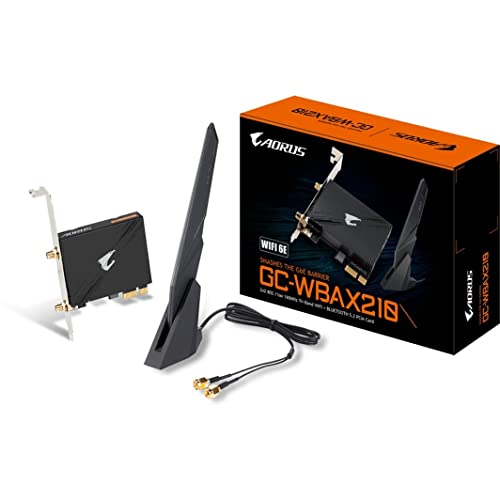
The GIGABYTE WiFi 6E GC-WBAX210 is a PCIe expansion card designed to bring next-generation wireless connectivity to desktop gaming PCs. It integrates Intel's AX210 module, which supports the new 6GHz band alongside traditional 2.4GHz and 5GHz, offering a dedicated spectrum for ultra-low latency and high-speed data transfer.
This card is best suited for PC gamers who demand the lowest possible latency in online multiplayer games, especially those living in crowded Wi-Fi environments like apartments or dorm rooms. Streamers and content creators will also benefit from the increased bandwidth for uploading high-bitrate video and managing multiple devices. Even casual gamers and work-from-home users will appreciate the reliable, lag-free connection for everyday tasks.
In real-world gaming scenarios, the 6GHz band can significantly reduce interference from neighboring networks, leading to more consistent ping and fewer spikes during critical moments. With speeds up to 2400Mbps, downloading large game files or streaming 4K content becomes noticeably faster. The integrated Bluetooth 5.2 also offers low-latency connectivity for wireless controllers, headsets, and other peripherals, reducing clutter on your desk.
Build quality is solid, with a standard PCIe bracket and included low-profile bracket for smaller cases. The dual antennas are detachable and provide good signal coverage when positioned properly. Installation is straightforward: insert the card into an available PCIe x1 or x4 slot, secure the antennas, and install the Intel drivers. No complex software configuration is needed for basic operation, though Intel's software allows for advanced network management.
One realistic limitation is that the full benefits of WiFi 6E require a compatible router. If you're still using an older router, the card will still work on 2.4GHz and 5GHz bands, but you won't see the 6GHz speed boost. Additionally, the antennas can be a bit bulky, so you'll need to ensure they have clear line-of-sight to your router for best performance.
Overall, the GIGABYTE WiFi 6E GC-WBAX210 is a practical upgrade for any gaming PC builder looking to future-proof their setup. It's particularly valuable for competitive gamers and streamers who need reliable, low-latency wireless connectivity without running Ethernet cables across the room. If you're building a new rig or upgrading an existing one, this card is a worthwhile investment for a smoother online experience.

Pros
- Eliminates wired Ethernet dependency while maintaining low latency for competitive gaming
- Bluetooth 5.2 adds convenience for wireless gaming mice, keyboards, and controllers
- Easy installation with included brackets and Bluetooth cable for desktop users
- Supports the latest WiFi 6 standard, future-proofing your gaming PC
Cons
- Requires an available PCIe x1 slot, which may conflict with larger GPUs or other expansion cards
- Bluetooth functionality requires connecting an internal USB header cable, adding a small extra step
- Red color may not match all PC build themes, especially all-white or all-RGB setups
If you're building or upgrading a gaming PC and want to cut the cord without sacrificing speed, the BZIZU WiFi 6 PCIe Card with Bluetooth 5.2 is a practical solution. This adapter slots directly into your motherboard's PCIe lane and delivers up to 3000Mbps wireless speeds using the Intel AX200 chipset. For PC gamers, streamers, and content creators, that means reliable, low-latency performance for online matches, 4K streaming, and VR experiences.
Performance-wise, the card leverages WiFi 6 technologies like OFDMA and MU-MIMO to reduce lag even on congested networks. Whether you're in a dorm, apartment, or shared home, these features help keep your ping stable during intense FPS or MOBA sessions. The dual high-gain antennas also extend your Wi-Fi range, which is great if your gaming desk is far from the router. Bluetooth 5.2 is a nice bonus, letting you connect wireless controllers, headsets, or a gaming mouse without needing a separate adapter.
Built with a red PCB and including both standard and low-profile brackets, this card fits the typical mid-tower or even smaller Mini-ITX cases. The Bluetooth functionality does require plugging the included cable into a F_USB header on your motherboard, so be ready for that extra step. Overall build quality feels solid for a $20-range card, and the Intel chipset is widely recognized for driver stability under Windows 11 and 10.
Setup is straightforward if you're comfortable opening your PC case. Just insert the card, screw it in, connect the Bluetooth cable, and install the latest drivers from Intel. No extra software bloatware is needed since the drivers handle everything. Some users have noted the red color might not suit all builds, but it's a minor cosmetic point. The low-profile bracket is a thoughtful addition for compact setups like HTPCs or smaller gaming rigs.
A realistic limitation is that the PCIe x1 slot can be blocked by a large GPU or a thick CPU cooler on some motherboards. You'll want to check your motherboard layout before purchasing. Also, this card doesn't support macOS or Linux officially, so it's strictly for Windows gamers. If you have a free slot and want to ditch Ethernet cables, it's a worthy upgrade for most gaming scenarios.
For PC gamers, casual players, or streamers looking to clean up their desk without drilling holes for cables, this WiFi 6 PCIe card delivers consistent speed and Bluetooth convenience at a budget-friendly price. It's not a high-end networking solution, but for the vast majority of gaming setups, it removes a common bottleneck without breaking the bank.

Pros
- Extremely fast WiFi 7 speeds ideal for competitive gaming and high-bandwidth streaming.
- Bluetooth 5.4 offers improved range and stability for wireless peripherals.
- MLO technology reduces latency for smoother online gameplay.
- High-gain antennas provide excellent signal reception and range.
- Low-profile bracket included for mini tower cases.
Cons
- Not compatible with Windows 10 or older operating systems, limiting upgrade options.
- Requires a WiFi 7 router to unlock full performance benefits.
- May be overkill for casual users who don't need the latest wireless standard.
The TP-Link Archer TBE552E is a WiFi 7 PCIe network card designed to bring next-generation wireless performance to your gaming desktop. As a tri-band adapter, it supports the 6 GHz, 5 GHz, and 2.4 GHz bands, delivering combined speeds up to 9.3 Gbps. This makes it an excellent choice for competitive gamers, streamers, and content creators who demand ultra-low latency and high bandwidth for online gaming, 4K streaming, and large file transfers.
For PC gamers and esports players, the real highlight is Multi-Link Operation (MLO), which allows the card to simultaneously use multiple frequency bands for a more stable and responsive connection. This translates to reduced lag in fast-paced titles like Call of Duty or Valorant, and smoother gameplay during Twitch streams. The inclusion of Bluetooth 5.4 is a welcome addition, enabling you to connect wireless controllers, headsets, and mice without extra dongles, keeping your desk clean and organized.
Build quality is solid, with a compact PCIe design that fits easily into most motherboards. The package includes both a standard and low-profile bracket, so it works in mini tower cases as well. The two high-gain antennas are detachable and provide excellent range, ensuring strong signal even if your router is in another room. Setup is straightforward for Windows 11 users, though it's important to note that this card is not compatible with Windows 10 or earlier versions, which may be a limitation for some.
In terms of security, WPA3 support adds robust encryption to protect your network from unauthorized access, a nice touch for those concerned about privacy. The card also supports OFDMA and MU-MIMO, which help manage multiple devices on your network without performance drops, ideal for households with many connected gadgets.
One realistic limitation is that to fully leverage WiFi 7 speeds, you'll need a compatible WiFi 7 router. If you're still on WiFi 6 or older, the card will still work but won't reach its maximum potential. Additionally, the price point is higher than standard WiFi 6 cards, so it's best suited for early adopters or those building a future-proof gaming rig.
Overall, the TP-Link Archer TBE552E is a strong recommendation for PC gamers and streamers who want the fastest wireless connection available and are already on Windows 11. It's a practical upgrade for gaming setups where running Ethernet isn't feasible, and it offers excellent performance for competitive play, content creation, and everyday use.

Pros
- Access to the 6 GHz band dramatically reduces latency for competitive gaming and streaming.
- Tri-band design ensures consistent speeds even on crowded networks.
- Bluetooth 5.3 provides reliable connectivity for gaming peripherals and audio devices.
- Compact, magnetized antenna keeps desk clean and can be repositioned easily.
- Strong security with WPA3 and CISA Secure-by-Design compliance.
Cons
- Requires Windows 11 to utilize the 6 GHz band, which may not suit all users.
- Single antenna design may be less versatile than multi-antenna solutions for extremely large or obstructed spaces.
- Bluetooth functionality may require driver installation and could conflict with existing Bluetooth hardware.
The TP-Link Archer TXE73E is a PCIe WiFi 6E network card designed to bring cutting-edge wireless performance to desktop gaming PCs. It's a perfect fit for competitive gamers, streamers, content creators, and anyone who demands low-latency, high-speed internet without the clutter of Ethernet cables. By tapping into the new 6 GHz band, this card offers a dedicated, interference-free channel that can significantly reduce lag in online games and improve streaming stability.
For gamers, the real-world impact is noticeable: faster downloads, smoother 4K streaming, and more responsive multiplayer sessions. The tri-band design (6 GHz, 5 GHz, 2.4 GHz) lets you allocate bandwidth so your gaming PC gets priority while other devices use separate channels. OFDMA and MU-MIMO further optimize network traffic, making this card a solid choice for households with multiple connected devices. Bluetooth 5.3 is a welcome addition, allowing you to connect wireless controllers, headsets, and keyboards with improved speed and reliability over older standards.
Build quality is typical for TP-Link: a compact PCIe card with a single, high-gain antenna mounted on a flexible, magnetized base. This saves valuable desk space and lets you position the antenna for best reception. The low-profile bracket is included for smaller cases, and the card itself is lightweight and easy to install. Setup is straightforward under Windows 11 or 10 (64-bit), though to access the 6 GHz band you'll need Windows 11.
One limitation is the single antenna. While it performs well for most setups, users with very large homes or multiple floors might miss the range of multi-antenna designs. Also, if your motherboard already has built-in Bluetooth, you may need to disable it to avoid conflicts. The card doesn't include software for network management beyond what Windows provides, but that's fine for most gamers who just want plug-and-play performance.
Overall, the TP-Link Archer TXE73E is a compelling upgrade for gamers and streamers who want to future-proof their desktop's wireless capabilities. It offers a noticeable performance boost over standard WiFi 5 or WiFi 6 cards, especially in latency-sensitive scenarios. If you're building a new gaming rig or upgrading an existing one, and you have a WiFi 6E router, this card is a solid investment for a cleaner, faster wireless experience.

Pros
- Fast Wi-Fi 6 speeds reduce lag and improve responsiveness in competitive online games.
- 7dBi antenna provides excellent range and signal stability even at a distance from the router.
- Simple plug-and-play setup on Windows 11/10 gets you online in minutes.
- WPA3 security adds peace of mind for privacy-conscious users and streamers.
- Affordable upgrade for older PCs lacking Wi-Fi 6 support or with faulty wireless cards.
Cons
- Does not support Mac OS, Chrome OS, or Linux – Windows only.
- Antenna is attached and not user-replaceable; a few users reported durability concerns with the antenna joint.
- Performance depends on router and internet plan; not a cure-all for slow ISP speeds.
The LIVINGTHING AX900 is a Wi-Fi 6 USB adapter designed to bring modern wireless performance to desktop PCs and laptops. It uses the 802.11ax standard to deliver combined speeds up to 900Mbps, with a 7dBi antenna for extended range and beamforming for focused signal strength. This adapter is aimed at PC gamers, competitive esports players, streamers, content creators, and anyone who relies on stable, low-latency internet for their daily setup.
In real-world use, the AX900 excels at eliminating lag and stuttering during online gaming sessions. The dual-band operation lets you connect to the less congested 5GHz band for maximum speeds, while the 2.4GHz band maintains compatibility with older routers. MU-MIMO and OFDMA technologies ensure your gaming traffic gets priority, reducing latency spikes even when other devices are active on the same network. For streaming 4K or 8K video from YouTube TV or Netflix, the adapter provides smooth playback without buffering – a clear improvement over older N300 adapters.
Build quality is practical for a sub-$20 adapter. The USB connector is sturdy, and the 7dBi antenna is mounted on a pivot for optimal positioning. While some user reviews mention the antenna can loosen over time, most find it reliable for everyday use. The plastic housing is lightweight but feels solid enough for a desktop environment. Setup is straightforward: plug into a USB 3.0 port, and Windows 11/10 automatically installs the driver. Windows 7 requires a manual driver installation, but the process is simple. Note that this adapter does not support Mac, Chrome OS, or Linux – it is strictly for Windows systems.
One realistic limitation is that the adapter’s performance is tied to your router and internet plan. If you have a slow ISP or an older router, you won’t see the full 900Mbps. Additionally, the antenna is non-removable, so users who need a longer cable or external antenna setup will be disappointed. A few buyers reported receiving a defective unit, but the 2-year service and online support from LIVINGTHING helps mitigate that risk.
For PC gamers looking to upgrade a desktop without built-in Wi-Fi or replace a failing wireless card, the LIVINGTHING AX900 offers a cost-effective solution. It is also a solid choice for college gamers in dorm rooms where running Ethernet isn’t practical, or for work-from-home gamers who need reliable video conferencing and game downloads. The WPA3 security is a bonus for privacy-minded users.
Overall, if you need a fast, easy-to-install Wi-Fi 6 adapter for a Windows desktop or laptop, and you understand its limitations (Windows-only, attached antenna), the AX900 delivers strong value. It will improve your gaming experience by reducing lag, but it is not a magic fix for poor internet service. For the price, it is a recommended upgrade for budget-conscious gamers and setup builders.

Pros
- Fast and stable dual-band Wi-Fi for online gaming and streaming.
- Integrated Bluetooth 5.0 reduces clutter by eliminating separate adapters.
- Simple installation with clear instructions and low-profile bracket included.
- Solid security features with WPA3 for peace of mind.
Cons
- Requires a free PCIe slot and internal USB header for Bluetooth functionality.
- No Wi-Fi 6 support, so future-proofing is limited.
- External antennas can be a bit bulky for tightly packed cases.
The TP-Link Archer T5E is a PCIe wireless network card designed to upgrade desktop PCs with fast AC1200 Wi-Fi and Bluetooth 5.0 capability. For PC gamers and streaming enthusiasts, a reliable connection is crucial, and this card provides dual-band speeds up to 1200 Mbps combined with low-latency performance suitable for online shooters and MOBA titles. The inclusion of Bluetooth 5.0 also means you can pair game controllers, wireless headsets, or a precision mouse without needing extra USB adapters, freeing up ports for other gear.
This card is especially well-suited for competitive gamers, streamers, and content creators who need consistent bandwidth for Twitch uploads or Discord calls. Casual gamers and college dorm residents will appreciate the simple upgrade path from built-in motherboard Wi-Fi, often plagued by dropouts. The dual external antennas and beamforming technology focus the signal toward your router, improving range and stability even through walls or floors, which is a common headache in shared living spaces.
Build quality is solid for the price point, with a compact PCIe design and a low-profile bracket included for small form factor cases. The two high-gain antennas are adjustable, helping you find the optimal orientation. The card uses 2x2 MIMO to handle multiple data streams, which translates to more consistent throughput during busy network hours. Security is also addressed with WPA3 support, keeping your gaming sessions and personal data safer from unauthorized access.
Installation is straightforward: plug the card into an available PCIe x1 slot, connect the Bluetooth USB cable to an internal F_USB header on your motherboard, and screw on the antennas. Windows 10 and 11 recognize it without extra drivers, though TP-Link offers utility software for advanced settings. For gamers who aren't comfortable with internal hardware, the process still only takes about ten minutes and requires a basic Phillips screwdriver. The low-profile bracket is a thoughtful inclusion for mini-ITX builds or slim desktop towers.
One realistic limitation is the lack of Wi-Fi 6 support, meaning this card is best for users with AC-class routers. If you already have a Wi-Fi 6 access point, investing in an AX card might be worth it for future-proofing. Additionally, the Bluetooth functionality requires that internal USB header; some budget motherboards may lack one, so checking your board's layout beforehand is recommended. The antennas are external and can be slightly intrusive if your desk space is tight, but they are detachable for storage.
Overall, the TP-Link Archer T5E is a practical and affordable solution for anyone building or upgrading a gaming PC who wants stable wireless connectivity and Bluetooth without breaking the bank. It offers a noticeable improvement over generic USB dongles in terms of latency and range, making it a strong choice for esports players, casual gamers, and streaming enthusiasts alike. For dorm rooms, home offices, or any setup where running Ethernet isn't feasible, this card delivers reliable performance that keeps you in the game.

Pros
- Fast WiFi 6 speeds with low latency, great for competitive gaming and streaming
- Easy plug-and-play setup on Windows 11/10, no driver hassles
- High-gain antennas improve range and signal stability in larger homes or dorms
- Compact design with flexible placement via the 1-meter USB cable
- Supports the latest WPA3 security for enhanced network protection
Cons
- Requires manual driver installation on Mac OS, which may be less convenient
- USB adapter body may be bulky if not using the included cable, potentially blocking adjacent ports
- No Bluetooth functionality included, so separate adapter needed for wireless peripherals
The TP-Link Archer TX20U Plus is a WiFi 6 USB adapter that brings modern wireless performance to desktop PCs. It's designed for PC gamers, streamers, and content creators who need a stable, low-latency connection without running Ethernet cables across the room. Whether you're in a dorm, home office, or gaming setup where wired networking isn't practical, this adapter offers a straightforward upgrade.
In real-world gaming scenarios, the AX1800 speeds (up to 1201 Mbps on 5GHz) help reduce lag and buffering during intense multiplayer matches. The dual-band support lets you choose the less congested band, and features like MU-MIMO and OFDMA keep your connection stable even when other devices are active on the network. For competitive gamers, this means fewer dropped packets and more consistent hit registration in fast-paced FPS games.
Build quality is solid with a compact plastic housing and two adjustable high-gain antennas. The 1-meter USB 3.0 cable allows you to position the adapter away from your PC case, reducing interference from other electronics. The antennas can be angled for optimal signal reception, which is a nice touch for desks tucked in corners or near walls.
Setup is simple on Windows 11 and 10 - just plug it in and Windows automatically installs drivers. Mac users will need to manually download drivers from TP-Link's website, which is a minor inconvenience. The adapter supports WPA3 encryption, so your network stays secure. There's no software for advanced settings, but for most gamers, the default configuration works fine.
One limitation is the lack of Bluetooth, so you'll need a separate adapter for wireless controllers or headsets. Also, the adapter's body is a bit wide, so if you plug it directly into a front USB port, it might block neighboring ports. Using the included cable solves this. Overall, the Archer TX20U Plus is a practical, affordable way to bring WiFi 6 to a gaming desktop. It's best for gamers who can't wire Ethernet but still want reliable, low-latency wireless for online play and streaming.
The Archer TX20U Plus leverages WiFi 6 technology to deliver lower latency and higher throughput compared to older WiFi 5 adapters. In crowded network environments, such as apartment buildings or households with many devices, the OFDMA and MU-MIMO features help maintain a steady connection for your gaming rig. This means fewer lag spikes during competitive matches and smoother streaming on Twitch or YouTube.
On the 5GHz band, the adapter can reach theoretical speeds of 1201 Mbps, which is more than enough for online gaming and 4K streaming simultaneously. The high-gain antennas also improve signal reception, so even if your router is in another room, you'll likely see better performance than with a standard USB dongle. For esports players who demand consistent ping, this adapter can be a reliable alternative to a wired connection.
It's worth noting that real-world performance depends on your router and network conditions. But based on user feedback and specifications, the TX20U Plus offers a noticeable improvement over built-in WiFi or older adapters. If you're a PC gamer stuck with wireless due to your setup, this is a worthy upgrade for reducing latency and improving overall responsiveness.

Pros
- Significantly reduces lag and packet loss for online gaming compared to older WiFi standards
- Bluetooth 5.2 offers improved range and speed for connecting gaming peripherals wirelessly
- Easy installation with included brackets for both standard and mini tower cases
- Stable connection with high-gain antennas, even at moderate distances from the router
Cons
- Requires a free PCIe x1 slot and USB header for Bluetooth, which may be limited in smaller builds
- Bluetooth functionality needs the included USB cable connected to an internal USB header
- Driver installation may require an internet connection or another PC for initial setup
The TP-Link Archer TX20E is a WiFi 6 PCIe network card designed for desktop PCs that need a fast, low-latency wireless connection. It's an excellent choice for PC gamers who want to cut the cord without sacrificing performance, whether you're into competitive shooters, MMOs, or streaming your gameplay on Twitch. With support for the latest WiFi 6 standard, this card delivers speeds up to 1.8 Gbps, which is more than enough for high-resolution game downloads and smooth online play.
For competitive gamers, the Archer TX20E's OFDMA and MU-MIMO technologies are a big deal. They allow the card to handle multiple data streams simultaneously, reducing lag even when your home network is crowded with other devices. This means you'll experience fewer spikes in ping and more consistent performance during intense matches. The included Bluetooth 5.2 is a nice bonus, letting you connect wireless gaming mice, keyboards, or headsets without needing a separate adapter.
Build quality is solid, with two high-gain antennas that can be positioned for optimal signal reception. The card itself is compact and comes with both standard and low-profile brackets, so it fits in almost any desktop case, from full towers to small form factor builds. Installation is straightforward: just plug it into an available PCIe x1 slot and connect the USB cable to an internal USB header for Bluetooth. Windows 11 and 10 are supported, and drivers are easy to install from TP-Link's website.
One realistic limitation is that the Bluetooth function requires a free USB header on your motherboard, which might be occupied in some builds. Also, like any wireless adapter, performance depends on your router and distance. If you have a WiFi 6 router and are within reasonable range, you'll get excellent speeds and low latency. For users in larger homes or with thick walls, the antennas do a good job maintaining a stable connection.
Overall, the TP-Link Archer TX20E is a practical upgrade for any gaming desktop that lacks built-in WiFi or Bluetooth. It's especially useful for gamers who want to reduce cable clutter and enjoy the freedom of wireless connectivity without compromising on performance. Whether you're building a new gaming PC or upgrading an existing one, this card offers great value for the price.
Latency and Hardware FAQs for Best Wifi Card For Gaming Desktop
Does a PCIe card provide lower latency than a USB wireless adapter?
Yes, a PCIe card consistently delivers lower latency and more stable ping than a USB dongle. Direct motherboard communication over the PCIe lane reduces interface overhead and packet delivery delay. In addition, PCIe models feature larger thermal heat sinks and high-gain antennas that prevent signal drops during intense multiplayer matches.
Is a dedicated Wi-Fi card necessary if a motherboard lacks built-in wireless?
Yes, a dedicated expansion card is the most reliable way to add wireless connectivity to a bare desktop motherboard. It slots easily into any open PCIe x1 or x16 lane without requiring complex system modifications. These cards also work smoothly inside custom builds and standard air-cooled gaming PC setups without disrupting primary case airflow.
What internal header connection is required to enable onboard Bluetooth?
A standard 9-pin internal USB 2.0 motherboard header is required to power the Bluetooth radio on PCIe network adapters. While the PCIe slot handles wireless internet data, the included thin cable bridges the card to the motherboard header for peripheral communication. Without this cable plugged into the motherboard, Wi-Fi continues to work, but Bluetooth controllers and headsets will not connect.
Does Wi-Fi 6E or Wi-Fi 7 require Windows 11 to access the 6GHz frequency band?
Yes, Microsoft restricts native 6GHz band support for Wi-Fi 6E and Wi-Fi 7 to Windows 11. While Windows 10 can still utilize 2.4GHz and 5GHz channels on these advanced adapters, it cannot tap into the wider 6GHz spectrum. Gamers seeking congestion-free channels and 320MHz channel widths must run Windows 11 to realize full hardware potential.
Can installing a PCIe Wi-Fi card block airflow to the graphics card?
No, choosing an appropriate expansion slot prevents clearance and thermal issues with modern GPUs. Placing the slim network card into the lowest available PCIe x1 slot leaves ample room underneath thick graphics card cooling fans. Careful placement maintains unobstructed intake airflow, keeping graphics cards cool during marathon sessions.







Write Your Review
No reviews yet. Be the first to share your experience!