


Cramped mouse swipes and tangled peripheral cords ruin competitive focus faster than a sudden frame drop during an intense firefight. When your desk becomes a messy holding zone for cables, controllers, and stray cups, your reaction speed suffers and wrist fatigue sets in early. Investing in the best pc gaming desk accessories helps clear that physical clutter, turning an overcrowded table into a clean, responsive station. Based on our analysis of build materials, clamp tolerances, and real-world space savings, smart additions keep your critical peripherals reachable while protecting high-end hardware from accidental spills. If you are starting fresh, pairing these with a dedicated gaming desk with LED lights creates an immersive, organized foundation right out of the box.
Long marathon sessions demand proper wrist alignment and reliable cord control to prevent cable drag from throwing off your aim. Thoughtful add-ons like silicone cable organizers, rotating headset hangers, and dense memory foam wrist rests let you maintain consistent posture without breaking the bank. These subtle ergonomic and organizational upgrades also complement broader upgrades for gaming PC setups by optimizing your immediate physical workspace for competitive consistency. Keeping drinks secured off the tabletop and elevating your phone for side-screen Discord monitoring keeps your surface tidy, comfortable, and ready for long gaming grinds.

Pros
- Simple peel-and-stick installation with no tools needed
- Holds multiple cables securely in place without slipping
- Silicone material is flexible and won't scratch or damage cables
- Works on a variety of surfaces including wood, glass, and plastic
- Very affordable and includes three different sizes for various cable bundles
Cons
- Not suitable for thick cables over 6mm in diameter or braided power cords
- Adhesive may lose grip over time if exposed to heat or humidity
- Once stuck, repositioning is difficult without losing stickiness
The Baskiss Cable Clips are a straightforward and practical solution for anyone dealing with cable clutter on their gaming desk or streaming setup. This 3-pack includes clips with 3, 5, and 7 slots, allowing you to organize different numbers of cables depending on your needs. Each clip is made from soft silicone that holds cables up to 6mm in diameter, which covers most common charging cables, mouse wires, and headphone cords.
For PC gamers and streamers, a tidy desk is more than just a visual preference - it helps reduce distractions and keeps your gear within easy reach. These clips can keep your mouse bungee, keyboard cable, and headset wire neatly arranged along the edge of your desk or under your monitor stand. The adhesive backing is strong enough to stick to wood, glass, plastic, and metal surfaces, so you can attach them just about anywhere.
Setup is effortless: peel off the protective film and press the clip onto a clean, dry surface. No screws or tools required. Once in place, the silicone material grips cables gently but firmly, preventing them from slipping out. The clips are also flexible enough to add or remove cables without too much fuss.
However, there are some limitations. The clips are designed for small-diameter cables only - thicker power cords or braided cables over 6mm won't fit. Also, the adhesive is permanent once fully pressed; repositioning can weaken its grip. Over time, especially in warm or humid environments, the adhesive may lose some holding power, so cleaning the surface before application is recommended.
For the price, these clips deliver solid value for gamers, content creators, and home office workers looking to clean up their desk without spending a lot. They won't solve every cable management challenge, but they're a great starting point for keeping commonly used cables organized and accessible.
Overall, if you're a PC gamer, streamer, or just someone tired of tangled wires, the Baskiss Cable Clips offer a low-cost, low-effort way to improve your desk setup. They work best for light-duty cable management and are a practical addition to any gaming rig or workstation.

Pros
- No-drill clamp installation is quick, tool-free, and desk-friendly.
- Spill-proof lines and rubber pad at the bottom keep your desk dry.
- Metal build is more durable than plastic alternatives, offering long-term reliability.
- Compatible with a wide range of cup sizes and shapes, including those with handles.
Cons
- May not fit very wide or oversized cups beyond 40 oz diameter.
- Clamp might not work on desks with thick edges over 2 inches.
- Only available in black; limited color options for those wanting customization.
If you're a PC gamer, streamer, or someone who spends long hours at a desk, keeping your workspace clean and clutter-free is essential. The OOKUU Large Desk Cup Holder Clamp is a simple yet smart accessory that helps you do just that. It's a sturdy metal clamp-on holder designed to securely cradle your drink, pen holder, or other small items right under your desk, freeing up valuable surface area for your keyboard, mouse, or gaming peripherals.
This cup holder is built for a wide range of users: competitive gamers who want to avoid spills during intense matches, casual gamers looking for a tidy setup, streamers who need easy access to drinks without leaving their chair, college gamers in dorm rooms, and work-from-home professionals who want a clean desk. The large 3.95-inch diameter fits most standard water bottles, tumblers, and even cups with handles, making it versatile for your daily hydration needs.
Performance-wise, the OOKUU holder focuses on spill prevention and stability. The bottom features spill-proof lines and a non-slip pad to keep your drink in place and catch any condensation or small drips. The clamp itself is reinforced with an anti-slip pad and a five-position adjustable bracket, allowing you to mount it at various angles. This means you can position two holders side by side without running into space issues, which is great for holding both a drink and a snack or a pen holder.
Build quality is a strong point here. The main body is made from high-quality metal, which is far more durable and tear-resistant than typical plastic cup holders. The clamp uses a metal construction with a hand-tightened knob that secures firmly without tools. Protective pads on the clamp prevent scratches on your desk edge, ensuring your gaming desk stays pristine. This robust build can handle the weight of larger 40 oz tumblers without wobbling or bending.
Setting up the OOKUU cup holder is straightforward. You don't need to drill any holes or use adhesive. Just position the clamp on your desk edge, tighten the knob by hand, and you're good to go. It's easy to remove or reposition if you rearrange your setup. Maintenance is minimal - just wipe it clean with a damp cloth if any spills occur. The U-shaped slot is especially handy for cups with handles, adding extra convenience for coffee mug users.
There are a couple of realistic limitations. The clamp may not work on desks with edges thicker than about 2 inches, so measure before buying. Also, while the diameter covers most cups, very wide bottles or mugs over 40 oz may not fit. The color is only black, which is neutral and matches most gaming setups, but those wanting RGB or other colors won't find options. For the price, this is a practical, well-built desk accessory that enhances your gaming or work area by keeping your drink secure and your desk tidy.
The OOKUU Large Desk Cup Holder Clamp is built to last. It uses a thick metal construction for both the cup holder and the clamp mechanism, which gives it a solid feel compared to flimsy plastic alternatives. The clamp features a non-slip pad on the contact points to ensure a firm grip on your desk edge without sliding or marking the surface. The protective padding also prevents scratches, so your desk stays looking new. The cup holder itself includes spill-proof ribs and a rubberized bottom pad to keep drinks stable and catch any condensation. All moving parts, like the adjustable bracket, are made from metal, ensuring long-term durability even under regular use. The hand-tightened knob is large enough to apply good torque without tools, making installation and adjustment easy. Overall, the build quality matches the needs of a daily-use gaming or office accessory.
Integrating the OOKUU cup holder into your desk setup is simple. The clamp-on design requires no drilling, adhesive, or permanent modifications. It attaches to any desk edge up to about 2 inches thick, making it compatible with most standard desks, including gaming desks, office desks, and dorm room tables. The five adjustable installation directions let you angle the holder to fit your reach and space, even allowing two holders to be mounted side by side without conflict. This is especially useful for gamers who want a drink and a snack within easy reach. The large 3.95-inch diameter accommodates a wide variety of bottle sizes - from standard 18 oz water bottles to larger 40 oz tumblers - as well as cups with handles thanks to the U-shaped slot. It can also serve as a pen holder or small accessory organizer, adding to its versatility. Whether you have a minimalist desk or a full RGB setup, this holder blends in with its black finish and stays out of the way while keeping essential items accessible.

Pros
- Tool-free, no-drill installation makes it easy to set up and reposition as your gaming desk evolves.
- Modular design with removable storage boxes and hooks adapts to different gear, from headsets to game controllers.
- Space-efficient – adds vertical storage to the side of your desk, freeing up valuable desk surface for mouse and keyboard.
- Sturdy clamp with protective padding holds securely without damaging desk surfaces.
Cons
- Maximum clamp thickness of 2 inches may not fit thicker office desks or standing desk frames.
- Pegboard panels are plastic, so heavy items like a full metal headset may require careful positioning to avoid sagging over time.
- Storage boxes are small; larger items like full-size gaming headsets with wide ear cups might not fit the dedicated hooks comfortably.
The KDD 7-in-1 Clamp-on Desk Pegboard is essentially a modular sidecar for your gaming desk. It clamps onto the edge of your workspace, adding vertical storage for headphones, controllers, phone, pens, and cables - all without drilling a single hole. For PC gamers, streamers, and setup builders who obsess over cable management and desktop real estate, this little organizer can make a noticeable difference.
Installation is about as simple as it gets: slide the clamp onto your desk, tighten a handle, and you are ready to snap on the accessories. The two pegboard panels connect with buckles and can be detached or rearranged depending on your needs. This flexibility is great for users who swap peripherals often, like switching between a streaming headset and a gaming headset, or storing a controller for racing games.
In terms of real-world gaming use, the biggest advantage is reclaiming desk space. Instead of a headset sprawling across your mousepad or controllers cluttering the corner, everything stays within arm's reach on the side. The included cable clips are a nice touch for routing charging cables away from your keyboard and mouse area, reducing visual clutter and potential tangles.
Build quality is functional and budget-friendly. The plastic pegboard feels light but sturdy enough for everyday use. The clamp has rubber pads that protect your desk from scratches. However, if you plan to hang a heavy professional headset or multiple controllers, you might want to check weight distribution - the hooks and boxes are designed for modest loads. The storage boxes are good for small items like earbuds, pens, or USB drives, but not for large objects.
One realistic limitation is the clamp's thickness limit of 2 inches. Many standing desks or solid wood desktops exceed that, so measure before you buy. Also, the pegboard is not expandable beyond the two panels provided, though you could theoretically clamp another unit on a different side. The all-black design fits well with most gaming setups, especially those with RGB lighting, as it does not compete for attention.
Overall, the KDD pegboard is a practical, low-cost solution for gamers, streamers, remote workers, and college students looking to tidy up their desk. It is not a premium metal pegboard system, but it gets the job done without a permanent commitment. If you value easy installation and modular organization, this is a solid pick for your gaming station.

Pros
- Affordable way to add ambient RGB lighting to any gaming desk or TV setup
- Music sync works well for game audio and playlists, enhancing immersion without extra hub
- Both app and remote control make it easy to switch modes or dim lights mid-game
- USB power and included line switch simplify installation and daily use
Cons
- Music sensor may pick up ambient noise, causing occasional flickering in quiet scenes
- Light bar size is relatively short (12.8 inches), so it works best as accent lighting rather than full backlight for large monitors
- App requires smartphone and setup may feel basic for users wanting advanced automation like screen mirroring
The Ledagic LED Light Bar is a compact, USB-powered RGB+W light strip designed to add ambient backlighting to your gaming monitor, TV, or desk area. It’s targeted at PC gamers, streamers, casual players, and RGB setup enthusiasts who want an easy way to improve their gaming atmosphere without breaking the bank.
For real-world use, the built-in music sync feature is the standout. It picks up audio from your games, movies, or playlists and changes colors in real time. While it’s not as precise as high-end sound-reactive systems, it’s plenty fun for casual sessions and creates a lively vibe in a dorm room or streaming setup. The 64+ modes include strobe, gradient, chasing, and more, and you can switch between colorful IC+RGB effects and clean white light for reading or work. Brightness is adjustable from 1% to full, so you can tone it down for late-night gaming without eye strain.
Build quality is decent for the price. The plastic housing feels light but sturdy, and the 60-inch USB cable gives enough reach to route neatly behind a monitor or TV. Powering it via a TV or PC USB port means it turns on and off with your device – a nice convenience. The included remote works reliably from about 10 feet, and the LotusLamp X app offers color picking, timer settings, and mode selection. There’s also a small button on the USB plug for quick on/off control, which is handy if you misplace the remote.
Setup is practically plug-and-play: stick the light bar where you want it (it has adhesive backing), plug into any USB port, and start experimenting with modes. No software install or hub required. Cleaning is simple – just wipe the bar with a dry cloth. The main limitation is the size: at 12.8 inches, it works best as a localized accent light rather than a full backlight for a 27-inch or larger monitor. For smaller displays or as a desk lamp alternative, it’s a solid fit.
Overall, the Ledagic LED Light Bar offers good value if you’re after a cheap, easy way to add reactive lighting to your PC gaming setup. It’s especially suited for college gamers, streamers on a budget, or anyone wanting to dip their toes into RGB without complex wiring. While it won’t replace high-end addressable strips, it delivers reliable performance for the price and fits neatly into most gaming desks or TV entertainment centers.
Pros
- Adjustable height and angle reduce neck strain during long gaming sessions
- Anti-slip silicone keeps phone secure on the stand and desk
- Cable management hole keeps charging cable tidy
- Compact footprint fits easily on a crowded gaming desk
Cons
- Not designed for heavy tablets larger than 10 inches
- Height adjustment range is modest at just 1.4 inches
- Some users may find the base a bit small for wide phones in thick cases
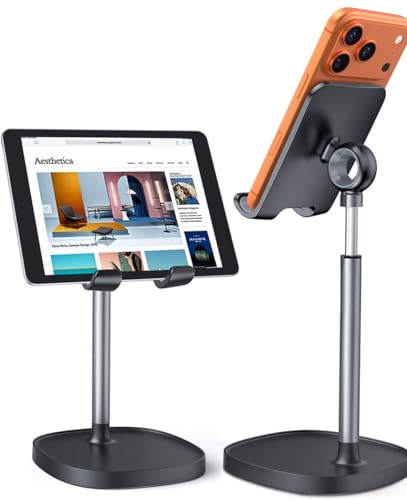
The LISEN Cell Phone Stand is a simple but effective desk accessory that can make a real difference for PC gamers, streamers, and anyone who spends long hours at a desk. This adjustable phone holder is designed to hold smartphones and small tablets between 4 and 10 inches, positioning them at eye level so you can keep an eye on chats, stream alerts, or walkthroughs without constantly looking down. It's a practical addition to any gaming setup, especially if you're juggling multiple screens or need quick access to your phone during a match.
In terms of build quality, the stand features a metal construction with a sturdy base and a fully adjustable arm. The height can be set from 7.1 to 8.5 inches, and the angle tilts from 5 to 85 degrees, giving you plenty of flexibility to find the perfect viewing angle. The entire stand is covered in anti-skid silicone, both on the cradle and the base, which keeps your phone firmly in place and prevents scratches. The integrated charging hole is a thoughtful touch, letting you plug in your phone without awkward cable bends.
For PC gamers, this stand is a great companion for Discord, Twitch chat, or watching replays. It sits neatly beside your monitor and keeps your phone visible without taking up much desk space. Streamers will appreciate being able to see their stream chat or alerts at a glance. The adjustable angle also helps reduce neck strain during long sessions, which is a real benefit for anyone who spends hours at a desk. It's compatible with most cases, including OtterBox, so you don't have to remove your protective case.
Setup is straightforward: the stand comes with a hex screw and tool to tighten the pivot joint, and once it's locked in, it holds firm. No wobbling or sagging, even with a larger phone. The anti-slip pads on the bottom keep the stand from sliding around on your desk, which is important during intense gaming moments. It's also lightweight enough to move between your home and office setup if needed.
One realistic limitation is that the stand is best suited for phones and smaller tablets. A full-size iPad or heavy tablet may be too large or cause the stand to tip if not positioned carefully. Also, the height adjustment range is only 1.4 inches, so if you need a very tall stand, this might not be the one. But for typical desktop use with a phone, it works well.
Overall, the LISEN Cell Phone Stand is a solid, no-frills accessory that does exactly what it promises. It's especially useful for PC gamers, streamers, and anyone who wants to keep their phone visible and accessible while working or gaming. At its price point, it's a worthwhile addition to a clean, organized desk setup.

Pros
- Cloud-soft memory foam provides excellent wrist support for long gaming sessions.
- 3-in-1 set offers great value - keyboard rest, mouse rest, and coaster.
- Easy to clean water-resistant leather surface.
- Non-slip silicone base prevents sliding during fast-paced gaming.
- Aesthetic cloud design complements white or neutral desk setups.
Cons
- Designed for tenkeyless keyboards; full-size keyboard users may need to check dimensions.
- White color may require more frequent cleaning to stay pristine.
- Some users may prefer a gel-filled wrist rest for a different feel.
The Sushret Cloud Wrist Rest Keyboard Set is a 3-in-1 desk accessory bundle that brings both comfort and personality to your gaming or work setup. It includes a cloud-shaped keyboard wrist rest, a matching mouse wrist rest, and a small coaster, all made from high-density memory foam wrapped in soft PU leather. The design is inspired by actual clouds, offering a squishy yet supportive feel that aims to reduce wrist fatigue during long gaming sessions or workdays.
This set is ideal for PC gamers, streamers, content creators, and anyone who spends hours at a desk typing or using a mouse. Casual gamers and competitive players alike will appreciate the ergonomic support, which helps maintain proper wrist alignment and may reduce the risk of carpal tunnel syndrome. The memory foam cushions your wrists without being too firm, striking a balance between comfort and stability.
Build quality is solid for the price point. The PU leather is water-resistant and sweat-proof, making it easy to wipe clean after snacks or spills. The silicone base grips the desk firmly, so the rests stay put even during frantic gaming moments. The memory foam is 63D density, which means it's dense enough to hold its shape over time but still soft enough to feel like a cloud.
Setup is straightforward - just place the keyboard rest in front of your keyboard and the mouse rest next to your mouse. The tenkeyless size is designed for keyboards without a number pad, which is common among gaming keyboards. If you use a full-size keyboard with a numpad, the keyboard rest may not cover the entire width, but it still supports the main typing area. The coaster is a nice bonus for your drink.
One limitation is that the white color, while visually pleasing, can show dirt and stains more easily than darker options. The memory foam might also compress slightly over many months of heavy use, but for the price, the set offers excellent initial comfort and support. There are no software or cables to deal with - it's a plug-and-play (literally place-and-play) accessory.
Overall, the Sushret Cloud Wrist Rest Set is a practical and affordable upgrade for any gaming desk or home office. It provides tangible comfort benefits for long sessions, adds a touch of whimsy to your setup, and includes everything you need to support your wrists. For the price, it's a solid choice for streamers, students, and anyone looking to improve their ergonomics without breaking the bank.

Pros
- Unique elevated PC display stand is a standout feature for RGB and tempered glass case enthusiasts.
- Integrated RGB lighting adds ambiance without requiring extra strips or hubs.
- Three drawers provide surprisingly generous storage for a desk with a built-in PC stand.
- Heavy-duty steel frame feels solid and stable during intense gaming sessions.
- Reversible design offers flexibility for different room layouts and cable routing.
Cons
- The elevated PC stand may limit monitor placement options for users with very large monitors.
- Some users might prefer a larger side shelf for bigger collectibles or speakers.
- Assembly can be time-consuming due to the number of components and the reversible configuration.
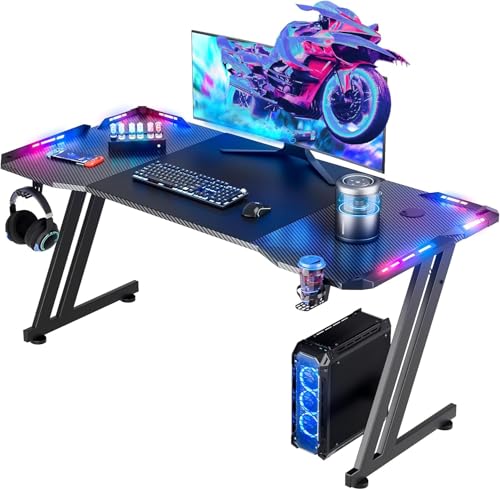
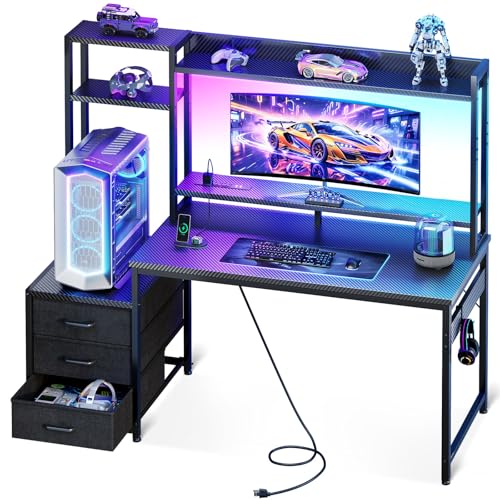
The AODK 63 inch Gaming Desk is a specialized gaming desk designed for PC gamers who want to showcase their high-end builds. Unlike standard desks that hide your tower underneath, this desk features an elevated PC display stand that lifts your chassis to eye level, making it perfect for panoramic fish tank cases like the Lian Li O11 or Hyte Y60. This desk is best suited for gaming setup builders, streamers, RGB enthusiasts, and anyone who treats their PC as the centerpiece of their gaming room.
In terms of real-world performance, the desk excels at enhancing your gaming experience through its integrated RGB LED lighting strip. The lighting sits under the monitor shelf and can be synced visually with your PC's internal RGB, creating a cohesive, glowing ecosystem that looks fantastic during long gaming sessions or streaming on Twitch. The 63-inch surface provides plenty of space for a dual-monitor setup, a full-size keyboard, and a mouse pad, so you can keep your competitive gaming gear within easy reach without feeling cramped.
Build quality is a strong point here. The desk uses an industrial steel frame and a thick desktop board that feels solid and stable, even when supporting a heavy full-tower case on the elevated stand. The stand itself is reinforced and tested to handle the weight of glass panels and high-end GPUs without wobbling, which is crucial for protecting expensive hardware during intense gameplay. The three built-in drawers are a practical addition, swallowing up cables, controllers, and accessories to keep your desktop clean and minimalist.
Setup is fairly straightforward, though you should expect to spend some time assembling the various components, especially if you choose to reverse the configuration. The reversible design is a nice touch, allowing you to place the PC stand and side shelf on either side based on your room layout and cable management preferences. The side shelf is great for displaying Funko Pops, action figures, or small speakers, but it may be too shallow for larger collectibles or studio monitors.
One realistic limitation is that the elevated PC stand might interfere with monitor placement for users with very large monitors or those who prefer a specific ergonomic height. Additionally, while the drawers are useful, they are not full-extension, so accessing items at the back can be a bit tricky. Overall, though, the desk offers a unique combination of display-focused design and practical storage that many gamers will appreciate.
For PC gamers who want their rig to be the star of the show, the AODK 63 inch Gaming Desk is a solid choice. It works well for competitive and casual gamers alike, and its RGB integration and storage features make it especially appealing for streamers and content creators. If you have a tempered glass case and want to create a clean, immersive gaming setup without sacrificing workspace, this desk delivers on its promises.
Pros
- Integrated 15W wireless charger saves desk space and charges compatible phones quickly.
- Large surface area accommodates full-size keyboards and mice with room for other desk items.
- RGB lighting with memory function adds customizable flair without complicated software.
- Smooth, water-resistant surface provides consistent mouse tracking and easy maintenance.
- Affordable price point for a feature-rich desk mat with wireless charging.
Cons
- Fast charging requires a 9V 2A adapter (not included) to reach 15W speeds.
- Some users may experience temporary curling due to shipping; requires flattening period.
- RGB lighting is not per-key or software controlled; only preset modes are available.
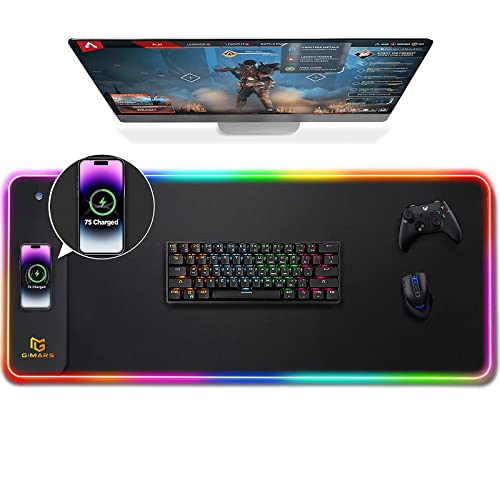
The Gimars RGB Gaming Mouse Pad is a versatile desk accessory that blends a large mouse pad with a built-in 15W Qi wireless charger. Designed for PC gamers, streamers, and anyone who wants a cleaner desk, this mat offers a practical solution for charging your phone while keeping your workspace organized. Its extra-large 31.5x11.8 inch size easily covers a keyboard, mouse, and other peripherals, making it a solid choice for both gaming and office setups.
One of the standout features is the integrated wireless charging pad with a raised platform. This design improves alignment success by about 80% compared to flat charging zones, so you don't have to fiddle with your phone placement. The 15W fast charging works with most Qi-enabled devices (like recent iPhones and Samsung Galaxy models), though you'll need to supply your own 9V2A adapter for the fastest speeds. Many users will appreciate the convenience of simply placing their phone on the mat during gaming sessions or work hours.
The RGB lighting offers 10 modes: 7 static colors and 3 dynamic effects. A memory function remembers your last selection, so you don't have to cycle through modes each time. While it's not per-key addressable or software-controlled, the lighting adds a nice ambient glow that complements any gaming or streaming setup. The light bar also serves as a charging status indicator (red for charging, green for full, yellow for standby), which is a thoughtful touch.
In terms of performance, the mat's micro-textured fabric provides a smooth surface for accurate mouse tracking, whether you're using a optical or laser sensor. It's also water-resistant, so accidental spills won't ruin the mat - just wipe it clean. The 4mm thickness strikes a balance between comfort and stability, and the natural rubber base grips most desks firmly without sliding. The edges are reinforced with double stitching, which helps prevent fraying and keeps the mat flat over time (though shipping may cause temporary curling, easily fixed by laying it flat for 12 hours).
The main limitation is that the charger requires buying a separate adapter to reach full 15W speeds - using a standard 5V adapter will charge slower. Also, the RGB lighting, while attractive, isn't customizable beyond the preset modes. Some users might prefer software control for syncing with other gear. But for the price, these are minor trade-offs.
Overall, the Gimars RGB Gaming Mouse Pad is a practical purchase for PC gamers and desk setup enthusiasts who want a tidy, feature-rich mat. It's especially useful for streamers or remote workers who keep their phone nearby and want fast charging without extra cables. If you're building a budget-friendly RGB setup or just want to reduce desk clutter, this mat delivers solid performance and convenience.
The built-in 15W Qi wireless charger is a highlight of this mouse pad. It uses a raised platform that makes it easy to align your phone correctly - a common frustration with flat chargers. The mat supports 15W, 10W, and 7.5W charging speeds depending on your power adapter and device. A 9V2A adapter is recommended for the fastest charging (not included). The indicator lights let you know charging status at a glance. This feature eliminates the need for a separate wireless charger on your desk, saving space and reducing cable clutter.
The RGB lighting on this mouse pad offers 10 distinct modes: 7 static colors (like red, blue, green, and more) and 3 dynamic effects (such as breathing or color cycling). There's no software or app to configure - you control everything via the button on the mat. A useful memory function remembers your last chosen mode, so you don't have to reset it each time you power on. The lighting bar also doubles as a charging status indicator. While not as advanced as per-key RGB, it provides nice ambient illumination for any gaming setup.
This desk mat measures 31.5 x 11.8 inches and is just 4mm thick, making it easy to slide under your keyboard and mouse. The surface is made from a smooth, water-resistant micro-textured fabric that tracks mouse movements accurately and can be wiped clean after spills. The base is natural rubber with a textured grip that holds firmly on most desks. The edges feature double stitching for durability and to prevent fraying or curling. The Type-C connection is a modern upgrade, and the included cable is long enough for most setups. Overall, the build quality feels solid for its price range.
Pros
- No drilling or adhesive required – simply place on desk and rearrange as needed
- RGB lighting adds immersive glow without software – one-button control with mode memory
- Compact vertical storage frees up desk surface for mouse, keyboard, and monitor
- Headset and controller hooks fit standard gaming gear comfortably
- Storage box and hooks keep small items like cables, pens, and phone organized
Cons
- Base footprint may be slightly small for very heavy headsets or multiple controllers – stability depends on weight distribution
- RGB lighting is powered via USB (likely cable included) – adds one more cable to manage if not routed neatly
- Limited to vertical storage – no ability to mount larger items like full-size keyboards or monitor arms
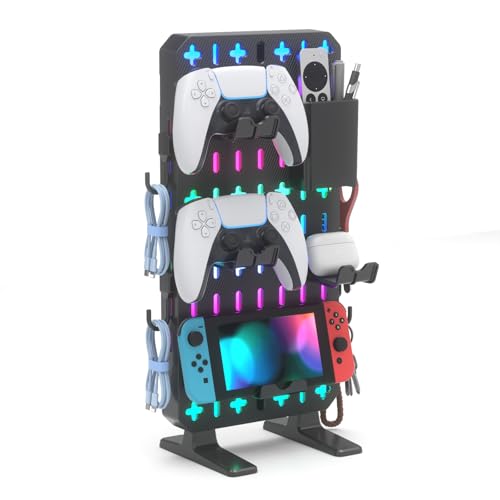
The KDD 6 in 1 RGB Gaming Desk Accessories is a practical solution for gamers and streamers who need to reclaim desk space without permanent modifications. This freestanding pegboard organizer combines a phone stand, three controller and headset hangers, a storage box, and five hooks into one compact unit. It’s designed for small desks, dorm rooms, and minimalist gaming setups where every inch matters.
Best suited for PC gamers, competitive players, casual gamers, and content creators who want to keep their gear within easy reach. The built-in RGB lighting features nine modes – including breathing, flashing, and static colors – controlled by a single button with memory function. While it won’t rival high-end addressable RGB ecosystems, it adds a pleasant glow that matches many gaming peripherals.
Performance here is about organization and convenience rather than raw responsiveness. The thick back panel provides good stability, and the protective base pads keep your desk scratch-free. The modular design lets you reposition the storage box, hooks, and hangers to suit your workflow. Fitting most PlayStation, Xbox, Switch, and Steam controllers plus standard gaming headsets, it ensures your most-used accessories are always within arm’s reach.
Build quality feels solid for the price – the plastic construction is typical for this category, but the freestanding base and sturdy back prevent tipping under normal use. Setup is truly no-drill: just unpack, place on your desk, and arrange the accessories. Cable management is indirect – you can weave cables through hooks or tuck them in the storage box, but there are no dedicated cable channels.
One limitation is that the compact base may not be ideal for very heavy headsets or multiple large controllers simultaneously, as the center of gravity can shift. Also, the RGB power requires a USB port, adding a cable. However, for most users, this organizer effectively clears desk clutter without the permanence of wall-mounted alternatives.
If you're a college gamer, streamer, or anyone with a tight desk setup, the KDD 6 in 1 RGB Gaming Desk Accessories offers an affordable way to tidy up while adding a touch of RGB flair. It's a practical buy for those who prioritize vertical storage and flexibility over maximum capacity.

Pros
- Easy to install and remove without tools or adhesive
- Rotating arm provides flexible positioning for easy access
- Rubber padding protects both headset and desk surface
- Affordable price point for a functional desk accessory
Cons
- Clamp may not fit desks thicker than 1.57 inches, limiting compatibility with some heavy-duty desks
- Plastic construction may feel less premium compared to metal alternatives
- Cable clip is small and may not accommodate thicker braided cables
The EURPMASK Rotating Headphone Stand is a simple yet effective solution for gamers and streamers who want to keep their desk organized without sacrificing valuable surface area. This clamp-on headset holder attaches securely to desks, shelves, or tables with a thickness between 0.31 and 1.57 inches, making it a versatile choice for most standard gaming setups. The spring clamp is easy to install and remove, leaving no residue or damage behind, which is a big plus for renters or those who frequently rearrange their battle station.
This headphone stand is best suited for PC gamers, competitive gamers, casual gamers, esports players, streamers, content creators, and work-from-home gamers who use a headset regularly and want to keep it within easy reach. The 360-degree rotating arm allows you to swivel the headset to your preferred position, whether that's hanging neatly under the desk or angled for quick grab-and-go access. The built-in cable clip helps manage the headset wire, reducing tangles and keeping your gaming area looking clean and professional.
In terms of real-world performance, this stand focuses on convenience and desk organization rather than high-tech features. The rotating mechanism moves smoothly, and the clamp holds firmly without slipping. The curved edges and soft rubber pads on the holder protect your headset from scratches, while the rubber pads on the clamp ends prevent damage to your desk surface, whether it's glass, wood, or metal. For long gaming sessions, having your headset stored properly when not in use can extend its lifespan and keep it free from dust or accidental knocks.
Build quality is decent for the price point, with a sturdy plastic construction that feels durable enough for everyday use. The clamp mechanism is spring-loaded and provides a secure grip, though it may not fit desks thicker than 1.57 inches, so be sure to measure your desk before purchasing. The cable clip is a nice addition, but it's relatively small and may not accommodate thicker braided cables found on some premium gaming headsets. Setup is straightforward: simply clamp it onto your desk, adjust the arm, and you're good to go with no software or tools required.
One realistic limitation is that the plastic build may not feel as premium as metal headphone stands, but it keeps the weight low and the price affordable. The stand is also limited to holding one headset at a time, so if you have multiple headsets for different platforms, you may need additional stands. However, for most gamers with a single primary headset, this is a practical and space-saving solution.
Overall, the EURPMASK Rotating Headphone Stand is a solid choice for gamers, streamers, and desk setup enthusiasts who want an affordable, easy-to-install headset holder that keeps their gear organized and accessible. It's especially useful for those with limited desk space, such as college gamers in dorm rooms or home office workers who need a tidy workspace. If you're looking for a no-fuss way to declutter your gaming desk and protect your headset, this clamp-on stand is worth considering.
Frequently Asked Questions
Do desk cup holder clamps fit thick gaming tables?
Most clamp-on cup holders fit surfaces between 0.5 inches and 2 inches thick. The OOKUU metal cup clamp uses an adjustable threaded hand knob with non-slip protective pads that attach safely to standard desktop boards without needing tools or drilling. If you use a thicker surface or a custom wooden bench, checking the clearance before mounting ensures the bracket grips firmly without wobbling during intense mouse movements.
How do silicone cable clips help reduce mouse cable drag?
Yes, silicone cord clips keep peripheral wires anchored in fixed positions to prevent cable pull across the desk surface. By routing your braided mouse cord or keyboard cable through flexible slots, you eliminate heavy slack dropping behind the table. This simple cord management stabilizes your mouse glide and mirrors the consistent feel of a dedicated mouse bungee without requiring extra tabletop real estate.
Can desk pegboards hold heavy game controllers and headsets safely?
Yes, modular metal and ABS pegboards like the KDD models are designed to secure multiple gamepads and oversized headsets easily. They utilize clamp-on or weighted freestanding bases fitted with protective padding to bear the weight of console controllers and audio gear without tipping over. Organizing your gear vertically frees up space on larger surfaces like a 63-inch gaming desk while keeping essential accessories within arm’s reach.
Will an RGB mouse pad interfere with optical mouse sensor tracking?
No, quality gaming desk mats use micro-textured cloth surfaces engineered for precise tracking with all optical and laser mouse sensors. The Gimars XXL mat features a smooth fabric weave that ensures zero sensor stutter alongside an anti-slip rubber base to prevent movement during rapid flicks. In addition, its integrated 15W Qi charging pad delivers convenient wireless power to compatible smartphones while you play.
Are ergonomic wrist rests worth it for long gaming sessions in 2026?
Yes, high-density memory foam wrist rests relieve carpal pressure and keep your forearms properly aligned with your mechanical keyboard. Cushions like the Sushret cloud wrist rest provide soft palm support and breathable textured faux leather that prevents sweat buildup and wrist strain during marathon raids. Gamers using an elevated platform or a standing desk converter for gaming particularly benefit from ergonomic wrist support to maintain neutral hand angles across variable desk heights.




Write Your Review
No reviews yet. Be the first to share your experience!