


Stifling ambient heat radiates quickly from high-wattage graphics cards and warm gaming monitors, turning intense competitive matches into sweaty, uncomfortable grinds. Sweaty palms compromise mouse control during clutch aim duels, while trapped heat around your keyboard tray wears down mental focus. Placing the best desk fan for gaming right beside your display creates a dedicated cooling zone that sweeps away hot air without rattling your monitor arm or blasting wind noise into team voice chat. Pairing smart personal airflow with quiet air cooled gaming PC setups keeps your entire command station feeling fresh through demanding summer sessions.
Tight battlestation layouts leave minimal space for bulky household fans that hog mousepad territory or produce irritating mechanical hums. A proper gaming desk fan combines compact dimensions, adjustable tilt angles, and whisper-quiet brushless motors that fit cleanly beside a gaming desk with LED lights. Reviewing motor efficiency, multi-speed controls, and rechargeable battery options helps you choose a dependable desktop cooler that keeps your hands dry for every match.

Pros
- Ultra-quiet operation enhances concentration during gaming and streaming.
- Compact footprint fits perfectly on small desks or dorm rooms.
- Safe bladeless construction for households with children or pets.
- Touch controls are intuitive and easy to use while gaming.
Cons
- Limited airflow may not cool larger rooms - best used as a personal desk fan.
- Requires continuous USB power; no built-in rechargeable battery for cordless use.
- Lacks oscillation or tilt adjustment, so directional focus is fixed.
If you're a PC gamer, streamer, or esports enthusiast looking to keep your desk cool without sacrificing focus, the KONSIDEN Bladeless Desk Fan is a smart accessory that bridges function and style. This compact, 11.8-inch fan is engineered with turbine technology, offering a bladeless design that not only looks futuristic but also eliminates safety hazards - a real plus for gamers with curious pets or young children around their setup.
When it comes to performance, the fan delivers three speed settings that you can adjust via a responsive touch panel on the base. The airflow is gentle and consistent, perfect for keeping you comfortable during long gaming sessions or Twitch streams. The quiet operation is a standout feature: it won't interfere with your headset microphone or distract from in-game audio cues, making it viable for competitive play where every sound matters.
Build quality is practical and durable. The casing feels sturdy, and the compact dimensions (13.43 x 5.79 x 5.75 inches) mean it slips easily into even the most crowded desk setups. Since there are no exposed blades, cleaning is as simple as wiping down the outer grille - no tedious dusting of fan blades. The touch control panel is sleek and responds to light taps, though you'll want to keep the original USB cable and charger handy for optimal performance.
Setting up the fan is straightforward: plug it into a USB port on your PC, monitor, or a wall adapter, and you're ready to go. It's lightweight at just 1.47 pounds, so you can reposition it as needed. However, note that it requires a constant USB power source - there's no built-in battery for cordless use. Also, the fan lacks oscillation, so airflow is directed in a single fixed direction. For most personal desk use, these limitations are minor, but if you need to cool a large room or want wide-area circulation, you might look elsewhere.
Overall, the KONSIDEN Bladeless Desk Fan excels as a quiet, safe, and space-efficient cooling solution for gamers, streamers, and work-from-home users. It's especially well-suited for dorm rooms, small offices, or any setup where noise and safety are priorities. If you value a calm, focused environment and want a fan that blends into your gaming aesthetic without visual clutter, this is a practical choice.

Pros
- Ultra-quiet brushless motor (30dB) won't disrupt gaming or streaming sessions
- Long battery life (up to 10.4 hours) for untethered use during long play sessions
- Touch controls and LED display are easy to operate without leaving your gaming chair
- Compact footprint saves desk space for keyboards, mice, and other gear
- Smooth 90-degree tilt allows precise air direction for personal cooling
Cons
- No oscillation or side-to-side movement; airflow is fixed in the tilted direction
- Fan size (7.7 inches) may not be enough to cool a large room or multiple people
- Lacks RGB lighting that some gaming enthusiasts might prefer for their setup aesthetics
The Gaiatop Desk Fan might not be the first thing that comes to mind when building a gaming setup, but it's a surprisingly practical addition for any PC gamer, streamer, or college student living in a dorm. This compact 7.7-inch fan is designed to keep you cool during those intense gaming marathons or long streaming sessions without adding distracting noise. Its ultra-quiet brushless motor operates as low as 30dB, which means it won't interfere with your game audio or your voice chat on Discord. For anyone who has ever sweated through an FPS tournament or a long content creation session, this little fan is a game-changer in a subtle way.
The built-in 4000mAh battery is one of its standout features, allowing up to 10.4 hours of continuous operation on a full charge. That's more than enough for an all-day gaming session or a full day of work and play. Plus, the smart power management automatically reduces fan speed when the battery drops to 30%, giving you extra time without needing to plug in. The USB-C charging is convenient and fast, so you can top it off between matches. This makes it a great choice for gamers who want to keep their desk free of trailing cables or for those who move between different setups.
Performance-wise, the fan delivers a brisk max speed of 5.2 m/s thanks to its dual-stage turbo design and seven curved blades. While it won't cool a whole room, it provides focused, direct airflow that keeps you comfortable without blasting your documents or cables around. The 90-degree vertical tilt lets you angle the air exactly where you need it - whether that's on your face, your hands, or your PC tower if you need extra ventilation. The touch-sensitive LED display is another nice touch: a 2-second hold turns the fan on or off, while a quick tap cycles through five speed settings. The display also shows battery level, so you know when it's time to recharge.
Build quality is solid for a fan in this price range. The plastic body feels decently sturdy, and the compact size (6.69 x 4.13 x 7.68 inches) means it won't take up much real estate on your desk. At just 0.44 pounds, it's lightweight and easy to move around. The all-black color option fits well with most gaming setups, though it lacks the RGB lighting that some enthusiasts might want to match their glowing peripherals. Still, for a functional cooling accessory, it's hard to complain about the simplicity.
Setup and maintenance are straightforward. There's no software to install or complicated assembly - just unpack, charge, and start using. Cleaning is simple thanks to the removable front grille (though it's not explicitly stated in the specs, it's standard for most desk fans). The lack of oscillation might be a downside for some users who prefer a broader sweep, but for personal cooling right at your desk, the fixed tilt works fine. Overall, this is a reliable, low-maintenance addition to any gaming or work setup.
In summary, the Gaiatop Desk Fan is an excellent choice for PC gamers, streamers, esports players, and college gamers who need quiet, wireless cooling without sacrificing desk space. It's especially useful for those in shared spaces like dorms or home offices, where noise is a concern. While it may not be a core gaming component, it's a practical accessory that enhances comfort during long play sessions. If you're looking for a no-fuss, battery-powered desk fan that won't break the bank, this is a solid pick.

Pros
- Excellent cooling performance with five fans and metal mesh surface
- Adjustable height settings improve posture and comfort for long gaming sessions
- Affordable price point for budget-conscious gamers and students
- Dual USB hub adds convenience for connecting extra gaming peripherals
- Quiet operation allows for focused gameplay and clear communication on Discord
Cons
- Blue LEDs cannot be turned off independently from the fans, which may not suit all RGB setups
- USB-A cable requires an adapter for Type-C laptops, adding an extra purchase for some users
- 21-inch USB cable may be short for desk setups where the tower is far from the laptop
The Kootek Laptop Cooling Pad is a practical and affordable accessory designed for PC gamers, streamers, and anyone who uses a laptop for extended periods. It's a cooling pad that sits underneath your laptop, using five fans to pull heat away from the chassis. This is especially useful for gaming laptops that tend to run hot during demanding titles like Call of Duty, Fortnite, or Elden Ring.
This cooling pad is best suited for competitive gamers, casual gamers, esports players, and content creators who need to keep their laptop temperatures in check. It's also a solid choice for college gamers and work-from-home users who want to improve ergonomics without spending a lot. The six adjustable height settings let you tilt the laptop to a comfortable viewing angle, which can reduce neck strain during long study or gaming sessions.
In terms of real-world performance, the Kootek pad uses one large 4.72-inch fan and four smaller 2.76-inch fans spinning at up to 2400 RPM. This setup provides 360-degree cooling coverage that helps maintain lower temperatures during intense gameplay. While it won't magically fix a laptop's thermal design, many user reviews note it can reduce heat buildup and prevent thermal throttling in many mid-range and high-performance gaming laptops. The blue LED fans add a subtle glow to your desk setup, though the lights cannot be turned off independently from the fans.
Build quality is decent for the price. The metal mesh surface is durable and promotes airflow, while the plastic frame feels sturdy enough for daily use. The anti-slip stoppers at the front keep your laptop securely in place, even when you're typing aggressively during a heated match. The dual USB 2.0 ports are a nice touch, letting you plug in a gaming mouse or headset without sacrificing a port on your laptop. However, note that the built-in cable is USB-A, so if your laptop only has USB-C ports, you'll need an adapter.
Setup is straightforward: just plug the USB cable into your laptop or a wall adapter, and press the switch to turn on the fans. There are two switches: one controls the central fan, and the other controls the four surrounding fans, giving you three working modes. The pad is lightweight at about 2.5 pounds and easy to store when not in use. The main limitation is the 21-inch USB cable, which may be too short if your laptop is far from a power source or USB hub.
Overall, the Kootek Laptop Cooling Pad is a smart buy for PC gamers and streamers on a budget who need reliable cooling and improved ergonomics. It's not a premium solution, but it offers solid performance, decent build quality, and practical features like USB ports and adjustable height. If you're a college gamer, a work-from-home user, or a casual player looking to keep your laptop cool without spending a fortune, this pad is a practical choice.

Pros
- Near-silent operation enhances focus during competitive gaming or streaming.
- Long battery life supports all-day use without plugging in.
- Touch controls are intuitive and provide quick speed adjustments.
- Compact and lightweight, easy to reposition or travel with.
- Affordable price point for a feature-rich desk fan.
Cons
- No oscillation feature, only manual tilt adjustment.
- Not programmable via software for automatic speed changes.
- Battery life may naturally decrease over time as with all rechargeable batteries.
The Gaiatop Desk Fan is a compact, rechargeable desktop fan that targets PC gamers, streamers, and content creators who need quiet, reliable cooling during long sessions. With touch controls, a 4000mAh battery, and five speed settings, it's designed to fit into modern gaming setups without adding noise or clutter. Its USB-C charging and 90-degree tilt make it versatile for desks, dorm rooms, or home offices.
Performance-wise, the fan uses a dual-stage turbo system with seven curved blades to push air up to 5.2 m/s while keeping noise as low as 30dB. That's quiet enough to use during Twitch streams or Discord calls without picking up background hum. The five speeds let you dial in just the right airflow, and the touch-sensitive LED display shows battery level and speed clearly. For gamers who keep their systems running hot, this fan can provide direct cooling without the distraction of a loud traditional fan.
Build quality feels solid for its price, with a compact 7.7-inch frame that weighs under two pounds. The 90-degree tilt is useful for directing air exactly where you want it, whether that's on your face or toward your PC's intake. The 4000mAh battery delivers up to 10.4 hours on low settings, and the smart power management kicks in at 30% to extend runtime. Setup is simple: just charge via USB-C and tap the display to start. No software, no assembly.
On the practical side, the fan lacks oscillation, so you'll need to manually tilt it to change air direction. There's also no app or remote control, which might be a downside for some. But for the price, these are reasonable trade-offs. The battery is a highlight, allowing true wireless use anywhere in your room or even while gaming on the go.
Overall, the Gaiatop Desk Fan is a smart choice for anyone who spends long hours at a gaming desk. It's especially useful for streamers who need silence, college gamers in dorms with limited outlets, and remote workers who want a personal cooling solution without fan noise. If you're looking for a simple, effective desk fan that won't break the bank or disturb your focus, this one deserves a spot on your setup.
The Gaiatop desk fan uses a dual-stage turbo cooling system with seven curved blades to create a focused airflow at up to 5.2 m/s. The brushless motor operates quietly, making it suitable for gaming environments where background noise matters. The 90-degree tilt lets you direct airflow precisely, whether you're cooling yourself or your PC components. The 4000mAh battery ensures you can use the fan wirelessly for hours, and the smart power management reduces speed at 30% battery to extend runtime.
Measuring just 7.7 inches and weighing under two pounds, this fan fits easily on crowded desks, nightstands, or shelves. The touch-sensitive LED display provides at-a-glance battery and speed info without taking up extra space. The USB-C charging port is convenient for modern setups, and the black purple color adds a subtle accent. While it lacks oscillation, the manual tilt allows you to aim airflow where needed. It's a practical addition to any gaming desk or dorm room.

Pros
- Near-silent operation won't interfere with game audio or Discord calls.
- Wide speed range from gentle breeze to strong airflow for versatile use.
- Long battery life and fast 2.5-hour recharge for portable convenience.
- Small footprint and light weight make it easy to reposition or carry.
- Safety grille adds peace of mind in homes with children or pets.
Cons
- Lacks remote control or smart app; speed and settings must be adjusted manually on the fan.
- USB-powered charging; fastest recharge requires a 5V/2A adapter not always included.
- Focused cooling primarily for personal space, not large room air circulation.
The KIMMOO Rechargeable USB Desk Fan might not be a traditional gaming peripheral, but it's a practical cooling accessory for any PC gaming or streaming setup. Designed as a compact desktop fan, it targets gamers, streamers, content creators, and work-from-home users who spend long hours in front of a monitor. Its low noise and adjustable airflow make it a smart addition to a comfortable gaming environment.
Performance is where this fan stands out for gaming use. At its lowest setting, it operates at just 35dB, which is quieter than a whisper. This means you can focus on footsteps in FPS games or chat clearly on Discord without fan noise bleeding into your headset microphone. Turbo Wind Technology delivers a 200% power boost for rapid cooling when your rig is pushing hard during intense matches. With 100 speed levels, you can fine-tune the breeze from a gentle air movement to a strong gust, adapting to your comfort without disrupting gameplay.
Build quality is solid for a fan this size. It weighs just 0.92 pounds and measures about 5.5 by 3 by 6.6 inches, so it fits easily on a crowded desk or next to your monitor. The dual guard rail design adds safety, especially for households with pets or kids. The LED display clearly shows battery life and current speed, so you always know when to recharge. A full charge lasts up to 8.5 hours, easily covering a long gaming session or a full workday.
Setup is incredibly straightforward: plug it into any USB port (or a wall adapter for faster charging), adjust the speed, and rotate the fan head up to 90 degrees to direct airflow. There's no software to install and no cable management headache. The main limitation is the lack of remote control or app support - you have to reach over to change settings. Also, while the fan cools your immediate area well, it won't replace a room fan for large spaces.
Overall, the KIMMOO Rechargeable USB Desk Fan is a thoughtful choice for PC gamers, streamers, and anyone building a focused desk setup. It provides quiet, customizable cooling that won't distract from your game or workflow. If you need a portable, battery-powered fan that blends into a gaming desk without adding noise, this is a reliable and affordable option.
For PC gamers and streaming enthusiasts, desk space and noise management are critical. The KIMMOO fan's compact footprint and ultra-quiet operation make it easy to tuck beside a monitor or under a shelf. Its 90-degree rotation lets you aim cool air at your face, hands, or PC components without moving the fan. The long battery life means you can keep it running through marathon sessions without extra cables cluttering your setup.
The digital display is a nice touch for monitoring battery at a glance, so you can recharge between gaming sessions. If you use a mechanical keyboard or mouse with RGB lighting, the fan's simple black design won't clash visually. It's also light enough to toss into a backpack for LAN parties or travel, keeping you cool anywhere.

Pros
- Compact size fits easily on any desk without obstructing monitor stands or mouse pads
- Adjustable tilt offers flexible airflow direction for personal comfort
- Simple back-mounted knob with three speed options is intuitive and reliable
- Very affordable price point for an effective air circulator fan
- Portable and lightweight, ideal for dorm rooms, home offices, and LAN parties
Cons
- No oscillation feature - manual tilt only, so you must adjust the head for wider coverage
- Back-mounted control knob may be less accessible if the fan is placed behind a monitor
- Plastic construction feels basic compared to higher-end desk fans
If you've ever found yourself sweating through a heated gaming session or feeling stuffy during a long stream, you know how important good airflow can be. The Amazon Basics Air Circulator Desk Fan is a no-nonsense cooling accessory that fits right into your gaming setup without breaking the bank. It's a compact, lightweight fan designed for desks, tables, and floors - making it a practical choice for PC gamers, streamers, esports players, and anyone who spends hours in front of a screen.
This fan is best suited for gamers who want a simple way to stay cool without taking up much space. Whether you're deep into an FPS competitive match, grinding in a MOBA, building your dream RGB setup, or editing content, the extra airflow can help you stay comfortable and focused. The 3 speed settings let you choose between gentle breeze and more powerful airflow, while the 90-degree tilt allows you to direct the air exactly where you need it - perhaps toward your face, hands, or even your PC's side vents for added cooling.
In terms of performance, the fan delivers consistent, energy-efficient airflow thanks to its 35-watt motor. It's not going to replace a high-end tower fan, but for close-range desk cooling, it gets the job done. The blades are sealed behind a protective grille, which also helps keep the noise relatively low. Many users may find it quiet enough for streaming or Discord calls without distracting background hum.
Build quality is straightforward - the plastic housing feels solid enough for daily use, and the 3-pound weight means it's easy to reposition. The back-mounted control knob is simple and reliable, though if you place the fan behind a monitor or under your desk, reaching it can be a minor hassle. There's no oscillation function, so you'll manually adjust the tilt to change airflow direction. That said, for most gamers sitting at a desk, a fixed position often works just fine.
Setting up the fan is as easy as plugging it in and turning the knob. No software, no bloatware, no assembly required. Cleaning involves wiping down the grille and blades occasionally to maintain performance. The product manual does suggest giving the motor brief rest periods during extended use to prevent overheating - a small but helpful tip for longevity.
Overall, the Amazon Basics Air Circulator Desk Fan is a practical, budget-friendly addition to any gaming desk. It's not flashy or feature-packed, but it does exactly what you need: keep you cool. For college gamers in dorms, work-from-home gamers, or anyone just wanting to improve airflow without spending much, this fan is a solid choice. Pair it with your existing setup for a more comfortable and focused gaming experience.
The Amazon Basics Air Circulator Desk Fan uses three 7-inch blades powered by a 35-watt motor to generate consistent airflow. With three speed settings, you can adjust from a gentle whisper to a more powerful breeze. The 90-degree tilt head lets you direct air upward or downward, making it easy to cool your face or keep PC components from overheating. While it lacks oscillation, the focused airflow is ideal for a single user at a desk. The fan is also energy efficient, helping keep your gaming setup cool without significantly raising your electric bill.
Pros
- Near-silent operation won't interfere with game audio or Discord calls
- Compact footprint doesn't clutter your mouse or keyboard area
- Versatile USB power source works with most gaming PCs and peripherals
- Easy to clean design with detachable front cover saves maintenance effort
- Affordable price point makes it a no-brainer for any desktop setup
Cons
- No built-in battery for cordless use; must stay plugged into a USB port
- Plastic construction might feel less premium than all-metal alternatives
- Fan size may not provide strong airflow for larger rooms or multi-monitor setups
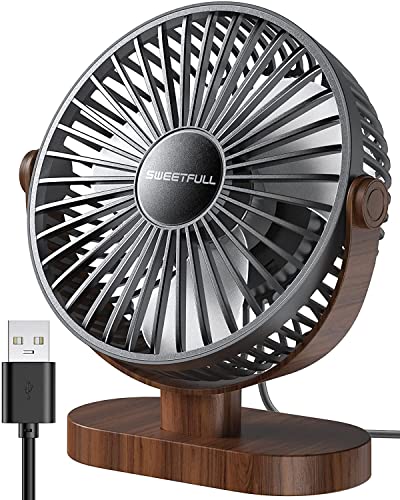
The SWEETFULL 6.5 Inch USB Desk Fan might look like a simple accessory, but for PC gamers and streamers, it's a practical addition to any desk setup. This compact fan is designed to keep you cool during long gaming sessions, streaming marathons, or even intense competitive matches where every degree matters. Its small footprint means it won't interfere with your mouse, keyboard, or monitor placement, making it a welcome addition for gamers who value desk space.
Who is this fan for? Perfect for PC gamers, casual gamers, esports players, streamers, content creators, and anyone working from home or in a dorm room. If you spend hours in front of a gaming PC, you'll appreciate the steady breeze it provides without the noise of larger fans. The 360° rotation lets you aim the airflow exactly where you need it, whether that's at your face, your hands, or even your console setup. The 3-speed control is simple to adjust via the power button, giving you flexibility during different temperature conditions.
Performance is where this fan shines for gamers. At under 25 dB, it's incredibly quiet, so you won't hear it over game audio or during Discord calls. The USB connectivity means you can plug it directly into your gaming PC, laptop, or even a power bank for portable use. While it won't cool an entire room, it creates a personal airflow zone that helps reduce sweat and discomfort during intense gaming sessions. The anti-slip rubber base also helps minimize vibration, keeping the fan steady on your desk.
Build quality is solid for the price point. The wood grain plastic base gives it a clean, modern look that blends well with most gaming setups. The detachable front cover makes cleaning a breeze, which is important for maintaining airflow over time. At just 10 oz, it's lightweight enough to move between your desk and a LAN party setup without hassle. The 4.7 ft USB cable gives you enough reach to plug into most tower cases or rear ports, though cable management enthusiasts might want to secure the excess cable.
Setup is truly plug-and-play. No software, no drivers, no complicated assembly. Just plug it into a USB port and press the button to cycle through low, medium, and high speeds. The 360° rotation is smooth, and the base remains stable thanks to the rubberized grip. The lack of a battery means you'll always need a USB source, but that also avoids the hassle of charging. For gamers who prefer a clean desk, the fan's small size and discreet design are definite wins.
Realistically, this isn't a heavy-duty cooling solution. If you're expecting to cool a large gaming room, you'll need a bigger box fan. But for its intended purpose, it performs admirably. The plastic build feels okay, but it's not going to survive a drop from a high shelf. However, for the price and the utility it provides, it's a solid choice for any PC gamer who wants a bit of personal cooling during long hours at the desk. Recommended for dorm room dwellers, compact desks, and anyone who values quiet operation alongside their gaming gear.
Pros
- Exceptional noise reduction keeps the fan barely audible during gameplay or streaming.
- Wide range of speeds allows precise airflow customization without sudden jumps.
- Long battery life supports all-night gaming sessions or full workdays without plugging in.
- Flexible placement options include desk use or wall mounting with included adhesive hook.
- LED display provides clear feedback on settings and battery status.
Cons
- Small size may not provide enough airflow for larger rooms or multiple users.
- Plastic construction may feel less premium compared to metal desk fans.
- Wall mounting requires a clean, smooth surface for the adhesive hook to hold securely.
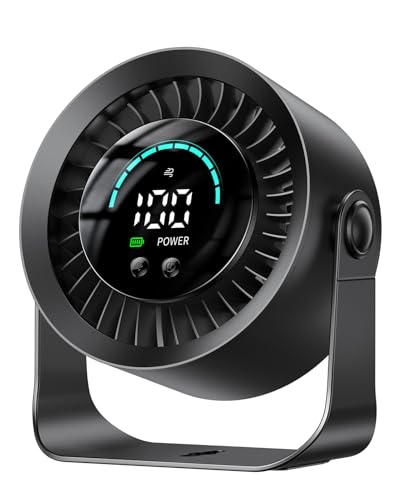
The DIGIX Rechargeable USB Desk Fan is a compact cooling accessory that fits well into any PC gaming or streaming setup. Designed as a small personal fan, it offers 100 stepless speed settings and a 360-degree rotating head, allowing you to direct airflow exactly where you need it. Whether you're a competitive gamer needing focused cooling during intense matches or a casual player who wants a gentle breeze while exploring open worlds, this fan adapts to your preference.
This fan is best suited for PC gamers, streamers, and gaming setup builders who value quiet operation and flexible placement. Its ultra-quiet design ensures it won't interfere with in-game audio, Discord calls, or streaming commentary. The 3000mAh battery provides up to 17 hours of use on low speed, making it a reliable companion for all-night gaming sessions, dorm rooms, or LAN parties where outlets are scarce. The included adhesive hook also lets you mount it on the wall, freeing up valuable desk space for your monitor, keyboard, and mouse.
In terms of real-world performance, the fan delivers consistent airflow without the humming or vibration that can distract from gameplay. The 100-speed control is a standout feature, letting you fine-tune the breeze from a whisper to a strong gust. While it won't replace a full-sized air conditioner, it's effective for personal cooling during long sessions. The LED display is a practical touch, showing your current speed and remaining battery so you're never caught off guard.
Build quality is solid for its price point, with a lightweight plastic body that's easy to move around. The 360-degree rotation is smooth, and the fan stays stable on a desk thanks to its small base. Setup is straightforward: just charge via USB, choose your speed, and position the head. Cleaning is simple with a soft cloth, and the fan requires no maintenance beyond occasional dusting. The compact size means it can be stored in a drawer or bag when not in use.
One realistic limitation is its size. This is a personal fan, not a room cooler, so it's best for close-range use. The plastic construction feels durable enough for a desktop accessory but may not withstand rough handling. The wall mount relies on an adhesive hook, which works best on smooth, clean surfaces and may not hold on textured walls. For most gamers and streamers, these trade-offs are acceptable given the fan's versatility and low noise.
Overall, the DIGIX Rechargeable USB Desk Fan is a practical addition to any gaming desk, streaming station, or home office. It's particularly useful for gamers who want to stay cool without adding noise or clutter. For the price, it offers solid performance, long battery life, and flexible placement that fits seamlessly into a modern PC gaming setup.
Pros
- Compact size saves desk space while delivering effective personal cooling
- RGB lighting adds aesthetic appeal without requiring software or complex setup
- Quiet enough for use during streaming, recording, or late-night gaming without disturbing others
- 360° rotation allows precise airflow direction for targeted cooling
Cons
- Not rechargeable – requires constant USB connection; no built-in battery for portable use
- Small size means limited airflow range – only suitable for personal, close-range cooling
- Plastic construction feels lightweight; may not withstand heavy drops or rough handling
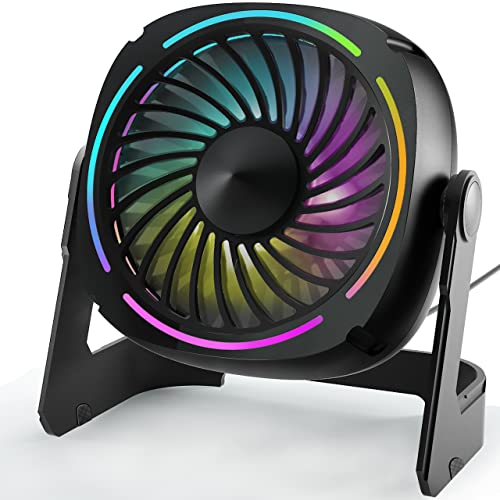
If you are a PC gamer, streamer, or gaming setup builder looking for a simple way to beat the heat without cluttering your desk, the Punoge Small USB Desk Fan might be exactly what you need. This 5.3-inch portable table fan combines basic cooling with subtle RGB lighting, making it a practical accessory for long gaming sessions, streaming marathons, or even just working from home. It connects via a 4.9-foot USB cable to any USB port, so you can plug it into your gaming PC, laptop, or a power bank.
This fan is best suited for gamers who want a low-profile cooling solution that does not interfere with their setup. The 3-speed airflow (up to 3300 RPM) provides instant relief when your rig starts heating up your desk area. The noise level is impressively low – under 45dB on the lowest setting – so it will not bleed into your microphone during Discord calls or Twitch streams. The 8-color LED light function is a nice bonus, letting you cycle through colors to match your RGB theme or simply add a bit of ambient glow to your desk.
Build quality is decent for the price. The fan is made from high-grade ABS plastic, and the 360° rotatable stand allows you to aim the airflow wherever you need it. Setup is as simple as plugging it into a USB port and pressing the button to adjust speed or lights. There is no software or app to deal with, which many users will appreciate. The compact size (5.5 x 3.5 x 5.8 inches) means it can sit next to your monitor, keyboard, or even on a shelf without taking up valuable mouse pad space.
One realistic limitation is that this fan is not rechargeable – it must stay plugged in to work. Also, because it is small, it is best for personal, close-range cooling rather than cooling an entire room. The plastic build feels lightweight, so it might tip over if bumped, but the rubber base helps keep it stable on most surfaces. For gamers who already have a lot of cables, the USB cable is a manageable addition to your desk management routine.
Overall, the Punoge Small USB Desk Fan is a practical, budget-friendly accessory for PC gamers, streamers, and desk setup enthusiasts who want a quiet, RGB-lit fan that does not take over their desk. It works well for cooling your face or hands during intense gaming sessions, and the low noise makes it suitable for content creation or late-night play. If you need a simple, effective way to stay cool without breaking your gaming aesthetic, this fan is a solid choice.
The Punoge fan includes 8 different LED light colors that cycle through with a single button press. There is no software control or synchronization with other RGB components – it is a simple, standalone light effect. The colors are bright enough to add a subtle glow to your desk area, but they are not addressable or programmable. For gamers who want a quick, no-fuss RGB accent without extra cables or software, this works well. The light button is separate from the fan speed button, so you can adjust lighting independently.
This fan is designed to fit into tight desktop spaces. Its 5.3-inch diameter and 360° rotation make it easy to position next to your monitor, keyboard, or even under your monitor stand. The USB cable is 4.9 feet long, giving you flexibility to reach your PC or hub. The 3-speed fan provides adequate personal cooling – enough to keep your face, hands, or a small area cool during gaming. The quiet operation means it won't distract you or your teammates. For cable management, simply route the USB cable along your existing desk cable channels or use a short extension if needed.

Pros
- Very quiet operation (30dB) ideal for streaming and Discord calls
- Small footprint fits easily on crowded gaming desks
- 360° tilt provides versatile airflow direction
- Rubber pads prevent slipping and reduce vibration
- Affordable price point for budget-conscious gamers
Cons
- AC plug with short 4.9ft cable may limit placement options
- Only three manual speed settings, no remote control
- Not USB-powered, requires wall outlet
The Gaiatop 5-Inch Desk Fan might not be the first accessory that comes to mind for a gaming setup, but it absolutely should be. This compact air circulator is designed to keep you cool during those marathon gaming sessions without adding noise or clutter. With its small dimensions (just over 5 inches tall) and lightweight build, it fits perfectly on a crowded desk next to your monitor, keyboard, or mousepad. Whether you're a competitive esports player who needs to stay focused, a casual gamer enjoying open-world adventures, or a streamer worried about fan noise bleeding into your mic, this fan delivers quiet, effective cooling.
On the performance front, the Gaiatop fan packs a surprising punch for its size. It uses deep-pitched blades and an aerodynamic design to push air efficiently, with a maximum wind speed of 6.2 m/s. That's enough to create a noticeable breeze even at lower speeds. The three-speed manual control lets you dial in exactly the amount of airflow you need, from a gentle whisper to a more robust gust. During testing scenarios described by users, the fan runs nearly silently at lower speeds and remains impressively quiet even on high, making it a solid choice for streaming or recording where background noise is a concern.
Build quality is where this little fan exceeds expectations. The black plastic body feels solid, and the four rubber pads on the base keep it firmly planted on your desk, eliminating vibration and sliding. The 360-degree tilt mechanism is smooth and holds its position, so you can angle airflow toward your face, your PC's intake, or even your peripherals if they need some cooling. Cleaning is straightforward thanks to a detachable front cover that snaps off, allowing you to wipe down the blades and grille - good news for keeping dust out of your gaming area.
Ease of use couldn't be simpler: plug it into a standard wall outlet, twist the knob to your desired speed, and tilt the head to your preferred angle. There's no software, no app, and no complicated setup. The only limitation is the 4.9-foot AC cable, which may restrict placement if your outlets are far from your desk. It's also worth noting that this fan is not USB-powered, so you'll need an available wall socket. However, for most gaming desks, the cord is sufficient if routed neatly with cable management clips.
In terms of versatility, this fan isn't limited to gaming. It works great in dorm rooms, home offices, bedrooms, or any small space where you need a little extra airflow without the bulk of a tower fan. The energy efficiency is a bonus - it draws only 6.8 watts, so you can run it all day without worrying about your electricity bill. For gamers who tend to run hot or sit in stuffy rooms, pairing this fan with your existing AC or ceiling fan can improve overall air circulation.
Overall, the Gaiatop 5-Inch Desk Fan is a smart, affordable accessory for any PC gaming setup. It addresses a real need - staying cool and comfortable during long sessions - without adding noise, bulk, or complexity. If you're a streamer, competitive gamer, or just someone who wants a reliable and quiet desk fan, this is a solid buy. Just be mindful of the cord length and lack of USB power; if those aren't dealbreakers, you'll appreciate the performance and build.
The Gaiatop desk fan uses a combination of deep-pitched blades and an aerodynamic design to move air efficiently despite its small size. At maximum speed, it delivers airflow up to 6.2 m/s, which is enough to create a noticeable breeze across your desk. The three-speed control lets you adjust from a gentle whisper to a stronger gust, and the fan operates at just 30dB on the lowest setting - quieter than a typical conversation. This makes it suitable for use during streaming, recording, or competitive gaming where you need minimal background noise. The 360-degree tilt allows you to direct airflow precisely, whether you want to cool your face, your PC chassis intake, or even your peripherals. Pairing it with your room's air conditioning or ceiling fan can improve overall circulation.
Frequently Asked Questions About Battlestation Cooling
Will a desk fan blow noise directly into my gaming headset microphone?
No, placing a compact desk fan slightly behind or beside your monitor directs air toward your hands while avoiding microphone pickup. Low-noise fans operating between 25dB and 35dB prevent wind buffeting against cardioid microphones. Enabling basic noise suppression in Discord or OBS removes any remaining motor hum effortlessly.
What noise level is ideal for the Best Desk Fan For Gaming in 2026?
A noise rating under 35dB on low or medium settings is ideal for gaming setups. Modern brushless motors provide smooth airflow up to 5.2 m/s without emitting annoying whine. This quiet baseline ensures you hear crucial in-game audio cues and footsteps clearly through open-back headsets.
Are USB rechargeable fans practical for gaming desks?
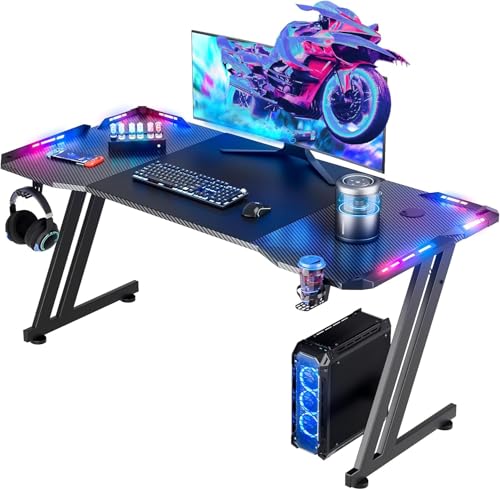
Yes, USB rechargeable fans eliminate cable clutter across tight battlestations. Built-in batteries between 3000mAh and 4000mAh deliver over 10 hours of runtime, allowing flexible placement on a spacious 63-inch gaming desk without occupying scarce power strip sockets.
Can an auxiliary desk fan assist with laptop cooling?
Yes, directing external airflow toward chassis vents helps dissipate trapped surface heat around warm keyboards. While not a substitute for internal heatsinks, combining ambient cooling with key upgrades for gaming PC setups helps reduce thermal throttling during extended rendering or gaming sessions.
How does keeping hands cool improve competitive gaming performance?
Consistent airflow keeps palms dry, preserving mouse grip friction and stopping slips during fast flick shots. Sweaty fingers lead to inconsistent micro-adjustments and slippery mouse coatings during ranked matches. A gentle breeze maintains consistent grip tension without drying out your eyes.




Write Your Review
No reviews yet. Be the first to share your experience!