


Choosing a laptop for VR gaming often feels like solving a puzzle where the pieces never quite fit. You see high-end GPU names, but you wonder if they can actually handle the demanding frame rates and low latency that virtual reality requires. It is easy to get lost in marketing jargon when you just want a system that works smoothly without overheating or dropping frames during intense sessions. The gap between a standard gaming rig and a true VR-ready machine is significant, and understanding that difference is key to making a smart purchase. This guide breaks down the essential hardware components that matter most for immersive experiences.
We have carefully analyzed the specifications of the top contenders to help you navigate this complex market. From processor speed to cooling efficiency, each factor plays a role in how well a laptop performs under load. You need to consider not just the raw power, but also the display refresh rates and connectivity options that support your headset. Whether you are looking for a high-end powerhouse or a more budget-friendly entry point, there are clear distinctions to make. By focusing on verified specs and practical performance indicators, you can avoid common pitfalls and find a device that suits your specific gaming style and budget constraints.


Pros
- Exceptional gaming performance from the Intel Core i7 and RTX 5060, handling modern titles at high settings.
- 165Hz display with fast response time provides buttery-smooth gameplay in fast-paced shooters.
- Robust cooling solution keeps temperatures manageable during long sessions or heavy workloads.
- Plenty of storage and memory for gaming and content creation, with easy upgrade options.
- Customizable RGB adds flair to any gaming setup, with a stealth mode for professional environments.
Cons
- Battery life is limited (around 2 hours) under heavy use, so you'll need to stay plugged in for gaming.
- At 5.83 pounds, it's heavier than some competitors, making it less portable for daily carry.
- FHD+ resolution may not satisfy users seeking higher pixel density for content creation or AAA titles.
The ASUS ROG Strix G16 (2025) is a new 16-inch gaming laptop that packs a serious punch for its size. Powered by an Intel Core i7-14650HX processor and an NVIDIA GeForce RTX 5060 laptop GPU (based on the Blackwell architecture with DLSS 4), this machine is built for gamers who want desktop-level performance in a more portable package. It also comes with 16GB of DDR5-5600MHz RAM and a 1TB PCIe Gen 4 SSD, ensuring fast load times and smooth multitasking for both gaming and productivity.
This laptop is best suited for competitive gamers, esports players, and streamers who need high frame rates and low latency. The 16-inch FHD+ display offers a 165Hz refresh rate with a 3ms response time, making it ideal for fast-paced games like Valorant, Overwatch 2, or Apex Legends. The ACR film helps reduce glare and enhances contrast, so you can see enemies clearly even in bright environments. For content creators, the 16:10 aspect ratio gives a bit more vertical space for editing timelines or browsing documents.
In terms of real-world performance, the RTX 5060 with DLSS 4 delivers noticeable improvements in visual clarity and frame rates without sacrificing responsiveness. The keyboard is esports-ready with good key travel and responsive actuation, making it comfortable for extended gaming sessions. The Dolby Atmos audio provides immersive sound, though the built-in speakers are decent for casual listening—you'll likely want a dedicated gaming headset for competitive play. The cooling system uses a vapor chamber, tri-fan technology, and liquid metal on the CPU, which keeps the laptop cool and quiet even under heavy load, reducing thermal throttling during long gaming marathons.
Build quality is solid, with a durable chassis in Eclipse Gray that feels premium. The full-surround RGB light bar and Aura Sync compatibility let you customize the lighting to match your gaming setup. Stealth Mode is a nice touch for when you need to work or study without distraction. The laptop also offers tool-free access to the RAM and SSD, making upgrades a breeze if you need more storage or memory down the line. Connectivity is great with Wi-Fi 7 for lag-free online gaming and three USB 3.0 ports for peripherals.
Setup is straightforward: it comes with Windows 11 Home pre-installed and a 3-month PC Game Pass, so you can dive right into your library. The software (Armoury Crate) gives you control over performance profiles, cooling, and RGB lighting, though it can feel a bit cluttered initially. One limitation is the battery life—under gaming use, you'll get only around 2 hours, so you'll need to stay plugged in for serious sessions. The laptop is also a bit heavy at 5.83 pounds, which might not be ideal if you frequently move between classes or co-working spaces.
Overall, the ASUS ROG Strix G16 (2025) is a compelling choice for U.S. PC gamers who want a balanced mix of raw performance, fast display, and customizable aesthetics. It works well for competitive gaming, streaming, and even light content creation, thanks to the RTX 5060's encoder. While it has some portability trade-offs, the performance and cooling make it a strong contender for your next gaming laptop. If you're a competitive gamer or streamer looking for a solid mid-range upgrade, this model is worth considering.
The ASUS ROG Strix G16 (2025) is built around the Intel Core i7-14650HX and NVIDIA RTX 5060, a combination that handles modern titles at high to ultra settings with ease. For competitive games like Fortnite and CS2, you can expect well over 100 FPS at the native FHD+ resolution, thanks to the 165Hz display's fast response. The DLSS 4 support further boosts frame rates and image quality in supported games, making it a strong choice for esports and AAA gaming alike.
The laptop's chassis is made from durable materials with a sleek Eclipse Gray finish that resists fingerprints. The hinge is sturdy, and the keyboard deck doesn't flex under pressure. The tool-free access for RAM and SSD is a welcome practical touch, allowing easy upgrades without voiding the warranty. Overall, the build feels premium and capable of surviving daily transport between home, work, or a LAN party.
ROG's Intelligent Cooling system features a vapor chamber covering the CPU and GPU, tri-fan technology, and liquid metal applied to the chipset. This setup keeps temperatures under control even during extended gaming sessions, with fans that are audible but not overly loud. The design pulls air from the bottom and vents out the rear and sides, so ensure you have a clean desk surface for optimal airflow.
The 16-inch FHD+ (1920x1200) IPS-level display offers a 165Hz refresh rate and a 3ms response time, providing smooth visuals with minimal blur. The ACR film improves contrast and reduces reflections, making it easier to see details in bright rooms. The 16:10 aspect ratio gives extra vertical space, which is nice for productivity tasks. However, the resolution is FHD, so if you need higher pixel density for photo editing or 4K content, this may not be the best fit.
The ROG Strix G16 comes with Wi-Fi 7 for fast, low-latency wireless connections, plus Bluetooth for peripherals. It has three USB 3.0 Type-A ports, one USB-C port (likely with DisplayPort support), an HDMI 2.1 output, a 3.5mm audio jack, and an Ethernet port. This should cover most gaming setups, though you may want a USB hub if you need more ports for streaming gear or external drives.


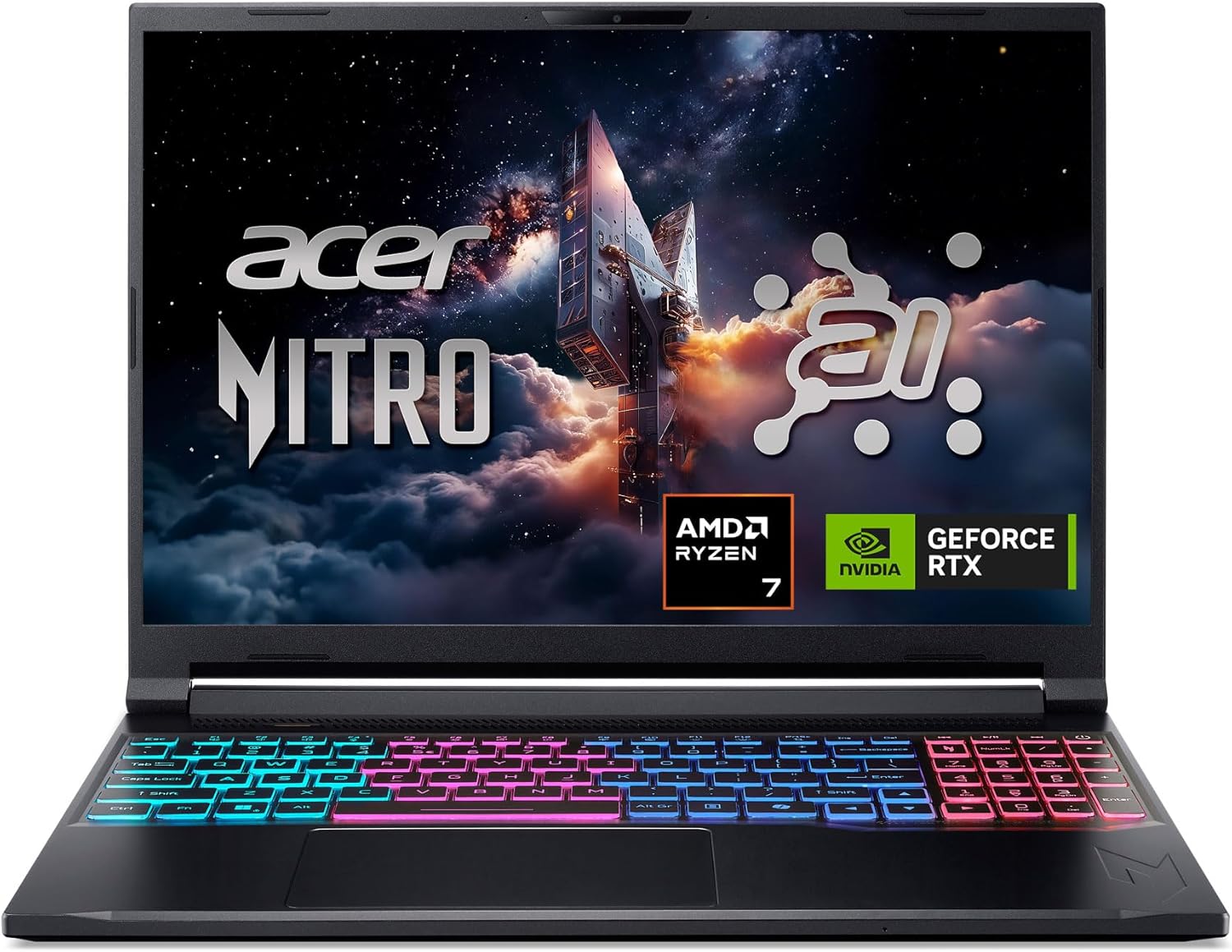
Pros
- Powerful AI-optimized CPU and GPU combination for demanding games and creative apps
- Excellent 32GB DDR5 RAM and fast 1TB Gen 4 SSD out of the box reduce need for upgrades
- High 180Hz refresh rate with good color accuracy enhances visual clarity and responsiveness
- Compact and relatively lightweight chassis (4.63 lbs) makes it portable for gamers on the go
- Robust cooling solution with quad air intakes and dual fans keeps thermals under control during intense sessions
Cons
- Maximum RAM is 32GB with no expansion slots available after purchase, limiting future upgrade potential
- Battery life may be typical for a gaming laptop and could require frequent charging during extended unplugged use
- Integrated webcam quality not specified; users may want an external camera for streaming
The Acer Nitro V 16S AI is a mid-range gaming laptop built around the latest AMD Ryzen 7 260 processor and NVIDIA GeForce RTX 5060 GPU. It's designed for PC gamers who want a balance of performance and portability, as well as content creators and streamers who can leverage the AI capabilities for tasks like upscaling, background effects, and faster encoding. With a 16-inch 180Hz display and 32GB of DDR5 RAM, this laptop aims to deliver smooth gameplay and efficient multitasking right out of the box.
When it comes to real-world gaming performance, the RTX 5060 with DLSS 4 and full ray tracing support gives you high frame rates in modern titles at 1080p or 1200p resolution. The 180Hz refresh rate makes fast action in FPS and racing games feel buttery smooth, while the 100% sRGB coverage ensures vibrant colors for open-world adventures. The AMD Ryzen 7 260's AI TOPS also help with background tasks, voice commands, and optimizing settings in supported software, giving an edge in competitive scenarios.
Build quality is typical for the Nitro line: a black plastic chassis with a clean, understated look. At 4.63 pounds, it's slim enough to slip into a backpack for college or LAN parties. The dual-fan quad-intake cooling keeps temperatures reasonable under load, though you'll still hear the fans ramp up during extended gaming sessions. The keyboard includes a backlit numeric keypad, and the touchpad is responsive for everyday use. Port selection is solid with USB4, two USB 3.2 Gen 2, HDMI 2.1, and Ethernet, making external monitor or dock setups easy.
Setting up the laptop is straightforward: it runs Windows 11 Home, and the pre-installed NitroSense software gives you control over fan speeds, power profiles, and system monitoring. The Acer PurifiedView and PurifiedVoice 2.0 features handle webcam background blur and noise reduction during Discord calls or streams. There are two M.2 SSD slots (one free) for storage expansion, but note that the RAM is soldered and maxes out at 32GB, so choose your capacity wisely at purchase.
One realistic limitation is that while the laptop includes a USB4 port, you'll need an external GPU dock if you ever want more graphics power - but for most users the RTX 5060 is plenty. Battery life is average for a gaming laptop; expect around four to five hours of light use. Also, the 1080p webcam isn't specified, but many laptops in this range offer only basic 720p or 1080p sensors, so external webcams are still recommended for professional streaming.
Overall, the Acer Nitro V 16S AI is a well-rounded portable gaming machine that hits a sweet spot for price-conscious PC gamers, esports players, and content creators. If you value high-refresh-rate gaming, AI-assisted performance, and decent portability without breaking the bank, this laptop is worth considering. It also comes with a three-month PC Game Pass trial to get you started with hundreds of games on day one.
The RTX 5060 laptop GPU with 572 AI TOPS and DLSS 4 Multi Frame Generation provides a significant boost in supported games. You can expect high settings at 1080p with smooth frame rates in titles like Call of Duty, Fortnite, and Cyberpunk 2077. The 180Hz display minimizes motion blur and screen tearing, while the AMD Ryzen 7 260 processor handles CPU-intensive simulations and background tasks without stutter. Gamers who play competitive esports titles will appreciate the low-latency response and Killer Ethernet for stable online play.
Despite being a slim 0.79-inch profile, the Nitro V 16S AI packs a dual-fan, quad-intake, quad-exhaust cooling system. This design pushes heat out efficiently, keeping the CPU and GPU within safe operating temperatures during long gaming sessions. The chassis is made of durable plastic with a matte finish that resists fingerprints. The hinge feels sturdy, and the weight of 4.63 pounds makes it manageable for daily carry. The backlit keyboard has a numeric keypad and decent key travel, suitable for both gaming and typing.

VR Laptop Buying FAQs
Is an RTX 5060 enough for VR gaming?
Yes, the RTX 5060 is generally sufficient for many VR titles. It offers strong ray tracing capabilities and DLSS support, which help maintain stable frame rates. This GPU handles moderate to high-resolution VR workloads well without excessive thermal stress.
How much RAM do I need for VR?
16GB is the minimum standard for modern VR gaming. However, 32GB provides a safer buffer for multitasking and future-proofing. More memory helps prevent stuttering when the system is running background applications alongside the VR environment.
Does the display refresh rate matter for VR?
Not directly, as the headset uses its own panels. However, a high refresh rate on the laptop screen helps with non-VR tasks. It ensures smooth motion during desktop use and reduces eye strain when switching between VR and 2D content.
Are these laptops portable enough for travel?
Most gaming laptops are heavier than standard ultrabooks due to cooling systems. Models like the 15.6-inch options offer better portability. You should check the specific weight and battery life if you plan to carry the device frequently.
Do I need a dedicated cooling system?
Yes, VR gaming generates significant heat that requires robust thermal management. Advanced cooling systems with multiple fans and heat pipes are essential. They prevent thermal throttling, which can cause performance drops and reduced frame rates during long sessions.


Write Your Review
No reviews yet. Be the first to share your experience!