


VRAM limits can turn smooth gameplay into stutter, while an oversized cooler can make a tidy PC build a squeeze. The Nvidia Rtx 5060 Ti Vs Nvidia Rtx 5070 comparison here covers cards across the RTX 5060, RTX 5060 Ti, RTX 5070, and RTX 5070 Ti families, so check each exact model rather than assuming every listing has the same memory or dimensions. For example, the listed PNY RTX 5060 Ti has 16GB of GDDR7, while the NVIDIA RTX 5070 has 12GB. That difference matters for texture-heavy games, creative projects, and local AI workloads, but it doesn’t by itself establish which card delivers more frames.
After carefully analyzing the available specifications, the useful buying checks are clear: compare VRAM capacity, cooler layout, stated boost clocks, display outputs, and power-supply guidance where provided. The MSI RTX 5070 Ti options list triple-fan cooling, and one model specifies a minimum 750W power supply. Exact card length and connector requirements aren’t supplied for every listing, so confirm those details with the manufacturer before ordering. For broader high-frame-rate options, see this guide to graphics cards for high-FPS gaming, or compare the demands of 4K gaming graphics cards.



Pros
- Excellent 1080p and solid 1440p gaming performance with DLSS 4 and ray tracing support.
- Compact 2.5-slot size fits well in small form factor (SFF) builds without sacrificing cooling.
- Quiet operation under light load thanks to 0dB Technology; dual BIOS adds flexibility.
- Strong build quality with protective backplate, stainless steel bracket, and ASUS GPU Guard.
- High energy efficiency with a low 150W TDP, reducing heat and power costs.
Cons
- 8GB VRAM may limit performance in some demanding AAA titles at 1440p with ultra textures and ray tracing.
- No RGB lighting, which may disappoint enthusiasts seeking a fully illuminated gaming setup.
- Overclocking headroom may be limited due to the compact cooler design compared to larger triple-fan models.
The ASUS Dual GeForce RTX 5060 OC Edition is a graphics card designed for PC gamers and esports players who want strong 1080p and capable 1440p performance without breaking the bank. Powered by NVIDIA's Blackwell architecture and featuring 8GB of GDDR7 memory, this card supports DLSS 4, ray tracing, and PCIe 5.0 connectivity. Its compact 2.5-slot form factor makes it an excellent choice for small form factor (SFF) builds, while the dual-fan cooling solution keeps temperatures in check during long gaming sessions.
Performance-wise, this card excels at 1080p gaming, easily hitting high frame rates in competitive titles like Fortnite, CS2, and Valorant. At 1440p, it handles most modern games at high settings, though you may need to tweak a few options in the most demanding AAA titles. The inclusion of DLSS 4 provides a noticeable boost in both image quality and frame rates for supported games, making it a solid option for both casual and competitive gamers. According to user feedback, the card runs cool and quiet, even under stress, which is a big plus for anyone who values a noise-free environment.
Build quality is a strong point for this ASUS model. The card features a protective backplate to prevent PCB flex, a stainless steel mounting bracket for added durability, and ASUS GPU Guard that secures the card's corners to reduce cracking risk. The dual Axial-tech fans incorporate smaller hubs and longer blades to improve airflow, while dual-ball bearings extend the fan lifespan. The vented backplate also helps dissipate heat, contributing to overall stability. These details reflect ASUS's attention to long-term reliability.
Setup is straightforward: the card is plug-and-play with a standard 8-pin power connector and fits most mid-tower or small form factor cases. The Dual BIOS switch allows you to choose between Performance and Quiet modes, giving you control over noise and thermals. Software customization via ASUS GPU Tweak lets you monitor clock speeds, adjust fan curves, and tweak voltages, though the card's OC out-of-the-box settings are already well-tuned. Cable management is easy thanks to its compact size, and there is no RGB to wire or sync, simplifying the build process.
One realistic limitation is the 8GB VRAM. While sufficient for most current games at 1080p and many at 1440p, future titles may push memory demands higher, especially with ray-traced effects and ultra texture packs. The card also lacks any RGB lighting, which might be a drawback for those who want a fully lit gaming rig. Additionally, overclocking potential may be modest due to the compact cooler, though the factory OC already offers a minor performance boost. For streamers and content creators, the 5060 provides solid performance for video editing and rendering, though the 8GB VRAM may constrain larger projects.
Overall, the ASUS Dual GeForce RTX 5060 OC Edition is a smart choice for PC gamers, esports players, and compact build enthusiasts who prioritize efficiency, quiet operation, and reliable performance. It is hard to beat at this price point for 1080p gaming and offers enough headroom for 1440p when settings are adjusted. If you need more VRAM or RGB flash, consider the 5060 Ti or an AMD alternative, but for most gamers building a balanced mid-range rig, this card delivers exactly what you need.


FAQs
Is 16GB of VRAM better than 12GB for gaming?
Yes, 16GB provides more memory capacity than 12GB, which can give demanding games and creative apps more room for textures and project data. It doesn’t guarantee higher frame rates; GPU performance and game settings also matter. The listed PNY RTX 5060 Ti has 16GB, while the NVIDIA RTX 5070 has 12GB.
What power supply should I use with these graphics cards?
Use the power-supply recommendation for the exact card model and the rest of your PC. The MSI RTX 5070 Ti Shadow listing specifies a minimum 750W PSU, but the supplied details don’t state requirements for every card here. Check the card maker’s connector and wattage guidance, and avoid bending a power cable sharply at its plug.
Will these GPUs fit in a small PC case?
Fit depends on the individual card’s length, height, and slot thickness, plus your case’s clearance. Those dimensions aren’t provided for most listed models, so verify them against your case before buying. The ASUS RTX 5060 is described as a 2.5-slot design, while the PNY RTX 5060 Ti is described as compact.
Are triple-fan graphics cards quieter than dual-fan cards?
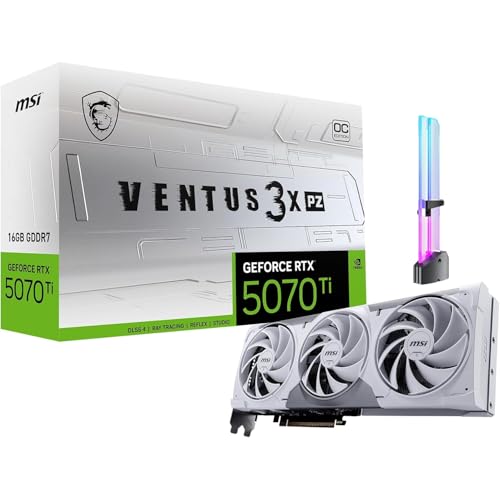
Not necessarily; fan count alone can’t confirm noise levels. Triple-fan designs, such as the listed MSI RTX 5070 Ti Ventus 3X OC, spread cooling across more fans, while the PNY RTX 5060 Ti uses two fans in a compact design. Case airflow, fan curves, and workload also affect noise and cooling.
Can I use a PCIe 5.0 graphics card in an older motherboard?
Often, newer PCIe graphics cards can operate in older compatible PCIe x16 slots, but exact compatibility and performance depend on the motherboard and system. Several listings specify PCIe 5.0, but the product details here don’t confirm each card’s behavior on a particular older board. Check the motherboard manual and card requirements before purchase.
Do these cards support modern monitor connections and upscaling?
Some listed models specify DisplayPort 2.1b and HDMI 2.1b, and NVIDIA Blackwell models list DLSS 4 support. The MSI RTX 5070 Ti Ventus 3X PZ OC specifies three DisplayPort 2.1b outputs and one HDMI 2.1b output. Match the exact card’s ports to your monitor, and remember that upscaling support varies by game.
How can I reduce graphics card sag in a horizontal build?
Use a compatible anti-sag support when a heavy card needs extra support. The MSI RTX 5070 Ti Ventus 3X PZ OC listing includes a GPU holder, while other listed products may not. Check support placement so it doesn’t obstruct fans or put pressure on the card. This GPU chassis guide offers related build-planning context.





Write Your Review
No reviews yet. Be the first to share your experience!