


Portability and setup shape the decision
A gaming laptop can travel between home, class, and work, while a desktop requires a fixed setup and a separate display. That difference matters as much as the processor or graphics card for many buyers comparing gaming laptop vs gaming desktop. The products here include both formats, but the listings do not provide directly comparable benchmark results, battery runtimes, or full details for every configuration. Treat stated performance descriptions as product information, not independent test findings.
The laptop choices range from the GIGABYTE Gaming A16 with a Ryzen 7 260 and RTX 5060 Laptop GPU to configurations with an RTX 5070, including a GIGABYTE model with an i7-13620H, 32GB DDR5 RAM, and a 165Hz WUXGA display. The ASUS ROG Strix G18 lists a 240Hz, 2560×1600 display, while the HP Omen 16 Slim lists 64GB RAM and a 144Hz WUXGA panel. These details can help match screen and memory needs, but GPU names alone do not establish real-world frame rates. For additional graphics context, see this guide to graphics cards for gaming laptops.
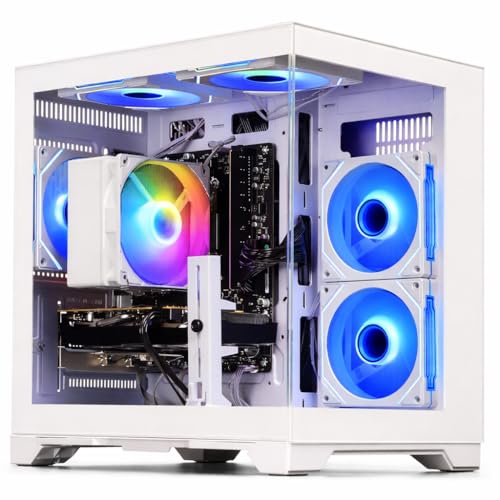
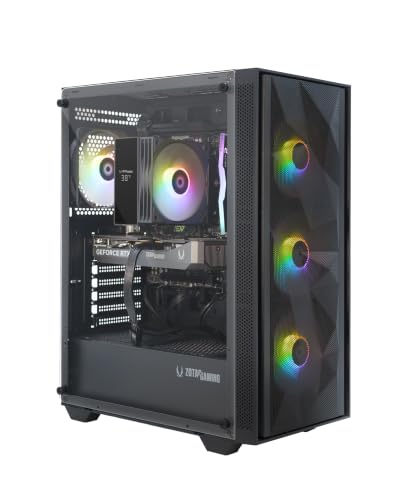
Desktop options span basic configurations and systems with an RTX 5060, including the ZOTAC MEK with 16GB RAM and a 1TB NVMe SSD. A desktop may make sense if you already have a suitable monitor and don’t need to carry your gaming system; the supplied listings don’t confirm upgradeability across all models. Laptop buyers should weigh the convenience of an integrated screen and keyboard against unspecified battery life and the need to check each model’s ports. For a broader look at laptop options, browse the RTX gaming laptop roundup.
Products to compare


Pros
- Affordable entry point into PC gaming
- 16GB RAM handles multitasking and daily use well
- SSD ensures quick system responsiveness
- Includes RGB peripherals and WiFi
- Renewed by Dell may offer reliability and warranty
Cons
- GT 1030 is limited for modern AAA gaming; best for esports and older titles
- Only 256GB SSD may fill up quickly; consider adding more storage
- Renewed product condition may vary; check seller ratings
This Dell Gaming Tower Desktop PC (Renewed) is a budget-friendly entry-level desktop aimed at casual gamers, college students, and anyone looking to dip their toes into PC gaming without a huge investment. It pairs a 7th-gen Intel Core i5-7500 processor with 16GB of DDR4 RAM and a 256GB SSD, plus a dedicated GeForce GT 1030 graphics card. The package also includes an RGB keyboard and mouse, making it a ready-to-play setup for light gaming, schoolwork, or home office use.
In terms of real-world performance, this PC handles esports titles like Fortnite, League of Legends, and CS:GO at moderate settings quite well thanks to the GT 1030. The i5-7500 and 16GB RAM keep multitasking snappy, and the SSD delivers quick boot times and responsive storage. However, the GT 1030 is not meant for modern AAA games at high settings; if you're after the latest blockbusters, you'll need a more powerful GPU. For casual gamers and those who play older or indie titles, it's perfectly capable.
Build quality is typical of Dell’s tower designs, and being a renewed unit, it has been tested and refurbished to work like new. The included RGB keyboard and mouse are basic but functional, giving your desk a bit of customizable lighting out of the box. WiFi is built-in, so you can connect without Ethernet, and Windows 11 Pro comes pre-installed, providing a modern and familiar OS environment.
Setup is straightforward: plug in the power, connect peripherals, and you’re ready to go. The small 256GB SSD is a limitation; you may quickly run out of space for games and files. Adding a secondary hard drive or external storage is advisable. Also, as a renewed product, cosmetic wear or minor marks are possible, though performance should be reliable if purchased from a reputable seller.
Overall, this Dell gaming tower is a solid pick for budget-focused buyers who want a functional gaming PC for esports, everyday computing, and a taste of PC gaming. For more demanding gamers, consider saving for a system with a better GPU. But as an affordable gateway to PC gaming, it hits the mark.

Pros
- High-refresh 240Hz display with excellent color accuracy and fast response times for competitive edge.
- Powerful Intel Ultra 9 and RTX 5070 combo handles demanding games and creative workloads with ease.
- Large 18-inch screen provides immersive gaming experience without sacrificing portability.
- Ample 32GB RAM and 1TB SSD deliver snappy performance and plenty of storage out of the box.
- Rich connectivity options including Thunderbolt 4, HDMI 2.1, and Wi-Fi 7 future-proof your setup.
Cons
- Premium price point may be steep for budget-conscious gamers.
- Large 18-inch chassis reduces portability and may require a spacious desk setup.
- Limited user reviews available, so long-term reliability and real-world performance are not yet widely confirmed.
The ASUS ROG Strix G18 G815 is a premium gaming laptop designed for enthusiasts who demand desktop-class performance in a portable form. Featuring an 18-inch 2560x1600 IPS display with a 240Hz refresh rate and 100% DCI-P3 color gamut, this laptop is built to deliver smooth, vibrant visuals for competitive gaming and content creation. Under the hood, it packs an Intel 24-core Ultra 9 275HX processor and an NVIDIA GeForce RTX 5070 GPU with 8GB GDDR7 memory, making it a beast for modern games, streaming, and multitasking.
For serious PC gamers, especially those into fast-paced esports titles like Valorant or Call of Duty, the 240Hz panel combined with a 3ms response time offers near-instantaneous visual feedback, reducing motion blur and giving you a competitive advantage. The high core-count processor also handles streaming and recording without hiccups, making it a solid choice for Twitch streamers and YouTube content creators. Casual gamers and open-world explorers will appreciate the large screen and vivid colors for immersive single-player experiences.
Build quality is typical of ASUS ROG's Strix lineup: a robust chassis with a sleek black finish, a 4-zone RGB backlit keyboard for customizable lighting, and a comprehensive port selection including Thunderbolt 4, HDMI 2.1 FRL, three USB-A 3.2 ports, and a USB-C 3.2 port. Wi-Fi 7 ensures fast wireless connectivity, while the included Windows 11 Pro and Copilot AI features enhance productivity. The 32GB of RAM and 1TB SSD mean you can jump straight into gaming without worrying about upgrades.
Setting up this laptop is straightforward: it comes with Windows 11 Pro pre-installed, and the ROG Armoury Crate software allows easy customization of performance profiles, RGB lighting, and cooling fans. The large 18-inch screen does require a spacious desk, but the anti-glare coating helps reduce reflections during long sessions. Maintenance is simple, with accessible panels for future RAM or SSD upgrades, though many users may not need them immediately.
One realistic limitation is the price: at over $2300, it's a significant investment. The laptop's size also makes it less portable than 15- or 16-inch models, so it's best suited for gamers who primarily use it at a dedicated desk. Additionally, since there are no user reviews yet, long-term reliability and thermal performance under heavy load remain unverified by the community.
Overall, the ASUS ROG Strix G18 G815 is a compelling choice for competitive gamers, streamers, and creators who want a large, high-refresh-rate display and top-tier internal specs. It's less ideal for those on a tight budget or who need maximum portability. If you're building a high-end gaming setup and want a laptop that can double as a powerhouse desktop replacement, this model deserves serious consideration.
The 18-inch 2560x1600 IPS display on the ASUS ROG Strix G18 G815 is a standout feature for gamers and content creators. With a 240Hz refresh rate and 3ms response time, it delivers exceptionally smooth motion in fast-paced games, reducing ghosting and input lag. The 100% DCI-P3 color coverage ensures vibrant, accurate colors, making it suitable for photo and video editing as well. The anti-glare coating helps maintain visibility in brightly lit rooms, and the 16:10 aspect ratio provides extra vertical screen real estate for productivity tasks. For competitive players, the high refresh rate and quick response give a clear edge in titles where every millisecond counts.


Pros
- Excellent price-to-performance ratio for mid-range gaming and creative work.
- Fast 165Hz display with 16:10 aspect ratio gives extra vertical screen space for productivity.
- Plenty of storage expansion with an open M.2 SSD slot for easy upgrades.
- Quiet fans under normal loads, with effective cooling that keeps temps below 71C under heavy gaming.
- Sturdy build quality with a 180-degree hinge that allows flexible placement.
Cons
- GiMATE software can be buggy and uses up to 2.5GB of RAM; some users report difficulty disabling AI features.
- Fan noise ramps up noticeably under heavy loads, requiring a well-ventilated desk setup.
- Battery life is limited when gaming (needs constant AC power); average speakers lack depth and volume.
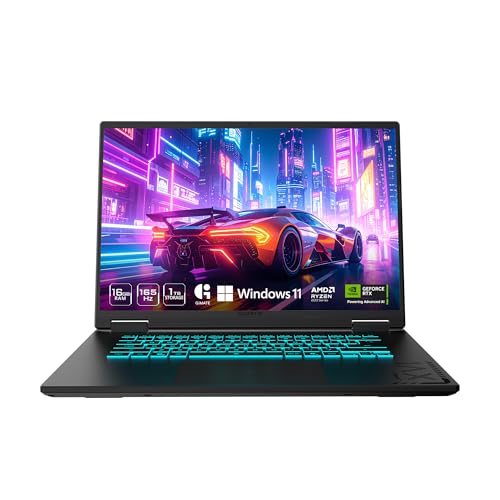
The GIGABYTE Gaming A16 is a mid-range gaming laptop designed for PC gamers, streamers, and content creators who want solid performance without breaking the bank. It pairs an Intel Core i7-13620H processor with an NVIDIA GeForce RTX 5070 GPU, 32GB of DDR5 RAM, and a 1TB NVMe SSD, making it capable of handling modern AAA titles and creative software at high settings.
In real-world use, this laptop delivers smooth framerates in demanding games like Cyberpunk 2077 (around 70-90 FPS with DLSS 4 enabled) and consistent 165 FPS in lighter esports titles. The 1920x1200 165Hz display offers fluid motion and a taller aspect ratio that feels natural for both gaming and browsing. However, the 45% NTSC color coverage means it's not ideal for professional color work, but for gaming and media consumption it's perfectly adequate.
Build quality is decent for the price. The chassis is slim (0.76 inches) and the 180-degree hinge feels robust, though the keyboard deck has a lot of empty space around the keys. The GIGABYTE Golden Curve keyboard provides satisfying tactile feedback with minimal noise, making it comfortable for long gaming sessions. The trackpad is accurate, but some users note it travels too far when clicking.
Cooling is effective, keeping the CPU and GPU under 71°C during heavy loads, but the fans become quite loud. Proper ventilation is essential - placing the laptop on a hard, flat surface or a grated stand helps maintain performance. The included straight power plug is a minor inconvenience for desk cable management.
The biggest downside is the GiMATE software. It's designed to optimize battery life and performance, but it can be intrusive and resource-heavy. Several users report that it disables the dedicated GPU without warning, and uninstalling it is the only fix. If you're comfortable managing drivers manually, this is a minor annoyance. Otherwise, it's a significant drawback.
Overall, the GIGABYTE Gaming A16 is a strong value for budget-conscious gamers who prioritize frame rates over bells and whistles. It works well for gaming setups, dorm rooms, or home offices where you need a powerful yet portable machine. If you can tolerate the software quirks and invest in a good cooling pad, this laptop will serve you well for several years of gaming and productivity.
The RTX 5070 (8GB) and Core i7-13620H provide excellent 1080p-1200p gaming performance. In Battlefield 6 and Star Citizen, users report consistent 70-90 FPS on max settings, while Cyberpunk 2077 with DLSS 4 delivers around 165 FPS at 1900x1080 with ray tracing on Ultra. The 165Hz display ensures smooth gameplay, though path tracing drops frames significantly. The GPU lacks the raw power of higher-tier cards, but for most modern titles, it's more than capable.
The laptop feels sturdy with a slim profile and a 180-degree hinge that allows flat placement. The chassis is all plastic but doesn't flex excessively. The keyboard is comfortable for typing and gaming, though the trackpad's click mechanism could be better. The speakers are downward-firing and adequate for casual use, but external headphones or speakers are recommended for immersive audio. The 1TB SSD is fast, and there's an empty M.2 slot for easy storage expansion.
The GiMATE software is a mixed bag. It offers pre-set power modes (Performance, Balanced, Eco) and some AI-driven battery optimization, but lacks manual fan curve control. Several users found it intrusive and RAM-hungry, with some disabling the GPU unintentionally. The RGB keyboard lighting controls are basic and occasionally sluggish. If you prefer full control, it's best to uninstall GiMATE and manage settings through Windows and NVIDIA Control Panel.
FAQs
Is a gaming laptop or desktop better for travel?
A laptop is the portable form factor, while a desktop is designed for a stationary setup. The listed laptop models include built-in displays, but their battery runtimes and weights aren’t supplied, so check those details if travel is a priority.
Do these laptops and desktops have comparable gaming performance?
The available information doesn’t establish a direct performance comparison. Laptop and desktop GPU names are not enough to determine frame rates, and no consistent benchmark results are provided. Match the configuration to your games and display needs rather than relying on the GPU name alone.
Which listed laptop has the highest stated refresh rate?
The ASUS ROG Strix G18 listing specifies a 240Hz display. The GIGABYTE A16 listing specifies 165Hz, and the HP Omen 16 Slim specifies 144Hz. Refresh rate is one display consideration, not a guarantee of game performance.
How much RAM and storage should I look for?
Choose capacity around your games and other applications, and check the listed configuration before purchase. The laptop options include configurations with 32GB or 64GB RAM, while the ZOTAC desktop lists 16GB RAM and a 1TB NVMe SSD. Upgradeability isn’t confirmed for every system.
Do the listings confirm laptop battery life or weight?
No, the supplied product details don’t state battery runtime or laptop weight. Don’t assume a slim chassis guarantees long unplugged use. Check the manufacturer’s listing for those specifications if portability is central to your decision.
What ports and wireless features are listed?
Port selection varies by model. The ASUS listing includes Thunderbolt 4, USB-C, HDMI, and Ethernet, while the HP listing specifies USB-C, USB-A, HDMI, and Ethernet. Check the exact model’s Wi-Fi and port details to make sure it fits your peripherals and network needs.


Write Your Review
No reviews yet. Be the first to share your experience!