


Compare configurations before settling on a Blade
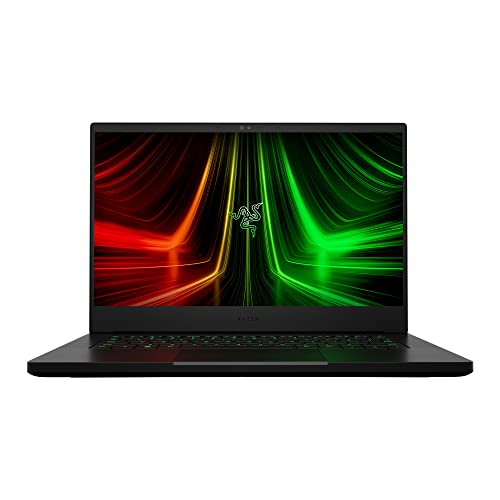
A slim gaming laptop can pair a compact footprint with powerful listed components, but the right configuration depends on the games and creative work you plan to run. The razer blade 14 gaming laptop lineup here includes older and newer 14-inch models, plus 16-inch and 18-inch alternatives, so the product names alone don’t tell the whole story. Compare the GPU, installed memory, display, and storage together, and remember that specifications don’t establish real-world frame rates or battery runtime.
The 2025 Blade 14 options list RTX 5060 or RTX 5070 graphics, a 3K 120Hz OLED display, and 16GB or 32GB of LPDDR5X memory. Their product descriptions state a 72 Whr battery and up to 11 hours of on-screen time, which is a manufacturer estimate, not an independently measured result. The 16-inch models list QHD+ 240Hz OLED displays and newer Intel processors, while the 18-inch Blade adds a dual-mode display and upgradeable memory. For a lower listed price point among these configurations, compare the ASUS ROG Zephyrus G14, but note its 16GB of onboard RAM. For a broader view of graphics options, see this gaming laptop graphics card guide and laptop noise and specification considerations. The information below is based on supplied product listings, not hands-on testing.


FAQs
Which listed Blade 14 configuration has more memory?
The 2025 RTX 5070 Blade 14 lists 32GB of LPDDR5X memory, while the RTX 5060 configuration lists 16GB. Both descriptions specify 1TB of storage and a 3K 120Hz OLED display. The supplied details do not state that this memory is upgradeable.
Does the Blade 14 have a discrete graphics card?
Yes, the listed 2025 Blade 14 configurations specify discrete NVIDIA GeForce RTX 5060 or RTX 5070 laptop GPUs. The older 14-inch model lists an RTX 3070 Ti. GPU names alone don’t establish frame rates, so consider the games and settings you expect to use.
What display does the 2025 Razer Blade 14 list?
The 2025 Blade 14 listings specify a 3K OLED panel with a 120Hz refresh rate and 0.2 ms response time. These are listed display specifications, not independent measurements. Compare screen size and resolution with the portability and gaming needs you have.
Is the Blade 18 a better fit for memory upgrades?
The supplied Blade 18 description says its 32GB DDR5 memory is upgradeable up to 128GB. By contrast, the listed 16-inch Blade configurations specify non-upgradeable LPDDR5X memory. The larger model weighs 7.06 lbs, so weigh its upgrade options against its size and weight.
Can I rely on the Blade 14 battery estimate for travel?
The product descriptions state up to 11 hours of on-screen time and a 72 Whr battery for the 2025 Blade 14. That figure is a manufacturer claim, not a guaranteed runtime or independent test result. Your workload and settings may affect how useful the estimate is for travel.
What ports and wireless features are listed?
The 2025 Blade 14 listing identifies USB-C, USB-A, HDMI 2.1, and Wi-Fi 6E on the older model; the 2025 description highlights Wi-Fi 7 for the 16-inch models. The Blade 18 lists Thunderbolt 5 and 4, HDMI 2.1, SD UHS-II, 2.5Gb Ethernet, and USB-A. Check the exact configuration listing before buying, since connectivity varies across models.
Is the ASUS Zephyrus G14 an alternative to the Blade 14?
The listed ASUS ROG Zephyrus G14 has a 14-inch 2.8K OLED 120Hz display, an RTX 5060, 16GB of onboard RAM, and a 1TB SSD. Its product listing also names Windows 11 Home and a 73 WHr battery. Compare those details with the Blade 14 configuration you’re considering, and review the gaming laptop budget guide for more price-conscious context.





Write Your Review
No reviews yet. Be the first to share your experience!