

Stuttering frame rates and long load times can kill the fun fast. You want a rig that handles Fortnite, Valorant, or Minecraft without constant lag or crashes. That’s where a solid best gaming computer for beginners comes in. These prebuilt desktops from STGAubron, Dell, and abytespark are designed to get you into the action without needing a degree in PC building. We’ve looked at specs like GPU power, RAM size, and storage speed to find options that balance cost with real gaming performance. If you’re moving from console or just want a reliable setup, these picks aim to deliver smooth 60+ FPS in popular titles. Check out our guide on what gaming computers are used for to see how these machines fit your needs.
Each system here includes a dedicated graphics card or strong integrated graphics, enough RAM for multitasking, and fast SSDs for quick boot times. No more waiting around for games to load or dealing with choppy visuals. Whether you’re into competitive shooters or open-world adventures, a best gaming computer for beginners should offer consistent frame rates and easy setup. We’ve focused on models that come with Windows 11 pre-installed and often include peripherals like a mouse and keyboard, so you’re ready to play right out of the box. For more budget-friendly options, see our best gaming PC under $800 list.

Pros
- Strong price-to-performance ratio for entry-level to mid-range gaming
- Ample RAM and SSD storage for smooth multitasking and quick game loads
- Includes WiFi 6 and Bluetooth 5.0 for modern wireless connectivity
- Comes with RGB peripherals and four RGB fans for an immersive setup aesthetic
Cons
- Processor is a 4th-gen Intel Core i7, which may bottleneck newer AAA titles compared to modern CPUs
- Graphics card (RX 580) is an older architecture, limiting ray tracing and high-refresh gaming at 1440p
- Only 512GB SSD may require additional storage for larger game libraries
The STGAubron Gaming PC Desktop is a pre-built tower designed for gamers who want a solid entry-level to mid-range gaming experience without the hassle of building their own system. It combines an Intel Core i7 processor (4th-gen, up to 3.9GHz) with an AMD Radeon RX 580 8GB graphics card, 16GB of RAM, and a 512GB SSD. This configuration is well-suited for casual and competitive gamers, streaming enthusiasts, and even those who need a capable machine for photo/video editing, schoolwork, or day trading.
When it comes to real-world gaming, the RX 580 can handle popular titles like Fortnite, Call of Duty Warzone, Valorant, Apex Legends, and GTA V at 60+ FPS on medium to high settings. The 16GB of RAM ensures smooth multitasking, letting you run Discord, OBS, or browser tabs in the background while gaming. The 512GB SSD provides quick boot times and fast level loads, though heavy gamers may want to add a secondary drive later.
Build quality is typical for a budget-friendly pre-built: a standard tower with a tempered glass side panel (likely) and four RGB fans for decent airflow. The included RGB gaming mouse and keyboard are functional starters, but most users will eventually upgrade to more premium peripherals. The system also features WiFi 6 and Bluetooth 5.0, which means lag-free wireless connections and fast downloads if your router supports it.
Setup is straightforward: unbox, plug in the power and peripherals, connect to your monitor via HDMI or DisplayPort, and boot into Windows 11 Home. The case has minimal cable management pre-installed, and the RGB fans and case lighting can be controlled via a remote or button on the case. For cleaning, the easily removable side panel makes dusting the interior simple.
A realistic limitation is that the CPU is an older 4th-gen Core i7, which might hold back performance in CPU-heavy games or multitasking scenarios compared to newer budget processors like an i3-12100F. The RX 580 also lacks modern features like ray tracing and efficient encoding, so if you're aiming for high-refresh 1440p gaming or intensive streaming, you may want to look at higher-end options. The 512GB SSD fills up quickly, so an external or secondary drive is worth considering.
Overall, this STGAubron gaming PC offers good value for its price point, especially for gamers on a tight budget who want a turnkey system that can handle esports and mainstream titles. It's also a nice fit for college students or home office users who want a versatile desktop that can game and work. Just be aware of the older components and plan for potential upgrades down the line.
Pros
- Affordable entry-level prebuilt with a solid CPU and enough RAM for casual gaming
- Comes with RGB fans and a full set of peripherals, saving you extra purchase costs
- Connectivity includes USB 3.0, display outputs (HDMI, DP, DVI), and serial port for versatile use
- Quiet and cool operation thanks to the included 4 RGB fans
Cons
- GTX 1050 Ti is an older GPU that may struggle with newer AAA titles at high settings
- Storage is limited to 512GB, which may fill up quickly with modern game installations
- Only 0 reviews at launch, so real-world long-term reliability is unconfirmed
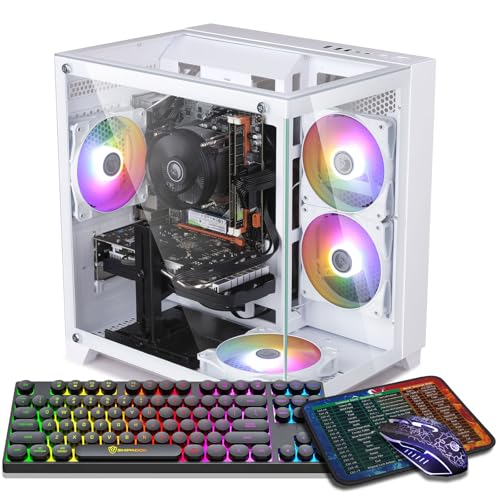
The ZER-LON Gaming PC Desktop is a prebuilt tower designed for budget-conscious gamers who want a ready-to-use system right out of the box. It combines an Intel Core i7 processor (up to 3.9GHz) with a GTX 1050 Ti 4GB graphics card, 16GB of RAM, and a 512GB SSD. This configuration is aimed at casual gamers, streamers, college students, and anyone looking to dive into PC gaming without building their own rig.
In terms of gaming performance, this PC handles popular esports titles like Fortnite, Valorant, CSGO, and Rocket League at 60+ FPS on medium to high settings, according to the product description. It can also run older AAA games like GTA V and Overwatch smoothly. However, the GTX 1050 Ti is an entry-level GPU from a few generations ago, so newer demanding games like Cyberpunk 2077 or Elden Ring will likely require lowering settings or resolution. For competitive games and casual play, it offers solid value.
Build quality includes a standard tower case with four pre-installed RGB fans that provide decent airflow and a colorful aesthetic. The PC also comes with a gaming keyboard, mouse, mouse pad, and a graphics card support bracket, which is a nice bonus for a complete setup. Connectivity-wise, you get 2x USB 3.0, 6x USB 2.0, HDMI, DisplayPort, DVI, and built-in WiFi 5.0, making it easy to connect monitors, peripherals, and network.
Setup is straightforward since it is prebuilt; just plug in the power, connect a monitor and keyboard, and you are ready to go. The SSD ensures quick boot times and game loading. The included WiFi means you may not need an Ethernet cable, but a wired connection could be more reliable for online gaming. One limitation is the 512GB SSD; with modern games often exceeding 50GB, you may need to add external storage or a secondary drive later.
Overall, this ZER-LON gaming PC is a practical choice for gamers on a tight budget who want a clear upgrade path later. It is best suited for playing less demanding games, doing schoolwork, streaming light content, or working from home. If you plan to play the latest triple-A titles at high settings, you may want to consider a more powerful GPU. But for its price point and included accessories, it offers a well-rounded entry into PC gaming.
Based on the product specifications, this PC can achieve 60+ FPS in games like Fortnite, Call of Duty Warzone, Valorant, Apex Legends, and Minecraft at 1080p resolution. The GTX 1050 Ti 4GB is capable for esports titles and older AAA games, but newer titles like Hogwarts Legacy may require lower settings. The 16GB RAM ensures smooth multitasking while gaming, and the 512GB SSD reduces load times significantly. For competitive gamers, the system offers low latency for fast-paced games, but the GPU is not designed for high-refresh-rate gaming above 60Hz.
The ZER-LON gaming PC provides a wide range of ports: 2x USB 3.0, 6x USB 2.0, 1x RJ-45 Ethernet, 1x Serial port, plus a 3-in-1 display output (HDMI, DisplayPort, DVI). Built-in WiFi 5.0 allows wireless networking without an adapter. This connectivity makes it easy to connect multiple peripherals like a mouse, keyboard, headset, and external drives. The inclusion of a serial port may be useful for industrial or legacy devices, but most gamers will primarily use USB and HDMI.

Pros
- Affordable all-in-one bundle with monitor and peripherals included.
- Core i7 processor and 16GB RAM handle multitasking well for a budget gaming PC.
- RGB front panel adds a splash of color to any desk setup.
- 512GB SSD provides snappy load times for games and apps.
- Renewed unit offers good value for gamers on a strict budget.
Cons
- GT 1030 is limited to older or less demanding games at lower settings; not suitable for modern AAA titles.
- Only 8GB of video memory would be insufficient for high-resolution textures or VR gaming.
- Renewed product may show minor cosmetic wear and has a shorter warranty compared to new units.
The Dell Gaming OptiPlex Desktop RGB Computer PC is a renewed desktop aimed at budget-conscious gamers who want a complete setup without breaking the bank. It pairs a robust Intel Core i7 processor with a GeForce GT 1030 graphics card, 16GB of RAM, and a 512GB SSD, all wrapped in a tower that includes a front RGB light panel. This is not a high-end rig for maxing out Cyberpunk 2077, but it is a smart entry point for casual gaming, esports, and general productivity.
Best suited for college gamers, work-from-home multitaskers, and anyone who plays less demanding titles like Fortnite, Valorant, or League of Legends, this PC delivers smooth performance at medium settings. The included 24-inch monitor, keyboard, mouse, and headset mean you can plug in and play immediately. For streamers, the GT 1030 is not powerful enough for high-quality game capture, but it can handle light streaming with older games or non-gaming content.
Build quality is typical of renewed business-class OptiPlex hardware: solid metal chassis, easy access for upgrades, and a compact footprint that fits well on a desk. The RGB front panel adds a nice aesthetic touch for fans of colorful setups, and the remote control makes it easy to change lighting patterns. The 512GB SSD provides snappy boot times and quick game loads, while 16GB of RAM ensures smooth multitasking between games, Discord, and web browsing.
On the practicality side, the renewed status means you get a fully tested unit with all necessary accessories and a minimum 90-day warranty. The peripherals are basic but functional, so you may want to upgrade the mouse and keyboard later. The GT 1030 is the weakest link here, so temper expectations for modern AAA titles; stick to eSports and older games for the best experience. Cable management is decent, and the PC runs relatively cool and quiet during light use.
Overall, this is a fantastic starter gaming PC for a dorm room, a secondary streaming machine, or a budget-friendly family computer that can handle light gaming. If you are a serious competitive gamer or want to play the latest titles at high settings, look elsewhere. But for the price, the Dell OptiPlex bundle offers great value for casual gamers and those new to PC gaming.

Pros
- All-in-one bundle with monitor and peripherals saves you from buying components separately
- Small footprint makes it perfect for cramped desks or dorm rooms
- Adequate performance for older or less demanding games like Minecraft, Valorant, and indie titles
- Renewed unit with Windows 11 Pro includes modern features and security
Cons
- Integrated Intel HD Graphics limit gaming to low settings and less demanding titles
- DDR3 RAM is older technology and may not match the speed of newer DDR4 or DDR5 systems
- Small form factor restricts future GPU upgrades due to space and power limitations
This Dell Optiplex Small Form Factor (SFF) desktop bundle is a renewed office PC repurposed into a budget-friendly gaming setup. It includes a 24-inch monitor, RGB keyboard and mouse, and a headset, making it a complete package for anyone looking to get into PC gaming without breaking the bank. The core specs feature an Intel i5 quad-core processor from the 4th generation (3.2GHz), 16GB of DDR3 RAM, and a 512GB solid-state drive, all running Windows 11 Pro.
Best suited for casual gamers, college students, streamers just starting out, and work-from-home users, this system handles everyday tasks like web browsing, office applications, and light gaming with ease. The SSD ensures fast boot times and snappy game loading, while the 16GB RAM allows for smooth multitasking during Discord calls or streaming. However, don't expect to run modern AAA titles at high settings the integrated Intel HD Graphics are fine for older games, MOBAs, and indie titles but will struggle with graphically intensive Esports or open-world games.
In terms of build quality, the Dell Optiplex SFF is known for its durability and reliable construction. The compact chassis fits easily on most desks, leaving room for extra peripherals or cable management. The included 24-inch monitor offers a 1920x1080 resolution, which is adequate for general use and older games, though its refresh rate is standard 60Hz. The RGB peripherals provide a customizable glow to your setup, though the keyboard uses rubber dome switches rather than mechanical ones, so hardcore competitive gamers may want to upgrade later.
Setup is straightforward just unbox, connect the power and peripherals, and you're ready to go. The system comes with Windows 11 Pro pre-installed, so there's no OS installation hassle. Cable management is minimal thanks to the SFF design and included wireless connectivity for Wi-Fi. Maintenance involves occasional dusting of the compact case, but the system runs relatively cool for office workloads.
Realistic limitations include the older DDR3 RAM, which cannot be upgraded to DDR4, and the integrated graphics which lack the power for serious gaming. The SFF case also limits expansion you won't fit a modern GPU inside without external enclosures. This is not a machine for competitive FPS or VR gaming, but it excels as an entry-level desktop for light gaming, streaming, and productivity.
Overall, if you're a budget-conscious gamer, a student setting up a first desktop, or someone who needs a reliable PC for work and casual play, this Dell Optiplex bundle offers solid value. It's a practical, no-fuss solution that gets you started right away with all the essentials. Just be aware of its limitations in GPU performance and upgrade potential.
The integrated Intel HD Graphics in this Optiplex SFF handle older or less demanding games adequately. You can expect playable frame rates in titles like Minecraft, League of Legends, CS:GO (on low settings), and many indie games. For streaming or light content creation, the i5 processor and 16GB RAM manage OBS Studio and Discord alongside older games. However, modern triple-A games and high-refresh-rate gaming are not realistic without a dedicated graphics card, which this system cannot accommodate internally due to its small form factor.
Dell's Optiplex line is built for business reliability, and this SFF model is no exception. The metal chassis feels sturdy, and the internal layout is clean, though compact. The 512GB SSD and 16GB DDR3 RAM are standard components that should perform well for years. The included 24-inch monitor is a basic 1080p display with decent color reproduction for the price. The RGB keyboard and mouse are budget peripherals but functional for casual use. The headset offers a built-in microphone and comfortable ear cups for extended sessions.
This bundle comes with a 24-inch LED monitor (1920x1080 resolution), a wired RGB gaming keyboard and mouse, and a wired headset with microphone. These accessories are entry-level but perfectly usable for someone starting out. The keyboard has RGB backlighting with a few lighting modes, and the mouse offers standard DPI settings. The headset provides decent audio and microphone clarity for Discord calls and casual streaming. All together, they make this a true plug-and-play gaming setup.

Pros
- Generous 16GB RAM and 512GB NVMe SSD for fast performance.
- Includes keyboard, mouse, and mouse pad for a complete starter setup.
- RGB fans and case lighting add visual appeal without extra cost.
- WiFi connectivity eliminates need for wired Ethernet.
- Affordable price point for entry-level gaming.
Cons
- RX550 graphics card is entry-level and may struggle with demanding modern AAA titles at higher settings.
- Only 512GB storage may fill up quickly with large game files; consider adding more storage later.
- Limited to 4GB VRAM, which could be a bottleneck in texture-heavy games.
The abytespark Prebuilt Gaming PC Desktop is a budget-friendly tower designed for gamers who want a straightforward, ready-to-play system without the hassle of building their own. Featuring an Intel Core i5 processor, AMD Radeon RX550 GPU with 4GB GDDR5 memory, 16GB of RAM, and a 512GB NVMe SSD, this white case setup also includes four RGB fans and comes with Windows 11 pre-installed. It's best suited for casual gamers, streamers just starting out, college students, or anyone working from home who needs a capable PC for both productivity and light gaming.
In terms of real-world gaming performance, this PC can handle popular titles like Fortnite, Apex Legends, Overwatch, CSGO, and League of Legends at 50+ FPS on medium settings. The RX550 is not a powerhouse, but it delivers smooth framerates for esports and older games. For competitive gamers focused on low-latency responsiveness, the combination of the i5 and 16GB RAM ensures minimal stutter during gameplay. However, don't expect to run Cyberpunk 2077 or modern AAA games at high settings - this PC is built for accessibility, not high-end graphics.
Build quality is decent for the price point. The white tower is compact and lightweight at 13 pounds, making it easy to move or fit in a dorm room. The four RGB fans provide adequate airflow for the components, and the included RGB case lighting adds a nice touch for setup aesthetics. The package also comes with a basic gaming keyboard, mouse, and mouse pad, so you can start gaming right away. Connectivity is solid with WiFi 5, 2x USB 3.0, 6x USB 2.0, HDMI, DisplayPort, and DVI outputs.
Setup is incredibly simple - just plug in the power, connect your monitor and peripherals, and you're ready to go. The included Windows 11 Home 64-bit means no OS installation is needed. Cable management inside the case is adequate, though you may want to tidy up a bit for optimal airflow. The lifetime free technical support is a nice bonus for new PC users who might need help with software or upgrades.
Realistically, the main limitations are the RX550's 4GB VRAM and the 512GB SSD, which can fill up fast with modern game installations. If you plan to play many AAA titles or store large media files, you'll want to add a secondary hard drive or external storage. Additionally, the included peripherals are basic - serious gamers may want to upgrade to a better mouse and keyboard for improved comfort and precision.
Overall, the abytespark Prebuilt Gaming PC is a great choice for budget-conscious gamers, students, or anyone new to PC gaming who wants a functional, attractive system without breaking the bank. It handles esports and casual titles well, looks good on a desk, and comes with everything needed to get started. If you're a competitive gamer aiming for high refresh rates or max settings, you'll want to look at a more powerful rig, but for entry-level use, this PC delivers solid value.

Pros
- Strong value for budget-conscious gamers needing a complete desktop solution.
- Includes RGB keyboard and mouse, so no extra purchase required for basic setup.
- WiFi 6 and Bluetooth 5.0 offer modern wireless standards for low-latency connections.
- 16GB RAM is generous for a system at this price point, enabling smooth multitasking.
- Three RGB fans add aesthetic appeal and help keep components cool under load.
Cons
- Radeon RX 560 is an older entry-level GPU; may struggle with demanding AAA titles at high settings.
- Storage is limited to 512GB; users with large game libraries may need additional drives.
- Power supply and motherboard details are not specified, which may concern enthusiasts about upgrade potential.
The STGAubron Gaming PC is a prebuilt desktop designed for entry-level to mid-range gaming and everyday computing. It targets casual gamers, students, work-from-home users, and anyone building their first gaming setup on a budget. With an Intel Core i5 processor, Radeon RX 560 graphics, 16GB of RAM, and a 512GB SSD, this system aims to deliver a balanced experience for esports titles, light productivity, and media consumption.
In terms of real-world performance, the RX 560 can maintain over 60 frames per second in popular games like Fortnite, Valorant, Overwatch, and Rocket League at moderate settings. The 16GB RAM allows for smooth multitasking, such as running Discord, a browser, and a game simultaneously. The 512GB SSD ensures quick boot times and snappy application launches. Built-in WiFi 6 and Bluetooth 5.0 provide stable wireless connections for online gaming and streaming without the need for extra adapters.
The tower itself features a black case with three RGB fans, giving it a gamer aesthetic that many users enjoy. The included RGB keyboard and mouse are basic but functional, perfect for getting started immediately. The compact size makes it easy to place on most desks, and the side panel likely offers a view of the interior – which is common in this price range. While build quality is decent for a budget prebuilt, some internal components like the power supply and motherboard are not explicitly listed, which is typical at this price point.
Setting up the STGAubron PC is straightforward: just connect the monitor, peripherals, and power, then turn it on. Windows 11 Home is pre-installed, so you can start gaming right away. Cable management inside the case is adequate, though not as tidy as a custom build. For maintenance, you can easily clean the front filters and RGB fans with compressed air. One realistic limitation is that the RX 560 is not powerful enough for 1440p gaming or demanding AAA titles at ultra settings. Also, the 512GB storage may fill up quickly if you install several large games.
Overall, this gaming PC is a solid option for budget-conscious buyers who want a ready-to-run system without the hassle of building one. It works well for casual gaming, schoolwork, and home office tasks. If you are a competitive esports gamer or a content creator needing more graphics power, you may want to consider a system with a more capable GPU. But for the price, the STGAubron delivers a respectable balance of performance, features, and aesthetics for everyday use.
The STGAubron Gaming PC pairs an Intel Core i5 processor with a Radeon RX 560 4GB GPU. This combination is well-suited for popular esports titles like Fortnite, Valorant, Rocket League, and Overwatch, where you can expect 60+ FPS at medium to high settings. In more demanding games like GTA V or Call of Duty Warzone, you may need to lower settings to achieve playable frame rates. The 16GB RAM helps keep games running smoothly, and the 512GB SSD reduces load times significantly compared to a traditional HDD.
For streaming or recording, the Core i5 can handle light streaming to Twitch or YouTube at 720p, but for higher quality streams, a dedicated streaming PC or a more powerful GPU would be recommended. WiFi 6 ensures low-latency online play, and the included wired keyboard and mouse are responsive for basic gaming needs.
The STGAubron PC comes in a standard black tower with a clear side panel (likely acrylic) and three pre-installed RGB fans. The fans create a colorful lighting effect that adds personality to any desk setup. The case feels sturdy for its price, though the side panel might be plastic rather than tempered glass. Inside, the motherboard and power supply are standard OEM components – suitable for the build but not easily identifiable for upgrades. The included mouse and keyboard are membrane-based with RGB lighting; they feel basic but perfectly functional for everyday use and casual gaming.
Overall, the build quality meets expectations for a budget prebuilt system. It's not designed for heavy overclocking or extreme upgrades, but it provides a reliable foundation for years of normal use.

Pros
- Strong CPU performance for multitasking and productivity
- Generous 1TB M.2 SSD storage with fast read/write speeds
- Quiet and effective ARGB cooling system
- Easy setup right out of the box with Windows 11 preinstalled
- Good value for a prebuilt desktop with modern specs
Cons
- Integrated graphics limit gaming to less demanding titles at lower settings
- No dedicated GPU included, which may disappoint competitive gamers
- RAM is limited to 16GB, which may require an upgrade for heavy multitasking or content creation
The ALCPOK AMD Ryzen 7 5700G gaming desktop is a prebuilt tower designed for casual gamers, streamers, content creators, and home office users who need a reliable all-in-one system. It combines a capable processor with fast memory and storage, making it a solid choice for everyday computing and light gaming.
At the heart of this machine is the AMD Ryzen 7 5700G, an 8-core processor with integrated Radeon graphics. This CPU handles multitasking with ease, whether you are running multiple browser tabs, editing photos in Photoshop, or streaming on Twitch. The 16GB of DDR4 3200MHz RAM keeps things snappy, and the 1TB M.2 SSD ensures quick load times for your favorite games and applications.
For gaming, this PC is best suited for titles that do not demand a dedicated GPU. Games like Fortnite, League of Legends, and Minecraft run at playable frame rates on medium settings. It is not built for high-end AAA gaming at max details, but it delivers a smooth experience for less demanding esports and indie titles. The integrated graphics are fine for casual play and streaming light content.
The build quality is practical with a clean tower design and ARGB cooling fans that add a touch of personality to your desk setup. The prebuilt nature means you can unbox, plug in, and start using it right away with Windows 11 Home preinstalled. Cable management inside the case is tidy, and the 550W Bronze power supply provides enough headroom for future upgrades like adding a dedicated graphics card.
One realistic limitation is the lack of a discrete GPU, which means this PC is not ideal for competitive gamers or those wanting to play graphically demanding titles. Upgrading the RAM to 32GB may also be beneficial for heavy multitaskers. However, for its price point, the ALCPOK Ryzen 7 5700G desktop offers a solid foundation for casual gaming, streaming, and productivity.
Overall, this prebuilt tower is a practical choice for college gamers, work-from-home professionals, and anyone building a budget-friendly gaming setup. It is easy to maintain, quiet in operation, and ready to handle everyday tasks with room to grow. If you need a reliable desktop for light gaming and general use, this ALCPOK model is worth considering.

Pros
- Includes a 24-inch monitor and RGB peripherals for a complete, immersive setup at a low price
- Intel Core i7 and 16GB RAM handle everyday computing, streaming, and light gaming without slowdowns
- Renewed and tested with a warranty, giving peace of mind while saving money
- RGB front panel with remote adds customizable lighting to match any gaming room aesthetic
- Easy upgrade path with support for low-profile dedicated graphics cards
Cons
- No dedicated graphics card included, so modern or demanding games will struggle without an upgrade
- The included peripherals (keyboard, mouse, headset) are basic RGB models and may not satisfy competitive gamers or audiophiles
- Renewed product may ship in a generic box and cosmetic signs of previous use could be present
The Dell OptiPlex RGB Desktop is a renewed all-in-one PC package that pairs a reliable office-grade tower with a set of RGB accessories and a monitor. It's designed for users who want a functional, good-looking setup without spending a fortune, making it a strong candidate for casual PC gamers, college students, work-from-home professionals, or anyone building their first gaming desk.
Under the hood, you get an Intel Core i7 quad-core processor (3.40 GHz), 16 GB of RAM, and a 512 GB SSD. This combination delivers snappy performance for everyday tasks like web browsing, streaming, office work, and even light creative projects. The SSD ensures fast boot times and quick application launches. However, the lack of a dedicated graphics card means you won't be playing modern AAA titles at high settings. The description notes you can add a low-profile GPU for beginner-level gaming, which is a practical way to expand its capabilities over time.
Build quality is typical of Dell's OptiPlex line: a sturdy, compact tower that fits well in most desk setups. Being a renewed product, each unit is professionally inspected, tested, and cleaned. It ships with all necessary cables and accessories, though the box may be generic. The included 24-inch HDMI monitor (likely 1080p) is suitable for general use and light gaming, but don't expect high refresh rates or vibrant HDR. The RGB keyboard, mouse, and headset are basic but add a cohesive aesthetic, especially with the tower's front RGB panel that you can control via a remote.
Setup is straightforward: plug in the monitor, peripherals, and power, connect to WiFi, and you're up and running on Windows 11 Pro. The operating system is modern and stable, with easy access to the Microsoft Store for apps and optional antivirus or Office 365. Cable management is minimal since the monitor and peripherals use standard cables, and the tower's compact size leaves room on your desk.
One realistic limitation is the integrated graphics. For anything beyond indie games or titles from a few years ago, you'll need to budget for a low-profile graphics card. The included peripherals are functional but may not satisfy gamers who require mechanical switches, high-DPI sensors, or studio-quality audio. Additionally, renewed products can have minor cosmetic blemishes, though functionality is tested.
Overall, the Dell OptiPlex RGB Desktop Combo is a smart buy for budget-focused users who want a complete, good-looking setup for everyday computing and casual gaming. It's especially appealing for college gamers, home office workers, or RGB enthusiasts who plan to gradually upgrade. If you're a competitive esports player or a streamer needing high frame rates, this system will require a graphics card upgrade before it meets your needs. But as an affordable foundation, it offers solid value.
Out of the box, this system relies on Intel integrated graphics, which can handle older or less demanding games like Minecraft, League of Legends, or CS:GO at lower settings and acceptable frame rates. For modern AAA titles, expect stuttering and low FPS. The product description highlights that adding a low-profile dedicated graphics card (like a GTX 1650 or equivalent) transforms this PC into a decent beginner gaming machine capable of 1080p gaming at medium settings. The Core i7 processor and 16GB RAM will not bottleneck such an upgrade, making this a viable base for a budget gaming build.
The combo includes a 24-inch HDMI monitor (likely 1080p 60Hz), an RGB wired keyboard, an RGB wired mouse, and an RGB wired headset. These peripherals are entry-level but provide a unified RGB look that syncs with the tower's front panel lighting. The keyboard and mouse are basic membrane and optical models, suitable for everyday typing and casual gaming. The headset offers decent audio for voice chat and media consumption. The monitor has standard tilt adjustment and VGA/HDMI inputs. For the price, these accessories add convenience and aesthetic value, though serious gamers may want to upgrade them over time.
Frequently Asked Questions
Can a beginner gaming PC run modern games like Fortnite and Warzone?
Yes, many entry-level gaming PCs with a dedicated GPU like the Radeon RX 560 or GTX 1050 Ti can run Fortnite, Warzone, and similar titles at 60+ FPS on medium settings. Models like the STGAubron with RX 580 or ZER-LON with GTX 1050 Ti are built for this. Just check the specific GPU and RAM before buying.
Is it better to buy a prebuilt gaming PC or build one as a beginner?
Prebuilt systems are easier for beginners since they come assembled, tested, and often include a warranty. You avoid troubleshooting driver issues or cable management. Many prebuilts also include peripherals, making them a hassle-free start.
How much RAM do I need for a beginner gaming computer?
16GB is the sweet spot for most modern games and multitasking. It handles game clients, Discord, and browser tabs without slowdown. Some budget models may offer 8GB, but 16GB ensures smoother performance in 2026.
Do beginner gaming PCs come with Wi-Fi and Bluetooth?
Many do. For example, the STGAubron models include Wi-Fi 6 and Bluetooth 5.0 for fast wireless connections. Always check the specs if you need wireless connectivity for online gaming or peripherals.
Can I upgrade a prebuilt gaming PC later?
Yes, most prebuilt towers allow upgrades to RAM, storage, and sometimes the GPU. Models like the Dell OptiPlex may have limited space, but standard mid-tower cases offer more room. Check for available expansion slots and PSU wattage before upgrading.
What should I look for in a beginner gaming PC under $500?
Look for at least a dedicated GPU (like RX 560 or GTX 1050 Ti), 16GB RAM, and a 512GB SSD. These specs handle most esports and AAA titles at 1080p. Also check for a recent Windows version and warranty coverage. For more details, see our guide on best video cards for gaming computers.


Write Your Review
No reviews yet. Be the first to share your experience!