


Elevate Your Desktop Control and Gaming Precision
Restricted desk space and tangling cords can quickly derail fast-paced gameplay, making reliable peripheral pairings essential for fluid desktop control. Pairing a high-precision optical sensor with a responsive keyboard layout ensures your commands register cleanly during intense gaming sessions or demanding workdays. Selecting the best gaming mouse and keyboard setup requires looking closely at sensor tracking ranges, anti-ghosting matrices, and stable connectivity modes. Whether you prefer a 2.4 GHz wireless link to eliminate desk drag or a zero-latency wired connection, matching your gear to your grip style keeps movement natural. If you are also redesigning your battlestation, reviewing our guide on how to build a gaming desk can help optimize your workspace for mouse movement and wire management.
Modern peripheral combinations frequently combine multi-stage DPI mice with dedicated multimedia keys and tactile membrane or mechanical feel switches. Reviewing the manufacturer specifications across brands like REDRAGON and RedThunder highlights useful features such as integrated wrist rests, aluminum top plates, and customizable RGB illumination. Dedicated macro keys and software remapping also allow gamers to tailor quick weapon swaps or productivity shortcuts without cluttering their setup. If you run demanding titles alongside a dedicated system like a gaming PC for World of Warcraft, having reliable, anti-ghosting peripheral combinations helps prevent missed inputs during crucial battles.

Pros
- Very affordable price for a complete keyboard and mouse combo
- Solid aluminum alloy construction feels sturdy and long-lasting
- RGB lighting adds customization without software hassle
- Ergonomic design reduces wrist strain during long gaming or typing sessions
- Anti-ghosting allows multiple key presses simultaneously, useful for fast-paced games
Cons
- Membrane switches lack the tactile feedback and longevity of mechanical keyboards
- Mouse DPI adjustment is limited to preset values without software customization
- No dedicated macro keys or on-board memory for advanced gamers
The AULA T102 is a wired gaming keyboard and mouse combo designed for budget-conscious PC gamers who want a cohesive, RGB-lit setup without spending a lot. It features a full 104-key layout with a brushed aluminum alloy top plate, giving it a premium look and feel that usually costs much more. The included mouse has adjustable DPI settings (1200-2400-4800-7200) and matching RGB lighting, making this a complete entry-level bundle.
This combo is best suited for casual gamers, college students, or anyone building their first gaming PC. It works well for titles like Fortnite, Valorant, or Minecraft where fast key presses matter but mechanical switches aren't necessary. The membrane keys are quiet and have a 2.0mm actuation, which provides a decent typing experience for both gaming and homework. The 26-key anti-ghosting ensures that rapid inputs won't be missed during heated battles.
Build quality is a strong point for the price. The metal panel adds rigidity and helps the keyboard survive accidental bumps or drops. The mouse feels lightweight but solid, with a braided cable that resists tangling. Both devices plug and play instantly with Windows 7, 8, and 10 - no drivers or software required. The automatic sleep mode after 5 minutes of inactivity helps save power and prolong LED life.
RGB lighting is limited to rainbow presets but can be adjusted for brightness and effect through function keys. You get three modes (constant, breathing, heartbeat) and three brightness levels, which is enough to match many gaming setups. The mouse also has a breathable backlight that syncs with the keyboard style. While not individually customizable per key, the overall glow is satisfying for a sub-$30 combo.
One limitation is the membrane switch feel - mechanical keyboard enthusiasts may find it mushy. The mouse lacks extra side buttons or software for DPI profiles, so you're stuck with the presets. Also, the phone holder on top of the keyboard is a nice addition but might collect dust if not used. However, for the price, these trade-offs are expected and acceptable.
Overall, the AULA T102 combo is a smart purchase for anyone who wants a reliable, RGB-lit keyboard and mouse without a big investment. It's easy to set up, comfortable for daily use, and built to last. If you're a casual gamer or a student on a budget, this combo will serve you well. For serious competitive gamers, stepping up to mechanical switches may be worth considering, but for the money, this is hard to beat.

Pros
- Excellent value for a full keyboard, mouse, and wrist rest combo under $40.
- Responsive mouse with adjustable DPI (up to 7200) and comfortable ergonomic shape.
- Customizable RGB lighting with multiple modes and easy-to-use FN key shortcuts.
- Sturdy build quality with steel plate reinforcement and non-slip mouse design.
- Detachable wrist rest provides genuine comfort for extended gaming or typing sessions.
Cons
- Mouse RGB lighting may not cycle as described; some users report it stays on a single color.
- Compatibility issues reported when using with Mac systems via KVM switch, though PC performance is solid.
- No included instructions for RGB customization; users need to find settings online.
The RedThunder K10 is a wired gaming keyboard and mouse combo that delivers surprising quality at a budget-friendly price point. This all-in-one package includes a full-size 104-key keyboard with anti-ghosting support, a 7200 DPI optical mouse, and a detachable soft leather wrist rest. Designed for PC gamers, casual players, and those building their first gaming setup, it offers a practical way to upgrade your desk without breaking the bank.
For performance, the keyboard features 26 anti-ghosting keys, allowing multiple simultaneous presses without missed inputs, which is useful for fast-paced games like FPS or MOBAs. The mouse uses an optical sensor with up to 7200 DPI, 12000 FPS scan rate, and 1000Hz polling rate, providing smooth and accurate tracking for gaming or daily tasks. The RGB lighting on both devices can be customized through FN key shortcuts, offering modes like breathing, streamer, and custom color zones, though some users may need to look up the manual online for full control.
Build quality is solid for the price. The keyboard has a built-in steel plate for durability, and the double-shot ABS keycaps resist fading and sweat. The mouse is lightweight with a non-slip ABS texture and two side buttons for extra control. The detachable wrist rest is filled with memory foam and covered in smooth faux leather, which helps reduce wrist strain during long gaming sessions or work hours. The combo is plug-and-play via USB, working instantly with Windows PCs and laptops, though Mac compatibility via KVM switches may be inconsistent based on user feedback.
In terms of practicality, the setup is straightforward: just plug in the USB cables and start using. The keyboard has adjustable tilt legs for ergonomic angle, and the mouse cable is long enough for most desk layouts. Cleaning is easy with the smooth keycaps and wrist rest surface. The main drawback is that the mouse RGB lighting may not cycle through all colors as advertised, and some users report it stays on a single color. Additionally, the lack of printed instructions for RGB customization can be a minor inconvenience, though online resources fill the gap.
Overall, the RedThunder K10 is a strong choice for casual gamers, esports beginners, college students, or anyone looking for an affordable gaming combo that covers the basics well. It offers good responsiveness, comfortable ergonomics, and customizable aesthetics without a high price tag. While it may not satisfy hardcore competitive players seeking premium switches or software control, it delivers reliable performance for everyday gaming and productivity. If you're building a budget gaming PC or upgrading a dorm room setup, this combo is a practical and value-packed option.

Pros
- Excellent value for the price - includes both keyboard and mouse with RGB and macro functionality.
- Ergonomic wrist rest and low-profile keys provide comfort for long gaming or typing sessions.
- Mouse DPI adjustment from 800 to 7200 offers flexibility for different game genres and screen resolutions.
- Positive user feedback on durability and build quality, with many reporting years of reliable use.
- Easy setup with no driver hassles - just plug in and start gaming or working immediately.
Cons
- Membrane keys may feel mushy to gamers accustomed to mechanical switches, lacking the tactile click.
- Wired connection only - not ideal for those seeking a clutter-free wireless desk setup.
- Software download required for full macro and lighting customization, which some users found unavailable or complicated.
The Redragon S101-3 PRO is a wired gaming keyboard and mouse combo designed for PC gamers who want solid performance without breaking the bank. It includes a full-size RGB backlit keyboard with membrane switches and a high-precision mouse with adjustable DPI up to 7200, making it a practical choice for competitive gamers, casual players, esports newcomers, streamers building a budget streaming setup, and college gamers setting up their first gaming desk.
In real-world use, the keyboard offers quick responsiveness thanks to anti-ghosting technology, ensuring every key press registers during intense FPS or MOBA sessions. The mouse's adjustable DPI lets you switch between slow, precise aiming for sniping and fast tracking for fast-paced action. User reviews highlight that the combo maintains low latency and reliable input accuracy, making it suitable for both gaming and everyday productivity tasks like typing assignments or managing spreadsheets.
Build quality is surprisingly robust for the price point. The keyboard features a spill-resistant design and a comfortable wrist rest, while the mouse has an ergonomic shape that fits medium to large hands. The membrane keys provide a soft, quiet feel that works well in shared spaces or dorm rooms, though enthusiasts used to mechanical switches may find them less tactile. The included foldable stand lets you adjust the keyboard angle for better typing posture.
Setup is straightforward: plug the USB cables into your PC, and everything works out of the box. Customizing RGB effects and macro commands requires downloading Redragon software from their website, which is free but not always easy to find according to some reviewers. Once set, lighting and DPI profiles save directly to the hardware, so you don't need the software running constantly. Cable management is simple thanks to the braided USB cables, though the wired design means two cables on your desk.
One realistic limitation is that the keyboard uses membrane switches rather than mechanical ones, so it lacks the crisp feedback that competitive gamers often prefer. Additionally, the mouse's DPI settings are preset steps (800/1200/1600/2400/7200) rather than fully customizable increments. Some users also noted that the software can be inconsistent across different Windows versions.
Overall, the Redragon S101-3 PRO is a reliable and feature-rich combo that delivers excellent value for budget-conscious PC gamers, streamers starting out, or anyone needing a dependable upgrade for work and play. It won't match high-end mechanical gear, but for its price, it offers responsive performance, comfortable ergonomics, and enough RGB flair to light up your gaming setup without emptying your wallet.

Pros
- Reliable tri-mode wireless with stable 2.4G connection and Bluetooth for multi-device use.
- Full-size keyboard with comfortable keystrokes and quiet operation reduces fatigue during long sessions.
- Programmable keys and mouse buttons via Redragon software offer deep customization for macros and DPI.
- Sturdy build quality and positive long-term user feedback suggest excellent durability for the price.
- Affordable price point delivers strong value for budget-conscious gamers and setup builders.
Cons
- Keyboard may have a brief reconnection delay after sleeping (5-10 seconds), which can interrupt fast-paced gaming.
- Some users report the keyboard feels slightly mushy compared to higher-end mechanical switches.
- Software driver download required for full customization, and early reviews note limited initial compatibility.
The Redragon S101M-KS is a wireless gaming keyboard and mouse combo designed for PC gamers who want to cut the cord without sacrificing performance or breaking the bank. This tri-mode set supports wired USB, 2.4G wireless via a single dual-function receiver, and Bluetooth connectivity, giving you flexibility for desktop gaming, laptop use, or streaming setups. With a 4800 DPI adjustable mouse and 10 dedicated multimedia keys, it targets casual gamers, competitive esports players, and content creators building an affordable, clutter-free gaming station.
In real-world use, the combo delivers solid responsiveness and low-latency performance, especially in 2.4G mode. The mouse offers five DPI levels (800/1200/1600/3200/4800) that you can cycle through on the fly, making it suitable for both precise aiming in FPS titles and faster cursor movement in MOBA or strategy games. The keyboard features anti-ghosting and 12 combination multimedia keys, which help maintain input accuracy during intense gaming sessions. According to user feedback, the keyboard is comfortable for long typing and gaming, though some describe the keys as slightly softer than mechanical-switch alternatives.
Build quality appears robust for its price range, with a full-size layout and an ergonomic design that includes a wrist rest. The RGB backlighting offers 8 patterns with adjustable speed and brightness, adding visual flair to any desk setup. Both the keyboard and mouse are rechargeable, with the keyboard lasting up to 300 hours with RGB off. The dual-function 2.4G receiver stored in the keyboard slot simplifies cable management and keeps your workspace tidy. The mouse also features programmable buttons via Redragon's software, allowing you to remap controls for gaming or productivity shortcuts.
Setting up the S101M-KS is straightforward: plug in the receiver, power on the devices, and they connect automatically. For Bluetooth, a quick pairing button on the mouse and FN+1/2/3 on the keyboard gets you connected to PCs, laptops, or tablets. The included 6-foot detachable USB-C cable offers wired use and charging. One limitation noted by users is that the keyboard may take a few seconds to wake from sleep mode, which could be a minor hiccup in fast-paced games. The software customization is available via Redragon's website, though some early buyers reported initial configuration hiccups.
While the S101M-KS is not a top-tier mechanical setup, it offers excellent value for budget-focused gamers, streamers, or college students building a first gaming PC. Its tri-mode connectivity makes it versatile for work-from-home setups or LAN parties, and the RGB lighting enhances any gaming room aesthetic. For competitive players seeking ultra-responsive switches or higher polling rates, higher-end options exist, but this combo excels as an affordable, reliable everyday solution.
The S101M-KS gaming combo delivers reliable wireless performance for most gaming scenarios. The 2.4G mode provides a stable, low-latency connection ideal for fast-paced shooters and real-time strategy games. The mouse's 4800 DPI sensor with five adjustable levels allows quick sensitivity changes, while the keyboard's anti-ghosting ensures simultaneous key presses register accurately. However, the keyboard's wake-up delay of a few seconds may interrupt action in games requiring instant input after idle periods.
Constructed with a durable plastic frame, the keyboard and mouse feel solid for the price point. The keys have a soft, membrane-like feel that many users find comfortable for extended typing and gaming. The mouse fits well in medium to large hands, with textured side grips for secure control. The included braided USB-C cable adds durability, while the storage slot for the 2.4G receiver prevents loss.
The full-size keyboard includes an integrated wrist rest that reduces strain during long gaming sessions. The mouse ambidextrous shape suits palm and claw grips, with programmable side buttons within easy reach. Users report low fatigue even after hours of use, though the key feel may not satisfy mechanical-switch enthusiasts.
Eight RGB backlighting patterns with adjustable brightness and speed let you personalize the aesthetic. The software (download from Redragon.com) enables keyboard macro assignments and mouse DPI/polling rate adjustments up to 1000Hz. While the RGB is not per-key, the preset modes offer dynamic effects that complement any gaming setup.
Pros
- Affordable wireless combo with a large battery capacity for extended use
- Rainbow backlighting adds visual appeal to any gaming desk setup
- Removable hand rest improves ergonomics for marathon gaming sessions
Cons
- Mechanical feel switches may not satisfy enthusiasts seeking true mechanical key switches
- Mouse lacks side buttons for advanced in-game commands in competitive FPS or MOBA titles
- Shared receiver can be a hassle if one device is lost or needs replacement
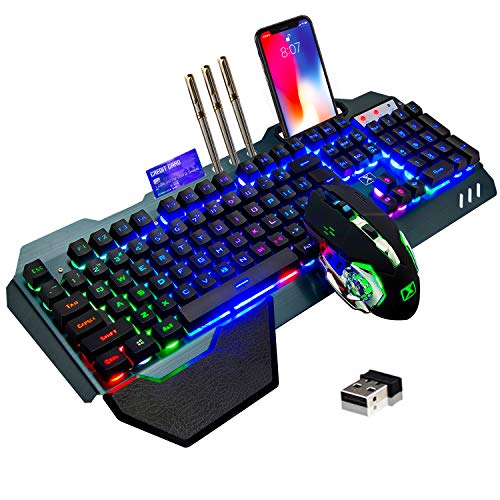
The LexonElec Wireless Gaming Keyboard and Mouse Combo is a budget-friendly option for PC gamers looking to cut the cord without breaking the bank. This set includes a full-size keyboard with a rainbow backlit mechanical-feel design and a 7-color mute mouse, both powered by a shared 2.4G wireless connection. It's a practical choice for casual gamers, college students, or anyone building a first gaming setup who wants a clean, wireless desk aesthetic.
In terms of performance, the keyboard uses a mechanical-feel membrane switch, which offers a tactile bump but lacks the crisp actuation of true mechanical switches. It's fine for typing and casual gaming, but competitive players may find it less responsive for fast-paced FPS or MOBA games. The mouse features adjustable DPI settings (800, 1200, 1600, 2400), allowing you to switch between slow, precise movements and faster cursor speeds. Its mute clicks are a plus for late-night gaming sessions or shared living spaces.
Build quality is decent for the price point. The keyboard has an aluminum alloy top panel that adds rigidity and a slight premium feel, while the floating keycap design makes cleaning easier. The removable hand rest snaps on securely and provides reasonable palm support for extended use. The mouse has a plastic body with electroplated side grips, which help with handling but may show wear over time. The included phone holder on the keyboard is a thoughtful touch for keeping your phone nearby during gaming.
Setup is straightforward: plug the Nano receiver into a USB port, and both devices pair automatically. The keyboard and mouse share the same receiver, which simplifies connectivity but means you can't use one without the other. The built-in batteries are rechargeable via USB-C (keyboard) and micro-USB (mouse), and the keyboard's 3000mAh battery can last weeks with moderate backlight usage. The mouse's 800mAh battery also offers solid endurance. Both devices have an auto-sleep feature after 5 minutes of inactivity, which conserves power but may cause a slight delay on wake-up.
A realistic limitation is the lack of dedicated software for customization. You can't remap keys, create macros, or adjust RGB lighting beyond the built-in preset modes. The backlighting is limited to rainbow colors (no per-key RGB), and the mouse only has basic DPI settings without profile storage. This combo is best suited for gamers who want a simple, plug-and-play wireless experience without diving into complex software.
Overall, the LexonElec Wireless Gaming Keyboard and Mouse Combo is a solid entry-level choice for casual gamers, streamers on a budget, or anyone building an RGB gaming setup without spending a lot. It delivers reliable wireless performance, decent battery life, and a clean aesthetic. If you're a competitive gamer who needs precise mechanical switches or a fully customizable RGB ecosystem, you'll want to consider higher-end options. But for everyday gaming, schoolwork, or light streaming, this combo offers good value for the money.
Pros
- Affordable all-in-one wireless combo with reliable tri-mode connectivity.
- Lightweight 65g mouse with excellent battery life and high DPI range.
- Anti-ghosting keyboard and customizable software enhance gaming performance.
- RGB lighting options add flair to any desk setup without extra cost.
Cons
- Keyboard uses membrane switches rather than mechanical, which may not appeal to enthusiasts seeking tactile feedback.
- Software required for full customization may have a learning curve for some users.
- Limited user reviews available, so long-term durability is unverified.
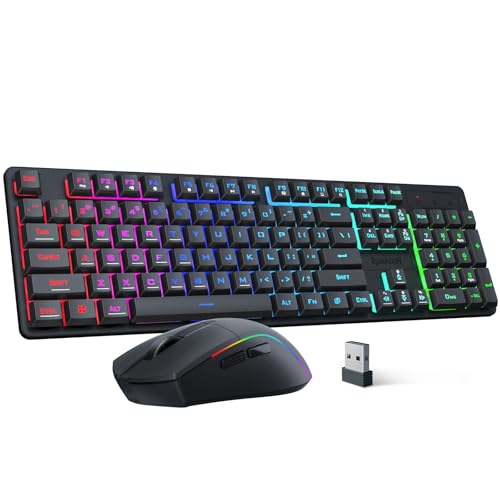
The Redragon S107KS is a wireless gaming keyboard and mouse combo designed for PC gamers who want a clutter-free desk without sacrificing performance. It’s a versatile set that works well for competitive gamers, casual players, streamers, and even work-from-home or college gamers looking for a reliable all-in-one solution.
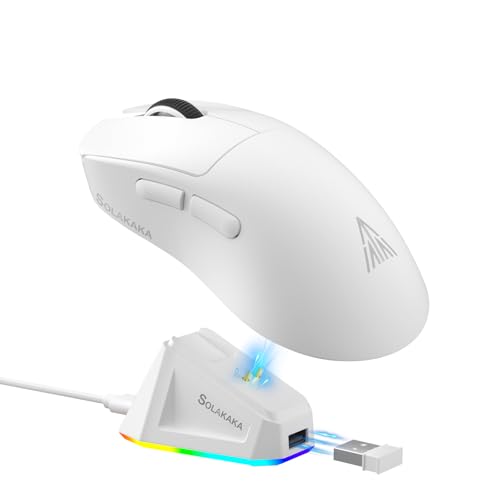
In terms of real-world performance, the mouse offers up to 10,000 DPI and a 1,000 Hz polling rate, which translates to responsive tracking in fast-paced FPS or MOBA games. The 25-key anti-ghosting on the keyboard ensures that simultaneous key presses register accurately, which is crucial for executing complex combos. The tri-mode connectivity (wired, 2.4G, and Bluetooth) makes it easy to switch between gaming rig, laptop, or tablet, and the single 2.4G receiver handles both devices – a practical convenience for multi-device users.
Build quality is decent for the price. The mouse weighs only 65g, making it one of the lightest options in this segment, and its battery lasts up to 200 hours depending on usage. The keyboard features a compact layout with multimedia keys, though it uses membrane switches rather than mechanical ones. This might be a drawback for enthusiasts who prefer tactile feedback, but it keeps the combo affordable and quiet for shared spaces like dorm rooms or offices.
Setup is straightforward: plug in the receiver, pair via Bluetooth, or use the included cable. The Redragon software lets you adjust DPI, polling rate, macros, and RGB lighting – but you’ll need to download it separately. The RGB backlighting offers 6 modes on the keyboard and millions of colors on the mouse, with adjustable brightness and speed, which is a nice touch for RGB setup enthusiasts.
A realistic limitation is the lack of mechanical switches, which may affect long-term typing comfort for heavy users. Also, the software interface isn’t the most intuitive, but it’s functional once you get used to it. Since this is a newer model with few reviews, long-term reliability is still an unknown, but Redragon generally has a solid reputation for budget gaming gear.
Overall, the Redragon S107KS is a smart buy for budget-conscious PC gamers, streamers, or anyone who wants a wireless keyboard and mouse combo with solid performance, RGB flair, and versatile connectivity. It’s especially suited for those building a first gaming setup or upgrading an older wired kit without spending a lot.
Pros
- Reliable 2.4G wireless performance with minimal input lag for casual and competitive gaming.
- Long battery life with 3000mAh keyboard and 800mAh mouse, plus auto-sleep for energy efficiency.
- Comfortable ergonomic mouse with anti-sweat grip and adjustable DPI up to 3200.
- Easy plug-and-play setup with a shared USB receiver that reduces cable clutter.
- Affordable price point for a full keyboard and mouse combo with RGB lighting and mechanical feel.
Cons
- Some users report LED backlight flickering or uneven lighting after extended use.
- Battery life may degrade over time, with some reviews noting shorter charge retention after months.
- Limited MacOS support and requires a USB-C adapter for Mac users.
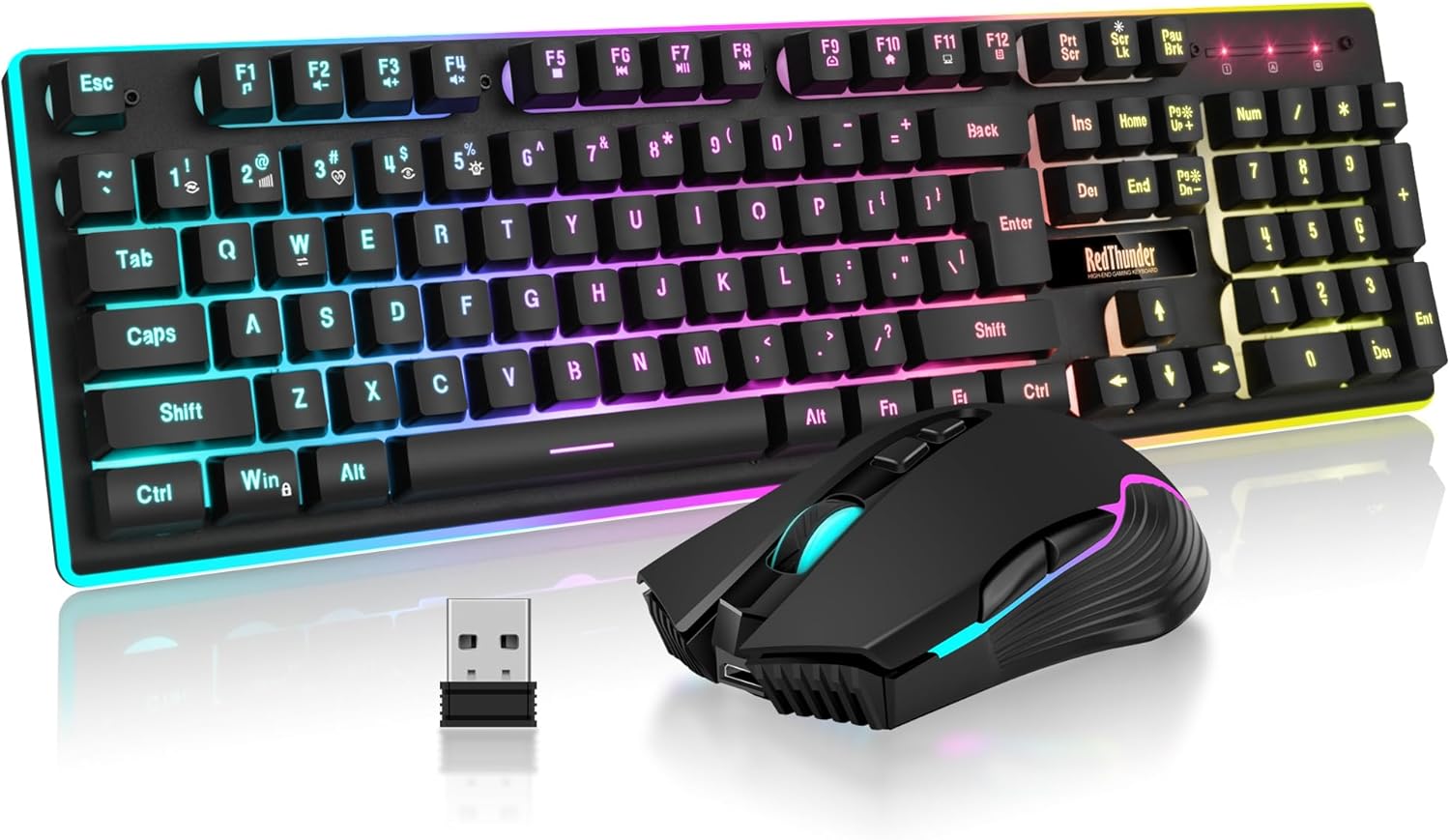
The RedThunder K10 Wireless Gaming Keyboard and Mouse Combo is a budget-friendly solution for PC gamers who want a clean, cable-free desk setup without sacrificing essential gaming features. This combo includes a full-size keyboard with a mechanical feel and a 7D 3200DPI mouse, both powered by a single 2.4G wireless receiver. It's designed for casual gamers, college gamers, and anyone building a gaming setup on a budget, but it also works well for everyday productivity and light competitive play.
In terms of real-world performance, the K10 delivers stable wireless connectivity with low latency, making it suitable for FPS, MOBA, and open-world games. The anti-ghosting keys ensure that rapid inputs register accurately, which is crucial during intense battles. The mouse offers adjustable DPI up to 3200, providing decent sensitivity for most gaming scenarios, though competitive gamers may prefer higher DPI options. The mechanical-feel keys provide satisfying tactile feedback without the noise of full mechanical switches, which some users may appreciate for quieter gaming sessions.
Build quality is solid for the price point. The keyboard features a frosted metal cover that adds durability and a premium feel, while the ABS keycaps use two-color injection molding to prevent fading over time. The mouse fits the palm comfortably with an anti-sweat, non-slip design that helps maintain control during long sessions. Both devices include RGB lighting - the keyboard offers multiple backlight modes and brightness levels, while the mouse cycles through 7 colors - adding visual flair to any gaming setup.
Setup is straightforward: the keyboard and mouse share a single USB receiver stored in the mouse, so you just plug it in and turn on the devices. The 3000mAh keyboard battery and 800mAh mouse battery provide several days of use between charges, and the auto-sleep feature helps conserve power. However, some users have noted that the LED lights can flicker or the keyboard may need occasional re-pairing, which can be a minor inconvenience. Charging via USB-C is convenient, but it's important to charge fully before first use to avoid connectivity issues.
Realistic limitations include reports of battery degradation over several months, with some users experiencing shorter charge retention or LED inconsistencies. The mouse scroll wheel may also wear out faster than expected based on some reviews. Additionally, MacOS support is limited, and a USB-C adapter is required for Mac users. While the K10 is not built for hardcore esports or heavy daily use, it's a reliable choice for casual gamers, dorm room setups, or as a secondary keyboard for work and play.
Overall, the RedThunder K10 Wireless Gaming Keyboard and Mouse Combo offers good value for budget-conscious PC gamers. It provides a wireless, RGB-lit setup with decent performance and comfort for casual gaming and everyday tasks. If you're looking for an affordable way to declutter your desk and add some flair to your gaming room, this combo is worth considering. Just be aware of potential long-term durability issues and plan for occasional charging maintenance.
Frequently Asked Questions
What does DPI mean on a gaming mouse?
DPI stands for dots per inch and measures cursor movement distance relative to physical mouse travel. Higher DPI settings allow for faster on-screen navigation with smaller hand gestures, which is helpful on high-resolution displays. However, DPI is simply a sensitivity setting rather than a measurement of overall sensor quality. Most gamers prefer having on-the-fly DPI switching to balance rapid cursor sweeps with steady aiming precision.
Can a wireless gaming keyboard and mouse combo introduce noticeable latency?
No, modern 2.4 GHz wireless peripheral combos typically deliver responsive, low-latency input suitable for everyday gaming. Combos using a shared 2-in-1 nano receiver keep desktop cables minimal while freeing up valuable computer ports. While Bluetooth mode can introduce slight latency during fast gameplay, 2.4 GHz wireless and wired USB modes maintain rapid response times. Players pairing wireless gear with a portable setup like a gaming laptop for Battlefield can enjoy clean portability without sluggish tracking.
What is the benefit of anti-ghosting keys on a gaming keyboard?
Anti-ghosting prevents missed keystrokes when pressing several keys at the exact same moment. Standard office keyboards can freeze or drop commands when handling multi-finger combinations. Gaming keyboards with 25 or 26 anti-ghosting keys ensure that critical movement and action clusters around the WASD zone register reliably under pressure.
How do rechargeable wireless combos preserve battery life during daily use?
Most wireless peripheral sets feature automatic sleep timers that engage after two to five minutes of idle time. Built-in lithium batteries, such as 3000 mAh keyboard packs and 800 mAh mouse cells, support extended gaming sessions without disposable battery swaps. Dimming or turning off dynamic RGB lighting patterns can further extend operating hours between USB recharge sessions.
Are mechanical feel membrane keyboards practical for gaming and typing?
Yes, mechanical feel membrane switches provide tactile key rebound and comfortable cushioning at an accessible price point. They deliver a satisfying typing cadence while keeping keypress noise significantly quieter than open mechanical switches. This makes them well-suited for shared workspaces, late-night gaming, and everyday typing tasks.



Write Your Review
No reviews yet. Be the first to share your experience!