


Selecting the Right Pointer for High-Speed Play
Cable drag and awkward shell contours can quickly interrupt gameplay during fast hand movements across your pad. Finding consistent tracking during quick flicks or extended sessions depends heavily on matching sensor sensitivity, button layout, and physical weight to your grip style. Evaluating the best gaming mouse canada 2026 options reveals a wide selection of hardware designs, ranging from ultra-light honeycomb bodies built for rapid twitches to multi-button configurations tailored for intricate macro commands. Planning your desk layout around a dedicated battlestation desk setup ensures your pointer has ample room to glide smoothly without obstruction.
Manufacturer specifications highlight clear functional differences between budget-friendly optical models and advanced laser sensors. Tri-mode connectivity options like Bluetooth, 2.4 GHz wireless, and Type-C wired connections eliminate cable clutter, while traditional wired USB peripherals provide reliable, non-stop power without requiring battery checks. Sensitivity ranges reaching up to 16400 DPI offer extensive cursor speed customization, though ergonomic contours, side macro buttons, and dependable switch ratings often make a more noticeable impact on daily play. Comparing listed hardware details and software settings helps pinpoint the right fit for your computing setup.

Pros
- Extremely lightweight at 49g, ideal for fast-paced competitive gaming where every gram matters.
- Tri-mode wireless gives flexibility: low-latency 2.4GHz for gaming, Bluetooth for casual use, and wired for zero-lag charging.
- 8000 DPI sensor with adjustable levels covers a wide range of sensitivity preferences from slow sniping to fast flick shots.
- Programmable buttons and software support allow deep customization for macros, media control, and DPI switching.
- Affordable price point makes it accessible for budget-conscious gamers looking for a feature-rich wireless mouse.
Cons
- Honeycomb shell may collect dust and debris over time, requiring occasional cleaning to maintain aesthetics and sensor accuracy.
- No adjustable weight system or RGB lighting, which may disappoint gamers who prefer heavier mice or customizable lighting effects.
- The symmetrical shape lacks ergonomic contours for palm grip users, potentially causing fatigue during very long sessions compared to contoured mice.
The Redragon M725 Honeycomb Shell Gaming Mouse is a lightweight, tri-mode wireless mouse designed for gamers who prioritize speed and comfort. At just 49 grams, it's one of the lightest gaming mice available, making it an excellent choice for competitive FPS and MOBA players who need quick, precise movements without arm fatigue. The honeycomb shell not only reduces weight but also promotes airflow, keeping your palm dry during intense sessions.
This mouse is best suited for PC gamers, esports players, streamers, and content creators who want a reliable wireless option without the bulk. The 8000 DPI optical sensor offers five adjustable levels (400/800/1600/2400/4000), covering a broad sensitivity range for different gaming styles. Whether you're sniping in Valorant or flicking in Overwatch, the sensor tracks smoothly on most surfaces. The tri-mode connectivity (2.4GHz, Bluetooth 5.1, and Type-C wired) lets you switch between gaming on a desktop, working on a laptop, or traveling with a tablet.
Build quality feels solid for its weight class, with a plastic honeycomb frame that's durable enough for daily use. The two side buttons are positioned for easy access without accidental presses, and the main buttons use reliable switches rated for millions of clicks. The symmetrical shape works for both left- and right-handed users, though it lacks the ergonomic curves of some larger mice. The included USB-C cable is flexible and can be used for charging or as a wired connection when you need zero latency.
Setup is straightforward: plug in the 2.4GHz receiver or pair via Bluetooth, and the mouse is ready. The Redragon software (available for download) lets you remap all five buttons, create macros, adjust DPI settings, and save up to five profiles. This is especially useful for gamers who play multiple genres or use different sensitivity settings for work and play. The mouse is rechargeable with a built-in battery, so no need for disposable batteries.
One realistic limitation is the honeycomb design's tendency to collect dust and lint, especially if you use it on a fabric mouse pad. Regular cleaning with a soft brush or compressed air keeps it looking fresh. Also, there's no RGB lighting, which may be a dealbreaker for gamers who want a glowing setup. However, the matte black finish is understated and professional.
Overall, the Redragon M725 is a fantastic value for budget-conscious gamers who want a lightweight wireless mouse with solid performance. It works well for competitive gaming, casual use, streaming, and even productivity tasks. If you're building a gaming PC on a budget or looking for a travel-friendly mouse that doesn't sacrifice responsiveness, this is a smart pick.
The Redragon M725 delivers reliable gaming performance thanks to its up to 8000 DPI optical sensor and 2.4GHz wireless connection. In fast-paced games like Call of Duty or Apex Legends, the low-latency wireless ensures your movements translate instantly on screen. The five DPI levels let you switch between slow, precise aiming and fast turning without entering menus. The lightweight honeycomb design makes it easy to flick and lift the mouse, which is a big plus for low-sensitivity players. While the sensor isn't top-of-the-line like some premium mice, it's more than adequate for most competitive and casual gamers.

Pros
- Affordable price point for budget-conscious gamers and general PC users.
- Ergonomic design reduces strain during extended use, suitable for both gaming and office tasks.
- Easy plug-and-play setup with no software required; works on multiple Windows versions and MacBooks.
- Adjustable DPI levels offer flexibility for different gaming styles and screen resolutions.
- Colorful RGB lighting adds visual appeal without complicated customization software.
Cons
- DPI range limited to 3600, which may not satisfy gamers who prefer ultra-high sensitivity for competitive play.
- RGB lighting cannot be turned off without unplugging the mouse, which may be inconvenient for some users.
- Build quality may feel less premium compared to higher-end gaming mice, though it holds up well for the price.
The BENGOO gaming mouse is a wired optical mouse designed for PC gamers, casual users, and anyone looking for a budget-friendly upgrade from a standard office mouse. It fits well into a variety of setups - from dorm room gaming rigs to home office desks - thanks to its ergonomic shape and multi-color RGB lighting.
This mouse is best suited for casual gamers, college students, and those new to PC gaming who want adjustable DPI without breaking the bank. With four DPI settings (1200, 1600, 2400, 3600), you can switch between slow, precise movements for sniping or fast sweeps for MOBA games. The six programmable buttons add convenience for in-game commands or daily productivity tasks, though they rely on in-game binding rather than dedicated software.
In terms of performance, the optical sensor delivers consistent tracking on most surfaces. The low-friction footpad ensures smooth gliding, and the 4.9-foot USB cable gives enough reach for standard desktop layouts. While it lacks the high-end sensor and polling rate options of premium gaming mice, it offers reliable responsiveness for non-competitive gaming and general use. The RGB breathing lights cycle through colors automatically, adding a subtle glow to your desk without the need for extra software.
Build quality is decent for the price point. The plastic body feels lightweight but sturdy enough for daily use. The ergonomic contour fits comfortably under your palm, reducing fatigue during long sessions. However, the cable is not braided, and the mouse lacks any weight customization. It's a simple, no-fuss design that prioritizes affordability over premium features.
Setup is as easy as it gets - just plug the USB into your Windows PC or MacBook, and the mouse works immediately. No drivers, no configuration software. This makes it ideal for users who want a hassle-free experience. Cleaning is straightforward with a damp cloth, and the footpad can be wiped down to maintain smooth movement. One limitation is that the RGB lights cannot be turned off without unplugging the mouse, which might bother some users in dark environments.
Overall, the BENGOO gaming mouse is a practical recommendation for budget-conscious PC gamers, work-from-home users, and casual streamers who need a functional, comfortable mouse with adjustable DPI and basic RGB. It won't replace high-end esports peripherals, but for its price, it delivers solid value for everyday gaming and productivity tasks.

Pros
- Excellent value for price with features normally found in higher-end mice.
- Comfortable ergonomic shape suitable for palm, claw, or fingertip grips.
- Responsive sensor with consistent tracking across various surfaces.
- Full software control for button mapping, DPI settings, and RGB effects.
- Long-lasting build quality with braided cable and reinforced USB port.
Cons
- Software download process can be confusing; requires navigating Redragon's website to find the correct driver.
- Slightly heavier than some modern ultralight gaming mice, which may affect fast flick shots for competitive FPS players.
- Occasional unregistered clicks reported by some users, though this seems to be rare.
The Redragon M602 Griffin is a wired gaming mouse that has been a staple in the budget gaming peripherals market since its launch in 2015. It combines a comfortable ergonomic shape, a high-precision optical sensor with up to 7200 DPI, and nine programmable buttons, all wrapped in a durable design with customizable RGB lighting. Priced affordably, it aims to deliver features that rival more expensive mice without compromising on core performance.
This mouse is well-suited for a wide range of users: casual and competitive PC gamers, esports enthusiasts, streamers, content creators, college gamers, and even work-from-home professionals. Its versatility makes it a reliable choice for anyone who needs a responsive and comfortable pointing device for both gaming and daily tasks. The M602 fits naturally into a gaming setup, adding a splash of RGB without requiring a big investment.
In terms of gaming performance, the optical sensor provides smooth and consistent tracking across various surfaces. The adjustable DPI can be changed on the fly using a dedicated button, allowing quick adaptation between different game genres or desktop work. While the mouse lacks a high polling rate specification, user feedback indicates that responsiveness is adequate for most gaming scenarios, including fast-paced shooters and MOBAs. The mechanical switches are rated for 500,000 clicks and provide a satisfying tactile feedback, though some users have noted that the left and right buttons feel slightly different in pressure.
Build quality is a strong point for the M602. The matte plastic body feels solid and resists fingerprints. The braided cable is a premium touch at this price point, reducing tangles and adding durability. The ergonomic shape is contoured for right-handed use, with a pronounced thumb rest and finger grooves that promote a natural grip. This design helps reduce fatigue during extended gaming sessions, making it a comfortable choice for marathon play.
Setup is straightforward: plugging the mouse into a USB port immediately enables basic functionality. For full customization of buttons, DPI steps, and RGB lighting, users need to download the Redragon software from the company's website. The software offers a range of options, though the download process can be a bit confusing due to multiple product variants. Once installed, it allows fine-tuning of lighting effects, macro recording, and button remapping. The RGB lighting offers seven modes and effects, which can be adjusted without software by using a dedicated button under the scroll wheel.
As for limitations, the main drawbacks are the slightly higher weight compared to ultralight mice and the occasional software navigation hassle. Some users have reported infrequent missed clicks, but this appears to be an outlier rather than a widespread issue. Overall, the Redragon M602 is an excellent budget gaming mouse for those who prioritize comfort, durability, and customization without a high price tag. It is a reliable performer for everyday gaming and work, and its long track record of positive reviews speaks to its value.

Pros
- Incredible value for the price - punches above its weight class.
- Comfortable for medium to large hands with solid grip.
- Customizable RGB and DPI via straightforward software.
- Responsive sensor with no noticeable lag.
- Sturdy build quality with rubberized side texture.
Cons
- Software is basic compared to premium gaming mouse drivers.
- Clicks are louder than silent mice, which may bother some users.
- Wired connection limits desk flexibility for those preferring wireless.
The Redragon M612 RGB Gaming Mouse is a wired optical mouse designed for PC gamers who want high performance without breaking the bank. With an 8000 DPI sensor, 9 programmable buttons, and customizable RGB lighting, this mouse targets a wide audience from competitive esports players to casual gamers, streamers, and even work-from-home users. According to user feedback, it delivers solid tracking and responsive clicks, making it a reliable choice for fast-paced FPS, MOBA, and battle royale games.
In real-world use, the M612 offers low-latency performance thanks to its wired USB connection, eliminating wireless interference concerns. The 5 adjustable DPI levels (default 500-4000, expandable to 8000 via software) allow quick sensitivity changes on the fly, which is crucial for gaming accuracy. The optical sensor tracks smoothly across various surfaces, and the rapid-fire button proves useful in games requiring rapid left-clicks. Gamers with medium to large hands will appreciate the ergonomic claw-grip shape and the rubberized texture on the left side for enhanced grip during long sessions.
Build quality punches above its price point. The frosted coating resists fingerprints, and the overall feel is solid without being too heavy at 6 ounces. The clicks are tactile and audible, providing satisfying feedback. The RGB lighting offers five modes (including dynamic streaming and breathing effects) that can be customized via the Redragon Pro software. While the software is straightforward, power users may find it less advanced than offerings from premium brands, but it gets the job done for DPI, button mapping, and lighting control.
Setup is plug-and-play; no drivers are required for basic function, but installing the software unlocks full customization. The cable is durable and long enough for most desk setups. Cleaning is simple due to the smooth surface. One limitation is the lack of wireless connectivity, but wired ensures zero latency and no battery worries. Some users with small hands might prefer a more compact shape, and the clicks are louder than silent mice. However, these are minor trade-offs given the price.
Overall, the Redragon M612 is an excellent value for anyone building a gaming PC on a budget, looking for a reliable secondary mouse, or needing a performer for competitive gaming without spending a premium. It suits esports players, college gamers, and RGB enthusiasts alike. For the price, it's hard to beat the combination of performance, comfort, and customization.

Pros
- Nine programmable buttons with macro recording support and five internal profile storage slots
- Included 8-piece weight tuning set allows users to adjust the physical balance of the mouse
- Dedicated rapid-fire button and on-the-fly DPI adjustment button provide fast hardware access
- Braided 6-foot cable with gold-plated USB connector provides a durable, reliable wired connection without battery concerns
Cons
- Driver software is distributed on a physical CD, which may be inconvenient for modern computers lacking an optical disc drive
- Operating system support is documented specifically for Windows, leaving macOS and Linux customization unconfirmed
- Wired-only design is less practical for users needing a cord-free travel mouse
The Redragon M801 is a dedicated wired gaming mouse built for PC gamers, MMO players, and desktop users who require extensive input customization. Equipped with an Avago sensor, Omron micro switches, and nine programmable buttons, it is aimed at computer users who want fast macro execution and responsive cursor tracking directly at their fingertips. Its full-size sculpted design provides distinct resting areas for your fingers while keeping quick-action toggles within easy reach.
For connection and system compatibility, the M801 relies on a permanent six-foot braided-fiber cable ending in a gold-plated USB connector. Because it draws power straight from your computer USB port, you never have to manage rechargeable batteries or worry about wireless signal degradation during gameplay. The manufacturer lists verified compatibility with Windows 10, 8, 7, Vista, XP, and later Windows iterations. Compatibility with macOS, ChromeOS, or Linux is not documented by the manufacturer, so non-Windows users should verify third-party driver utility support before buying.
Handling and physical control are notable highlights of this model. The mouse features smooth Teflon feet pads on the underside for fluid gliding, combined with a contoured body designed for standard right-handed grip styles. Inside, users can install or remove weights using the included 8-piece weight tuning cartridge to adjust the overall heft and center of gravity to personal preference. The hardware controls include nine programmable buttons, highlighted by a rapid-fire button that registers three clicks with a single press, as well as an on-the-fly DPI button that steps through 1000, 2000, 4000, 8200, and 16000 DPI levels.
Everyday setup is simple for standard pointer movement, requiring only an open USB-A port on your Windows computer. For deeper customization, including button remapping, macro recording, and adjusting the RGB backlighting, software is provided on an included driver CD. The mouse houses onboard memory that stores up to five distinct profiles, allowing you to configure unique settings for different game genres or productivity tasks and switch between them without reconfiguring every time. The integrated RGB lighting offers eight effects, ten brightness settings, and breathing modes, with the option to disable lighting entirely when working in professional or dim environments.
A few realistic limitations should be considered before purchase. Because the companion software is delivered on an optical CD, users with modern laptops or custom desktop cases lacking a disc drive will need to locate digital drivers online. Additionally, advanced button programming and lighting customization are only verified for Windows operating systems. The permanent cable and heavier profile also mean this mouse is better suited for a dedicated home or office desk rather than a minimalist, travel-oriented laptop bag.
Overall, the Redragon M801 serves as a capable, feature-packed wired mouse for Windows gamers and desktop multi-taskers who prioritize customizable controls and physical balance adjustment over wireless portability. If your setup includes an available USB port, runs Windows, and benefits from dedicated macro execution and adjustable weight tuning, this model provides practical utility without unnecessary complexity.
The Redragon M801 provides a wide range of hardware controls specifically intended for action, strategy, and MMO gaming. The Avago sensor supports sensitivity adjustments up to 16000 DPI, accompanied by a 1000 Hz polling rate, 12000 FPS frame capture rate, and 30G acceleration specifications to match fast desktop hand movements. The built-in DPI toggle button makes it simple to step through five factory presets (1000, 2000, 4000, 8200, and 16000 DPI) on the fly without interrupting your workflow or gameplay.
Button customization is powered by nine programmable buttons, allowing users to assign specific keybinds, shortcuts, or recorded macro sequences to individual controls. A standout inclusion is the dedicated rapid-fire button, which translates one physical click into three rapid actuations. Five internal memory profiles allow you to preserve specific button layouts and RGB lighting presets directly on the mouse hardware, making profile switching quick and consistent.
In terms of physical construction, the M801 features a deep black finish with a contoured shell and low-friction Teflon underside pads for smooth motion across desk pads and hard surfaces. The mouse is connected via a durable 6-foot braided-fiber cable featuring a gold-plated USB connector designed to maintain signal reliability and resist everyday bending or fraying.
The package contains the Redragon M801 mouse, an 8-piece weight tuning cartridge, an instruction manual, and a driver installation CD. The tuning set allows users to physically add or subtract weight from the mouse base, providing tactile customization that accommodates varied hand sizes, grip styles, and movement habits.
Pros
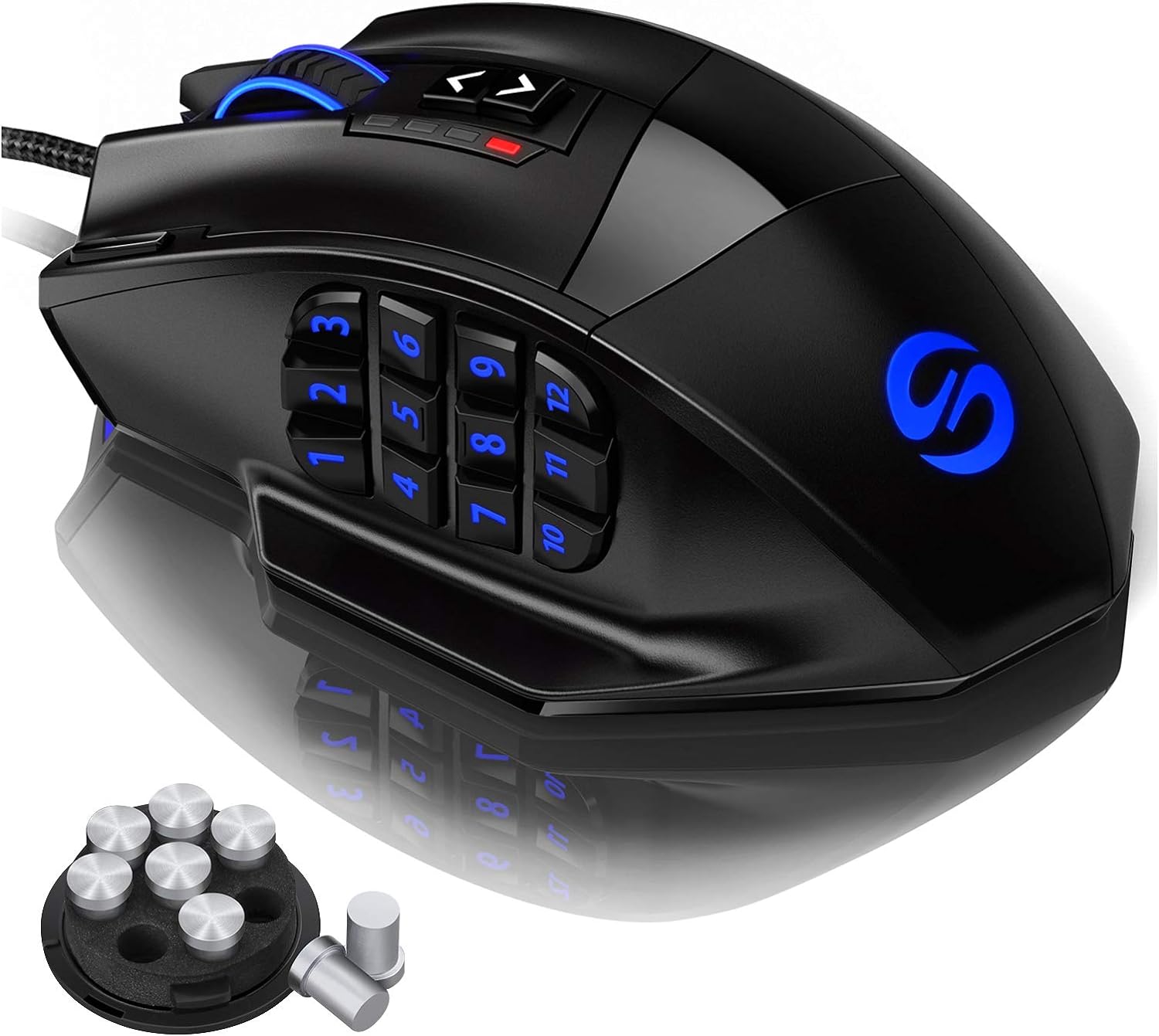
- Excellent value for a feature-rich MMO mouse with 18 programmable buttons
- High DPI range and precise Avago laser sensor suitable for various game genres
- Comfortable ergonomic shape with textured grip and adjustable weight for personalized feel
- RGB lighting with profile-specific colors helps identify settings at a glance
- Durable build with braided cable and Teflon feet for smooth gliding
Cons
- Software only available for Windows; profiles persist on Mac/Linux but cannot be adjusted
- Right-handed design only, not suitable for left-handed users
- 12 side buttons may feel crowded for users with smaller hands or those preferring fewer buttons
The UtechSmart Venus Gaming Mouse is a wired MMO gaming mouse designed for PC gamers who need quick access to many commands. With its 12 programmable side buttons, adjustable 16400 DPI laser sensor, and customizable RGB lighting, it caters to MMO, MOBA, and FPS players, as well as streamers, content creators, and competitive gamers who want to streamline their keybinds. Its ergonomic right-handed shape and frosted surface provide a comfortable grip for long sessions, making it a practical choice for college gamers, esports players, and anyone building a gaming setup on a budget.
In real-world use, the Venus mouse offers responsive tracking thanks to the Avago laser sensor and Omron micro switches. The 1000 Hz polling rate ensures low-latency input, which is crucial for fast-paced games like Fortnite, PUBG, and World of Warcraft. The 12 side buttons are angled differently to help your thumb find the right key quickly, reducing reaction time in complex MMO rotations. The adjustable weight system (up to 8 weights) lets you fine-tune the mouse's balance for better control. The braided 6ft cable with gold-plated USB connector ensures stable data transfer and minimal drag, while the included Velcro tie helps with cable management on your desk.
Build quality is solid for the price point. The mouse has a durable plastic shell with a matte finish that resists sweat. The Teflon feet pads provide smooth gliding on most mouse pads. The RGB lighting is vibrant and can be customized with 16 million colors across five profiles, which you can assign to different games. The software (Windows-only) allows you to program macros, adjust DPI, and set lighting effects. Once configured, the profiles are stored on the mouse, so they work on Mac and Linux as well.
Setup is straightforward: plug the mouse into a USB port, download the driver from the official website or Google Drive link, and start customizing. The learning curve is minimal if you've used programmable mice before, but the sheer number of buttons might take some getting used to. The mouse is right-handed only, which is a limitation for left-handed gamers. Also, the software is only available on Windows, so Mac and Linux users must pre-configure profiles on a Windows PC.
Overall, the UtechSmart Venus Gaming Mouse is a fantastic option for MMO and MOBA players who want a high-button-count mouse without breaking the bank. It offers strong performance, comfortable ergonomics, and plenty of customization. While it may not suit left-handed users or those who prefer a minimalist button layout, its value for dedicated gamers is undeniable. Whether you're raiding in WoW, building in Fortnite, or streaming on Twitch, this mouse can handle the workload.
The Venus mouse uses an Avago laser sensor capable of up to 16400 DPI, 12000 FPS, and 1000 Hz polling rate. This translates to precise tracking with minimal latency, suitable for both twitchy FPS games and methodical MMO gameplay. The Omron switches provide crisp, reliable clicks with a satisfying feel. The 12 side buttons are responsive and can be mapped to any keyboard key or macro, giving you an edge in games where every second counts. The adjustable DPI button on top lets you switch sensitivity on the fly, which is handy for different in-game situations.
The UtechSmart Venus features a sturdy plastic construction with a frosted coating that improves grip and resists fingerprints. The braided 6ft cable is flexible yet durable, with a gold-plated USB connector for corrosion resistance. Two extra Teflon feet pads are included for replacement, ensuring long-term smooth gliding. The mouse also comes with a weight tuning cartridge containing 8 weights (2.4g each) that can be added or removed to adjust the overall heft. The Omron switches are rated for high durability, so you can expect consistent performance over time.
Designed for right-handed users, the Venus mouse has a contoured shape that supports the palm and provides a rest for the thumb. The frosted surface prevents slippage even during intense gaming sessions. The 12 side buttons are arranged in angled rows, making them easy to locate by touch without looking. The mouse is relatively lightweight without weights (around 100g) but can be tuned up to about 120g. The included Teflon feet ensure smooth movement across most surfaces. Long-term comfort is good, though users with very large or small hands may want to test the fit.
The Venus mouse offers extensive RGB lighting with 16 million colors. The lighting zones include the scroll wheel, the UtechSmart logo, the side buttons, and a front LED strip. You can choose from multiple effects like breathing, static, and color cycling, and adjust brightness and speed via the software. There are five onboard profiles, each with its own LED color for easy identification. The software also allows you to remap all 18 programmable buttons, create macros, and adjust DPI settings. Once saved, profiles are stored on the mouse, so your customizations travel with you even on computers without the software.
Frequently Asked Questions
What does DPI mean on a gaming mouse?
DPI, or dots per inch, measures the sensitivity of the optical or laser sensor rather than overall build quality. A higher DPI setting allows your cursor to move farther across your screen with minimal physical movement from your wrist or arm. Models like the BENGOO Gaming Mouse Wired offer straightforward DPI steps up to 3600, while the Redragon M725 Honeycomb Shell Gaming Mouse supports adjustments up to 8000 DPI via dedicated software.
Is a wireless mouse reliable for competitive gaming?
Yes, modern 2.4 GHz wireless connections and wired USB cables both provide responsive cursor tracking for active gaming. The Redragon M725 Honeycomb Shell Gaming Mouse features tri-mode connectivity, allowing users to toggle between 2.4 GHz wireless, Bluetooth 5.1 for multiple devices, and standard Type-C wired operation. Wired alternatives eliminate the need to recharge batteries, providing continuous connectivity through a dedicated USB port.
How many programmable buttons are useful for MMO titles?
MMO games benefit significantly from side thumb clusters that feature nine or more customizable buttons for macros and spell rotations. The UtechSmart Venus Gaming Mouse RGB Wired provides 12 angled side buttons and onboard profile storage, which pairs effectively with a gaming computer for World of Warcraft. Standard action titles generally require only two side thumb buttons for essential commands like melee or inventory access.
Does mouse weight impact aiming precision and hand comfort?
Mouse weight influences how easily you can initiate and stop quick cursor sweeps on your desk mat. Ultra-light honeycomb frames weighing around 49g minimize hand effort during rapid flick shots, while heavier bodies provide deliberate tracking resistance. Devices like the Redragon M801 Gaming Mouse incorporate an eight-piece weight tuning set, giving users the flexibility to adjust physical mass according to personal grip preferences.
Can mouse customization software function on Mac operating systems?
Most mouse configuration utilities are designed specifically for Windows platforms. Standard pointer tracking, default DPI steps, and primary click buttons function on macOS via universal USB protocols. Advanced profile customization, RGB lighting effects, and macro remapping on models like the Redragon M602 Gaming Mouse generally require access to a Windows PC for initial programming.
How does polling rate affect cursor tracking performance?
Polling rate indicates how frequently the mouse communicates its positional coordinates to your operating system. A 1000 Hz polling rate reports data every single millisecond, resulting in smooth on-screen tracking on modern monitors. Models such as the Redragon M612 RGB Gaming Mouse utilize high-speed optical tracking that keeps up with fast physical inputs during competitive play.






Write Your Review
No reviews yet. Be the first to share your experience!